How To Share a Crew

Step 1. Log in to Enterprise.
Log in to your Enterprise account.
If you do not have an Enterprise account, sign up for an account and follow the prompts provided.
Please note that Sub-Contractors can use Enterprise for FREE with a limited feature set, restricted to only three (3) crews per account. If you choose to start a free account, you will not have access to all the Enterprise features a GC should have.

Located: Menu / Dashboard
When you’ve logged in, you’ll enter your dashboard view.
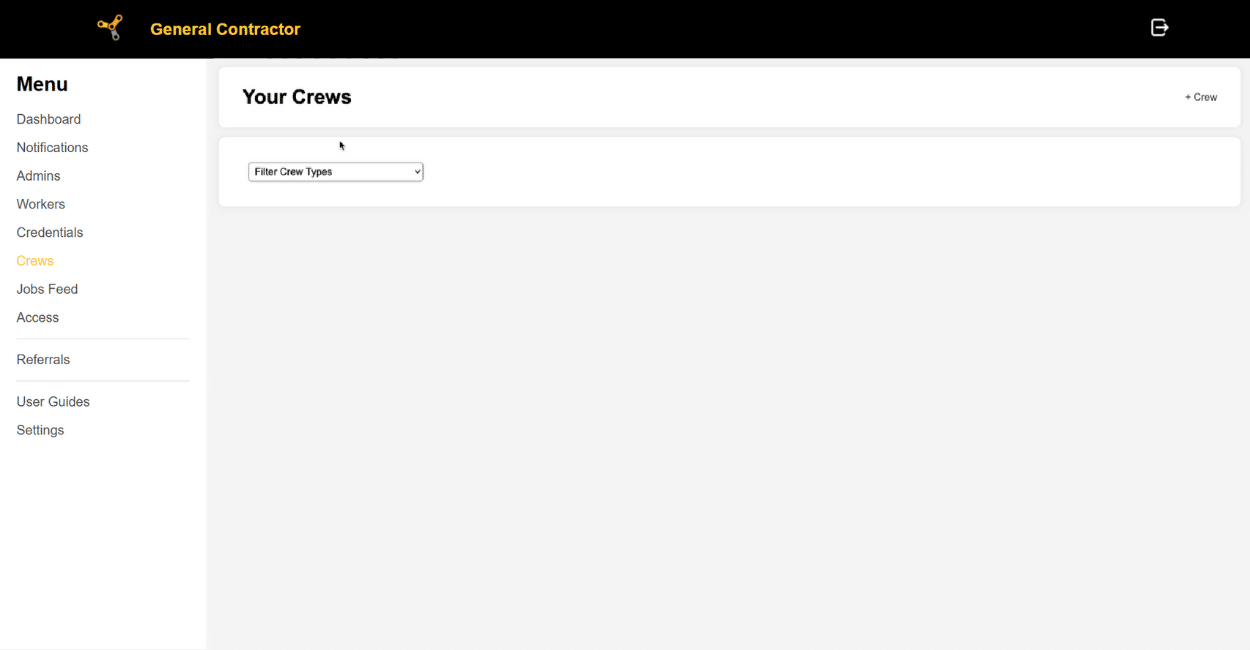
Step 2. Create a Crew
Located: Menu / Crew
Click on the Crew tab on the left side of your screen.

Click on the ” + Crew ” button on the top right of the screen.

Enter the prompted information to make the crew.
Only fields with an asterisk* are mandatory.

The Crew will appear on your Crew menu.
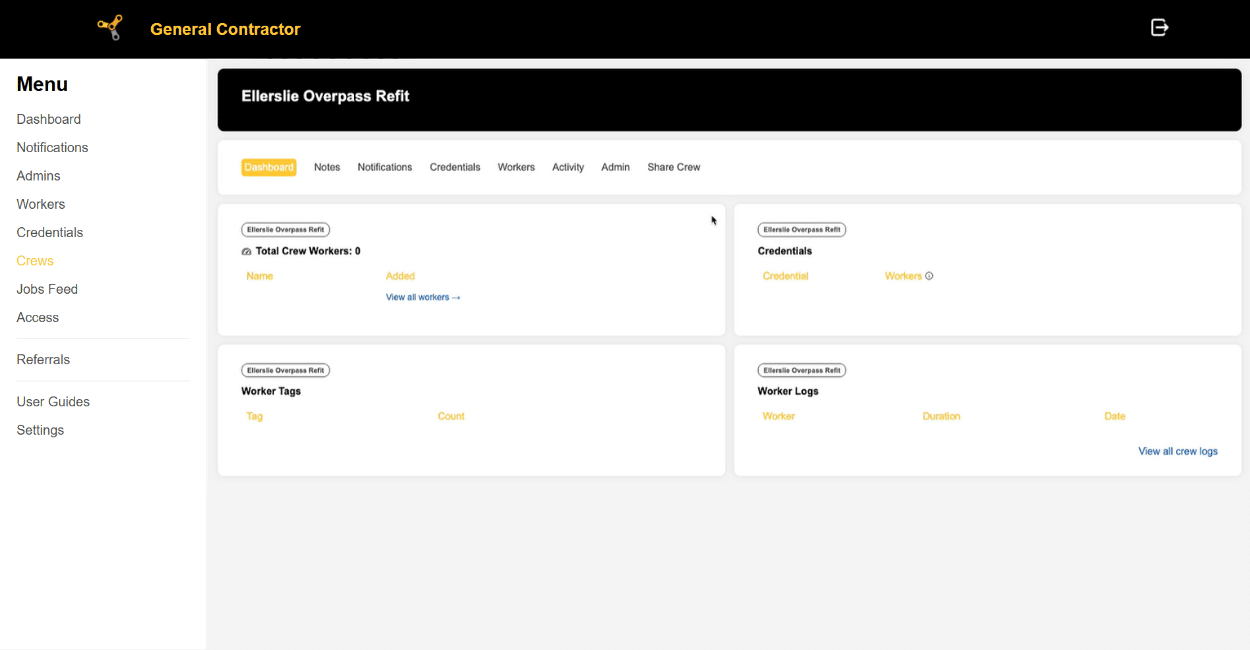
Step 3. Request a Crew from a Sub Contractor
On your Crew menu, click on the Crew you would like your subcontractor to share their workers to.

Click on the ” Share Crew ” tab on the right side of the screen.

Click on the ” Request a Crew ” button.
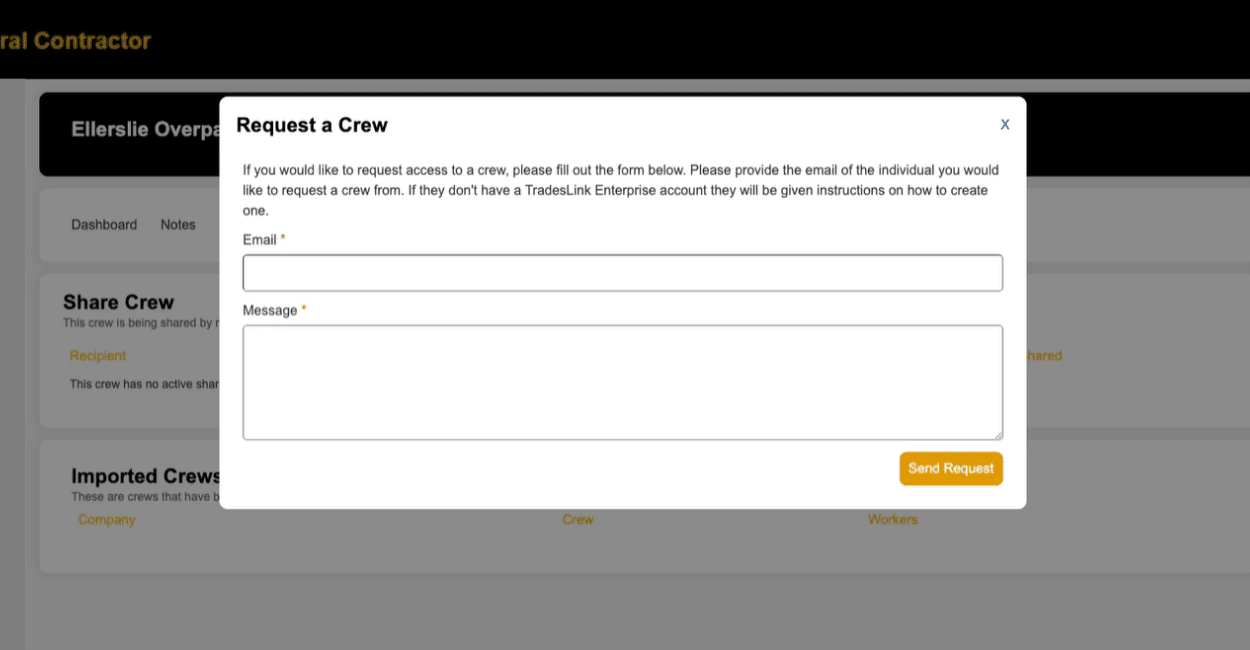
Fill out the information as prompted. This will send an email directly your Sub Contractor via email.
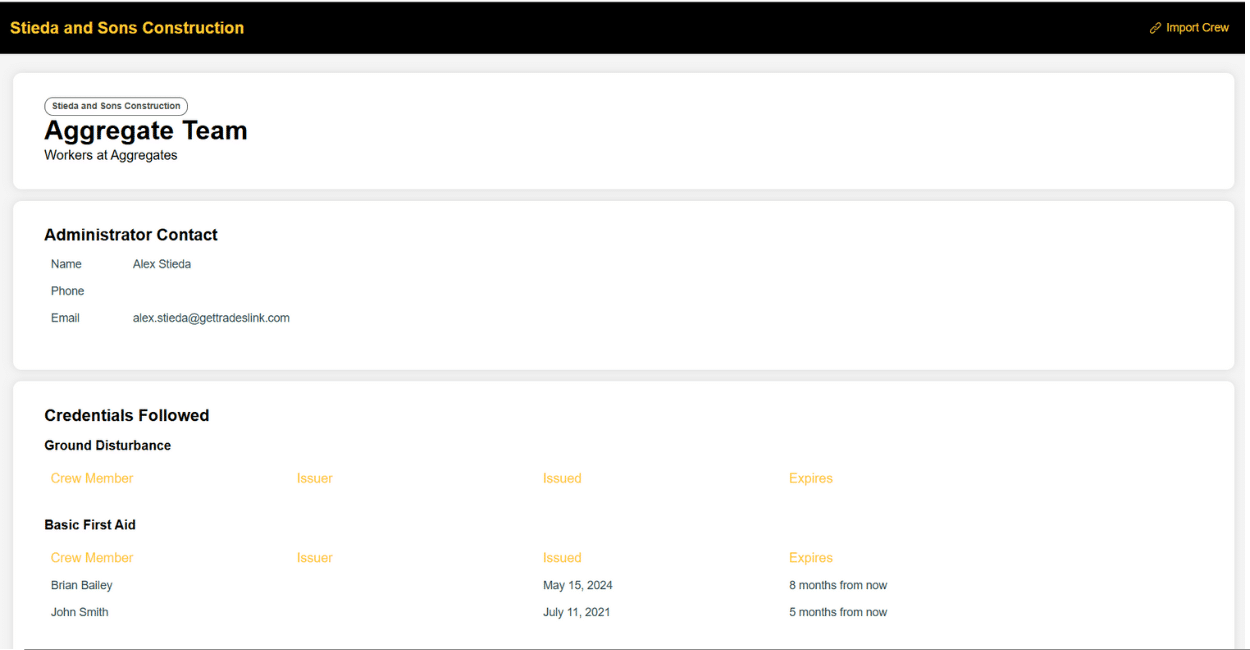
Once they’ve responded, you’ll receive a link to their crew.

Click on the “Import Crew” button on the top right of the screen to import those workers into your crew.
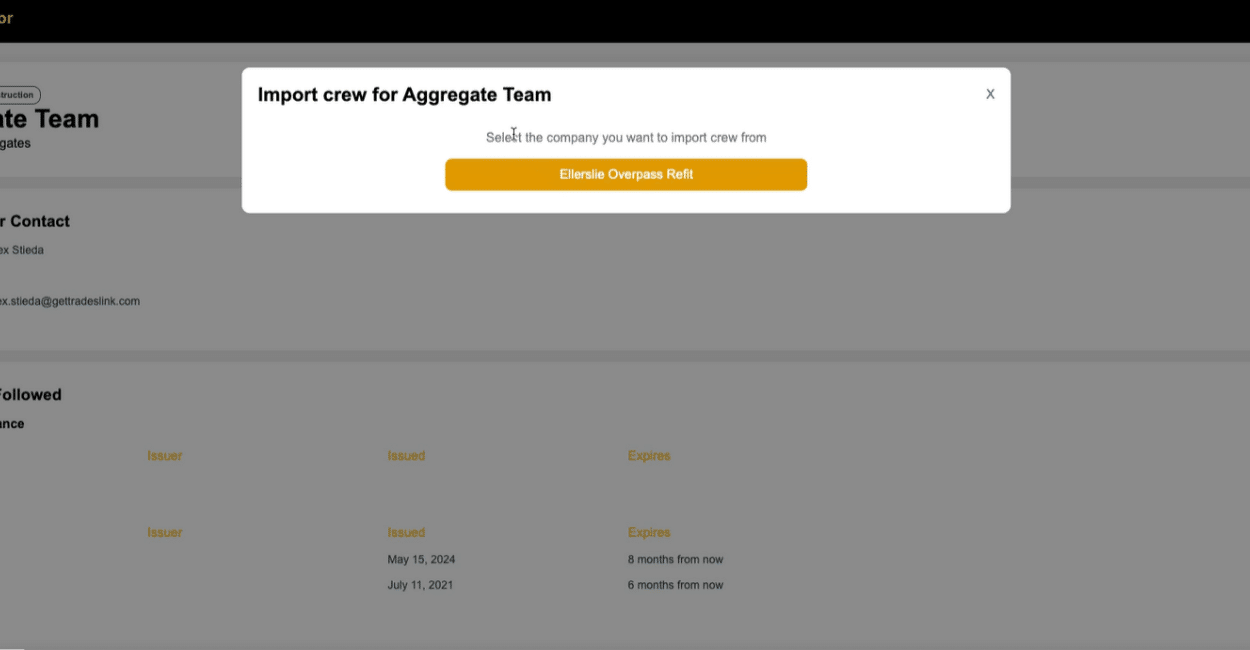
The system will ask you to choose which Crew you’d like to add your Sub’s workers to.

Once you’ve chosen your crew, your Sub Contractor’s workers will be added to your crew!
The post Wiki How to Share Crews: General Contractor Instructions appeared first on TradesLink - The Professional Network for Tradespeople.
]]>How To Share a Crew
Step 1. Log in to Enterprise.
Log in to your Enterprise account.
If you do not have an Enterprise account, sign up for an account and follow the prompts provided.
Please note that Sub-Contractors can use Enterprise for FREE with a limited feature set, restricted to only three (3) crews per account.
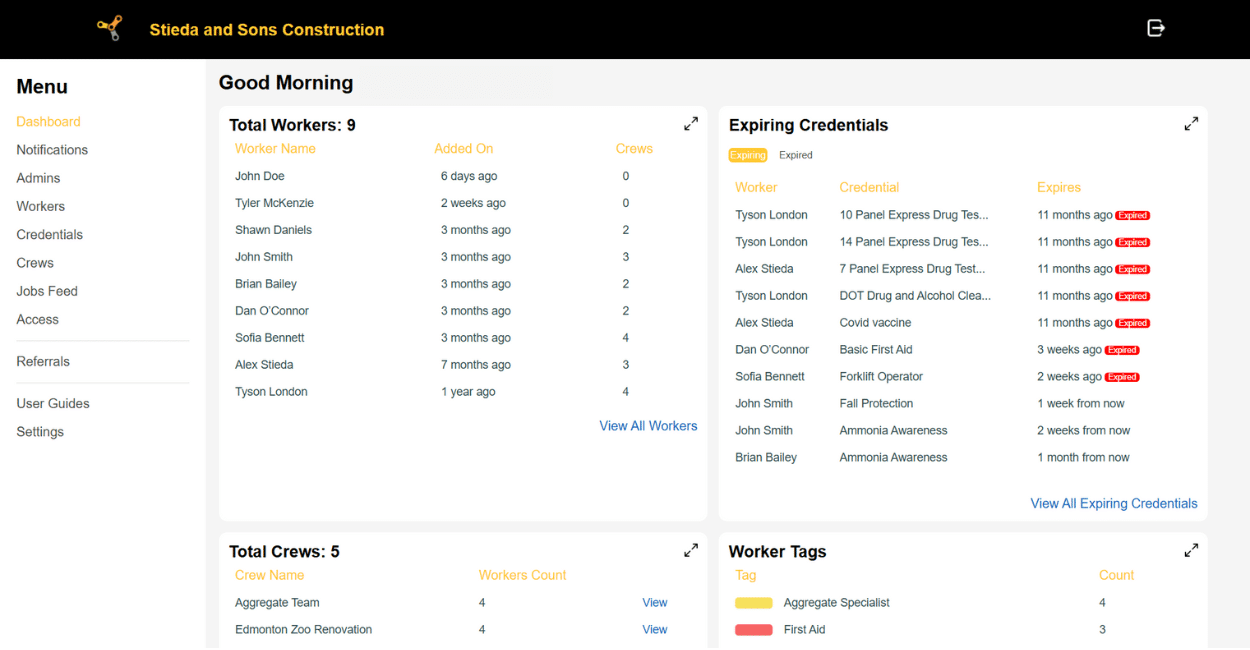
Located: Menu / Dashboard
When you’ve logged in, you’ll enter your dashboard view.

Step 2. Enter Your Workers
Click on the Workers tab on the right side of your screen.
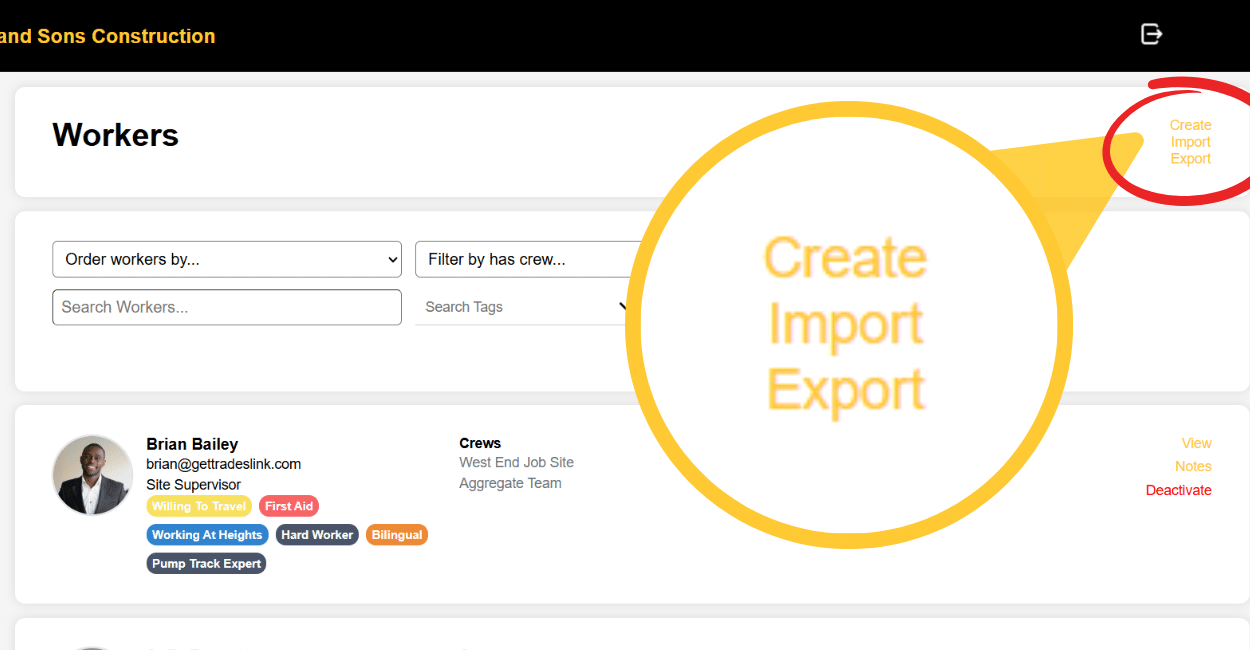
Add workers by choosing to either Create them or Import them.
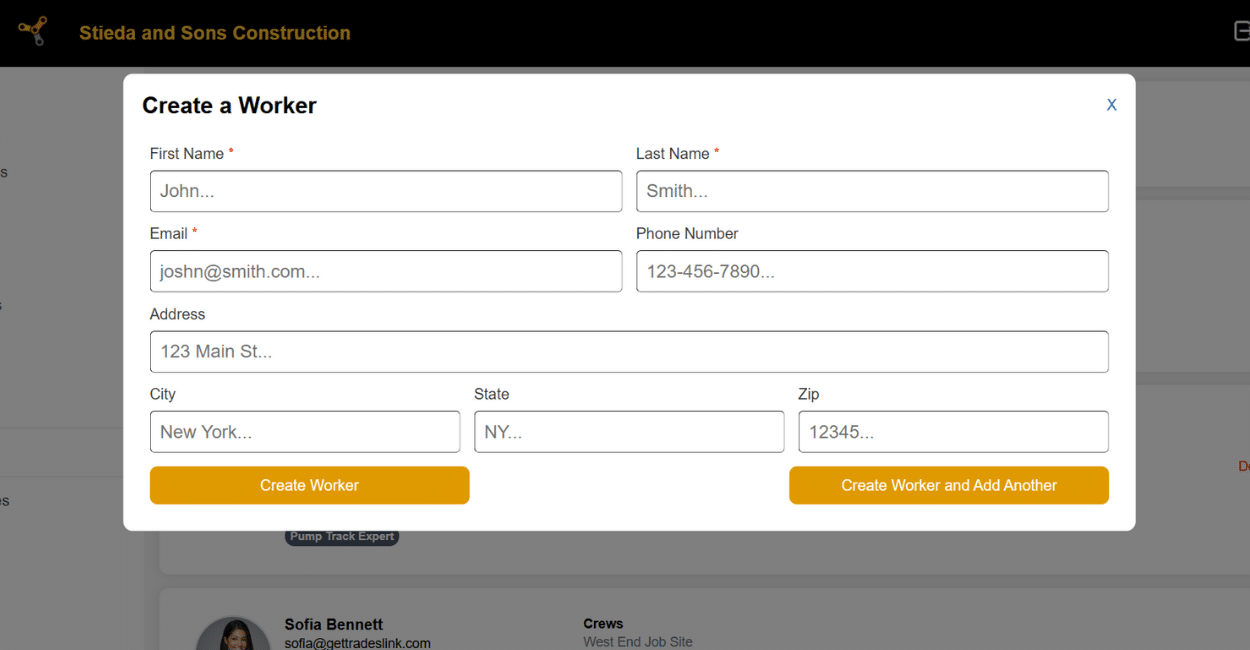
If you choose to Create a Worker, your screen will look like this. Fill out the prompted information.
Only fields with an asterisk* are mandatory.
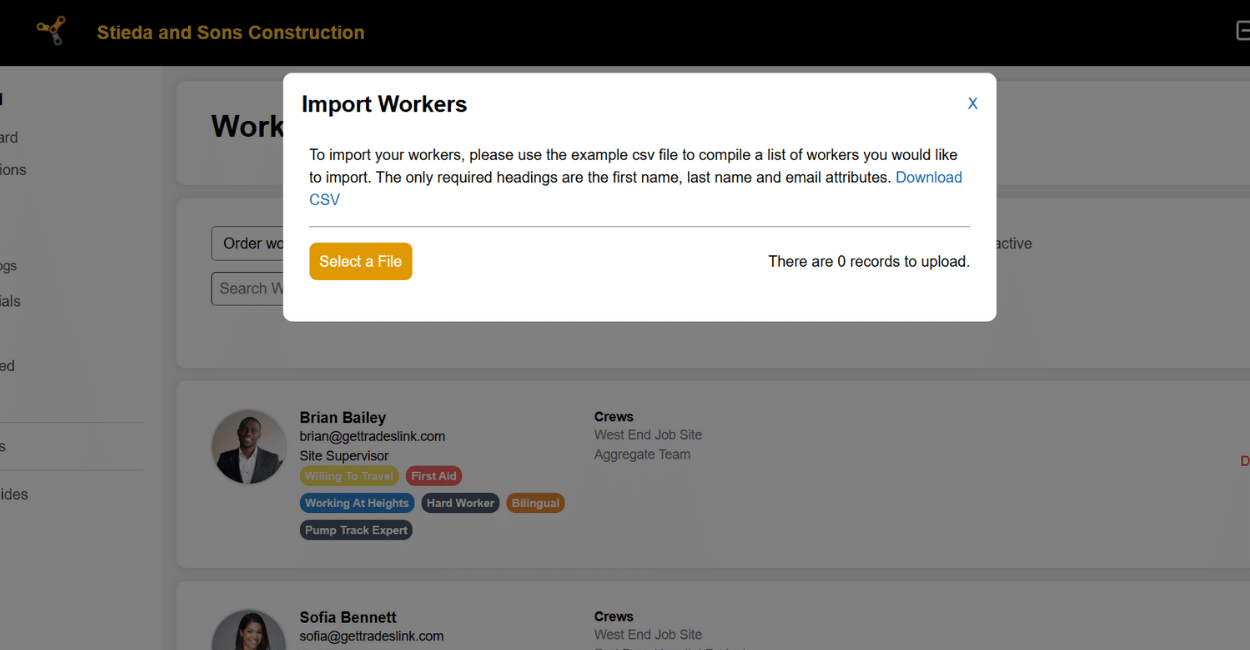
To mass Import workers, upload a spreadsheet with your worker information as instructed on screen. A CSV file is provided for you to use as a guide.
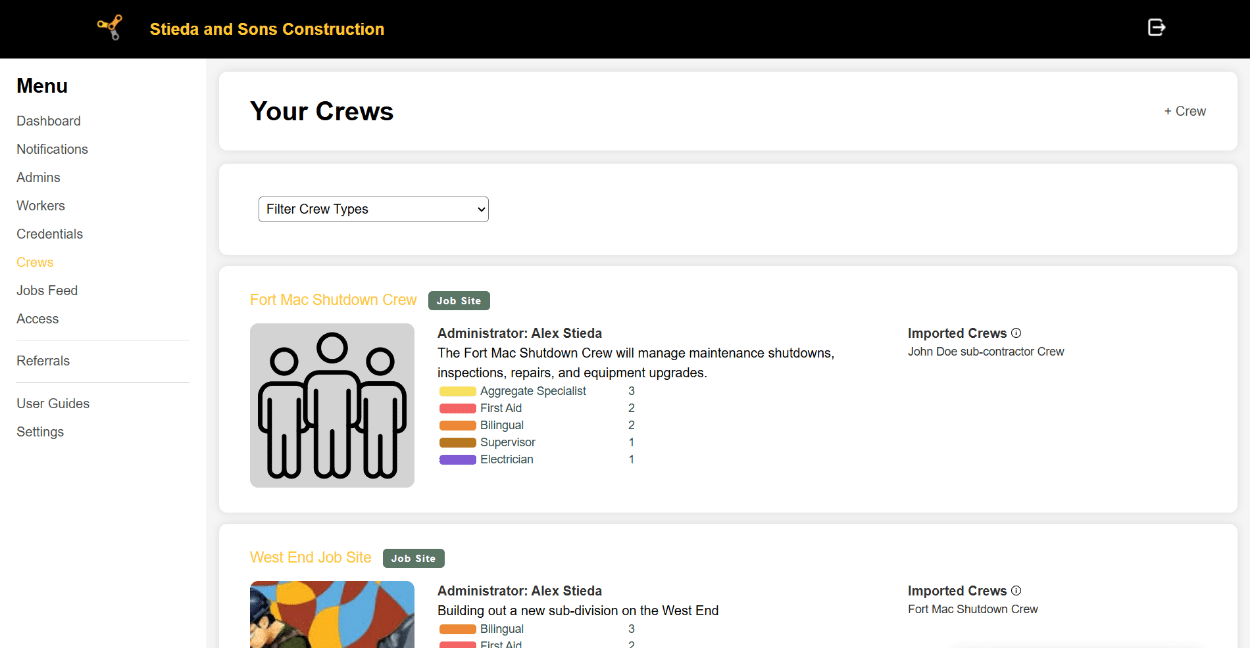
Step 3. Create a Crew
Located: Menu / Crew
Click on the Crew tab on the left side of your screen.

Click on the ” + Crew ” button on the top right of the screen.

Enter the prompted information to make the crew.
Only fields with an asterisk* are mandatory.

Located: Menu / Crew / [Your Crew] / Workers
Once your crew has been made, you can add your workers to the crew.
Click on the Workers Tab within your team.

Located: Menu / Crew / [Your Crew] / Workers
Add workers to your crew by clicking on the ” + Workers ” button on the top right of the Crew Workers section.
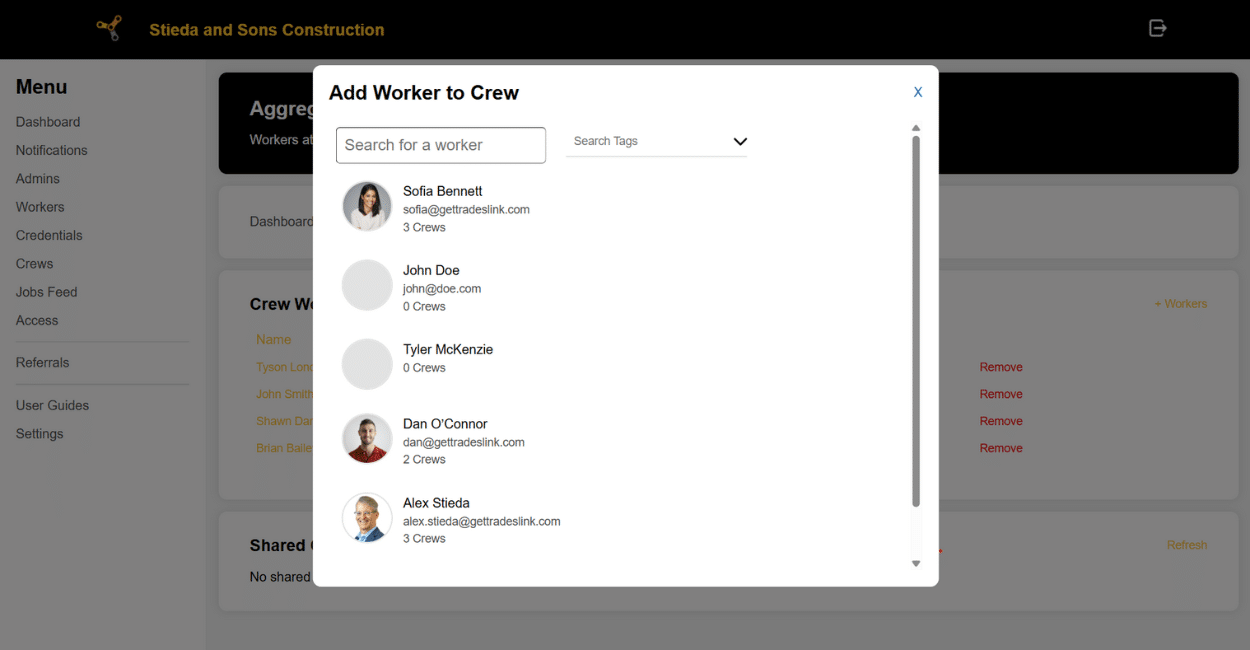
All your workers will appear on screen. Select the workers you want to add to your Crew.
When you’re done, your Crew is complete!
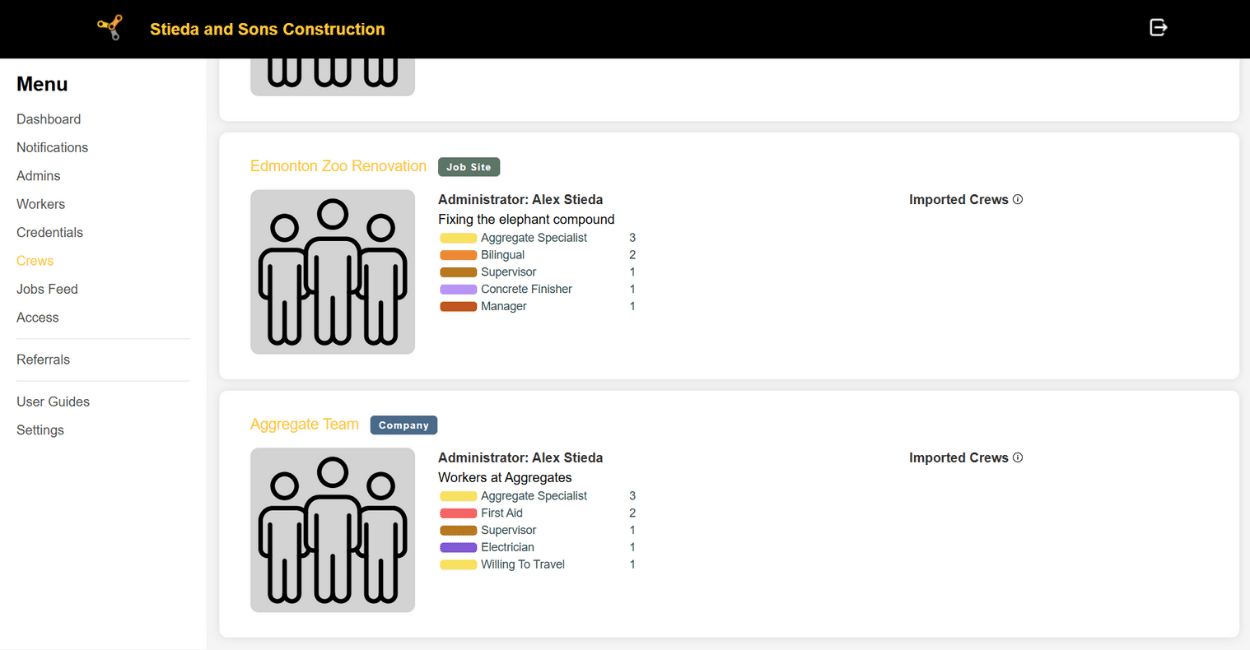
The Crew will appear on your Crew menu.
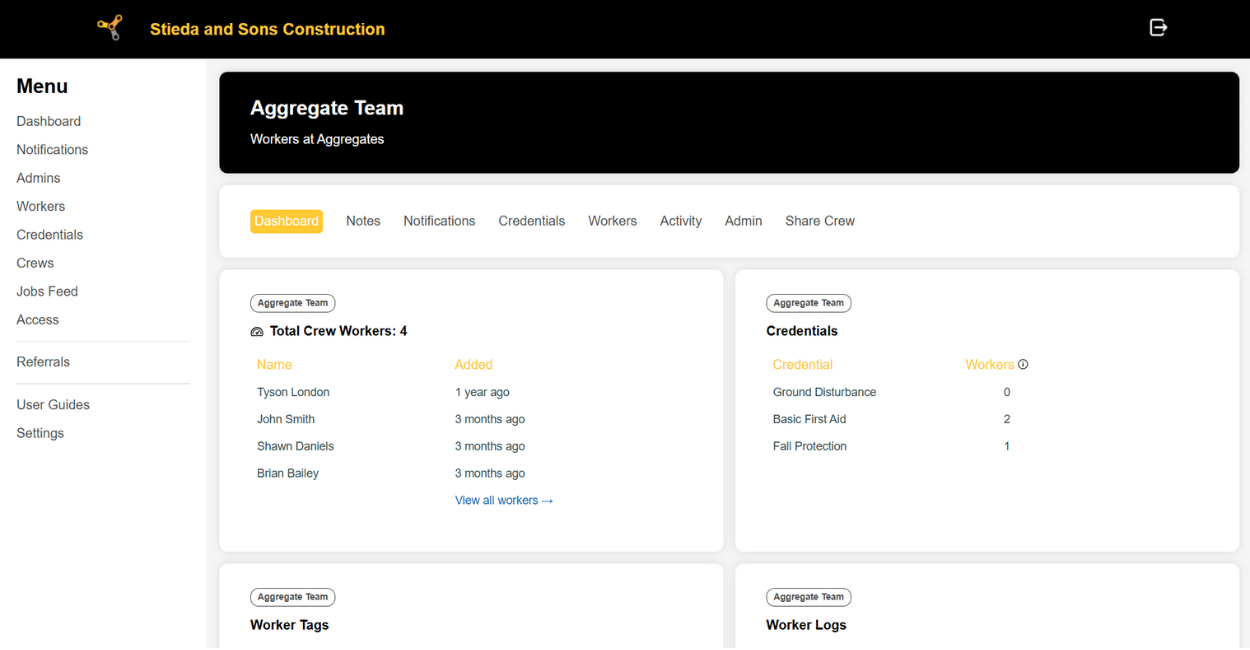
Step 4. Share Your Crew with a General Contractor
You may receive an email from a General Contractor on Enterprise, prompting you to share your crew.
On your Crew menu, click on the Crew you would like to share.

Click on the ” Share Crew ” tab on the right side of the screen.

Fill out the information as prompted. This will send your crew directly to your General Contractor via email as a view-only link.
If your General Contractor has Enterprise, they’ll be able to import this crew into their system!
If your General Contractor does NOT have Enterprise, they’ll only be able to view your crew information.
The post Wiki How to Share Crews: Sub Contractor Instructions appeared first on TradesLink - The Professional Network for Tradespeople.
]]>The post ACTI Partners with TradesLink appeared first on TradesLink - The Professional Network for Tradespeople.
]]>TradesLink is proud to announce a new partnership with the Alberta Construction Training Institute (ACTI) and the Edmonton Construction Association (ECA). Formalized through a signed memorandum of agreement as of last March, this collaboration aims to make essential safety training more accessible and affordable for construction professionals across Canada.

Alex at TradesLink’s Lunch & Learn, promoting Enterprise for the first time.
Most industry experts are well aware of how integral proper training is.
Obviously, such training is known to ensure the safety of employees and the quality of the work they produce.
Oftentimes, workers and employers will overlook or neglect this training. There have been cases of workers submitting fake training certificates. The level at which this has been normalized does not negate the fact that workers must have validated legislative training in order to be trusted to complete their projects safely and sufficiently. Hence, training must be made more accessible for our workers.
Therefore, through this new partnership, TradesLink and ACTI want to offer FREE WHMIS (GHS 2025) training for all ECA members. ACTI also provides additional safety training courses at reduced rates, which one can easily access by contacting ACTI directly here:
telephone: 587-340-3849 | email: [email protected]
ECA members can call ACTI to redeem their free WHMIS training and receive discount coupons for other training courses. Soon, ACTI hopes this initiative will eventually extend to all Local Construction Associations (LCAs) across Canada, making high-quality safety training accessible to construction professionals nationwide.
The partnership represents a shared commitment to workplace safety and professional development. TradesLink is always looking for ways to support tradespeople and construction companies in the country. This endeavour can help thousands more individuals get access to the training they need to succeed in the industry.
TradesLink, ACTI, and the ECA look forward to building a safer, more informed workforce together.
The post ACTI Partners with TradesLink appeared first on TradesLink - The Professional Network for Tradespeople.
]]>How to Use TradesLink’s New Job-Finding Feature
The latest TradesLink update launches a new job-finding feature that makes the regular job search more accessible and efficient. Unlike traditional job boards catering to the general public, TradesLink offers tailored job searches filtered by location, trade, experience level, and job type for trades-specific roles only. This precision ensures that tradespeople only see positions that match their specific qualifications, saving time and effort.
The best part? You don’t need an account to use it. TradesLink’s job feed is available to anyone who downloads the app; it’s simple, free, and accessible. (However, creating a complete profile enhances streamlines and personalizes your experience).

Steps to Using the Job-Finding Feature
Let’s break down how to use TradesLink’s job-finding feature!
Click here to watch the breakdown on video.
Step 1: Define Your Job Search Criteria
Whether or not you have an account, your first step will be to define your search criteria. TradesLink offers a range of filtering options:
Location: Choose where you want to work, whether close to home or in a new city.
Trade Type: Select your specific trade—whether you’re an electrician, welder, plumber, or other skilled tradesperson.
These filters will help you zero in on jop posts that fit your qualifications and preferences the best. If you have a TradesLink account, the app will also consider your profile information when compiling results.
Step 2: Browse Jobs
Once you’ve applied your filters, TradesLink will display a list of relevant job openings. Each job posting provides a detailed description that includes:
- A link to the job post.
- The employer/company that’s recruiting.
- Location and compensation details.
- Application expiration.
You can go straight to the job posting and see all the relevant details to help you determine if the position suits you.
Step 3: Save Jobs for Later (Account Feature)
If you’ve created an account, you can save jobs to review later. This feature is handy if you find a job you’re interested in but aren’t ready to apply for immediately. Click the “Save” button, and you can return to your list of saved jobs anytime. Just make sure to revisit these job postings before they expire!
Step 4: Apply for Jobs
Once you find a job you want to apply for, applying becomes easy. Head to the job posting of the position you’re interested in and send in your application as per the instructions from the respective company.
On top of being able to leverage your profile information to provide tailored suggestions on the job feed, having a completed profile on TradesLink can offer other benefits to one’s job search. Employers who have access to TradesLink can easily access relevant information like skills, certifications, and work samples on a person’s profile. TradesLink is a place where you can show off your expertise, and that content comes in handy when employers are on the app, sifting through applicant profiles.
In Conclusion
TradesLink’s job-finding feature stands out for its convenience and precision in helping trades professionals secure the right opportunities. With its tailored search filters, users can quickly find jobs that align with their specific skills, location, and experience, cutting down on the time spent sifting through irrelevant postings. The ability to save listings for later and receive personalized recommendations further enhances the experience, making job hunting a more streamlined and efficient process.
Whether you’re a seasoned tradesperson or just entering the industry, TradesLink’s job-finding feature is designed to connect you with the right opportunities quickly and effortlessly.
Download the app today and find your next job!
The post How to Use TradesLink: Find Your Next Job appeared first on TradesLink - The Professional Network for Tradespeople.
]]>The post How to Use TradesLink: Build Your Profile appeared first on TradesLink - The Professional Network for Tradespeople.
]]>A well-crafted TradesLink profile is essential to making the most out of the TradesLink app and standing out in the trades industry. This guide will help you construct a powerful profile highlighting your strengths and increasing your chances of landing your next great opportunity.
Start with the Basics: Fill Out Your Personal Information
Before you dive into showcasing your skills, you must ensure that all your basic information is complete: your name, contact information, and location. Employers often filter job candidates by location, so make sure your location is up-to-date and accurate.
Next, add a professional profile photo. Having a picture to distinguish your account makes such a difference because it humanizes your profile and adds a personal touch. Remember, this is your first impression with employers—choose a picture that reflects professionalism while being approachable. A headshot in a work setting or even your uniform can add to your tradesperson persona.
Craft a Strong Headline
Your headline is one of the first things potential employers, peers, and new connections will see, so make it count. This short section should highlight your trade and key qualifications.
For example:
- “Certified Electrician with 10+ Years of Commercial and Residential Experience”
- “Experienced Plumber Specializing in High-End Residential Projects”
Keep it concise and focused on your most marketable skills. This is your first impression amongst mutual peers and possible employers interested in learning more about you.
Upload Your Work to the Portfolio Section
One of the best features of TradesLink is the ability to showcase your past work through pictures and videos. Posting about your work field experiences can set you apart from other candidates. Employers in the trades want tangible proof of what you can do, and this section allows you to demonstrate your skills.
Start by uploading clear, high-quality photos of projects you’ve completed. Whether you’re a carpenter, welder, electrician, or plumber, include a variety of work demonstrating your range and attention to detail. Add before and after photos to highlight your process and transformation.
Videos are also an excellent addition to your profile, as they can provide a more dynamic view of your craftsmanship. For example, a short clip showing how you solved a complicated plumbing issue or installed a custom electrical system can give potential employers deeper insight into your expertise.
Highlight Your Skills and Certifications
Your skills and certifications make you stand out as a professional tradesperson. This section is crucial because it shows employers precisely what you bring to the table. TradesLink lets you list your trade-specific skills, from technical proficiencies to specialized tools and techniques.
Don’t just stop at general skills—be specific. For example, if you’re a welder, mention the types of welding processes you’re proficient in, such as TIG, MIG, or Stick Welding. If you’re an HVAC technician, include skills like ductwork fabrication or thermostat installation.
Next, upload all relevant certifications. Safety courses (like WHMIS or OSHA certifications), trade licenses, or specialized training (e.g., gas fitting or electrical certifications) can all be uploaded. TradesLink makes it easy to manage your certifications, and it will even notify you when they’re about to expire, ensuring that you’re always up-to-date and compliant.
Get Vouches from Colleagues and Employers
TradesLink offers a unique feature called Vouches, where colleagues and former employers can endorse your skills directly on your profile. Word-of-mouth and reputation are crucial in the trades industry, and vouches are testimonials that back up your abilities.
To get started, contact former colleagues, supervisors, or employers you’ve worked with and ask them to vouch for your work ethic and skills. A vouch from a respected industry professional adds credibility to your profile and allows potential employers to develop a deeper understanding of your skills and expertise.
The more vouches you have, the stronger your profile will be. Consider them real-time references employers can review when considering you for a job.
Update Your Job Preferences
Another significant aspect of TradesLink is that it tailors job recommendations to your needs. Make sure to fill out your job preferences, including your desired job type, preferred locations, and availability. Having this information on file will ensure you receive relevant job notifications based on your skills and preferences.
Additionally, keep an eye on the job feed. TradesLink continuously updates with new postings, and having your preferences set will help you stay ahead of the competition by allowing you to apply early for positions that fit your qualifications.
Share Your Profile
TradesLink makes it easy to share your profile with employers directly through the platform or by sending it via email or text. This feature is incredibly useful when networking or applying for jobs outside the platform. Rather than sending a traditional resume, you can share your complete TradesLink profile, showcasing your qualifications, past work, and vouches in one seamless package.
Conclusion
Creating a strong profile on TradesLink is more than just filling out a form; it’s about building a personal brand that reflects your skills, experience, and professionalism. You can craft a compelling profile that differentiates you from the competition by utilizing TradesLink’s unique features, such as the portfolio section, vouches, and credential management.
So take the time to fill out your profile thoroughly, upload your best work, and let TradesLink do the rest. With a powerful profile, you’ll be well on your way to finding the next great opportunity in your trade.
The post How to Use TradesLink: Build Your Profile appeared first on TradesLink - The Professional Network for Tradespeople.
]]>The post How to Use TradesLink: Make a Crew appeared first on TradesLink - The Professional Network for Tradespeople.
]]>At TradesLink Mobile, we understand the importance of having a tight-knit community, especially for tradespeople. That’s why we’ve developed the Crew feature—an exclusive, customizable space for you and your team to stay connected, share insights, and collaborate like never before.
You can create a dedicated space within the app for your team or group, offering functionalities like content sharing and real-time chat.
Key Features:
- Exclusive Space: Establish a private area for your Crew to share posts and engage in discussions away from the public feed.
- Admin Management: As the creator, you can appoint administrators to help moderate the Crew, ensuring a safe and productive environment.
- Content Sharing & Communication: Members can share content, comment on others’ posts, and participate in live discussions through dedicated talk channels.
- Flexible Membership: Members can leave the Crew at any time. To join, users must receive an invitation or submit a request that aligns with the group’s criteria.
Crews have a lot of benefits to an organization’s culture, functionality, and collaboration. These crews can be used for organizations, training programs, and even spaces for peers to connect. You can always join a pre-existing crew, but you’re also welcome to create your own! Here’s how to get started:

Step 1: Click on the “Crew“ tab at the bottom of your screen.
Step 2: At the top are two icons: a magnifying glass (for searching for pre-existing crews to join) and a plus sign (for creating a new crew). Click on the plus sign.
Step 3: Read through and accept the Crew Policy.
Step 4: Select your Crew Type amongst the following options: Company, Trade, Union, Job Site, Alumni, Organization, or Other.
Step 5: Once you’ve selected your Crew Type, you can input the necessary information. This includes the crew name, location, website, and description.
Step 6: Select a crew badge (like a logo) and photo (banner) for your Crew.
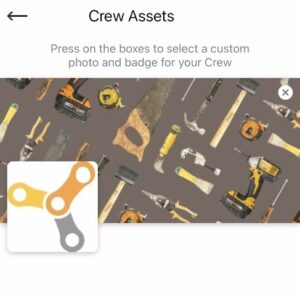
Step 7: Adjust the privacy settings for your Crew. Will members be allowed to join via invite only? Do you want the public to see your Crew’s activity?

Step 8: Click the ‘Finish‘ button at the bottom of the screen and start inviting people into your Crew!

TradesLink Mobile’s Crew feature fosters stronger connections and smoother collaboration among tradespeople. Ready to build your Crew? Sign up today and start collaborating like never before.
The post How to Use TradesLink: Make a Crew appeared first on TradesLink - The Professional Network for Tradespeople.
]]>The post TradesLink Pro Tips: Maximize Your Job Search appeared first on TradesLink - The Professional Network for Tradespeople.
]]>Hey there, fellow tradespeople! Are you tired of scouring job boards and sending out resumes, to get no response? In today’s world, competing for work has become more challenging than ever.
Well, we’ve got some excellent news for you: the TradesLink app is here to make your job search a breeze.
First, let’s talk about how easy it is to use TradesLink to find your dream job. All you have to do is:
- Click on the “Jobs” icon
- Complete your trade and location
- With a single click on “Search,” you’ll instantly see a list of jobs that are ideally suited for your skills and experience.
But wait, there’s more! With TradesLink, you can:
- Save your job searches for quick access later.
- Save your favourite jobs so you never lose track of a great opportunity.
- Apply directly to jobs through the app with just a few taps.
And here’s a pro tip: complete your TradesLink Profile, including your trade credentials, work experience, and skills. A completed profile will help the app find even better job matches for you. Plus, potential employers can see all your qualifications in one place.
Speaking of employers, TradesLink isn’t just great for job seekers – it’s also an incredible tool for connecting with companies looking for skilled tradespeople like you. By creating a detailed profile and showing your skills, you’ll be able to catch the eye of top employers in your field.
So what are you waiting for? Download TradesLink today and start maximizing your job search. With a user-friendly interface, powerful search tools, and a database full of job opportunities, you’ll wonder how you ever managed without it.
The post TradesLink Pro Tips: Maximize Your Job Search appeared first on TradesLink - The Professional Network for Tradespeople.
]]>The post How TradesLink’s Job Matching Algorithm Works appeared first on TradesLink - The Professional Network for Tradespeople.
]]>At the heart of TradesLink’s mission to connect skilled tradespeople with the best employers is its powerful job-matching algorithm. There is a constant search for employment in the trades industries, and TradesLink’s new job search function aids users with finding work with ease. This algorithm dives deep into user profiles and employer goals to make the most relevant and rewarding connections.
Here’s a look at how the TradesLink algorithm works and the benefits it provides:
The Tradesperson Profile
Users who sign up for TradesLink build an in-depth profile that goes far beyond a standard resume. This profile includes:
- Work history and past projects with the ability to upload photos and videos as a portfolio
- Verified credentials, certifications, and licenses with expiration date tracking
- Skills, specialties, and areas of expertise
- Geographic preferences and willingness to relocate
- Detailed employment preferences like salary requirements, company culture, and more
The algorithm uses this rich profile data to gain a comprehensive understanding of each tradesperson’s unique background, qualifications, and career goals.
Employer Needs Analysis
On the employer side, the TradesLink algorithm closely analyzes each job posting to determine the specific skillset, experience, and qualifications required. It also factors in location, compensation, and other vital criteria.
By taking the time to thoroughly understand both the tradesperson and the employer, the algorithm can identify the most promising matches—not just based on keywords but on a deeper level of qualification fit.
Personalized Job Recommendations
Armed with its detailed profiles and job criteria, the TradesLink algorithm works proactively, surfacing the best opportunities for each user. Users receive a curated feed of job recommendations tailored to their unique backgrounds and preferences.
Having such a customized range of job offers eliminates the need for endless job board searches and helps tradespeople focus on the roles that are the best fit. Employers, in turn, are connected with exceedingly qualified candidates interested in their open positions.
Ongoing Optimization
But the TradesLink algorithm doesn’t stop there. It monitors user activity, job performance, and feedback to optimize its matching capabilities continuously. The app’s recommendations only get more accurate over time.
The result is a job-matching experience that is efficient, effective, and truly personalized to the needs of tradespeople and employers.
By choosing TradesLink, tradespeople invest in a tool that understands their unique challenges and speaks their language. Download TradesLink today to elevate your trades career and never worry about finding your next job again.
The post How TradesLink’s Job Matching Algorithm Works appeared first on TradesLink - The Professional Network for Tradespeople.
]]>5 Reasons Why TradesLink Is the Best Platform for Finding Trades Jobs
In a highly competitive job market, tradespeople need a platform that caters specifically to their industry. While traditional job boards like Indeed and ZipRecruiter serve general job seekers, they often lack the tools and features required for skilled trades professionals. This is where TradesLink excels. It is a specialized platform designed to meet the needs of tradespeople, offering a range of features that simplify job hunting and career advancement. Here are the top five reasons TradesLink is the best platform for finding jobs in the trades industry.
Tailored to the Trades Industry
Unlike general job boards that list various positions, TradesLink is focused solely on the trades industry. This specialized approach ensures that tradespeople aren’t wasting time sifting through irrelevant job postings for office or tech positions. Every job listed on TradesLink directly relates to skilled trades, making it easy to find relevant opportunities.
Whether you’re a carpenter, electrician, or welder, TradesLink’s targeted job listings help you find positions suited to your expertise, ensuring you’re applying for the right roles without the clutter of unrelated postings.
Visual Portfolio Showcase
A standard resume often doesn’t capture the full scope of a tradesperson’s hands-on experience. TradesLink offers a visual portfolio feature, allowing users to upload photos and videos of their past work. This feature provides a powerful way to show off your craftsmanship, giving potential employers a firsthand look at your skills.
For example, if you’ve completed a complex electrical installation or built custom cabinetry, the ability to share images or videos of your work can leave a lasting impression. This feature is crucial for tradespeople, as it helps set you apart from applicants who rely solely on written resumes.
Credential Management and Alerts
Keeping track of certifications and licenses is critical for any tradesperson, as these qualifications eventually expire. TradesLink simplifies this process with its credential management system. The platform allows you to store all your certifications in one place and sends alerts when any of them are about to expire.
This proactive feature helps you stay compliant with industry standards and always ready for your next job opportunity. It demonstrates to employers that you are organized and professional, which can boost your credibility and employability.
Peer Endorsements (Vouches)
In the trades industry, your reputation is one of your greatest assets. Word-of-mouth recommendations carry significant weight, and TradesLink incorporates this through its vouching system. This feature allows colleagues, peers, and former employers to endorse your skills and work ethic directly on your profile.
These vouches act as personal testimonials, giving employers a clear sense of your abilities and reliability. Having the validation of your colleagues can be particularly valuable when applying for jobs, as a peer endorsement can distinguish you from other candidates and validate your expertise in ways that a resume alone cannot.
Advanced Job Matching
TradesLink makes finding the right job easier with its advanced job-matching and filtering features. You can search for work based on your specific trade, location, and certifications, allowing for a more focused and efficient job hunt.
Unlike traditional job boards where you may have to sift through irrelevant listings, TradesLink offers opportunities tailored to your skills. This customized approach helps you connect with jobs that match your qualifications, increasing the likelihood of finding the right position quickly.
Conclusion: Elevate Your Career with TradesLink
For tradespeople looking to advance their careers, TradesLink offers more than just job listings. It’s a comprehensive networking platform designed to meet the unique needs of skilled trades professionals. From its industry-specific focus and visual portfolio feature to its credential management system and peer endorsements, TradesLink provides all the tools you need to stand out in a competitive market.
If you’re serious about showcasing your skills and connecting with the best opportunities, TradesLink is the platform that will help you take your career to the next level. With its targeted approach and user-friendly features, TradesLink makes finding trades jobs simpler, more efficient, and more effective than ever before.
The post Top 5 Reasons TradesLink is Best for Finding Trades Jobs appeared first on TradesLink - The Professional Network for Tradespeople.
]]>TradesLink and the Future of Skilled Trades in Alberta: Navigating a Changing Job Market
As Alberta’s trades sector evolves between 2024 and 2033, tradespeople will face both challenges and opportunities. With significant shifts in population dynamics, economic factors, and industry trends, workers must adapt to new demands and competitive pressures.
TradesLink offers a digital solution to help tradespeople manage their careers, stand out from the competition, and navigate the shifting labour market. By combining technology with professional development, TradesLink empowers trades professionals to excel in this evolving landscape.
TradesLink: Setting Tradespeople Apart
In a competitive job market, tradespeople need more than traditional resumes to stand out. TradesLink provides an innovative platform tailored to the specific needs of skilled workers, offering unique tools that enhance professional profiles, streamline job searches, and support credential management.
1. Comprehensive User Profiles
TradesLink enables tradespeople to create detailed online profiles that include visual portfolios. Users can showcase their skills in ways that traditional resumes can’t by uploading pictures and videos of completed projects.
This feature is particularly handy in Alberta’s growing construction sector, where a strong visual representation of work can give job seekers a competitive edge.
2. Credential Management
TradesLink’s credential management system is invaluable in an industry that demands up-to-date certifications. Users receive alerts when certifications are about to expire, ensuring they stay compliant and competitive.
This tool is crucial as Alberta expects to recruit over 63,000 construction workers by 2033, many of whom must be able to maintain specialized qualifications.
3. Networking and Peer Endorsements
TradesLink fosters professional connections through “Crews,” allowing tradespeople to network within specific subgroups. This feature supports career growth by providing access to job leads and industry insights.
Additionally, TradesLink’s vouching system lets peers and employers endorse a worker’s skills, adding credibility to their profile—an essential factor in Alberta’s competitive trades job market.
Alberta’s Skilled Trades Outlook: 2024-2033
As Alberta’s construction sector grows, trades professionals must be able to anticipate and adapt to both expansion and contraction in different areas of the industry.
1. Residential Construction
Alberta’s residential construction market is expected to rebound in 2024, driven by population growth and housing demands. However, by 2033, employment in this sector is forecast to contract by 1%.
In this shrinking market, TradesLink’s ability to showcase work and credentials will help tradespeople stand out as job opportunities become more limited.
2. Non-Residential Growth
Unlike residential construction, Alberta’s non-residential construction market is set to grow by 14% by 2033. The need for skilled workers in commercial and industrial projects will increase, offering steady employment.
TradesLink’s job-matching feature helps users connect with employers seeking specific skills, making it easier for tradespeople to find relevant jobs in this expanding sector.
Demographic and Economic Changes
Alberta’s population dynamics and economic trends will directly influence the skilled trades labour market.
1. Aging Workforce and Immigration
With an aging workforce, the proportion of Albertans over 65 is set to rise to 17% by 2033, leading to significant recruitment needs. At the same time, increased immigration will help fill these gaps.
Tradespeople must stay competitive by keeping their credentials up-to-date and expanding their professional networks. TradesLink’s credential management and networking tools can help tradespeople navigate these changes in the labour force.
2. Green Energy Opportunities
As Alberta transitions towards green energy projects, tradespeople with expertise in solar, electric vehicle infrastructure, and other renewable energy technologies will be in high demand.
TradesLink’s tailored job recommendations can help workers identify new opportunities in these emerging sectors, ensuring they stay ahead of industry trends.
Economic Factors Impacting Trades
Alberta’s economy will also shape the future of skilled trades, with GDP growth and fluctuating energy prices affecting job opportunities.
1. Steady GDP Growth
Alberta’s real GDP is expected to grow by around 2% annually, providing a stable economic backdrop for trades professionals. However, tradespeople will need to be adaptable as demand fluctuates across sectors like oil, gas, and construction.
TradesLink’s job-matching system allows users to quickly respond to changes in the market, connecting them with employers based on their specific skills and qualifications.
2. Oil and Gas Sector
Oil and natural gas prices are projected to rise moderately by 2033, influencing demand for skilled trades in energy infrastructure.
Workers with experience in these areas can use TradesLink to connect with employers and stay informed about job opportunities as they arise, ensuring they remain competitive in a fluctuating market.
Conclusion: TradesLink’s Role in Alberta’s Evolving Trades Industry
Alberta’s skilled trades sector will grow and change over the next decade, presenting both opportunities and challenges for workers. Tradespeople must adapt to shifts in industry demands, economic conditions, and workforce demographics.
TradesLink offers a valuable solution by providing tools that support credential management, networking, job matching, and visual portfolios.
By leveraging TradesLink’s features, trades professionals can stay competitive in Alberta’s evolving job market.
Whether in residential construction, non-residential projects, or emerging sectors like green energy, TradesLink helps tradespeople present their best professional selves. Trades workers on TradesLink can be well-positioned for success in the coming decade.
Source: BuildForce Canada
The post Navigating a Changing Job Market with TradesLink appeared first on TradesLink - The Professional Network for Tradespeople.
]]>