
Harness the power of CodeQL. Get started now.
The post Post-quantum security for SSH access on GitHub appeared first on The GitHub Blog.
]]>Today, we’re announcing some changes that will improve the security of accessing Git data over SSH.
What’s changing?
We’re adding a new post-quantum secure SSH key exchange algorithm, known alternately as sntrup761x25519-sha512 and [email protected], to our SSH endpoints for accessing Git data.
This only affects SSH access and doesn’t impact HTTPS access at all.
It also does not affect GitHub Enterprise Cloud with data residency in the United States region.
Why are we making these changes?
These changes will keep your data secure both now and far into the future by ensuring they are protected against future decryption attacks carried out on quantum computers.
When you make an SSH connection, a key exchange algorithm is used for both sides to agree on a secret. The secret is then used to generate encryption and integrity keys. While today’s key exchange algorithms are secure, new ones are being introduced that are secure against cryptanalytic attacks carried out by quantum computers.
We don’t know if it will ever be possible to produce a quantum computer powerful enough to break traditional key exchange algorithms. Nevertheless, an attacker could save encrypted sessions now and, if a suitable quantum computer is built in the future, decrypt them later. This is known as a “store now, decrypt later” attack.
To protect your traffic to GitHub when using SSH, we’re rolling out a hybrid post-quantum key exchange algorithm: sntrup761x25519-sha512 (also known by the older name [email protected]). This provides security against quantum computers by combining a new post-quantum-secure algorithm, Streamlined NTRU Prime, with the classical Elliptic Curve Diffie-Hellman algorithm using the X25519 curve. Even though these post-quantum algorithms are newer and thus have received less testing, combining them with the classical algorithm ensures that security won’t be weaker than what the classical algorithm provides.
These changes are rolling out to github.com and non-US resident GitHub Enterprise Cloud regions. Only FIPS-approved cryptography may be used within the US region, and this post-quantum algorithm isn’t approved by FIPS.
When are these changes effective?
We’ll enable the new algorithm on September 17, 2025 for GitHub.com and GitHub Enterprise Cloud with data residency (with the exception of the US region).
This will also be included in GitHub Enterprise Server 3.19.
How do I prepare?
This change only affects connections with a Git client over SSH. If your Git remotes start with https://, you won’t be impacted by this change.
For most uses, the new key exchange algorithm won’t result in any noticeable change. If your SSH client supports [email protected] or sntrup761x25519-sha512 (for example, OpenSSH 9.0 or newer), it will automatically choose the new algorithm by default if your client prefers it. No configuration change should be necessary unless you modified your client’s defaults.
If you use an older SSH client, your client should fall back to an older key exchange algorithm. That means you won’t experience the security benefits of using a post-quantum algorithm until you upgrade, but your SSH experience should continue to work as normal, since the SSH protocol automatically picks an algorithm that both sides support.
If you want to test whether your version of OpenSSH supports this algorithm, you can run the following command: ssh -Q kex. That lists all of the key exchange algorithms supported, so if you see sntrup761x25519-sha512 or [email protected], then it’s supported.
To check which key exchange algorithm OpenSSH uses when you connect to GitHub.com, run the following command on Linux, macOS, Git Bash, or other Unix-like environments:
$ ssh -v [email protected] exit 2>&1 | grep 'kex: algorithm:'For other implementations of SSH, please see the documentation for that implementation.
What’s next?
We’ll keep an eye on the latest developments in security. As the SSH libraries we use begin to support additional post-quantum algorithms, including ones that comply with FIPS, we’ll update you on our offerings.
The post Post-quantum security for SSH access on GitHub appeared first on The GitHub Blog.
]]>The post Finding leaked passwords with AI: How we built Copilot secret scanning appeared first on The GitHub Blog.
]]>In October 2024, we announced the general availability of Copilot secret scanning, leveraging AI to detect generic passwords in users’ codebases. This post describes how Copilot secret scanning works under the hood, the challenges we ran into when developing it, and the framework we use for testing and iteration.
What is Copilot secret scanning?
Copilot secret scanning is a feature of GitHub Secret Protection, which protects millions of repositories on GitHub by detecting hundreds of pattern types through our partner program. The precision of these detections is paramount for security teams and developers when dealing with security alerts. Historically, our detection approach has relied on regular expressions, which is an effective method for identifying secrets with strict, provider-minted formats. However, this method struggles with the nuanced and varied structures of generic passwords, often generating excessive noise for security teams and developers.
We now detect generic passwords with GitHub Copilot, using AI to analyze context—such as the usage and location of a potential secret—to limit noise and deliver relevant alerts that are critical to the health and security of your repositories.

Getting to the point where we were confident in our password precision was a journey over many test cases, prompt iterations, and model changes. Let’s dive in to explore what we learned along the way and find out where we’re going.
The private preview highlighted a problem early on: unconventional file types and structures
At the core of Copilot secret scanning lies a request to a large language model (LLM), expressed through an LLM prompt consisting of:
- General information about the type of vulnerability, in this case passwords.
- The source code location and contents of the file where we believe the vulnerability may exist.
- A strict JSON format specification for the model output, to allow for automated processing.
Our first iteration of the prompt used the few-shot prompting technique, which provides the LLM with example inputs and outputs to demonstrate how to perform the task. We wanted a resource-effective model to run the detections at scale and landed on GPT-3.5-Turbo. In parallel, we developed a basic offline evaluation framework, including manually curated test cases with both positive and negative findings, to help us validate that our approach was sound before deploying it to customers.
We deployed this first iteration to our private preview participants and immediately noticed a problem. While it worked reasonably well at identifying credentials in our offline evaluation, it would fail spectacularly in some customer repositories. The model had difficulty interpreting file types and structures not typically seen in the conventional coding languages and patterns that LLMs train on.
This experience revealed the complexity of the problem and the limiting nature of LLMs. We had to reevaluate our approach.
The road to public preview: Improving offline evaluation and prompting
In response to these initial results, we enhanced the offline evaluation framework in a few key ways. First, we added reports from private preview participants to increase the diversity of our test cases. Next, we enhanced the framework so that we could visually identify and analyze deviations resulting from model or prompt changes. This allowed us to better see the impact of customizing different steps in our prompting strategy. Finally, we leveraged the GitHub Code Security team’s evaluation processes to create a data collection pipeline, and used GPT-4 to create our own test cases based on learnings from existing secret scanning alerts in open source repositories.
This improved offline evaluation and gave us the breadth needed to measure both precision and recall. Precision is the ability to find secrets more accurately, with concerns to the false positive rate, while recall is the ability to find secrets more reliably, with concerns to the false negative rate.

From here, we ran a series of experiments to evaluate detection quality:
- What if we tried a different model?
- What if we ran the prompt multiple times and somehow combined the responses?
- What if we ran two different prompts on two different models in sequence?
- How do we better handle the nondeterministic nature of LLM responses?
More specifically, we started experimenting with a few different mechanisms to improve our detection with the LLM.
We tried voting (asking the model the same question many times), which allowed for more deterministic responses but had no material impact on our precision.
We also tried using a larger model (GPT-4) trained on a larger set of parameters as a confirming scanner, to validate the accuracy of candidates found by GPT-3.5-Turbo. This helped improve precision without reducing our recall, but was also more resource intensive.
We also tried a few different prompting strategies, such as Fill-in-the-Middle, Zero-Shot, and Chain-of-Thought. We ended up collaborating with our colleagues at Microsoft and used their MetaReflection technique, a novel offline reinforcement learning technique that allows experiential learnings from past trials to come up with a hybrid Chain of Thought (CoT) and few-shot prompt that improves precision with a small penalty in recall.
We ultimately ended up using a combination of all these techniques and moved Copilot secret scanning into public preview, opening it widely to all GitHub Secret Protection customers. This brings us to our next hurdle: scale.
Scaling out capacity for a public preview
Secret scanning not only scans incoming Git pushes, but also your entire Git history on all branches. With each new customer, the necessary resources increase linearly. Rather than simply expanding LLM capacity, we focused on striking the most effective balance between value and cost to ensure optimal performance and efficiency. Before tackling how we managed the resources, we tried to find ways to reduce resource usage itself by:
- Identifying and excluding a class of changes from scanning (such as media files or language files that contain “test,” “mock,” or “spec” in the filepath), because we expected they would never contain credentials or they would be incomprehensible to the model.
- Experimenting with newer models, such as GPT-4-Turbo and GPT-4o-mini, that were expected to be less resource intensive without compromising on performance and latency.
- Experimenting with different context windows to find one that reduced resources without significantly increasing latency for the LLM to respond to our queries.
- Making improvements to how we tokenize the content we want to scan, including retaining some memory of previous tokenizations while processing new parts of a file.
While some of these efforts proved fruitful, such as limiting the content we scanned, other efforts were less effective. For example, breaking down content into smaller pieces didn’t have much of an impact, while using a more powerful model did.
Ultimately, the most impactful change came from creating a workload-aware request management system that allowed us to maximize and equitably share LLM capacity against the variety of different workloads we run during scans.
In building the system, we noticed a fundamental problem that needed addressing in our capacity management: assigning specific rate limits to individual workloads (such as scanning incoming Git commits or scanning the full history) was suboptimal. As each workload was tied to specific traffic patterns—Git commits, for example, tend to correlate with working hours, while full history scanning correlates with discrete events like a security manager or administrator enabling the feature on a new organization—it was easy to land in a situation where an individual workload could run into rate limits within its operational context, leaving additional resources available elsewhere unused.
We drew significant inspiration from existing solutions in this space, such as Doorman, GitHub’s own Freno, and various other weighted, fair-priority, queue-related algorithms. We came up with an algorithm that allows us to set a range of limits for each workload, preventing the workload from completely overwhelming the LLM, while allowing it to tap into resources from other workloads going unused at the moment. This strategy was so effective at maximizing utilization that we ended up using it within Copilot Autofix and security campaigns as well.
Mirror testing our way to general availability
Achieving confidence in detection quality was crucial for moving Copilot secret scanning to general availability. We implemented a mirror testing framework that ran our prompt and filtering changes against a subset of repositories that participated in our public preview. Rescanning these repositories with our latest improvements allowed us to assess the change in real alert volumes and false positive resolutions, without impacting users.
We found a huge drop in detections and false positives with very few missing real passwords. In some cases, we saw a 94% reduction in false positives across organizations! This before-and-after comparison indicated that all the different changes we made during private and public preview led to increased precision without sacrificing recall, and that we were ready to provide a reliable and efficient detection mechanism to all GitHub Secret Protection customers.
Lessons for the future
Copilot secret scanning is now detecting passwords on nearly 35% of all GitHub Secret Protection repositories. We’re continuing to monitor performance and apply lessons learned as we leverage the tooling we created along the way:
- A focus on precision: Security and development teams need accurate and actionable alerts without the noise—this is always our primary goal.
- Including diverse test cases: We continue to incorporate examples based on learnings from customer feedback into our test bed as we refine our detection capabilities.
- Effective resource management: We always need to balance scalability with performance.
- Collaborative innovation: Partnering with other GitHub and Microsoft teams helps us push the boundaries of what Copilot can achieve.
These learnings are also shared across Copilot Autofix, which continues to expand coverage for code scanning alerts and helps development teams remediate code scanning alerts quickly.
Since our general availability launch, enablement for Copilot secret scanning has been included in security configurations, allowing you to control which repositories are detecting secrets across your organizations or enterprise. We’re dedicated to continuous improvement through ongoing monitoring, mirror testing, and approach refinement based on customer feedback and detection trends. Copilot secret scanning serves as a critical component for robust application security and will evolve to meet the dynamic needs of our users.
Copilot secret scanning is a feature of GitHub Secret Protection, which offers enterprise-ready solutions for preventing accidental secret exposure in your repositories. GitHub Secret Protection is available to purchase starting April 1, 2025.
The post Finding leaked passwords with AI: How we built Copilot secret scanning appeared first on The GitHub Blog.
]]>The post Fixing security vulnerabilities with AI appeared first on The GitHub Blog.
]]>Copilot Autofix is now generally available.
In November 2023, we announced the launch of code scanning autofix, leveraging AI to suggest fixes for security vulnerabilities in users’ codebases. This post describes how autofix works under the hood, as well as the evaluation framework we use for testing and iteration.
What is code scanning autofix?
GitHub code scanning analyzes the code in a repository to find security vulnerabilities and other errors. Scans can be triggered on a schedule or upon specified events, such as pushing to a branch or opening a pull request. When a problem is identified, an alert is presented to the user. Code scanning can be used with first- or third-party alerting tools, including open source and private tools. GitHub provides a first party alerting tool powered by CodeQL, our semantic code analysis engine, which allows querying of a codebase as though it were data. Our in-house security experts have developed a rich set of queries to detect security vulnerabilities across a host of popular languages and frameworks. Building on top of this detection capability, code scanning autofix takes security a step further, by suggesting AI-generated fixes for alerts. In its first iteration, autofix is enabled for CodeQL alerts detected in a pull request, beginning with JavaScript and TypeScript alerts. It explains the problem and its fix strategy in natural language, displays the suggested fix directly in the pull request page, and allows the developer to commit, dismiss, or edit the suggestion.
The basic idea behind autofix is simple: when a code analysis tool such as CodeQL detects a problem, we send the affected code and a description of the problem to a large language model (LLM), asking it to suggest code edits that will fix the problem without changing the functionality of the code. The following sections delve into some of the details and subtleties of constructing the LLM prompt, processing the model’s response, evaluating the quality of the feature, and serving it to our users.
The autofix prompt
At the core of our technology lies a request to an LLM, expressed through an LLM prompt. CodeQL static analysis detects a vulnerability, generating an alert that references the problematic code location as well as any other relevant locations. For example, for a SQL-injection vulnerability, the alert flags the location where tainted data is used to build a database query, and also includes one or more flow paths showing how untrusted data may reach this location without sanitization. We extract information from the alert to construct an LLM prompt consisting of:
- General information about this type of vulnerability, typically including a general example of the vulnerability and how to fix it, extracted from the CodeQL query help.
- The source-code location and content of the alert message.
- Relevant code snippets from the locations all along the flow path and any code locations referenced in the alert message.
- Specification of the response we expect.
We then ask the model to show us how to edit the code to fix the vulnerability.
We describe a strict format for the model output, to allow for automated processing. The model outputs Markdown consisting of the following sections:
- Detailed natural language instructions for fixing the vulnerability.
- A full specification of the needed code edits, following the format defined in the prompt.
- A list of dependencies that should be added to the project, if applicable. This is needed, for example, if the fix makes use of a third-party sanitization library on which the project does not already depend.
We surface the natural language explanation to users together with the code scanning alert, followed by a diff patch constructed from the code edits and added dependencies. Users can review the suggested fix, edit and adjust it if necessary, and apply it as a commit in their pull request.
Pre- and post-processing
If our goal were to produce a nice demo, this simple setup would suffice. Supporting real-world complexity and overcoming LLM limitations, however, requires a combination of careful prompt crafting and post-processing heuristics. A full description of our approach is beyond the scope of this post, but we outline some of the more impactful aspects below.
Selecting code to show the model
CodeQL alerts include location information for the alert and sometimes steps along the data flow path from the source to the sink. Sometimes additional source-code locations are referenced in the alert message. Any of these locations may require edits to fix the vulnerability. Further parts of the codebase, such as the test suite, may also need edits, but we focus on the most likely candidates due to prompt length constraints.
For each of these code locations, we use a set of heuristics to select a surrounding region that provides the needed context while minimizing lines of code, eliding less relevant parts as needed to achieve the target length. The region is designed to include the imports and definitions at the top of the file, as these often need to be augmented in the fix suggestion. When multiple locations from the CodeQL alert reside in the same file, we structure a combined code snippet that gives the needed context for all of them.
The result is a set of one or more code snippets, potentially from multiple source-code files, showing the model the parts of the project where edits are most likely to be needed, with line numbers added so as to allow reference to specific lines both in the model prompt and in the model response. To prevent fabrications, we explicitly constrain the model to make edits only to the code included in the prompt.
Adding dependencies
Some fixes require adding a new project dependency, such as a data sanitation library. To do so, we need to find the configuration file(s) that list project dependencies, determine whether the needed packages are already included, and if not make the needed additions. We could use an LLM for all these steps, but this would require showing the LLM the list of files in the codebase as well as the contents of the relevant ones. This would increase both the number of model calls and the number of prompt tokens. Instead, we simply ask the model to list external dependencies used in its fix. We implement language-specific heuristics to locate the relevant configuration file, parse it to determine whether the needed dependencies already exist, and if not add the needed edits to the diff patch we produce.
Specifying a format for code edits
We need a compact format for the model to specify code edits. The most obvious choice would be asking the model to output a standard diff patch directly. Unfortunately, experimentation shows that this approach exacerbates the model’s known difficulties with arithmetic, often yielding incorrect line number computations without enough code context to make heuristic corrections. We experimented with several alternatives, including defining a fixed set of line edit commands the model can use. The approach that yielded the best results in practice involves allowing the model to provide “before” and “after” code blocks, demonstrating the snippets that require changes (including some surrounding context lines) and the edits to be made.
Overcoming model errors
We employ a variety of post-processing heuristics to detect and correct small errors in the model output. For example, “before” code blocks might not exactly match the original source-code, and line numbers may be slightly off. We implement a fuzzy search to match the original code, overcoming and correcting errors in indentation, semicolons, code comments, and the like. We use a parser to check for syntax errors in the edited code. We also implement semantic checks such as name-resolution checks and type checks. If we detect errors we are unable to fix heuristically, we flag the suggested edit as (partially) incorrect. In cases where the model suggests new dependencies to add to the project, we verify that these packages exist in the ecosystem’s package registry and check for known security vulnerabilities or malicious packages.
Evaluation and iteration
To make iterative improvements to our prompts and heuristics while at the same time minimizing LLM compute costs, we need to evaluate fix suggestions at scale. In taking autofix from demo quality to production quality, we relied on an extensive automated test harness to enable fast evaluation and iteration.
The first component of the test harness is a data collection pipeline that processes open source repositories with code scanning alerts, collecting alerts that have test coverage for the alert location. For JavaScript / TypeScript, the first supported languages, we collected over 1,400 alerts with test coverage from 63 CodeQL queries.
The second component of the test harness is a GitHub Actions workflow that runs autofix on each alert in the evaluation set. After committing the generated fix in a fork, the workflow runs both CodeQL and the repository’s test suite to evaluate the validity of the fix. In particular, a fix is considered successful only if:
- It removes the CodeQL alert.
- It introduces no new CodeQL alerts.
- It produces no syntax errors.
- It does not change the outcome of any of the repository tests.
As we iterated on the prompt, the code edit format, and various post-processing heuristics, we made use of this test harness to ensure that our changes were improving our success rate. We coupled the automated evaluations with periodic manual triage, to focus our efforts on the most prevalent problems, as well as to validate the accuracy of the automated framework. This rigorous approach to data-driven development allowed us to triple our success rate while at the same time reducing LLM compute requirements by a factor of six.
Architecture, infrastructure, and user experience
Generating useful fixes is a first step, but surfacing them to our users requires further front- and back-end modifications. Designing for simplicity, we’ve built autofix on top of existing functionality wherever possible. The user experience enhances the code scanning pull request experience. Along with a code scanning alert, users can now see a suggested fix, which may include suggested changes in multiple files, optionally outside the scope of the pull request diff. A natural language explanation of the fix is also displayed. Users can commit the suggested fixes directly to the pull request, or edit the suggestions in their local IDE or in a GitHub Codespace.
The backend, too, is built on top of existing code scanning infrastructure, making it seamless for our users. Customers do not need to make any changes to their code scanning workflows to see fix suggestions for supported CodeQL queries.

The user opens a pull request or pushes a commit. Code scanning runs as usual, as part of an actions workflow or workflow in a third-party CI system, uploading the results in the SARIF format to the code scanning API. The code scanning backend service checks whether the results are for a supported language. If so, it runs the fix generator as a CLI tool. The fix generator leverages the SARIF alert data, augmented with relevant pieces of source-code from the repository, to craft a prompt for the LLM. It calls the LLM via an authenticated API call to an internally-deployed API running LLMs on Azure. The LLM response is run through a filtering system which helps prevent certain classes of harmful responses. The fix generator then post-processes the LLM response to produce a fix suggestion. The code scanning backend stores the resulting suggestion, making it available for rendering alongside the alert in pull request views. Suggestions are cached for reuse where possible, reducing LLM compute requirements.
As with all GitHub products, we followed standard and internal security procedures, and put our architectural design through a rigorous security and privacy review process to safeguard our users. We also took precautions against AI-specific risks such as prompt injection attacks. While software security can never be fully guaranteed, we conducted red team testing to stress-test our model response filters and other safety mechanisms, assessing risks related to security, harmful content, and model bias.
Telemetry and monitoring
Before launching autofix, we wanted to ensure that we could monitor performance and measure its impact in the wild. We don’t collect the prompt or the model responses because these may contain private user code. Instead, we collect anonymized, aggregated telemetry on user interactions with suggested fixes, such as the percentage of alerts for which a fix suggestion was generated, the percentage of suggestions that were committed as-is to the branch, the percentage of suggestions that were applied through the GitHub CLI or Codespace, the percentage of suggestions that were dismissed, and the fix rate for alerts with suggestions versus alerts without. As we onboard more users onto the beta program, we’ll look at this telemetry to understand the usefulness of our suggestions.
Additionally, we’re monitoring the service for errors, such as overloading of the Azure model API or triggering of the filters that block harmful content. Before expanding autofix to unlimited public beta and eventually general availability, we want to ensure a consistent, stable user experience.
What’s next?
As we roll out the code scanning autofix beta to an increasing number of users, we’re collecting feedback, fixing papercuts, and monitoring metrics to ensure that our suggestions are in fact useful for security vulnerabilities in the wild. In parallel, we’re expanding autofix to more languages and use cases, and improving the user experience. If you want to join the public beta, sign up here. Keep an eye out for more updates soon!
The post Fixing security vulnerabilities with AI appeared first on The GitHub Blog.
]]>The post How we use Dependabot to secure GitHub appeared first on The GitHub Blog.
]]>Keeping our dependencies up to date is one of the easiest ways to keep GitHub’s systems secure. The issue of supply chain security has become increasingly obvious in the past number of years, from the malicious flatmap-stream package, to the most recent log4shell vulnerabilities. Dependabot will alert developers when a repository is using a software dependency with a known vulnerability. By rolling out Dependabot internally to all of our repositories, we can measure, and significantly reduce, our usage of software dependencies with known vulnerabilities.
How we approach new tools and processes
Within Product Security Engineering, we spend a lot of time thinking about how new security tools and processes may impact the day-to-day work of our engineers. We use a number of guiding principles when evaluating tools and designing a rollout plan. For example, Does the security benefit of this new process outweigh the impact on engineering teams? How do we roll this out incrementally and gather feedback? What are our expectations for engineers, and how do we clearly communicate these expectations?
For Dependabot in particular, some of these questions were easy to answer. Dependabot is a native feature of GitHub, meaning, that it integrates with our engineers’ current workflows on GitHub.com. By better tracking the security of our software supply chain, we will keep GitHub and our users secure, which outweighs any potential impact on engineering teams.
We used a three-stage process to roll out Dependabot at GitHub: measure the current state of Dependabot alerts, a staged rollout to enable Dependabot incrementally over the organization, and finally, focus on remediating repositories with open Dependabot alerts.
Measurement
Our first aim was to accurately measure the current state of dependencies internally. We were not yet concerned with the state of any particular repository, but wanted to understand the general risk across the company. We did this by building internal tools to gather statistics about Dependabot alerts across the whole organization via the public GraphQL API. Getting this tooling in place early allowed us to gather metrics continuously and understand the general trends within GitHub before, during, and after the rollout.
Dependabot, like other GitHub Advanced Security features, can be enabled for all repositories within an organization from the organization’s administration page. However, GitHub has several thousand repositories internally, and we were aware that enabling Dependabot organization-wide could have a large impact on teams. We mitigated this impact in two ways: a staged rollout and frequent company-wide communications.
Rollout
A staged rollout allowed us to gather feedback from an initial set of repository owners before proceeding with the organization-wide rollout. We use this approach internally for security tools within GitHub, as we believe that unshipping a new tool or process can cause even more confusion across the company. For Dependabot, we decided on enabling the feature initially on a subset of our most active repositories to ensure that we could gather useful feedback. We then expanded it to a larger subset, before finally enabling the feature organization wide.
As a heavily-distributed company working asynchronously across multiple timezones, we used a mixture of GitHub Issues and GitHub Discussions to share new tools and processes with engineers. We aimed to answer, clearly and succinctly, the most important questions in our communications: What are we doing? Why are we doing this? When are we doing this? Lastly, what do I need to do? The last question was key. We made it clear that we were rolling out Dependabot organization-wide to understand our current risk and that, while we encourage repository owners to upgrade dependencies, we were not expecting every Dependabot alert to be fixed right away.
We also used these discussions as a touchpoint for other related tasks, such as encouraging teams to archive repositories if they are no longer in use. In organizations, there are always early adopters of new tools and features. Although we clearly laid out our incremental rollout plan, we also encouraged teams to enable Dependabot right away if it made sense for their repositories.
All in all, we made the initial ship to 200 repositories, followed up in 30 days with another 1,000 repositories, and enabled it organization-wide at the 45-day point from our initial ship. After enabling it organization-wide, we also used the “Automatically enabled for new repositories” feature to ensure that new repositories are following best practices by default.
Remediation
Once we had Dependabot enabled for all GitHub repositories, we could measure the general trend of Dependabot alerts across the company. Using our tooling, we could see that the general trend of Dependabot alerts across the company was broadly flat. We now switched our focus from measuring the current state to working with repository owners to upgrade our dependencies.
We managed this process through GitHub’s internal Service Catalog tool. This is the single source of truth within GitHub for services running inside GitHub and defines where a service is deployed, who owns the service, and how to contact them. The service concept is an abstraction over repositories. The Service Catalog only tracks repositories that are currently deployed inside GitHub, which is a small subset of repositories. By leveraging the Service Catalog, we could ensure that we focused our remediation efforts on repositories that are running in production, where a vulnerable dependency could present a risk to GitHub and our users.
Each service can have domain-specific metrics associated with them, and we built tooling to continuously pull Dependabot data via the GitHub REST API and upload it to the Service Catalog:
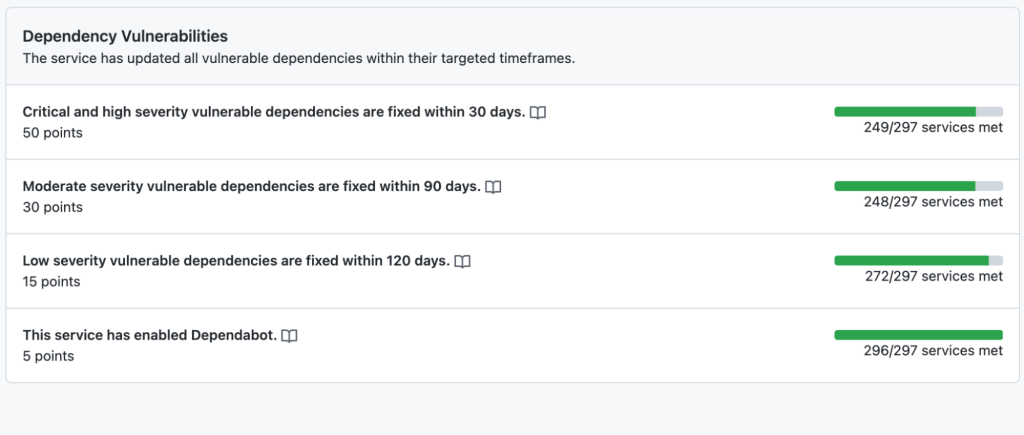
The Service Catalog allows us to assign service level objectives (SLOs) to individual metrics. We acknowledge that not all Dependabot alerts can be actioned immediately. Instead, we assign a realistic grace period for service owners to remediate Dependabot alerts before marking a metric as failing.
At this point, the Service Catalog metrics showed that around one-third of services had Dependabot alerts that needed remediation. We then needed a process for prioritizing and managing the work of upgrading dependencies across the company. We decided to integrate with GitHub’s internal Engineering Fundamentals program. This takes a company-wide view of the various metrics in the Service Catalog that we consider the baseline for well-maintained, available, and secure services.
The program is all about prioritization: given the current set of services not meeting baseline expectations, what is the priority for service owners right now? By integrating Dependabot alerts into the program, it allows us to clearly communicate the priority of dependency upgrades against other foundational work. This also drove conversations around deprecation. Like all companies, we had a number of internal services that were currently, or soon to be, deprecated. By making these metrics clearly visible, it allowed us to quantify the risk of keeping these deprecated services running in production and led to service owners reprioritizing the work to fully shut down those services.
The cornerstone of GitHub’s Engineering Fundamentals program is a monthly synchronous meeting with engineering leadership and service owners. Every month, we define realistic goals for service owners to achieve in the next four weeks then review the progress against those goals. This allowed us to break down the nebulous task—fixing all open Dependabot alerts—into a clear set of tasks over a series of months. After integrating the Dependabot metrics with the program, we then made it a focus for engineering teams for a whole quarter of the year, which allowed us to build momentum on upgrading dependencies for services.
Outcomes
Our focus on Dependabot alerts was a success. By leveraging the Engineering Fundamentals program, we increased the percentage of services with zero Dependabot alerts from 68% up to 81%. This represents roughly 50 core GitHub services remediated in just three months, including several services performing large Rails upgrades to ensure they are using the most recent version. As the Engineering Fundamentals program runs continuously, this was not a one-off piece of work. Rather, the program allows us to follow the Dependabot alert metrics over time and intervene if we see them trending in the wrong direction.
After trialing this approach with Dependabot, we have since incorporated other GitHub Advanced Security tools and features, such as CodeQL into our Engineering Fundamentals program. By integrating more sources of security alerts, GitHub now has a more complete picture of the state of services across the company, which allows us to clearly prioritize work.
As an internal security team, GitHub’s Product Security Engineering Team faces many of the same challenges as our GitHub Enterprise users, and we use our experience to inform the design of GitHub features. Our emphasis on organization-wide metrics was a key part of measuring progress on this piece of work. That feedback has informed how we designed the Security Overview feature, which allows GitHub Enterprise users to easily see the current state of GitHub Advanced Security alerts across their organization.
Are you inspired to work at GitHub?
- Dedicated remote-first company with flexible hours
- Building great products used by tens of millions of people and companies around the world
- Committed to nurturing a diverse and inclusive workplace
- And so much more!
Does this sound like a fit you? We’d love for you to join us. Check out our Careers page to see all of our current job openings.
The post How we use Dependabot to secure GitHub appeared first on The GitHub Blog.
]]>The post Security keys are now supported for SSH Git operations appeared first on The GitHub Blog.
]]>What are security keys and how do they work?
Security keys, such as the YubiKey, are portable and transferable between machines in a convenient form factor. Most security keys connect via USB, NFC, or Bluetooth. When used in a web browser with two-factor authentication enabled, security keys provide a strong, convenient, and phishing-proof alternative to one-time passwords provided by applications or SMS. Much of the data on the key is protected from external access and modification, ensuring the secrets cannot be taken from the security key. Security keys should be protected as a credential, so keep track of them and you can be confident that you have usable, strong authentication. As long as you retain access to the security key, you can be confident that it can’t be used by anyone else for any other purpose.

Use your existing security key for Git operations
When used for SSH operations, security keys move the sensitive part of your SSH key from your computer to a secure external security key. SSH keys that are bound to security keys protect you from accidental private key exposure and malware. You perform a gesture, such as a tap on the security key, to indicate when you intend to use the security key to authenticate. This action provides the notion of “user presence.”
Security keys are not limited to a single application, so the same individual security key is available for both web and SSH authentication. You don’t need to acquire a separate security key for each use case. And unlike web authentication, two-factor authentication is not a requirement when using security keys to authenticate to Git. As always, we recommend using a strong password, enrolling in two-factor authentication, and setting up account recovery mechanisms. Conveniently, security keys themselves happen to be a great recovery option for securely retaining access to your two-factor-enabled account if you lose access to your phone and backup codes.
The same SSH keys you already know and love, just a little different
Generating and using security keys for SSH is quite similar to how you generated and used SSH keys in the past. You can password-protect your key and require a security key! According to our data, you likely either use an RSA or ed25519 key. Now you can use two additional key types: ecdsa-sk and ed25519-sk, where the “sk” suffix is short for “security key.”
$ ssh-keygen -t ecdsa-sk -C <email address>
Generating public/private ecdsa-sk key pair.
You may need to touch your authenticator to authorize key generation.
Once generated, you add these new keys to your account just like any other SSH key. You’ll still create a public and private key pair, but secret bits are generated and stored in the security key, with the public part stored on your machine like any other SSH public key. There is a private key file stored on your machine, but your private SSH key is a reference to the security key device itself. If your private key file on your computer is stolen, it would be useless without the security key. When using SSH with a security key, none of the sensitive information ever leaves the physical security key device. If you’re the only person with physical access to your security key, it’s safe to leave plugged in at all times.

Safer Git access and key management
With security keys, you can achieve a higher level of account security and protection from account takeover. You can take things a step further by removing your previously registered SSH keys, using only SSH keys backed by security keys. Using only SSH keys backed by security keys gives you strong assurance that you are the only person pulling your Git data via SSH as long as you keep the security key safe like any other private key.
Security keys provide meaningful safety assurances even if you only access Git on trusted, consistent systems. At the other end of the spectrum, you might find yourself working in numerous unfamiliar environments where you need to perform Git operations. Security keys dramatically reduce the impact of inadvertent exposure without the need to manage each SSH key on your account carefully. You can confidently generate and leave SSH keys on any system for any length of time and not have to worry about removing access later. We’ll remove unused keys from your account, making key management even easier. Remember to periodically use keys you want to retain over time so we don’t delete them for you.
Protecting against unintended operations
Every remote Git operation will require an additional key tap to ensure that malware cannot initiate requests without your approval. You can still perform local operations, such as checkout, branch, and merge, without interruption. When you’re happy with your code or ready to receive updates, remote operations like push, fetch, and pull will require that you tap your security key before continuing. As always, SSH keys must be present and optionally unlocked with a password for all Git operations. Unlike password-protected SSH keys, clients do not cache security key taps for multiple operations.
$ git clone [email protected]:github/secure_headers.git
Cloning into 'secure_headers'...
Confirm user presence for key ECDSA-SK SHA256:xzg6NAJDyJB1ptnbRNy8UxD6mdm7J/YBdu2p5+fCUa0
User presence confirmed
Already familiar with using SSH keys backed by security keys? In that case, you might wonder why we require verification (via the security key “tap”) when you can configure your security key to allow operations to proceed as long as the security key is present. While we understand the appeal of removing the need for the taps, we determined our current approach to require presence and intention is the best balance between usability and security.
Towards a future with fewer passwords
Today, you can use a password, a personal access token (PAT), or an SSH key to access Git at GitHub. Later this year, as we continue to iterate toward more secure authentication patterns, passwords will no longer be supported for Git operations. We recognize that passwords are convenient, but they are a consistent source of account security challenges. We believe passwords represent the present and past, but not the future. We would rather invest in alternatives, like our Personal Access Tokens, by adding features such as fine-grained access and more control over expiration. It’s a long journey, but every effort to reduce the use of passwords has improved the security of the entire GitHub ecosystem.
By removing password support for Git, as we already successfully did for our API, we will raise the baseline security hygiene for every user and organization, and for the resulting software supply chain. By adding SSH security key support, we have provided a new, more secure, and easy-to-use way to strongly authenticate with Git while preventing unintended and potentially malicious access. If you are ready to make the switch, log in to your account and follow the instructions in our documentation to create a new key and add it to your account.
We wanted to extend our gratitude to Yubico, with whom we’ve partnered several times over the years, for being an early collaborator with us on this feature and providing us valuable feedback to ensure we continue to improve developer security.
The post Security keys are now supported for SSH Git operations appeared first on The GitHub Blog.
]]>The post Behind GitHub’s new authentication token formats appeared first on The GitHub Blog.
]]>Many of our old authentication token formats are hex-encoded 40 character strings that are indistinguishable from other encoded data like SHA hashes. These have several limitations, such as inefficient or even inaccurate detection of compromised tokens for our secret scanning feature. We continually strive for security excellence, so we knew that token detection was something we wanted to improve. How could we make our tokens easier to identify and more secure?
Without further ado, here are the design decisions behind our new authentication token formats that let us meet both goals.
Identifiable prefixes
As we see across the industry from companies like Slack and Stripe, token prefixes are a clear way to make tokens identifiable. We are including specific 3 letter prefixes to represent each token, starting with a company signifier, gh, and the first letter of the token type. The results are:
ghpfor GitHub personal access tokensghofor OAuth access tokensghufor GitHub user-to-server tokensghsfor GitHub server-to-server tokensghrfor refresh tokens
Additionally, we want to make these prefixes clearly distinguishable within the token to improve readability. Thus, we are adding a separator: _. An underscore is not a Base64 character which helps ensure that our tokens cannot be accidentally duplicated by randomly generated strings like SHAs.
One other neat thing about _ is it will reliably select the whole token when you double click on it. Other characters we considered are sometimes included in application word separators and thus will stop highlighting at that character. Try out double clicking this-random-text versus this_random_text!
With this prefix alone, we anticipate the false positive rate for secret scanning will be down to 0.5%.
Checksum
Identifiable prefixes are great, but let’s go one step further. A checksum virtually eliminates false positives for secret scanning offline. We can check the token input matches the checksum and eliminate fake tokens without having to hit our database.
A 32 bit checksum in the last 6 digits of each token strikes the optimal balance between keeping the random token portion at a consistent entropy and enough confidence in the checksum. We start the implementation with a CRC32 algorithm, a standard checksum algorithm. We then encode the result with a Base62 implementation, using leading zeros for padding as needed.
Token entropy
We of course can’t forget about token entropy. Entropy is a logarithmic measure of information or uncertainty inherent in the possible token combinations. We use it as a representation of uniqueness for a given pattern and it’s important to maintain for the vast number of tokens we generate everyday. For personal access tokens alone, we create over 10k on a slow day and upwards of 18k on peak days. With our new formats, not only did we maintain our previous levels — we increased them!
Previously, our implementation for OAuth access tokens had an entropy of 160:
Math.log(((“a”..“f”).to_a + (0..9).to_a).length)/Math.log(2) * 40 = 160
Our implementation for OAuth access tokens are now 178:
Math.log(((“a”..“z”).to_a + (“A”..“Z”).to_a + (0..9).to_a).length)/Math.log(2) * 30 = 178
As we continue to grow and move forward, we will increase this entropy even more. But for now, we are thrilled our tokens have increased identifiability, security, and entropy — all without changing the token length.
What does this mean for you?
As a GitHub user…
We strongly encourage you to reset any personal access tokens and OAuth tokens you have. These improvements help secret scanning detection and will help you mitigate any risk to compromised tokens. You can reset your personal access tokens by going to developer settings and your OAuth tokens with our API.
As a service provider…
If you issue tokens as part of your platform and aren’t part of our secret scanning feature, we encourage you to follow the guidelines we outline here for your own tokens and join our secret scanning program so we can keep your tokens secure too.
We thank you for helping us make our platform and services the best and most secure they can be.
The post Behind GitHub’s new authentication token formats appeared first on The GitHub Blog.
]]>The post How we threat model appeared first on The GitHub Blog.
]]>What is threat modeling?
Before we dive into how we approach threat modeling at GitHub, let’s first agree on what threat modeling is. Defining the goals of the process helps everyone involved set expectations for what comes out.
At GitHub, threat modeling isn’t necessarily a specific tool or set of deliverables—it’s a process to help foster ongoing discussions between security and engineering teams around a new or existing system. A threat model is a collaborative security exercise where we evaluate and validate the design and task planning for a new or existing service. This exercise involves structured thinking about potential security vulnerabilities that could adversely affect your service.
Every threat modeling conversation should have at least the following goals:
- First, dig into the proposed or existing architecture, ensuring everyone understands how the system works. (If nothing else, now you know! While you’re at it, document it.)
- Then, holistically evaluate the entire surface area and develop the most likely points of compromise. This is the key deliverable.
- Develop mitigation strategies to be implemented for each point of compromise. Since no one has infinite resources, these are probably prioritized.
What is our threat modeling process?
Decide when to threat model
At GitHub, we typically do threat modeling on a set cadence with each of the feature teams, and before the release of any new features that make major changes to the architecture. Depending on the amount of engineering taking place on a feature, you may need a faster cadence (every couple months) or a slower one (once per year). If you have an existing cadence of software review, we’ve found that integrating it with those existing processes helps everyone to adapt to adding a new security process. Regardless of your timing, set guidelines, and be flexible.
Build the threat model
Threat modeling is usually a collaborative exercise, so the engineering team for the product and the security team will get together to talk through the architecture and potential security concerns. Ahead of time, our security team will provide documentation and examples to the engineering teams on effective threat modeling. We typically ask each engineering team to generate a model in advance, covering a significant part of a system to review as part of a single threat modeling conversation. Setting these expectations early (and doing the homework) helps to ensure that the meeting is effective.
Though the process and discussions are what matter more than the specific output, at GitHub, we ask the engineering team to bring a threat model developed either in Microsoft’s Threat Modeling Tool or OWASP’s Threat Dragon (both are entirely free!). These tools enable the teams to clearly present important information for the threat model such as APIs, trust boundaries, dependencies, datastores, authentication mechanisms, etc. In addition to providing some consistency between teams, these files will also act as important collateral to share with any auditors if you need to meet various security compliance requirements.
Review the threat model
When it’s time to review the threat model, we typically schedule a one hour session, broken into two parts. The first five to 10 minutes of every session is spent with the engineering team understanding the design of the system that is being reviewed. This time ensures that everyone is on the same page and helps clarify any ambiguities from the previously prepared threat mode—including which technologies are being used and any design quirks. After everyone is aligned, we can jump right into the security discussion.
At this point in the security discussion, we’ve found it helpful to use a framework to methodically address different vulnerability classes. One of the methodologies we frequently use is Microsoft’s STRIDE model—Spoofing, Tampering, Repudiation, Information Disclosure, Denial of Service, Escalation of Privilege—a mnemonic covering common attack vectors which may be found in an application. Stepping through these classes while looking at the overarching system enables the security teams to holistically look at a system being analyzed and ensure that they cover the most likely threats. Following STRIDE fills the remainder of the hour as conversation expands and more parts of the system get unpacked.
As potential security vulnerabilities or design flaws are found, the security team takes note of them as well as potential remediations. This is so we can generate a list of potential changes for the engineering team to consider making after the session. We found that as threat modeling became more common across GitHub, teams learned to engage the security team while developing the system—which is better, as it fostered getting ahead of potential issues and addressing major architectural changes before hands hit keyboards. This in turn helped the security teams deploy better defense in depth through secure design principles.
As the session draws to an end, we recount the key findings and improvements that the teams should make and generate tracking items for those. A summary is distributed to the participants where anyone is free to ask follow up questions to better flesh out the action items.
What we learned from threat modeling
As I mentioned above, we’ve found a number of benefits to threat modeling that drive an organization’s security-minded culture. In our case, we’ve seen three notable benefits:
System-wide security improvements
The simple act of sitting down and discussing the system holistically provided a great opportunity for everyone to discuss the underlying system. Knowledge sharing between the teams helped everyone grow in their knowledge of the systems in the environment. This also contributed in the development of vulnerability mitigation strategies for issues discovered during the threat model review, which improved the security posture of the entire organization.
Proactive design guidance
As threat modeling matured, we worked to “shift left,” or do it earlier in the development process and set up sessions before a product ships. Often, security teams need to respond to issues as they are discovered. But as an organization shifts the timing of threat modeling to be earlier in the process, security teams can, at times, help guide engineering teams from system designs that might present future vulnerabilities.
Improved communication between security and engineering teams
This benefit has been an incredible shift for engineering and security teams. Since it brings them together on a regular cadence, threat modeling has helped build connections between these teams that make it easier to reach out— in both directions.
Bringing it all together
To recap, we’ve covered a number of key activities that helped improve threat modeling at GitHub. Here’s a quick summary of our process:
- Merge threat modeling processes into existing development lifecycle processes and automate if possible
- Ensure everyone comes prepared
- Use a defined mechanism to methodically cover risk areas, such as STRIDE
- Leave with specific action items
- Follow up
By following these steps, we found that we could improve the security of the system being developed, proactively engage with engineering teams (before shipping!), and forge strong connections between the teams involved in developing software.
How do you threat model?
We’d love to hear from you about your best (or worst) threat modeling practices! Tweet us your ideas with the #GitHubThreatModeling hashtag.
The post How we threat model appeared first on The GitHub Blog.
]]>The post CERT partners with GitHub Security Lab for automated remediation appeared first on The GitHub Blog.
]]>Regardless of how proud you are of the results, do you ever get a nagging feeling that maybe you didn’t make enough of an impact? While single bug fixes are worthwhile in improving code, it’s not sufficient enough to improve the state of security of the open source software (OSS) ecosystem as a whole. This holds true especially when you consider that software is always growing and changing—and as vulnerabilities are fixed, new ones are introduced.
Beyond single bug fixes
At GitHub, we host millions of OSS projects which puts us in a unique position to take a different approach with OSS security. We have the power and responsibility to make an impact beyond single bug fixes. This is why a big part of the GitHub Security Lab mission is to find ways to scale our vulnerability hunting efforts and empower others to do the same.
Our goal is to turn single vulnerabilities into hundreds, if not thousands, of bug fixes at a time. Enabled by the GitHub engineering teams, we aim to establish workflows that are open to the community that tackle vulnerabilities at scale on the GitHub platform.
Ultimately, we want to establish feedback loops with the developer and security communities, and act as security facilitators, all while working with the OSS community to secure the software we all depend upon.
We’re taking a deep-dive in the remediation of a security vulnerability with CERT. Learn more about how we found ways to scale our vulnerability hunting efforts and empower others to do the same.
Continue reading on the Security Lab blog
The post CERT partners with GitHub Security Lab for automated remediation appeared first on The GitHub Blog.
]]>The post Behind the scenes: GitHub security alerts appeared first on The GitHub Blog.
]]>How does it work?
Vulnerability alerts rely on two pieces of data: an inventory of all the software that your code depends on, and a curated list of known vulnerabilities in open-source code.
Any time you push a change to a dependency manifest file, GitHub has a job that parses those manifest files, and stores your dependency on those packages in the dependency graph. If you’re dependent on something that hasn’t been seen before, a background task runs to get more information about the package from the package registries themselves and adds it. We use the information from the package registries to establish the canonical repository that the package came from, and to help populate metadata like readmes, known versions, and the published licenses.
On GitHub Enterprise Server, this process works identically, except we don’t get any information from the public package registries in order to protect the privacy of the server and its code.
The dependency graph supports manifests for JavaScript (npm, Yarn), .NET (Nuget), Java (Maven), PHP (Composer), Python (PyPI), and Ruby (Rubygems). This data powers our vulnerability alerts, but also dependency insights, the used by badge, and the community contributors experiences.
Beyond the dependency graph, we aggregate data from a number of sources and curate those to bring you actionable security alerts. GitHub brings in security vulnerability data from a number of sources, including the National Vulnerability Database (a service of the United States National Institute of Standards and Technology), maintainer security advisories from open-source maintainers, community datasources, and our partner WhiteSource.
Once we learn about a vulnerability, it passes through an advanced machine learning model that’s trained to recognize vulnerabilities which impact developers. This model rejects anything that isn’t related to an open-source toolchain. If the model accepts the vulnerability, a bot creates a pull request in a GitHub private repository for our team of curation experts to manually review.

GitHub curates vulnerabilities because CVEs (Common Vulnerability Entries) are often ambiguous about which open-source projects are impacted. This can be particularly challenging when multiple libraries with similar names exist, or when they’re a part of a larger toolkit. Depending on the kind of vulnerability, our curation team may follow-up with outside security researchers or maintainers about the impact assessment. This follow-up helps to confirm that an alert is warranted and to identify the exact packages that are impacted.
Once the curation team completes the mappings, we merge the pull request and it starts a background job that notifies users about any affected repositories. Depending on the vulnerability, this can cause a lot of alerts. In a recent incident, more than two million repositories were alerted about a vulnerable version of lodash, a popular JavaScript utility library.
GitHub Enterprise Server customers get a slightly different experience. If an admin has enabled security vulnerability alerts through GitHub Connect, the server will download the latest curated list of vulnerabilities from GitHub.com over the private GitHub Connect channel on its next scheduled sync (about once per hour). If a new vulnerability exists, the server determines the impacted users and repositories before generating alerts directly.
Security vulnerabilities are a matter of public good. High-profile breaches impact the trustworthiness of the entire tech industry, so we publish a curated set of vulnerabilities on our GraphQL APIs for community projects and enterprise tools to use in custom workflows as necessary. Users can also browse the known vulnerabilities from public sources on the GitHub Advisory Database.
Engineers behind the feature
Despite advanced technology, security alerting is a human process driven by dedicated GitHubbers. Meet Rob (@rschultheis), one of the core members of our security team, and learn about his experiences at GitHub through a friendly Q&A:
 Humphrey Dogart (German Shepherd) and Rob Schultheis (Software Engineer on the GitHub Security team)
How long have you been with GitHub?
Two years
How did you get into software security?
I’ve worked with open source software for most of my 20 year career in tech, and honestly for much of that time I didn’t pay much attention to security. When I started at GitHub I was given the opportunity to work on the first iteration of security alerts. It quickly became clear that having a high quality, open dataset was going to be a critical factor in the success of the feature. I dove into the task of curating that advisory dataset and found a whole side to the industry that was open for exploration, and I’ve stayed with it ever since!
What are the trickiest parts of vulnerability curation?
The hardest problem is probably confirming that our advisory data correctly identifies which version(s) of a package are vulnerable to a given advisory, and which version(s) first address it.
What was the most difficult security vulnerability you’ve had to publish?
One memorable vulnerability was CVE-2015-9284. This one was tough in several ways because it was a part of a popular library, it was also unpatched when it became fully public, and finally, it was published four years after the initial disclosure to maintainers. Even worse, all attempts to fix it had stalled.
We ended up proceeding to publish it and the community quickly responded and finally got the security issue patched.
What’s your favorite feel-good moment working in security?
Seeing tweets and other feedback thanking us is always wonderful. We do read them! And that goes the same for those critical of the feature or the way certain advisories were disclosed or published. Please keep them coming—they’re really valuable to us as we keep evolving our security offerings.
Since you work at home, can you introduce us to your furry officemate?
I live with a seven month old shepherd named Humphrey Dogart. His primary responsibilities are making sure I don’t spend all day on the computer, and he does a great job of that. I think we make a great team!
Learn more about GitHub security alerts
The post Behind the scenes: GitHub security alerts appeared first on The GitHub Blog.
]]>The post GitHub Token Scanning—one billion tokens identified and five new partners appeared first on The GitHub Blog.
]]>Since adding token scanning, we’ve sent our integration partners one billion tokens for validation.*
Five new token scanning partners
As part of GitHub’s commitment to protecting our customers from security threats, we’re happy to announce that we’ve partnered with Atlassian, Dropbox, Discord, Proctorio, and Pulumi to scan for their token formats. They’re in good company, joining other service providers including Alibaba Cloud, AWS, Azure, Google Cloud, Mailgun, npm, Slack, Stripe, and Twilio in protecting developers. Now if you accidentally check in a token for products like Jira or Discord, the provider gets notified about a potential match within seconds of check-in, allowing them to revoke the token before it’s used maliciously.
How does token scanning work?
On a typical day, we see almost nine million commits pushed to GitHub. Within seconds of those commits being pushed (or private repositories being made public), we scan the contents for a number of known token formats. When we detect a match, we’ll notify the appropriate service provider and they’ll respond accordingly—revoking the tokens and notifying the affected users.
Here’s an example of how one user was notified about a Discord token that was accidentally submitted to a public repository:

Service providers—help us prevent security breaches before they happen
If you’re a cloud or API service provider using tokens for authentication and authorization and would like to protect your users from these rare, but potentially devastating scenarios, we’d love to work with you.
It’s as simple as a bit of paperwork, defining some regular expression to match your token format(s), and setting up an API endpoint.
Learn more about becoming a GitHub token scanning partner
* “Tokens for validation” represents the number of tokens we’ve sent to our token scanning partners for potential matches and thus may include false positives. GitHub notifies the appropriate service provider to respond accordingly—revoking the tokens and notifying the affected users—but we do not receive data on the number of validated tokens from partners.
The post GitHub Token Scanning—one billion tokens identified and five new partners appeared first on The GitHub Blog.
]]>