


This Home Assistant integration provides five sensors per entry, each showing the upcoming public transport connections between two locations – including real-time updates.
For example, you can get connections that you often need (e.g., home → main station) as a sensor, but you can also always see dynamic connections (e.g., route from my current location to home).
Note: It works exclusively within the Deutsche Bahn (DB) network.
You can use the following as both origin and destination:
- 🧍 Person entities (with coordinates as an attribute)
- 📍 Zones
This allows you, for example, to retrieve real-time data from a user's current location to their home address.

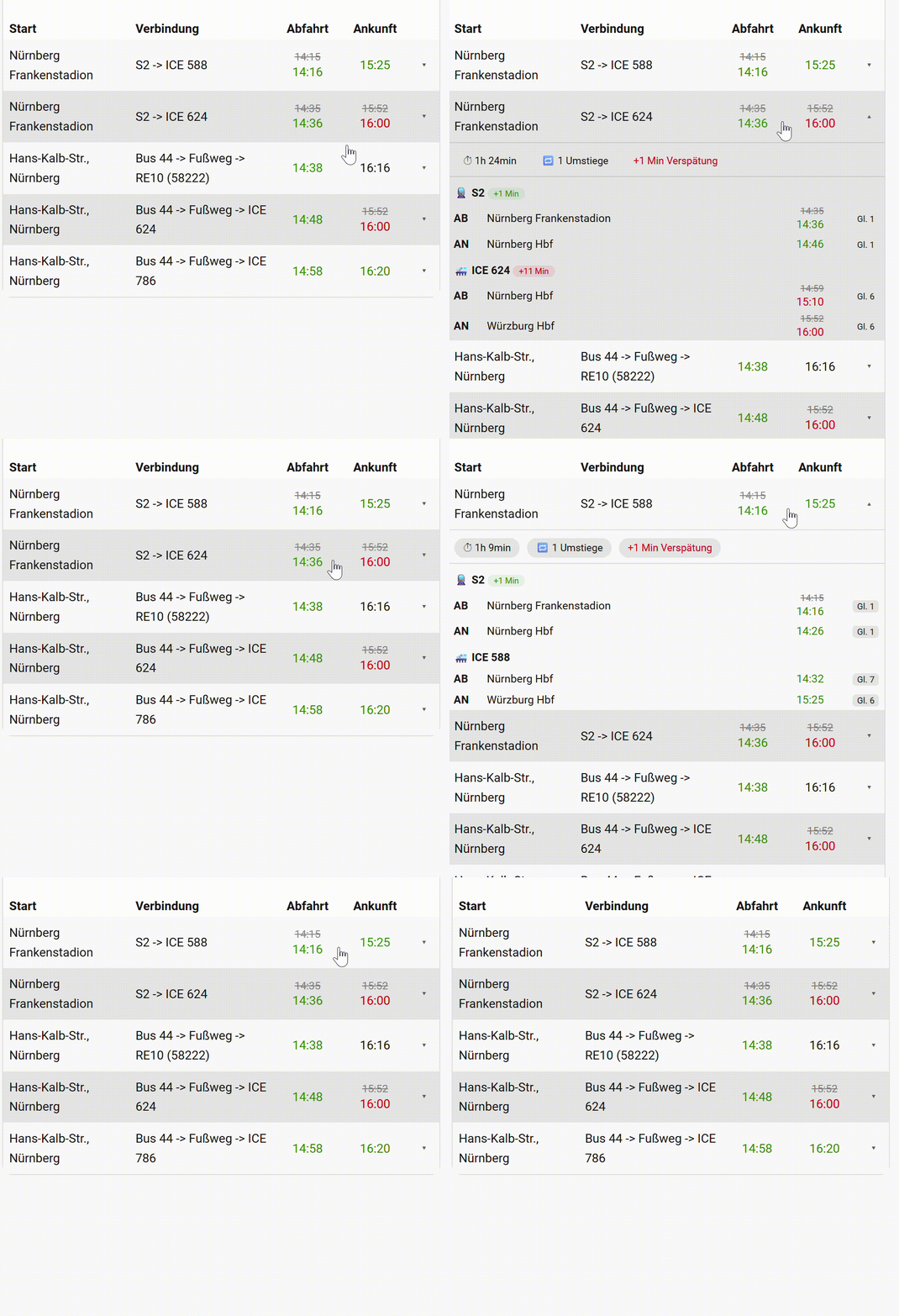
The easiest and most feature-rich way to display your connections is the dedicated DB Info Card — a custom Lovelace card built specifically for this integration.
Features:
- Clean table view with real-time delay visualization
- Expandable rows with per-segment details (stops, platforms, delays)
- Built-in visual editor — no YAML required
👉 Installation & Documentation
⚙️ Alternative: flex-table-card (old method)
To display the sensors using flex-table-card, make sure the following custom cards are installed:

type: custom:flex-table-card
entities:
  include: sensor.<NAME_OF_SENSORS_WITH_WILDCARD>* # e.g. sensor.wu_hbf_max_morlock_stadion_verbindung_*
sort_by: sort_time
columns:
  - name: Start
    data: Departure
  - name: Verbindung
    data: Name
  - name: Abfahrt
    multi:
      - - attr
        - Departure Time
      - - attr
        - Departure Time Real
    modify: >
      var time = new Date(x.split(" ")[0]); var timeReal = new Date(x.split(
      " ")[1]); if (isNaN(timeReal.getTime())) {
        time.toLocaleTimeString('de-DE', {hour: '2-digit', minute: '2-digit'});
      } else if (time >= timeReal) {
        '<div style="color:green">' +
        time.toLocaleTimeString('de-DE', {hour: '2-digit', minute: '2-digit'}) +
        '</div>';
      } else {
        var delayMinutes = (timeReal - time) / (1000 * 60);
        if (delayMinutes > 4) {
          '<s><div style="color:grey">' +
          time.toLocaleTimeString('de-DE', {hour: '2-digit', minute: '2-digit'}) +
          '</div></s><div style="color:red">' +
          timeReal.toLocaleTimeString('de-DE', {hour: '2-digit', minute: '2-digit'}) +
          '</div>';
        } else {
          '<s><div style="color:grey">' +
          time.toLocaleTimeString('de-DE', {hour: '2-digit', minute: '2-digit'}) +
          '</div></s><div style="color:green">' +
          timeReal.toLocaleTimeString('de-DE', {hour: '2-digit', minute: '2-digit'}) +
          '</div>';
        }
      }
  - name: Ankunft
    multi:
      - - attr
        - Arrival Time
      - - attr
        - Arrival Time Real
    modify: >
      var time = new Date(x.split(" ")[0]); var timeReal = new Date(x.split(
      " ")[1]); if (isNaN(timeReal.getTime())) {
        time.toLocaleTimeString('de-DE', {hour: '2-digit', minute: '2-digit'});
      } else if (time >= timeReal) {
        '<div style="color:green">' +
        time.toLocaleTimeString('de-DE', {hour: '2-digit', minute: '2-digit'}) +
        '</div>';
      } else {
        var delayMinutes = (timeReal - time) / (1000 * 60);
        if (delayMinutes > 4) {
          '<s><div style="color:grey">' +
          time.toLocaleTimeString('de-DE', {hour: '2-digit', minute: '2-digit'}) +
          '</div></s><div style="color:red">' +
          timeReal.toLocaleTimeString('de-DE', {hour: '2-digit', minute: '2-digit'}) +
          '</div>';
        } else {
          '<s><div style="color:grey">' +
          time.toLocaleTimeString('de-DE', {hour: '2-digit', minute: '2-digit'}) +
          '</div></s><div style="color:green">' +
          timeReal.toLocaleTimeString('de-DE', {hour: '2-digit', minute: '2-digit'}) +
          '</div>';
        }
      }
  - name: sort_time
    multi:
      - - attr
        - Departure Time
      - - attr
        - Departure Time Real
    modify: >
      var time = new Date(x.split(" ")[0]); var timeReal = new Date(x.split(
      " ")[1]); if (isNaN(timeReal.getTime())) {
        time.toLocaleTimeString('de-DE', {hour: '2-digit', minute: '2-digit'});
      } else {
        '<div style="color:green">' +
        timeReal.toLocaleTimeString('de-DE', {hour: '2-digit', minute: '2-digit'}) +
        '</div>';
      }
    hidden: true
css:
  table+: "padding: 1px 5px 16px 5px;"
card_mod:
  style:
    $: |
      h1.card-header {
        font-size: 20px;
        padding-top: 3px;
        padding-bottom: 1px;
}🔹Via HACS

Copy the folder: custom_components/db_info into your Home Assistant directory: config/custom_components
Enjoy using the integration! 🚆

