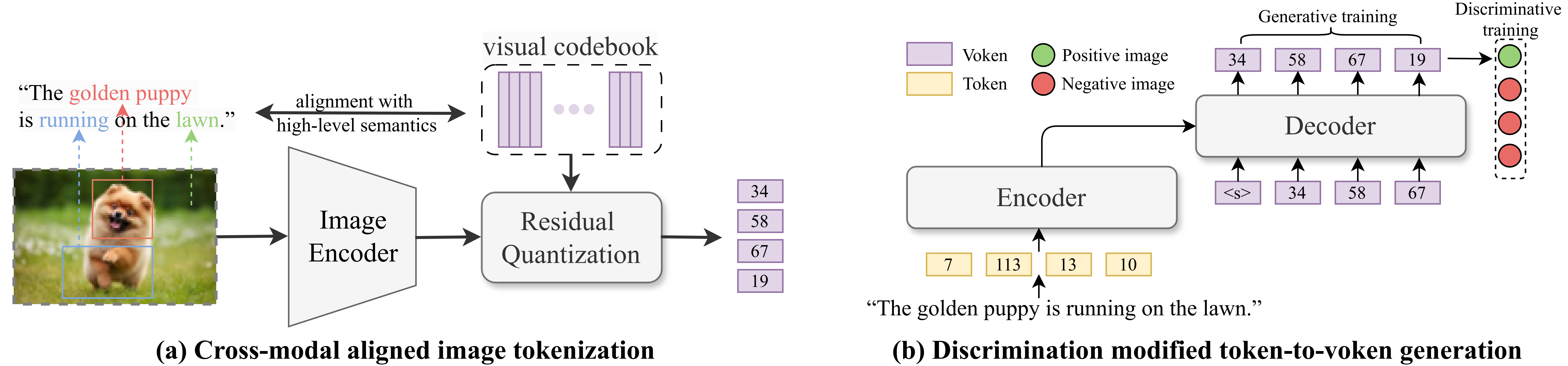
This project implements AVG, a new approach for text-to-image retrieval that reformulates the task as token-to-voken generation to improve both retrieval effectiveness and efficiency. Unlike traditional methods based on cross-attention (one-tower) or shared embedding spaces (two-tower), AVG incorporates fine-grained token-level interactions while maintaining fast retrieval speed. It uses a semantically aligned image tokenizer and a hybrid generative-discriminative training objective to reduce semantic misalignment and bridge the gap to the retrieval target. Experimental results show that AVG achieves a 7.53% relative improvement in effectiveness and a 4× speedup compared to the widely used two-tower baseline, CLIP.
For more details, refer to our paper accepted to SIGIR 2025: Revolutionizing Text-to-Image Retrieval as Autoregressive Token-to-Voken Generation.
The code is tested on Python 3.9.18, PyTorch 1.13.1 and CUDA 11.7.
You can create a conda environment with the required dependencies using the provided environment.yml file.
conda env create -f environment.yml
conda activate avg-
The dataset used in the paper is the COCO 2014 dataset and the Flickr30k dataset. The raw images should be downloaded and placed in the
RQ-VAE/datadirectory, along with captions. The captions files we used can be found here. -
Run the following command to preprocess the data to generate the image features and text features:
cd RQ-VAE
bash scripts/prepare_emb.sh- You can also use the simple tools/generate_psudo_query.py script to generate pseudo queries to augment the dataset. The psudo queries we used can be found here.
cd RQ-VAE
bash scripts/train_rqvae.sh
The trained model will be saved in the RQ-VAE/output directory.
bash scripts/generate_codes.shThis script encodes images into discrete token sequences, which will be used in downstream Retriever and Reranker stages.
Use the previously generated voken codes to construct the training data for the retriever:
cd ..
bash scripts/prepare_retriever_dataset.sh🔹 Stage 1: Generative Training (T5 or LLaMA)
To train a T5-based retriever:
bash scripts/train_retriever_t5.sh
# Recall metrics will be automatically recorded in the log file and wandb.
To train a LLaMA-based retriever:
bash scripts/finetune_retriever_llama.shFor testing the LLaMA-based retriever (requires separate evaluation):
bash scripts/test_retriever_llama.sh🔹 Stage 2: Discriminative Fine-Tuning (Optional)
Load the checkpoint from Stage 1 and perform discriminative training:
bash scripts/train_retriever_t5_stage2.sh
# Note: Hyperparameters are sensitive and may require tuning.We use the SEED-LLaMA model as the reranker. A lightweight MLP head is added for scoring candidate responses retrieved by the retriever.
First, generate retrieval results for training set and test set:
bash scripts/prepare_reranker_dataset.shThen, convert the voken codes to SEED-LLaMA token IDs:
bash scripts/convert_voken_to_seed.shbash scripts/finetune_reranker_llama.shbash scripts/test_reranker_llama.sh-
Make sure to update all dataset-related paths in the training and evaluation scripts according to your local directory structure.
-
The default hyperparameters (e.g., learning rate, batch size, number of epochs) are configured for a reference dataset. You must tune them for your own dataset.
-
Some scripts assume a fixed number of retrieval candidates (e.g., top-50 or top-100). Adjust top_k accordingly based on your retriever output.
If you find this code useful, please consider citing our paper:
@inproceedings{li2025avg,
  title={Revolutionizing Text-to-Image Retrieval as Autoregressive Token-to-Voken Generation},
  author={Yongqi Li and Hongru Cai and Wenjie Wang and Leigang Qu and Yinwei Wei and Wenjie Li and Liqiang Nie and Tat-Seng Chua},
  booktitle={Proceedings of the 48th International ACM SIGIR Conference on Research and Development in Information Retrieval},
  series={SIGIR '25},
  year={2025}
}This project is licensed under the CC BY-NC 4.0 License.
Part of the code (./models) is based on the SEED-LLaMA. We continue to honor and adhere to its licensing terms.
For inquiries, feel free to reach out to Hongru Cai at [email protected].