Visualize any GitHub repository with beautiful interactive graphs and star history charts at git-history.com

- 🌌 Interactive Force Graph - Explore repository structure with draggable, zoomable nodes
- 📦 Pack View - Circle-packing visualization showing files nested inside folders
- ⭐ Star History - Beautiful charts showing repository growth over time
- 📊 Embeddable Charts - Add live star history SVG to your README (dark & light themes)
- 🎬 Commit Timeline - Watch commits animate through the codebase
- 🔄 Multi-Repo Comparison - Compare star histories of multiple repositories
- 🔌 Chrome Extension - View star history directly on GitHub pages

| Feature | Status | Description |
|---|---|---|
| Force Graph Layout | ✅ Done | Interactive force-directed graph with D3.js |
| Circle Packing (Pack View) | ✅ Done | Files nested inside folder circles |
| File Type Coloring | ✅ Done | Color nodes by extension (.ts, .js, .css, etc.) |
| File Size Scaling | ✅ Done | Node size represents file size |
| Layout Toggle | ✅ Done | Switch between Force and Pack views |
| Zoom to Folder | 🔜 Planned | Double-click folder to zoom into contents |
| Feature | Status | Description |
|---|---|---|
| Commit Timeline | ✅ Done | Animated playback through commit history |
| Contributor Avatars | ✅ Done | Show developer avatars during playback |
| File Change Animation | ✅ Done | Projectiles animate from author to changed files |
| Branch Visualization | 🔜 Planned | Show different branches as separate trees |
| Time-lapse Mode | 🔜 Planned | Watch codebase evolution from first commit |
| Feature | Status | Description |
|---|---|---|
| Star History Chart | ✅ Done | Beautiful growth charts with real data |
| Multi-Repo Comparison | ✅ Done | Compare multiple repos on one chart |
| Embeddable SVG | ✅ Done | Add charts to any README |
| Dark & Light Themes | ✅ Done | Theme support for embeds |
| Export as Image/CSV | 🔜 Planned | Download chart data |
| Feature | Status | Description |
|---|---|---|
| GitHub Page Injection | ✅ Done | Star history on repo pages |
| Popup UI | ✅ Done | Quick access to any repo |
Want to contribute? PRs welcome!
- Node.js 18+
- GitHub Personal Access Token (optional but recommended)
git clone https://github.com/MotiaDev/visualize-git.git
cd visualize-git
npm installTo avoid rate limits, create a Personal Access Token with public_repo scope:
# Create .env file
echo "GITHUB_TOKEN=ghp_xxxxxxxxxxxxxxxxxxxx" > .env
Rate Limits:
- Without token: 60 requests/hour
⚠️ - With token: 5,000 requests/hour ✅
# Terminal 1: Start Motia backend
npm run dev

# Terminal 2: Start Vite frontend
npm run olddev
Open http://localhost:3000 and enter any repo like facebook/react!
Add live star history to any README:
[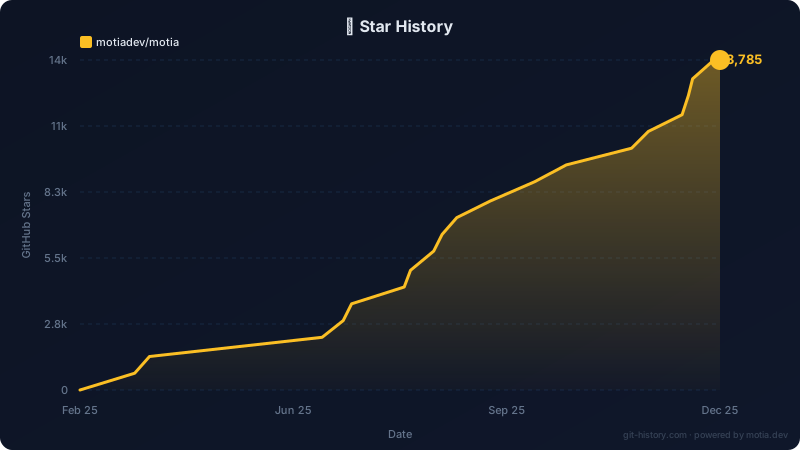](https://github.com/motiadev/motia)| Parameter | Description | Example |
|---|---|---|
repos |
Comma-separated repos (required) | motiadev/motia,vercel/next.js |
theme |
dark or light (default: dark) |
theme=light |
<!-- Single repo -->
[](https://github.com/motiadev/motia)
<!-- Multi-repo comparison -->
[](https://github.com)
<!-- Light theme -->
[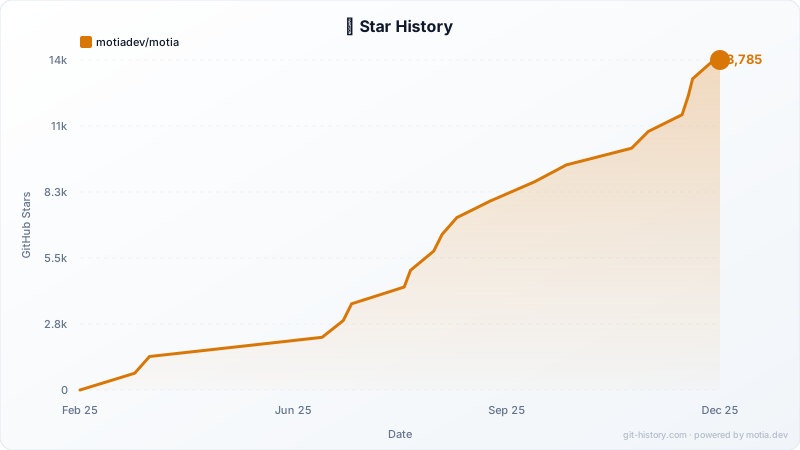](https://github.com/motiadev/motia)Visualize and test your API flows in the Motia Workbench:

| Endpoint | Description |
|---|---|
GET /api/github/repo/:owner/:repo |
Fetch repository details |
GET /api/github/tree/:owner/:repo |
Fetch file tree for visualization |
GET /api/github/stars/:owner/:repo |
Fetch star history data |
GET /api/github/commits/:owner/:repo |
Fetch commit history |
GET /api/embed/stars?repos=... |
Embeddable SVG star chart |
GET /api/embed/badge/:owner/:repo |
Star count badge |
All endpoints support optional ?token=ghp_xxx for higher rate limits.
npx motia cloud deploy \
  --api-key <your-api-key> \
  --version-name v1.0.0 \
  --env-file .env.production
vercel --prodSet these environment variables in Vercel:
VITE_API_BASE- Your Vercel URL (e.g.,https://git-history.com)MOTIA_BACKEND_URL- Your Motia Cloud URL (private)
The chrome-extension/ folder adds star history directly to GitHub repository pages.
- Go to
chrome://extensions/ - Enable "Developer mode"
- Click "Load unpacked" → select
chrome-extension/folder
- Update
API_BASEinpopup.jsandcontent.jsto your production URL - Zip the
chrome-extensionfolder - Upload to Chrome Web Store
git-history/
├── src/github/              # Motia Backend Steps
│   ├── get-repo-details.step.ts
│   ├── get-repo-tree.step.ts
│   ├── get-star-history.step.ts
│   ├── get-commits.step.ts
│   ├── embed-stars.step.ts
│   └── embed-badge.step.ts
├── components/              # React Frontend
│   ├── Visualizer.tsx       # D3.js force graph
│   ├── StarHistory.tsx      # Star history chart
│   ├── TimelinePlayer.tsx   # Commit timeline
│   └── ...
├── services/
│   └── githubService.ts     # API client
├── chrome-extension/        # Chrome Extension
└── motia.config.ts          # Motia configuration
- Backend: Motia - Event-driven API framework
- Frontend: React 18 + Vite + TypeScript
- Visualization: D3.js v7 (force graphs, circle packing)
- Styling: Tailwind CSS
- Validation: Zod schemas
| Issue | Solution |
|---|---|
Property 'X' does not exist on type 'Handlers' |
Run npx motia generate-types |
| GitHub API rate limit (403) | Add GITHUB_TOKEN to .env |
| CORS errors | Ensure API_BASE is correct in githubService.ts |
- Fork the repository
- Create a feature branch:
git checkout -b feature/amazing-feature - Commit your changes:
git commit -m 'Add amazing feature' - Push to the branch:
git push origin feature/amazing-feature - Open a Pull Request
MIT
Built with ⚡ Motia
If you find this useful, please ⭐ star the repo!