Releases: Soundux/Soundux
Soundux v0.2.7


Soundux v0.2.7
🤖 Automatic Windows Setup (Thanks to @EinfachEinAlex)


Soundux is now able to detect misconfigurations with VB-Cable 🧠 and can automatically setup everything VB-Cable related for you 👷!
👀 UI Improvements


We made the favorite icon outlined when in disabled state and added a favorite indicator for the emulated launchpad view 💖!
🧪 Custom Sound Volume (#75)

You can now change the volume for sounds individually 🔉!
⌨️ Keyboard Tab-Navigation (#235)
You can now navigate through your tabs by pressing Arrow Up and Arrow Down ⚡!
🐛 Bug fixes & other improvements ✨
- General
- Fix Audio playing at 100% Volume in the beginning (#225)
- Improved Sorting Performance (Backend-Sorting)
- Per-Tab sorting
- Fixed Space not working in search
- New Translations: Greek, French, Dutch (Thanks to the translators: @MrKingMichael, @MeblIkea, @NathanBnm, @lucasvbeek)
Add Tabnow opens in the last opened directory and initially in your home folder- Space now pauses/resumes all sounds
- Added
--reset-mutexoption that resets the instace guard in case of failure
- Linux
- Windows
- Mute During Playback is now available!
- VB-Cable is now automatically selected on the first startup
- Installer now silently installs VB-Cable and Webview2 Runtime
- We now install VCRedist2010 because
youtube-dldepends on it - Fixed crash when folder name contained non latin characters
Soundux v0.2.6

Soundux v0.2.6
📂 Recursive Folder adding
We now automatically detect subfolders (with a recursion depth of 1) in the directories added via Add Tab and add those folders if they contain sounds 🤖
🐛 Bug fixes & other improvements ✨
- Linux
- Fix crash on close when PulseAudio was not properly loaded
- Fix icons for Ubuntu/Debian
Soundux v0.2.5

Soundux v0.2.5
🥡 Multiple Output / Passthrough Applications (#178)


You can now play sounds to multiple applications at once 🪄
You can also passthrough multiple applications now 🎉
🥷 Hidden Flag
You can now supply --hidden as a startup argument to make soundux start hidden ☁️.
🐛 Bug fixes & other improvements ✨
- General
- Fixed Restore Outputs
- Improved Crash Info
- Improved UI
- Launchpad Pagination on bottom
- Fixed Icons in light theme
- Space Bar to pause sound
- UI Performance
- Windows
- Fixed issues on 2k+ displays (#203)
- Disable Accelerator Keys
- Linux
Soundux v0.2.4
Soundux v0.2.4 (Hotfix)
🐛 Bug fixes & other improvements ✨
- Linux
- Crash when audiobackend is unavailable
- White-Page bug on Ubuntu
- Icon support for Flatpak
Soundux v0.2.3
Soundux v0.2.3
🔌 PipeWire Support (#106, #195)
PipeWire-Support is now almost feature-complete 🎉🎉🎉
"Mute during playback" and "Use as default" device are not yet supported on PipeWire but will be in the future 🔮

🚯 Delete Confirmations

We now make sure you don't accidentally delete things 💐
📂 Open Tab Folder

You can now open a folder in the file explorer from within the UI 🪄
❤️ Favorites (#58)

Favorites are finally here, group your favorite sounds across tabs 💗
🔀 Playlist Mode (#176, #38)

We've added a Playlist / Shuffle mode!
⌨️ Push-To-Talk Keys (#116, #179)

You can now set keys that automatically get pressed while playing a sound 🧙🏿
🗑️ Move to trash / Delete


You can now delete files directly in the UI ✨, choose if you want to remove them permanently ❌ or move them to the trash 🚮
👀 UI Improvements (#112, #93)


We've made some UI improvements:
- New settings layout
- You can now select to use the System Theme
🚀 Improved Emulated Launchpad Mode (#79, #99)

You can now control sounds with your keyboard only!
Be more productive when playing sounds ⌚
🐛 Bug fixes & other improvements ✨
- General
- Check for ffmpeg existance when using ytdl
- Refactor webviewpp & traypp code
- Refactor a lot of code
- Fix crashes & freezes
- Fixed youtube-dl not working for some sites
- Turkish Translation (#187)
- Linux
- Make Libwnck optional runtime dependency
- Make use of PulseAudio API and avoid pactl
- Windows
- Embed required files in executable
- Static link OpenSSL
- Fixed issue with non latin languages (russian, greek, ...)
Soundux v0.2.2
⚠️ As this is a beta expect bugs and please report them ⚠️
Soundux v0.2.2
🤏 Tray (#108)

You can now minimize Soundux to your system tray 🛩️
🗓️ Update Modal (#105)

Stay up-to-date with the new update notifications 📅
📥 Downloader Integration (#47)

An integration for youtube-dl was added 🪄
👀 UI Improvements (#112, #93)


We've made some UI improvements:
- Sounds now play by pressing them once 🤞 (instead of twice!)
- Sync Volume feature was improved
- Set hotkey was moved to the list item for the classic view and to a right-click menu in the grid view
〽️ Sorting options (#115)

We improved the sorting!
You can now choose the way the sounds are sorted 👍
⌨️ Better Hotkeys
We improved the hotkey system to make it more convenient to use!
Hotkeys now work even though another key is held while activating the hotkey 🤝!
The order in which the keys are pressed is now also ignored 🔀! (This is broken in this release, fixed as of e45de2b)
You can also bind mouse-keys now 🐁
🔍 New search

We made the search more convenient to use and we also added the possibility to navigate through it with the arrow keys!
You can also play sounds directly from the search now 🪄
The search should also work better now as we added fuzzy search 🥝
📎 Application Icons & more descriptive names


You can now see the icons and names (in addition to the binary) of the applications 🎉!
🚀 Launchpad Mode (#79)
You can now control sounds with your keyboard only!
Be more productive when playing sounds ⌚
🔇 Mute during playback (Linux only, #32)
We implemented an option that allows you to automatically mute yourself during playback 🧙🏿♂️
🖥️ System Information (#96)
You can now copy your system information with one click inside the settings. This is especially useful for bug reports 😉
🐛 Bug fixes & other improvements ✨
- General
- Added more debug output
- Fixed a bug where not all sounds would be stopped when pressing stop button
- Improved UI layout (Side buttons, spacers, ...)
- Linux
- Fixed bug where it was not possible to play sound to Wine applications
- Fixed bug that caused sink to not be moved back
- Fixed "Set as default device" (#87)
- Fixed not being able to scroll tabs (#85)
- Fixed a bug that caused Wine applications to not show up properly
- DEB package now installs desktop entry & icon
- Added RPM package
- Fixed white-page bug caused by webkit2gtk update
- Pass-through now works in conjunction with "Use as default device"
- Windows
- Fixed bug that caused high cpu usage (#89)
- Fixed VCRuntime Errors
The Windows Portable is now based on the latest master commit (e6f8a87), because the old portable was broken.
Soundux v0.2.2 Beta 2
Soundux v0.2.2 Beta 1
Soundux v0.2.1
Soundux v0.2.1
👂🏽 Play sounds without output application/device (#83)
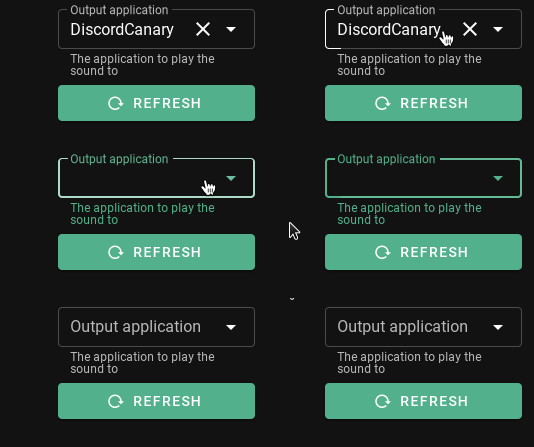
You can now play sounds without having to select an output application 🔊
🐛 Bug fixes (#82)
- Fixed a bug that required you to restart Soundux after unloading the
module-switch-on-connectmodule 🧙. - More error checking 🔎 (cae1f9c)
- Switch to webviewpp, should fix an issue where the
Switch on Connectwarning would sometimes not show up
⚠️ Warning
Please note: The deb package will only work on Debian sid and Ubuntu 20.04 or later
Soundux v0.2

Soundux v0.2
👀 New GUI (#45)

The all new UI is here and it comes with a lot of new features 🎉
🪟 Grid View (#54)

You're now able to enable a grid-view 😄 More sounds at a glance!
🌎 Internationalization (#52)

Do you speak English less fluent?
You can now experience Soundux in your native language (if it is already translated, if not go ahead and translate it! 💭)
⚠️ Add warning for switch-on-connect (#50)

The switch-on-connect-module previously caused problems, we now prompt you with a friendly warning that will allow you to unload the module directly from the UI!
🍞 Use Toast Messages (#40)

Instead of prompting you with big modals that were very annoying we now show small friendly notifications in the bottom right 🌷
🔉 Play / Pause / Seek (#37)

Tired of waiting for your sound to reach the part you were most interested in?
Tired of having to restart the whole sound instead of pausing it for a second?
Fear no more, media control features are here 👋
🔌 Application pass-through (#36)

Ever wanted to share your application sound on Discord on Linux?
Well we went ahead and made a workaround with our new Application Pass-through 👷♂️
So that Discord doesn't have to 🤦♂️
📁 Fixed Folder Selection
Previously the folder selection on Windows was extremely bugged and very inconvenient to use.
This is now fixed 🗃️!
🛑 Fix stop button on Windows
We also had a bug on Windows that would prevent you from stopping sounds 🤦♀️
As you can guess, this is now fixed ✅!
🔁 Repeat button
Do you want to listen to your favorite sounds on repeat?
Repeat button appeared 🪄
🎤 Use as default device
It was previously impossible to play sounds to games that use push to talk, so we added "Use as default device", checking this in the settings will allow you to play sounds in your favorite games that use push to talk!
🍀 Major code base improvements & Other Fixes 🧹
Ever had Soundux crash and all the applications automatically go back to the Soundux Sinks after you started it again?
Soundux is now smarter 🧠 and fixes this by itself 🧙🏿♂️