An AI-powered platform for creating, editing, and transforming product images into professional marketing materials. Built with FastAPI, React, and powered by cutting-edge AI models including FLUX.1-Kontext for advanced image editing.
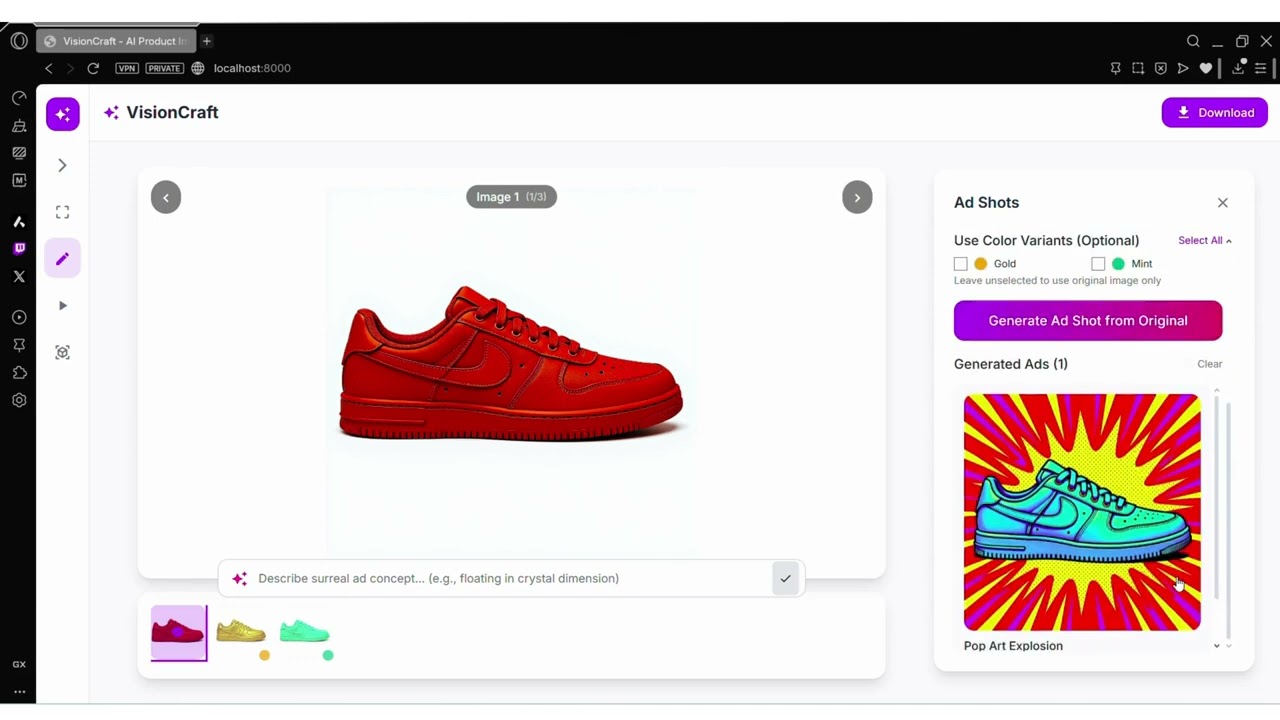
- AI Image Generation: Create product images from text descriptions
- Advanced Image Editing: Professional editing with FLUX.1-Kontext
- Color Variations: Generate multiple color variants of products
- Ad Shot Creation: Transform products into surreal advertisement scenes
- Video Animation: Create animated product videos with Kling 2.5
- FLUX.1-Kontext: Advanced image-to-image editing and generation
- FAL Kling 2.5: High-quality video animation generation
- Hunyuan 3D 2.0: 2D to 3D model conversion
- Modal Labs: Scalable GPU compute for AI model deployment
├── app.py                    # Main FastAPI application
├── modal_flux_kontext.py     # FLUX.1-Kontext Modal deployment
├── frontend/
│   ├── index.html           # Main HTML entry point
│   ├── App.js              # React application root
│   ├── components/         # Reusable UI components
│   ├── tools/              # Feature-specific panels
│   └── styles/             # CSS styling
FLUX.1-Kontext is a state-of-the-art image editing model that excels at:
- Context-aware editing: Understanding and preserving image context
- Professional quality: Commercial-grade image transformations
- Flexible prompting: Natural language descriptions for edits
- Style consistency: Maintaining visual coherence across edits
@app.cls(
    image=image,
    gpu="A100-40GB",
    volumes={"/models": volume},
    timeout=900,
    secrets=[modal.Secret.from_name("huggingface")]
)
class FluxKontext:
    def load_model(self):
        self.pipe = FluxKontextPipeline.from_pretrained(
            "black-forest-labs/FLUX.1-Kontext-dev",
            torch_dtype=torch.bfloat16
)- Input: Base64 encoded image + text prompt
- Processing: FLUX.1-Kontext applies context-aware transformations
- Output: High-quality edited image maintaining original context
- Color Variations: "Change the product color to red while maintaining lighting"
- Style Transfer: "Make this product look premium and luxurious"
- Background Editing: "Place this product in a modern office setting"
- Material Changes: "Convert this plastic product to metal finish"
@app.post("/api/generate")
async def generate_image(request: GenerateRequest):
    modal_url = os.getenv("MODAL_FLUX_URL")

    request_data = {
        "image_base64": request.image_base64,
        "prompt": request.prompt,
        "guidance_scale": request.guidance_scale,
        "num_inference_steps": request.num_inference_steps
    }

    async with httpx.AsyncClient(timeout=300.0) as client:
response = await client.post(f"{modal_url}/generate", json=request_data)- Python 3.11+
- Node.js 16+
- Modal Labs account
- FAL AI account
- Hugging Face account with FLUX.1-Kontext access
- Clone the repository
git clone https://github.com/StarAtNyte/VisionCraft.git
cd VisionCraft- Install Python dependencies
pip install -r requirements.txt- Install Node.js dependencies
npm install- Configure environment variables
# Create .env file
FAL_KEY=your_fal_api_key
MODAL_FLUX_URL=your_modal_deployment_url
HF_TOKEN=your_huggingface_token- Install Modal CLI
pip install modal
modal setup- Deploy FLUX.1-Kontext service
modal deploy modal_flux_kontext.py- Get deployment URL
modal app list
# Copy the web app URL to your .env file- Get API key from FAL AI
- Add to
.envfile asFAL_KEY
# Start main FastAPI server
uvicorn app:app --reload --port 8000

# Start FAL animation service (optional)
python fal_kling_animate.py

# Start Hunyuan 3D service (optional)
cd wan-huggingface && python app.py# Using Gunicorn
gunicorn app:app -w 4 -k uvicorn.workers.UvicornWorker --bind 0.0.0.0:8000- Main App: http://localhost:8000
- Studio Interface: http://localhost:8000/
- Marketing Page: http://localhost:8000/home
- Upload product images (JPG, PNG, WEBP)
- Import from URLs
- Drag & drop support
// Example API call
const response = await fetch('/api/generate', {
    method: 'POST',
    headers: { 'Content-Type': 'application/json' },
    body: JSON.stringify({
        image_base64: imageData,
        prompt: "Change the product color to blue while maintaining the original lighting and shadows",
        guidance_scale: 3.5,
        num_inference_steps: 28
    })
});- Transform products into surreal advertisement scenes
- Context-aware background replacement
- Professional lighting adjustments
-
Generate product videos with FAL Kling 2.5
-
Multiple animation styles available
-
Customizable duration and quality
-
Ready for AR/VR applications