This project is for solving Problem Statement 1 given by Just Analytics for Code; Without Barriers Hackathon. This project solution explains how to use Microsoft Custom Vision AI to detect defects in the aircraft parts images by object detection and will be integrated with Microsoft PowerApps.
- Create Cognitive Services and Custom Vision resources in Azure portal to be used. Custom Vision training and prediction resources created to train the images from dataset given and predict whether it has defects of scratch and dent.

- Upload images to be trained and predict in https://www.customvision.ai/.
- Create project with Object Detection and using Domains of General[A1]. General A1 chosen to train the images as it can detect the scratch unlike Domain General. General A1 usually performed for difficult use cases.

- Tag the images with label of scratch and dent identifying all of them. Tag labels must be minimum of 15 label to be able to train. It provide a nice UI to navigate with and easily label them. Training done without doing data pre-processing for the images as it is of importance to identify the defects in any kind of light settings. A quick test can be performed before publishing the model for prediction.
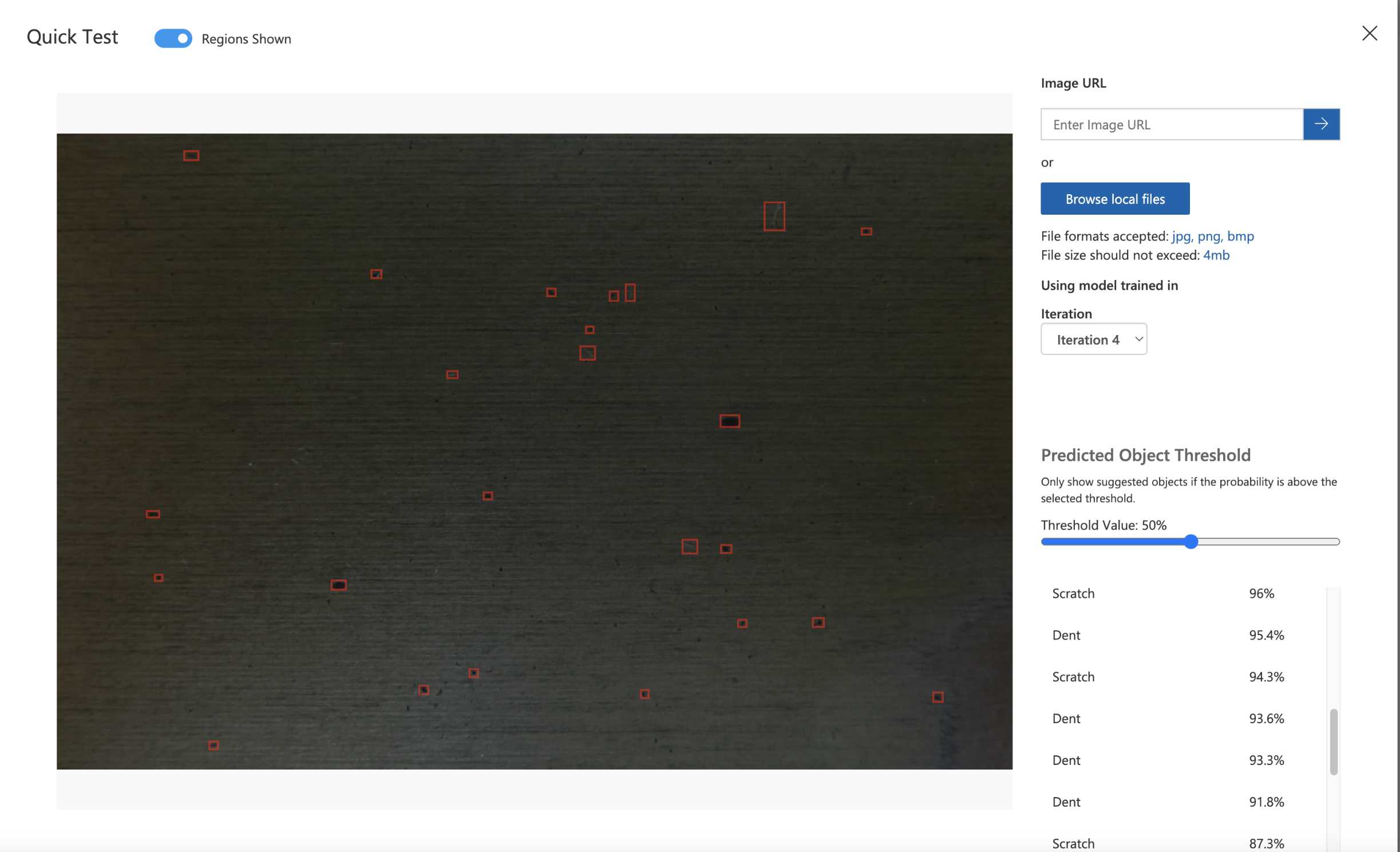
- Even the smallest dent and scratch can be seen when performing Quick Test after training.

- Training performed multiple iterations and iteration 8 chosen for predicting the unseen images. With 54 images trained, it have the ability to detect more of scratch defect which was not able before. Iteration 6 had 52 images trained and with just an increase of 2 images to iteration 8 of 54 images, it was able to improve the accuracy of detecting scratch defect from Recall of 16.7% to 41.2%. Significant improvement of precision, recall and mean average precision for dent defect was seen.


- For this project, 72 images dataset was provided. 62 images was used for training and 10 are set aside for testing. A set of 30, 52, 54 and 62 images were trained and overall good result was obtained with training of 54 images. The 62 images result gave inaccurate prediction of scratch and dent. This is due to the unbalanced tags of the dent and scratch for training since the scratch have been tagged lesser than dent. Nevertheless, with small set of images trained, it can still predict the scratch and dent which would be hard to be performed without Custom Vision.
- There is defect of irregular colours but due to insufficient example of images having the defect make it unable to be trained as the tag labels must at least be 15 to be trained using Custom Vision. Only defects of scratch and dent was trained and being predicted in this project.

In the Custom Vision portal, training images is uploaded manually and automatic training can be done by using API. Python language is being used for the training API. This training images will automatically send to Custom Vision portal and iteration will start. The code can be obtained from train-detector.py.
-
Microsoft Visual Object Tagging Tool (VoTT) is used to tag the dent and scratch on the images. It has the ability exporting to json file as this will be used to identify the bounding box of the coordinates of each tag. Since in the portal is done using the cursor and it has the capability of tagging the defect and trained from the labeled bounding box automatically but if done manually, annotation of the images must be done by ourselves to find the exact location of defect and scratch.
-
The data of the training images is saved in Azure Blob Storage to be tagged on VoTT. It's very secure and protect the data privacy as SAS token and enable CORS should be done before connecting to the blob storage. After finished tagging, export to json file was done named
aircraft-defects-export.jsonto Azure Blob storage.

-
The exported json file of bounding coordinates was not normalized hence was calculated manually and put into
tagged-images.json. All the images will automatically exchange data using traning API to Custom Vision portal. -
When bounding box is not correctly tagged at the correct location of the defect, it can be adjusted in the Custom Vision portal on the Training Images section. Additional defect detected can be tagged as well.


- After finished training images using API, the new iteration is evaluated to identify which iterations have the highest accuracy for predicting the defects and correctly tagging them. After this, the iteration of training the model is published for prediction to be done for the unseen images.
- The 10 images from dataset for testing that has been set aside will be predicted its image of having defects or not
- A client terminal app is used to predict the images by using Python SDK and to plot the tagged exact region of dent and scratches. The code can be obtained from
test-detector.py. - The result showed the exact location of dent and scratch which could not be visible by the human eyes. This shows that Custom Vision have made it possible to detect the defects in real time and the model was well trained even with 54 images. The accuracy of the predicion is even up to above 90% for many defects in the image.
- Defects of higher probability than 50% are displayed to avoid false positives.


- Since all images dataset provided have defects, image of a clean metal surface from the internet were used to test the prediction. This is due to some of the images of aircraft parts seem to be of metal or steel surfaces. It could be seen the first output have no defect at all and the second output have detect scratches. Even at this point, the model could detect scratch. The training of the model could be better by having more training images in different lighting conditions and different angles to produce better defect detection later.


- The output defects exact coordinates was generated from the terminal client app using the prediction python SDK.

Since the client terminal app does not have frontend UI to navigate with, another way can be done to build apps by using Power Apps. Power Apps will be connected to the API prediction resources from Custom Vision services and will be deployed to cloud. For this project, client mobile app is built by connecting to the API and deployed to cloud.
- Power Apps provide connection to the Custom Vision services by using data to add connectors and set the connection using the prediction key and URL which can be obtained from Custom Vision portal.


- The design of the apps are as follow:


- The button Detect Defects is the most important where it will connect to the prediction resources to detect whether there is defect when the image is uploaded. The following code should be specify in the button:
ClearCollect(gallerycol,CustomVision.DetectImageV2("Your Custom Vision AI project ID","Your Iteration",UploadedImage1).predictions)
- The apps output will be displayed the probability of the respective tag name which are Dent and Scratch. The output containing the tag name and probabilities can be scrolled till the end to detect defects on the uploaded images.
- The management of the manufacturing company can use the apps to detect any defects on the image uploaded. Hence, batches of finished aircraft parts manufactured images can be uploaded to identify if it has defects. The management can set the threshold of probability of the defects to determine what is their tolerance of defect. It is recommended to set threshold probability to 50% or above as predicted scratch or dent below 50% could be a false positive where it is wrongly classified as defect.

Note: The terminal client app and Power Apps built for this project can be both used for the manufacturing company to detect the defects in the images of aircraft parts.
The app can be improved more by finding ways to provide bounding box for the exact location of the defects on the image of aircraft parts for a better evaulation.