Check out live website here: https://only-grass.vercel.app/
Professional mobile-first platform for discovering and experiencing premium grass patches through AI-powered matching
OnlyGrass is an intelligent grass discovery platform that helps users find, swipe, and book sessions at the perfect grass patches for mindful contemplation, picnics, and premium grass-touching experiences.
OnlyGrass combines satellite imagery analysis with AI-powered descriptions to create a Tinder-style experience for discovering local grass patches. Users can swipe through curated locations, match with fellow grass enthusiasts, and book group sessions for shared outdoor experiences.
- Key Features
- Demo Video
- Screenshots
- Technical Architecture
- Repository Structure
- Getting Started
- Project Description
- License
- Tinder-Style Discovery: Intuitive swipe interface for browsing grass patches
- AI-Powered Descriptions: Claude 4-generated witty descriptions for each location
- Voice Integration: Text-to-speech with VAPI AI for audio feedback and roasts
- Smart Matching System: Connect with fellow grass enthusiasts based on preferences
- Session Booking: Schedule and coordinate group grass-touching sessions
- FHI Score System: Gamified points system for tracking grass-touching achievements
- Challenge Mode: Time-limited challenges with photo verification and Gemini AI verification
- Interactive Map: Explore nearby patches with satellite imagery and Google Maps integration
- GrassBot AI Assistant: Built-in AI roasting system with voice capabilities and mood-based responses
- User Authentication: Secure login system with Supabase integration
- Real-time Database: Live data synchronization with PostgreSQL and Prisma ORM
- Premium Mobile UI: Glass morphism effects with LiquidGlass shader effects and smooth animations
- Session Reviews: Post-session feedback system with quality assessments and feature tagging
- Social Network: Full social system with friends, leaderboards, and user search
- Friend Requests: Send, accept, and manage friend connections with other users
- Competitive Leaderboards: Global and friends-only leaderboards with FHI score rankings
- Weekly Statistics: Track grass touched, FHI gained, and challenges completed
- Achievement System: Unlock badges and rewards for grass-touching milestones
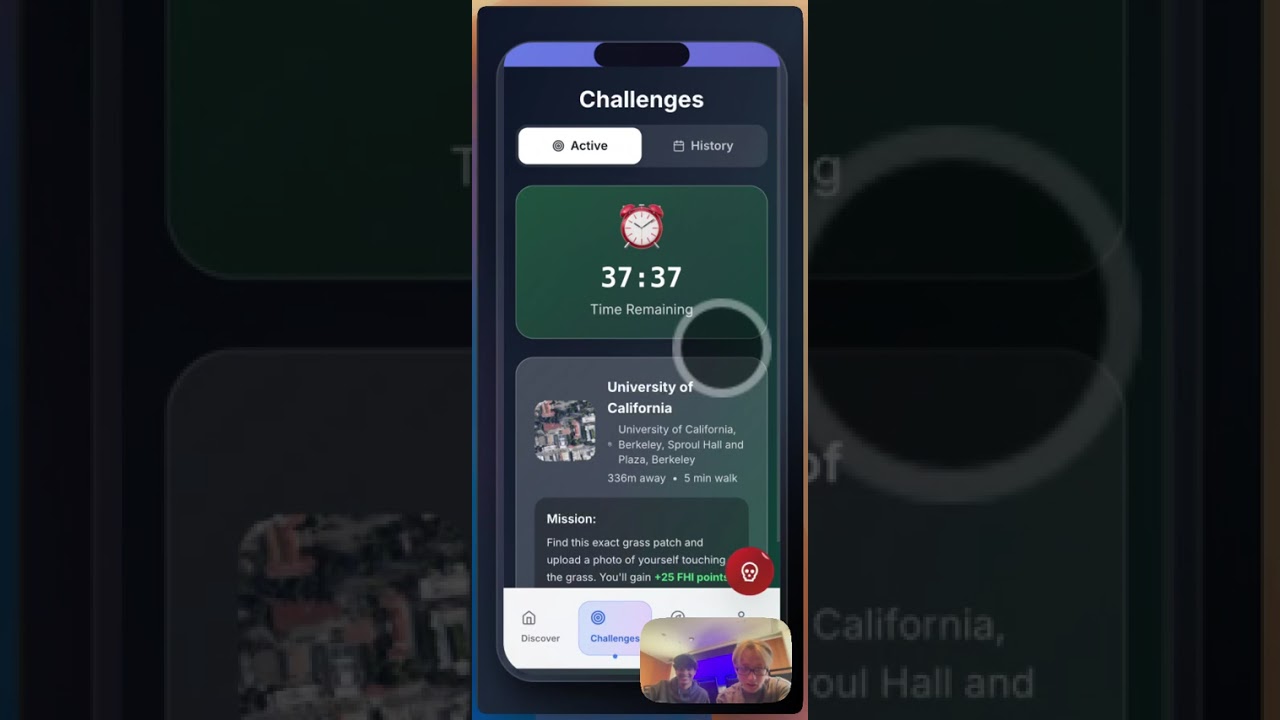
Click the thumbnail above to watch our comprehensive demo showcasing OnlyGrass's AI-powered grass discovery, voice-enabled roasting system, challenge mechanics, and premium mobile interface with real-time FHI scoring.
The live demo at https://only-grass.vercel.app/ is fully functional and deployed with all features working in real-time, including voice AI, social features, and live leaderboards.
The main swipe interface featuring AI-generated grass patch descriptions, gesture-based navigation, and premium visual effects with dynamic scoring system.

Interactive matching interface showing connections with other grass enthusiasts, booking options, and social features for coordinating group sessions.

Comprehensive user profile displaying FHI scores, achievements, weekly statistics, and personal grass-touching journey with streak tracking.

Discovery interface with trending patches, nearby locations, search functionality, and detailed information about grass quality and accessibility ratings.

Comprehensive social network with friends management, competitive leaderboards, user search, and friend request system with real-time FHI score rankings.

AI-powered chat assistant providing personalized recommendations, motivation, and guidance throughout the grass discovery experience.

OnlyGrass leverages modern web technologies to create a seamless, performant mobile experience:
- Frontend: React 18 with TypeScript for type safety
- Styling: Tailwind CSS with custom design system and glass morphism effects
- Animations: Framer Motion for premium micro-interactions
- State Management: Zustand for lightweight global state
- Routing: React Router DOM with animated transitions
- Gestures: React Use Gesture for advanced swipe mechanics
- Voice AI: VAPI text-to-speech integration with mood-based voice selection
- Authentication: Supabase Auth for secure user management
- Backend: Express.js with TypeScript and comprehensive API layer
- Database: Prisma ORM with PostgreSQL and real-time synchronization
- AI Integration: Anthropic Claude for witty descriptions and roasting system
- Image Processing: Google Gemini Vision for patch classification and challenge verification
- Maps: Google Maps JavaScript API for location services and satellite imagery
- Visual Effects: Custom LiquidGlass shader effects with WebGL
- Caching: Redis integration for performance optimization
- File Storage: Multer and Sharp for image processing and storage
OnlyGrass/
├── README.md                    # Project overview and setup guide
├── package.json                 # Frontend dependencies and scripts
├── package-lock.json           # Frontend dependency lockfile
├── vite.config.ts              # Vite build configuration
├── tailwind.config.js          # Tailwind CSS customization
├── tsconfig.json               # TypeScript configuration
├── index.html                  # HTML entry point
├── public/                     # Static assets and screenshots
│   └── screenshots/            # Screenshot images for README
├── src/                        # React frontend source code
│   ├── App.tsx                 # Main app component with routing
│   ├── main.tsx                # React app entry point
│   ├── index.css               # Global styles and Tailwind imports
│   ├── components/             # Reusable UI components
│   │   ├── SwipeScreen.tsx     # Main swipe interface with voice integration
│   │   ├── MatchScreen.tsx     # User matching and connections
│   │   ├── ProfileScreen.tsx   # User profile and statistics
│   │   ├── ExploreScreen.tsx   # Patch discovery and search
│   │   ├── BookingScreen.tsx   # Session scheduling interface
│   │   ├── ChallengeScreen.tsx # Time-limited challenges with AI verification
│   │   ├── SettingsScreen.tsx  # App configuration and preferences
│   │   ├── GrassBotChat.tsx    # AI roasting system with voice capabilities
│   │   ├── GrassCard.tsx       # Individual patch cards with animations
│   │   ├── LiquidGlass.tsx     # WebGL shader effects and visual enhancements
│   │   ├── Navigation.tsx      # Bottom navigation bar
│   │   ├── SessionCompleteScreen.tsx # Post-session feedback and reviews
│   │   ├── SocialScreen.tsx    # Friends, leaderboards, and social features
│   │   └── auth/               # Authentication components
│   │       └── AuthScreen.tsx  # User login and registration
│   ├── services/               # External service integrations
│   │   ├── anthropic.ts        # Claude AI for descriptions and roasts
│   │   ├── vapi.ts             # Voice AI text-to-speech service
│   │   ├── gemini.ts           # Google Gemini Vision API
│   │   ├── googleMaps.ts       # Google Maps integration
│   │   ├── database.ts         # Database operations and queries
│   │   ├── social.ts           # Friends, leaderboards, and social features
│   │   └── auth.ts             # Authentication service layer
│   ├── store/                  # State management
│   │   └── useAppStore.ts      # Zustand store with comprehensive app state
│   └── types/                  # TypeScript type definitions
│       └── index.ts            # Complete interface definitions
└── backend/                    # Express.js API server
    ├── package.json            # Backend dependencies and scripts
    ├── package-lock.json       # Backend dependency lockfile
    └── prisma/                 # Database schema and migrations
        └── schema.prisma       # Prisma database schema
- Node.js v18+ and npm
- Git for version control
- Modern web browser with JavaScript enabled
Before running the application locally, you'll need to configure environment variables for the backend API integrations.
-
Clone the Repository
git clone <repository-url>
cd OnlyGrass
-
Configure Backend Environment
Navigate to the backend directory and create a
.envfile:cd backend cp .env.example .env # If example exists, or create new file
Add the following environment variables to
backend/.env:# Database Configuration DATABASE_URL="postgresql://username:password@localhost:5432/onlygrass" # Supabase Configuration (for authentication and additional storage) SUPABASE_URL=your_supabase_project_url SUPABASE_ANON_KEY=your_supabase_anon_key SUPABASE_SERVICE_KEY=your_supabase_service_role_key # AI Service APIs ANTHROPIC_API_KEY=your_anthropic_api_key_here GOOGLE_GEMINI_API_KEY=your_google_gemini_api_key_here # Voice AI Integration VAPI_API_KEY=your_vapi_api_key_here # Google Maps Integration GOOGLE_MAPS_API_KEY=your_google_maps_api_key_here # Application Security JWT_SECRET=your_jwt_secret_key_here # Redis Configuration (for caching) REDIS_URL=redis://localhost:6379 # Server Configuration PORT=3001 NODE_ENV=development # File Upload Configuration MAX_FILE_SIZE=10485760 # 10MB in bytes UPLOAD_DIR=uploads/
-
Install PostgreSQL (if not already installed)
- macOS:
brew install postgresql - Ubuntu:
sudo apt install postgresql postgresql-contrib - Windows: Download from https://www.postgresql.org/download/
- macOS:
-
Create Database
# Access PostgreSQL
psql -U postgres

# Create database
CREATE DATABASE onlygrass;

# Exit PostgreSQL
\q
-
Run Database Migrations
cd backend
npx prisma migrate dev
npx prisma generate
-
Install Backend Dependencies
cd backend npm install -
Start Development Server
npm run dev
The backend server will start on
http://localhost:3001with auto-reload enabled. -
Verify Backend Health
curl http://localhost:3001/health
-
Install Frontend Dependencies
In a new terminal window, navigate to the project root:
cd OnlyGrass  # Ensure you're in the root directory
npm install
-
Start Development Server
npm run dev
The frontend will start on
http://localhost:3000and automatically proxy API requests to the backend. -
Access the Application
Open your browser and navigate to
http://localhost:3000to see the OnlyGrass application running locally.
-
Frontend Production Build
npm run build npm run preview # Preview production build locally -
Backend Production Build
cd backend
npm run build
npm start  # Run production server
-
Install Vercel CLI
npm install -g vercel
-
Deploy Frontend
vercel --prod
-
Configure Environment Variables in Vercel Dashboard
- Add all frontend environment variables through the Vercel dashboard
- Ensure API endpoints point to production backend
-
For Railway
npm install -g @railway/cli
railway login
railway init
railway up
-
For Render
- Connect your GitHub repository to Render
- Configure build and start commands
- Add environment variables in Render dashboard
-
Build Docker Images
# Frontend
docker build -t onlygrass-frontend .

# Backend
cd backend
docker build -t onlygrass-backend .
-
Run with Docker Compose
docker-compose up -d
-
Port Conflicts
- Frontend default: 3000 (configurable in vite.config.ts)
- Backend default: 3001 (configurable in backend/.env)
-
Database Connection Issues
- Verify PostgreSQL is running:
brew services start postgresql - Check database URL format in backend/.env
- Ensure database exists:
psql -U postgres -l
- Verify PostgreSQL is running:
-
API Key Configuration
- Verify all API keys are properly set in backend/.env
- Check API key permissions and quotas
- Restart backend server after environment changes
-
Build Errors
- Clear node_modules and reinstall:
rm -rf node_modules package-lock.json && npm install - Verify Node.js version compatibility (v18+ required)
- Check for TypeScript errors:
npm run typecheck - Ensure all required API keys are configured in environment files
- Clear node_modules and reinstall:
-
Voice Integration Issues
- Verify VAPI API key is correctly set in environment variables
- Check browser permissions for audio playback
- Ensure modern browser with Web Speech API support
-
Authentication Problems
- Verify Supabase configuration and keys
- Check network connectivity to Supabase endpoints
- Clear browser localStorage and cookies if needed
OnlyGrass revolutionizes outdoor space discovery by combining modern web technologies with advanced AI-powered content generation and voice interaction. The platform creates an engaging, gamified experience for finding and enjoying grass patches while building community connections through shared outdoor activities.
The application features a sophisticated mobile-first design with premium animations, WebGL shader effects, gesture-based navigation, and intelligent matching algorithms. Key innovations include:
- AI-Powered Roasting System: GrassBot provides motivational (and sometimes brutal) feedback using Anthropic Claude with voice synthesis
- Voice-First Interaction: VAPI integration enables spoken feedback and audio guidance throughout the experience
- Computer Vision Integration: Google Gemini Vision API verifies grass-touching challenges and classifies patch quality
- Real-time Gamification: Dynamic FHI (Functional Human Index) scoring system with achievements and streak tracking
- Advanced Visual Effects: Custom LiquidGlass WebGL shaders and glass morphism design create a premium aesthetic
- Comprehensive Session Management: End-to-end booking, challenge, and review system with photo verification
Built for scalability with modern deployment practices and enterprise-grade architecture, OnlyGrass demonstrates the potential for AI-enhanced outdoor lifestyle applications.
Live Demo Status: The application is fully deployed and operational at https://only-grass.vercel.app/ with all features including real-time social interactions, voice AI, computer vision verification, and live database synchronization working seamlessly.
This project is licensed under the MIT License.