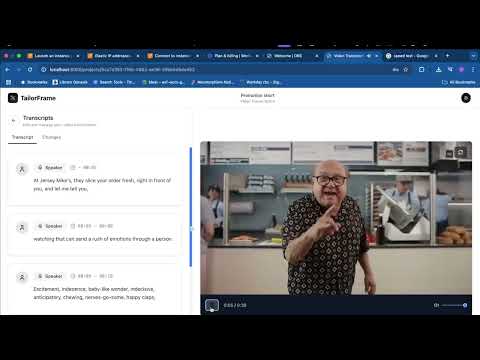
Click the image above to watch the demo video!
Inspiration:
Novel creators live on growth and building on new ideas—not redoing the same idea repeatedly. Changing details, such as locations of an event or a product delay, should not be time-consuming. TailorFrame fixes words in the footage, so creators don't have to redo their content for these updates, saving time, money, and momentum.
What it does:
TailorFrame is a webapp that fixes words in a video using a simple workflow:
- Upload a video
- Edit the transcript
- Download the updated file
The edited transcript is sent to ElevenLabs to edit a word in a voice line. For example, creators can switch out “Monday sale” to “Friday sale”.
How we built it:
- Frontend: Next.js (Vite + React + TypeScript), Tailwind CSS, responsive for desktop and mobile
- Backend: FastAPI, Postgres, Docker, Vercel for deployment
- AI: OpenAI API for transcript standardization, ElevenLabs for audio creation
- Dev Tools: Cursor, Bolt
Challenges:
- Experimented with video and audio manipulation, ultimately focusing on audio for scope reasons
- Audio extraction and segmentation workflow between ElevenLabs, OpenAI, and our app was challenging
Accomplishments:
- Delivered main functionality within 24 hours
- Learned new technologies (ElevenLabs, AI audio/video solutions)
- Achieved satisfying audio-video sync
What's next:
- Sentence replacement (not just words)
- Lip syncing for video edits (future scope)
- Upload video and transcript
- Edit transcript and regenerate audio for specific segments
- Download the updated video with new audio
- Modern, responsive UI
- API endpoints for file management, TTS, and audio/video processing
git clone https://github.com/yourusername/tailorframe.git
cd tailorframeCreate a .env file in the root directory (or export variables in your shell):
ELEVENLABS_API_KEY=your_elevenlabs_api_key
OPENAI_API_KEY=your_openai_api_key
VOICE_ID=your_preferred_voice_id # Optional, defaults to RachelMake sure you have Docker and Docker Compose installed.
docker-compose up --build- Frontend: http://localhost:3000
- Backend API: http://localhost:8000/docs
- Nginx (combined): http://localhost:8080
# Install Python dependencies
python3 -m venv venv
source venv/bin/activate
pip install -r requirements.txt

# Set environment variables as above

# Start the backend
cd src
uvicorn main:app --reload --host 0.0.0.0 --port 8000cd frontend
npm install
npm run dev
# Visit http://localhost:3000hackaitoronto/
│
├── src/ # Backend (FastAPI)
│ ├── main.py # API entrypoint
│ ├── services/ # Audio, video, transcript, ElevenLabs logic
│ ├── models/ # Database and Pydantic models
│ ├── scripts/ # Utility scripts
│ ├── core/ # Auth, config, middleware
│ └── tests/ # Backend tests
│
├── frontend/ # Frontend (React + Vite + Tailwind)
│ ├── src/
│ │ ├── components/ # Main React components (see below)
│ │ ├── hooks/ # Custom hooks (e.g., useAuth, useToast)
│ │ ├── lib/ # API clients, config, utils
│ │ ├── routes/ # App routes
│ │ └── store/ # Zustand stores
│ └── public/ # Static assets
│
├── uploads/ # Uploaded files
├── outputs/ # Processed files
├── thumbnails/ # Video thumbnails
├── docker-compose.yml # Multi-service orchestration
├── Dockerfile # Backend Dockerfile
├── Makefile # Helper commands
└── requirements.txt # Backend dependencies
- LandingPage, LandingHero, LandingHeader, LandingFooter, LandingDemo, LandingCarousel: Landing and marketing UI
- AuthPage: Authentication (login/signup)
- ProjectsPage, ProjectCard, ProjectDetailView, CreateProjectModal: Project management UI
- TranscriptPanel: Transcript editing and audio regeneration
- VideoPlayer: Video playback with updated audio
- Header: App navigation
- UI Components: Buttons, dialogs, forms, tooltips, etc. (in
components/ui/) - Icons: Custom SVG icons (in
components/icons/)
-
Backend:
make install-backend— Install backend dependenciesmake dev-backend— Start backend in dev modemake start-backend— Start backend in prod modecd src && python test_backend.py— Run backend tests
-
Frontend:
npm install— Install dependenciesnpm run dev— Start frontend in dev modenpm run build— Build for production
- Built for HackAI Toronto
- Demo: YouTube
- Powered by OpenAI, ElevenLabs, Vercel, Docker, Cursor, Bolt
MIT