


Learn how to use Elixir Plug to create a basic web server.
Create a new Elixir/OTP project with supervision tree:
mix new app --sup
cd app
That will create a project directory with the following files:
├── LICENSE
├── README.md
├── lib
│   ├── app
│   │   └── application.ex
│   └── app.ex
├── mix.exs
└── test
    ├── app_test.exs
    └── test_helper.exs
Plug is the system for handling HTTP requests
but it is not an HTTP server,
for that we need to add
Cowboy.
Open your mix.exs file and locate the defp deps do section.
Add the following line to the list of dependencies:
{:plug_cowboy, "~> 2.1"}Once you've saved your file,
it should look like this:
mix.exs#L25
Install the dependencies by running the following command:
mix deps.getThat will create a
mix.lock
file that lists the exact version of dependencies used.
At the most basic level, a Plug is a request handler. Let's create a "Hello World" example with the bare minimum code.
Create a new file with the path: lib/app/hello_world.ex
Add the following code to the file:
defmodule App.HelloWorld do
  import Plug.Conn

  def init(options), do: options

  def call(conn, _opts) do
    conn
    |> put_resp_content_type("text/plain")
    |> send_resp(200, "Hello World!\n")
  end
end
init/1 and call/2 are required functions for a Plug.
init/1 is invoked when the application is initialised.
call/2 is invoked as the handler for all requests.
We cannot run this file yet,
we need to add it to list of "children"
in the start/2 function
in lib/app/application.ex.
Open your lib/app/application.ex file
and replace the contents with the following code:
defmodule App.Application do
  # See https://hexdocs.pm/elixir/Application.html
  # for more information on OTP Applications

  use Application
  require Logger

  def start(_type, _args) do
    children = [
      {Plug.Cowboy, scheme: :http, plug: App.HelloWorld, options: [port: 4000]}
    ]

    Logger.info("Visit: http://localhost:4000")
    # See https://hexdocs.pm/elixir/Supervisor.html
    # for other strategies and supported options
    opts = [strategy: :one_for_one, name: App.Supervisor]
    Supervisor.start_link(children, opts)
  end
end
Your application.ex file should look like this:
lib/app/application.ex
Once the file is saved, run the app with the following command:
mix run --no-halt
Note: to shut down the server, use the ctrl + c keyboard shortcut.
You should see output similar to the following:
Compiling 3 files (.ex)
Generated app app

22:52:04.719 [info]  Visit: http://localhost:4000
Open your web browser and visit: http://localhost:4000

Create a new file: lib/app/router.ex
Add the following code to it:
defmodule App.Router do
  use Plug.Router

  plug :match
  plug :dispatch

  get "/" do
    send_resp(conn, 200, "Hello Elixir Plug!")
  end

  match _ do
    send_resp(conn, 404, "Oops!")
  end
end
This code sets up a Plug Router by using the Plug.Router micros.
The plug :match and plug :dispatch do what they suggest,
match and dispatch HTTP requests.
get "/" do
  send_resp(conn, 200, "Hello Elixir Plug!")
end
Responds the GET / with "Hello Elixir Plug!".
match _ do
  send_resp(conn, 404, "Oops!")
end
Any other request that does not match the /
(or other endpoints)
will receive this 404 response.
Let's update the application to
Open the application.ex file and replace the line:
{Plug.Cowboy, scheme: :http, plug: App.HelloWorld, options: [port: 4000]}With:
{Plug.Cowboy, scheme: :http, plug: App.Router, options: [port: 4000]}App.HelloWorld -> App.Router
The application.ex file at the end of this step is:
lib/app/application.ex#L10
mix run --no-halt

Create a new file with the path: lib/app/verify_request.ex
Visit: http://localhost:4000/upload
Firefox shows a blank screen with no content:

Google Chrome shows the following HTTP ERROR 500:

Terminal output:
10:38:03.777 [error] #PID<0.339.0> running App.Router (connection #PID<0.338.0>, stream id 1) terminated
Server: localhost:4000 (http)
Request: GET /upload
** (exit) an exception was raised:
    ** (App.Plug.VerifyRequest.IncompleteRequestError)
        (app 0.1.0) lib/app/verify_request.ex:23: App.Plug.VerifyRequest.verify_request!/2
        (app 0.1.0) lib/app/verify_request.ex:13: App.Plug.VerifyRequest.call/2
        (app 0.1.0) lib/app/router.ex:1: App.Router.plug_builder_call/2
        (plug_cowboy 2.1.2) lib/plug/cowboy/handler.ex:12: Plug.Cowboy.Handler.init/2
        (cowboy 2.7.0) /elixir-plug-tutorial/deps/cowboy/src/cowboy_handler.erl:41: :cowboy_handler.execute/2
        (cowboy 2.7.0) /elixir-plug-tutorial/deps/cowboy/src/cowboy_stream_h.erl:320: :cowboy_stream_h.execute/3
        (cowboy 2.7.0) /elixir-plug-tutorial/deps/cowboy/src/cowboy_stream_h.erl:302: :cowboy_stream_h.request_process/3
        (stdlib 3.11.2) proc_lib.erl:249: :proc_lib.init_p_do_apply/3
This is horrible UX. 😕 (error handling added below)
http://127.0.0.1:4000/upload?content=thing1&mimetype=thing2

Create a file with the following path:
test/app/router_test.exs
Add the following code to the file:
defmodule App.RouterTest do
  use ExUnit.Case
  use Plug.Test

  alias App.Router

  @content "<html><body>Hi!</body></html>"
  @mimetype "text/html"

  @opts Router.init([])

  test "returns welcome" do
    conn =
      :get
      |> conn("/", "")
      |> Router.call(@opts)

    assert conn.state == :sent
    assert conn.status == 200
  end

  test "returns uploaded" do
    conn =
      :get
      |> conn("/upload?content=#{@content}&mimetype=#{@mimetype}")
      |> Router.call(@opts)

    assert conn.state == :sent
    assert conn.status == 201
  end

  test "returns 404" do
    conn =
      :get
      |> conn("/missing", "")
      |> Router.call(@opts)

    assert conn.state == :sent
    assert conn.status == 404
  end
end
Run the tests with the command:
mix test
You should expect to see the following output:
.....

Finished in 0.03 seconds
1 doctest, 4 tests, 0 failures
## Error Handling
As noted above, the UX for an unsuccessful request is rather bad.
Open the router.ex file and add the following line near the top:
use Plug.ErrorHandlerThen at the end of the file add the following function definition:
defp handle_errors(conn, %{kind: kind, reason: reason, stack: stack}) do
  IO.inspect(kind, label: :kind)
  IO.inspect(reason, label: :reason)
  IO.inspect(stack, label: :stack)
  send_resp(conn, conn.status, "Something went wrong")
end
Your router.ex file should now look like this:
lib/app/router.ex
Running the app now:
mix run --no-halt
Visiting the /upload path in your browser:
http://localhost:4000/upload
You will now see:

In your terminal, you will see the following output:
kind: :error
reason: %App.Plug.VerifyRequest.IncompleteRequestError{message: "", plug_status: 400}
stack: [
  {App.Plug.VerifyRequest, :verify_request!, 2,
   [file: 'lib/app/verify_request.ex', line: 23]},
  {App.Plug.VerifyRequest, :call, 2,
   [file: 'lib/app/verify_request.ex', line: 13]},
  {App.Router, :plug_builder_call, 2, [file: 'lib/app/router.ex', line: 1]},
  {App.Router, :call, 2, [file: 'lib/plug/error_handler.ex', line: 65]},
  {Plug.Cowboy.Handler, :init, 2,
   [file: 'lib/plug/cowboy/handler.ex', line: 12]},
  {:cowboy_handler, :execute, 2,
   [
     file: '/elixir-plug-tutorial/deps/cowboy/src/cowboy_handler.erl',
     line: 41
   ]},
  {:cowboy_stream_h, :execute, 3,
   [
     file: '/elixir-plug-tutorial/deps/cowboy/src/cowboy_stream_h.erl',
     line: 320
   ]},
  {:cowboy_stream_h, :request_process, 3,
   [
     file: '/elixir-plug-tutorial/deps/cowboy/src/cowboy_stream_h.erl',
     line: 302
   ]}
]
By the end of this little quest, we have
The best way to discover which files are unused in your project,
is to run ExCoveralls.
Open the mix.exs file
and add the following lines to the project/0 definition:
test_coverage: [tool: ExCoveralls],
preferred_cli_env: [
  coveralls: :test,
  "coveralls.detail": :test,
  "coveralls.post": :test,
  "coveralls.html": :test
],
Then in the deps/0 add the dependency:
{:excoveralls, "~> 0.12.3", only: :test},At the end of this step your file should look like this: mix.exs
Once you've added the lines to mix.exs
download the dependencies:
mix deps.getOnce the dependencies are downloaded, run the following command:
mix coveralls.html
You should see output similar to the following:
----------------
COV    FILE                                        LINES RELEVANT   MISSED
  0.0% lib/app.ex                                     18        0        0
100.0% lib/app/application.ex                         19        4        0
  0.0% lib/app/hello_world.ex                         11        2        2
 60.0% lib/app/router.ex                              29       10        4
 83.3% lib/app/verify_request.ex                      27        6        1
[TOTAL]  68.2%
----------------
As we can see, there are two files that are completely unused:
lib/app.ex
and
lib/app/hello_world.ex.
Additionally there are two files that are only partially used.
Let's start by removing the unused files and the default test:
git rm lib/app.ex lib/app/hello_world.ex test/app_test.exs
Don't worry about deleting files. They are still available in the Git history.
Re-run the coverage report:
mix coveralls.html
The coverage report has increased to 75%:
----------------
COV    FILE                                        LINES RELEVANT   MISSED
100.0% lib/app/application.ex                         19        4        0
 60.0% lib/app/router.ex                              29       10        4
 83.3% lib/app/verify_request.ex                      27        6        1
[TOTAL]  75.0%
----------------
Now we can address the "missed" lines
in the router.ex and verify_request.ex files.
Open the HTML coverage report by running the following command in your terminal:
open cover/excoveralls.html
That will open the report in your default web browser:

The lines that remain uncovered in the router.ex
correspond to the:

Update the function definition from defp to def
so we can test it.
See: 915ef0e
Open the router_test.exs
file and add the following test code:
test "Invoke the App.Router.handle_errors/2" do
  args = %{kind: "kind", reason: "reason", stack: "stack"}
  conn =
    :get
    |> conn("/", "")
    |> Map.put(:status, 500)
    |> Router.handle_errors(args)

  assert conn.resp_body == "Something went wrong"
endThe only line that is not yet covered in the project is:
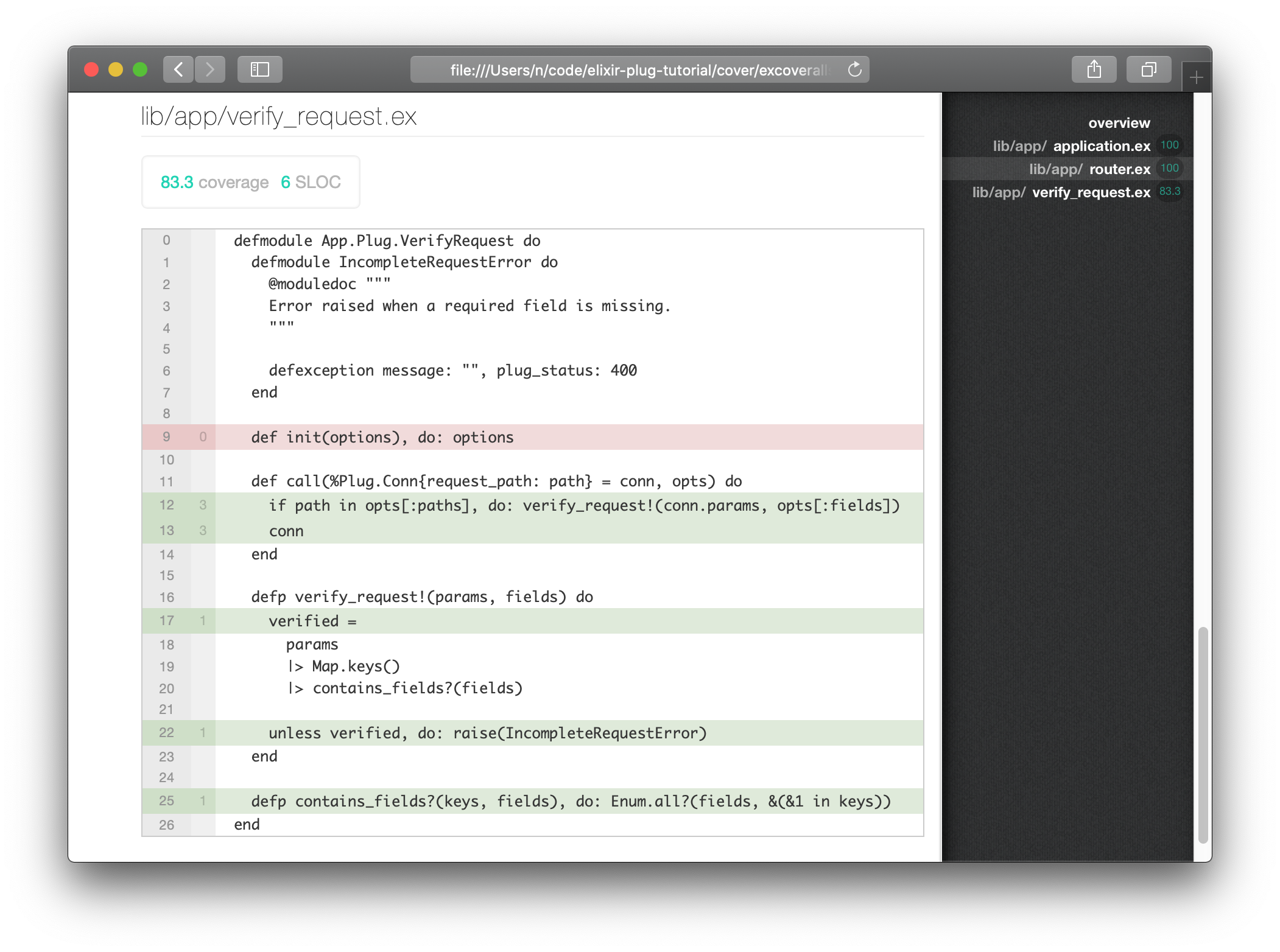
Open the test/app/router_test.exs file
and locate the line test "returns uploaded" do.
Update the test to the following:
test "returns uploaded" do
  options = App.Plug.VerifyRequest.init(%{})
  conn =
    :get
    |> conn("/upload?content=#{@content}&mimetype=#{@mimetype}")
    |> Router.call(options)

  assert conn.state == :sent
  assert conn.status == 201
end
Re-run the coverage report:
mix coveralls.html
You should now see:
----------------
COV    FILE                                        LINES RELEVANT   MISSED
100.0% lib/app/application.ex                         19        4        0
100.0% lib/app/router.ex                              29       10        0
100.0% lib/app/verify_request.ex                      27        6        0
[TOTAL] 100.0%
----------------
- Elixir Plug GitHub: https://github.com/elixir-plug/plug
- Elixir School Plug: https://elixirschool.com/en/lessons/specifics/plug/
- Getting started with Plug in Elixir https://www.brianstorti.com/getting-started-with-plug-elixir/
- A deeper dive in Elixir's Plug: https://ieftimov.com/post/a-deeper-dive-in-elixir-plug
- Elixir: Building a Small JSON Endpoint With Plug, Cowboy and Poison https://dev.to/jonlunsford/elixir-building-a-small-json-endpoint-with-plug-cowboy-and-poison-1826
- Serving Plug: Building an Elixir HTTP server from scratch https://blog.appsignal.com/2019/01/22/serving-plug-building-an-elixir-http-server.html
- Testing Elixir Plugs (2016): https://thoughtbot.com/blog/testing-elixir-plugs
- Target a specific path: https://medium.com/inside-heetch/an-elixir-plug-that-targets-a-specific-path-f0c17bd232a7