Performance on iPhone XS / iPhone XR significantly low (~20fps instead of 60fps) #115036


Description

internal
b/263817100
Details
Any flutter app (even the standard template when initializing a new flutter project) runs at approximately 20fps instead of 60fps on an iPhone XS / iPhone XR (currently running iOS 16.1).
It appears that this was already an issue in the past and it was also fixed then. In the current Flutter version this issue exists again, so my guess is that in the meantime something was changed again which produces this issue again.
I mainly refer to this issue from the past, since many indicators point to the same problem, so I used the same (little bit updated) small application to reproduce the problem:
Sample application
import 'package:flutter/material.dart';

void main() => runApp(const MyApp());

class MyApp extends StatelessWidget {
  const MyApp({Key key}) : super(key: key);

  @override
  Widget build(BuildContext context) {
    const padding = EdgeInsets.symmetric(vertical: 10, horizontal: 10);

    return MaterialApp(
      home: Scaffold(
        body: ListView(
          children: <Widget>[
            Container(
              margin: padding,
              height: 200,
              color: Colors.grey,
            ),
            Container(
              margin: padding,
              height: 200,
              color: Colors.orange,
            ),
            Container(
              margin: padding,
              height: 200,
              color: Colors.grey,
            ),
            Container(
              margin: padding,
              height: 200,
              color: Colors.orange,
            ),
            Container(
              margin: padding,
              height: 200,
              color: Colors.grey,
            ),
            Container(
              margin: padding,
              height: 200,
              color: Colors.orange,
            ),
            Container(
              margin: padding,
              height: 200,
              color: Colors.grey,
            ),
            Container(
              margin: padding,
              height: 200,
              color: Colors.orange,
            ),
          ],
        ),
      ),
    );
  }
}
Interesting for me was this comment, which pointed out that the performance increases again on landscape mode, which is also true for me. When rotating back to portrait mode, sometimes the performance stays good for some reason.
I recorded a video of the performance issues in the sample application on the iPhone XS and rotated the phone to landscape mode, so you can see the improvement there:
According to the profiler, flutter doesn't take too long to render the frames, but in reality the app still runs at a slower framerate.
Screenshot of the overlay:

(Similar results without the overlay when checking the flutter devtools):
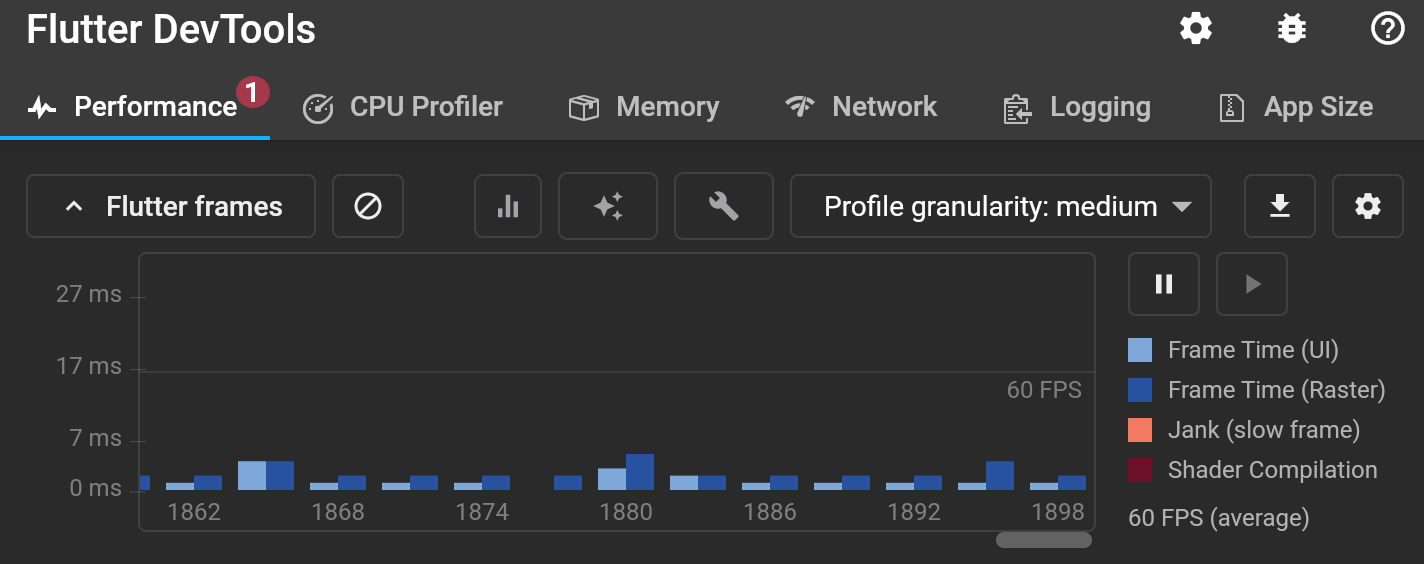
But when opening the "Flutter Performance" Tab in Android studio, it shows that the app only runs at 20fps in portrait mode:

And on landscape mode it is (at least) 60fps again:

I also confirmed the ~20fps by checking the recorded 60fps video frame by frame. And I used the flutter package performance_fps which also reported 20fps.
I'm not an expert, so I included just a screenshot of the timeline shown in the Dart Observatory showing the method calls while scrolling through the app, hope this will help:

Target Platform: iOS
Target OS version/browser: iOS 16.1
Devices: iPhone XS / iPhone XR
Logs
No issues found when running flutter analyze
Logs when running flutter doctor -v
base ❯ flutter doctor -v
[✓] Flutter (Channel master, 3.5.0-12.0.pre.175, on macOS 13.0 22A380 darwin-x64, locale de-DE)
    • Flutter version 3.5.0-12.0.pre.175 on channel master at /usr/local/Caskroom/flutter/2.8.1/flutter
    • Upstream repository https://github.com/flutter/flutter.git
    • Framework revision 92f10ed712 (vor 21 Stunden), 2022-11-08 17:57:52 -0800
    • Engine revision e7d7edab98
    • Dart version 2.19.0 (build 2.19.0-374.0.dev)
    • DevTools version 2.19.0

[✓] Android toolchain - develop for Android devices (Android SDK version 32.0.0)
    • Android SDK at /Users/kevin/Library/Android/sdk
    • Platform android-33, build-tools 32.0.0
    • Java binary at: /Users/kevin/Library/Application Support/JetBrains/Toolbox/apps/AndroidStudio/ch-0/213.7172.25.2113.9123335/Android Studio.app/Contents/jre/Contents/Home/bin/java
    • Java version OpenJDK Runtime Environment (build 11.0.13+0-b1751.21-8125866)
    • All Android licenses accepted.

[✓] Xcode - develop for iOS and macOS (Xcode 14.1)
    • Xcode at /Applications/Xcode.app/Contents/Developer
    • Build 14B47b
    • CocoaPods version 1.11.2

[✓] Chrome - develop for the web
    • Chrome at /Applications/Google Chrome.app/Contents/MacOS/Google Chrome

[✓] Android Studio (version 2021.3)
    • Android Studio at /Users/kevin/Library/Application Support/JetBrains/Toolbox/apps/AndroidStudio/ch-0/213.7172.25.2113.9014738/Android Studio.app/Contents
    • Flutter plugin can be installed from:
      🔨 https://plugins.jetbrains.com/plugin/9212-flutter
    • Dart plugin can be installed from:
      🔨 https://plugins.jetbrains.com/plugin/6351-dart
    • Java version OpenJDK Runtime Environment (build 11.0.13+0-b1751.21-8125866)

[✓] Android Studio (version 2021.3)
    • Android Studio at /Users/kevin/Library/Application Support/JetBrains/Toolbox/apps/AndroidStudio/ch-0/213.7172.25.2113.9123335/Android Studio.app/Contents
    • Flutter plugin can be installed from:
      🔨 https://plugins.jetbrains.com/plugin/9212-flutter
    • Dart plugin can be installed from:
      🔨 https://plugins.jetbrains.com/plugin/6351-dart
    • Java version OpenJDK Runtime Environment (build 11.0.13+0-b1751.21-8125866)

[✓] IntelliJ IDEA Ultimate Edition (version 2022.2.3)
    • IntelliJ at /Users/kevin/Applications/JetBrains Toolbox/IntelliJ IDEA Ultimate.app
    • Flutter plugin can be installed from:
      🔨 https://plugins.jetbrains.com/plugin/9212-flutter
    • Dart plugin can be installed from:
      🔨 https://plugins.jetbrains.com/plugin/6351-dart

[✓] IntelliJ IDEA Ultimate Edition (version 2022.2.2)
    • IntelliJ at /Users/kevin/Library/Application Support/JetBrains/Toolbox/apps/IDEA-U/ch-0/222.4167.29/IntelliJ IDEA.app
    • Flutter plugin can be installed from:
      🔨 https://plugins.jetbrains.com/plugin/9212-flutter
    • Dart plugin can be installed from:
      🔨 https://plugins.jetbrains.com/plugin/6351-dart

[✓] IntelliJ IDEA Ultimate Edition (version 2022.2.3)
    • IntelliJ at /Users/kevin/Library/Application Support/JetBrains/Toolbox/apps/IDEA-U/ch-0/222.4345.14/IntelliJ IDEA.app
    • Flutter plugin can be installed from:
      🔨 https://plugins.jetbrains.com/plugin/9212-flutter
    • Dart plugin can be installed from:
      🔨 https://plugins.jetbrains.com/plugin/6351-dart

[✓] VS Code (version 1.73.0)
    • VS Code at /Applications/Visual Studio Code.app/Contents
    • Flutter extension can be installed from:
      🔨 https://marketplace.visualstudio.com/items?itemName=Dart-Code.flutter

[✓] Connected device (3 available)
    • iPhone von Kevin (mobile) • 00008020-000C508114D8002E • ios            • iOS 16.1 20B82
    • macOS (desktop)           • macos                     • darwin-x64     • macOS 13.0 22A380 darwin-x64
    • Chrome (web)              • chrome                    • web-javascript • Google Chrome 107.0.5304.110
    ! Error: (null) needs to connect to determine its availability. Check the connection between the device and its companion iPhone, and the connection between the iPhone and Xcode. Both devices may also need to be restarted and
      unlocked. (code 1)

[✓] HTTP Host Availability
    • All required HTTP hosts are available

• No issues found!