Windows: Dead keys are not producing accented characters #86179


Description

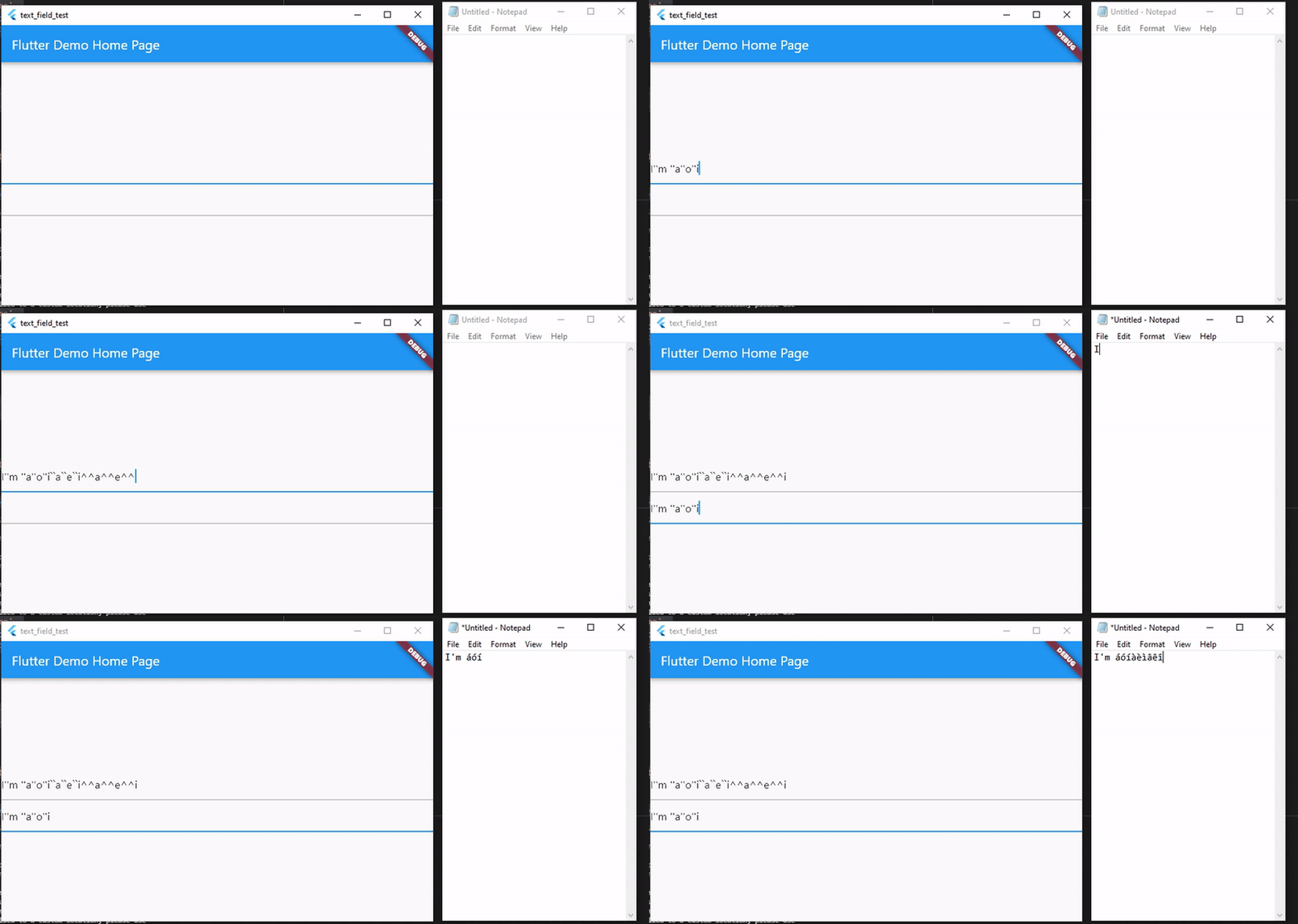
Steps to Reproduce
-
Run
flutter create text_field_test. -
Update main.dart as follows
import 'package:flutter/material.dart';

void main() {
  runApp(const MyApp());
}

class MyApp extends StatelessWidget {
  const MyApp({Key? key}) : super(key: key);

  @override
  Widget build(BuildContext context) {
    return MaterialApp(
      title: 'Flutter Demo',
      theme: ThemeData( primarySwatch: Colors.blue),
      home: const MyHomePage(title: 'Flutter Demo Home Page'),
    );
  }
}

class MyHomePage extends StatefulWidget {
  const MyHomePage({Key? key, required this.title}) : super(key: key);
  final String title;

  @override
  State<MyHomePage> createState() => _MyHomePageState();
}

class _MyHomePageState extends State<MyHomePage> {
  @override
  Widget build(BuildContext context) {
    return Scaffold(
      appBar: AppBar(title: Text(widget.title)),
      body: Center(
        child: Column(
          mainAxisAlignment: MainAxisAlignment.center,
          children: <Widget>[
            TextFormField(),
            const TextField(),
          ],
        ),
      ),
    );
  }
}
-
Set the keyboard layout to English United States - International
-
Type anything in the text field
Expected results: Characters with accents typed using two key strokes ("'" key plus letter, "`" key plus letter, "^" key plus letter) can be entered
Actual results: Accent characters are entered (repeated twice), followed by letters
> flutter analyze
Analyzing text_field_test...
No issues found! (ran in 5.1s)
> flutter doctor
Doctor summary (to see all details, run flutter doctor -v):
[√] Flutter (Channel master, 2.4.0-1.0.pre.151, on Microsoft Windows [Version 10.0.19042.1083], locale en-US)
[X] Android toolchain - develop for Android devices
    X Unable to locate Android SDK.
      Install Android Studio from: https://developer.android.com/studio/index.html
      On first launch it will assist you in installing the Android SDK components.
      (or visit https://flutter.dev/docs/get-started/install/windows#android-setup for detailed instructions).
      If the Android SDK has been installed to a custom location, please use
      `flutter config --android-sdk` to update to that location.

[√] Chrome - develop for the web
[√] Visual Studio - develop for Windows (Visual Studio Community 2019 16.9.4)
[!] Android Studio (not installed)
[√] VS Code, 64-bit edition (version 1.58.0)
[√] Connected device (2 available)

! Doctor found issues in 2 categories.
Metadata
Metadata
Assignees
Labels
Important issues not at the top of the work listRunning on desktopEntering text in a text field or keyboard related problemsIt was better in the past than it is nowflutter/engine related. See also e: labels.Found to occur in 2.4The issue has been confirmed reproducible and is ready to work onBuilding on or for Windows specifically