Add ScrollController.onAttach & onDetach, samples/docs on listening/getting scrolling info#124823
Conversation


 Piinks
added
c: new feature
Piinks
added
c: new feature
 flutter-dashboard
bot
added
a: text input
flutter-dashboard
bot
added
a: text input
 Piinks
force-pushed
the
scrollControllerNotify
branch
from
Piinks
force-pushed
the
scrollControllerNotify
branch
from
74555f0 to
725879c
Compare

 thkim1011
left a comment
thkim1011
left a comment
thkim1011
left a comment
There was a problem hiding this comment.
Left a couple of comments; this was my first time reading through the ScrollController code so I'm a bit confused about the implementation. What does it mean for a ScrollController to have multiple ScrollPosition's?
examples/api/lib/widgets/scroll_position/scroll_controller_notification.0.dart
Outdated
Show resolved
Hide resolved
| // Returning false allows the notification to continue bubbling up to | ||
| // ancestor listeners. If we wanted the notification to stop bubbling, | ||
| // return true. |
There was a problem hiding this comment.
Would this be done via passing the ScrollController to descendants and allowing any one of them to call ScrollController.addListener?
There was a problem hiding this comment.
No, this method is not associated with the ScrollController. This is the part of the example that shows how to listen without a scroll controller. Using ScrollController.addListener does not allow the developer to affect the notification bubbling up the tree.
examples/api/lib/widgets/scroll_position/scroll_controller_on_attach.0.dart
Outdated
Show resolved
Hide resolved
| _controller = ScrollController( | ||
| onAttach: _handlePositionAttach, | ||
| onDetach: _handlePositionDetach, | ||
| ); |
There was a problem hiding this comment.
Maybe a comment here to clarify when _handlePositionAttach and _handlePositionDetach will be called might be helpful. I had to go back and look through the code to figure out what was happening.
There was a problem hiding this comment.
Also I'm not too sure when ScrollController.attach gets called (which would then call _handlePositionAttach?) if at all in this demo. Perhaps this could be clarified?
There was a problem hiding this comment.
attach is called by the Scrollable after the ScrollPosition was created. I'll add more docs.
There was a problem hiding this comment.
This code sample will be embedded with the docs in scroll_controller.dart. Those docs are meant to provide a lot of the context here rather than duplicating them. If some of this is unclear in the docs on the ScrollController class, we should improve them there rather than in the sample. Let me know if the docs in scroll_controller.dart are not helpful.
| final ScrollControllerCallback? onAttach; | ||
|
|
||
| /// Called when a [ScrollPosition] is detached from the scroll controller. | ||
| /// | ||
| /// {@tool dartpad} | ||
| /// This sample shows how to apply a listener to the | ||
| /// [ScrollPosition.isScrollingNotifier] using [ScrollController.onAttach] | ||
| /// & [ScrollController.onDetach]. | ||
| /// This is used to change the [AppBar]'s color when scrolling is occurring. | ||
| /// | ||
| /// ** See code in examples/api/lib/widgets/scroll_position/scroll_controller_on_attach.0.dart ** | ||
| /// {@end-tool} | ||
| final ScrollControllerCallback? onDetach; |
There was a problem hiding this comment.
I'm wondering if it's worth it to call this onAttachPosition and onDetachPosition instead. I can see that we already call the method for attaching/detaching a position attach and detach, but when I was reading through the demo code without having read through the actual implementation, it wasn't very clear if onAttach happens on attaching a position or if it happens in a more general scenario of attaching anything to the ScrollController (which may happen to someone else who isn't completely familiar with ScrollController?).
There was a problem hiding this comment.
I was hoping to match the convention of the named method in the class, attach/detach. I think reading the sample code before reading the docs is definitely difficult to follow, but when the docs are rendered, the sample comes after all of the info.

Good question! The ScrollController is used to create the ScrollPosition in Scrollable. If Scrollable has not been provided a controller (via ScrollView), then it creates one in order to create the position. |


…tening/getting scrolling info (flutter/flutter#124823)
…tening/getting scrolling info (flutter/flutter#124823)
…tening/getting scrolling info (flutter/flutter#124823)
…tening/getting scrolling info (flutter/flutter#124823)
…tening/getting scrolling info (flutter/flutter#124823)
…tening/getting scrolling info (flutter/flutter#124823)
…tening/getting scrolling info (flutter/flutter#124823)
…tening/getting scrolling info (flutter/flutter#124823)
…tening/getting scrolling info (flutter/flutter#124823)
…tening/getting scrolling info (flutter/flutter#124823)
…tening/getting scrolling info (flutter/flutter#124823)
…etting scrolling info (flutter#124823) This PR does a couple of things! https://user-images.githubusercontent.com/16964204/231897483-416287f9-50ce-468d-a714-2a4bc0f2e011.mov 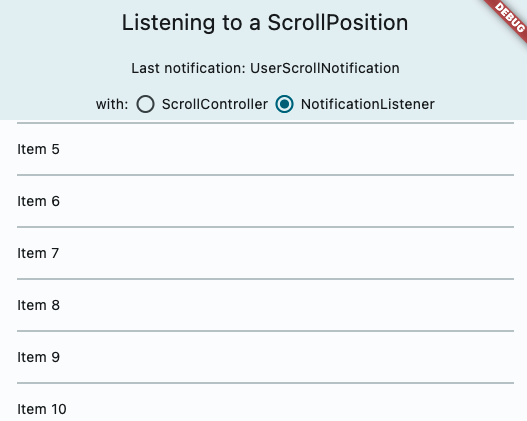 Fixes flutter#20819 Fixes flutter#41910 Fixes flutter#121419 ### Adds ScrollController.onAttach and ScrollController.onDetach This resolves a long held pain point for developers. When using a scroll controller, there is not scroll position until the scrollable widget is built, and almost all methods of notification are only triggered when scrolling happens. Adding these two methods will help developers gain access to the scroll position when it is created. A common workaround for this was using a post frame callback to access controller.position after the first frame, but this is ripe for issues such as having multiple positions attached to the controller, or the scrollable no longer existing after that post frame callback. I think this can also be helpful for folks to debug cases when the scroll controller has multiple positions attached. In particular, this also resolves this commented case: flutter#20819 (comment) The isScrollingNotifier is hard for developers to access. ### Docs & samples I was surprised we did not have samples on scroll notification or scroll controller, so I overhauled it and added a lot of docs on all the different ways to access scrolling information, when it is available and how they differ.
…tening/getting scrolling info (flutter/flutter#124823)
…tening/getting scrolling info (flutter/flutter#124823)
…tening/getting scrolling info (flutter/flutter#124823)
…tening/getting scrolling info (flutter/flutter#124823)


2 participants


This PR does a couple of things!
Screen.Recording.2023-04-13.at.4.28.27.PM.mov
Fixes #20819
Fixes #41910
Fixes #121419
Adds ScrollController.onAttach and ScrollController.onDetach
This resolves a long held pain point for developers. When using a scroll controller, there is not scroll position until the scrollable widget is built, and almost all methods of notification are only triggered when scrolling happens. Adding these two methods will help developers gain access to the scroll position when it is created. A common workaround for this was using a post frame callback to access controller.position after the first frame, but this is ripe for issues such as having multiple positions attached to the controller, or the scrollable no longer existing after that post frame callback. I think this can also be helpful for folks to debug cases when the scroll controller has multiple positions attached.
In particular, this also resolves this commented case: #20819 (comment)
The isScrollingNotifier is hard for developers to access.
Docs & samples
I was surprised we did not have samples on scroll notification or scroll controller, so I overhauled it and added a lot of docs on all the different ways to access scrolling information, when it is available and how they differ.
Pre-launch Checklist
///).If you need help, consider asking for advice on the #hackers-new channel on Discord.