ENH: Add pan and zoom toolbar handling to 3D Axes#22614
ENH: Add pan and zoom toolbar handling to 3D Axes#22614greglucas wants to merge 1 commit intomatplotlib:mainfrom
Conversation


1) This moves the pan logic that was already in the mouse move handler
into the "drag_pan" method to make it available from the toolbar.

2) This expands upon the panning logic to enable a zoom-to-box feature.
The zoom-to-box is done relative to the Axes, so it shrinks/expands
the box as a fraction of each delta, from lower-left Axes to lower-left
zoom-box. Thus, it tries to handle non-centered zooms, which adds more
cases to handle versus the current right-click zoom only scaling from
the center of the projection.

|
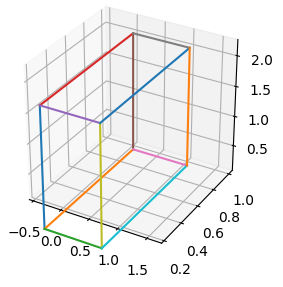
Tried this out today. Something feels off, consider the behavior when I try to zoom in on the corner of this box, and the area I'm zooming in on goes out of frame. If I zoom out by deselecting the zoom button and using the right mouse button, I see that the data aspect ratio has changed, which I don't think it should for a near-square zoom box. Don't have time to dig into the logic right now, but that should hopefully give something to dig into here. |



|
@scottshambaugh, I think this is likely due to selecting x/y/z coordinates from the 2d-x'y' plane and setting the limits based on those. (i.e. where in depth do those coordinates come from and what depth do we want to use to set the x/y/z limits for the axes?) I agree with you, this is not super ideal as it is currently. Maybe we should just remove the zoom box capability and leave it at pan which I think works better in these cases. This was a rough attempt a while ago, so I don't have a lot of interest in pushing it through right now. Please feel free to take this over if you have the time/desire! |


|
@scottshambaugh Thanks for testing this PR! |

|
Greetings, unfortunately, without the canvas layer locking with the zoom, the charts are unusable.
|

|
I’m taking a stab at this, more to come soon. |
|
I’ve got an icy-cold beer with your name on it if you can get those hoverable-crosshairs snapping to grid!
<3
… On Jul 16, 2022, at 8:52 PM, Scott Shambaugh ***@***.***> wrote:
I’m taking a stab at this, more to come soon.
—
Reply to this email directly, view it on GitHub <#22614 (comment)>, or unsubscribe <https://github.com/notifications/unsubscribe-auth/AUOMPBTDMZSFS2G4KA5QTP3VUN7ONANCNFSM5QBXWHXA>.
You are receiving this because you commented.
|

|
superseded by #23449 |

6 participants


PR Summary
This enables the toolbar buttons to work with 3D axes now. The panning works pretty seamlessly, but the zooming is perhaps not the easiest to use still. This is because it is zooming based on relative locations between the selected box and the Axes, but the Axes actually expands beyond the corners seen in the 3D grid world. If you zoom using the x/y keys to constrain the axes, you will see that the zoom box actually goes a ways outside the 3D world, and then behaves quite well when constrained like that from an intuitive sense. I'm open to suggestions here if anyone can think of a better way to implement the zoom logic, or if we think it is still a bit too complicated and that tool should not be implemented at all.
Test with any of the 3D examples:
https://matplotlib.org/stable/gallery/mplot3d/surface3d.html
https://matplotlib.org/stable/gallery/mplot3d/scatter3d.html
Commit summary:
Closes #110
PR Checklist
Tests and Styling
pytestpasses).flake8-docstringsand runflake8 --docstring-convention=all).Documentation
doc/users/next_whats_new/(follow instructions in README.rst there).doc/api/next_api_changes/(follow instructions in README.rst there).