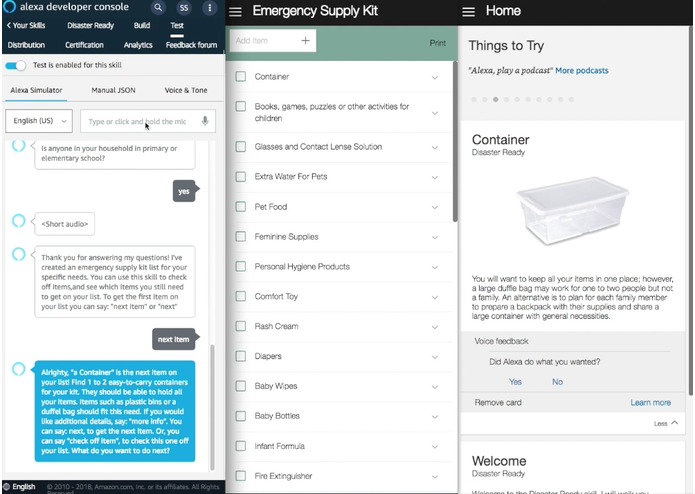
Disaster Ready, a skill built for the Amazon Alexa Tech for Social Good Challenge, walks users through assembling an emergency supply kit for disasters or other emergencies. First, the skill gives a short survey, so the unique needs of the user’s home can be considered when their list is created. Then a custom emergency supply kit list is generated in their Alexa App.
The user can access and manage the list through the skill or on their mobile phone in the Alexa app. Having the emergency supply list on their phone in their todo lists section serves as a reminder to the user that they are building kit and allows them to work on it outside of the skill. When the user uses the skill, supply list items are listed off one by one and recommendations for each item are given as well. In addition, the user can check or uncheck the item on the list or receive more detailed information about how and when they might use the supply item in cases of an emergency or a disaster.
- Node.js (4.5 or greater)
- Node Package Manager (npm)
- AWS Account - You will need to use Lambda, DynamoDB, and access to the Alexa Skills Kit Developer Console
-
Set up AWS IAM user. An AWS account is required since the skill will use Lambda. Additionally, you will need an AWS IAM user. Ensure that your AWS credentials are set up with the appropriate permissions on the computer to which you are installing ASK CLI. For more information on this step see Amazon's documentation: Set Up Credentials for an Amazon Web Services (AWS) Account.
-
Install ASK CLI. Please reference Amazon's "Quick Start Alexa Skills Kit Command Line Interface" if you are having trouble with this step.
npm install -g ask-cli -
Initialize ASK CLI
ask init -
Create a new skill project. The newly created skill project folder will contain all necessary files to deploy it with minimal changes. You will replace these files with those in the repository eventually.
ask new -
Clone the Disaster Ready project
git clone [email protected]:smithsa/disaster-ready.git -
Copy contents of the newly cloned repository into the project you created at step 4.
-
Navigate to
lambda/customdirectorycd disaster-ready/lambda/custom -
Now install node packages
npm install -
Ensure the name of the skill you used for step 4 matches in "skill.json." Additionally, set invocation name in models/en-US.json.
-
Deploy the code to AWS Lambda
ask deploy
You can test and run the skill through the command line or the Alexa Skills Kit Developer Console.
Command Line
Run the command below. For more information on this command refer to Alexa's Simulate Command Documentaiton
ask simulate -t [insert command here]
Alexa Skills Kit Developer Console
You can navigate to the Alexa Skills Kit Developer Console. Select the skill you are workig on, and select the "Test" tab menu item at the top of the page. You can open the skill by typing "open [your skill name]." You can enter any other commands as well.
Refer to Amazon's Alexa Skills Kit Developer Console: Test video from more instruction on how to test withing the console.
To understand the commands you can give the skill watch the view demo.
- Fork it!
- Create your feature branch:
git checkout -b my-new-feature - Commit your changes:
git commit -am 'Add some feature' - Push to the branch:
git push origin my-new-feature - Submit a pull request :D