


Max Headbox is an open-source voice-activated LLM agent built for Raspberry Pi. It operates 100% locally on-device, which eliminates reliance on cloud-based AI providers. It can be configured to execute custom tools and automate actions on your Pi.
 Read my blog post about this project!
To get Max Headbox up and running, you'll need the following hardware:
- Raspberry Pi 5 (tested on a 16GB and 8GB model)
- A microphone is necessary for voice commands. (I've used this one from Amazon)
- GeeekPi Screen, Case, and Cooler: This all-in-one bundle from Amazon provides a screen, a protective case, and an active cooler to keep your Raspberry Pi running smoothly. (This bundle is optional but definitley use an active cooler!)
If you don't want to replicate the exact box form factor, you can still run it anywhere you want, just make sure you have about 6GB available to run the LLMs.
Ensure you have the following software installed before proceeding with the setup:
- Node 22
- Python 3
- Ollama
Ruby is no longer needed to run the project, the backend has been rewritten in Express.js
Follow these steps to get Max Headbox set up and ready to run.
git clone https://github.com/syxanash/maxheadbox.git
cd maxheadboxnvm use
npm installNavigate to the backend/ directory and install the required Python packages.
cd backend/
pip3 install -r requirements.txtAfter installing Ollama, pull the necessary language models:
ollama pull gemma3:1b
ollama pull qwen3:1.7b
In the settings select expose Ollama to the network:
sudo systemctl edit ollama.service
Enter the following conf:
[Service]

Environment="OLLAMA_HOST=0.0.0.0"
and then restart with: sudo systemctl daemon-reload && sudo systemctl restart ollama
Before starting the app, you need to configure the following variables in your .env file:
VITE_BACKEND_URL=http://192.168.XXX.XXX:4567
VITE_WEBSOCKET_URL=ws://192.168.XXX.XXX:4567
VITE_OLLAMA_URL=http://192.168.XXX.XXX:11434
Replace with the local IP addresses of your servers.
The first two variables use the same address since the WebSocket app also runs on Express. If your Ollama instance is running on a different device, you'll need to specify its network address.
By default the recording directory is /dev/shm/whisper_recordings if you're developing and running the project on a different OS you can change this in your env file e.g.
RECORDINGS_DIR="~/Desktop/whisper_recordings"
To start the Max Headbox agent, run the following command from the root of the project directory:
npm run prod-startYou should now be able to see the app running on localhost. For development instead run:
npm run dev-startCreating tools is as simple as making a JavaScript module in src/tools/ that exports an object with four properties: the tool's name, the parameters passed to the function, a describe field, and the function's main execution body.
Some frontend tools may require backend API handlers to fetch information from the Pi hardware (since the frontend cannot query it directly) and expose it via REST. I created a folder in backend/notions/ where I placed all these Express routes.
Take a look at what's already there to have an idea.
The tools with the .txt extension are provided for reference. If you want to import them into the agent, just rename the extension to .js or .rb for the backend ones.
If you consider certain tools to be dangerous and want additional confirmation before the agent executes them, you can set the property dangerous: true when creating a new tool. When the model selects this tool, it will ask for your confirmation before executing it. Simply reply with YES or NO. Checkout the demo video with the light bulb to see how this confirmation flow works!

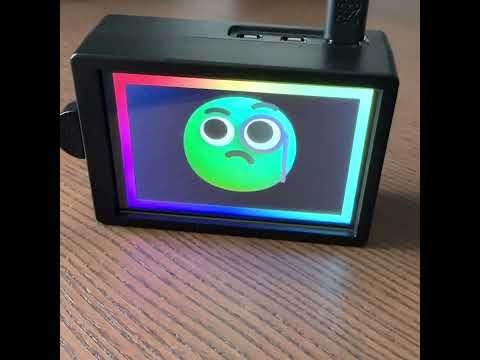
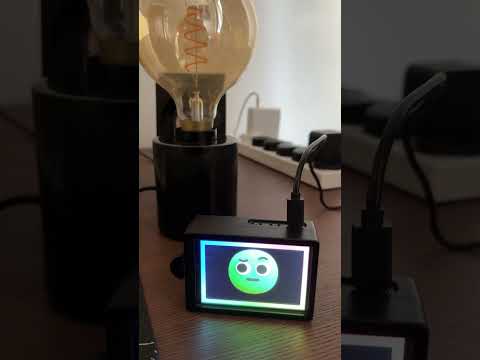
- The voice activation was achieved using Vosk.
- faster-whisper: Used for efficient and accurate voice transcription. For a detailed guide on setting it up locally, check out this this tutorial!
- The animated character in the UI was created by slightly modifying Microsoft's beautiful Fluent Emoji set.
I'm aware of Ollama's shady practices and the issues with llama.cpp's creator. Eventually, I will migrate, but for now it served its purpose for rapid prototyping my project. I've read it's even more performant, so yes, I'll definitely migrate (maybe).
I wanted the web app to be the most important part of the project, containing the logic of the actual Agent. I thought of using the Express+Python backend layer only for interacting with the Raspberry Pi hardware (e.g. microphone and transcribing services etc.), it could easily be rewritten in a different stack and reconnected to the frontend if needed, in fact the original version was written in Ruby Sinatra. Check the architecture diagram here:

Yes for sure, but after extensive testing, I noticed that the performance impact isn't very significant. To be completely honest, at most it might save a few seconds before the LLM completes its job. I'd rather have a nice UI feedback showing that something is happening, rather than a black screen while the LLM is processing (a small tradeoff). Happy to be proven wrong tho!
Great idea. When I have time, I'll definitely look into it. For now, I just wanted to make the wake-word system work, and that's it.
Fantastic question, thanks for asking! Check out my blog post to see why I went with redefining a function payload for invoking tools instead of using the tools' APIs directly.
No, if the quality of the code is shite, it's entirely my doing, completely organic, don't worry.
Jokes aside, the only tools I've created using Copilot are weather.js and wiki.js, because I wanted something quick to test my Agent.
Dinner is ready. For any more questions, my assistant will take it from here alternatively open a GitHub issue. Have a good night!
