We need captures to be able to begin the process of adding the card. You can find the tool and details on how to do that for a gpu here. https://gitlab.com/OpenRGBDevelopers/NvAPISpy
Local mode often doesn't work so don't be surprised if you have to use the global option as I did for my Gigabyte card.
Oh all modes stuff is the same as the old controller no better or worse on the 2282 branch. Other then Static not existing on the old.
Awesome Zones and "leds" work in direct mode.

Just Mode Issues Left:
Static and Pulse still do nothing.
I also don't think I should be able to pick zones in the other modes. But I can in Pulse, Flash, Double Flash and Gradient. Picking a Zone does nothing in these modes.

Colour Cycle unlike the other modes does not act the same as if set from Fusion 2. If set from there it is always smooth but if set from OpenRGB it seems to try to smoothly shift from one colour to another but randomly flashes the fans as if they have a rainbow set across the "leds" of that fan (ie 8 chuncks of colour rather then the whole fan fading to the next colour)
for instance in some cases filling the buffer with 00 worked for the master mouse but others wouldn't work at all without the expected FF filled buffer and that wasn't obvious it took more trial and error then it should of until I realized the base controller was not filling the buffer the way the device expected.
hmmm ok I'll still test it but while I get your point a bit it seems like a very unnecessary risk. I would have thought we should be matching stock 1 to 1 for every card. Not doing so is just asking for unknown issues in my opinion especially when we are poking at things blindly. Even more so if some cards do and some don't it just seems like something that runs the risk of causing foreseen issues.
aww sad times build fail
oh right I see why aren't you just matching it?
0xBC 0x00 0x00 0x00 0x00 0x00 0xFE 0xFF
0xBD 0x00 0x00 0x00 0x00 0x00 0xFE 0xFF
It can't be hard to make those last two use 0x00 instead of the 0x01 and to add the 0xFE 0xFF idk why it fills those spots as it does but it was pretty consistent in the captures.
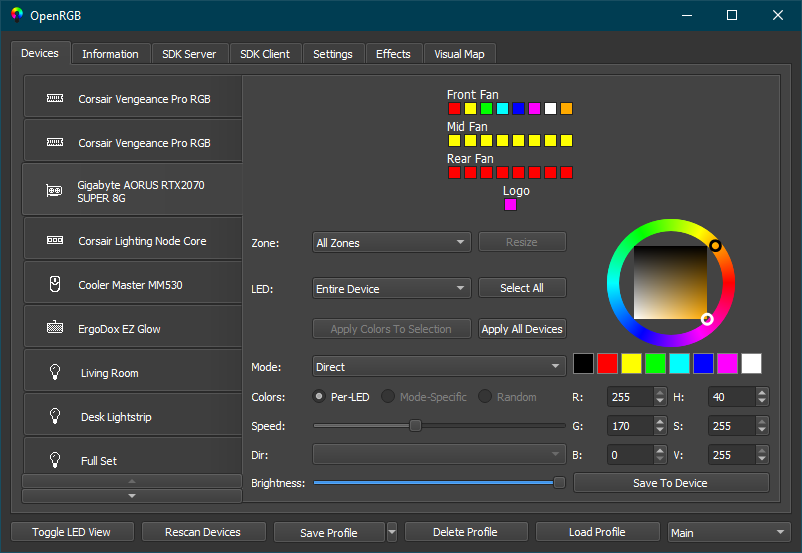
There we go no change in the Device view so new new screenshot but the log looks spot on now for what it should be sending. I assume its intentional that it isn't actually changing the lights on the card? It's now acting like I think you expected originally. I ended on Red, Green, Blue, White again, through in a cyan early on which shows and a light blue of some random values and they all show in the logs.
Ok more progress the logs show changes but not the right ones. I set all to cyan I think then played around a bit setting each zone to a different colour and ended on Set Top to Red, Middle to Green, Bottom to Blue and Logo to White but the last 4 commands in this log do not show the commands that would result in that effect. Lots of FF all together without the 00's that should be breaking up the red blue and green. Plus I seen no sign of the cyan that I applied a few times and would of had other values.
Thanks for you work on this it's much appreciated.
At first I thought it wasn't doing anything but huzza the Log finally has stuff in it. So with this build on launch Direct does nothing no matter the colour, zone or led selected. The modes work as well as they did before (static not at all and colour cycle is glitchy). The logs now show a block that looks correct except its always 00's even when I was picking colours for all or when I tried to set colours just for the logo.
With the most recent build the crash is gone. So thats better. Static does nothing, Direct works but only entire device or front fan entire zone actually change colour and Front Fan is controlling the entire card. I still dont see anything in the logs but I will include one.
Sadly the logs even with the loglevel don't show much. The Cards RGB controller didn't die haha!! Most modes work as before and do show all the leds in the list but trying to pick them by zone or led didn't seem to apply anything per zone and i don't think those effects should have the option anyways. Static Mode crashes Openrgb. And I tried playing with Direct but it didn't show any output in the logs other then the mode not found. The terminal never showed anything either.
Unfortunately I don't think anything you changed worked and I don't really see why on a quick look other then if that false you added to every def was supposed to be the "has addressable led" cause if it is you have all cards even mine set to false so it's still using legacy if I read things right. Starting the build mentioned Defaults to black, applies black as direct but does not apply any colours I pick. If I switch mode to anything but pulse and I see it work the same as before a little buggy on colour cycle and colour shift but mostly correct (and the exact same behaviour as previously). If I then switch back to Direct it applies what ever colour I had picked that did not apply before.
With --loglevel6 the log OpenRGB_20220327_131306.log doesn't seem to show anything useful. The terminal didn't either.
You will also notice in the first screenshot that the LED's are not setup as expected. I still have 4 zones but the leds are now just the zone name plus a 0 and each zone still only has a single "led".
I think this shows some major changes at least from the captures I get and what the current controllers do I don't see any 0x88's or 0xAA's in any of these captures which is weird since that seems to be consistent between the Fusion and Fusion 2 gpu controllers.
Very understandable. Had some spare time just to look through logs and we mostly covered this earlier but here's all I think we need for the static / direct stuff but I have noticed a bunch of the effects are not working as intended either. Most work except pulse but those that work have a tendency to flicker a little so I'll try and poke through those later.
I haven't really gotten the hang of what should be zones and what should be leds with OpenRGB but this would make 25 "zones" but there is at most 9-10 leds on the card haha. 2 per fan that I am 100% sure use the same colour (flashing to make the zones) and 3-4 in the logo based on how it does transitions across the logo quite smoothly but it acts as a single zone in static mode.
I do not think we can set a single zone or a pair at a time though it seems to consistently send this entire block when you update any single "zone".
This Entire Block is sent for every change no matter which Zone is changed
Waiting:
NvAPI_I2CWriteEx: Dev: 0x50 RegSize: 0x00 Reg: Size: 0x08 Data: 0xAA 0x00 0x00 0x00 0x00 0x00 0x00 0x00
Initialize Static Colour Command:
NvAPI_I2CWriteEx: Dev: 0x50 RegSize: 0x00 Reg: Size: 0x08 Data: 0x88 0x01 0x02 0x63 0x00 0x00 0x00 0x00
Fan #1 - 2 Zones Per Line: | Zone 1 | | Zone 2 |
NvAPI_I2CWriteEx: Dev: 0x50 RegSize: 0x00 Reg: Size: 0x08 Data: 0xB0 0x01 0xFF 0x18 0x18 0xFE 0x11 0x11
NvAPI_I2CWriteEx: Dev: 0x50 RegSize: 0x00 Reg: Size: 0x08 Data: 0xB1 0x01 0xFE 0x12 0x12 0xFE 0x13 0x13
NvAPI_I2CWriteEx: Dev: 0x50 RegSize: 0x00 Reg: Size: 0x08 Data: 0xB2 0x01 0xFE 0x14 0x14 0xFF 0x14 0x14
NvAPI_I2CWriteEx: Dev: 0x50 RegSize: 0x00 Reg: Size: 0x08 Data: 0xB3 0x01 0xFF 0x15 0x15 0xFF 0x16 0x16
Fan #2 - 2 Zones Per Line: | Zone 1 | | Zone 2 |
NvAPI_I2CWriteEx: Dev: 0x50 RegSize: 0x00 Reg: Size: 0x08 Data: 0xB4 0x01 0x28 0xFE 0x28 0x20 0xFF 0x20
NvAPI_I2CWriteEx: Dev: 0x50 RegSize: 0x00 Reg: Size: 0x08 Data: 0xB5 0x01 0x21 0xFF 0x21 0x22 0xFF 0x22
NvAPI_I2CWriteEx: Dev: 0x50 RegSize: 0x00 Reg: Size: 0x08 Data: 0xB6 0x01 0x23 0xFF 0x23 0x25 0xFE 0x25
NvAPI_I2CWriteEx: Dev: 0x50 RegSize: 0x00 Reg: Size: 0x08 Data: 0xB7 0x01 0x26 0xFE 0x26 0x27 0xFE 0x27
Fan #3 - 2 Zones Per Line: | Zone 1 | | Zone 2 |
NvAPI_I2CWriteEx: Dev: 0x50 RegSize: 0x00 Reg: Size: 0x08 Data: 0xB8 0x01 0x38 0x38 0xFF 0x30 0x30 0xFF
NvAPI_I2CWriteEx: Dev: 0x50 RegSize: 0x00 Reg: Size: 0x08 Data: 0xB9 0x01 0x31 0x31 0xFF 0x32 0x32 0xFF
NvAPI_I2CWriteEx: Dev: 0x50 RegSize: 0x00 Reg: Size: 0x08 Data: 0xBA 0x01 0x33 0x33 0xFF 0x34 0x34 0xFF
NvAPI_I2CWriteEx: Dev: 0x50 RegSize: 0x00 Reg: Size: 0x08 Data: 0xBB 0x01 0x35 0x35 0xFF 0x37 0x37 0xFF
Logo: | Logo |
NvAPI_I2CWriteEx: Dev: 0x50 RegSize: 0x00 Reg: Size: 0x08 Data: 0xBC 0x00 0xB0 0x0A 0x1E 0x00 0xFE 0xFF
NvAPI_I2CWriteEx: Dev: 0x50 RegSize: 0x00 Reg: Size: 0x08 Data: 0xBD 0x00 0x00 0x00 0x00 0x00 0xFE 0xFF
Dracrius (afb41fa3) at 25 Mar 22:45
Sorry about that had trouble pushing one time didn't mean to mess that up. Thanks for the details it should be fixed now.
Hopefully that's an acceptable solution. I kept the name short to maintain the layout the settings already had.