In the past years I have had an ongoing project – I wanted an ultra-light modifiable electric violin. And finally I can share it with you.
This violin, weighs with all the parts on just 500 grams, which is the same as my acoustic violin. Moreover, the center of mass is close to the player making the violin feel lighter than an acoustic when playing.
This is made possible by an innovation I came up with, and have not seen anyone else do – The violin uses a truss like the one in a guitar neck, letting you balance the weight of the strings and tune the neck. This means that the violin can be printed with just a 15% infill making it ultra light (pegboard box at 20%).
I am not planning to start a violin-building business, so I see no reason to keep this to myself and I am releasing it. I ask you to give me some attribution, and consider releasing your design too. And perhaps a violin 
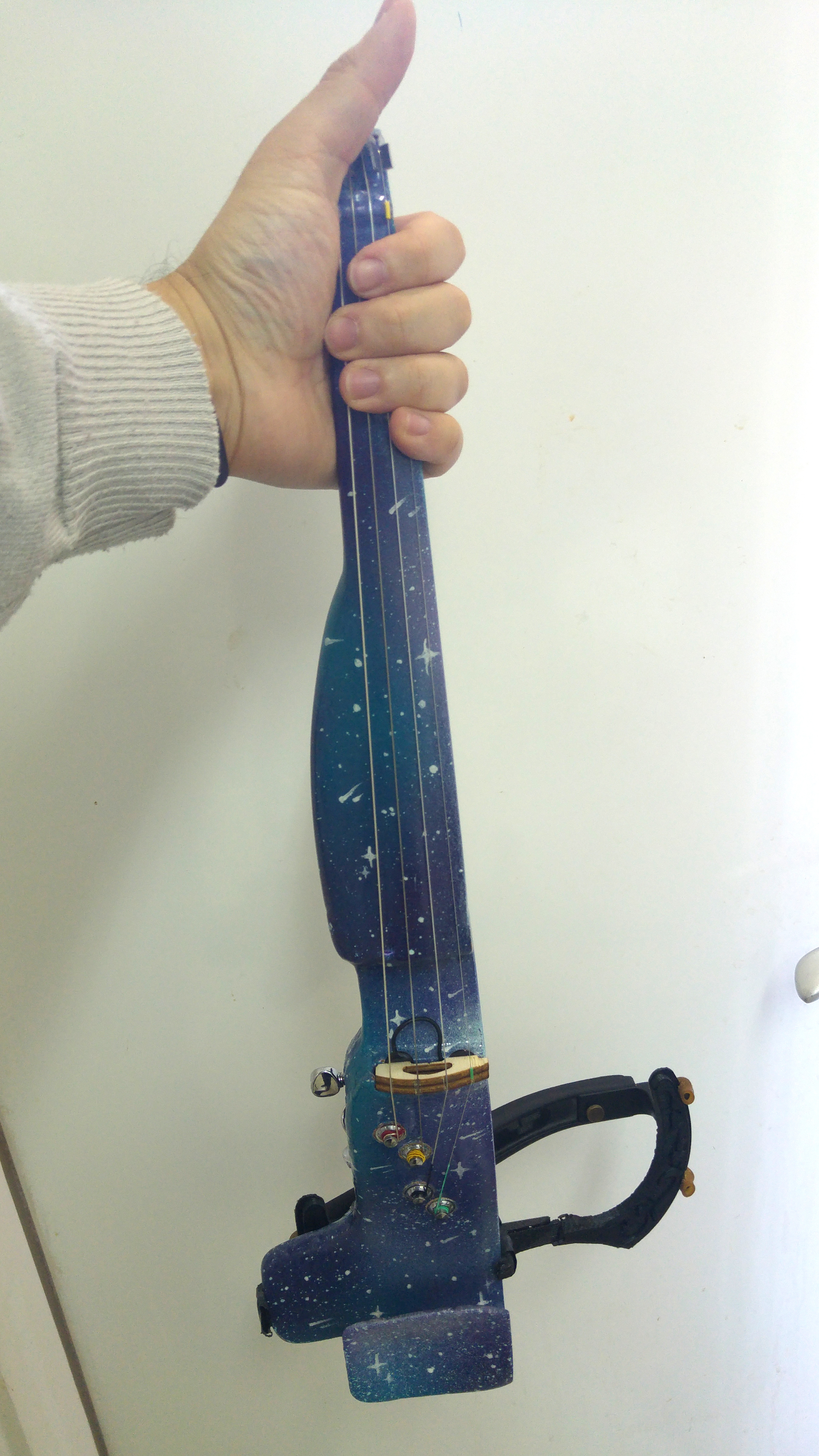
This is the end result

The design

I made the design with the help of several mechanical engineers that I want to thank – Tal Reindel, Michael Lev-Ari Layoush, Itai Meshorer, and Don Corson. Also want to take the opportunity to thank Yair Grinberg, Oleh Shevchuk. It’s also based on the ElVioin v2 which is under the Creative Commons – Attribution – Share Alike license. So you can use it, share it, modify it and even sell it. But our particular design must also be released under the same license.
You can download the design files here.
The Pickup
You could use other pickups, however I found Oleg’s magnetic pickup l sounding just amazing, and clear. I think it was worth the money and transforms this instrument to one with a professional quality of sound.

The parts
You will need the following parts. I tried adding links so you know what to get, but it does not have to be from these sources.
- 3D printed parts – I recommend using ABS because it means your violin is heat resistant. Print the body parts at 15% infill with the peg-box at 20%.
- A ukulele truss 330mm in length – the link is to the exact one I used.
- Guitar tuning keys
- 6 Pin Toggle Switch
- 1/4 inch audio jack
- ACRIFIX 1R 0192 glue (it’s a reactive cement really) – which is amazing and means you need no screws for the body. I found it here for sale and not online.
- Electric wire to fit in the tunnel
- Copper paper to sit on the string
- Double Sided Conduct Copper Foil Tape
- Oleg’s pickup (contact)
- Shoulder rest
- Screw and nuts for chin-rest
- screws for shareholder rest attachment
- Smooth-on XTC-3D for smoothing
- Metal-core violin strings (cheap ones seemed to do fine, but you could use D’Addario Hellicore too).
The Build
- Sand any parts you want smooth, or use smooth-on XTC-3D.
- Thread the truss along the body
- Thread the electrical wire along the body and make sure to have slack on both sides


- Glue the parts together using the glue. Do this outside.
- At this point it’s a good time to smooth the neck using the Smooth-on XTC-3D for smoothing., although I only did that later in the build.
- Add the tuning keys and screw them in to place. You might need to drill the hole for the screws to go in smoothly.
- Add in the chin rest and shoulder rest attachment.
- I’d recommend a test run with the strings to see that the tension holds at this point –
- thread in the strings and see that it holds together. Make sure to add some nylon or paper under the E and A strings so they don’t cut though the bridge.
- You also need to file a groove in the nut for the strings to keep in place, otherwise you get a buzzing sound. You could use a file, but I found nail scissors also work.
- I personally like placing the lower G string on the tuning key closest to the player and then D, A and E. I know it’s not the normal way but I find it comfortable. You can pick any order you like
- This is the cool part about this violin – you can now adjust the truss to compensate for the strings warping the neck.

- Electronics – electric shield the box, install the pickup and solder the components using this diagram:


At this point, you can re-install the strings and you should have a functioning electric violin that is light, sounds good and is customizable. I really like how silent it is, and that I get only the signal of the violin when it’s plugged in.
How does it sound?
- Here is a video of me playing it
- Here is a video of me playing it with a wah wah pedal (also on youtube)
3D parts
Here is a link to the 3D parts on printables and (soon on thingiverse).
I would really appreciate any input to the design. Here is a list of things that I know could be done better
Things to improve
- It’s not easy to thread new stings
- The chin rest is not static and can hit the tuning peg to it. I might fix that myself
- The electronics box screws are too small and I had to use 2mm inserts
In memory of Yair Grinberg
I also want to note that the violin tuning keys were donated from Yair Grinberg’s workshop. I never met Yair, but I was invited by his family to take parts from his workshop after he passed away. There were a lot of cool things and half-made inventions there. Among the parts where the tuning keys which are part of this violin. I only wish I could have met him exchange ideas and show the violin to him.
Contributions are welcome
As always, if you have any input, suggestions or want help to build a violin like this you are welcome to comment.
]]>
The past year I’ve been playing pretty active on federated social networks. This led me to try and write a federated social network group system. Although this group system is far from being complete since Fedigroup is currently in pre-alpha level. I think it is worth sharing what I have learned, and also explain a bit why, if you met me during the past three years. I’ve been going about federated social networks.
You are also welcome to join a server I maintain here, Hayu.sh is the second largest Hebrew-speaking instance.
What is a federated social network?
A federation in servers means everyone can run their own server which is autonomous. And it can communicate with other servers too. Creating a large network. The first protocol on the internet is actually federated too – email.
There is no one central email server, or single email software. In social networks this means that you join a server, and follow and interact with everyone else. Even though your server could be, like in my case, hosted in your own home, with you owning all the data. You can also join a any other server, and switch between them.
For Hebrew speakers, I gave a small TED lecture about it, which is hosted on a federated video server. You can watch it here (Hebrew).
The Fediverse is the servers using the a W3C Standard that does just that
What made the Fediverse possible is the standard that was passed to describe it. The protocol is called ActivityPub 2.0. And it lets social networks share status messages (notes), shares (boosts) and favorites across different servers. It was created by a group of people who cared, not large companies. Despite some of them being members of the W3C. Its also worth mentioning that one of the major adopters of the ActivityPub 2.0 protocol was Mastodon, a type of social network server, which resembles twitter. And that really help gain critical mass.
Why didn’t I hear about this?
I was asked this by other developers and power users. It makes people dismiss the Fediverse as a passing or niche thing.
Unlike Facebook, Twitter even if you’re been avoiding social networks, their marketing will reach you, your news channel, municipality and country are likely using them. Their existence depends on it that you use and browse on their site. However, in the Fediverse does not have a business model that demands it. Or a marketing team. Its just people. You are welcome to join, but no ones income depends on it.
The Fediverse is growing though, by word-of-mouth, or text-in-blog. Recently even celebrities and others. The latest are the BBC, PNAS, George Takei, Neil Gaiman, Stephen Fry and the European Commission.
Not to be confused with crypto – Which lacks moderation
I think one of the strength of the Fediverse is that it’s actually not going with the blockchain trend now, which is where a lot of effort is going to distribute things.
The Fediverse does not run using the now trendy crypto stuff. The advantage of it is that it costs far less to run. A small server for a few tens of people + a domain and you are good to go.
Another thing is that having an admin means you have a moderator, which is becoming critical for social networks. Large companies today are unable to moderate the volumes of messages on their social networks, resulting in many bad decisions, people getting blocked by algorithms and others who should roam freely. Many social networks today still don’t have moderation-by-design in mind. Even less in a trust-less network that uses crypto.
What is Fedigroup
Fedigroup is a server type that allows users to create a group and share it across the Fediverse. When a user creates a group, they can specify the topics they want to discuss, and the group, when mentioned, will automatically boost their posts related to those topics. This helps increase visibility for posts within the group and attract more members. Additionally, Fedigroup stores the contents of the group for future reference, making it easier for members to find and access previous discussions. Currently, there is also a web interface available that allows users to search through the contents of groups they belong to (the search button though is not implemented yet). Overall, Fedigroup provides a convenient way for users to create and participate in specialized communities within the Fediverse with group memory.
Features
- Federated – you can mention a group and it will boost the message if you are following it
- Has a responsive UI written in NiceGUI
- You can log in using your Mastodon/Pleroma or any MastodonAPI compatible account
- You can use your federated account to create group and then you have access to moderate it
- Posts in the group are archived in a database that can be searched (search not implemented)
- See all the posts in the groups you follow
Unimplemented (roadmap in theory)
- Use your MastodonAPI-compatible account to comment and preform tasks on the WebUI
- Search history of the group

I stopped developing it because it was far too much work only for me. It might pick up if someone joins me, but alone I will not manage to make it as good as others out there. It has potential as being a place to search for history on the Fediverse which is a little challenging today.
Also I think the recent migration of Reddit users show that the Fediverse is handling groups pretty well.
Still, Fedigroup was a good learning experience on how the technology works, and I think its worth sharing if you want to build a Federated instance that uses python, FastAPI and PostgreSQL.
If anyone wants to pick up where I left they are welcome. The source code is available on GitHub.
There is a running instance at: https://fedigroup.party
You welcome to try it out and as always – code contributions are welcome

Hey all,
Back in 2018 I wrote a blog post about the electric violin that I built. Life got crazy and it got stuck as a draft. Its a really good iteration process, and soon I plan to release a fully open source design I made which is much better than this one. However, this is the first violin I made and despite the sound being iffy, its by far the prettiest. So here is the post about how I made it. I am also adding notes from today, 5 years later. Since stuff has developed and I am in the process of releasing my own design.
So here is the post:
So I 3D printed an electric violin, I wanted to share with you how I did this, what I learned in the process. And perhaps spark a community to share these violins and knowledge how to build them. Arnon Zamir was a partner and we did a mix of research and building together. Dar Abramov did the amazing paint job.
So there is this wonderful project violin designed by David Perry called the F-F-Fiddle. I think the most innovate part is using a carbon fiber rod (originally aluminum) to connect several parts from a 10inch (254mm) and now 8inch (200mm) 3D printer.
The model
David published a pretty comprehensive PDF with the design and assembly instructions. However I wanted to take it a few steps further and do a cool paint job and finish.
First I used Luke’s bout, it was a bit of the mistake because we actually had to cut the guitar keys so they would fit (and that makes them bend a little). The Guitar keys are at the moment the most annoying thing in the F-F-Fiddle.
We really want to change that.
Finishing – this is just the start
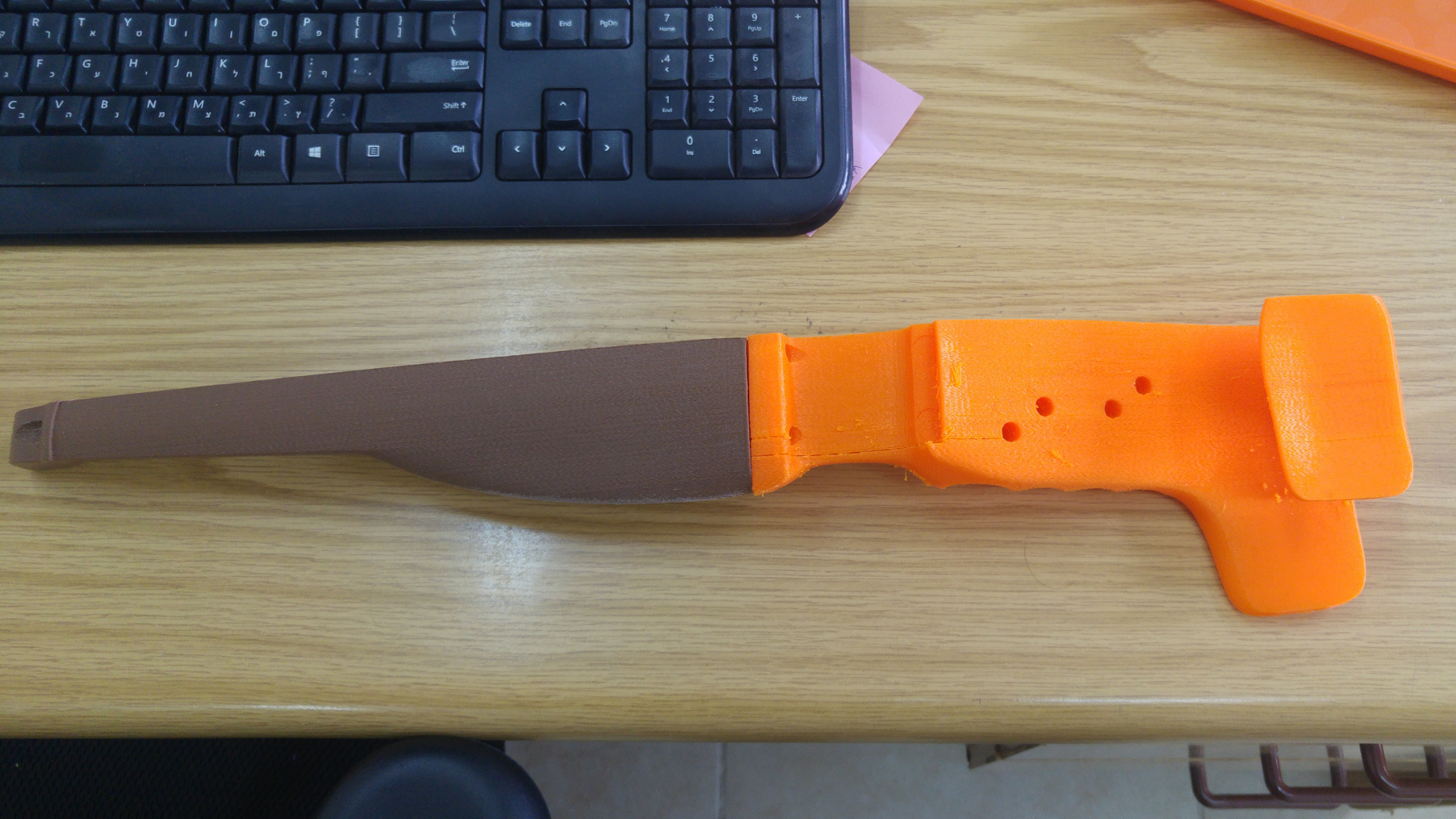
After you get the 3D printed parts, you need to make them look and feel good to actually play on. David reported that sanded violins, especially the fingerboards, are much better to play with. The methods to finish 3D prints have progressed a lot, but I found the best results here were using a primer, and then sanding the print. The primer gets in between the layers and fills them up. In combination with sanding (both with a random orbital sander and by hand with sand paper and a filer, I got a really smooth finish.

For fixing defects in the print I used plastic epoxy putty (make sure its plastic epoxy putty and not metal). The epoxy putty is really easy to sand, it even says so on the cover. It means your printer does not have to be crazy perfect. But you do need more sanding.
For final coating we used epoxy. Arnon had lots of experience with it building boats. I found its a little too soft for the violin, but I can’t find anything better.
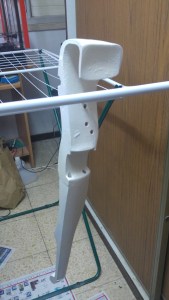
After the coating there was more sanding, if you start to see the edge of the print, this means you are doing well and the gaps of the print are filled.
Pain job
The paint job we done by Dar Abramov using x2 primers and some paint, its amazing
Here are some photos of the process


Epoxy coating
Here are some pictures of the epoxy coating process. Arnon did a lot of lays.


Pickups
Note – Today I am using Oleg’s magnetic pickup, and the pickups below I have not tested really.
I just used a K&K Sound Systems Twin Spot Internal as explained in the F-F-Fiddle manual, the bridge is CNCed from random wood which was probably a bad choice. I am in the process if trying to find a magnetic pickup to try that out. Most sites that talk about magnetic pickups for violins are from the early 2000’s and its hard to understand how to get one. “Notes on Amplified Fiddles” (it dies and might only work on archive.org) has interesting insights. It looks like everyone is using Barbera Transducers pickups which are piezo-based, but are hard to get, or Starfish violin pickups which are easier to get but not as good (according to people who tried both, I don’t have them to try).
Keys
Luke’s bout design requires you to cut the keys to fit, so we had to cut some metal. I really want to make a new violin design which would not require that. Will note that tuning a violin with guitar tuners is much more comfortable than the traditional acoustic method. Bundled with the tail tuners tuning would be amazing.

Adapting the shoulder rest
So the F-F-Fiddle isn’t too comfortable on its own and there were several attempts to make a shoulder rest for it. I made an adapter for acoustic violins shoulder rests that works best.
What’s next? Effects!
Note: today Zynthian are a live and kicking with a newer device and have adopted CustomPiOS
I’ve started playing about with the Zynthian project. I will write about that hopefully in a later post, but in short Zynthian lets you use a Raspberry Pi, I am helping the Zynthian team get a build using CustomiOS.

Violins are a crossroad – Lets build a community!
Note: If you wanna start today, join the discord, its active now.
Violins are a really conservative community. When telling violists what I am doing, nearly all don’t really understand. Many won’t even consider changing things. Even the most cutting edge ones make the electric violins sound like acoustic ones. If the guitarists community would have acted the same we would have missed a whole lot of music in the last century.
3D printing makes e-violin building much more accessible because violins are limited to 400gr not be too heavy. And I hear from several electric violin players that the weight is a problem in this field. This is easily done with 3D printing.
Note: so F-F-Fiddle google forum has also a pretty active Discord, and the community there is really active!
At the time I set up
Thanks to F-F-Fiddle google forum. Its mostly David there, but its useful to search sometimes
]]>
Hey all,
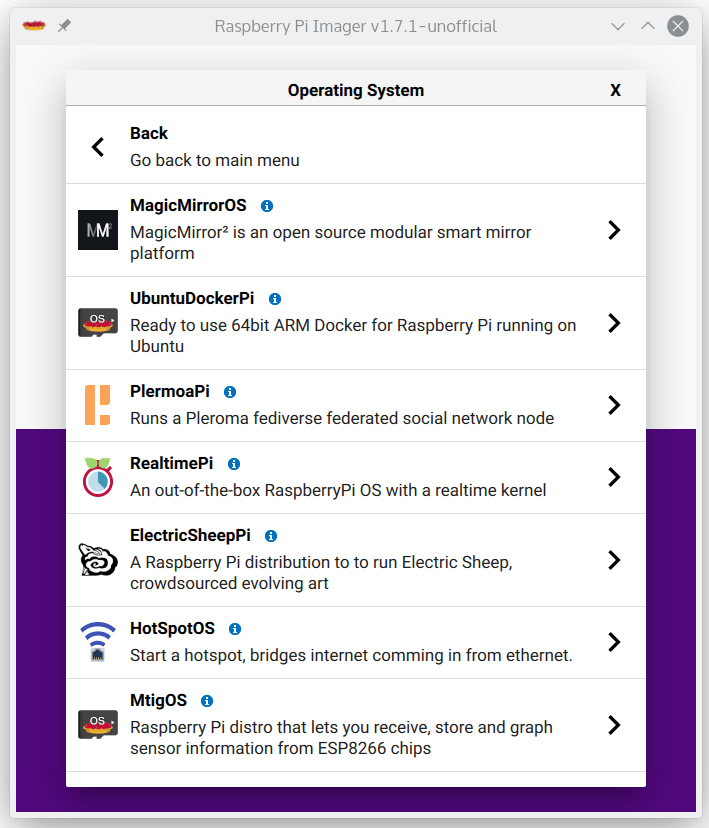
I have started to maintain a fork of rpi-imager called Pi Imager. The main goal of it is to have a place to host images for anyone who wants their images downloaded and flashed with a single tool. There are already 7 extra distributions you can flash on the unofficial imager and I hope with this post this number will grow.
The changes to the official imager are:
- There is an unofficial category that has images you can’t get on the official imager. You can submit a pull request to this repository and add yours.
- Everything is automatic. You can fork it, make your own commits, and you have a working build system –
- Every new commit to pi-imager builds a new build for Windows, Mac and Linux, ready to use
- When you ask to add a new image and the pull request is accepted, it’s added to the global list automatically
- There is a feature to disable username change that can be set on the distribution side. It broke stuff in OctoPi (currently in main branch).
- Appimage support for Linux (fixes this issue)
- Trademark and colors have been removed as requested by RaspberryPi, it’s purple now!
I want to stress that the fork is here to work with the community and not to split it, you can have both installed. I have been in contact with Raspberry Pi before and after its release. It lets us have something that they can’t provide – an unofficial place that with a single click downloads and flashes community-maintained images, and lots of them.
Code and image contributions are welcome!
Get Pi Imager here

Update: OctoPi-Klipper is now called OctoKlipperPi. The reason is that it was too similar and people kept confusing the two.
Hey all,
I recently upgraded my printer’s board to an MKS SGen v1.0 (thanks to Tal Raindel who had one at hand). Not the latest board out there, but newer than my old MKS Gen l 1.0, which decided to die.
This give me the incentive to switch from Marlin 1.0 to Klipper. When I did that, I found that the only way to get Klipper working with OctoPi, is to manually run a bunch of commands on the Pi.
In a way, its been stuck in the same state OctoPrint was in 2013 when no one was using it, I wrote about that then when creating OctoPi.
So this led me to build OctoPi-Klipper, which is basically just OctoPi bundled with the latest OctoPrint and latest Klipper, shipped with the correct settings on OctoPrint.
I also made it ship with OctoKlipper plugin, which lets you paste in the printer configuration for Klipper and a few other improvements.
I used CustoPiZer written by Gina, and derived from CustomPiOS, mainly to help people adopt
Get the latest OctoPi-Klipper images here
Code contributions are welcome!

Atribution: Icon by: Freepik
Hey all,
I am releasing today something I’ve been working on the past year. It stared with a friend that had a requirement to do off-site backups of his work for his insurance, but BackupFriend has became a full blown backup solution.
The idea is you get a RaspberryPi and plug a harddrive to it, put it at your friends, family or just in your house and backup up to it using a desktop client that should have the feel like Dropbox/Google Drive/etc. You also get history! The RaspberryPi can also be changed to a remote server (instructions here). This guide focuses on self-hosted instructions, because I think its strange all backup solutions out there require you to pay rent for your own data.
Using a 4TB drive for under $100 and a Pi, you can get much more storage which is not ephemeral.
The desktop client has been tested on both Linux, MacOS and Windows.
Also, many thanks to Pull Request Community that featured BackupFriend as a project to work on, that helped get a few PRs on-board.
What you will need
- A Raspberry Pi, preferably 4B because of the USB3
- Note: Raspsberrypi can be replaced with a server (instructions here).
- A home network with a computer running Linux, MacOS or Windows, which you will be backing up from
- An external hard drive that can connect to the Pi (I use a 4TB WD My Passport drive, you can also just use a thumb drive for testing).
How to install on a Pi
- Download and the BackupFriend image (source code so you can see what’s under the hood)
- Unzip the image and install it to an SD card like any other Raspberry Pi image
- Configure your WiFi by editing
backupfriendpi-wpa-supplicant.txtat the root of the flashed card when using it like a flash drive (You can also just plug the device to an Ethernet port on your router). - Attach the external drive and power up.
- Hostname is
backupfriend(notraspberrypias usual), username:piand inital password is:raspberry - After a few minutes you should be able to access http://backupfriend/ or http://backupfriend.local.
- Default password for the Web UI is
adminpasswordadmin123.
You should see a login screen like this:

At this point you have the backup server running. Excellent!
The backup server is now sitting on your local network. If you want to have it backing up on a remote location, you will need to open the router port to it, and set the domain name on the nginx-proxy container there. More info on that here.
How to set up the Desktop Client
Now that we have a server on the Pi, let’s backup to it form the local host.
Linux
sudo python3 -m pip install backupfriendWindows
- Download .zip for windows run the executable backupfriend-client.exe.
- If you want to make it start on boot follow this guide.
Mac
- Download the .zip for mac and open it to extract the .app
- Copy it to our applications folder.
- If you want to make it start on boot follow this guide (guide would not work if the .app is not in the applications folder).
First Time Run
On the first run you will be asked to follow a wizard and create your connection keys. Those let you backup sequentially to the server. Just follow the guide and copy the public key:


Server setup
Now that we have a key, let’missing apostrophes place it in the server.
Log in to your backup server using the default
user: admin
password: admin123
You should get this view as shown below
Go to admin on the top right and select “Profile”
We need to set up the sync folder and SSH key.

In the SSH key page press “add new SSH key” and paste the public SSH key you got from the BackupFriend Client:

Now there is one more step to do before we can start backing up – setting the root folder for the user.
Click on “Admin area” and then on the “Users: 1” button as shown below:

Select the only admin user in the list and click on the “edit” button. You should see the following edit page.
Here you need to add the “Root directory” to be “/backup”. This means that anything in the “/backup” folder on the Pi would be visible in the web interface.

Once the changes are saved you will see the amount of free space on the main window:

Now we can finally sync. The first install comes with an example sync. It just syncs your temp folder. Click the “edit” and then you can confirm that it all works using the “test” button. You should get “connection succeeded”.
Note: Sometimes you might see first “warning: server added to authorized servers”. Just press “Test” again, its the SSH system setting that server as an authorized one.
When the job is running it will turn blue, when it’s finished it will turn green:

Once it’s done, or in the middle, you can access the backup on the web interface.
To do so you might need on the first time to refresh the repositories to it will be shown. To do that go to the “profile” and press “refresh repositories”:

Finally, you can see now the repositories and the files with their versions:

That’s it, you should have now a backup server on a Pi that you can also move elsewhere.
Development – Source Code Repos
There are quite a few parts for the project, here are the repos for them:
- BackupFriend Client – wxpython mostly)
- BackupFriend-docker – server-side Docker builder)
- BackupfriendPi – The RaspsberryPi image builder
- Rdiffweb fork – The web interface fork that runs on BackupFriend
This is just version 0.1.0 and there is a lot to improve. Since I am only one person I would greatly appreciate PRs and help getting this to be a full blown solution.
]]>
Hey all,
The latest Raspeberry Pi I am releasing is a distro that lets you flash and run social network called Pleroma. Its part of a group federated social networks known as the Fediverse. There are about 4 million users to date, although this does not compare to the giants today, its enough that the software is fairly mature and it looks and feel like networks you know, and there are enough people to follow and get a decent feed to read. It also mean you can use it for different uses not covered by mainsteam social networks.
Requirements
- A domain name that redirects to your Raspsberry Pi – you need a domain name because communication from server-to-server happens on HTTPs, which needs a domain for the signature to work. And laso because usernames are in format @[email protected] .
- Raspberry Pi prefrebly 3B+ , 4B and above.
- Pi should be connected to internet.
Setup
- Flash the PleromaPi image from official mirror (source code). Get the nightly build or latest stable release (at the moment the initlal release).
- Configure your WiFi by editing
pleromapi-wpa-supplicant.txtat the root of the flashed card when using it like a flash drive - Configure the Pleroma settings at
/boot/docker-compose/pleroma/environments/pleroma/pleroma.env
and set: # Make sure to use your specific domain and email, otherwise you won't get an HTTPs cerfificate [email protected] [email protected] DOMAIN=pleroma.gnethomelinux.com VIRTUAL_HOST=pleroma.gnethomelinux.com LETSENCRYPT_HOST=pleroma.gnethomelinux.com [email protected]- Boot your Pi and make sure its connected to the internet. wait for it to pull the latest Pleroma docker container, it should take a while. You can SSH to it and make sure its all working in order. You can ssh to the hostname pleromapi.local, username and password like in rpios (pi/raspberry)
- Create an admin account by running:
/home/pi/scripts/make_admin_user - Wait a while, you can test if you have no domain name set if Plermoa is accessible by running:
curl -k http://pleromapi.local -H "Host: ops.pleroma.social" - You can change pleroma settings at
/var/lib/pleroma/config.exs
The data is saved there and its recommended you back it up once you are actually using the instance.
In later versions I should be able to make the Pi auto-mount an external harddrive, and then you could store all the information there.
Source code is avilable here:
https://github.com/guysoft/PleromaPi
The docker-compose settings are forked on Pleroma’s gitlab:
https://git.pleroma.social/guysoft/pleroma-docker-compose/
Thats it! You should have a running Pleroma instance which is connected to the federated social network known as the Fediverse.
I would really value comments on how to improve this so it would be easy and hassle free to set up a social network instance.
Having your own node in the network mean you have full control on what is allowed to be posted, and what servers your Pi will allow to view. You can federate or defederate any content and you are not restricted to the current networks. So no more censorship, or moderate content you and people on your server don’t wish to see.
]]>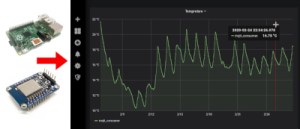
Raspberry Pi and esp8266 to give fancy graphs
Hey all,
This project started from a hackathon, where the organiser dumps a pile of esp8266 chips and sensors on a table that were up for grabs. I wanted build something that would take about 10 seconds to assemble and flash, and would be functional anywhere, no hardcoding of wifi settings and servers. Since I am the developer of CustomPiOS I also made a Raspberry Pi distro that has all the fancy dashboards pre-installed.
This work is also modular and written in a way you could build long lasting solutions, the code is all arranged so it’s easy to contribute and have a monitoring solution which is easy to customize.
What I am going to provide here is a set of tools, that would let you get pretty graphs from sensors with:
- NO coding required
- NO hardcoded wifi passwords or server settings
- NO soldering
- About 2-5 minutes assemble the hardware
- You get a standard which is supported in my dsitro and other devices. So you can use MQTT apps that are out there.
- Raspberry Pi image that sets up all the software that lets you see fancy graphs right away. Calling it MtigOS. It also automatically updates and is maintained.
- You are going to use Docker, without the need to know how to use Docker.
Cool tricks I am going to use:
- You press the reset button a couple of times to enter a web config interface available in an access point so you can set up your wifi and MQTT server
- I am saving you hosting this on a server and giving you the option to host this locally using a Raspberry Pi image.
- docker + docker-compose that sets up a database and graphing tool – everything is already all set up. So if you want a server instead of a Raspberry Pi you can use that too
no need to know docker.
It looks like this in the end:

Pre-shipped Grafana Dashboard

Temperature and PH sensor in an ice cream box, with a USB hub powering multiple sensors
I am using this solution for hydroponics system for PH and temperature, but can also use it to measure the temperature in my oven, soil moisture, basically anything you want. I would be happy to add additional sensors.
Hardware
All the firmware is available in this github repo
The hardware used is:
- ESP8266 – Any setup, I used both the WEMOS and NodeMCU 0.9/1.0 – Just make sure it has a reset button because some models don’t.
- Your local home network, basically you need to give the ESP8266 access to the Internet
- Sensors – Current sensors supported:
- Temperature sensor using DS18B20
- PH sensor – similar to this one
- Moisture sensor – get a capacitor sensor that looks like this, the cheap ones die after about 24 hours
Assembly
1. Temperature sensor

ESP and DS18B20 sensor
2. PH sensor
First, you need to calibrate the driver of the PH sensor as explained in the “PH probe module Offset and how to use it” section of this guide. You need to do it once.
Then assemble it as explained here:

ESP and PH sensor
3. Moisture sensor

Firmware
You need the following Arduino libraries installed, all can be installed from the LibraryManager:
- ArduinoJson 5, and LOWER
- DoubleResetDetect
- WifiManager
- Arduino plug and go library for the Maxim (previously Dallas) DS18B20 – For temp sensor
You also need the esp8266 boards from the Board manager as well.
Flash the firmware for the sensor you are using:
1. Temperature sensor ino – raw
2. PH sensor ino – raw
3. Moisture sensor ino – raw
Important: Make sure you set the Flash size to a number larger than 0.
You can set it by going in the Arduino IDE to Tools>Flash Size>4MB (FS:2MB).

How to set The ESP8266 to save the settings to its filesystem
That’s all the installation on the Arduino side of things. Lets move to the server side, we will return to what to do with your ESP8266 once we have a server set up.
Software
I am going to go a bit in to detail of what is going on below, you can ignore it. All you really need to know in this step is that if you flash the Raspberry Pi image, you will have all of this pre-installed and set up.
Raspberry Pi Method – Recommended
- Unzip the image and install it to an SD card like any other Raspberry Pi image
- Configure your WiFi by editing mtigos-wpa-supplicant.txt at the root of the flashed card when using it like a flash drive
- Boot the Pi from the SD card
- Hostname is mtigos (not raspberrypi as usual), username: pi and initial password is: raspberry
- After a few minutes you should be able to access http://mtigos.local/
Now that you have a server you need to set up your ESP8266 to connect to it, you can skip to that section below.
MtigOS github page with instructions how to flash a Pi image and set up wifi
Rather use your own server or anything with Docker and docker-compose installed
Then you can just use the docker-compose from the repo. I am going to assume you already have docker and docker-compsose installed. If you don’t know how to use them – just use the Raspberry Pi MtigOS image.
Download this repo and you will have all the docker-compose.yaml and setting files. Note that unlike the Raspberry Pi the port is port 3000 and not port 80 for the web service.
Some detail about what is installed
To display nice graphs we are going to use Grafana. I am going to use a popular solution which is:
- Sensor pushes data to MQTT
- Telegraf pushes data from MQTT to InfluxDB
- Grafana displays the data from InfluxDB
Installing and setting all this up is something I am going to save all the work for you. Just flash a RasperryPi with a distro with everything pre-installed.
I am calling it MtigOS ( Mosquitto, Telegraf, InfluxDB and Grafana ) OS.
Set Up the ESP8266 to Connect to your Network and MQTT server
Note that this step can be done by someone without any code of technical understanding this point. So you can give it to your friend, student etc.
Here is a video how to set up this phase (guide has an upgraded moisture sensor):
Text instructions:
- Press the ESP8266 button several times
- Search on your smartphone or phone for a wifi access point starting with ESP…
- Connect to it and then find the IP that you have. On android device you can do this by looking in the about section for the IP.
- Use the IP you found, for example 192.168.4.2 and replace the last digit with 1. So in that example it would be 192.168.4.1. Put that IP in your browser, you should get this page:
- Click on the button “configure wifi”
- Select you wifi SSID, insert your password
- In the same page fill in also your MQTT server address and the topic you want to publish to if you are using the Raspberry Pi image the server should be should be mtigos.local. and the topic should be to esp/moisture, esp/temp or esp/ph
- If you are using the PH sensor, here you will have an extra field that lets you set the calibration value of it. That is as explained in the calibration instruction I linked to above.
- This is important. Mtig/MtigOS has the default channels it listens to set as esp/moisture, esp/temp and esp/ph. So you must use these in the topic field. I put it as a setting because you can change this in grafana, or add multiple sensors this way. And because I am trying to avoid hardcoding. You can change which topics are saved to the database in telegraf.conf. And you will need to update your dashboards.
That’s it, you should have the Arduino publishing to MQTT, and Telegraf saving the data to InfluxDB.
Testing Tour Sensor is Reporting to the MQTT Server
This is a helpful step to make sure your sensor is indeed reporting to the server. You can look at it directly without looking at the graph, and it will confirm you got the previous steps right.
Its also convenient because it means you can check your smartphone for live status of the sensor readouts.
You can use a desktop tool such as MQTT.fx or an Android app such as IoT MQTT Panel. Anything you can put the Raspberry Pi/server IP address and then subscribe to the topic your ESP is publishing to (the topic you set it step 6.2 in the previous section.

IoT MQTT Panel from an android phone

MQTT.fx settings dialog

MQTT.fx receiving moisture information
Accessing the Grafana Dashboard
If you are using the MtigOS Raspberry Pi image, you need to set to open in a browser (port 80) the Raspberry Pi IP address. Or hostname http://mtigos.local/ . It might take a few minutes to start because the Raspberry Pi needs to connect to the internet and download the latest software. It does that automatically, and you must have internet available for the Pi for it to install the software.
The default user is “admin”. And the default password is also “admin”. After first login you will be asked to set a new password.
To reach the dashboard, click on “Home”, you should see under “general” a dashboard named “sensors”. The dashboard and telegraf are listening to the topics esp/moisture, esp/temp and esp/ph. You can edit and save anything you want in the dashboard.

Sensors dashboard once you click on “Home”
You should see a dashboard like this:

Sensors Dashboard
Note you can edit and save any changes in the dashboard and create new ones. If you made useful ones you can export them and contribute to the default ones.
That’s it! You have a modern customizable IOT monitoring service, that is storing your esp data in to a database, which you can build a set up anywhere you like, and let other people use. Its using open source components. If you have the coding ability it’s easy to add support for new sensors.
I am using a setup of this for my hydroponics. Here is a photo of it on my balcony:

My hydroponics system in the first month

My hydroponics system today, 5 months later
Update: Adding new graphs
I was asked by the author of whatimade.today to explain how to add new sensors Grafana.
Indeed you can add them!
There are 2 things you can use to extend new sensors.
1. Changing the graphs + Listening to different MQTT topics
If you want to add new graphs you need to do two things – listen to new topics on telegraf, and then change the query for them.
Editing the graphs to use a different topic is pretty easy, you can click on them and duplicate, or simply edit the existing:

Clicking on the top of the graph opens a menu to duplicate or edit it
Once you edit it you can change the query. Its an influxdb database, which uses InfluxQL language. If all you want is to change the topic, you can just change it in the existing query:

This is the edit dialog, you can change ‘topic = ‘esp/temp’ to any other topic
If you know how to edit these queries, you can also change the graph completely here and add new functionality. Grafana comes with many types of graphs.
If you made a cool graph, we can also add it back in to MtigOS so everyone can use it. Simply export it by going to settings > json model. There you will have the code used to make the graph.
MtigOS is open source, and the graphs shipped are available here.
Listening to different MQTT topics
Next – make Telegraf save the data in the the database. Information from MQTT is not saved, only published. Telegraph is the tool that passes stuff from MQTT to the database. Only the topics you tell it to log. That setting is on the RaspberryPi on /boot/docker-compose/mtig/telegraf.conf.
The file is placed on the boot partition because that means you can open it from windows.
Change this section to list any topics you want added (or removed).
  ## Topics to subscribe to
  topics = [
    "esp/moisture",
    "esp/temp",
    "esp/ph",
  ]
If you want, for example, a new sensor esp/light. You can just add it like this:
 ## Topics to subscribe to
topics = [
"esp/light",
"esp/moisture",
"esp/temp",
"esp/ph",
]
2. New ESP sketches that uses different libraries
If you have a new sensor, that you want to use with your ESP, with its own driver you will need to write code for it to work.
Note: if you want to read the analog sensor, you can just use the source from moisture sensor sketch, which just spits out the result from analog. However, if your sensor uses a library, or you want something more complicated, you can and will have to edit the ESP code. But you have a good template to base off in this repo. I will be happy to add new sensors to support, and as always –
Code contributions are welcome!
]]>
Sous vide pot with temperature sensor
Hey all,
So I’ve been cooking sous vide a few months now, with a sous vide I built myself. Its connected to a RaspberryPi and can be controlled via the web or telegram.
No soldering required!
Flash a ready made image to the Pi!
Bill of materials
- Slow cooker (crockpot) with a ‘high’ option. You can get them second hand, they are pretty cheap. Make sure it has no digital control.
- Raspberry Pi, even version 1 should work – also an SD card and power supply for the Pi.
- Pi Plate prototype board. Make sure you get one that matches your Raspberry Pi footprint if you are re-using an old Pi.
- Solid state relay that can handle mains
- Power cables
- Data cable to connect the relay to the Pi
- Power socket and power connector for your country – get locally so it fits your country standard.
- Water resistant temperature sensor DS1820 x2 – Get a spare one so you can measure the temperature difference and make sure your sous vide is uniformly heated.
- Important – 3D printed enclosure for raspberrypi (Raspberry Pi 1) and enclosure for the relay – you are mixing water and electricity in a kitchen, don’t be an idiot.
Assembly
- Build the following construction from the relay. You need phase to go via the relay, and in to the sous vide. Please look at this chart to understand what cable is equivalent in your country.

Relay assembly – brown writes is phase
- Close up the relay in its box, and attach the power plugs
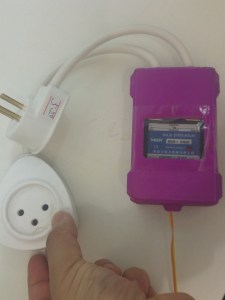
Relay in its case and power sockets in place, transparent sticky tape protects case
- Wire the temperature sensor DS1820 to GPIO pin 4 (you can use one on the screw terminal and another on the jumper slot, the second one is only to make sure you have a working sous vide.
- Connect SSR – terminal to ground, and + terminal to GPIO 17 (you can pick other GPIOs if you want).

Raspberypi wiring . Two temp sensors on GPIO 4, one Solid state relay (SSR) on GPIO 17
- plug the relay in the your power supply and plug your slow cocker to it. DANGER: Make sure your connections are right with a multimeter before. If you are unsure don’t do this. Mains power can kill!
- That’s it!


Rasepberrypi and relay in cases
Sous vide pot with temperature sensor
Software
I have built a distro called CraftBeerPiOS based on CraftBeerPi 2.2. Why 2.2 and not 3? Because there is an issue with the license. I would have picked something else, but Manuel the developer clearly writes in the README that CraftBeerPi is open source. Its dodge I know, I would welcome someone rewriting something like this. I would help build a distribution.
Why telegram? (which is optional)
I found that telegram was much faster and handy while I am in the kitchen, or if I want to turn the sous vide on before I come home. So I warmly recommend it over CraftBeerPi’s interface. I will mark all its step as optimal in case you don’t want it.
Anyway,
- All you got to do is just flash the img to the Pi. Which can be downloaded here. It has both CraftBeerPi and a telegram bot pre-install. The bot is written by me and is open source.
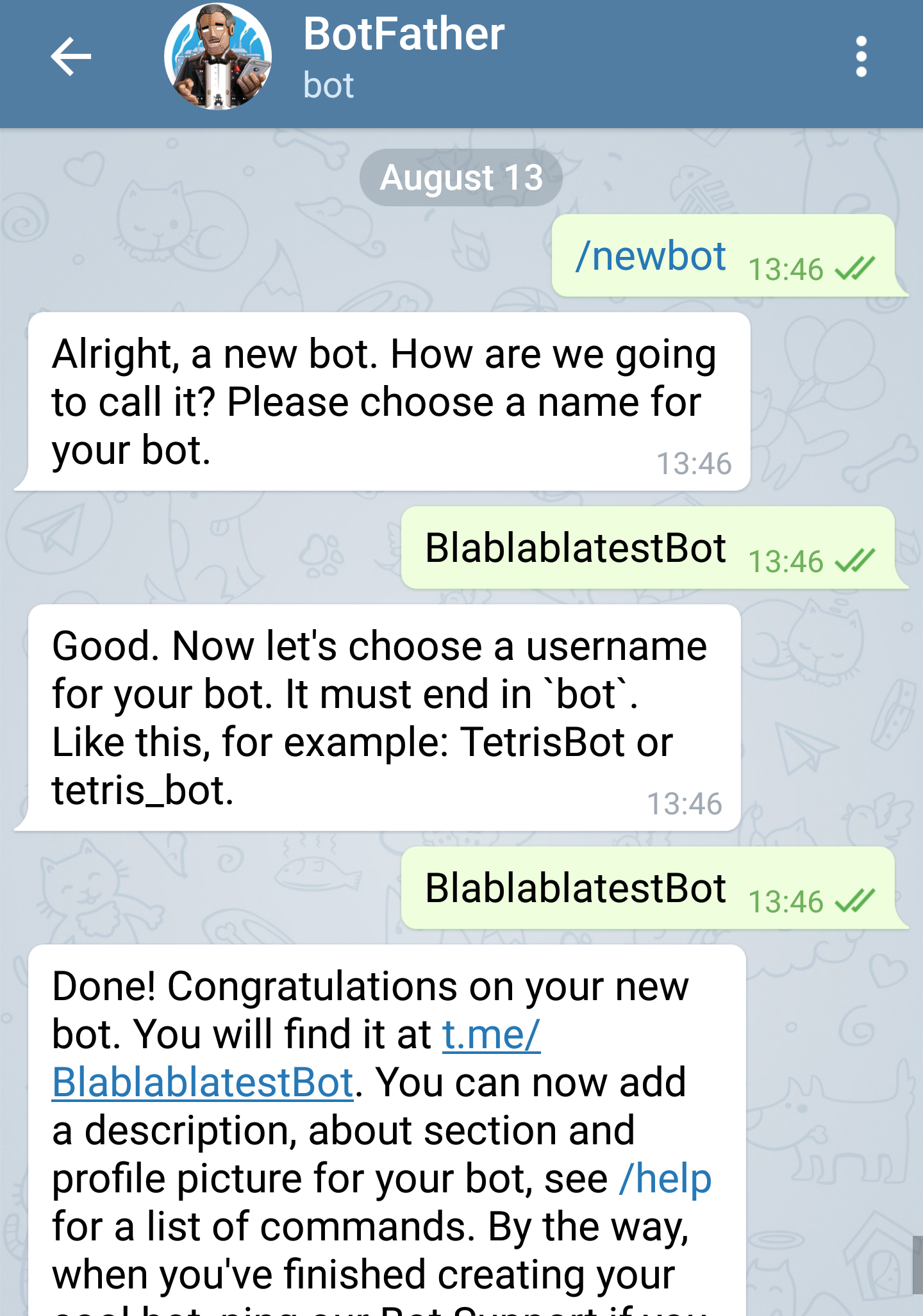
- [optional telegram] Create a telegram bot using the botfather here is an explanation how to do this. Its really easy – basically you text a bot the command /newbot, you are asked a few questions and get an API token, you place this token in the file /boot/config.ini where its asked for.

Setting a new bot
- Open the sdcard /boot partition, you can do this on windows. And edit the file /boot/craftbeerpios-wpa-supplicant.txt
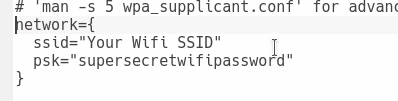
Set wifi setting you need to change
- [optional telegram] Add your telegram token

config.ini, Telegram token goes here
- Pop the SD card in the Pi and boot it
- You might want to attach a screen on first boot and make sure everything went well. If it did, you should have on your network a service on http://craftbeerpi.local:5000 .If you can’t find the hostname try the Raspberrypi’s IP address. Depending on your network router it might not work.
- Follow on that link the wizard to set up your temperature, relay, and kettle.

CraftBeerPi all set up with a thermometer and relay
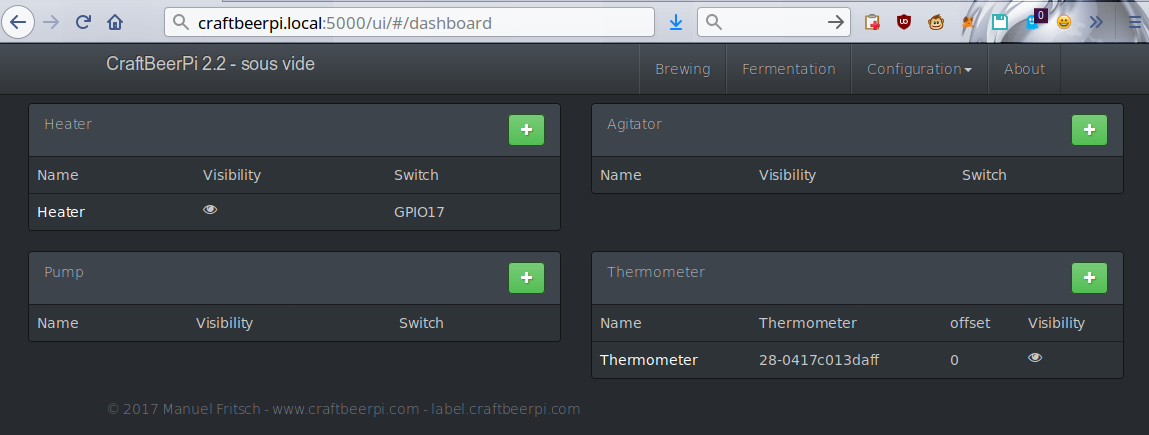
Hardware setting in craftbeerpi

How the kettle configuration looks
- [optional telegram] Text your new telegram bot the command /start this should make your telegram user appear in the telegram control panel located at http://craftbeerpi.local:5001.
- Login default user is admin, password 1234
- [optional telegram] Set yourself as an admin, otherwise you can’t control your sous vide. This is for security reasons.

CraftbeerPiBot access control
- [optional telegram] Send /help to the bot to see the available commands. You can set the sous vide temperature, turn it on and off.

Sous vide bot list of commands


Thats it, enjoy! Share recipes!

Sous vide pork belly cooked in maple and liquid smoke and rosemary for 18 hours at 72C

violinmakers.org logo
Hey all,
So I was going to post here about a violin I 3D printed and built, and then realised that this is a community waiting to happen. So I created a discourse forum called violinmakers.org. A place for people to share knowledge on how to build electric violin cellos and anything in between.
Electric violins today are usually heavier than their acoustic counterparts, 3D printing and carbon fibre makes it possible to print lighter violins with complex parts. Instead of spending a lot of time carving them in to heavy wood. The need is growing since nearly all music today is amplified.
The challenge is, that while modern instruments have been developing effects and new sounds, acoustic violins have been acoustic for the past 400 years. The years perfected acoustic violins, but this specialisation does not fully translate to electric violins, furthermore it makes it hard to top the rich sound of an acoustic. After all it takes more than a decade of practice to become an “ok” violin luthier.
Recently we achieved the ability to rapid prototype, plus we can learn from other instruments, such as electric guitars. Which have been creating amazing sound modelling techniques. With them I hope we can create new instruments. This is why I created the community.
There is already quite a long list of designs out there, shared in thingiverse mostly, but with little documentation on how to build them, and there is a lack of tests with pickups.
Pickups are am issue
Today, all available violins in the market use a piezo based pickup, this is because piezo pickups sense sound, they are mechanical. They were naturally chosen because they deliver a more acoustic sound, called electro-acoustic. Electric guitars use magnetic pickups, which have a more clear signal from the strings, but loose the acoustic sounds, which is compensated with amps and pedals. I have been playing with those too on violins, it might work. I know it was tested and abandoned around early 2000’s, but things have changed since. There are many more ways to experiment.
I hope that this forum will grow to be a larger community. At the moment I am the only one posting stuff, but I can already see traffic.
Comments, threads and more are welcome, and encouraged in the forum here, because the traffic should go there.
]]>