
•
Tested: Gobuster 3.x
You would be surprised at what people leave unprotected on a web server. An initial step in attacking a web application is Recon, and part of that entails enumerating hidden directories and files. Brute forcing web directories and filenames on a web server can often reveal unprotected web applications, scripts, old configuration files, and many other interesting things that should not be available to the public. It is even possible to brute force virtual hosts to find hidden hostnames such as development sites or admin portals.
Tools like Gobuster are commonly used during reconnaissance to brute force directories, discover subdomains and identify hidden infrastructure.
Gobuster Installation
Written in Go, this is a command-line tool for enumerating hidden files, subdomains along with the remote directories and virtual hosts. Using the command line it is simple to install.
For version 2 its as simple as:
$ sudo apt install gobuster
However, the Linux package commonly is not be the latest version of Gobuster. Check Repology: the packaging hub, which shows the latest package version. The Github repository shows a newer version V3.8.2
Under "Easy installation" on the github page the options to install are binary releases, a Go install, and Building from source. For this install let's play around with the Go install. Gobuster needs Go to be at least v1.24
Setting up a Go environment (optional)
Download the GO install from here: https://go.dev/dl/
change to the directory where Downloads normally arrive and do the following;
--> extract
$ sudo tar xvzf go1.26.0.linux-amd64.tar.gz
--> change permissions
$ sudo chown -R root:root ./go
--> move to local directory
$ sudo mv -v go /usr/local
Go no longer requires manually setting GOPATH. Since Go 1.11, module support is built-in and the default workspace (~/go) is configured automatically.
After extracting Go to /usr/local/go, add Go and the default binary directory to your PATH.
Add the following lines to .bashrc. Located in your home directory with ls -la ~ | grep bash.
--> adds the Go compiler directory to your PATH so thegocommand works globally. echo 'export PATH=$PATH:/usr/local/go/bin' >> ~/.bashrc --> adds the default Go binary directory (~/go/bin) so installed tools likegobustercan run. echo 'export PATH=$PATH:$HOME/go/bin' >> ~/.bashrc --> tells your current shell to re-read.bashrcand apply changes immediately. source ~/.bashrc
Go installs compiled tools to ~/go/bin by default. Your system does not automatically search this directory, so unless it is is your PATH, gobuster will not run.
To check its all worked and the Go environment is set up:
$ go version
go version go1.26.0 linux/amd64
Now with the Go environment confirmed now install Gobuster.
$ go install github.com/OJ/gobuster/v3@latest
check Gobuster is installed with:
$ gobuster -v
3.8.2

How to use Gobuster
Gobuster is now installed and ready to use. The rest of the tutorial is how to use Gobuster to brute force for files and directories.
Gobuster commands
Gobuster has a variety of commands to use as shown below. This tutorial focuses on 3: DIR, DNS, and VHOST.
To see a general list of commands use: gobuster -h Each of these modes then has its own set of flags available for different uses of the tool. For example for more info on flags/commands to use with dir use gobuster -h dir.
 $ gobuster -h
Usage:
  gobuster [command]

Available commands:
  dir         Uses directory/file enumeration mode
  vhost       Uses VHOST enumeration mode (hint: use the IP address at the URL parameter)
  dns         Uses DNS subdomain enumeration mode
  fuzz        Uses fuzzing mode. Replaces the keyword FUZZ in the URL, headers and req body.
  tftp        Uses TFTP enumeration mode
  s3          Uses aws bucket enumeration mode
  gcs         Uses gcs bucket enumeration mode
  help, h     Shows list of commands or can get help about any command eg. gobuster -h dir
Wordlists
An essential flag for gobuster is -w as tools like Gobuster and FFuf do not discover directories by magic, they request paths from a wordlist. The quality and size of the wordlist determine what you find.
Wordlists can be obtained from various places. Depending on the individual setup, wordlists may be preinstalled or found within other packages, including wordlists from Dirb or Dirbuster. The ultimate source and "Pentesters Companion" is SecLists - https://github.com/danielmiessler/SecLists which is a compilation of numerous lists held in one location.
Small wordlists:
A small list such as common.txt with approx 4,500 entries ( located in SecLists/Discovery/Web-Content/) quickly reveals obvious directories like admin, login or backup
Larger Lists
Larger lists can uncover endpoints, hidden API's , dev environments and other hidden resources, but they also take longer and generate more HTTP requests creating a noisier footprint in server logs and security monitoring systems.
Examples of commonly used larger lists are:
- directory-list-2.3-medium.txt approx 220,000 entries
- raft-large-directories.txt with approx 550,000 entries
Choosing a Wordlist
Different Gobuster modes require different types of wordlists. The following examples are commonly used from the SecLists collection.
| Mode | Purpose | Wordlist |
|---|---|---|
dir |
Discover hidden directories and files on a web server | SecLists/Discovery/Web-Content/directory-list-2.3-medium.txt |
dns |
Enumerate subdomains via DNS lookups | SecLists/Discovery/DNS/subdomains-top1million-5000.txt |
vhost |
Discover virtual hosts hosted on the same web server | SecLists/Discovery/DNS/subdomains-top1million-5000.txt |
It can also be worth creating a wordlist specific to the job at hand using a variety of resources.
Gobuster DIR command
The DIR mode is used for finding hidden directories and files.
To find additional flags available to use gobuster -h dir
$ gobuster -h dir
NAME:
gobuster dir - Uses directory/file enumeration mode

USAGE:
  gobuster dir [command options]

OPTIONS:
   --url value, -u value                                    The target URL
   --cookies value, -c value                                Cookies to use for the requests
   --username value, -U value                               Username for Basic Auth
   --password value, -P value                               Password for Basic Auth
   --follow-redirect, -r                                    Follow redirects (default: false)
   --headers value, -H value [ --headers value, -H value ]  Specify HTTP headers, -H 'Header1: val1' -H 'Header2: val2'
   --no-canonicalize-headers, --nch                         Do not canonicalize HTTP header names. If set header names are sent as is (default: false)
   --method value, -m value                                 the password to the p12 file (default: "GET")
   --useragent value, -a value                              Set the User-Agent string (default: "gobuster/3.8.2")
   --random-agent, --rua                                    Use a random User-Agent string (default: false)
   --proxy value                                            Proxy to use for requests [http(s)://host:port] or [socks5://host:port]
   --timeout value, --to value                              HTTP Timeout (default: 10s)
   --no-tls-validation, -k                                  Skip TLS certificate verification (default: false)
   --retry                                                  Should retry on request timeout (default: false)
   --retry-attempts value, --ra value                       Times to retry on request timeout (default: 3)
   --client-cert-pem value, --ccp value                     public key in PEM format for optional TLS client certificates]
   --client-cert-pem-key value, --ccpk value                private key in PEM format for optional TLS client certificates (this key needs to have no password)
   --client-cert-p12 value, --ccp12 value                   a p12 file to use for options TLS client certificates
   --client-cert-p12-password value, --ccp12p value         the password to the p12 file
   --tls-renegotiation                                      Enable TLS renegotiation (default: false)
   --interface value, --iface value                         specify network interface to use. Can't be used with local-ip
   --local-ip value                                         specify local ip of network interface to use. Can't be used with interface
   --wordlist value, -w value                               Path to the wordlist. Set to - to use STDIN.
   --delay value, -d value                                  Time each thread waits between requests (e.g. 1500ms) (default: 0s)
   --threads value, -t value                                Number of concurrent threads (default: 10)
   --wordlist-offset value, --wo value                      Resume from a given position in the wordlist (default: 0)
   --output value, -o value                                 Output file to write results to (defaults to stdout)
   --quiet, -q                                              Don't print the banner and other noise (default: false)
   --no-progress, --np                                      Don't display progress (default: false)
   --no-error, --ne                                         Don't display errors (default: false)
   --pattern value, -p value                                File containing replacement patterns
   --discover-pattern value, --pd value                     File containing replacement patterns applied to successful guesses
   --no-color, --nc                                         Disable color output (default: false)
   --debug                                                  enable debug output (default: false)
   --status-codes value, -s value                           Positive status codes (will be overwritten with status-codes-blacklist if set). Can also handle ranges like 200,300-400,404
   --status-codes-blacklist value, -b value                 Negative status codes (will override status-codes if set). Can also handle ranges like 200,300-400,404. (default: "404")
   --extensions value, -x value                             File extension(s) to search for
   --extensions-file value, -X value                        Read file extension(s) to search from the file
   --expanded, -e                                           Expanded mode, print full URLs (default: false)
   --no-status, -n                                          Don't print status codes (default: false)
   --hide-length, --hl                                      Hide the length of the body in the output (default: false)
   --add-slash, -f                                          Append / to each request (default: false)
   --discover-backup, --db                                  Upon finding a file search for backup files by appending multiple backup extensions (default: false)
   --exclude-length value, --xl value                       exclude the following content lengths (completely ignores the status). You can separate multiple lengths by comma and it also supports ranges like 203-206
   --force                                                  Continue even if the prechecks fail. Please only use this if you know what you are doing, it can lead to unexpected results. (default: false)
   --help, -h                                               show help
Flags
The 2 flags required to run a basic DIR scan are -u -w. This example uses common.txt from the SecList wordlists.
user@matrix:$ gobuster dir -u https://example.com -w /wordlists/Discovery/Web-Content/common.txt

Example results
===============================================================
Gobuster v3.8.2
by OJ Reeves (@TheColonial) & Christian Mehlmauer (@firefart)
===============================================================
[+] Url:                     https://example.com
[+] Method:                  GET
[+] Threads:                 10
[+] Wordlist:                /wordlists/Discovery/Web-Content/common.txt
[+] Negative Status codes:   404
[+] User Agent:              gobuster/3.8.2
[+] Timeout:                 10s
===============================================================
Starting gobuster in directory enumeration mode
===============================================================
/assets
/css
/download
Threads
Gobuster is fast, with hundreds of requests being sent using the default 10 threads. This speed can create problems with the system it is running on. It can be beneficial to drop the thread count down to 4.

Delay option
Additionally, adding the --delay option will slow the requests between each thread. Useful for when testing against a system that has rate-limiting or WAF.
For example, if threads is set to 4 and --delay to 1s, the total request rate is roughly 4 requests per second.
$ gobuster dir -u https://example.com -w /wordlists/Discovery/Web-Content/big.txt -t 4 --delay 1s -o results.txt
Large wordlists and aggressive scans often generate a lot of output. Filtering helps reduce noise and makes real findings easier to identify.
Filtering
Filtering results help reduce noise and makes findings easier to identify. In the example below the -s 200,301,302,403 tells Gobuster to show only responses with those HTTP status codes.
user@matrix:$ gobuster dir -u https://example.com -w /wordlists/Discovery/Web-Content/directory-list-2.3-medium.txt -s 200,301,302,403 -t 4 --delay 1s -o results.txt
Including 403 can reveal real but restricted resources, but on some targets it may add noise if the server returns 403 for non-existent paths.
Some web applications return 200 OK for every request using a catch-all error page.
This can cause Gobuster to report many false positives.
- Request a random path (e.g.
/random-test-path) - Note the response size
- If multiple random paths return the same size
- Exclude it with
--exclude-length
Results
Results are shown in the terminal, or use the -o option to output results to a file example -o results.txt
user@matrix:$ gobuster dir -u https://example.com -w /wordlists/Discovery/Web-Content/directory-list-2.3-small.txt -t 4 --delay 1s -o results.txt

===============================================================
Gobuster v3.8.2
by OJ Reeves (@TheColonial) & Christian Mehlmauer (@firefart)
===============================================================
[+] Url:                     https://example.co.uk/
[+] Method:                  GET
[+] Threads:                 4
[+] Delay:                   1s
[+] Wordlist:                /wordlists/Discovery/Web-Content/directory-list-2.3-small.txt
[+] Negative Status codes:   404
[+] User Agent:              gobuster/3.8.2
[+] Timeout:                 10s
===============================================================
2026/03/08 12:12:19 Starting gobuster in directory enumeration mode
===============================================================
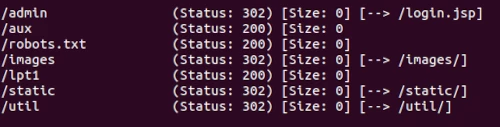
/admin
/aux
===============================================================
2026/03/08 12:46:57 Finished
===============================================================
Took a while, but by filtering the results to an output file its easy to see and retain for future enumerating. A few more interesting results this time.
Other DIR flag examples
Cleaner output
The results above show a normal output with status codes. To hide status codes from your output use -n
same results, just a cleaner output.
/admin
/login
/backup
File extension
An example of another flag to use is the -x File extension(s) to search for. This is for when you just want specific file extension or extensions. Such as, -x .php, .txt .
user@matrix:$ gobuster dir -u https://example.com -w /wordlists/Discovery/Web-Content/big.txt -x php, txt -t 4 --delay 1s -o results.txt
Continue enumerating
Continue to enumerate results to find as much information as possible. Run gobuster again with the results found and see what else appears. Keep digging to locate those hidden additional content deeper in the application.
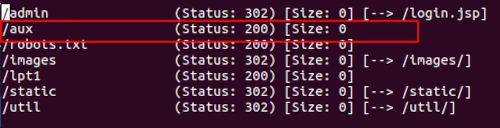
$ gobuster dir -u https://example.com/aux -w /wordlists/Discovery/Web-Content/big.txt -t 4 --delay 1s -o results.txt
Gobuster DNS command
Use the DNS command to discover subdomains with Gobuster. To see the options and flags available specifically for the DNS command use: gobuster -h dns
user@matrix:$ gobuster -h dns
NAME:
gobuster dns - Uses DNS subdomain enumeration mode
USAGE:
  gobuster dns [command options]

OPTIONS:
   --domain value, --do value            The target domain
   --check-cname, -c                     Also check CNAME records (default: false)
   --timeout value, --to value           DNS resolver timeout (default: 1s)
   --wildcard, --wc                      Force continued operation when wildcard found (default: false)
   --no-fqdn, --nf                       Do not automatically add a trailing dot to the domain, so the resolver uses the DNS search domain (default: false)
   --resolver value                      Use custom DNS server (format server.com or server.com:port)
   --protocol value                      Use either 'udp' or 'tcp' as protocol on the custom resolver (default: "udp")
   --wordlist value, -w value            Path to the wordlist. Set to - to use STDIN.
   --delay value, -d value               Time each thread waits between requests (e.g. 1500ms) (default: 0s)
   --threads value, -t value             Number of concurrent threads (default: 10)
   --wordlist-offset value, --wo value   Resume from a given position in the wordlist (default: 0)
   --output value, -o value              Output file to write results to (defaults to stdout)
   --quiet, -q                           Don't print the banner and other noise (default: false)
   --no-progress, --np                   Don't display progress (default: false)
   --no-error, --ne                      Don't display errors (default: false)
   --pattern value, -p value             File containing replacement patterns
   --discover-pattern value, --pd value  File containing replacement patterns applied to successful guesses
   --no-color, --nc                      Disable color output (default: false)
   --debug                               enable debug output (default: false)
   --help, -h                            show help
DNS example
$ gobuster dns --domain example.com --resolver 8.8.8.8 -w wordlists/SecLists/Discovery/DNS/subdomains-top1million-5000.txt -t 4 --delay 1s -q -o results.txt
Breaking this down.
dns: DNS enumeration mode--domain: the target domain.--resolver--resolver string : Use custom DNS server (format server.com or server.com:port)-w--wordlist string : Path to the wordlist-t: number of threads--delay: wait time between requests per thread-qDon't print the banner and other noise (cleans up the terminal output)-o--output string : Output file to write results to
Recent Gobuster versions use --domain (or --do) to specify the target domain. The -d shorthand is reserved for the --delay option.
The --resolver option specifies which DNS server Gobuster should use for lookups.
Using a fast public resolver can improve performance and avoid restrictions imposed by local DNS servers.
DNS enumeration from your own machine shows what is visible from your network.
To see the external attack surface from the internet, the HackerTarget Domain Profiler performs DNS, IP, ASN and infrastructure analysis automatically without needing to build custom wordlists or run multiple tools.
Results
In this case, as the flag -q for quiet mode was used, only the results are shown, the Gobuster banner and other information are removed.
Found: www.example.com
Found: nagios.example.com
Found: dev.example.com
Found: auto.example.com
The same search without the flag -q obviously gives the same results - and includes the banner information.
===============================================================
Gobuster v3.8.2
by OJ Reeves (@TheColonial) & Christian Mehlmauer (@firefart)
===============================================================
[+] Domain:     example.com
[+] Threads:    4
[+] Delay:      1s
[+] Resolver:   8.8.8.8
[+] Timeout:    1s
[+] Wordlist:   /home/wordlists/SecLists/Discovery/DNS/subdomains-top1million-5000.txt
===============================================================
2026/03/18 16:20:35 Starting gobuster in DNS enumeration mode
===============================================================

Found: www.example.com
Found: nagios.example.com
Found: dev.example.com
Found: auto.example.com

===============================================================
2026/03/18 16:20:37 Finished
===============================================================
Gobuster VHost command
The vhost command discovers Virtual hostnames on target web servers. Virtual hosting is a technique for hosting multiple domain names on a single server.
Exposing hostnames on a server may reveal supplementary web content belonging to the target. VHOST mode tests different Host headers against the target web server to identify additional virtual hosts that may be configured on the same IP address.
To brute-force virtual hosts, use the same wordlists as for DNS brute-forcing subdomains.
Similar to brute forcing subdomains eg. url = example.com, vhost looks for dev.example.com or beta.example.com etc.
For options and flags available use gobuster -h vhost
user@matrix:$ gobuster vhost --help
NAME:
   gobuster vhost - Uses VHOST enumeration mode (you most probably want to use the IP address as the URL parameter)

USAGE:
  gobuster vhost [command options]

OPTIONS:
   --url value, -u value                                    The target URL
   --cookies value, -c value                                Cookies to use for the requests
   --username value, -U value                               Username for Basic Auth
   --password value, -P value                               Password for Basic Auth
   --follow-redirect, -r                                    Follow redirects (default: false)
   --headers value, -H value [ --headers value, -H value ]  Specify HTTP headers, -H 'Header1: val1' -H 'Header2: val2'
   --no-canonicalize-headers, --nch                         Do not canonicalize HTTP header names. If set header names are sent as is (default: false)
   --method value, -m value                                 the password to the p12 file (default: "GET")
   --useragent value, -a value                              Set the User-Agent string (default: "gobuster/3.8.2")
   --random-agent, --rua                                    Use a random User-Agent string (default: false)
   --proxy value                                            Proxy to use for requests [http(s)://host:port] or [socks5://host:port]
   --timeout value, --to value                              HTTP Timeout (default: 10s)
   --no-tls-validation, -k                                  Skip TLS certificate verification (default: false)
   --retry                                                  Should retry on request timeout (default: false)
   --retry-attempts value, --ra value                       Times to retry on request timeout (default: 3)
   --client-cert-pem value, --ccp value                     public key in PEM format for optional TLS client certificates]
   --client-cert-pem-key value, --ccpk value                private key in PEM format for optional TLS client certificates (this key needs to have no password)
   --client-cert-p12 value, --ccp12 value                   a p12 file to use for options TLS client certificates
   --client-cert-p12-password value, --ccp12p value         the password to the p12 file
   --tls-renegotiation                                      Enable TLS renegotiation (default: false)
   --interface value, --iface value                         specify network interface to use. Can't be used with local-ip
   --local-ip value                                         specify local ip of network interface to use. Can't be used with interface
   --wordlist value, -w value                               Path to the wordlist. Set to - to use STDIN.
   --delay value, -d value                                  Time each thread waits between requests (e.g. 1500ms) (default: 0s)
   --threads value, -t value                                Number of concurrent threads (default: 10)
   --wordlist-offset value, --wo value                      Resume from a given position in the wordlist (default: 0)
   --output value, -o value                                 Output file to write results to (defaults to stdout)
   --quiet, -q                                              Don't print the banner and other noise (default: false)
   --no-progress, --np                                      Don't display progress (default: false)
   --no-error, --ne                                         Don't display errors (default: false)
   --pattern value, -p value                                File containing replacement patterns
   --discover-pattern value, --pd value                     File containing replacement patterns applied to successful guesses
   --no-color, --nc                                         Disable color output (default: false)
   --debug                                                  enable debug output (default: false)
   --append-domain, --ad                                    Append main domain from URL to words from wordlist. Otherwise the fully qualified domains need to be specified in the wordlist. (default: false)
   --exclude-length value, --xl value                       exclude the following content lengths. You can separate multiple lengths by comma and it also supports ranges like 203-206
   --exclude-status value, --xs value                       exclude the following status codes. Can also handle ranges like 200,300-400,404.
   --domain value, --do value                               the domain to append when using an IP address as URL. If left empty and you specify a domain based URL the hostname from the URL is extracted
   --force                                                  Force execution even when result is not guaranteed. (default: false)
   --exclude-hostname-length, --xh                          Automatically adjust exclude-length based on dynamic hostname length in responses (default: false)
   --help, -h                                               show help
As shown above the common flags are the same as DIR with the 2 essential flags being -u URL and -w wordlist. Not essential but useful -o output file and -t threads, -q for quiet mode to show the results only.
For virtual host discovery, DNS subdomain wordlists work best because virtual hosts often use the same naming conventions as subdomains.
Vhost example
user@matrix:$ gobuster vhost -u https://example.com -t 50 -w /wordlists/Discovery/DNS/subdomains-top1million-20000.txt
Results
===============================================================
Gobuster v3.8.2
by OJ Reeves (@TheColonial) & Christian Mehlmauer (@firefart)
===============================================================
[+] Url:          https://example.com
[+] Method:       GET
[+] Threads:      4
[+] Wordlist:     /wordlists/subdomains-top1million-5000.txt
[+] User Agent:   gobuster/3.8.2
[+] Timeout:      10s
===============================================================
2026/03/22 10:21:38 Starting gobuster in VHOST enumeration mode
===============================================================
Found: auto.example.com (Status: 200) [Size: 162]
Found: beta.example.com (Status: 200) [Size: 162]
Found: apache.example.com (Status: 200) [Size: 162]

===============================================================
2026/03/22 10:21:39 Finished
===============================================================
If every hostname returns the same page, use --exclude-length to filter repeated responses and reduce false positives.
Common Gobuster Pitfalls
When running Gobuster in real environments the following issues are commonly encountered.
-
Wildcard DNS
Some domains return an IP address for every subdomain. When this happens Gobuster may report many false positives.
What to do: Confirm the behaviour by resolving a random hostname (e.g.random-test.example.com). If every hostname resolves to the same IP, the domain likely uses wildcard DNS. In this situation DNS brute forcing becomes unreliable. Focus on other enumeration techniques such as certificate transparency logs, known subdomain lists, or web content discovery usinggobuster dir. -
Catch-all web applications
Some web servers return200 OKfor every path using a custom error page, causing many false positives.
What to do: Request a random path and note the response size. If multiple random paths return the same size, filter it using--exclude-length.$ gobuster dir -u https://example.com -w wordlist.txt --exclude-length 1234
-
Wordlist choice
The wordlist determines what Gobuster can discover.
What to do: Start with a small list such ascommon.txtto identify obvious directories quickly, then move to larger lists likedirectory-list-2.3-medium.txtfor deeper enumeration. -
Scanning too aggressively
High thread counts can trigger rate limits, WAF protection or temporary IP blocking.
What to do: Reduce threads and add a delay between requests, for example-t 4 --delay 1s.
Conclusion
Gobuster is a useful tool for recon and increasing the knowledge of the attack surface. Start with a smaller size wordlist and move to the larger ones as results will depend on the wordlist chosen. Keep enumerating. Don't stop at one search, it is surprising what is just sitting there waiting to be discovered.