


Over the last decade, the Unity projects that have scaled cleanly across platforms and content updates have shared a common trait: their teams treated performance as an architectural concern, not as a cleanup task before launch. When performance is pushed to the end of production, every fix is more expensive, more political, and more fragile than it needs to be.
This article outlines a framework that has held up across large mobile titles, live-service games, and console/PC productions. Rather than listing isolated tips, it describes five architectural pillars that give technical leaders a shared language for performance. When these pillars are in place, profiling becomes a confirmation step, not a series of unpleasant surprises.
Where Teams Go Wrong: Why “Optimization Tips” Aren’t Enough
Many studios still approach optimization as a distinct phase. They build features first, then profile and fix. That pattern leads to predictable failure modes:
- Structural bottlenecks that are expensive or impossible to fix without refactors (for example, everything on one Canvas, no asset streaming strategy).
- Inconsistent results: optimizations that help in one build regress in the next because there is no shared mental model across teams.
- Wasted effort: engineers polishing code that barely shows up in profiles while systemic issues in rendering, UI, physics, or loading remain untouched.
A framework that is agreed at the technical leadership level changes this. It turns performance into a design constraint that art, engineering, and production all understand. The following pillars are intentionally opinionated; they reflect patterns that have worked repeatedly in production-scale Unity games, not theoretical possibilities.
The Five Pillars of Production-Scale Unity Architecture
Pillar 1: Render & Batching Strategy
Principle: Decide upfront how you will control draw calls and overdraw. Batching and atlasing define your practical limits on object count and scene complexity.
Where studios slip: Allowing every feature team to introduce new materials and textures “for convenience,” or mixing static and dynamic content in ways that prevent batching. Draw calls then scale linearly with content, and late-stage optimizations require painful reauthoring of assets.
Architectural decision: Treat “same material, same texture (or atlas)” as a hard rule for anything that appears in large numbers. Use shared materials aggressively. Treat dynamic batching as a legacy tool for narrow, low-end scenarios; on modern targets, its CPU costs often outweigh the benefits.
| Approach | Typical outcome | When it backfires |
|---|---|---|
| Single Canvas, mixed static/dynamic UI | Full Canvas rebuild on any change | Menus with many elements; HUDs with frequent updates |
| Sprite Atlas + shared material for environment | One draw call per atlas for static geometry | When not applied consistently across level art |
| Dynamic batching for many objects | Fewer draw calls, more CPU cost | Modern PC/console; complex meshes |
On real productions, moving to coherent atlases and shared materials frequently turns “unexplained” render spikes into a stable, predictable baseline. It is common to see scenes move from thousands of draw calls into the low hundreds purely through systematic material discipline.
Pillar 2: UI as a System (Not an Afterthought)
Principle: UI is a performance system in its own right. On many successful projects, most early performance work lands not in gameplay code but in menus, HUDs, and meta-game flows.
Where studios slip: One monolithic Canvas for entire screens; leaving ContentSizeFitter, LayoutGroup, or AspectRatioFitter active at runtime; binding layout recalculations directly to gameplay values that change every frame. These choices turn every UI update into a structural rebuild.
Architectural rules that scale:
- Treat “rebuild frequency” as a design axis. Separate static UI (frames, backgrounds, labels that rarely change) from dynamic UI (health, timers, scores, animated indicators).
- Use multiple Canvases so that high-frequency changes only invalidate the minimal part of the UI tree.
- Treat runtime layout components as authoring tools. Where possible, let them run once during setup and then disable them; avoid driving them from per-frame logic.
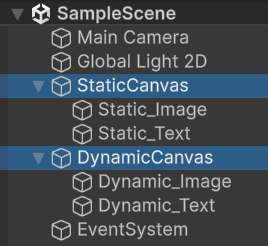
In practice, teams that institutionalize these rules see UI spikes in the profiler shrink from “unpredictable and unbudgeted” to “occasionally visible but well within their frame-time envelope,” even as UX becomes richer. Below is a comparison between single and multiple canvases.


Pillar 3: Physics as a Bounded Subsystem
Principle: Physics must have hard bounds. A project where rigidbody counts, collider complexity, and fixed-update work are allowed to grow unchecked will eventually hit invisible walls on low- and mid-tier hardware, regardless of how well other systems are engineered.
Where studios slip: Relying on Mesh Colliders for level geometry “for accuracy”; leaving far more rigidbodies awake than required; issuing raycasts and allocating per-frame in FixedUpdate for convenience. In profiles of such projects, Physics.Simulate and garbage collection often appear as dominant costs.
Architectural rules:
- Default to primitive colliders (Box, Sphere, Capsule) and use Mesh Colliders sparingly and intentionally.
- Enable and tune Rigidbody sleeping; do not allow large fields of static objects to remain active.
- Use the Layer Collision Matrix to systematically remove impossible or irrelevant collision pairs.
- Keep FixedUpdate logic allocation-free and bounded; anything unbounded belongs in a different system.

Best Practice: Profiler is your best friend to diagnose and resolve performance issues.

Physics debugger is also very helpful when it comes to showing your physics geometry.
Teams that take this seriously tend to see physics timings flatten out as content scales, instead of creeping upward with every new level and interaction. That is the kind of stability you need for long-lived projects that will ship to diverse hardware.
Pillar 4: Asset & Memory Architecture (Addressables & Pooling)
Principle: Loading and lifetime of assets and instances must be explicit. A project that “just loads what it needs” without clear ownership or lifetime models eventually encounters long load times, memory crashes, or both.
Where studios slip: Heavy use of Resources.Load(); no central view of who owns which assets; frequent Instantiate/Destroy calls in tight loops instead of pooling; reliance on “it seems fine on my machine” rather than measured memory behaviour.
Architectural rules:
- Use Addressables as the default for non-trivial content. Load by address, load asynchronously, and release when objects fall out of use.
- For any object type that is created and destroyed frequently (for example, projectiles, VFX bursts, UI list elements), budget and implement object pools early. Do not let temporary allocations dominate hot paths.
- Make memory budgets explicit. Know roughly how much texture, mesh, and audio memory you are prepared to spend per scene or per mode, and structure loading around those numbers.
Well-run live-service projects often credit this pillar with making their content updates sustainable. Once asset lifetime and instantiation patterns are designed rather than improvised, the risk of late-breaking memory regressions drops sharply.
Pillar 5: Build & Runtime Footprint (Size, Stripping, Platform)
Principle: Build size and runtime footprint are strategic levers. On mobile and emerging markets, megabytes directly affect acquisition and retention; on every platform, they influence update friction and operating margins.
Where studios slip: Shipping with default managed stripping; letting unused scenes and assets accumulate; using uncompressed or inappropriately compressed textures and audio; treating IL2CPP as “just a checkbox” rather than part of the overall footprint strategy.
Architectural rules:
- Align texture compression with target platforms (for example, ASTC/ETC2 for modern mobile, DXT for PC and many consoles), and keep maximum texture sizes under control.
- Rely on Build Reports and Addressables analysis to remove dead content systematically.
- Choose managed stripping levels deliberately, with explicit testing of reflection-heavy code paths and third-party libraries.
- Use IL2CPP for production builds where supported, both for performance and for a more controlled runtime surface.
Studios that treat build and runtime footprint as part of their architecture tend to ship smaller, faster-updating clients and have clearer stories for why the project is the size it is.
Measurable Impact
This framework can be tested in any reasonably mature project, you can validate it by asking a few simple questions in each pillar:
- Render and UI: Do we know our target draw-call and Canvas-rebuild budgets per scene, and can we show that we are within them on representative hardware?
- Physics: Can we bound rigidbody counts, collider complexity, and fixed-update work in a way that still holds six months from now?
- Assets and memory: Do we know who owns each major asset group and when it can be unloaded, and can we demonstrate stable memory behaviour under stress?
- Build: Can we explain, in a single page, what drives our build size and how it will change as content grows?
When the answers are clear and supported by profiler captures and build reports, you do not need diagrams to make the case. The project itself becomes the evidence.
Final Thoughts: From Tips to Architecture
Optimization in Unity should be measurement-driven and structure-first. Profile to find bottlenecks, but design so that the obvious bottlenecks are already constrained by your architecture. The framework here is one way to do that: five pillars that define how you think about rendering, UI, physics, assets, and build so that your next project does not depend on late heroics but on deliberate, shared decisions from the start.
Teams that adopt this mindset tend to ship more predictable builds, handle platform expansion with less drama, and maintain performance as new content and features arrive. That is what production-scale architecture looks like in practice.