Multiplexing
- FDM: the frequency spectrum is divided into frequency bands for individual signals.
- Wavelength Division Multiplexing is just FDM at very high frequencies
- TDM: the users take turns to use the entire bandwidth for a little burst of time.
- CDMA (Code Division Multiple Access)
Switching
- circuit switching
- connection-oriented
- a complete path established prior to the call, which lasts for the duration
- message switching
- packet switching
- connection-less
- data is divided into packets
- users share network resources (link, router) with store-and-forward approach.
- route chosen on packet-by-packet basis
- statistical multiplexing: resource are allocated and shared on demand.
- Virtual circuit:
- All packets associated with a session follow the same path
- Route is chosen at start of session
- Packets are labeled with a VC# designating the route
Four sources of packet delay
- processing
- queuing
- transmission delay
- propagation delay
The network core
- mesh of interconnected routers
- how is data transferred through net?
- circuit switching
- packet switching
Network of Networks
- ISP: Internet Service Provider
- Tier-1 ISP
- can reach every other network on the Internet without purchasing IP transit or paying settlements
- treat each other as equals
- national/international coverage (e.g. ChinaGBN, ChinaNet)
- Tier-2 ISP
- smaller (often) regional ISPs, connect to one or more Tier-1 ISPs, possibly other Tier-2 ISPs
- Tier-3 ISP
- last hop (“access”) network (closest to end systems)
Chapter 2
Hybrid of client-server and P2P
- Skype
- voice-over-IP P2P application
- centralized server: finding address of remote party
- client-client connection: direct (not through server)
- Instant messaging
- chatting between two users is P2P
- centralized service: client presence detection/location
What transport services dies an app need?
- data loss
- delay
- throughput: some apps (e.g., multimedia) require minimum amount of throughput to be “effective”; other apps (“elastic apps”) make use of whatever throughput they get.
- security

TCP service
- connection-oriented
- reliable transport
- flow control: sender won’t overwhelm receiver
- congestion control: throttle sender when network overloaded
- does not provide: timing, minimum throughput guarantees, security
Identifying processes
process identifier = IP address + port numbers
Domain Name System
- map between IP addresses and name.
- www.sjtu.edu.cn –> 202.120.2.119
- distributed database implemented in hierarchy of many name servers

- TLDs (Top-Level Domains)
- 22+ generic TLDs
- about 250 country code TLDs
- TLDs (Top-Level Domains)
- application-layer protocol host, routers, name servers to communicate to resolve names (address/name translation)
- UDP on port 53
- 13 root name services worldwide
- Contacted by local name server that can not resolve name
- contacts authoritative name server if name mapping not known
- gets mapping
- returns mapping to local name server
- Contacted by local name server that can not resolve name
- When host makes DNS query, query is sent to its local DNS server
- acts as proxy, forwards query into hierarchy
DNS protocol, messages
- DNS protocol: query and reply messages, both with same message format
- identification: 16 bit # for query, reply to query uses same #
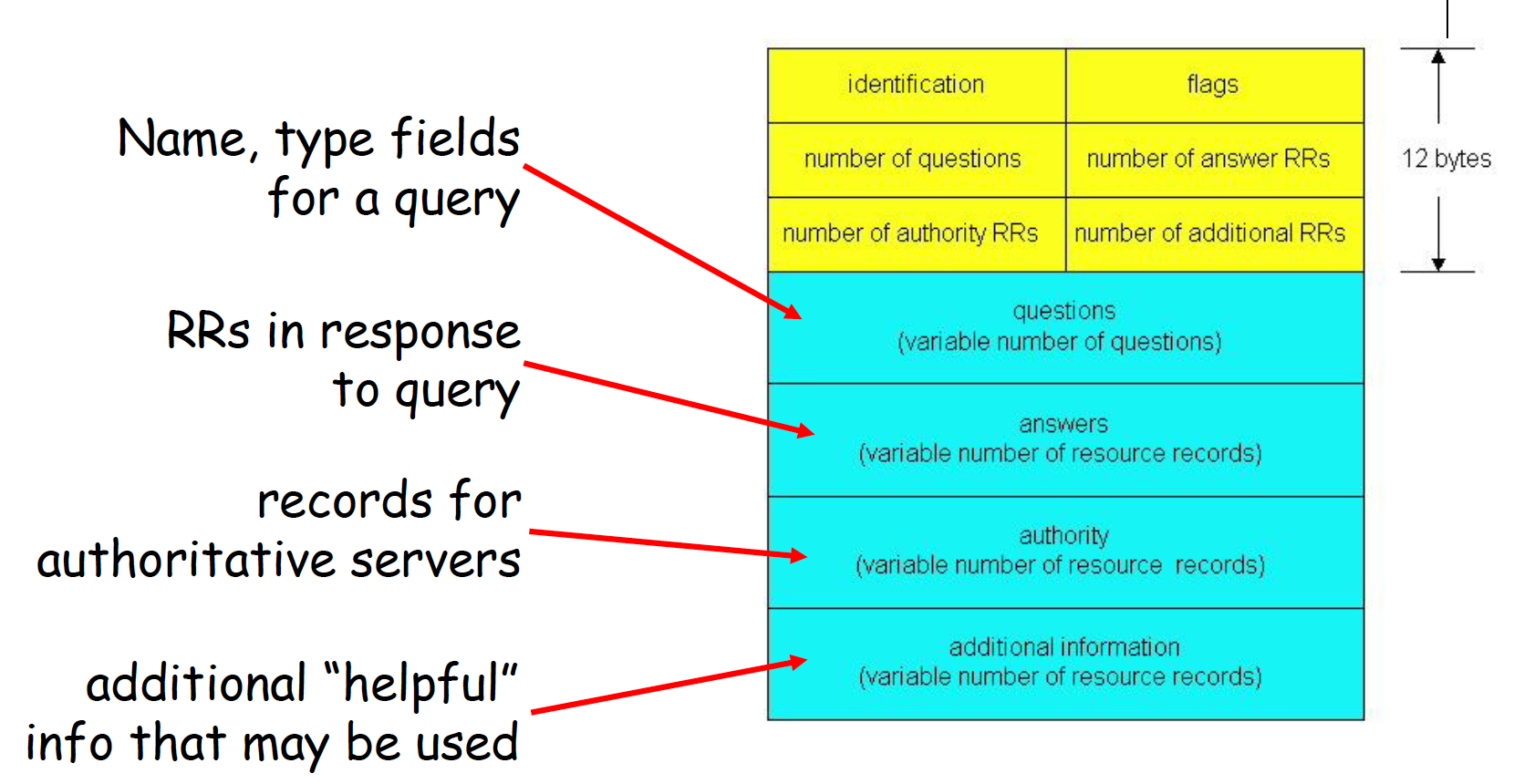
DNS servers
- Three classes:
- root DNS servers
- top-level domain DNS servers: These servers are responsible for top-level domains such as com, org, net, edu, and gov, and all of the country top-level domains such as uk, fr, ca, and jp.
- authoritative DNS servers
- There is another important type of DNS server called the local DNS server. A local DNS server does not strictly belong to the hierarchy of servers but is nevertheless central to the DNS architecture
HTTP(HyperText Transfer Protocol)
- Uses TCP
- client initiates TCP connection (creates socket) to server, port 80
- server accepts TCP connection from client
- HTTP messages exchanged between browser (HTTP client) and Web server (HTTP server)
- TCP connection closed
- HTTP is “stateless”
- server maintains no information about past client requests
- http request message general format
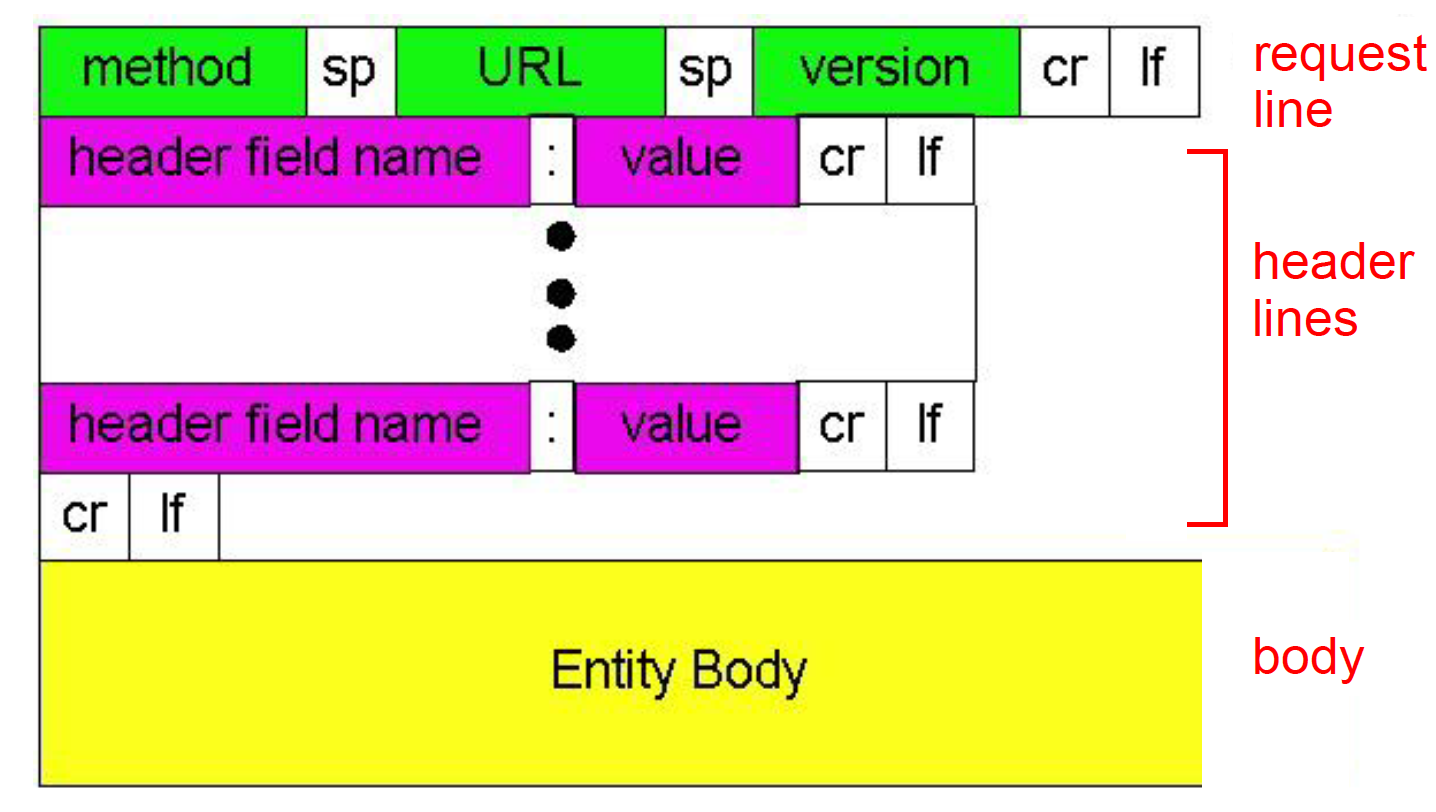
- method types
- HTTP/1.0
- GET
- POST
- HEAD
- HTTP/1.1
- GET, POST, HEAD
- PUT
- DELETE
- HTTP/1.0
HTTP response status codes
- Every request gets a response consisting of a status line, and possibly additional information.
- The status line contains a three-digit status code telling whether the request was satisfied, and if not, why not.
Cookies
- four components:
- cookie header line of HTTP response message
- cookie header line in HTTP request message
- cookie file kept on user’s host, managed by user’s browser
- back-end database at Web site
HTTP Performance
- Round Trip Time (RTT): time for a small packet to travel from client to server and back
- Page Load Time (PLT):
- One RTT to initiate TCP connection
- one RTT for HTTP request and first few bytes of HTTP response to return
- file transmission time
- total = 2 * RTT + transmission time
Electronic Mail
- mail servers
- mailbox: contains incoming messages for users
- message queue: contains outgoing messages to be sent
- SMTP protocol: between mail servers to send emails messages
- duplex TCP connection at port 25
- client: sending mail server
- server: receiving mail server
- mail access protocol

- POP:
- download and delete
- stateless across sessions
- IMAP:
- keep all messages at server
- keeps user state across sessions
- http: gmail etc
- POP:
CDN: Content delivery network
- Replicate Web pages on a bunch of servers
- Efficient distribution of popular content
- Faster delivery for clients
MIME
- Multipurpose Internet Mail Extensions
- MIME: to continue to use the RFC 822 format, but to add structure to the message body and define encoding rules for non-ASCII messages.
P2P
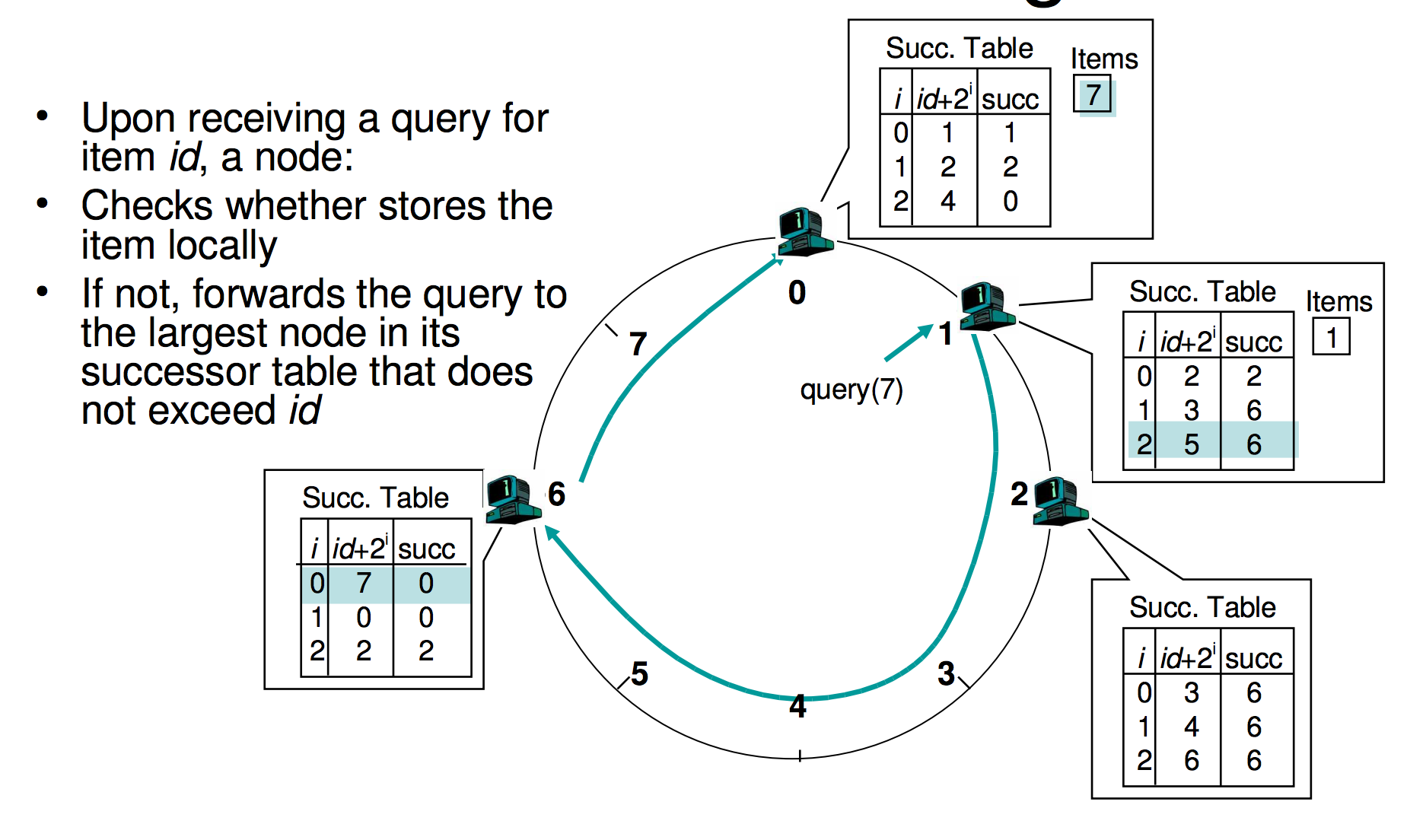
- Distributed Hash Table
- The distributed index Database has (key, value) pairs;
- key: content keywords
- value: IP address of the hosts with the content
- Assign integer identifier to each peer:
- ID(peer) = hash(IP, port)
- each peer only aware of immediate successor clockwise
- How to store (key, value) pairs in peers?
- Rule: store (key, value) pair to the peer that has the closestID.
- Convention: closest is the immediate successor of the key.
- The distributed index Database has (key, value) pairs;
Distributed Hash Table
both the number of neighbors per peer as well as the number of messages per query is O(log N), where N is the number of peers.
Socket
- Socket is locally identified with a port number
- Client needs to know server IP address and socket port number.
- API:
- BIND: associate a local address (port) with a asocket
- LISTEN: announce willingness to accept connections
Chapter 3
TCP and UDP

- TCP
- Flow control matches sender to receiver
- Congestion control matches sender to network
Ports
- Servers often bind to “well-known ports”
- FTP (20/21), SMTP (25), POP3 (110), IMAP (143), http (80), https(443).
Connection-oriented demux: Threaded Web Server
- TCP socket identified by 4-tuple:
(source IP address, source port number, dest IP address, dest port number)
Connectionless demux
- UDP socket identified by two-tuple:
(dest IP address, dest port number)
Why UDP?
- no connection establishment (which can add delay)
- no retransmission (which can add delay)
- simple: no connection state at sender, receiver
- small segment header: 8 bytes
- no flow control and congestion control: UDP can blast away as fast as desired
- Examples:
- short message interaction apps: DNS, SNMP, PRC
- loss tolerant and delay sensitive: ipPhone, SKYPE
Error detection code (EDC) and retransmission
- Parity checking
- single bit parity
- two dimensional bit parity
- Checksum: used in Internet (IP, TCP, UDP), but it is weak
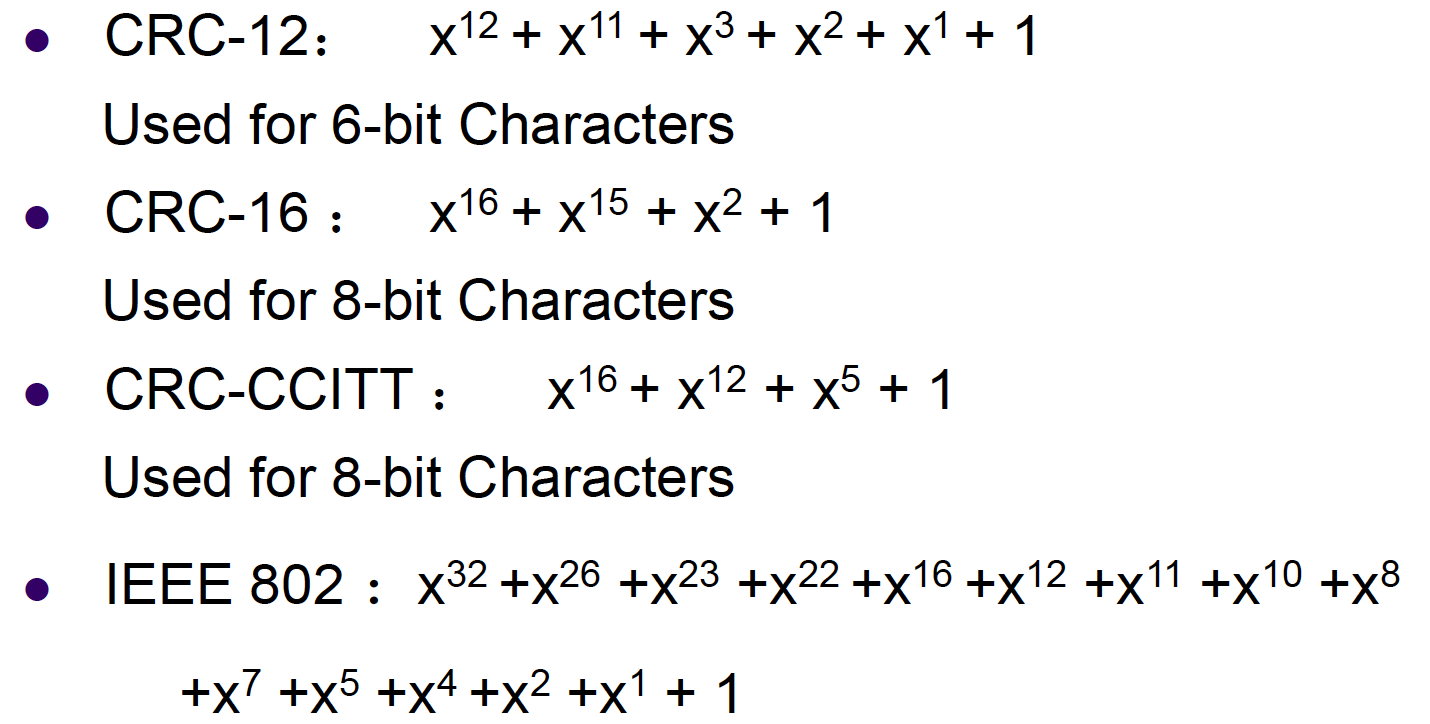
- CRC: cyclic redundancy check
- Cyclic Redundancy Check used in link layer can detect all burst errors less than r+1 bits
- Four International Standards Generator Polynomials
- The power of CRC:
- all single-bit errors will be detected
- All two isolated single-bit errors will be detected
- By making (x + 1) a factor of G(x), all errors consisting of an odd number of inverted bits will be detected
- all burst errors of length <= r will be detected
- can be constructed in hardware
- CRCs are widely used on links (Ethernet, ADSL, Cable)
Forwarding Error Correction
- Hamming Code
- can only correct one bit error
- used when the error rate is low
- Convolutional codes and LDPC heavily used in wireless data link layer
Detection vs Correction
- Forward Error Correction:
- when errors are expected
- or when no time for transmission
- Error Detection and Retransmission
- more efficient when errors are not expected
- burst errors when they do occur
Reliable Data Transfer
- RDT 1.0:
- underlying channel perfectly reliable (no error control)
- receiver has enough buffer and CPU power (no flow control)
- RDT 2.0: channel with errors
- underlying channel may flip bits in packet (no lost)
- checksum to detect bit errors
- receiver feedback: control msgs (ACK, NAK)
- sender retransmits pkt on receipt of NAK
- FLAWS:
- if ACK/NAK corrupted, sender doesn’t know what happened at receiver
- possible duplicate pkt with retransmission
- Handling duplicates:
- sender retransmits current pkt if ACK/NAK garbled
- sender adds sequence number to each pkt
- receiver discards duplicate pkt
- RDT 2.1: receiver handles garbled ACK/NAKs
- RDT 2.2: a NAK-free protocol
- instead of NAK, receiver sends ACK for last pkt received OK, receiver must explicitlyinclude seq # of pkt being ACKed
- duplicate ACK at sender results in same action as NAK: retransmit current pkt
- RDT 3.0: channels with errors and loss
- sender waits “reasonable” amount of time for ACK
- requires countdown timer
- to handle duplicate pkt, receiver must specify seq # of pkt being ACKed
Selective Repeat vs Go-Back-N
- Go-back-N: timer for oldest in-flight pkt
- cumulative ACK
- retransmit pkt k and all higher seq# pkts in window when timeout(k)
- Selective Repeat
- individual ACK
- sender timer for each unACKed pkt
- sender only resends pkts for which ACK not received
Window Overlay Problem
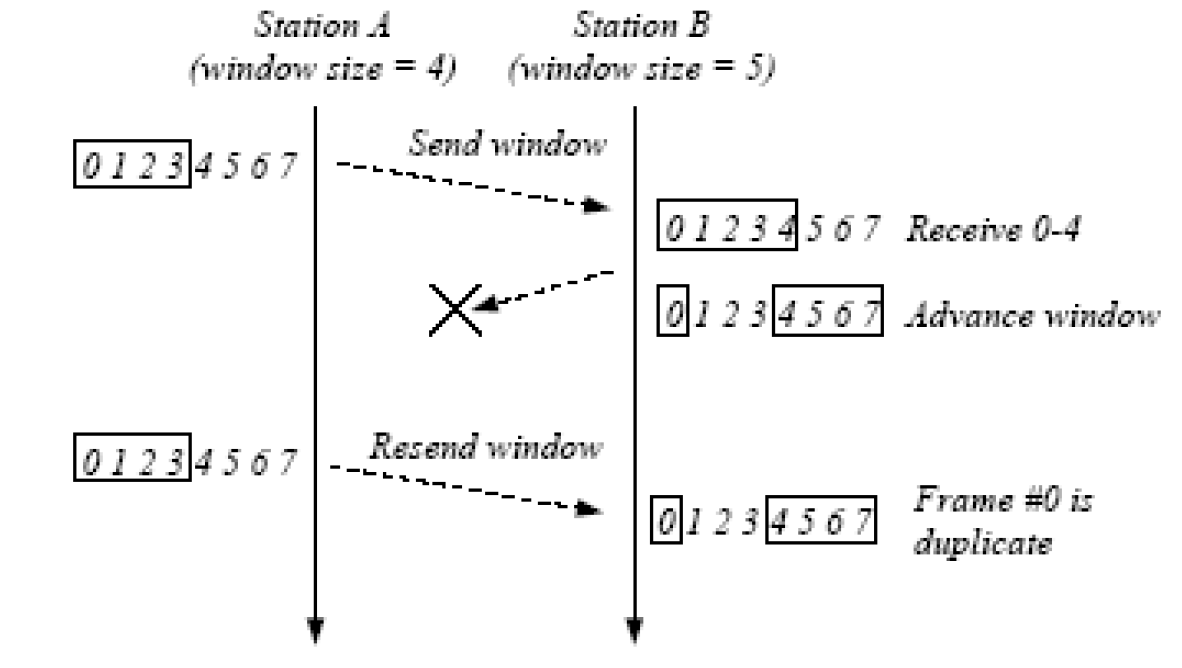
- To avoid overlapping new receiving window with the original window, the maximum window size should satisfy:
sending window + receiving window <= (MAX_SEQ + 1)
TCP overview
- end-to-end: no support for multicasting or broadcasting
- reliable byte stream:
- no “message boundaries”
- hybrid of GBN and SR
- pipelined segments
- cumulative and piggyback acks
- single retransmission timer
- retransmissions are triggered by
- timeout events
- 3 duplicate acks before timer expires: fast retransmit
- only retransmit one segment
- full duplex
- sequence number: byte stream “number” of first byte in segment’s data
- TCP checksum:
- TCP checksum checks the header, the data, and a pseudo header.
- The pseudo-header helps detect mis-delivered packets.
- It also violates the protocol hierarchy since the IP addresses in it belong to the IP layer, not to the TCP layer.
TCP timer management
- Problem: How do we determine the best timeout value for retransmitting segments in the face of a large standard deviation of round-trip delays?
- Solution: uses dynamic algorithm that constantly adjusts the timeout interval, based on continuous measurements of network performance.
TCP flow control
- announcing window size:the maximum number of bytes that may be sent and received.
- zero window size: sender stop sending. Two exceptions:
- urgent data
- 1-byte request for reannounce the window size.
TCP congestion control
Congestion can be caused by:
- data in burst (app and transport layer)
- lack of capacity/bandwidth (physical layer)
- insufficient memory of routers (network layer)
- slow processors of routers (network layer)
Congestion Prevention Policies in Open Loop Systems
To achieve congestion control, select appropriate policies at various levels: data link, network, and transport layer.

- strategy:
- predict when congestion is about to happen
- reduce rate early
- two approaches:
- host-centric: TCP congestion control
- Router-centric: warning bit, choke packet, load shedding
TCP congestion control
- Sender uses packet loss as the network congestion signal
- TCP assume that lost packets are caused by congestion, not by links.
- TCP use a Congestion Window (CongWin)next to the window granted by the receiver. The actual window size is the minimum of the two.
- Algorithm:
- When CongWin is below Threshold, sender in slow-start phase, window grows exponentially.
- When CongWin is above Threshold, sender is in congestion-avoidance phase, window grows linearly.
- When a triple duplicate ACK occurs, Threshold and CongWin set to CongWin/2.
- When timeout occurs, Threshold set to CongWin/2 and CongWin is set to 1 MSS.
TCP Additive Increase, Multiplicative Decrease (AIMD)
- additive increase: increase CongWin by 1 MSS every RTT until loss detected
- multiplicative decrease: cut CongWin in half after loss
When should the slow start (exponential increase) end?
- If there is a loss event:
- sets the value of congestion window to 1
- sets the “slow start threshold” to cwnd/2
- when the value of cwnd equals ssthresh, slow start ends and TCP transitions into congestion avoidance mode.
when should congestion avoidance’s linear increase (of 1 MSS per RTT) end?
- a timeout occurs
- The value of cwnd is set to 1 MSS, and the value of ssthresh is updated to half the value of cwnd
- a triple duplicate ACK event
- TCP halves the value of cwnd
- the value of ssthresh to be half the value of cwnd
TCP throughput
- Under assumptions, Because TCP’s throughput (that is, rate) increases linearly between the two extreme values, we have:
average throughput = 0.75 * W / RTT - the throughput of a TCP connection as a function of the loss rate (L), the round-trip time (RTT), and the maximum segment size (MSS):

TCP fairness
- A congestion-control mechanism is said to be fair if the average transmission rate of each connection is approximately R/K; that is, each connection gets an equal share of the link bandwidth.
Chapter 4
Network Layer Function:
- glue/interconnect lower-level networks together: allow packets to be sent between any pair of hosts
- network layer provides either host-to-host connectionless service or host-to-host connection service, but not both.
- connection service => virtual circuit (VC) networks
- connectionless service => datagram networks
- network-layer connection service is implemented in the routers in the network core as well as in the end systems
- Internet is a datagram network.
Router Functions:
- routing
- forwarding/switching
- congestion control: drop packets, update routing table
Implementation
- Router Forwarding Plane are typically implemented in hardware.
- ROuter Control Plane are typically implemented in software.
Virtual Circuit
- VC consists of:
- path from source to destination
- VC numbers, one number for each link along the path
- entries in routers along path
- Packet carries VC number rather than destination address as the index of forwarding
- VC number can be changed on each link
- Routers maintain connection state information
Why not keep the same VC number?
- replacing the number from link to link reduces the length of the VC field in the packet header.
- VC setup is considerably simplified by permitting a different VC number at each link along the path of the VC
Router (four parts)
- input port
- output port
- routing processor
- switching fabric
Input port function
- physical layer
- bit-level reception
- data link layer
- processing (protocol, decapsulation)
- network layer
- lookup, forwarding, queuing
Three types of switching
- memory: The simplest, earliest routers were traditional computers, with switching between input and output ports being done under direct control of the CPU (routing processor). An input port with an arriving packet first signaled the routing processor via an interrupt. The packet was then copied from the input port into processor memory. The routing processor then extracted the destination address from the header, looked up the appropriate output port in the forwarding table, and copied the packet to the output port’s buffers.
- bus: If multiple packets arrive to the router at the same time, each at a different input port, all but one must wait since only one packet can cross the bus at a time.
- interconnection network: A crossbar switch is an interconnection network consisting of 2N buses that connect N input ports to N output ports. If two packets from two different input ports are destined to the same output port, then one will have to wait at the input, since only one packet can be sent over any given bus at a time.
Output ports
- switch fabric -> queuing (buffer management) -> data link processing (protocol, decapsulation) ->line termination
Input port queuing
- fabric slower than input ports combined -> queuing may occur at input queues
- head-of-the-Line (HOL) blocking: queued datagram at front of queue prevents others in queue from moving forward
Output Port Queuing
- buffering when arrival rate via switch exceeds output line speed
Buffer design
- how much buffer? rule of thumb
- RTT; round-trip time; C: link capacity; N: number of TCP flows
- average buffer = RTT * C
- recent recommendation: with N flows, buffer equal to $RTT * C / \sqrt{N}$
Internet’s network layer
- IP protocol
- routing component: routing protocols compute the forwarding tables that are used to forward packets through the network
- a facility to report errors in datagrams and respond to requests for certain network-layer information: Internet Control Message Protocol (ICMP)
Datagram format
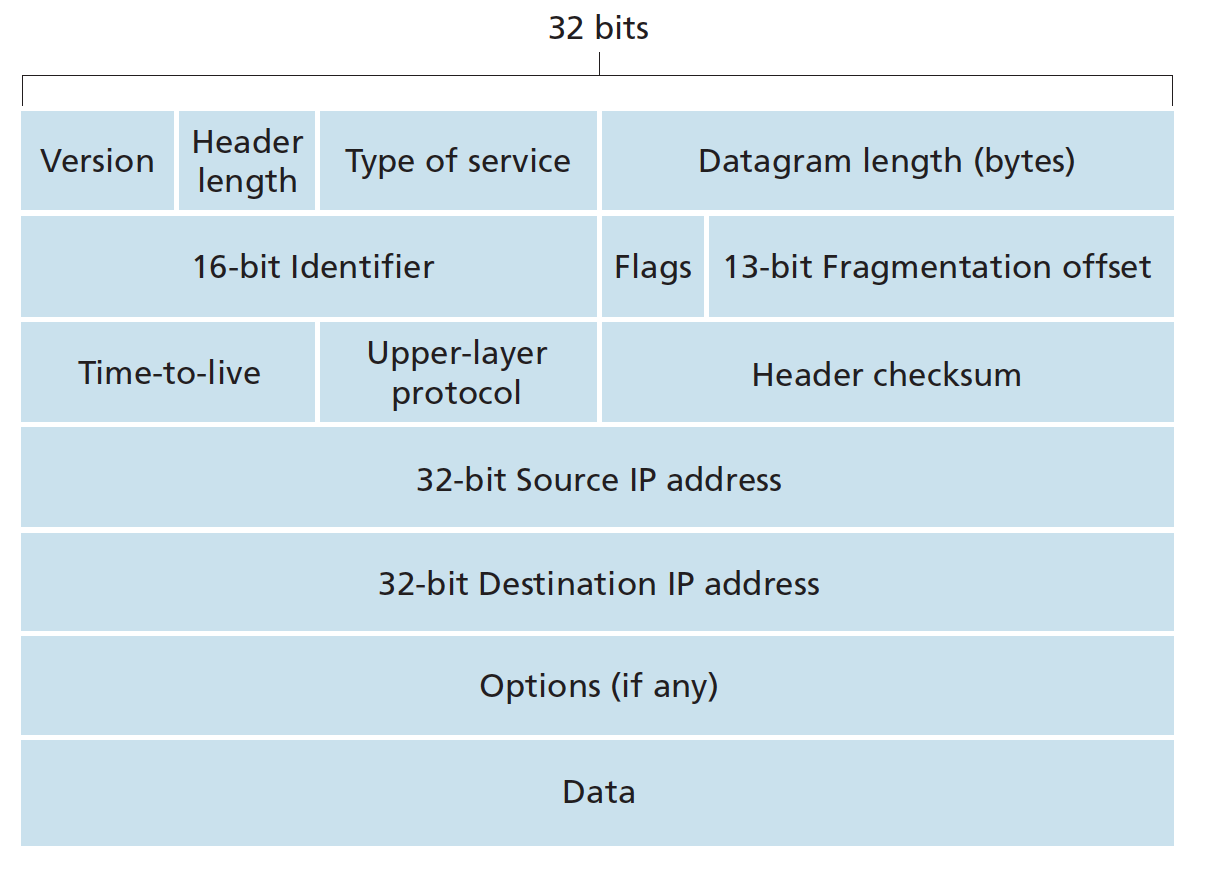
- protocol: This field is used only when an IP datagram reaches its final destination. The value of this field indicates the specific transport-layer protocol to which the data portion of this IP datagram should be passed. A value of 6 indicates that the data portion is passed to TCP, while a value of 17 indicates that the data is passed to UDP.
Header length
- IP header: 20 bytes
- TCP header: 20 bytes
MTU
The maximum amount of data that a link-layer frame can carry is called the maximum transmission unit (MTU).
IP fragmentation and reassembly
- Reassembling is done in end systems rather than routers.
- maximum transmission unit (MTU) of link layer puts a hard limit to the size of IP datagram
- the designers of IPv4 decided to put the job of datagram reassembly in the end systems rather than in network routers
- identification, flag, fragmentation field in the header
- in order for the destination host to be absolutely sure it has received the last fragment of the original datagram, the last fragment has a flag bit set to 0, whereas all the other fragments have this flag bit set to 1.
- At the destination, the payload of the datagram is passed to the transport layer only after the IP layer has fully reconstructed the original IP datagram. If one or more of the fragments does not arrive at the destination, the incomplete datagram is discarded and not passed to the transport layer
- Example:
A datagram of 4,000 bytes (20 bytes of IP header plus 3,980 bytes of IP payload) arrives at a router and must be forwarded to a link with an MTU of 1,500 bytes.
IP header options
- security: specifies how secret the datagram is.
- strict source routing: gives the complete path to be followed
- loose source route: gives a list of routers not to be missed
- record route: makes each router append its IP address
- Timestamp: makes each router append its timestamp and address
IP address
- 32 bit identifier for interface of routers and hosts
- written in dotted decimal
- must be globally unique for globally access
- IP requires each host and router interface to have its own IP address. Thus, an IP address is technically associated with an interface, rather than with the host or router containing that interface.
Subneting
- IP network: all computers addressed with a common identical network id
- an IP network is a broadcasting network
- multiple IP networks are interconnected by routers or 3-layer switch (VLAN)
- Problem with large IP networks:
- different computers are administratively controlled by different entities
- broadcasting storm
-
solution: dividing an IP network into two or more networks is called subnetting
- What’s a subnet?
- device interfaces with same subnet part of IP address
- can physically reach each other without intervening routers
- subnet mask: 223.1.1.0/24, indicates that the leftmost 24 bits of the 32-bit quantity define the subnet address.
Classless IP Addressing
- VLSM: variable length subnet mask
- IP address = subnet id + host id
- subnet mask: to indicate the subnet portion which is variable length
- a.b.c.d/x, where x is # bits in subnet portion of address
- 1 for subnet id bits, 0 for host id bits (e.g. 255.255.255.0)
The Internet’s address assignment strategy: CIDR (Classless InterDomain Routing)
- problem: routing table explosion
- assign class C addresses in contiguous blocks of 256 addresses so that multiple entries in routing table can be aggregated into one (reduced)
- Contiguous blocks of IP addresses with common prefix and the whole range of that prefix could be aggregated into one route entry.
- Even if there is a hole in the blocks of IP addresses the common prefix could still be aggregated with another longer prefix for the hole.
IP broadcast address
When a host sends a datagram with destination address 255.255.255.255, the message is delivered to all hosts on the same subnet. Routers optionally forward the message into neighboring subnets as well
DHCP: Dynamic Host Configuration Protocol
- For obtaining a host address
- Four steps:
- DHCP server discovery: the DHCP client creates an IP datagram containing its DHCP discover message along with the broadcast destination IP address of 255.255.255.255 and a “this host” source IP address of 0.0.0.0.
- DHCP server offer(s): A DHCP server receiving a DHCP discover message responds to the client with a DHCP offer message that is broadcast to all nodes on the subnet, again using the IP broadcast address of 255.255.255.255
- DHCP request: The newly arriving client will choose from among one or more server offers and respond to its selected offer with a DHCP request message,
- DHCP ACK: The server responds to the DHCP request message with a DHCP ACK message, confirming the requested parameters.
NAT: Network Address Translation
- Motivation: hosts in LANs use private IP address and share one public IP address for internet access
- handle public IP address shortage
- can change address of devices in LAN without notifying outside world
- can change ISPs without changing addresses of devices in LANs
- devices inside not explicitly addressable, visible by outside world (a security plus)
- uses 16 bit port field
- The NAT-enabled router does not look like a router to the outside world. Instead the NAT router behaves to the outside world as a single device with a single IP address.
- NAT is controversial:
- violates independence layering principles
- violates end-to-end argument
- NAT traversals must be taken into account by app designers
- address shortage should instead be addressed by IPv6
NAT Traversal Problem
- Solution 1: statically configure NAT to forward incoming connection requests at given port to server
- Solution 2: Universal Plug and Play: With UPnP, an application running in a host can request a NAT mapping between its (private IP address, private port number) and the (public IP address, public port number) for some requested public port number. In summary, UPnP allows external hosts to initiate communication sessions to NATed hosts, using either TCP or UDP.
- Solution 3: relaying (used in Skype)
- NATed client establishes connection to relay
- External client connects to relay
- relay bridges packets between to connections
ICMP
- Internet Control Message Protocol
- ICMP is often considered part of IP but architecturally it lies just above IP, as ICMP messages are carried inside IP datagrams. That is, ICMP messages are carried as IP payload
- Note that ICMP messages are used not only for signaling error conditions.
IPv6
- initial motivation: 32 bit address space soon to be completely allocated
- additional motivation:
- header format helps speed processing/forwarding
- header changes to facilitate QoS
- IPv6 datagram format:

- fixed length 40 byte header
- extension header allowed
- IPv6 increases the size of the IP address from 32 to 128 bits
- The resulting 40-byte fixed-length header allows faster processing of the IP datagram
Comparison of IPv4 and IPv6
- IPv4: 20+ byte headers, 12 + 1 fields
- IPv6: 40 byte headers, 8 fields
Routing Algorithm classification
- global:
- all routers have complete topology and link cost information
- link state algorithm
- local:
- routers knows link costs to neighbours, exchange of info with neighbors
- distance vector algorithm
- static:
- routers change slowly over time
- dynamic:
- routers change more quickly
- periodic update
- in response to network topology and link costs changes
- Internet routing algorithms (such as RIP, OSPF, and BGP) are load-insensitive, as a link’s cost does not explicitly reflect its current (or recent past) level of congestion.
Routing algorithms
Link state routing (LSR):
- Each router learns the entire network topology through exchanging information with all other routers, and then calculate least cost path to the other routers.
- Dijkstra’s algorithm to build the sink tree
- The number of times the loop is executed is equal to the number of nodes in the network.
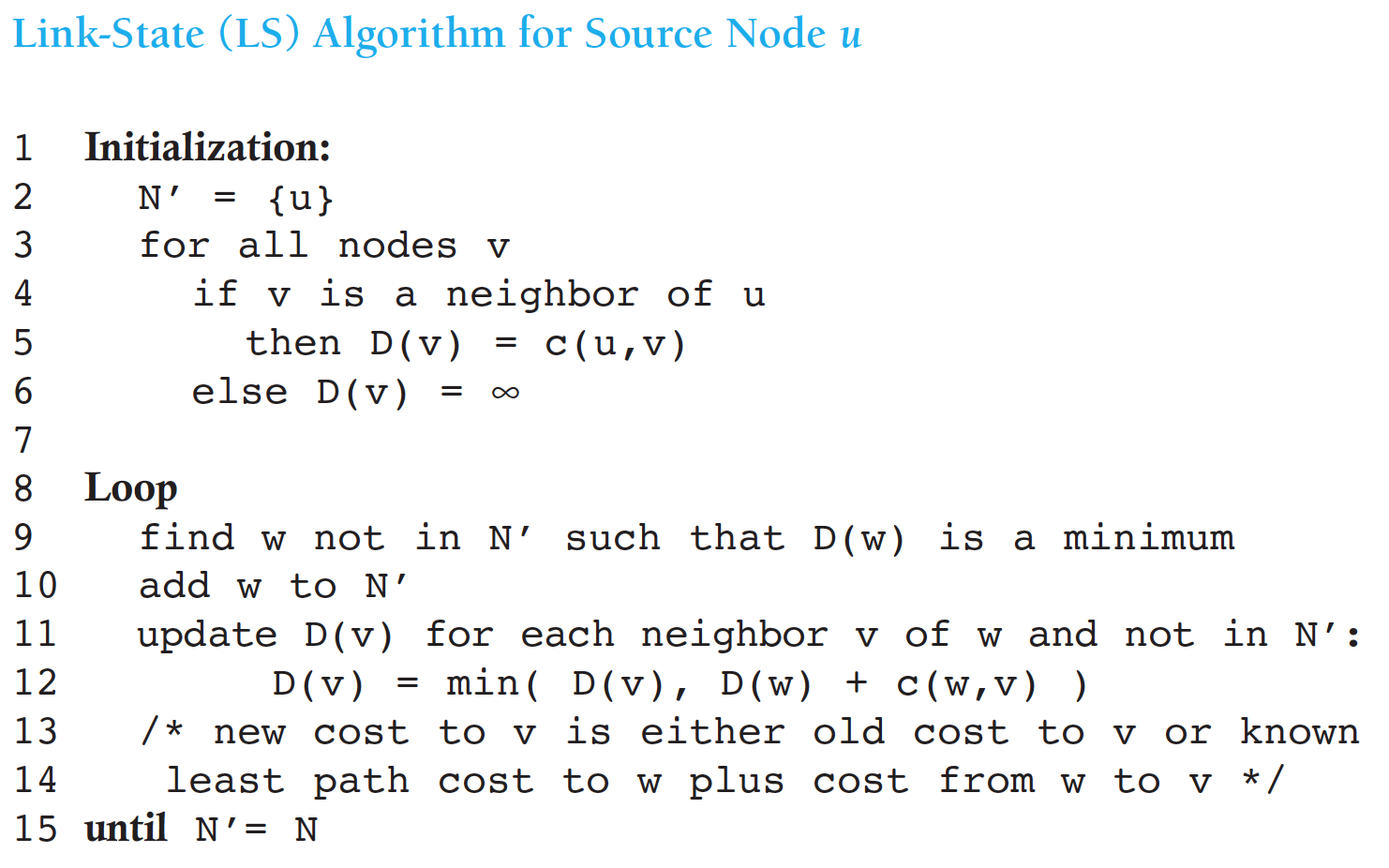
- The number of times the loop is executed is equal to the number of nodes in the network.
Distance Vector Routing / Bellman-Ford
- Each router maintains a table (i.e Distance Vector) with least cost/distance to every other routers.
Comparison between LSR and DVR
- message complexity:
- LSR: with n nodes, E links, O(nE) messages sent totally, O(n^2) complexity
- DVR: exchange between neighbors only, O(n) totally
- computation complexity:
- LSR: O(n^2) each node
- DVR: O(n) each node
- speed of convergence:
- LSR: 1 iteration, may have oscilliations
- DVR: n iterations
- good news travel fast
- count-to-infinity problem
- updating when:
- local link cost change
- LS/DV update message from others/neighbors
- periodically
- Neither algorithm is an obvious winner over the other; indeed, both algorithms are used in the Internet.
Hierarchical Routing
- Autonomous System (AS): aggregate routers into regions, correspond to an administrative domain. Assigned an unique 16/32 bit number
- intra-AS/interior gateway routing should find the least cost path as best as possible
- routers in same AS run same routing protocol
- routers in different AS can run different intra-AS routing protocol
- inter-AS/exterior gateway routing has to deal with a lot of politics. Routers do not automatically use the routes they find, but have to check manually whether it is allowed.
- Why different intra-AS, inter-AS routing?
- policy:
- inter-AS: admins want to have control over how its traffic routed, and who routes through its net. (untrusted)
- intra-AS: single admin, so no policy decisions needed (trusted)
- scale: hierarchical routing saves table size, reduced update traffic
- performance:
- intra-AS: can focus on performance
- inter-AS: policy may dominate performance
- policy:
Routing in the internet - Hierarchical
- most common intra-AS routing protocols
- RIP: Routing Information Protocol
- OSPF: Open Shortest Path First
- IGRP: Interior Gateway Routining Protocol
- most common inter-AS routing protocols
- BGP: Border Gateway Protocol
RIP (Routing Information Protocol)
- Distance Vector Algorithm
- DV advertisement exchanged among neighbors every 30 sec in UDP packets
- In RIP (and also in OSPF), costs are actually from source router to a destination subnet. RIP uses the term hop, which is the number of subnets traversed along the shortest path from source router to destination subnet, including the destination subnet.
- distance metric: # of hops, Limits networks to 15 hops (16 = inf to avoid count-to-infinity)
OSPF (Open Shortest Path Protocol)
- “open”: the routing protocol specification is publicly available
- OSPF is a link-state protocol that uses flooding of link-state information and a Dijkstra least-cost path algorithm
- OSPF advertisements disseminated to entireAS
- hierarchical OSPF in large domains
RIP and OSPF
- OSPF and its closely related cousin, IS-IS, are typically deployed in upper-tier ISPs
- RIP is deployed in lower-tier ISPs and enterprise networks
Hierarchical OSPF
- An OSPF autonomous system can be configured hierarchically into areas. Each area runs its own OSPF link-state routing algorithm, with each router in an area broadcasting its link state to all other routers in that area.
- two level hierarchy:
- local area: run OSPF
- backbone: area 0
- four kinds routers
- internal routers (IR)
- area border routers (ABR): Within each area, one or more area border routers are responsible for routing packets outside the area
- backbone routers (BaR): exactly one OSPF area in the AS is configured to be the backbone area. The primary role of the backbone area is to route traffic between the other areas in the AS
- boundary routers (BoR)
Border Gateway Protocol
- advertised prefix includes BGP attributes
- route = prefix + AS-path + Next-hop
- router may learn about multiple routes to some prefix. Router must select one from the routes.
- ordered selection rules (for good instead of best route):
- Local preferences (policy)
- Shortest AS-path
- Closet next hop router
- Additional criteria
Broadcast and multicast routing
broadcast routing:
- deliver packets from source to all other routers
- source duplication is inefficient
- in-network duplication can be more efficient with controlled duplicate transmission
- flooding: when node receives brdcst pckt, sends copies to all neighbors
- controlled flooding: node only brdcsts pkt if it hasn’t brdcst same packet before
- node keeps track of pckt IDs already brdcsted
- reverse path forwarding (RPF): only forward pckt if it arrived on shortest path between node and source
- spanning tree: no redundant packets received by any nodes
- nodes forward copies only along spanning tree
- Pro: makes excellent use of bandwidth
- Con: each router must have knowledge of some spanning tree
Multicast Routing
- goal: find a tree (or trees) connecting routers having local mcast group members
- source-based: different tree from each sender to rcvrs
- shared-tree: same tree used by all group members
- IP multicasting uses class D addresses
- Each class D address identifies a group of hosts.
- Groups are managed using IGMP (Internet Group Management Protocol)
- operates between a host and its directly attached router
- Network-layer multicast in the Internet consists of two complementary components: IGMP and multicast routing protocols.
- Intra-AS Multi-cast Routing Protocols
- Distance-Vector Multicast Routing Protocol (DVMRP) uses an RPF algorithm with pruning
- Protocol-Independent Multicast (PIM) routing protocol
- dense mode based on pruned RPF
- Sparse mode based on pruned spanning tree
- Inter-AS Multi-cast Routing Protocols
- extensions to BGP to allow it to carry routing information for other protocols, including multicast information
- MSDP(Multicast Source Discovery Protocol) to connect centers in PIM sparse mode
Chapter 5 The Data Link Layer
Checksum
- In the TCP and UDP protocols, the Internet checksum is computed over all fields (header and data fields included).
- In IP the checksum is computed over the IP header (since the UDP or TCP segment has its own checksum).
Data link layer
- Data link layer is the place in the protocol stack where software meets hardware (firmware)
- implemented in adapter (network interface card NID) in each host and routers
- Data-link layer has responsibility of transferring datagram from one node to physically adjacent node over a link (node-to-node job)
- Datagram transferred by different link protocols over multiple links from source to destination.
- point-to-point link protocols
- PPP
- HDLC
- broadcast link protocols
- Ethernet
- IEEE802.3
Data Link Layer Services
- framing: encapsulate datagram into frame, adding header, trailer
- reliable date transfer between adjacent nodes
- link access for shared medium
- Medium/Multiple Access Control (MAC)
- “MAC” addresses: used in frame headers to identify source, destination
Two point-to-point Data Link Protocols
- HDLC (High-Level Data Link Control):
- bit-oriented
- supports flow control and error control
- PPP (The Point-to-Point Protocol):
- Internet standard (RFC1661 1662 1663), is used in the Internet for a variety of purposes, including router-to-router traffic and home user-to-ISP traffic.
- byte-oriented
- PPP is a variant of HDLC without flow/error control, supporting multiple upper layer protocols
- PPP uses LCP to manage links and uses NCP to negotiate network-layer options
Ideal MAC Protocol
- for broadcast channel of rate R bps:
- efficient: when one node wants to transmit, it can send at rate R.
- fair: when M nodes want to transmit, each can send at average rate R/M
- fully decentralized:
- no special node to coordinate transmissions
- no synchronization of clocks, slots
- simple
Three broad classes of MAC protocols
- Channel Partitioning (static)
- divide channel into smaller “pieces” (TDM, FDM, CDM)
- allocate piece to node for exclusive use
- Random Access (dynamic)
- channel not divided, allow collisions
- “recover” from collisions
- Taking turns (dynamic)
- nodes take turns
- nodes with more to send can take longer turns
Random Access MAC Protocol
- random access:
- transmit at full channel data rate R When node has packet to send
- no priori coordination among nodes, possible collision
- random access MAC protocol specifies:
- how to detect collisions
- how to recover from collisions (e.g., via delayed retransmissions)
- Examples :
- ALOHA, slotted ALOHA
- CSMA, CSMA/CD, CSMA/CA
ALOHA
- Nodes transmit immediately whenever data is ready in pure ALOHA
- collision possible, retry after a random amount of time.
- frame sent at t0 collides with other frames sent in [t0-1,t0+1]
- Maximum efficiency of Pure ALOHA is 0.18
- Nodes transmit at the beginning of next slot whenever data is ready in slotted ALOHA
- Maximum efficiency of slottedALOHA is 0.36
- Problem: a node’s transmission decision is independent of other nodes’ activities
CSMA (Carrier Sense Multiple Access)
listen before transmit:
- If channel sensed idle: transmit entire frame
- p-persistent: transmit with probability p, and defer until next slot with probability 1-p.
- If channel sensed busy, defer transmission
- 1-persistent: keeping sensing and immediately start transmission when idle
- nonpersistent: wait a random period of time before trying again
Link-Layer Addressing
- Each adapter in LAN has 48 bit, permanent, globally unique MAC address
- MAC addresses are burned in NIC ROM
- ARP (Address Resolution Protocol) is used to translate IP address into MAC address
Ethernet efficiency
- Ethernet (bus) efficiency is better than ALOHA, but deteriorates as bit-rate and distance raise
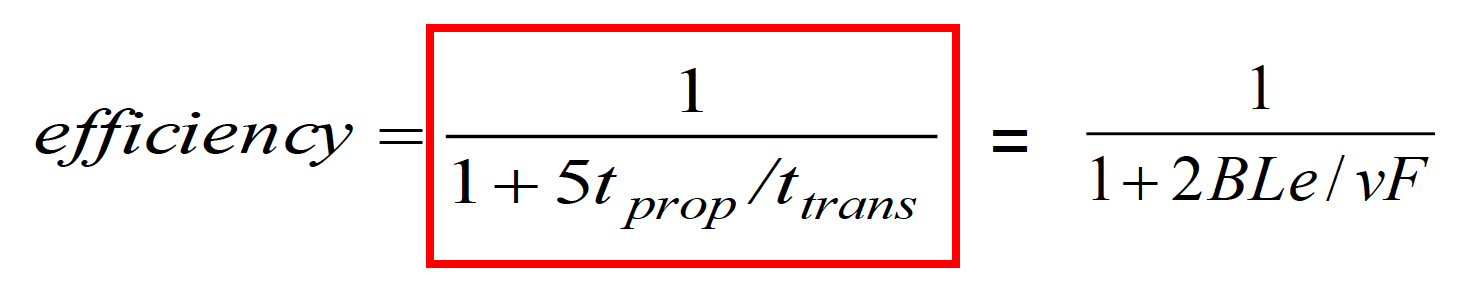
- Ethernet or CSMA/CD is unsuitable for high speed and long distance networks.
Collision Region (CR) and Broadcast Region (BR)
- Use switch to reduce the collision region
- Use router to reduce the broadcasting region and connect with Internet.
Virtual LAN
- Use switch to reduce the broadcasting region with less overhead and more flexibility
- Multiple VLANs over single switch are different broadcast domains
- VLAN can span multiple switches from different physical location
- VLANs isolate broadcast domains, could only connected by routing
Chapter 6 Wireless and Mobile Networks
- The 802.11(WiFi) is the wireless version of 802.3 (Ethernet) , but much different in physical and data link layer.
- all use CSMA/CA for multiple access
- all have base-station and ad-hoc network versions
- 802.15: Bluetooth Architecture
- TDD(Time Division Duplexing) : The master in each piconet defines a series of 625 μsec time slots, with the master getting half the slots and the slaves sharing the other half.
Features
- Preemptive multitasking
- Virtual memory
- Shared libraries
- Demand loading, dynamic kernel modules
- TCP/IP networking
- Symmetrical Multi-Processing support
- Open source
Two modes in Linux
- User mode: application software(including different libraries)
- Kernel mode: system calls, linux kernel, hardware
What’s a kernel
- executive system monitor
- controls and mediates access to hardware
- implements and supports fundamental abstractions (processes, files, devices)
- schedules/allocates system resources (memory, cpu, disk, descriptors)
- security and protection
- respond to user requests for service (system calls)
Kernel design goal
performance, stability, capability, security and protection, portability, extensibility
Linux source tree (directories)
- /root : the home directory for the root user
- /home : the user’s home directories along with directories for services (ftp, http…)
- /bin : commands needed during booting up that may be needed by normal users
- /sbin : similar to /bin. but not intended for normal users. run by Linux.
- /proc : a virtual file system that exits in the kernels imagination, which is memory. not on a disk.
- a directory with info about process number
- each process has a directory below /proc
- /usr : contain all commands, libraries, man pages, games and static files for normal operations
- /boot : files used bu the bootstrap loader. kernel images are often kept here.
- /lib : shared libraries needed by the programs on the root file system
- /modules : loadable kernel modules, especially those needed to boot the system after disasters
- /dev : device files
- /etc : configuration files specific to the machine
- /skel : when a home directory is created, it is initialized with files from this directory
- /sysconfig : files that configure the linux system for devices
- /var : files that change for mail, news , printers log files, man pages, temp files
- /mnt : mount points for temporary mounts by the system administrator
- /tmp : temporary files. programs running after bootup should use /var/tmp
linux/arch
- subdirectories for each current port
- each contains kernel, lib, mm, boot and other directories whose contents override code stubs in architecture independent code
linux/drivers
- largest amount of code in the kernel tree
- device, bus, platform and general directories
linux/fs
- contains virtual file system framework (VFS) and subdirectories for actual file systems
linux/include
- include/asm-* : architecture-dependent include subdirectories
- include/linux :
- header info needed both by the kernel and user apps
- usually linked to /usr/include/linux
- kernel-only portions guarded by
  #ifdef__KERNEL__
  /* kernel stuff */
  #endif
linux/init
- version.c : contains the version banner that prints at boot
- main.c : architecture-independent boot code (start_kernel is the main entry point)
linux/kernel
- the core kernel code
- sched.c : the main kernel file (scheduler, wait queues, timers, alarms, task queues)
- process control : fork.c, exec.c, signal.c, exit.c etc…
- kernel module support : kmod.c, ksyms.c, module.c
- other operations : time.c, resource.c, dma.c, printk.c, info.c, sys.c …
linux/lib
- kernel code cannot call standard C library routines
linux/mm
- paging and swapping
- allocation and deallocation
- memory mapping
linux/scripts
scripts for:
- menu-based kernel configuration
- kernel patching
- generating kernel documentation
Summary
- Linux is a modular, UNIX-like monolithic kernel
- kernel is the heart of the OS that executes with special hardware permission (kernel mode)
- “core kernel” provides framework, data structures, support for drivers, modules, subsystems
- architecture dependent source subtrees live in /arch
Booting
How computer startup?
- booting is a bootstrapping process that starts operating systems when the user turns on a computer system
- a boot sequence is the set of operations the computer performs when it is switched on that load an operating system
Booting sequence
- Turn on
- CPU jump to address of BIOS (0xFFFF0)
- BIOS runs POST (Power-On Self Test)
- Find bootable devices
- Load and execute boot sector from MBR
- Load OS
BIOS (Basic Input/Output System)
- BIOS refers to the software code run by a computer when first powered on
- the primary function is code program embedded on a chip and controls various devices that make up the computer
MBR (Master Boot Record)

- OS is booted from a hard disk, where MBR contains the primary boot loader
- The MBR is a 512-byte sector, located in the first sector in the disk (sector 1 of cylinder 0, head 0)
- After the MBR is loaded into RAM, the BIOS yields control to it
- The first 446 bytes are the primary boot loader, which contains both executable code and error message
- The next 64 bytes are the partition table, which contains a record for each of four partitions
- The MBR ends with two bytes that are defined as the magic number (0xAA55 or 0x55AA). The magic number serves as a validation check of the MBR.
- To see the contents of MBR, use:
  sudo dd if=/dev/sda of=mbr.bin bs=512 count=1
  od -xa mbr.bin
Boot loader
- more aptly called the kernel loader. the task at this stage is to load the linux kernel
- optional, initial RAM disk
- GRUB and LILO are the most popular Linux boot loader
- GRUB: GRand Unified Bootloader
- an operating system independent bootloader
- a multiboot software packet from GNU
- flexible command line interface
- file system access
- support multiple executable format
- support diskless system
- download OS from network
- LILO: LInux LOader
- not dependent on a specific file system
- can boot from hard disk and floppy
- up to 16 different images
- must change LILO when kernel image file or config file is changed
- GRUB: GRand Unified Bootloader
Kernel Image
- The kernel is the central part in most OS beacause of its task, which is the management of the system’s resources and the communication between hardware and software components.
- kernel always store in memory until computer is turned off.
- kernel image is not an executable kernel, but a compressed kernel image
- zImage size is less than 512 KB
- bzImage is larger than 512 KB
Task of kernel
- process management
- memory management
- device management
- system call
Init process
- the first thing the kernel does is to execute init process
- init is the root/parent of all processes executing in linux, and is responsible for staring all other processes
- the first process that init starts is a script: /etc/rc.d/rc.sysinit
- based on the appropriate run-level, scripts are executed to start various processes to run the system and make it functional
- the init process id is “1”
- init is responsible for starting system processes defined in /etc/inittab file
- init typically will start multiple instances of “getty”, which waits for console logins which spawn one’s user shell process
- upon shutdown, init control the sequence and processes for shutdown
Runlevels
- a runlevel is a software configuration of the system which allows only a selected group of processes to exist
- init can be in one of seven runlevels: 0-6
rc#.d files
- rc#.d files are the scripts for a given runlevel that run during boot and shutdown
- the scripts are found in /etc/rc.d/rc#.d, where the symbol # represents the run level
init.d
- deamon is a background process
- init.d is a directory that admin can start/stop individual deamons by changing on it
- admin can issue the command and either the satrt, stop, status, restart or reload option
- e.g. to stop the web server
  cd /etc/rc.d/init.d/
  httpd stop
实模式下的系统初始化
- setup.S连同内核映象由bootsect.S装入。setup.S从BIOS获取计算机系统的参数,放到内存参数区,仍在实模式下运行
- 辅助程序setup为内核映象的执行做好准备,然后跳转到0x10000(小内核),0x100000(大内核)开始内核本身的执行,此后就是内核的初始化过程
- setup.S:
- 版本检查和参数设置
- 为进入保护模式做准备
保护模式下的系统初始化
- 初始化寄存器和数据区
- 核心代码解压缩:调用
mics.c中的decompress_kernel - 页表初始化
- 初始化 idt, gdt, ldt
- 启动核心
- 前面是对CPU进行初始化,并启动保护模式
- 现在的任务是初始化内核的核心数据结构,主要涉及:
- 中断管理
- 进程管理
- 内存管理
- 设备管理
- 进入保护模式后,系统从
start_kernel开始执行,start_kernel函数变成0号进程,不再返回 Start_kernel显示版本信息,调用setup_arch()初始化核心的数据结构- 最后,调用
kernel_thread()创建1号进程init进程 - 父进程创建
init子进程之后,返回执行cpu_idle
Q&A
- Q: 在i386中,内核可执行代码在内存中的首地址是否可随意选择?
A: 从原理上讲是可以的,但实际上要考虑许多因素。例如微机内存的低端1MB的地址空间是不连续的。所以要把内核代码放在低端就要看是否能放的下。如果内核代码模块太大就不能将内核放在低端。 - Q: 主引导扇区位于硬盘的什么位置,如果一个硬盘的主引导扇区有故障此硬盘是否还可以使用?
A: 主引导扇区位于硬盘的0面0道1扇区。一般来讲如果一个硬盘的主引导扇区有故障,此硬盘虽然可以使用,但不能作为引导盘使用了,因为它的主引导扇区不能读出内容。
/proc File System and Kernel Module Programming
What is a kernel module?
- (wiki) an object file that contains code to extend the running kernel
- (RedHat) modules are pieces of code that can be loaded and unloaded into the kernel upon demand
advantages and disadvantages
- advantages:
- allowing the dynamic insertion and removal of code from the kernel at run-time
- save memory cost
- disadvantages: fragmentation penalty -> decrease memory performance
current kernel modules
cd /lib/modules/2.6.32-22-generic/
find . -name "*.ko"
current loaded modules
lsmod or cat /proc/modules
/proc
- a pseudo file system
- real time, resides in the virtual memory
- tracks the processes running on the machine and the state of the system
- a new /proc file system is created every time your linux machine reboots
- highly dynamic. the size of the proc directory is 0 and the last time of modification is the last bootup time
- /proc file system doesn’t exist on any particular media
- the contents of the /proc file system can be read by anyone who has the requisite permissions
- certain parts of the /proc file system can be read only by the owner of the process and of course root (some not even by root)
- the contents of the /proc are used by many utilities which grab the data from the particular /proc directory and display it. e.g. top, ps, lspci, dmesg etc
Tweak kernel parameters
- /proc/sys: making changes to this directory enables you to make real time changes to certain kernel parameters
- e.g. /proc/sys/net/ipv4/ip_forward, which has value of “0”, which can be seen using
cat. This can be changed in real time byecho 1 > /proc/sys/net/ipv4/ip_forward, thus allowing IP forwarding.
Details of some files in /proc
- buddyinfo: contains the number of free areas of each order for the kernel buddy system
- cmdline: kernel command line
- cpuinfo: human-readable information about the processors
- devices: list of device drivers configured into the currently running kernel (block and character)
- dma: shows which DMA channels are being used at the moment
- execdomains: related to security
- fb: frame buffer devices
- filesystems: filesystems configured/supported into/by the kernel
- interrupts: number of interrupts per IRQ on the x86 architecture
- iomem: shows the current map of the system’s memory for its various devices
- ioports: provides a list of currently registered port regions used for input or output communication with a device
- kcore:
- this file represents the physical memory of the system and is stored in the core file format
- unlike most /proc files, kcore does display a size. This value is given in bytes and is equal to the size of physical memory (RAM) used plus 4 KB.
- its content are designed to be examined by a debugger, such as gdb, the GNU Debugger
- only root user has the rights to view this file
- kmsg: used to hold messages generated by the kernel, which are then picked up by other programs, such as
klogd - loadavg:
- provides a look at load average
- the first three columns measure CPU utilization of the last 1, 5 and 10 minutes periods.
- the fourth column shows the number of currently running processes and the total number of processes
- the last column displays the last process ID used
- locks: displays the files currently locked by the kernel
- mdstat: contains the current information for multiple-disk, RAID configurations
- meminfo:
- one of the most commonly used /proc files
- it reports plenty of valuable information about the current utilization of RAM on the system
- misc: this files lists miscellaneous drivers registered on the miscellaneous major device, which is number 10
- modules: displays a list of all modules that have been loade by the system
- mounts: provides a quick list of all mounts in use by the system
- mtrr: refers to the current Memory Type Range Registers (MTRRs) in use with the system
- partitions: detailed information on the various partitions currently available to the system
- pci: full list of every PCI device on your system
- slabinfo: information about the memory usage on the slab level
- stat: keeps track of a variety of different statistics about the system since it was last restarted
- swap: measure swap space and its uilization
- uptime: contains information about how long the system has on since its last restart
- version: tells the versions of the kinux kernel and gcc, as well as the version of red hat linux installed on the system
The numerical named directories
- the processed that are running at the instant a snapshot of the /proc file system was taken
- the contents of all the directories are the same as these directories contain the carious parameters and status of the corresponding process
- you have full access only to the processes that you have started
A typical process directory
- cmdline: contains the whole command line used to invoke the process. the contents of this file are the command line arguments with all the parameters (without formatting/spaces)
- cwd: symbolic link to the current working directory
- environ: contains all the process-specific environment variables
- exe: symbolic link of the executable
- maps: parts of the process’ address space mapped to a file
- fd: this directory contains the list of file descriptors as opened by the particular process
- root: symbolic link pointing to the directory which is the root file system for the particular process
- status: information about the process
Other subdirectories in /proc
- /proc/self: link to the currently running process
- /proc/bus:
- contains information specific to the various buses available on the system
- for ISA, PCI and USB buses, current data on each is available in /proc/bus/<bus type directory>
- individual bus directories, signified with numbers, contains binary files that refer to the various devices available on that bus
- /proc/driver: specific drivers in use by kernel
- /proc/fs: specific file system, file handle, inode, dentry and quota information
- /proc/ide: information abput IDE devices
- /proc/irq: used to set IRQ to CPU affinity
- /proc/net: networking parameters and statistics
- arp: kernel’s ARP table. useful for connecting hardware address to an IP address on a system
- dev: lists the network devices along with transmit and receive statistics
- route: displays the kernel’s routing table
- /proc/scsi: like /proc/ide, it gives info about scsi devices
- /proc/sys:
- allows you to make configuration changes to a running kernel, by
echocommand - any configuration changes made will disappear when the system is restarted
- allows you to make configuration changes to a running kernel, by
/proc/sys subdirectories
- /proc/sys/dev: provides parameters for particular devices on the system. e.g.
cdrom/info: many important CD-ROM parameters - /proc/sys/kernel:
- acct: controls the suspension of process accounting based on the percentage of free space available on the filesystem containing the log
- ctrl-alt-del: controls whether [Ctrl]-[Alt]-[Delete] will gracefully restart the computer using init (value 0) or force an immediate reboot without syncing the dirty buffers to disk (value 1).
- domainname: allows you to configure the system’s domain name, such as domain.com.
- hostname: allows you to configure the system’s host name, such as host.domain.com
- threads-max: sets the maximum number of threads to be used in the kernel, with a default value of 4096
- panic: defines the number of seconds the kernel will postpone rebooting the system when a kernel panic is experienced. By default, the value is set to 0, which disables automatic rebooting after a panic.
- /proc/sys/vm: facilitates the configuration of the Linux kernel’s virtual memory subsystem
Advantages and disadvantages of the /proc file system
- advantages:
- coherent, intuitive interface to the kernel
- great for tweaking and collecting status info
- easy to use and programming
- disadvantages:
- certain amount of overhead, must use fs calls, alleviated somewhat by sysctl() interface
- user can possibly cause system instability
/proc file system entries
- to use any of the procfs functions, you have to include the correct header file
#include <linux/proc_fs.h> struct proc_dir_entry* create_proc_entry(const char* name, mode_t mode, struct proc_dir_entry* parent);- this function creates a regular file with the name
name, the modemodein the directoryparent - to create a file in the root of the procfs, use
NULLasparentparameter - when successful, the function will return a pointer to the freshly created
struct proc_dir_entry - e.g.
foo_file = create_proc_entry("foo", 0644, example_dir);
- this function creates a regular file with the name
struct proc_dir_entry* proc_mkdir(const char* name, struct proc_dir_entry* parent);- create a directory
namein the procfs directoryparent
- create a directory
struct proc_dir_entry* proc_symlink(const char* name, struct proc_dir_entry* parent, const char* dest);- this creates a symlink in the procfs directory
parentthat points fromnametodest. this translates in userland to ln -s dest name
- this creates a symlink in the procfs directory
void remove_proc_entry(const char* name, struct proc_dir_entry* parent);- removes the entry
namein the directoryparentfrom the procfs. - be sure to free the data entry from the struct
proc_dir_entrybefore the function is called
- removes the entry
Tips
- modules can only use APIs exported by kernel and other modules
- no libcs
- kernel exports some common APIs
- modules are part of kernel
- modules can control the whole system
- as a result, can damage the whole system
- modules basically can’t be written with C++
- determine which part should be in kernel
Process Management
Processes, Lightweight Processes and Threads
- Process: an instance of a program in execution
- (User) Thread: an execution flow of the process
- Pthread (POSIX thread) library
- Lightweight process (LWP): used to offer better support for multithreaded applications
- LWP may share resources: address space, open files…
- To associate a lightweight process with each thread
Process descriptor
task_struct data structure:
state: process statethread_info: low-level information for the processmm: pointers to memory area descriptorstty: tty associated with the processfs: current directoryfiles: pointers to file descriptorssignal: signals received
Process state
- TASK_RUNNING: 该状态表示进程处于可运行状态,也就是说要么正在CPU中运行,要么在runqueue队列中等待运行
- TASK_INTERRUPTABLE: 该状态表示进程处于可中断的睡眠状态。该进程正处在睡眠,但是可以被任何信号唤醒。当信号将该进程唤醒后,进程会去对信号做出响应。
- TASK_UNINTERRUPTABLE: 该状态表示进程处于不可中断的睡眠状态。该进程正处于睡眠,专心等待某一个事件(一般是IO事件),并且不希望被其他信号唤醒。
- TASK_STOPPED
- TASK_TRACED
- EXIT_ZOMBIE: 该状态是该进程变为僵尸进程,即其父进程没有对该进程的结束信号进行处理
- EXIT_DEAD
Identifying a process
- process descriptor pointers: 32 bits
- process ID (PID): 16 bits (~32767 for compatibility)
- linux associates different PID with each process or LWP
- programmers expect threads in the same group to have a common PID
- thread group: a collection of LWPs
- the PID of the first LWP in the group
tgidfield in process descriptor: usinggetpid()system call
The process list
tasksfield intask_structstructure- type
list_head prev,nextfields point to the previous and the nexttask_struct
- type
- process 0 (swapper):
init_task
Parenthood relationships among processes
- process 0 and 1: created by the kernel
- process 1
init: the ancestor of all processes
- process 1
- fields in process descriptor for parenthood
- real_parent
- parent
- children
- sibling
Pidhash table and chained lists
- to support the search for the process descriptor of a PID, since sequential search in the process list is inefficient
- the
pid_hasharray contains four hash tables and correspnding field in the process descriptorpid: PIDTYPE_PIDtgid: PIDTYPE_TGID (thread group leader)pgrp: PIDTYPE_PGID (group leader)session: PIDTYPE_SID (session leader)
- chaining is used to handle PID collisions
- the size of each pidhash table is dependent on the available memory
PID
pids field of the process descriptor: the pid data structure
nr: PID numberpid_chain: links to the previous and the next elements in the hash chain listpid_list: head of the per-PID list (in thread group)
How processes are organized
- processes in TASK_STOPPED, EXIT_ZOMBIE, EXIT_DEAD: not linked in lists
- processes in TASK_INTERRUPTABLE, TASK_UNINTERRUPTABLE: waiting queues
- two kinds of sleeping processes:
- exclusive process
- nonexclusive process: always woken up by the kernel when the event occurs
Process switch, task switch, context switch
- hardware context switch: a far jmp (in older Linux)
- software context switch: a sequence of mov instructions
- allows better control over the validity of data being loaded
- the amount of time required is about the same
Performing the process switch
- switch the page global directory
- switch the kernel mode stack and the hardware context
Task State Segment
TSS: a specific segment type in x86 architecture to store hardware contexts
Creating processes
- in traditional UNIX, resources owned by parent process are duplicated
- very slow and inefficient
- mechanisms to solve this problem
- Copy on Write: parent and child read the same physical page
- Ligitweight process (LWP): parent and child share per-process kernel data structures
vfork()system call: parent and child share the memory address space
clone(), fork() and vfork() system calls
clone(fn, arg, flags, child_stack, tls, ptid, ctid): creating lightweight process- a wrapper function in C library
- Uses
clone()system call
fork()andvfork()system calls: implemented byclonewith different parameters- each invokes
do_fork()function
Kernel threads
- kernel threads run only in kernel mode
- they use only linear addresses greater than PAGE_OFFSET
kernel_thread(): to create a kernel thread- example kernel threads:
- process 0 (swapper process), the ancestor of all processes
- process 1 (init process)
- others: keventd, kapm…
Destrying processes
exit()library function- two system calls in Linux 2.6
_exit()system call: handled bydo_exit()functionexit_group()system call: handled bydo_group_exit()function
- two system calls in Linux 2.6
- process removal: releasing the process descriptor of a zombie process by
release_task()
Scheduling policy
- based on time-sharing:
- time slice
- based on priority ranking:
- dynamic
- classification of processes:
- interactive processes: e.g. shells, text editors, GUI applications
- batch processes: e.g. compilers, database search engine, web server
- real-time processes: e.g. audio/video applications, data-collection from physical sensors, robit controllers
Process preemption
- Linux (user) processes are preemptive
- when a new process has higher priority than the current
- when its time quantum expires,
TIF_NEED_RESCHEDin thread_info will be set
- a preempted process is not suspended since it remains in the TASK_RUNNING state
- Linux kernel before 2.6 is nonpreemptive, simpler
How long should a quantum last
- neither too long nor too short:
- too short: overhead for process switch
- too long: process no longer appear to be executed concurrently
- always a compromise: the rule of thumb, to choose a duration as long as possible, while keeping good system response
Scheduling algorithm
- earlier version of Linux: simple and straightforward
- at every process switch, scan the runnable processes, compute the priorities and select the best one to run
- much more complex in Linux 2.6
- scales well with the number of processes and processors
- constant time scheduling
- 3 scheduling classes
- SCHED_FIFO: first-in first-out real-time
- SCHED_RR: round-robin real-time
- SCHED_NORMAL: conventional time-shared processes
Scheduling of conventional processes
Static priority
- static priority
- conventional processes: 100 - 139
- can be changed by
nice(),setpriority()system calls
- can be changed by
- base time quantum: the time-quantum assigned by the scheduler if it has exhausted its previous time quantum

- conventional processes: 100 - 139
Dynamic priority and average sleep time
- dynamic priority: 100 - 139
dynamic priority = max(100, min(static_priority - bonus + 5, 139))- bonus: 0 - 10
- < 5: penalty
- > 5: premium
- dependent on the average sleep time: average number of nanoseconds that the process spent while sleeping
- the more average sleep time, the more bonus:
- bonus: 0 - 10
Determine the status of a process
To determine whether a process is considered to be interactive or batch
- interactive if: dynamic_priority <= 3 * static_priority / 4 + 28
- i.e.
bonux - 5 >= static_priority / 4 - 28- interactive delta
Active and expired processes
- active processes: runnable processes that have not exhausted their time quantum
- expired processes: runnable processes that have exhausted their time quantum
- periodically, the role of processes changes
Scheduling of real-time processes
- real-time priority: 1 - 99
- real-time processes are always considered active
- can be changed by
sched_setparam()andsched_setscheduler()system calls
- can be changed by
- a real-time process is replaced only when:
- another process has higher real-time priority
- put to sleep by blocking operation
- stopped or killed
- voluntarily relinquishes the CPU by
sched_yield()system call - for round-robin real time (SCHED_RR), time quantum exhausted
Implementation Support of Scheduling
Data structures used by the scheduler
runqueuedata structure for each CPU- two sets of runnable processes in the
runqueuestructure prio_array_tdata structure- nr_active: # of process descriptors in the list
- bitmap: priority bitmap
- queue: the 140 list_heads
Functions used by the scheduler
scheduler_tick(): keep the time_slice counter up-to-datetry_to_wake_up()awaken a sleeping processrecalc_task_prio(): updates the dynamic priorityload_balance(): keep the runqueue of multiprocess system balancedschedule(): select a new process to run- Direct invocation:
- when the process must be blocked to wait for resource
- when long iterative tasks are executed in device drivers
- Lazy invocation: by setting the TIF_NEED_RESCHED flag
- when current process has used up its quantum, by
scheduler_tick() - when a process is woken up, by
try_to_wake_up() - when a
sched_setscheduler()system call is issued
- when current process has used up its quantum, by
- Direct invocation:
Runqueue balancing in multiprocessor systems
- 3 types of multiprocessor systems
- Classic multiprocessor architecture
- Hyper-threading
- NUMA
- A CPU can execute only the runnable processes in the corresponding runqueue
- The kernel periodically checks if the workloads of the runqueues are balanced
Scheduling domains
A set of CPUs whose workloads are kept balanced by the kernel
- hierarchically organized
- partitioned into groups: a subset of CPUs
System calls related to scheduling
nice(): for backward compatability only- allow processes to change their base priority
- replaced by
setpriority()
getpriority()andsetpriority():- act on the base priorities of all processes in a given group
- which: PRIO_PROCESS, PRIO_PGRP, PRIO_USER
- who: the value of pid, pgrp, or uid field to be used for selecting the processes
- niceval: the new base priority value: -20 - +19
sched_getscheduler(),sched_setscheduler(): queries/sets the scheduling policysched_getparam(),sched_setparam(): queries/sets the scheduling parameterssched_yield(): to relinquish the CPU voluntarily without being suspendedsched_get_priority_min(),sched_get_priority_max(): to return the minimum/maximum real-time static prioritysched_rr_get_interval(): to write into user space the round-robin time quantum for real-time process
Completely Fair Scheduler (CFS)
- Motivation of CFS: running task gets 100% usage of the CPU, all other tasks get 0% usage of the CPU
- New scheduling algorithm in linux kernel 2.6
- Design:
- the same virtual runtime for each task
- increasing the priority for sleeping task
- Implementation
- stores the records about the planned tasks in a red-black tree
- pick efficiently the process that has used the least amount of time (the leftmost node of the tree)
- the entry of the picked process is then removed form the tree, the spent execution time is updated and the entry is then returned to the tree where it normally takes some other location.
Kernel synchronization
Kernel control paths
- Linux kernel: like a server that answers requests
- parts of the kernel run in an interleaved way
- Kernel control path: a sequence of instructions executed in kernel mode on behalf of current process
- interrupts and exceptions
- lighter than a process (less context)
- Three CPU states are considered:
- User: running a process in user mode
- Excp: running an exception or a system call handler
- Intr: running an interrupt handler
Kernel preemption
- Preemptive kernel: a process running in kernel mode can be replaced by another process while in the middle of a kernel function
- The main motivation for making a kernel preemptive is to reduce the dispatch latency of the user mode process
- dispatch latency: delay between the time they become runnable and the time they actually begin running
- The kernel can be preempted only when it is excuting an exception handler (in particular a system call) and the kernel preemption has not been explicitly disabled
When synchronization is necessary
- A race condition can occur when the outcome of a computation depends on how two or more interleaved kernel control paths are nested
- To identify and protect the critical regions in exception handlers, interrupt handlers, deferrable functions, and kernel threads
- On single CPU, critical region can be implemented by disabling interrupts while accessing shared data
- If the same data is shared only by the service routines of system calls, critical region can be implemented by disabling kernel preemption while accessing shared data
- Things are more complicated on multiprocessor systems
- different synchronization techniques are necessary
When synchronization is not necessary
- The same interrupt cannot occur until the handler terminates
- Interrupt handlers and softirqs are nonpreemptable, non-blocking
- A kernel control path performing interrupt handling cannot be interrupted by a kernel control path executing a deferrable function or a system call service routine
- Softirqs cannot be interleaved
Per-CPU variables
- The simplest and most efficient synchronization technique consists of declaring kernel variables as per-cpu variables
- an array of data structures, one element per CPU in the system
- a CPU should not access the elements of the array corresponding to the other CPUs
- While per-cpu variables provide protection against concurrent accesses from several CPUs, they do not provide protection against accesses from asynchronous functions (interrupt handles and deferrable functions)
- per-cpu variables are prone to race conditions caused by kernel preemption, both in uniprocessor and multiprocessor systems
Memory Barriers
- when dealing with synchronization, instruction reordering must be avoided
- a memory barrier primitive ensures that the operations before the primitive are finished before the operations after the primitive
- all instructions that operate on I/O ports
- all instructions prefixed by lock byte
- all instructions that write into control registers, system registers or debug registers
- a few special instructions, e.g. iret
Spin locks
- Spin locks are a special kind of lock designed to work in a multiprocessor environment
- busy waiting
- very convenient
Read/Write Spin Locks
- To increase the amount of concurrency in the kernel
- multiple reads, one write
- rwlock_t structure
- lock field: 32 bit
Seqlock
- Introduced in Linux 2.6
- similar to read/write spin locks
- except that they give a much higher priority to writers
- a writer is allowed to proceed even when readers are active
Read-Copy Update
- Read-Copy update (RCU): another synchronization technique designed to protect data structures that are mostly accessed for reading by several CPUs
- RCU allows many readers and many writers to proceed concurrently
- RCU is lock free
- Key ideas
- only data structures that are dynamically allocated and referenced via pointers can be protected by RCU
- No kernel control path can sleep inside a critical section protected by RCU
Semaphores
- two kinds of semaphores
- kernel semaphores: by kernel control paths
- System V IPC semaphores: by user processes
- Kernel semaphores
- struct semaphore
- count
- wait
- sleepers
up(): to release a kernel semaphore (similar to signal)down(): to acquire kernel semaphore (similar to wait)
- struct semaphore
Read/Write semaphores
- similar to read/write spin locks
- except that waiting processes are suspended instead of spinning
- struct rw_semaphore
- count
- wait_list
- wait_lock
init_rwsem()down_read(),down_write: acquire a read/write semaphoreup_read(),up_write(): release a read/write semaphore
Completions
- to solve a subtle race condition in multiprocessor systems
- similar to semaphores
- struct completion
- done
- wait
complete(): corresponding toup()wait_for_completion(): corresponding todown()
Local interrupt disabling
- interrupts can be disabled on a CPU with
cliinstructionslocal_irq_disable()macro
- interrupts can enabled by
stiinstructionslocal_irq_enable()macro
Disabling/Enabling deferrable functions
softirq- the kernel sometimes need to disable deferrable functions without diabling interrupts
local_bh_disable()macrolocal_bh_enable()macro
Synchronizing accesses to kernel data structures
- rule of thumb for kernel developers:
- always keep the concurrency level as high as possible in the system
- two factors:
- the number of I/O devices that operate concurrently
- the number of CPUs that do productive work
- a shared data structure consisting of a single integer value can be updated by declaring it as an
atomic_ttype and by using atomic operations - inserting an element into a shared linked list is never atomic since it consists of at leasr pointer assignments
Examples of race condition
- when a program uses two or more semaphores, the potential for deadlock is present because two different paths could wait for each other
- Linux has few problems with deadlocks on semaphore requests since each path usually acquire just one semaphore
- in cases such as
rmdir()andrename()system calls, two semaphores requests - to avoid such deadlocks, semaphore requests are performed in address order
- semaphore request are performed in predefined address order
Symmetric multiprocessing (SMP)
Traditional View
- Traditionally, the computer has been viewed as a sequential machine
- a processor executes instructions one at a time in sequence
- each instruction is a sequence of operations
- two popular approached to providing parallelism
- symmetric multiprocesors
- clusters
Categories of computer systems
- single instruction single data (SISD) stream
- single processor executes a single instruction stream to operate on data stored in a single memory
- Single instruction Multiple data (SIMD) stream
- each instruction is executed on a different set of data by the different processors
- multiple instruction single data (MISD) stream
- a sequence of data is transmitted to a set of processors, each execute a different instruction sequence
- multiple instruction multiple data (MIMD)
- a set of processors simultaneously execute different instruction sequences on different data sets
Symmetric multiprocessing
- kernel can execute on any processor
- allowing portions of the kernel to execute in parallel
- typically each processor does self-scheduling from the pool of available process or threads
SMP
- Symmetric multiprocessing (SMP) involves a multiprocessor computer hardware and software where two or more identical processors connect to a single shared main memory, have full access to all I/O devices and are controlled by a single OS instance that treats all processors equally, reserving none for special purposes
- Most multiprocessor systems today use an SMP architecture. In the case of multi-core processors, the SMP architecture applies to the cores, treating them as seperate processors
Linux Support for SMP
- 启动过程:BSP负责操作系统的启动,在启动的最后阶段,BSP通过IPI激活各个AP,在系统的正常运行过程中,BSP和AP基本上是无差别的
- 进程调度:与单处理器系统的主要差别是执行进程切换后,被换下的进程有可能会换到其他CPU上继续运行。在计算优先权时,如果进程上次运行的CPU也是当前CPU,则会适当提高优先权,这样可以更有效地利用Cache
- 中断系统:为了支持SMP,在硬件上需要APIC中断控制系统。Linux定义了各种IPI的中断向量以及传送IPI的函数
NUMA
- Non-uniform memory access (NUMA) is a computer memory design used in multiprocessing, where the memory access time depends on the memory location relative to the processor
- Under NUMA, a processor can access its own local memory faster than non-local memory (memory local to another processor or memeory shared between processors)
- Benefits: the benefits of NUMA are limited to particular workloads, notably on servers where the data are often associated strongly with certain tasks or users
SMP 系统启动过程
- BIOS初始化:屏蔽AP(Application Processor),建立系统配置表
- MBR里面的引导程序(LILO,GRUB等)将内核载入内存
- 执行
head.S中的startup_32函数,最后调用start_kernel - 执行
start_kernel,这个函数相当于应用程序里面的main函数 start_kernel进行一系列的初始化工作,最后将执行:smp_init:关键的一步,启动各APrest_init,调用init创建1号init进程,自身调用cpu_idle成为0号进程
- 1号进程
init完成剩下的工作
reschedule_idle 工作过程
- 先检查p进程上一次运行的cpu是否空闲,如果空闲,这是最好的cpu,直接返回。
- 找一个合适的cpu,查看SMP中的每个CPU上运行的进程,与p进程相比的抢先权,把具有最高的抢先权值的进程记录在target_task中,该进程运行的cpu为最合适的CPU。
- 如target_task为空,说明没有找到合适的cpu,直接返回。
- 如果target_task不为空,则说明找到了合适的cpu,因此将target_task->need_resched置为1,如果运行target_task的cpu不是当前运行的cpu,则向运行target_task的cpu发送一个IPI中断,让它重新调度。
Memory Management - Addressing
Memory Addresses
- three kinds of addresses in 80x86 microprocessors
- logical address: included in the machine language instructions
- linear address (virtual address): a single 32-bit unsigned integer that can be used to address up to 4GB
- physical address (32-bit unsigned integers): used to address memory cells in memory chips
- logical address => segmentation unit => linear address => paging unit => physical address
Virtual File System (VFS)
Role of VFS
- a common interface to several kinds of file systems
- File systems supported by the VFS
- Disk-based filesystems
- Network filesystems
- special filesystems (e.g. /proc)
Common file system interface
- enable system calls such as
open(),read()andwrite()to work regardless of file system or storage media
Terminology
- file system: storage of data adhering to a specific structure
- file: ordered string of bytes
- directory: analogous to a folder
- special type of file
- instead of normal data, it contains pointers to other files
- directories are hooked together to create the hierarchical name space
- metadata: information describing a file
Physical file representation
- Inode:
- unique index
- holds file attributes and data block locations pertaining to a file
- Data blocks
- contain file data
- may not be physically contiguous
- File name:
- human-readable identifier for each file
The common file model
- defines common file model conceptual interfaces and data structures
- e.g. user space (
write()) => VFS (sys_write()) => file system (file system write methods) => physical media - object-oriented: data structures and associated operations
- Superblock object: a mounted file system
- Inode object: information about a file, represents a specific file
- File object: interaction between an open file and a process
- Dentry object: directory entry, single component of a path name
VFS operations
- each object contains operations object with methods:
- super_operations: invoked on a specific file system
- inode_operations: invoked on a specific inodes (which point to a file)
- dentry_operations: invoked on a specific directory entry
- file_operations: invoked on a file
- lower file system can implement own version of methods to be called by VFS
- if an operation is not defined by a lower file system (NULL), VFS will often call a generic version of the method
VFS Data Structures
Superblock object
- implemented by each file system
- used to store information describing that specific file system
- often physically written at the beginning of the partition (file system control block)
- found in
linux/fs.h
Inode object
- represent all the information needed to manipulate a file or directory
- constructed in memory, regardless of how file system stores metadata information
- three doubly linked lists
- List of valid unused inodes
- List of in-use inodes
- List of dirty inodes
Power Management - From Linux Kernel to Android
Linux Power Management
- Two popular power management standards in Linux
- APM (Advanced Power Management)
- Power management happens in two ways:
- function calls from APM driver to the BIOS requesting power state change
- automatically based on device activities
- Power states in APM:
- Full on
- APM enabled
- APM standby
- APM suspend
- Sleep/Hibernation
- Off
- Weakness of APM:
- each BIOS has its own policy, different computers have different activities
- unable to know why system is suspend
- BIOS does not know user activities
- does not know add-on devices (USB)
- Power management happens in two ways:
- ACPI (Advanced Configuration and Power Interface)
- control divided between OS and BIOS, decisions managed through OS
- Enables sophisticated power policies for general-purpose computers with standard usage patterns and hardware
- APM (Advanced Power Management)
Android Power Management
- Built on top of Linux Power Management
- Designed for devices which have a “default-off” behaviors
- the phone is not supposed to be on when we do not want to use it
- powered on only when requested to be run, off by default
- unlike PC, which has a “default-on” behavior
- Apps and services must request CPU resource with
“wake locks” through the Android application
framework (
PowerManagerclass) and native Linux libraries in order to keep power on, otherwise Android will shut down the CPU - Android PM uses wake locks and time out mechanism to switch state of system power, so that system power consumption decreases
- If there are no wake locks, CPU will be turned off
- If there are partial wake locks, screen and keyboard will be turned off
Android PM State Machine
- When an user application acquire full wake lock or screen/keyboard touch activity event occur, the machine will enter ‘AWAKE’ state
- If timeout happens or power key is pressed, the machine will enter
“notification” state:
- if partial wake lock is acquired, the machine will remain “notification”
- if all partial wake locks are released, the machine will
enter “sleep” state
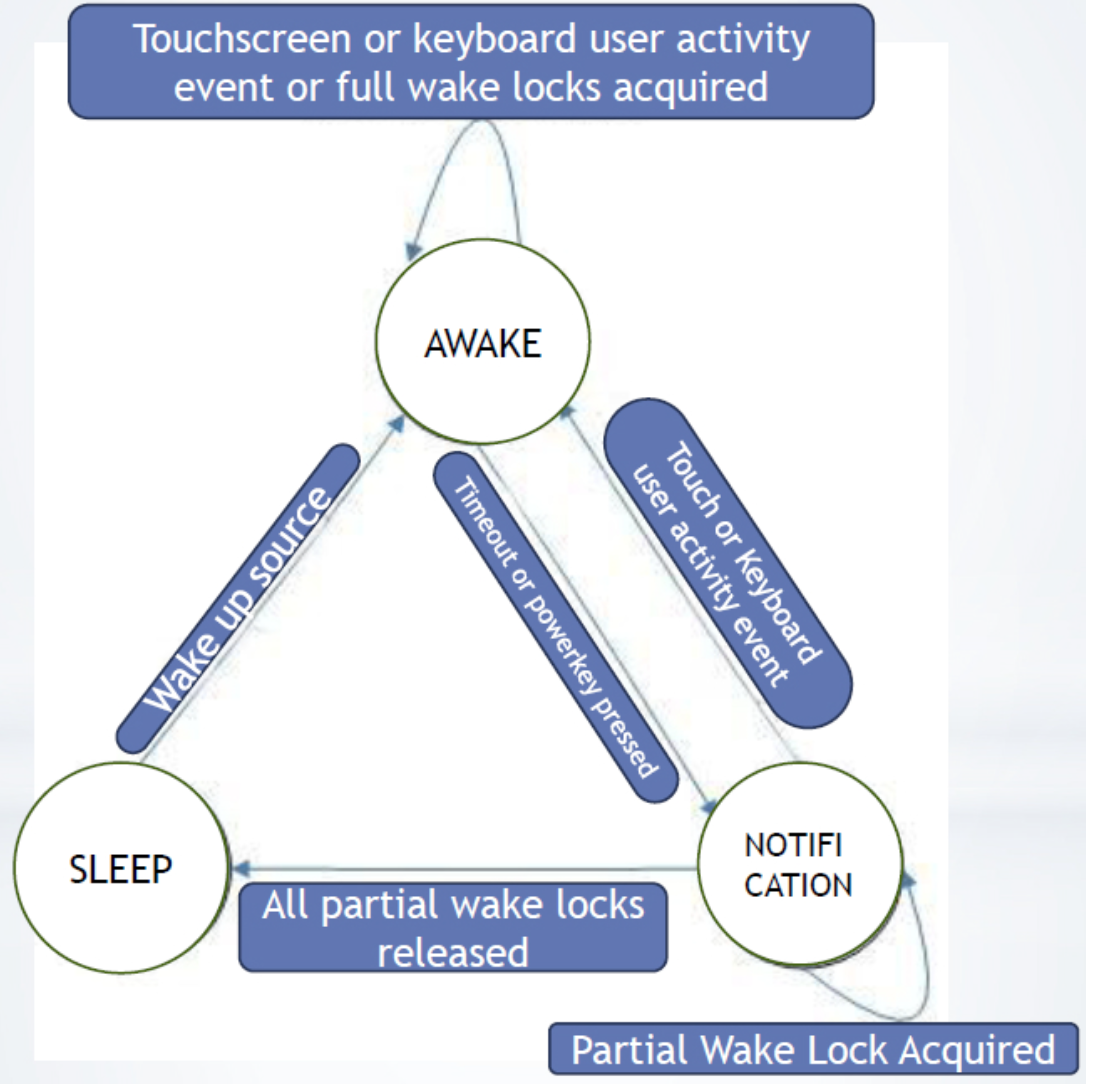
- There is one main wake lock called ‘main’ in the kernel
to keep the kernel awake
- It is the last wake lock to be released when system goes to suspend
Acquiring wake locks
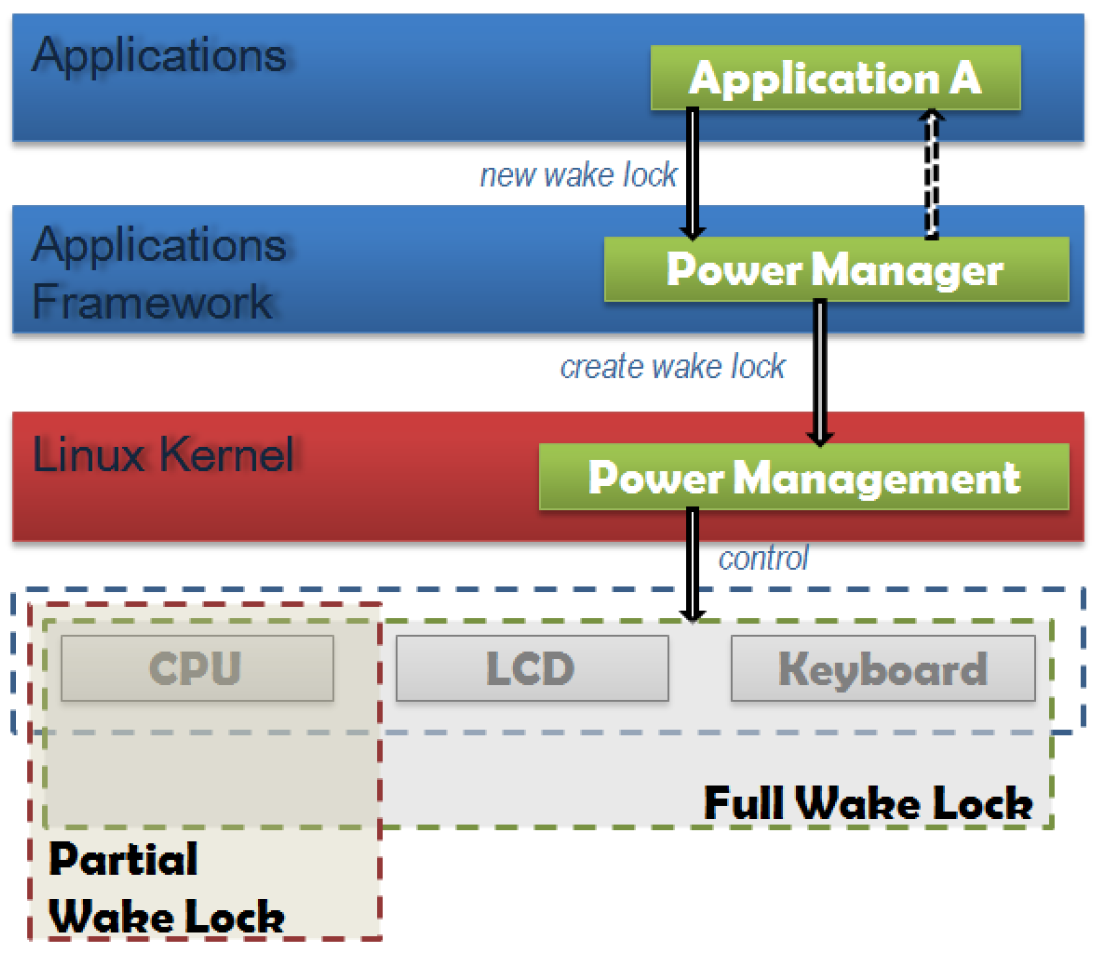
- request sent to PowerManager to acquire a wake lock
- PowerManagementService (in the kernel) to take a wake lock
- Add wake lock to the list
- set the power state:
- for a full wake lock, state should be set to “ON”
- For taking Partial wake lock, if it is the first partial wake lock, a kernel wake lock is taken. This will protect all the partial wake locks. For subsequent requests, kernel wake lock is not taken, but just added to the list
- It is the last wake lock to be released when system goes to suspend
System Sleep
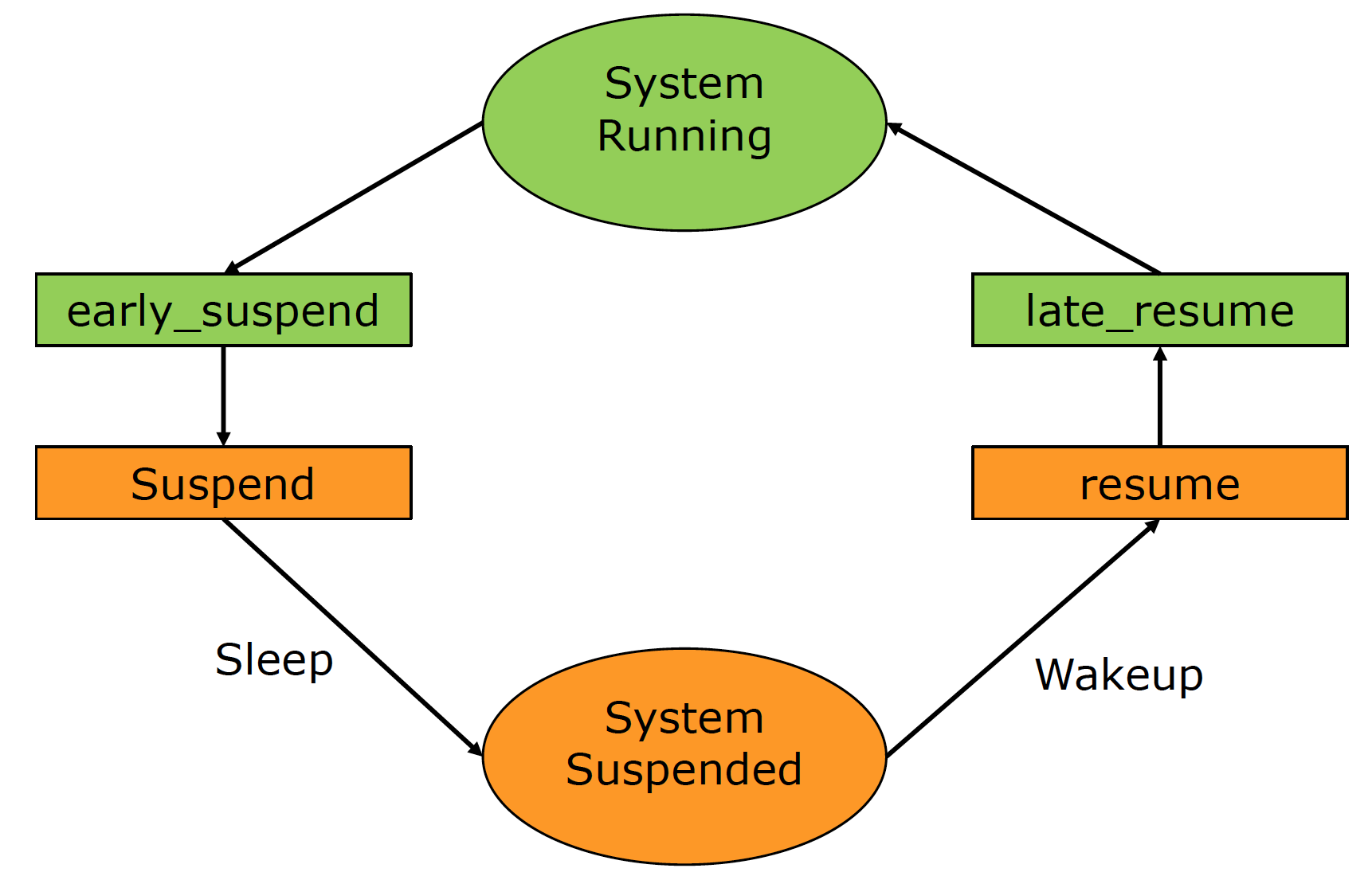
- early_suspend:
- Used by drivers that need to handle power mode settings to the device before kernel is suspended
- Used to turn off screen and non-wakeup source input devices
- E.g., consider a display driver
- In early suspend, the screen can be turned off
- In the suspend, other things like closing the driver can be done
- late_resume:
- When system is resumed, resume is called first, followed by resume late
Battery Service
- The BatteryService monitors the battery status, level, temperature etc.
- A Battery Driver in the kernel interacts with the physical battery via ADC to read battery voltage and I2C
- Whenever BatteryService receives information
from the BatteryDriver, it will act accordingly
- E.g. if battery level is low, it will ask system to shutdown
- Battery Service will monitor the battery status based on received uevent from the kernel
- uevent : An asynchronous communication channel for kernel
This is a collection of research and review papers of multi-agent reinforcement learning (MARL). The Papers are sorted by time. Any suggestions and pull requests are welcome.
The sharing principle of these references here is for research. If any authors do not want their paper to be listed here, please feel free to contact Lantao Yu (Email: lantaoyu [AT] hotmail.com).
Tutorial and Books
- Multiagent Reinforcement Learning by Daan Bloembergen, Daniel Hennes, Michael Kaisers, Peter Vrancx. ECML, 2013.
- Multiagent systems: Algorithmic, game-theoretic, and logical foundations by Shoham Y, Leyton-Brown K. Cambridge University Press, 2008.
Review Papers
- Deep Reinforcement Learning Variants of Multi-Agent Learning Algorithms by Castaneda A O. 2016.
- Evolutionary Dynamics of Multi-Agent Learning: A Survey by Bloembergen, Daan, et al. JAIR, 2015.
- Game theory and multi-agent reinforcement learning by Nowé A, Vrancx P, De Hauwere Y M. Reinforcement Learning. Springer Berlin Heidelberg, 2012.
- Multi-agent reinforcement learning: An overview by Buşoniu L, Babuška R, De Schutter B. Innovations in multi-agent systems and applications-1. Springer Berlin Heidelberg, 2010
- A comprehensive survey of multi-agent reinforcement learning by Busoniu L, Babuska R, De Schutter B. IEEE Transactions on Systems Man and Cybernetics Part C Applications and Reviews, 2008
- If multi-agent learning is the answer, what is the question? by Shoham Y, Powers R, Grenager T. Artificial Intelligence, 2007.
- From single-agent to multi-agent reinforcement learning: Foundational concepts and methods by Neto G. Learning theory course, 2005.
- Evolutionary game theory and multi-agent reinforcement learning by Tuyls K, Nowé A. The Knowledge Engineering Review, 2005.
- An Overview of Cooperative and Competitive Multiagent Learning by Pieter Jan ’t HoenKarl TuylsLiviu PanaitSean LukeJ. A. La Poutré. AAMAS’s workshop LAMAS, 2005.
Research Papers
Framework
- Multi-Agent Actor-Critic for Mixed Cooperative-Competitive Environments by Lowe R, Wu Y, Tamar A, et al. arXiv, 2017.
- Deep Decentralized Multi-task Multi-Agent RL under Partial Observability by Omidshafiei S, Pazis J, Amato C, et al. arXiv, 2017.
- Multiagent Bidirectionally-Coordinated Nets for Learning to Play StarCraft Combat Games by Peng P, Yuan Q, Wen Y, et al. arXiv, 2017.
- Robust Adversarial Reinforcement Learning by Lerrel Pinto, James Davidson, Rahul Sukthankar, Abhinav Gupta. arXiv, 2017.
- Stabilising Experience Replay for Deep Multi-Agent Reinforcement Learning by Foerster J, Nardelli N, Farquhar G, et al. arXiv, 2017.
- Multiagent reinforcement learning with sparse interactions by negotiation and knowledge transfer by Zhou L, Yang P, Chen C, et al. IEEE transactions on cybernetics, 2016.
- Decentralised multi-agent reinforcement learning for dynamic and uncertain environments by Marinescu A, Dusparic I, Taylor A, et al. arXiv, 2014.
- CLEANing the reward: counterfactual actions to remove exploratory action noise in multiagent learning by HolmesParker C, Taylor M E, Agogino A, et al. AAMAS, 2014.
- Bayesian reinforcement learning for multiagent systems with state uncertainty by Amato C, Oliehoek F A. MSDM Workshop, 2013.
- Multiagent learning: Basics, challenges, and prospects by Tuyls, Karl, and Gerhard Weiss. AI Magazine, 2012.
- Classes of multiagent q-learning dynamics with epsilon-greedy exploration by Wunder M, Littman M L, Babes M. ICML, 2010.
- Conditional random fields for multi-agent reinforcement learning by Zhang X, Aberdeen D, Vishwanathan S V N. ICML, 2007.
- Multi-agent reinforcement learning using strategies and voting by Partalas, Ioannis, Ioannis Feneris, and Ioannis Vlahavas. ICTAI, 2007.
- A reinforcement learning scheme for a partially-observable multi-agent game by Ishii S, Fujita H, Mitsutake M, et al. Machine Learning, 2005.
- Asymmetric multiagent reinforcement learning by Könönen V. Web Intelligence and Agent Systems, 2004.
- Adaptive policy gradient in multiagent learning by Banerjee B, Peng J. AAMAS, 2003.
- Reinforcement learning to play an optimal Nash equilibrium in team Markov games by Wang X, Sandholm T. NIPS, 2002.
- Value-function reinforcement learning in Markov game by Littman M L. Cognitive Systems Research, 2001.
- Hierarchical multi-agent reinforcement learning by Makar, Rajbala, Sridhar Mahadevan, and Mohammad Ghavamzadeh. The fifth international conference on Autonomous agents, 2001.
Joint action learning
- AWESOME: A general multiagent learning algorithm that converges in self-play and learns a best response against stationary opponents by Conitzer V, Sandholm T. Machine Learning, 2007.
- Extending Q-Learning to General Adaptive Multi-Agent Systems by Tesauro, Gerald. NIPS, 2003.
- Multiagent reinforcement learning: theoretical framework and an algorithm. by Hu, Junling, and Michael P. Wellman. ICML, 1998.
- The dynamics of reinforcement learning in cooperative multiagent systems by Claus C, Boutilier C. AAAI, 1998.
- Markov games as a framework for multi-agent reinforcement learning by Littman, Michael L. ICML, 1994.
Cooperation and competition
- Multi-agent Reinforcement Learning in Sequential Social Dilemmas by Leibo J Z, Zambaldi V, Lanctot M, et al. arXiv, 2017. [Post]
- Opponent Modeling in Deep Reinforcement Learning by He H, Boyd-Graber J, Kwok K, et al. ICML, 2016.
- Multiagent cooperation and competition with deep reinforcement learning by Tampuu A, Matiisen T, Kodelja D, et al. arXiv, 2015.
- Emotional multiagent reinforcement learning in social dilemmas by Yu C, Zhang M, Ren F. International Conference on Principles and Practice of Multi-Agent Systems, 2013.
- Multi-agent reinforcement learning in common interest and fixed sum stochastic games: An experimental study by Bab, Avraham, and Ronen I. Brafman. Journal of Machine Learning Research, 2008.
- Combining policy search with planning in multi-agent cooperation by Ma J, Cameron S. Robot Soccer World Cup, 2008.
- Collaborative multiagent reinforcement learning by payoff propagation by Kok J R, Vlassis N. JMLR, 2006.
- Learning to cooperate in multi-agent social dilemmas by de Cote E M, Lazaric A, Restelli M. AAMAS, 2006.
- Learning to compete, compromise, and cooperate in repeated general-sum games by Crandall J W, Goodrich M A. ICML, 2005.
- Sparse cooperative Q-learning by Kok J R, Vlassis N. ICML, 2004.
Coordination
- Coordinated Multi-Agent Imitation Learning by Le H M, Yue Y, Carr P. arXiv, 2017.
- Reinforcement social learning of coordination in networked cooperative multiagent systems by Hao J, Huang D, Cai Y, et al. AAAI Workshop, 2014.
- Coordinating multi-agent reinforcement learning with limited communication by Zhang, Chongjie, and Victor Lesser. AAMAS, 2013.
- Coordination guided reinforcement learning by Lau Q P, Lee M L, Hsu W. AAMAS, 2012.
- Coordination in multiagent reinforcement learning: a Bayesian approach by Chalkiadakis G, Boutilier C. AAMAS, 2003.
- Coordinated reinforcement learning by Guestrin C, Lagoudakis M, Parr R. ICML, 2002.
- Reinforcement learning of coordination in cooperative multi-agent systems by Kapetanakis S, Kudenko D. AAAI/IAAI, 2002.
Security
- Markov Security Games: Learning in Spatial Security Problems by Klima R, Tuyls K, Oliehoek F. The Learning, Inference and Control of Multi-Agent Systems at NIPS, 2016.
- Cooperative Capture by Multi-Agent using Reinforcement Learning, Application for Security Patrol Systems by Yasuyuki S, Hirofumi O, Tadashi M, et al. Control Conference (ASCC), 2015
- Improving learning and adaptation in security games by exploiting information asymmetry by He X, Dai H, Ning P. INFOCOM, 2015.
Self-Play
- Deep reinforcement learning from self-play in imperfect-information games by Heinrich, Johannes, and David Silver. arXiv, 2016.
- Fictitious Self-Play in Extensive-Form Games by Heinrich, Johannes, Marc Lanctot, and David Silver. ICML, 2015.
Learning To Communicate
- EMERGENCE OF LANGUAGE WITH MULTI-AGENT GAMES: LEARNING TO COMMUNICATE WITH SEQUENCES OF SYMBOLS by Serhii Havrylov, Ivan Titov. ICLR Workshop, 2017.
- Learning Cooperative Visual Dialog Agents with Deep Reinforcement Learning by Abhishek Das, Satwik Kottur, et al. arXiv, 2017.
- Emergence of Grounded Compositional Language in Multi-Agent Populations by Igor Mordatch, Pieter Abbeel. arXiv, 2017. [Post]
- Cooperation and communication in multiagent deep reinforcement learning by Hausknecht M J. 2017.
- Multi-agent cooperation and the emergence of (natural) language by Lazaridou A, Peysakhovich A, Baroni M. arXiv, 2016.
- Learning to communicate to solve riddles with deep distributed recurrent q-networks by Foerster J N, Assael Y M, de Freitas N, et al. arXiv, 2016.
- Learning to communicate with deep multi-agent reinforcement learning by Foerster J, Assael Y M, de Freitas N, et al. NIPS, 2016.
- Learning multiagent communication with backpropagation by Sukhbaatar S, Fergus R. NIPS, 2016.
- Efficient distributed reinforcement learning through agreement by Varshavskaya P, Kaelbling L P, Rus D. Distributed Autonomous Robotic Systems, 2009.
Transfer Learning
- Transfer Learning for Multiagent Reinforcement Learning Systems by da Silva, Felipe Leno, and Anna Helena Reali Costa. IJCAI, 2016.
- Accelerating multi-agent reinforcement learning with dynamic co-learning by Garant D, da Silva B C, Lesser V, et al. Technical report, 2015
- Transfer learning in multi-agent systems through parallel transfer by Taylor, Adam, et al. ICML, 2013.
- Transfer learning in multi-agent reinforcement learning domains by Boutsioukis, Georgios, Ioannis Partalas, and Ioannis Vlahavas. European Workshop on Reinforcement Learning, 2011.
- Transfer Learning for Multi-agent Coordination by Vrancx, Peter, Yann-Michaël De Hauwere, and Ann Nowé. ICAART, 2011.
Inverse Reinforcement Learning
- Cooperative inverse reinforcement learning by Hadfield-Menell D, Russell S J, Abbeel P, et al. NIPS, 2016.
- Comparison of Multi-agent and Single-agent Inverse Learning on a Simulated Soccer Example by Lin X, Beling P A, Cogill R. arXiv, 2014.
- Multi-agent inverse reinforcement learning for zero-sum games by Lin X, Beling P A, Cogill R. arXiv, 2014.
- Multi-robot inverse reinforcement learning under occlusion with interactions by Bogert K, Doshi P. AAMAS, 2014.
- Multi-agent inverse reinforcement learning by Natarajan S, Kunapuli G, Judah K, et al. ICMLA, 2010.
Application
- Collaborative Deep Reinforcement Learning for Joint Object Search by Kong X, Xin B, Wang Y, et al. arXiv, 2017.
- Safe, Multi-Agent, Reinforcement Learning for Autonomous Driving by Shalev-Shwartz S, Shammah S, Shashua A. arXiv, 2016.
- Applying multi-agent reinforcement learning to watershed management by Mason, Karl, et al. Proceedings of the Adaptive and Learning Agents workshop at AAMAS, 2016.
- Crowd Simulation Via Multi-Agent Reinforcement Learning by Torrey L. AAAI, 2010.
- Traffic light control by multiagent reinforcement learning systems by Bakker, Bram, et al. Interactive Collaborative Information Systems, 2010.
- Multiagent reinforcement learning for urban traffic control using coordination graphs by Kuyer, Lior, et al. oint European Conference on Machine Learning and Knowledge Discovery in Databases, 2008.
- A multi-agent Q-learning framework for optimizing stock trading systems by Lee J W, Jangmin O. DEXA, 2002.
- Multi-agent reinforcement learning for traffic light control by Wiering, Marco. ICML. 2000.