iGrid.NET5.0.15
Publisher Description
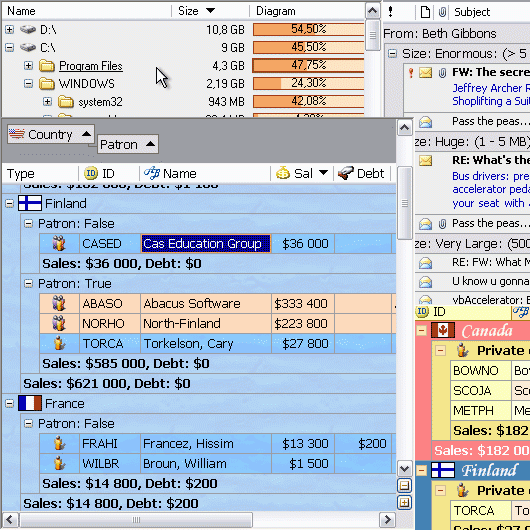
iGrid.NET is the most flexible, fastest and easiest grid for the .NET Framework. You can use iGrid.NET either as a ListView and .NET DataGrid substitution, or as a full-featured unbound grid control. It provides you with a wide range of properties and events which allow you to customize it for your particular task. You can use iGrid.NET either as a list view substitution or as a full-featured grid control. With iGrid.NET you can: - format each cell independently as well as a whole column at once, - create a message preview like in MS Outlook, - build tree-like interfaces, - freeze rows and columns, - design multi-row headers with merged header cells, - make scroll bars semi-transparent, - add custom buttons to scroll bars, - display custom drop-down controls, - edit multi-row text, - dynamically adjust contents of group rows, - and more. iGrid.NET fully supports right-to-left mode (for such languages as Hebrew or Arabic). To put iGrid.NET in this mode, just set its RightToLeft property to True. The vast majority of iGrid.NET's settings can be performed at design-time - you can populate and format the entire grid before you compile and launch your project. Simple access to the cells, columns, rows, and header cells makes iGrid.NET a pleasure to work with. You can use for-each statement to enumerate all the cells, rows, columns. Also you can enumerate the cells of a row or column. The string keys make it easier to quickly access any required row, column, or cell.
About iGrid.NET
This Components & Libraries program is available in English. It was last updated on 08 March, 2026. iGrid.NET is compatible with the following operating systems: Windows.
The company that develops iGrid.NET is 10Tec Company. The latest version released by its developer is 5.0.15. This version was rated by 1 users of our site and has an average rating of 4.0.
The download we have available for iGrid.NET has a file size of 13.6 MB. Just click the green Download button above to start the downloading process. The program is listed on our website since 2017-03-10 and was downloaded 315 times. We have already checked if the download link is safe, however for your own protection we recommend that you scan the downloaded software with your antivirus. Your antivirus may detect the iGrid.NET as malware if the download link is broken.
How to install iGrid.NET on your Windows device:
- Click on the Download button on our website. This will start the download from the website of the developer.
- Once the iGrid.NET is downloaded click on it to start the setup process (assuming you are on a desktop computer).
- When the installation is finished you should be able to see and run the program.
Program Details
System requirements
Download information
Pricing
Version History
version 5.0.15
posted on 2017-03-10
Minor bug fixes
version 2.50.0021
posted on 2009-10-30
A new build of iGrid.NET, a .NET DataGrid and DataGridView replacement, was published. It contains important improvements in design-time and run-time functionality, and all the recently revealed bugs were fixed. We highly recommend that all real-world apps use this updated build of iGrid.NET.