
DNS Health Check and DNS Reports
Keep your domain's DNS secure, synchronized, and fully optimized.
Results For:
DNS Health Checker
Our DNS health check and DNS reports tool analyzes a domain’s DNS configuration in great detail. This detail shows various problems that may have occurred, so you can fix them.
It checks name server responsiveness, SOA record accuracy, delegation consistency, and security vulnerabilities. The result is a comprehensive report showing both strengths and potential issues, helping administrators fix problems proactively.
How to Use This DNS Validation Tool?
-
Open the DNS Validation tool web page.
-
Enter your domain name into the search field.
-
Click the 'Start Validation' button.
-
Review the detailed DNS report, including name servers, SOA records, and security checks.
-
Address any issues flagged in the report to ensure optimal performance and security.
It is important to note that step 5 can’t be done from our tool itself; you will have to open your domain manager to do that.
Explanation of DNS Health Check Results
The DNS Health Check report provides detailed insights into your domain's DNS setup. Here’s what you need to understand about the results:

- Category: Specifies whether the check is related to DNS configuration, security, or SOA records. The exclamation mark on the left side shows that there is something that needs to be looked at, while a tick mark means that all is good.
- Host: Shows the domain or server being checked.
- Result: Displays the status or outcome of the check, including errors or recommended actions.
NS Table:
This is the second part of the results.

Lists name servers with their IP addresses, TTL, response time, and whether they are authoritative, listed in the parent zone, or match local configurations. Ticks (✔) indicate correct configuration, while crosses (✖) highlight issues that need attention.
This section helps you quickly interpret the report and prioritize fixes. Here’s what each section means:
- Status: Whether the server is currently reachable.
- Auth: Confirms the server is authoritative for the domain.
- Parent: Verifies that the parent zone has correctly delegated the server.
- Local: Checks that the server matches the local zone configuration.
Session Transcript:
The third part is the session transcript. It shows how the DNS lookup process was done.
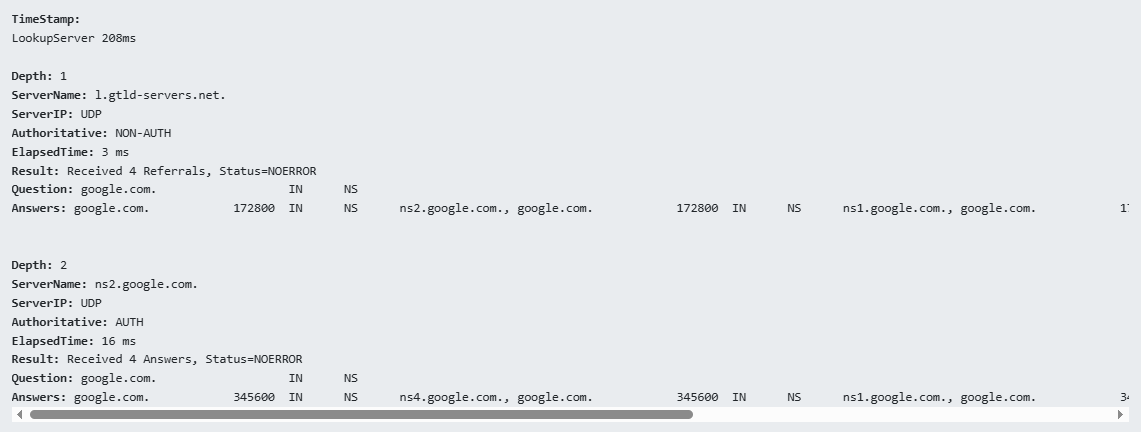
Here’s what you need to know about this:
- Timestamp: Shows how much time it took to do the lookup in milliseconds.
- Depth: Shows how deep the resolver had to look to find the records. Depth 1 means that the records were found really early (possibly in a top-level server).
- ServerName: l.gtld-servers.net.
This is a TLD (Top-Level Domain) server responsible for .com domains. - ServerIP: UDP
The query was made using the UDP protocol (standard for DNS queries). - Authoritative: NON-AUTH
This server is not the final authority for the domain. It’s just pointing you in the right direction. - ElapsedTime: 2 ms
The time it took this server to respond. - Status = NOERROR
The query was successful, and there were no issues in resolving the request. - Received 2 Referrals
Instead of giving the final answer, this server is referring you to the next server to query.
- Question example.com IN NS
This means:
“What are the name servers (NS records) for example.com?”
- Answers: These show the name servers in this case:
example.com. 172800 IN NS hera.ns.cloudflare.com.
example.com. 172800 IN NS elliott.ns.cloudflare.com.
This information is useful because it helps with:
- Debug domain configuration issues
- Verify which name servers a domain is using
- Track DNS propagation or misconfigurations
So, there you have it, now you know how to interpret the results of the DNS validator.
Notable Features of the DNS Record Validation Tool
Our DNS validator and health check-up tool is well-liked by its users due to the numerous features it provides. These features provide a great user experience. For example:
- Provides instantaneous Name Server status verification
- Provides a proper SOA record analysis with recommended value checks.
- Check for open zone transfer, which is a significant security loophole.
- It does recursive server and security checks
- It does parent and local NS list consistency validation
- Provides a detailed table of DNS server performance metrics
- Clear ticks and crosses to highlight configuration issues
- It is free to use and doesn’t require an account or login.
- It has no usage limits; domain managers and web masters can use it whenever they like.
- It works in your browser and doesn’t require any download or installation.
All of these features ultimately mean that it is easy to use yet quite powerful as well.
Who Can Use The DNS Health Checker?
The DNS health checker is designed for anyone responsible for managing or maintaining a domain name. So, the following people will find it quite useful.
1. Website Owners:
To ensure their website remains accessible and free from DNS-related downtime, they can use our DNS validator and check their DNS setup anytime.
2. System Administrators:
They can use our DNS Health Check and Reporting tool to verify proper delegation, authoritative name server configuration, and SOA consistency.
3. Hosting Providers:
They can use our tool to validate DNS setups for client domains and prevent configuration errors.
4. IT Security Teams:
They can use our DNS Validation tool to detect vulnerabilities such as open zone transfers or recursive server exposure.
5. Developers:
They can use the tool to test DNS changes before and after deployment.
6. Digital Agencies:
They can use the DNS health check and reporting tool to audit client domains and provide technical performance reports.
As a general rule, if you work with websites and domains in any way or are learning about them, you can use this tool to gain more insights with ease.
Frequently Asked Questions
What is DNS, and how does DNS work?
DNS is what keeps your website and online services accessible on the public Internet. Without the DNS, computers cannot resolve domain names to IP addresses and are unable to locate the servers where websites are hosted.
DNS works by storing DNS records that map domain names to IP addresses. They need to be updated whenever you change website hosting or domain name. So, they are not a set-and-forget type of thing.
Why Do We Need to Do a DNS Health Check
These are necessary to prevent downtime, improve website performance, and enhance security. Misconfigured DNS can lead to slow site loading, failed email delivery, or exposure to security vulnerabilities like open zone transfers. These are terrible for your website's growth, your reputation, and your business. That’s why regular DNS health checks are necessary.
How often should I check my DNS health?
You should check your DNS health as many times as you can. Monthly checks are recommended during normal operations, but when you make any kind of DNS changes, you should do a health check immediately after propagation is over.
Can this tool detect security vulnerabilities?
Yes, it can detect and highlight two security flaws in DNS setups: open zone transfers and recursive server issues.
Do I need technical knowledge to use it?
No, you don’t need any technical knowledge, like programming or coding, to use this tool. The tool is designed to be user-friendly with clear indicators and explanations. It automatically fetches results and displays them with just a press of a button.
What if I find an issue in the report?
When you find any issues in the DNS health checks, it is recommended that you consult with your DNS provider to resolve them promptly.
Does it check all name servers for a domain?
Yes, it evaluates all authoritative name servers and their responses to ensure full coverage.