It is recommended to learn about the concept of collections particularly HashMaps in Java and their working for a seamless understanding. Now, we outline different ways How to Update the Value of a Key in HashMap in Java. These approaches would also work for different maps like TreeMap, LinkedHashMap, etc.
Using the put() Method of HashMap Collection in Java
We can use the conventional put() method of HashMap collection to update a specific key. To use this method the key must be present within the HashMap but can also be modified for the default case.
Essential points :
- In a HashMap of Integer values, either directly put the value for a key or get the existing value for the key using the getKey() method and increment/decrement the value.
- If a key is not present and to avoid a Null-Pointer Exception use the getOrDefault() method to update the key, if it is not present assign a default value.
Let us look at the code.
import java.util.HashMap;

public class UpdateHashMapKeyUsingPut {

    public static void main(String[] args) {

    //Create HashMap of String keys and Integer values.
    HashMap<String,Integer> hm = new HashMap<String,Integer>();

    hm.put("Adam", 1);
    hm.put("Steve", 2);
    hm.put("James", 3);
    hm.put("Amanda", 4);
    hm.put("Carol", 5);

    System.out.println("HashMap before Update : "+hm);

    // Update key and assign new value.
    hm.put("James", 6);

    // Update key by incrementing its past value.
    hm.put("Steve",hm.get("Steve") + 1);

    // Update key with getOrDefault
    // Assigns default value : 7 if key is not present
    hm.put("Jones", hm.getOrDefault("Jones", 7));

    // If key present increment original value by 1.
    hm.put("Carol", hm.getOrDefault("Carol", 7) + 1);

    System.out.println("HashMap after Update : "+hm);

    }
}
Output:
HashMap before Update : {Adam=1, Steve=2, James=3, Carol=5, Amanda=4}
HashMap after Update : {Adam=1, Jones=7, Steve=3, James=6, Carol=6, Amanda=4}
Using the compute() Method of HashMap Collection in Java
The HashMap collection provides the compute() method that is useful in computing the key and values of a HashMap based on a BiFunction. We will understand this with some examples.
The syntax of the method:
default V compute(K key, BiFunction<? super K, ? super V, ? extends V> remappingFunction)
The method commonly accepts two parameters:
- The Key to update.
- The Remapping function or BiFunction – To compute the value of the Key.
Example
The method declaration : compute(“John”, (key, value) -> value + 1)
- Gets the value of key “John” and updates the key by incrementing the original value by 1.
Similarly, the method declaration : compute(“John”, (key, value) -> (value == null) ? 1 : value + 1)
- Checks if the value of key “John” is present and assign a default value of 1 if the key is absent.
Let us look at the implementation of these examples in code.
import java.util.HashMap;

public class UpdateHashMapKeyUsingCompute {

    public static void main(String[] args) {

    //Create HashMap of String keys and Integer values.
    HashMap<String,Integer> hm = new HashMap<String,Integer>();

    hm.put("Adam", 1);
    hm.put("Steve", 2);
    hm.put("James", 3);
    hm.put("Amanda", 4);
    hm.put("Carol", 5);

    System.out.println("HashMap before Update : "+hm);

    // Remap value using compute() method.
    // If key is present increment value.
    hm.compute("James", (key,value) -> value + 1);

    // If key absent assigns a default value
    hm.compute("Angel", (key,value) -> (value == null) ? 1 : value + 1);

    System.out.println("HashMap after Update : "+hm);

    }
}
Output:
HashMap before Update : {Adam=1, Steve=2, James=3, Carol=5, Amanda=4}
HashMap after Update : {Adam=1, Steve=2, James=4, Angel=1, Carol=5, Amanda=4}
Using the merge() Method of the HashMap Collection in Java
The merge() method of HashMap is basically used to merge two HashMaps based on Mapping criteria. However, we can also use this to Update the Value of a Key in HashMap. We will understand with some examples.
The syntax of the method:
public V merge(K key, V value, BiFunction remappingFunction)
The method accepts three parameters:
- Key to update.
- Value: Here, it corresponds to the default value for the key if absent.
- Re-Mapping or BiFunction: To compute the value of the key based on the rule and the default Value
Example:
The method declaration: merge((“Steve”, 2, (v1, v2) -> v1 + v2))
- Updates the value of the Key “Steve” with 4 as rule v1 + v2 with the default value of 2 gives result 4.
- If the Key is absent, it creates the Key “Steve” and assigns a default value of 2
Let us look at the code.
import java.util.HashMap;

public class UpdateHashMapKeyUsingMerge {

    public static void main(String[] args) {

    //Create HashMap of String keys and Integer values.
    HashMap<String,Integer> hm = new HashMap<String,Integer>();

    hm.put("Adam", 1);
    hm.put("Steve", 2);
    hm.put("James", 3);
    hm.put("Amanda", 4);
    hm.put("Carol", 5);

    System.out.println("HashMap before Update : "+hm);
    System.out.println();

    // Remap value using merge() method.
    // If key is present calculate new value based on rule
    hm.merge("Steve", 2, (v1, v2) -> v1 + v2);

    // If key absent assign default value.
    hm.merge("Stark", 2, (v1, v2) -> v1 + v2);

    System.out.println("HashMap after Update : "+hm);

    }
}
Output:
HashMap before Update : {Adam=1, Steve=2, James=3, Carol=5, Amanda=4}

HashMap after Update : {Adam=1, Steve=4, James=3, Carol=5, Stark=2, Amanda=4}
Using the computeIfPresent() Method of The HashMap Collection in Java
The computeIfPresent() method of the HashMap follows the same resemblance to the compute() method in working aspects as discussed above. We can use it to Update the Value of a Key in HashMap. We will understand with some examples.
The syntax of the method:
public Object computeIfPresent(Object key, BiFunction remappingFunction)
The computeIfPresent method() accepts the same parameters with their type as in the compute() method. The only catch is for this method to work the Key must be present within the HashMap.
Example
The method declaration : computeIfPresent(“John”, (key,value) -> value + 1)
- Updates the Key “John” only if it is present and increments the associated value by 1. If key is not present no update is done and no Errors/Exceptions are thrown.
Let us look at the code snippet.
import java.util.HashMap;

public class UpdateHashMapKeyUsingComputeIfPresent {

    public static void main(String[] args) {

    //Create HashMap of String keys and Integer values.
    HashMap<String,Integer> hm = new HashMap<String,Integer>();

    hm.put("Adam", 1);
    hm.put("Steve", 2);
    hm.put("James", 3);
    hm.put("Amanda", 4);
    hm.put("Carol", 5);

    System.out.println("HashMap before Update : "+hm);
    System.out.println();

    // Remap value using computeIfPresent() method.
    // Increments value by 2 only if key present
    hm.computeIfPresent("Steve", (key,value) -> value + 2);

    System.out.println("HashMap after Update : "+hm);

    }
}
Output:
HashMap before Update : {Adam=1, Steve=2, James=3, Carol=5, Amanda=4}

HashMap after Update : {Adam=1, Steve=4, James=3, Carol=5, Amanda=4}
Further reading:
Using the replace() Method of The HashMap Collection in Java
The replace() method of the Map interface implemented by the HashMap class is used to replace the value of a given key and Update the Key of the HashMap. The syntax of the method:
public V replace(K key, V value)
The replace() method has another variant where we specify the old and new values and then update the Map by replacing them. The syntax :
public boolean replace(K key, V oldValue, V newValue)
Let us look at the implementation in the code.
import java.util.HashMap;

public class UpdateHashMapKeyUsingReplace {

    public static void main(String[] args) {

    //Create HashMap of String keys and Integer values.
    HashMap<String,String> hm = new HashMap<String,String>();

    hm.put("Adam", "Computers");
    hm.put("Steve", "Accounts");
    hm.put("James", "Finance");
    hm.put("Amanda", "Admin");
    hm.put("Carol", "Finance");

    System.out.println("HashMap before Update : "+hm);
    System.out.println();

    // Direct replace value using replace() method
    hm.replace("Adam", "Developer");

    // Updating key value by concating strings
    hm.replace("Carol", hm.get("Carol").concat(" & Computers"));

    // Specifying old and new values to Update
    hm.replace("James", "Accounts", "Finance");

    System.out.println("HashMap after Update : "+hm);

    }
}
Output:
HashMap before Update : {Adam=Computers, Steve=Accounts, James=Finance, Carol=Finance, Amanda=Admin}

HashMap after Update : {Adam=Developer, Steve=Accounts, James=Finance, Carol=Finance & Computers, Amanda=Admin}
Using the TObjectIntHashMap Class of Gnu.Trove Package in Java
The gnu.trove package provides powerful and reusable components as dependencies that we can embed into our applications and programs. Here, to update the Value of a Key in HashMap we use the map library inbuilt functionality of this package library.
The Trove package provides the TObjectIntHashMap class which we will use in our examples. The HashMap is declared as follows:
// Map having keys of type String
TObjectIntHashMap<String> hm = new TObjectIntHashMap<String>();

// Map having keys of type Integer
TObjectIntHashMap<Integer> hm = new TObjectIntHashMap<Integer>();
Package Specification: gnu.trove.map.hash.TObjectIntHashMap
We specify only the Key Data type(String, Integer, Float, Object, etc) while declaring the Map, the Value Data type is by default the Integer type in TObjectIntHashMap
There are two ways we can update the key of a TObjectIntHashMap :
- Using
increment()method of TObjectIntHashMap Class. - Using
put()method of TObjectIntHashMap Class.
You can use the gnu.trove package and the inbuilt functionality in your Java application by importing with the following dependency.
<dependency>
    <groupId>gnu.trove</groupId>
    <artifactId>trove</artifactId>
    <version>3.0.3</version>
</dependency>
For ease, we use the JAR component of this package in our code which is available to download from here. Now, let us look into the steps:
- We will call the increment() method and provide the key as a parameter the value of which needs to be updated. The method by default increments the value by 1.
- We use the put() method and specify the key to update along with the value.
Note: Only Integer values are allowed as the value to be associated with each key while creating the Map.
Let us look at the implementation in the code.
import gnu.trove.map.hash.TObjectIntHashMap;

public class UpdateHashMapKeyUsingTrove {

    public static void main(String[] args) {

    //Create HashMap of String keys.
    TObjectIntHashMap<String> hm = new TObjectIntHashMap<String>();

    //Only Integer values to be provided.
    hm.put("Adam", 1);
    hm.put("Steve", 2);
    hm.put("James", 3);
    hm.put("Amanda", 4);
    hm.put("Carol", 5);

    System.out.println("HashMap before Update : "+hm);
    System.out.println();

    // Increments value of key by 1.
    hm.increment("Adam");

    // Updates value of key using put() method
    hm.put("Amanda", 10);

    System.out.println("HashMap after Update : "+hm);

    }
}
Output:
HashMap before Update : {Steve=2,Adam=1,Carol=5,James=3,Amanda=4}

HashMap after Update : {Steve=2,Adam=2,Carol=5,James=3,Amanda=10}
Using the Atomic Integer class in Java
The AtomicInteger class is present in java.util.concurrent package and is very useful in providing components for automatic operations on Integral values. Here, we will declare a HashMap having the Value field of type AtomicInteger.
Here we highlight 4 ways to update the value of a key in a HashMap using AtomicInteger class:
- Using
updateAndGet()method. - Using
incrementAndGet()method. - Using
addAndGet()method. - Using
decrementAndGet()method.
Now let us look into each method step by step.
- We call the updateAndGet() method with the key to be updated. It accepts an IntUnaryOperator function which we specify using a rule. Ex: hm.get(“John”).updateAndGet((value) -> value + 1) updates the value of Key “John” by adding 1 to it.
- We call the incrementAndGet() with a particular key that increments and updates the key’s value by 1.
- We call the addAndGet() method with the key to update and provide a number to add to the original value associated with the key.
- We call the decrementAndGet() with a particular key that by default decrements the key’s value by 1.
Let us look at the code for this approach as well.
import java.util.HashMap;
import java.util.concurrent.atomic.AtomicInteger;

public class UpdateHashMapKeyUsingAtomicInteger {

    public static void main(String[] args) {

    //Create HashMap of String keys and Atomic Integer Values.
    HashMap<String,AtomicInteger> hm = new HashMap<String,AtomicInteger>();

    //Create AtomicInteger and instantiate with integral values.
    hm.put("Adam", new AtomicInteger(1));
    hm.put("Steve", new AtomicInteger(2));
    hm.put("James", new AtomicInteger(3));
    hm.put("Amanda", new AtomicInteger(4));

    System.out.println("HashMap before Update : "+hm);
    System.out.println();

    // Update Key Value and add 10 to it.
    hm.get("Adam").updateAndGet((value) -> value + 10);

    //Increments value of key by 1
    hm.get("Steve").incrementAndGet();

    // Adds and updates 5 to the key value
    hm.get("James").addAndGet(5);

    //Decrements value of key by 1.
    hm.get("Amanda").decrementAndGet();

    System.out.println("HashMap after Update : "+hm);

    }
}
Output:
HashMap before Update : {Adam=1, Steve=2, James=3, Amanda=4}

HashMap after Update : {Adam=11, Steve=3, James=8, Amanda=3}
That’s all for the article, we discussed 7 ways How to Update the Value of a Key in HashMap in java in great depth and detail with code and working examples. You can try these examples out in your Local IDE for a clear understanding.
Feel free to reach out to us for any queries/suggestions.
]]>In this article, we will look at how to Create an Array of Linked Lists in Java. We will look at ways to create an Array of Linked Lists or a List of Linked Lists in detail with working examples. Let us first have a quick peek into the concept of Linked Lists in Java.
Linked List in Java
A Linked List is a linear, dynamic Data Structure that stores homogenous data(data of the same type) following a sequence in non-contiguous memory locations. Each value in the List is represented as a Node that holds the reference to its next consecutive Node in a different memory location.
Example of Linked List:
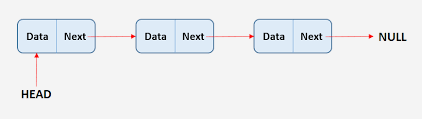
In Java, the implementation of Linked List is defined in the LinkedList class in java.util package as part of the Collection framework introduced in Java 8.
Application of Array of Linked Lists
There is a crucial need to create an Array of Linked Lists, they have wide use in representing the relationship between the nodes and edges of Graph Data Structure.
Although an Adjacency List using ArrayList is preferred, we can represent the Adjacency matrix representation of a Graph using this Array of Linked Lists. Each index of the array gives us information about the nodes and the Linked List at each index row gives information about the connected edges to the respective node.
Example of Adjacency Matrix or List:
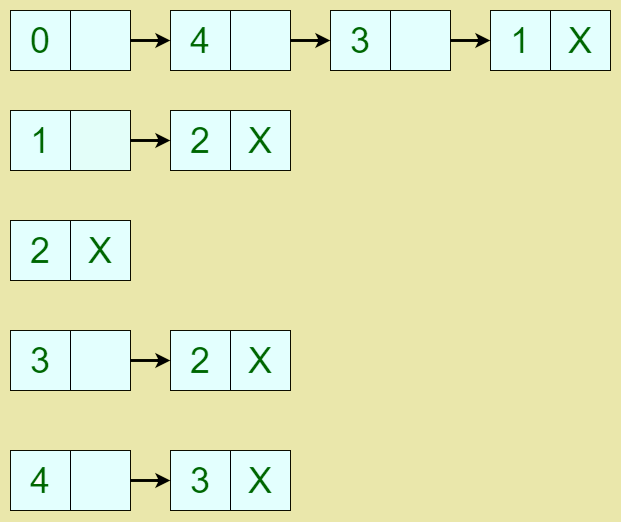
Here, each row starting index indicates the array index which holds a Linked List within itself. The Linked List shows the corresponding edges connected to each of the starting indexes in a connected and directed graph.
Create Array of Linked Lists in Java
Without further ado, we outline different ways to create an Array of Linked Lists in Java.
Using Object[] array of Linked Lists in Java
We can create an Array of Linked Lists by using the Object[] type array.
Important points to note:
- We will create LinkedList objects and initialize each list with dummy values using the add() method.
- We will then create an Object class-type array and initialize the array with the lists.
- As the Object class is the direct parent to all Java classes, it will readily accept the Linked Lists as input.
- Then, we print each List in the Object[] array using the toString() method.
Note: The advantage of using Object[] arr is that it allows us to store Linked Lists having elements of any data type as the Object class is a parent to all classes.
Let us look at the implementation code.
import java.util.LinkedList;

public class ObjectArrayOfLinkedLists {

    public static void main(String[] args) {

          // We create a Linked List of String type.
          LinkedList list1 = new LinkedList();
          list1.add("Welcome");
          list1.add("to");
          list1.add("Java2Blog");

          LinkedList list2 = new LinkedList();
          list2.add("Enjoy");
          list2.add("Learning");

          // We create a Linked List of Integer type.
          LinkedList list3 = new LinkedList();
          list3.add(1);
          list3.add(2);
          list3.add(3);

          // We can add all types of list into Object array.
          Object[] arr = {list1, list2, list3};

          System.out.println("The array of Linked Lists using Object[] array:");
          System.out.println();
          for(Object list : arr)
          {
              System.out.println(list.toString());
          }

    }
}
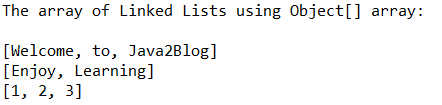
Output:
Using the Linked List array in Java
We can create an Array of Linked Lists by declaring an Array of LinkedList class type. It will follow the same declaration as an array using the new keyword with a fixed size.
Important points to note:
- Each index of an array holds a Linked List, it is to be ensured that while accessing the array we need to initialize each Linked List object.
- We cannot declare an Array of Linked Lists belonging to a specific type so we declare the LinkedList array of raw or generic type.
- Hence, We initialize each LinkedList of Integer type while accessing the array, like this: arr[i] = new LinkedList<Integer>();
- We fill each list with dummy values and print them accordingly.
Let us look at the code snippet.
import java.util.LinkedList;

public class LinkedListArraysExample {

	public static void main(String[] args) {

		// We create a Linked List of Generic type.
		LinkedList linkedList[] = new LinkedList[5];
		System.out.println("The Array of Linked List is: \n");
        for (int i = 0; i < 5; i++)
        {
           // Initialize each Linked List of Integer type within array
           linkedList[i] = new LinkedList<Integer>();
           for (int j = 1; j <= 5; j++)
           {
            linkedList[i].add(j);
           }
            System.out.print(linkedList[i]);
            System.out.println();
        }

	}
}
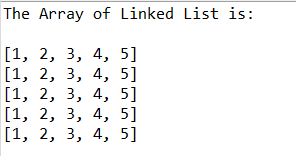
Output:
Using the ArrayList of Linked Lists in Java
Instead of creating an Array of Linked Lists, we can also resolve to create an ArrayList of LinkedList Objects. We will create individual Linked Lists and fill them with sample values. Then, add the Linked Lists to an ArrayList of type LinkedList.
Let us have a quick look at the implementation.
import java.util.ArrayList;
import java.util.LinkedList;

public class ArrayListOfLinkedListExample {

	public static void main(String[] args) {

		// We create a Linked List of String type.
		LinkedList<String> l1 = new LinkedList<String>();
        l1.add("Hello!");
        l1.add("Welcome to Java2Blog");

        LinkedList<String> l2 = new LinkedList<String>();
        l2.add("Have Fun");
        l2.add("Learning");

        ArrayList<LinkedList> arrayList = new ArrayList<LinkedList>();
        // we add the Linked Lists
        arrayList.add(l1);
        arrayList.add(l2);
        System.out.println("The ArrayList of Linked List is: \n");
        // Use the for each method to print each Linked list
        arrayList.forEach(System.out::println);

	}
}
Output:
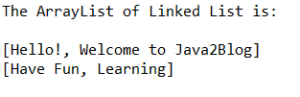
Further reading:
Using the Apache Commons Collections Package
The Apache Commons API provides powerful and reusable Java components and dependencies that we can embed into our applications and programs. Here, to create an Array of Linked Lists in we can use the inbuilt functionality of this package.
We will use the collections4 package of the Apache Commons Library by importing with the following dependency.
<!-- https://mvnrepository.com/artifact/org.apache.commons/commons-collections4 -->
<dependency org="org.apache.commons" name="commons-collections4" rev="4.4"/>
Important points to note:
- We will create a Linked List reference of the AbstractLinkedList type and then instantiate it using the CursorableLinkedList class.
- We then insert these Linked lists into an Object[] type array.
- Then, we print these Linked Lists using the toString() method.
Let us look at the implementation code for this approach.
import org.apache.commons.collections4.list.AbstractLinkedList;
import org.apache.commons.collections4.list.CursorableLinkedList;

public class ApacheCommonExample {

	public static void main(String[] args) {

		// We create a AbstractLinkedList reference l1
	    // Instantiate l1 using the CursorableLinkedList Class.
		AbstractLinkedList<Integer> l1 = new CursorableLinkedList<Integer>();
		l1.add(1);
		l1.add(2);
		l1.add(3);

		// We create another Linked List of same type
		AbstractLinkedList<Integer> l2 = new CursorableLinkedList<Integer>();
		l2.add(4);
		l2.add(5);
		l2.add(6);

		// We create a Object Array with the Linked Lists.
		Object arr[] = {l1,l2};
		System.out.println("The Array of Linked Lists using Apache Commons Collections Package: ");

		// Iterate through each list and print its equivalent toString()
		for(Object list : arr)
		{
	    	System.out.println(list.toString());
		}

	}
}
Output:

That’s all for the article we had a look at 4 different ways to Create an Array of Linked Lists in Java with working examples in detail. You can try out the examples in your Local Compiler/IDE for a clear understanding.
Feel free to reach out to us for any suggestions/doubts.
]]>An ArrayList in Java is a collection of elements of the same data type under a single variable name. In different cases, you can return an ArrayList from a method in Java. These cases are as given below.
- Returning ArrayList from a static method.
- Returning ArrayList from a non-static method.
Return ArrayList in Java From a Non-static Method
The methods that you normally define under a normal class name are the non-static methods.
You can not directly call the non-static methods using the class name. For calling a non-static method, you would need to create an instance of the class and then call the method using that instance.
This method of returning the ArrayList is similar except that the receiving method must use the class instance to call the returning method.
Let us see the example code.
package org.arpit.java2blog.generic;

import java.util.ArrayList;
import java.util.Arrays;

class Util{
    public ArrayList<String> convertStringToList(String countryStr)
    {
        // Split String by comma and return ArrayList
        ArrayList<String> countryList = new ArrayList<>(Arrays.asList(countryStr.split(",")));
        return countryList;
    }
}

public class ReturnListMain {
    public static void main(String [] args)
    {
        Util obj = new Util();
        String countryStr = "India,China,Japan";
        ArrayList<String> list = obj.convertStringToList(countryStr);
        list.forEach(System.out::println);
    }
}
Output:
China
Japan
Here we wrote simple utility method to take string as input and return ArrayList as output. This programs splits String by comma and return ArrayList.
You can also create new ArrayList and add elements one by one.
public ArrayList<String> convertStringToList(String countryStr)
    {
        // Split String by comma and return ArrayList
        ArrayList<String> countryList = new ArrayList<>();
        String[] CountryArr = countryStr.split(",");
        for(String country:CountryArr)
        {
            countryList.add(country);
        }
        return countryList;
    }
Return ArrayList in Java From a Static Method
As you might know, static methods in Java do not need any class instance to call them. You can call a static method using the class name.
Returning an ArrayList from a static method is simple.
- Create a static method with the return type as
ArrayList. - Create an ArrayList and instantiate it.
- Input the data into the list.
- Return the ArrayList.
Let us see an example code for the same.
package java2blog;

import java.util.ArrayList;

class Main{
    public static ArrayList<Integer> myFun()
    {
        ArrayList<Integer> list = new ArrayList<Integer>();

        list.add(1);
        list.add(2);
        list.add(3);

        return list;
    }
}

public class GetClass {
    public static void main(String [] args)
    {
        ArrayList list = Main.myFun();
        for(int i=0;i
Output:
Further reading:
Conclusion
This is all about returning the ArrayList from a method in Java.
Hope you enjoyed reading the article. Stay tuned for more such articles. Happy Learning!
]]>Using Collections.singletonList()
This is best way to create List with single element if you need an immutable List.
package org.arpit.java2blog;

import java.util.Collections;
import java.util.List;

public class CreateListWithSingleElementJavaCollections {

    public static void main(String[] args) {
        List list = Collections.singletonList("India");
        System.out.println("List: "+list);
    }
}
Output
List: [India]
If you try to add element to the list, you will get exception
Listlist = Collections.singletonList("India"); list.add("China");
Exception in thread "main" java.lang.UnsupportedOperationException
    at java.base/java.util.AbstractList.add(AbstractList.java:153)
    at java.base/java.util.AbstractList.add(AbstractList.java:111)
    at org.arpit.java2blog.CreateListWithSingleElementJavaCollections.main(CreateListWithSingleElementJavaCollections.java:10)
Using Array.asList() method [ Immuatable list]
Arrays.asList() method can be used to create list with single element. Created list will be immutable list.
package org.arpit.java2blog;

import java.util.Arrays;
import java.util.List;

public class CreateListWithSingleElementJava {

    public static void main(String[] args) {
        List list = Arrays.asList( "India");
        System.out.println(list);
    }
}
If you try to add element to the list, you will get exception
Listlist = Arrays.asList( "India"); list.add("China");
Exception in thread "main" java.lang.UnsupportedOperationException
    at java.base/java.util.AbstractList.add(AbstractList.java:153)
    at java.base/java.util.AbstractList.add(AbstractList.java:111)
    at org.arpit.java2blog.CreateListWithSingleElementJava.main(CreateListWithSingleElementJava.java:10)
Using new ArrayList with Array.asList() method [ Mutable list]
If you need mutable list, you can use Arrays.asList() and pass the result into new ArrayList.
Listlist = new ArrayList (Arrays.asList(s));
As this is mutable list, you can add elements to it.
package org.arpit.java2blog;

import java.util.ArrayList;
import java.util.Arrays;
import java.util.List;

public class CreateListWithSingleElementNewArrayList {

    public static void main(String[] args) {
        List list = new ArrayList(Arrays.asList( "India"));
        System.out.println("List: "+list);
        list.add("China");
        System.out.println("List after adding an element: "+list);
    }
}
Output
List: [India]
List after adding an element: [India, China]
You can also new ArrayList with Collections.singletonList() to create mutable list.
Listlist = new ArrayList (Collections.singletonList(s));
Further reading:
That’s all about how to create ArrayList with one element in java.
]]>HashMap in Java and how to add multiple values for Single Key In HashMap in Java.
HashMap
The HashMap in Java is an instrument that allows efficient access, insertion, deletion, and updating using the indexing concept by storing data in the form of key and value pairs.
It was introduced in the Java 1.2 version and hence has been a part of the Java Collection library.
It is included in java.util package. Java 5 denotes HashMaps as HashMap where K stands for the Key and V stands for the Value.
Can HashMap Store Multiple Values Automatically
HashMap shares similarities with HashTable, apart from the fact that it is asynchronous. It implies that HashMap can store null keys which HashTable cannot.
HashMap allows storage for any number of Null Values, but there has to be only one Null Key in the whole Map.
Another important property of HashMap is that if it encounters a different value for an already existing key, it overwrites the value for the same key.
This is what can sometimes be not wanted for a programming use case. And thus in this article, we will discuss a workaround for storing multiple values to the same key in HashMap in Java.
Ways to Add Multiple Values for Single Key In HashMap in Java
Using the Standard Library
If you are required to add different values under the same key, one of the methods could be to use a Java collection class such as an ArrayList, List, etc.
There are many such collections classes in Java that you can embed inside the HashMap, this would enable the whole collection to come under the same key in the HashMap.
The following sample code uses the ArrayList from java.util library. It is used to store the different values which later become a part of the HashMap.
Let us look at the following Java code for a better understanding of how it works.
import java.util.ArrayList;
import java.util.HashMap;
import java.util.Map;

public class Sample {
    public static void main(String[] args)
    {
        Map> Hmap=new HashMap>();

        Hmap.put(4, new ArrayList());
        Hmap.put(5, new ArrayList());

        Hmap.get(4).add("1+3");
        Hmap.get(4).add("2+2");
        Hmap.get(4).add("3+1");

        Hmap.get(5).add("1+4");
        Hmap.get(5).add("2+3");
        Hmap.get(5).add("3+2");
        Hmap.get(5).add("4+1");

        for(Map.Entry> entry: Hmap.entrySet())
        {
            Integer key=entry.getKey();
            ArrayList values=entry.getValue();
            System.out.println(key+"="+values);
        }
    }
}
Output :
In the above code, different combinations that make up a number are put under the same key in the HashMap.
The HashMap uses the Integer class and the ArrayList of Strings. The Strings are different combinations, for example, the string “1+3” results in 4, which is the key value for that string.
Further reading:
Using Apache Commons Library
Apache Commons library extends the Java API, it is a complete package with a very useful set of utility classes.
You need to add below dependency to get Apache commons jar.
<dependency>
        <groupId>org.apache.commons</groupId>
        <artifactId>commons-lang3</artifactId>
        <version>3.9</version>
</dependency>
It has implementations on many ordered data structures and manipulations of basic data structures.
You can use the MultiMap and MultiValueMap available in the Apache Commons collections library to store multiple values in the same key.
The following code illustrates the same.
import java.util.Set;

import org.apache.commons.collections4.MultiMap;
import org.apache.commons.collections4.map.MultiValueMap;

public class Sample {
    public static void main(String[] args)
    {
        MultiMap Hmap=new MultiValueMap();

        Hmap.put(4,"1+3");
        Hmap.put(4,"2+2");
        Hmap.put(4,"3+1");

        Hmap.put(5,"1+4");
        Hmap.put(5,"2+3");
        Hmap.put(5,"3+2");
        Hmap.put(5,"4+1");

        Set keys=Hmap.keySet();
        for(Integer i : keys)
        {
            System.out.println(i+"="+Hmap.get(i));
        }
    }
}
Output:
The above code implements the same example of storing combinations of numbers is with the output of the combinations stored as keys in the Hash Map.
However, the implementation is using the Apache Commons library that you can add as an external jar file or as dependency in the pom file of maven project.
Using Google Guava Library
Google guava is another similar library built by google, it was primarily developed for java projects within google, but it was hosted as an open source library.
You can use the Google Guava Library on any maven project similar to the Apache Commons library.
Here is the dependency which you need to add for guava in pom.xml.
            com.google.guava
            guava
            29.0-jre
This example uses the ArrayListMultiMap from the google guava library.
Similar to the Apache Commons library you can add this library as dependency in the pom file of maven project or as an external jar file library.
import java.util.Set;
import com.google.common.collect.ArrayListMultimap;
import com.google.common.collect.Multimap;

public class Sample {
    public static void main(String[] args)
    {
        ArrayListMultimap Hmap =new ArrayListMultimap();

        Hmap.put(4,"1+3");
        Hmap.put(4,"2+2");
        Hmap.put(4,"3+1");

        Hmap.put(5,"1+4");
        Hmap.put(5,"2+3");
        Hmap.put(5,"3+2");
        Hmap.put(5,"4+1");

        Set keys=Hmap.keySet();
        for(Integer i : keys)
        {
            System.out.println(i+"="+Hmap.get(i));
        }
    }
}
Output :
This code imports the ArrayListMultimapfrom google guava and uses for making the multi map which again stores the combinations in the same output key in the hash map.
Using TreeSet as Values
TreeSet is a very useful data set as it implements the navigable set which is derived from the sorted set which is again derived from the set class of the java library.
It comes handy when there is a requirement to store a huge amount of data but access to it has to be fast.
Note that you cannot insert null value into TreeSet as it cannot be compared to any other already existing data in the TreeSet.
We will continue with the above example of implementing storage of combinations of numbers in the same key of a Hash Map.
The following example code explains how TreeSet can be embedded into the HashMap in Java.
import java.util.ArrayList;
import java.util.HashMap;
import java.util.List;
import java.util.Set;
import java.util.TreeSet;

public class Sample {

    public static void main(String[] args) {
        HashMap> Hmap=new HashMap<>();
        List l4=new ArrayList();
        l4.add("3+1");
        l4.add("2+2");
        l4.add("1+3");

        List l5=new ArrayList();
        l5.add("4+1");
        l5.add("3+2");
        l5.add("2+3");
        l5.add("1+4");

        Hmap.put(4, new TreeSet(l4));
        Hmap.put(5, new TreeSet(l5));

        Set keys = Hmap.keySet();

        for (Integer i : keys) {
            System.out.println(i+"=" + Hmap.get(i));
        }

    }
}
Output :
As you can observe, the above code prints the output in the sorted order when implemented with the TreeSet embedded into the HashMap.
Access to HashMap values may be quicker but as you can see it may require extra usage of memory because lists are separately initialized.
Using a Wrapper Class
Wrapper Class in general in Java refers to a class which converts a primitive data type into objects of a class or from objects of a class to a primitive data type.
We have used the Integer Class in previous example codes which is an example of a wrapper class which wraps the primitive data type ‘int’.
We can also use Wrapper Class for an array or List of Objects.
To understand how wrapper class can help in getting multiple values under the same key in HashMap, let us look at the following code.
import java.util.HashMap;
import java.util.Set;
class Wrapped
{
    private String[] combination;
    public Wrapped(String[] combinations)
    {
        this.combination=combinations;
    }
    public String[] getcombo()
    {
        return this.combination;
    }
}
public class Sample {
    public static void main(String[] args) {
        HashMap Hmap=new HashMap<>();
        String[] l4= {"3+1","2+2","1+3"};
        String[] l5= {"4+1","3+2","2+3","1+4"};

        Hmap.put(4, new Wrapped(l4));
        Hmap.put(5, new Wrapped(l5));

        Set keys = Hmap.keySet();

        for (Integer i : keys) {
            String[] temp=Hmap.get(i).getcombo();
            System.out.print(i+"=");
            for(int j=0;j
Output:

4=[3+1] [2+2] [1+3]
5=[4+1] [3+2] [2+3] [1+4]

In the above sample code, Wrapper Class wraps an array of Strings which is a private member of the class.
The HashMap declared in the main class thus only has to implement an Integer for the key and for values, an object of the “Wrapped” class, allowing us to store multiple values under the same key.
Using Java Tuples
Tuples in Java provides another solution for combining elements.
A tuple is considered to be an ordered data structure that can contain different data types, these might not be connected to one another but as a whole has a significant meaning.
A noteworthy point about Tuples is that they are immutable, i.e once created they cannot be changed.
The Tuples Library in Java consists of many useful classes such as the Unit, Pairs,  Triplets, Quartets, etc.

You need to add below dependency to get javatuples jar.


    org.javatuples
    javatuples
    1.2

To understand how it can be used for storing multiple values under the same key in Hash Map in Java, let us look at the following code.
import java.util.HashMap;
import java.util.Set;
import org.javatuples.Triplet;

public class Sample {
    public static void main(String[] args) {

        HashMap> Hmap=new HashMap<>();

        Hmap.put(4, new Triplet("1+3","2+2","3+1"));

        Set keys = Hmap.keySet();

        for (Integer i : keys) {
            System.out.print(i+"="+Hmap.get(i));
        }

    }
}
Output :

4=[1+3, 2+2, 3+1]

This sample code uses the Triplet Class of Java from the JavaTuples Library.
This code creates the Hash Map of Integer and Triplet. While populating the hash map the code creates an object of the Triplet class as shown in the code.
Using compute() Function in JDK 8
If you are using a JDK version 8 or newer, you can make use of the compute() function as well.

The map.compute() function is a remapping function that allows the manipulation of the values inside the Hash Maps of Java.
Another point to note while using compute functions is to make sure that it does not alter the existing map.
Thus, this compute function can be used to manipulate the values such that multiple values are added to the same key.
The compute() function is generally used for updating values based on specific conditions. However, we can make simple changes into its embedding so as to make it useful in our use case.
To understand how this concept works, let us look at the following piece of code.
import java.util.ArrayList;
import java.util.HashMap;
import java.util.List;
import java.util.Map;
import java.util.Set;

public class Sample {
    private static  void put(Map> map, KEY key, VALUE value) {
        map.compute(key, (s, strings) -> strings == null ? new ArrayList<>() : strings).add(value);
    }
    public static void main(String[] args) {

        Map> Hmap=new HashMap<>();

        put(Hmap,4,"1+3");
        put(Hmap,4,"2+2");
        put(Hmap,4,"3+1");
        put(Hmap,5,"1+4");
        put(Hmap,5,"2+3");
        put(Hmap,5,"3+2");
        put(Hmap,5,"4+1");

        Set keys = Hmap.keySet();

        for (Integer i : keys) {
            System.out.println(i+"="+Hmap.get(i));
        }

    }
}
Output:

4=[1+3, 2+2, 3+1]
5=[1+4, 2+3, 3+2, 4+1]

On closer observation, you can see that the code explicitly modifies the put() function and uses it for insertion into the Hash Map.
The code declares the put() function as private static and it takes the three parameters as Map, Key, and Value.
Inside the function, the code uses the map.compute() function that creates an ArrayList if not already existing and if it does, adds the new value into it.
Conclusion
These are the different ways that you can use when there is a need to add multiple values into the same key of a Hash Map in Java.
The easiest way is to use the standard library data structures such as the ArrayList , etc.
However, if you are working on a maven project it could be easier to use MultiMap from external libraries such as google guava and Apache Commons as discussed in the article.
This article also discussed other workarounds like Java Tuples, Wrapper Class, the compute() function, and TreeSet as Values, for the problem, which may not be easy to implement but can be efficient depending upon the use case.
This is all about how to add multiple values for Single Key in HashMap in Java
Hope you have learned something new and enjoyed reading the article. Stay tuned for more such articles. Happy learning!
]]> ClassCastException is runtime exception which indicate that code has tried to cast an object to a subclass which is not an instance.
Reason for java.lang.ClassCastException: java.util.Arrays$ArrayList cannot be cast to java.util.ArrayList
Although static method Arrays.asList() returns List, it returns java.util.Arrays$ArrayList which is different from ArrayList, so when we try to cast Arrays.asList() to ArrayList, it throws exception.
Let’s understand with the help of example:
package org.arpit.java2blog;

import java.util.ArrayList;
import java.util.Arrays;

public class ArrayToList {

    public static void main(String[] args) {
        String[] countries =  {"India","China","Bhutan"};

        ArrayList listOfCountries = (ArrayList)Arrays.asList(countries);
        System.out.println(listOfCountries);
    }
}
Output:
Exception in thread "main" java.lang.ClassCastException: class java.util.Arrays$ArrayList cannot be cast to class java.util.ArrayList (java.util.Arrays$ArrayList and java.util.ArrayList are in module java.base of loader 'bootstrap')
    at org.arpit.java2blog.ArrayToList.main(ArrayToList.java:11)
Here is source code of Arrays.asList() method.
@SafeVarargs
    @SuppressWarnings("varargs")
    public static  List asList(T... a) {
        return new ArrayList<>(a);
    }

    /**
     * @serial include
     */
    private static class ArrayList extends AbstractList
        implements RandomAccess, java.io.Serializable
    {
    ...
    }
As you can see that there is static inner class present in java.util.Arrays which is different from java.util.ArrayList.
Fixes for java.lang.ClassCastException: java.util.Arrays$ArrayList cannot be cast to java.util.ArrayList
Use ArrayList’s constructor
If you must have instance of java.util.ArrayList, then you can create ArrayList instance using ArrayList‘s constructor.
ArrayListlistOfCountries = new ArrayList(Arrays.asList(countries));
Here is complete program
package org.arpit.java2blog;

import java.util.ArrayList;
import java.util.Arrays;

public class ArrayToList {

    public static void main(String[] args) {
        String[] countries =  {"India","China","Bhutan"};

        ArrayList listOfCountries = new ArrayList(Arrays.asList(countries));
        System.out.println(listOfCountries);
    }
}
Output:
Here is source code of ArrayList’s constructor
/**
     * Constructs a list containing the elements of the specified
     * collection, in the order they are returned by the collection's
     * iterator.
     *
     * @param c the collection whose elements are to be placed into this list
     * @throws NullPointerException if the specified collection is null
     */
    public ArrayList(Collection c) {
        elementData = c.toArray();
        size = elementData.length;
        // c.toArray might (incorrectly) not return Object[] (see 6260652)
        if (elementData.getClass() != Object[].class)
            elementData = Arrays.copyOf(elementData, size, Object[].class);
    }
Assign Arrays.asList() to List reference rather than ArrayList
We can declare List rather than ArrayList to avoid the exception. Since java.util.Arrays$ArrayList implements List interface, we can assign it to List reference.
ListlistOfCountries = Arrays.asList(countries);
Here is complete program
package org.arpit.java2blog;

import java.util.Arrays;
import java.util.List;

public class ArrayToList {

    public static void main(String[] args) {
        String[] countries =  {"India","China","Bhutan"};

        List listOfCountries = Arrays.asList(countries);
        System.out.println(listOfCountries);
    }
}
Output:
That’s all about how to fix [Fixed] java.lang.ClassCastException: java.util.Arrays$ArrayList cannot be cast to java.util.ArrayList.
]]>Book class with different properties and use it to create custom book objects when creating an ArrayList of objects.
We will filter these book objects using certain criteria and add the book objects that meet the criteria in a new ArrayList.
The following is the class declaration that we will use to instantiate our custom objects and the fields include title, author, publisher, and bookPrice.
Create a book class with the properties and generate getter methods to retrieve their values when filtering. Generate a toString() method which will enable us to log the different values filtered to the console
package org.arpit.java2blog;

import java.math.BigDecimal;
class Book{
    private String title;
    private String author;
    private String publisher;
    private BigDecimal bookPrice;

    public Book(String title,
                String author,
                String publisher,
                BigDecimal bookPrice) {
        this.title = title;
        this.author = author;
        this.publisher = publisher;
        this.bookPrice = bookPrice;
    }

    public String getTitle() {
        return title;
    }

    public String getAuthor() {
        return author;
    }

    public String getPublisher() {
        return publisher;
    }

    public Long getBookPrice() {
        return Long.valueOf(String.valueOf(bookPrice));
    }

    @Override
    public String toString() {
        return "Book{" +
                "title='" + title + '\'' +
                ", author='" + author + '\'' +
                ", publisher='" + publisher + '\'' +
                ", bookPrice=" + bookPrice +
                '}';
    }
}
Using the add() method to create ArrayList of objects in java
You can simply use add() method to create ArrayList of objects and add it to the ArrayList. This is simplest way to create ArrayList of objects in java.
Here is quick example:
package org.arpit.java2blog;

import java.math.BigDecimal;
import java.util.ArrayList;
import java.util.List;

public class ArrayListListOfObjects {

    public static void main(String[] args) {

        // Declaring ArrayList
        List listOfBooks =new ArrayList<>();

        Book javaInAction = new Book("Java in action", "mary public",
                "Everest publishers", new BigDecimal("600"));
        Book introductionToJava =  new Book("Introduction to Java", "mary public",
                "Heavyweight publishers", new BigDecimal("100"));
        Book advancedDatabases =  new Book("Advanced databases", "charles darwin",
                 "Longhorn publishers", new BigDecimal("600"));

        // Adding objects to ArrayList
        listOfBooks.add(javaInAction);
        listOfBooks.add(introductionToJava);
        listOfBooks.add(advancedDatabases);

        // Printing the ArrayList
        System.out.println(listOfBooks);
    }
}
Output:
Let’s take another example where we will filter all the books authored by Mary and add the books to a new ArrayList using the add() method.
We will use the Java 8 Stream which provides us with an efficient way to filter our list of objects.
package org.arpit.java2blog;

import java.util.ArrayList;
import java.util.List;
import java.util.stream.Collectors;

public class ArrayListOfObjects {
    public static void main(String[] args) {
         //using add() method
        System.out.println("Books authored by Mary: ================");
        ArrayList<Book> booksForMary = new ArrayList<>();
        List<Book> maryPublicBooks = books.stream()
                .filter(book -> book.getAuthor().equals("mary public"))
                .collect(Collectors.toList());
        for (Book book : maryPublicBooks) {
            booksForMary.add(book);
        }
        booksForMary.forEach(System.out::println);
    }
}
Output:
Book{title=’Java in action’, author=’mary public’, publisher=’Everest publishers’, bookPrice=600}
Book{title=’Introduction to Java’, author=’mary public’, publisher=’Heavyweight publishers’, bookPrice=100}
Further reading:
Using parameterized constructor to create ArrayList of objects in java
The ArrayList class has a constructor that accepts a collection of objects that we will initialize with book objects.
Create a new ArrayList with custom book objects by passing a List containing our book objects to this ArrayList’s constructor.
Call the forEach() method on the ArrayList created to print all the objects that were created during the ArrayList initialization.
package org.arpit.java2blog;

import java.util.ArrayList;
import java.util.List;

public class ArrayListOfObjects {
    public static void main(String[] args) {
        //using parameterized constructor
        ArrayList<Book> books = new ArrayList<>(List.of(
                new Book(
                        "Java in action",
                        "mary public",
                        "Everest publishers",
                        new BigDecimal("600")),
                new Book(
                        "Introduction to Java",
                        "mary public",
                        "Heavyweight publishers",
                        new BigDecimal("100")),
                new Book(
                        "Advanced databases",
                        "charles darwin",
                        "Longhorn publishers",
                        new BigDecimal("600"))));

        System.out.println("All books: ========================");
        books.forEach(System.out::println);
    }
}
Output:
Book{title=’Java in action’, author=’mary public’, publisher=’Everest publishers’, bookPrice=600}
Book{title=’Introduction to Java’, author=’mary public’, publisher=’Heavyweight publishers’, bookPrice=100}
Book{title=’Advanced databases’, author=’charles darwin’, publisher=’Longhorn publishers’, bookPrice=600}
For the next examples, we will use this list of books to create a new ArrayList of objects by filtering this list and adding the filtered objects to the new list.
Using addAll() method to create ArrayList of objects in java
In this example, we will filter all the books where the price is greater than 100 and add the objects returned to a new ArrayList using the addAll() method.
This method will return a list containing our filtered objects and we use the forEach() method to print the objects in the new ArrayList.
package com.Java2Blog;

import java.math.BigDecimal;
import java.util.ArrayList;
import java.util.List;
import java.util.stream.Collectors;

public class ArrayListOfObjects {
    public static void main(String[] args) {
         //using addAll() method
        System.out.println("Books price > 100: ================");
        ArrayList<Book> expensiveBooks = new ArrayList<>();
        List<Book> bookList = books.stream()
                .filter(book -> book.getBookPrice() > 100)
                .collect(Collectors.toList());
        expensiveBooks.addAll(bookList);
        expensiveBooks.forEach(System.out::println);
    }
}
Output:
Book{title=’Java in action’, author=’mary public’, publisher=’Everest publishers’, bookPrice=600}
Book{title=’Advanced databases’, author=’charles darwin’, publisher=’Longhorn publishers’, bookPrice=600}
Conclusion
In this tutorial, we have learned how to create an ArrayList of objects by using the following approaches: using parameterized constructor during ArrayList initialization, using the add() method, and using the addAll() method.
That’s all about how to create list of objects in java.
]]>In this tutorial, you will learn how to remove element from Arraylist in java while iterating using different implementations provided by Java.
It is necessary to understand the right way to remove items from a List because we might encounter errors in our programs if not done correctly.
For example, If we try to remove an item directly from a List while iterating through the List items, a ConcurrentModificationException is thrown.
The ConcurrentModificationException is an Exception that occurs when a thread tries to modify another thread that is iterating over the list items.
Since List is an Iterator implementation, the behavior of the iterator is undefined at this point, and if the iterator detects the behavior, it will throw the Exception.
Further reading:
To see this behavior in action, we will create an implementation that throws a ConcurrentModificationException and then implement different ways to solve the problem.
Create a method named removeItems() that accepts a list of names and inside it add a for-each loop that iterates through the list of names to find a name, and if it is found, we use the remove() method to remove it from the list.
Create a list of names and pass the list to the removeItems() method, and when you run the program, notice that it throws a ConcurrentModificationException.
package com.java2code;

import java.util.ArrayList;
import java.util.List;

public class RemoveListItems {
    public static void main(String[] args){
        List list = new ArrayList<>(List.of(
                "john",
                "doe",
                "mary",
                "public"
        ));

        removeItems(list);
    }

    public static void removeItems(List names){
       for (String name : names) {
           if (name.equals("john")){
               names.remove(name);
           }
       }
        System.out.println(names);
    }

}
Output:
at java.base/java.util.ArrayList$Itr.checkForComodification(ArrayList.java:1043)
at java.base/java.util.ArrayList$Itr.next(ArrayList.java:997)
at com.java2code.RemoveListItems.removeItems(RemoveListItems.java:111)
at com.java2code.RemoveListItems.main(RemoveListItems.java:16)
Create a class named Customer with field firstName and lastName and generate allArgsConstructor, getter, setter, and toString() methods. We will use this class to create our custom list of objects and try to remove an object from a list based on a condition.
public class Customer{
    private String firstName;
    private String lastName;

    public Customer(String firstName, String lastName) {
        this.firstName = firstName;
        this.lastName = lastName;
    }

    public String getLastName() {
        return lastName;
    }

    public String getFirstName() {
        return firstName;
    }

    @Override
    public String toString() {
        return "Customer{" +
                "firstName='" + firstName + '\'' +
                ", lastName='" + lastName + '\'' +
                '}';
    }
}
Using Collection’s removeIf() method
The removeIf() is a method from the Collection interface that accepts a Predicate which is simply a functional interface that accepts one value and returns a boolean.
This method removes all the elements that evaluate the Predicate to true, and any runtime exceptions that occur during the iteration are passed to the caller.
The items in the list are traversed using iterator(), and any matching item is removed using the remove() method. If the iterator implementation does not support remove operation, it throws UnsurpportedOperationException on the first matching element.
If any elements are removed, the method returns true, and if the provided filter is null, it throws a NullPointerException.
Create a list of customer objects and use the equals() method in the removeIf() method to remove a specified name if found in the List.
Log the modified list to the console and observe that the customer with the given name was removed from the list.
package com.java2code;

import java.util.ArrayList;
import java.util.List;

public class RemoveListItems {
    public static void main(String[] args){
        List customers = new ArrayList<>(
                List.of(
                        new Customer("john","doe"),
                        new Customer("mary","public"),
                        new Customer("peter","parker"),
                        new Customer("alex","anderson")
                )
        );

        Predicate filterName = customer -> customer.getFirstName().equals("john");
        customers.removeIf(filterName);

        customers.forEach(System.out::println);
    }
}
Output:
Customer{firstName=’peter’, lastName=’parker’}
Customer{firstName=’alex’, lastName=’anderson’}
Using ListIterator class
ListIterator is an Iterator implementation that allows us to modify a list during the iteration and traversed in both forward and previous directions.
You can call next() or previous() when traversing the list, and the remove() method is implemented to operate on the last element returned by a call to previous or next.
If previous or next has not been called or you made a call to add or remove after the last call to previous or next, the method throws an IllegalStateException.
Create a list of integers and use the hasNext() method to iterate through the list and add an if statement that checks for an item using a call to next().
Remove the item from the list if it is found and log the modified list to the console to verify that the item was removed.
package com.java2code;

import java.util.ArrayList;
import java.util.List;
import java.util.ListIterator;

public class RemoveListItems {
    public static void main(String[] args) {
         List integers = new ArrayList<>(
                List.of(
                        1,2,3,4,5,6,7,8
                )
        );

        ListIterator listIterator = integers.listIterator();

        while (listIterator.hasNext()){
            if (listIterator.next().equals(5)){
                listIterator.remove();
            }
        }

        integers.forEach(System.out::println);
    }
}
Output:
2
3
4
6
7
8
Using removeAll() method
The removeAll() is a method of the Collection interface that accepts a collection of elements and removes all the elements that are contained in the collection.
The method returns true if the collection changes as a result of the call.
The method throws UnsupportedOperationException if the method is not supported by this collection, a ClassCastException if the specified collection has a type incompatible with it, and a NullPointerException if the provided collection is null or has a null element or the specified collection, does not support null elements.
Create a list of elements and traverse through the list using the for-each method and add the elements you want to remove to a new List.
Call the modified list removeAll() method and pass the new list we have just created and observe that it removes the items in the new list from the original list.
package com.java2code;

import java.util.ArrayList;
import java.util.List;

public class RemoveListItems {
    public static void main(String[] args){
         List characters = new ArrayList<>(
                List.of(
                        'A','B','C','D','E','F'
                )
        );

        List charactersToRemove = new ArrayList<>();

        for (Character character : characters) {
            if (character.equals('D')){
                charactersToRemove.add(character);
            }
        }

        characters.removeAll(charactersToRemove);

        characters.forEach(System.out::println);
    }
}
Output:
B
C
E
F
Using Java 8 Stream to filter List items
Create a list of customer objects and call the stream() method from the list, which will return a Stream of the list items.
The Java 8 Stream will allow us to perform aggregate operations on the stream to get our desired output.
The stream() method will be followed by a call to the filter() method that accepts a Predicate which is a functional interface that accepts a single input and returns a boolean.
The filter method will remove the customer object that we specify and return a list with the remaining customer objects using the Collectors.toList() method.
package com.java2code;

import java.util.ArrayList;
import java.util.List;
import java.util.stream.Collectors;

public class RemoveListItems {
    public static void main(String[] args){
           List customers = new ArrayList<>(
                List.of(
                        new Customer("john","doe"),
                        new Customer("mary","public"),
                        new Customer("peter","parker"),
                        new Customer("alex","anderson")
                )
        );

        List filteredList = customers.stream()
                .filter(customer -> !customer.getFirstName().equals("peter"))
                .collect(Collectors.toList());

        filteredList.forEach(System.out::println);
    }
}
Output:
Customer{firstName=’mary’, lastName=’public’}
Customer{firstName=’alex’, lastName=’anderson’}
Conclusion
In this tutorial, you have learned what is ConcurrentModificationException and how it comes about when removing items while traversing through a list. You have also learned how to avoid this Exception by using the removeIf(), removeAll(), ListIterator class, and Java 8 Stream.
Print from the HashMap Reference
This is the most basic and easiest method to print out HashMap in java. Pass the HashMap reference to the System.out.println, and the HashMap will output the key-value of the elements enclosed in curly brackets.
We will use a HashMap constructor and a pass Map of elements to the constructor, which provides an easier way to initialize a HashMap with values using the Map.of() method.
A Map is an interface that forms the basis for all map implementations, including a HashMap. The Map.of() method returns an unmodifiable map containing the number of elements you create.
If there are any duplicate keys, the method throws IllegalArgumentException and a NullPointerException if any key or value is null.
public static void main(String[] args) {
        HashMap names = new HashMap<>(Map.of(
                1, "david",
                2, "simon",
                3, "mary",
                4, "john",
                5, "jane"
        ));
        System.out.println(names);
}
Output:
Print HashMap using foreach method with keyset()
The HashMap get(Object key) is a method that returns the value that belongs to a particular key.
To get the key for every value in the HashMap, we use a for-loop with the keySet() method.
The key set method returns a set of unique keys, and we pass the keys to the get method to retrieve each value.
public static void main(String[] arg){
    HashMap emails = new HashMap<>(Map.of(
                1,"[email protected]",
                2,"[email protected]",
                3,"[email protected]"
        ));
        for (Integer key: emails.keySet()){
            System.out.println(key +" = "+emails.get(key));
        }
}
Output:
Print HashMap using Consumer with entrySet()
To use Consumer functional interface, you have to use the entrySet() method, which returns a Set containing the same type of key-value elements.
Since the Set is a Collection class that implements Iterable, use the forEach() method to print out the elements of the HashMap.
The forEach() is a method from the Iterable class, and it accepts only a Consumer as the parameter.
The for-each method iterates through the elements in the HashMap until they are exhausted as it prints them out using System.out.println.
public static void main(String[] arg){
    HashMap marks = new HashMap<>(Map.of(
           1,'A',
           2,'B',
           3,'C',
           4,'D'
        ));
    marks.entrySet().forEach(System.out::println);
}
Output:
2=B
3=C
4=D
Print HashMap using Arrays’s asList() method
To print out the elements of a HashMap using this class, pass the HashMap reference to the asList() method of the Arrays class.
This method will print out a list of elements in the HashMap as an Array.
When the reference of the array is is null, it throws a NullpointerException except where noted.
public static void main(String[] arg){
     HashMap bikes = new HashMap<>(Map.of(
                1,"hardtail",
                2,"full supension",
                3,"speciality"
        ));

    System.out.println(Arrays.asList(bikes));
}
Output:
Print HashMap using Collections’s singletonList()
The singletonList() is a static method from the Collections class hence no instantiation is required to use the method.
singletonList() returns an immutable list which is simply a list that can not be modified by either adding or removing elements from it once it has been created.
When you try to add or remove elements from the singleton list it throws an UnsupportedOperationException indicating that it is not supported in the list.
The singletonList method is generic meaning that it can handle any data type and, in our case just pass the HashMap reference and it will automatically infer the type.
public static void main(String[] arg){
      HashMap courses = new HashMap<>(Map.of(
                1,"how to print linked list in Java",
                2,"how to create ER diagrams",
                3,"deep dive into deadlock"
        ));
    System.out.println(Collections.singletonList(courses));
}
Output:
Print HashMap using getkey() and getValue with entrySet()
To use the getKey() and getValue() methods, we use the entrySet() method which returns a Set of Map entries Map.Entry.
The map entry contains the key-value elements in the HashMap, and the elements are only available during the iteration period.
Since Set is a Collection the only way to reference the Map entry is by using an iterator inherited from the Iterable class.
A for loop will iterate through the elements in the Set of Map entries and print out the key for each value using the get key method and the value using the get value method.
public static void main(String[] arg){
        HashMap houses = new HashMap<>(Map.of(
                1,"bungalow",
                2,"mansion",
                3,"flat"
        ));
        for (Map.Entry theHouse :houses.entrySet()){
            System.out.println(theHouse.getKey() +" = "+theHouse.getValue());
        }
}
Output:
2 = mansion
3 = flat
Print HashMap using BiConsumer
BiConsumer is a Functional Interface that represents an operation that accepts two arguments and returns no value.
The BiConsumer functional interface is a parameter of the forEach() method. The for-each method is inherited by the HashMap from the Map interface.
The type declared in the HashMap is the only type of value that will be accepted by the BiConsumer.
The functional interface will use the accept() method behind the scenes to receive the key and value parameters from the HashMap.
The action of our consumer will be printing out the elements in the HashMap. Note that if the action is null or an entry is removed during iteration, the for-each method will throw a NullPointerException and CurrentModificationException, respectively.
public static void main(String[] arg){
    HashMap mapNames = new HashMap<>(Map.of(
                "john","doe",
                "mary","public",
                "peter","parker",
                "donald","trump"
        ));
    BiConsumer firstAndLastNameBiConsumer = (firstName, lastName) -> {
        System.out.println(firstName + " " + lastName);
    };
    mapNames.forEach(firstAndLastNameBiConsumer);
}
Output:
john doe
donald trump
peter parker
Print HashMap using Iterator
We can access the iterator() method through the entrySet() method, which returns a Set containing Map entries.
Since the Set class inherits from the Iterable interface we can return an Iterator then use the forEachRemaining() method to iterate through the elements.
The forEachRemaining is a method from the Iterator interface that we will use to print out the elements in the HashMap by passing a Consumer.
public static void main(String[] arg){
    HashMap quotes = new HashMap<>(Map.of(
                    1,"harry harry has no blessings",
                    2,"pride comes before a fall",
                    3,"Early bird catches the worm",
                    4,"the higher you go the cooler it becomes"
            ));
        Iterator> iterator = quotes.entrySet().iterator();
        iterator.forEachRemaining(System.out::println);

}
Output:
2=pride comes before a fall
3=Early bird catches the worm
4=the higher you go the cooler it becomes
Print HashMap using custom Objects
Whether you are creating a phone book or dictionary application, you must create custom objects for your HashMap.
We will create a HashMap that maps an id to a particular student object. The student id will be of type Integer.
Create a Student class with first name and last name properties, then add a constructor with the two fields and generate toString() method.
public class Student{
        private String firstName;
        private String lastName;

        public Student(String firstName, String lastName) {
            this.firstName = firstName;
            this.lastName = lastName;
        }
        @Override
        public String toString() {
             return "Student{" +
                "firstName='" + firstName + '\'' +
                ", lastName='" + lastName + '\'' +
                '}';
    }
 }
Create a HashMap with several objects of the Student and print them out using the getKey() and getValue() methods or any other approach that we have implemented in this article.
public static void main(String[] arg){
    HashMap students = new HashMap<>(Map.of(
                1,new Student("john","doe"),
                2,new Student("abdirizack","mustafa"),
                3,new Student("mary","public")
        ));

    for (Map.Entry studentEntry: students.entrySet()){
        System.out.println(studentEntry.getKey()+ " = "+ studentEntry.getValue());
    }
}
Output:
2 = Student{firstName=’abdirizack’, lastName=’mustafa’}
3 = Student{firstName=’mary’, lastName=’public’}
If you do not override
toString()method in custom objects, then you will not get readable output.Conclusion
In this article, you have learned different ways that you can use to print out the elements of a HashMap. The approaches covered include printing directly from the HashMap reference, using the
get()method, using aConsumer, usingArrays.asList(),
usingCollections.singletonList(), usinggetKey()andgetValue(), using aBiConsumer, using anIteratorand finally custom objects.
That’s all about how to print HashMap in java.
]]>