Pull requests always seem like a great idea in theory to me that just doesn't work smoothly in practice. We create them faster than we review them, complex ones might wait for reviews for days, and it's often unclear what the goal of the review should be: knowledge sharing, scrutiny, or a quick sanity check.
Now add coding agents to the mix. AI is accelerating how fast developers can ship code, but it's not accelerating how fast humans can review it. PRs seem to be getting larger, not smaller - while larger PRs take exponentially longer to review. We're making the problem worse.
So I am wondering: what if the answer isn't improving the review process, but dropping human code reviews as the default entirely? What would the consequences be if we relied on automated reviews instead?
I've been thinking about this a lot as we build Aonyx, where we're using coding agents heavily ourselves. I don't have all the answers yet, but here's the model I'm exploring.


Are Pull Request Reviews Really a Bottleneck?
Let's first look at the data and confirm whether pull request reviews really are an issue. After all, the problem might be me and not the reviews. Sadly, though, the data is quite clear on this:
- A LinearB study of a million PRs across around 25,000 developers found that it takes about five days to get through a review and merge the code.
- Another LinearB study found that pull requests are waiting on average 4+ days before being picked up, and PR review pickups are the number one bottleneck in cycle time.
What makes this even worse is the relationship between PR size and review time. The data suggests it's not linear - it's probably closer to exponential:
- The same study by LinearB found that cycle time and idle time doubled for pull requests of 200 lines of code compared to pull requests with 100 lines of code.
- And Propel found that each additional 100 lines of code increases review time by 25 minutes.
This tracks with my experience. Small PRs are easy to reason about and quick to approve. Large PRs sit in the queue because nobody wants to context-switch into a 500-line diff, and when someone finally does, they're more likely to skim than scrutinize.
Are Coding Agents Making It Worse?
My gut feeling is that coding agents push larger units of work than humans typically do. When I work without an agent, I can make fine-grained commits and push them one by one. But when I hand a feature to an agent, I'm not going to review and push every small task–I'm going to push the whole implementation. That naturally means bigger pull requests.
The early data supports this. Jellyfish found that pull requests are getting about 18% larger as AI adoption increases. And a study of Claude Code PRs on GitHub found that over 27% of agent-authored PRs combined multiple tasks, with "too large" being among the top three rejection reasons.
This compounds the bottleneck. If larger pull requests take exponentially longer to review, and agents push larger pull requests, then agents aren't just increasing the volume of code–they're increasing it in the shape that's hardest to review.
Why Optimization Doesn't Help
So where does this lead us? If AI-generated code is already creating review bottlenecks, and AI capabilities are only accelerating, what does the future look like?
The trajectory seems clear: coding agents will generate more code–not just more pull requests, but larger ones. As AI coding agents become more capable, they'll tackle bigger features, refactor more aggressively, and iterate faster. The volume of code flowing into review queues will keep growing.
The natural response, and what I've certainly done in the past, is to optimize our way out. Make reviews faster by providing more context to reviewers. Streamline our processes. Create more dedicated review time. Build better tooling. And yes, these help—but they don't solve the fundamental problem.
Because even if we get twice as fast at reviewing code, and AI lets us generate twice as much code, we end up spending the same amount of time reviewing. The productivity gains from code generation get entirely consumed by the increased review burden. We're running faster just to stay in place.
In fact, it's likely worse than that. As review volume increases, quality probably degrades. Reviewers get fatigued, context switching adds overhead. The review queue will grow, delays will compound, and the bottleneck will tighten.
We can't optimize our way out of this. Optimization keeps us playing the same game at higher speed. What we need is to change the game itself.
If reviewing generated code is the bottleneck, maybe we're reviewing the wrong thing. Or more precisely: maybe we're reviewing at the wrong time. The answer isn't to review code faster—it's to review something else, earlier in the process, before the expensive code generation happens at all.
Shifting Review Left
Here's the idea I want to explore: instead of reviewing code after it's written, we review the specification before any code gets generated.
This works well with spec-driven development, an approach that's been gaining traction with coding agents. The idea is that you write a detailed specification–scope, approach, expected behavior, edge cases–and hand that to an agent to implement. In this model, the spec becomes the artifact that gets reviewed, not the code. Your team aligns on what you're building before any code exists, which is when feedback is cheapest to act on.
Even without full spec-driven development, this could be as simple as writing a GitHub Issue thoroughly enough that it can be handed to a coding agent. The team iterates on the issue together, and once there's alignment, the developer takes it from there.
The key shift: we trust the developer to verify that the implementation matches the spec. They're responsible for reviewing the AI-generated code, running tests, and confirming it does what it's supposed to do. We don't gate on a formal PR review by another teammate, because we already agreed on what this feature should be.
Human code review becomes the exception, not the rule. Instead, we rely on automated checks running in CI - linting, tests, type checking, security scanning. We cover as much as we can with deterministic, rule-based approaches. For security-critical paths or sensitive data, tools like CODEOWNERS can require human review on specific files or directories.
I'm also curious about using AI to check whether the implementation matches the specification. If an AI can review the code against the original spec and request a human review when something doesn't align, that adds another layer of confidence without blocking on human time for every PR.
The result is that human collaboration happens earlier, when it's most valuable - shaping what gets built rather than nitpicking how it was built. And the review bottleneck disappears because we're not blocking on humans to approve every line of code.
Open Questions
I don't have this fully figured out. There are a few things I'm still thinking through.
How do we maintain knowledge sharing?
One of the underrated benefits of code review is that it spreads awareness of how the codebase is evolving. If we stop reviewing each other's code, how does the team stay informed? One idea: a regular, non-blocking review of recent changes. Not to approve or reject, but to understand what's changed and surface follow-up ideas. Maybe a weekly session where the team skims through merged pull requests together, not for gatekeeping but for learning.
Can automated checks provide enough confidence?
Linting, tests, and security scanning catch a lot–but not everything. There's judgment involved in code review that's hard to automate: is this the right approach? Does this duplicate something that already exists? Is this going to be maintainable? I suspect we'll need better AI tooling here, particularly around checking implementation against specification.
How does this work with compliance?
Frameworks like SOC 2 and ISO 27001 often expect peer reviews as part of secure development practices. The good news is these frameworks are more flexible than they first appear–they require you to define and follow your own controls, not specifically mandate peer review. If you can demonstrate that automated checks plus AI-triggered escalation achieve the security objectives, that might be defensible with auditors. But it's an open question, and probably depends on your company, auditor, and risk profile.
What's Next?
This is still a hypothesis, not a playbook. But it's one we're going to test at Aonyx. As we build with coding agents ourselves, we'll see how spec-driven collaboration holds up in practice–what works, what breaks, and what we didn't anticipate.
If you've been thinking about this too, or have tried something similar, I'd love to hear about it. Let me know on Mastodon or Bluesky.




I joined the Rust Foundation as their first engineer in September 2022. The volunteer-based and notoriously overworked Infrastructure Team of the Rust Project had asked the Rust Foundation for support, and together they decided that the best course of action was to hire a full-time staff member to join the team.
Rust was already growing quickly when I arrived, with bandwidth usage doubling every year. My first task was to migrate most of that bandwidth from AWS CloudFront to Fastly, who had just become an infrastructure sponsor of Rust. This almost worked out perfectly with the exception of one small, 30 minute outage of crates.io. Oops! 🙈
 The Rust Infrastructure Team
Beyond the migration work, I focused on making our processes more transparent and sustainable. One of the biggest improvements was establishing comprehensive documentation of our services in our team repository. This created visibility into what had previously been tribal knowledge and made onboarding much easier as the team grew.
Growing Into Leadership
After my first year in the team, Pietro Albini stepped down as the lead of the Infrastructure Team and I took over for him, together with Jake Goulding. A year later, the Rust Foundation formally promoted me to Infrastructure Lead as recognition of my changed role and responsibilities.
 the infrastructure team
Shortly after taking on the leadership role, I presented at RustConf 2023 in Albuquerque to talk about the project's infrastructure. Most people are probably not aware of all the work that the Infrastructure Team does and the infrastructure that we manage, so this was a great opportunity to highlight the amazing work the volunteers in the team had done for years.
In 2024, I spoke at RustNation UK about the shift I was observing. Rust's adoption kept growing and the language was suddenly used in all major operating systems. Rust was no longer a "research project" – it had quietly become part of the critical infrastructure of the internet. I think we as a project and community are still trying to learn what that means in practice, and how to respond to the changes in our culture that this shift requires.
During my second year, more and more of my time was spent on project management and less on actual development. Grant applications required roadmaps and detailed project plans. With the team lead role, I started thinking strategically about the future of the team and what resources we would need to achieve our goals. Looking back on my career path – from individual contributor a few years ago through DevOps and tech leadership roles – this felt like a natural progression toward company leadership.
The Technical Work Continues
With me having less time for daily development and a clear need in the team for more hands on deck, the Rust Foundation hired its second Infrastructure Engineer Marco Ieni. He is a great developer and person! It was a pleasure working together for 15 months, and I have absolutely no concerns handing over my work and responsibilities in the Foundation to him. 🫶
Those 15 months together were dominated by a single topic: the cost of our Continuous Integration on GitHub Actions. While my contribution was limited to stakeholder management, war gaming budgets, and making contingency plans, Marco worked tirelessly to optimize our use of GitHub Actions by moving as many workloads as possible from large runners to the free standard runners, ultimately reducing their usage by 75%. Go watch his talk from RustConf 2025 once it's on YouTube on the topic–it was amazing work!
Besides CI cost optimization, much of my time in my third and final year at the Rust Foundation was spent thinking about long-term strategies for our infrastructure, the team, and the sustainability of both. We applied for different grants that required multi-year project plans, talked extensively about funding, and explored how to attract and retain contributors to increase the size of the Infrastructure Team. At RustConf 2025, I had a chance to discuss these challenges publicly when I sat down with Xander Cesari to talk about how the rise of AI and increasing supply chain security threats are changing our priorities, and the role that the Rust Foundation plays in supporting both the Rust Project and the broader ecosystem.
Rust's Paradigm Shift and What It Means
It truly feels to me that Rust is at an inflection point in its history. When I started working on Rust three years ago, it still felt like a young, ambitious open source project fighting for its place among the established ecosystems. Things were a bit chaotic, things moved fast, things broke at times. But that was okay...
Today, Rust is everywhere. It is used to build every major operating system. It runs in cars, rockets, and airplanes. It is not just used by early adopters, but by enterprises and the Fortune 500.
This means change. Nowhere is that more obvious than when it comes to supply chain security. For my first two years at the Foundation, me accidentally deleting a DNS record and causing a global outage was the biggest risk to Rust's credibility. Now, it's nation state actors playing the long game to infiltrate open source projects and penetrate supply chains.
My personal opinion is that this means that the Rust Project must evolve as well. The processes that got us here won't get us through the next decade(s). We need to work more professionally, even though that will be less fun. In the Infrastructure Team that might mean more peer reviews, even stricter access controls, and proper change management. No more deploys straight to production. For the Rust Project, clearly defined responsibilities and accountability. Leadership from the top down to set strategic priorities and long-term goals.
This transformation requires people with a long-term commitment to drive cultural change over many years. As I reflected on this need and my own career aspirations, I realized I had to make a choice between staying to lead this change and pursuing something I'd dreamed about for years.
A Once-in-a-Lifetime Opportunity
Even before I started working for the Rust Foundation, I had been tinkering with my best friend on ideas about software development in general and with Rust specifically. Over the past three years and infrequent weekend hackathons, we continued our experimentation and developed a strong vision for how we'd like to develop software. And we started talking about starting a company together...
For a while, this was just a fun thought experiment. But as we both found ourselves at natural transition points in our careers, we realized we had a unique window where our technical interests, expertise, and life circumstances had perfectly aligned. It's the kind of opportunity you can't plan for – and when it happens, you have to take it.
The next six months will be focused on rapid prototyping and fundraising as we build what we're calling an opinionated Rust framework for applications. I've always been passionate about creating better developer experiences – it's what led me into DevOps roles and ultimately to the Rust Foundation. Now we want to create a framework that delivers excellent developer experience by making opinionated choices about how to best use Rust. We believe there's an opportunity to create a framework that doesn't just make Rust development faster, but fundamentally more enjoyable and productive. It's early days, but we're excited about the vision we're developing and the chance to bring it to life in an era where AI is reshaping what's possible in developer tooling.
As difficult as the decision to leave was, I would've always regretted not taking this plunge into the unknown and giving our project a proper try.
Thanks
It has been an amazing experience working for the Rust Foundation and with the people there. They are the kindest people and have been nothing but supportive of me and my work in the Rust Project. Whatever I needed or asked for, they worked hard to make it happen. Be that a new colleague, infrastructure credits, or just emotional support. I will miss them dearly and hope that we get to work together in the future. ❤️
I also want to thank the Infrastructure Team for welcoming me with open arms when I joined and being a great team to work in as a full-timer. I had the room to do my work, got feedback when I asked for it, and was trusted from day 1 to have the team's best interests at heart. While I will handover the team lead to someone else in the coming months, I want to stick around as a volunteer to keep contributing to the project's infrastructure.
And, finally, I want to thank the countless maintainers of Rust and members of the community that I got to meet in my role as the Rust Foundation's Infrastructure Engineer. Thanks for many inspiring conversations!
I will take some time off now to have a much-needed break, but hope to see you all in person again at the usual conferences next year! 🦀
]]>
Setting up a reliable CI pipeline is often more complicated than it should be. Differences in environments and inconsistencies between local development and CI make workflows difficult to maintain and debug. A common struggle is ensuring that the same checks run everywhere—locally, in CI, and across different developers’ machines—without duplicating logic or encountering subtle execution differences. Too often, something that works on one developer’s machine fails in CI, or behaves differently on another developer’s machine, leading to unnecessary debugging and frustration.
Trying Earthly with Rust
This issue was especially noticeable in a Rust crate of mine, where I needed to run checks using different Rust compiler versions—stable, beta, and nightly. Switching between them locally was cumbersome, and remembering which version was required for each check became frustrating.
I had previously used tools like Just to define common tasks in my projects, but those still ran on the host system, meaning they weren’t isolated or fully reproducible. I wanted a tool that could run these checks in a controlled environment, and that’s when I came across Earthly.
My first Earthfile was quite straightforward, implementing the key checks I typically run in my projects. Below are two of the checks that kickstarted this journey—one using the beta toolchain, the other running on nightly. By running these with Earthly, I no longer had to worry about disrupting my local development environment.
deps-latest:
    FROM +sources

    # Switch to beta toolchain
    RUN rustup default beta

    # Update the dependencies to the latest versions
    RUN cargo update

    # Run tests to ensure the latest versions are compatible
    RUN cargo test --all-features --all-targets --locked

deps-minimal:
    FROM +sources

    # Switch to nightly toolchain
    RUN rustup default nightly

    # Set minimal versions for dependencies
    RUN cargo update -Z direct-minimal-versions

    # Run tests to ensure the minimal versions are compatible
    RUN cargo test --all-features --all-targets --locked
The next step was integration these checks into GitHub Actions.
jobs:
  minimal:
    name: Test minimal versions
    runs-on: ubuntu-latest

    needs: detect-changes
    if: needs.detect-changes.outputs.any_changed == 'true'

    steps:
      - name: Checkout code
        uses: actions/checkout@v4

      - name: Install earthly
        uses: earthly/actions-setup@v1
        with:
          version: 0.8

      - name: Run tests with minimal versions
        run: earthly --ci +deps-minimal
This felt like a massive improvement over my previous workflow. Now, I could run these checks with a single command in an isolated environment, whether locally or in CI, and always get the same result.
Moving All Checks into Earthly
After getting comfortable with Earthly and seeing success with the Rust checks, I decided to migrate all other checks in my projects into the Earthfile. Here’s an example of how I handled JSON and Markdown formatting:
all:
    BUILD +json-format
    BUILD +markdown-format
    BUILD +markdown-lint
    BUILD +rust-deps-latest
    BUILD +rust-deps-minimal
    BUILD +rust-doc
    BUILD +rust-features
    BUILD +rust-format
    BUILD +rust-lint
    BUILD +rust-msrv
    BUILD +rust-test
    BUILD +yaml-format
    BUILD +yaml-lint

prettier-container:
    FROM node:alpine
    WORKDIR /typed-fields

    # Install prettier
    RUN npm install -g prettier

    # Copy the source code into the container
    COPY . .

json-format:
    FROM +prettier-container

    # Check the JSON formatting
    RUN prettier --check **/*.json

markdown-format:
    FROM +prettier-container

    # Check the Markdown formatting
    RUN prettier --check **/*.md
By the end, the Earthfile contained 13 different checks, all of which could be executed with a single command:
earthly +allThese checks covered code formatting, linting for common file types, and various Rust-related tasks. Just like in the first step, I also integrated them into GitHub Actions, making it possible—for the first time—to fully reproduce CI locally. 🥳
Trying Earthly Satellites
While migrating checks to GitHub Actions, I ran into a major performance issue with the larger Rust checks. Previously, I had used various Actions and some caching tricks to cache intermediary Rust build artifacts between runs. Earthly, on the other hand, is blazingly fast locally due to its built-in caching—but on GitHub’s ephemeral infrastructure, it rebuilt everything from scratch every time.
Earthly's solution to this problem are Earthly Satellites, remote builders that persist a cache between builds. Earthly advertises a 2-20x speed improvement, and their free plan includes 6000 minutes, which seemed more than enough for my small project. At first, this sounded like a perfect solution. But in practice, I ran into two major problems that made Earthly Satellites unsuitable for my workflow.
The first issue was the size of the free Earthly runners, which were significantly smaller than GitHub’s free runners. If I remember correctly, Earthly’s xsmall instance—the default for free users—has only 2 vCPUs and 4GB of RAM, whereas GitHub’s free runners offer 4 vCPUs and 16GB of RAM. Rust benefits tremendously from more memory, and the limited resources of the Earthly runners meant I could never match GitHub’s performance.
The free plan does allow an upgrade to small instances, which doubles the CPU and RAM, but that also cuts the free build minutes in half. This tradeoff made it difficult to justify using Earthly Satellites, especially when GitHub’s free plan already provided better performance with no limitations.
(Earthly seems to have removed the instance size details from their website, so the hardware numbers are based on my memory. 🤷♂️)
The second issue was Earthly’s GitHub Actions integration, which is only available on paid plans. On the free plan, I could trigger an Earthly check from a GitHub Actions runner and have it execute remotely on an Earthly Satellite. But this setup introduced an extra cost: the GitHub Actions runner had to sit idle and wait for the Earthly Satellite to return a result. Since GitHub’s free plan gives me access to runners at no cost, this effectively meant I was “paying” for both a GitHub Actions runner and an Earthly Satellite just to run the same check.
- name: Run tests with test coverage
  env:
    EARTHLY_TOKEN: ${{ secrets.EARTHLY_TOKEN }}
  run: earthly --ci --org jdno --sat small-amd64-1 +all
I can imagine that Earthly Satellites are a great option for closed-source projects that already have to pay for GitHub Actions runners or for teams that need larger machines than the free plans provide. But for my needs, GitHub’s free open-source CI offering is unbeatable. It gave me faster builds at no cost without requiring any additional setup.
Caching using GitHub Container Registry
Even after switching back to GitHub’s free runners, I still had the problem of long, uncached builds. Earthly’s local caching made things fast on my machine, but every new CI run started from scratch, leading to unnecessary rebuilds.
After digging through Earthly’s documentation—and quite a few GitHub issues—I finally found the feature I needed: remote caching. Interestingly, it wasn’t in the latest documentation but in the docs for a previous version of Earthly.
As it turns out, setting up GitHub’s Container Registry (GHCR) as a remote cache for Earthly is actually quite simple. All it required was granting access to the registry within the CI job and passing the --remote-cache argument:
  rust-test:
    name: Run tests
    runs-on: ubuntu-latest

    permissions:
      packages: write
      contents: read

    steps:
      - name: Checkout code
        uses: actions/checkout@v4

      - name: Login to GitHub Container Registry
        uses: docker/login-action@v3
        with:
          registry: ghcr.io
          username: ${{ github.actor }}
          password: ${{ secrets.GITHUB_TOKEN }}

      - name: Install earthly
        uses: earthly/actions-setup@v1
        with:
          github-token: ${{ secrets.GITHUB_TOKEN }}
          version: 0.8

      - name: Run tests with test coverage
        env:
          EARTHLY_TOKEN: ${{ secrets.EARTHLY_TOKEN }}
        run: |
          earthly \
            --ci \
            --push \
            --remote-cache=ghcr.io/jdno/typed-fields:cache-run-tests \
            +rust-test
The impact was immediate and significant. The first build—without caching—took around 4 minutes to complete. But once the cache was warm, the same build finished in just 33 seconds. Earthly was now correctly detecting which steps actually needed to be re-run, leading to huge efficiency gains.
And this wasn’t just a small-project benefit—larger projects saw an even bigger impact. Build times that previously took 15-20 minutes were reduced to around 2 minutes on average. This was the 2-20x speed improvement that Earthly had promised!
Refactoring using Earthly Functions
As my Earthfile grew, I started looking for ways to reduce duplication and keep the code manageable. Initially, I relied on different targets to share setup steps. For example:
prettier-container:
    FROM node:alpine
    WORKDIR /typed-fields

    # Install prettier
    RUN npm install -g prettier

    # Copy the source code into the container
    COPY . .

json-format:
    FROM +prettier-container

    # Check the JSON formatting
    RUN prettier --check **/*.json
In this example, the +json-format target inherits the setup from the +prettier-container target. This pattern worked well for avoiding repeated setup steps across multiple targets, like +markdown-format or +yaml-format.
However, this approach only works for early-stage setup—it’s not well-suited for sharing steps that happen later in the pipeline. That’s where functions come in.
One great example is the COPY . . directive. Every target needs to copy the source code into the container, but for optimal caching, this should happen after the environment is prepared. Different targets might use different base images, making it impossible to share a single setup target. The solution? Extract it into a function:
COPY_SOURCES:
    FUNCTION

    # Copy the source code into the container
    COPY . .

prettier-container:
    FROM node:alpine
    WORKDIR /typed-fields

    # Install prettier
    RUN npm install -g prettier

    # Copy the source code into the container
    DO +COPY_SOURCES
The COPY_SOURCES function is so simple that I technically don’t need it. However, I’m still experimenting with ways to copy only the relevant files into the container to optimize caching. Having the ability to centralize logic like this makes evolving my CI pipelines much easier.
Breaking Up the Monolithic Earthfile
At this point, my Earthfile had grown to over 200 lines, containing 2 functions and around 20 targets. I tried to keep it concise, but for what was supposed to be a “simple” project, it was becoming increasingly difficult to manage.
One of the biggest challenges I encountered with Earthly was how imports and build contexts interact. Before diving into the problem, let me first share the solution I came up with. Here’s a heavily redacted version of my repository structure:
tree -a -L 3 .
.
├── .earthly
│   ├── markdown
│   │   └── Earthfile
│   ├── prettier
│   │   └── Earthfile
│   ├── rust
│   │   └── Earthfile
│   ├── toml
│   │   └── Earthfile
│   └── yaml
│       └── Earthfile
├── .earthlyignore
└── Earthfile
I ended up creating a .earthly directory, with subdirectories for the different tech stacks I was testing. Each subdirectory contained its own Earthfile, which implemented the necessary checks using functions. The top-level Earthfile became nothing more than a thin wrapper that called these functions:
format-markdown:
    ARG FIX="false"
    DO ./.earthly/prettier+PRETTIER --EXTENSION="md" --FIX="$FIX"
While this approach felt like a bit of a hack, it significantly improved readability and maintainability. The top-level Earthfile became much shorter, making it easier to see which checks were available and what arguments they accepted. Meanwhile, the individual Earthfile allowed me to add more functionality and documentation without worrying about bloating a single file.
Beyond just improving this project, I see this as the first step toward reusing Earthly functions across multiple projects. I’m currently working on extracting these Earthfile into a separate repository, allowing me to share them across all my projects without duplicating code.
Making CI Fully Dynamic
At this point, I could have stopped and called it quits. But I had two more ideas I wanted to test—starting with reducing duplication in my GitHub Actions setup.
Previously, I split my workflows by tech stack to define granular rules for when to run each workflow. Each workflow would first check the Git diff to determine whether any relevant files had changed, and only then would it execute the necessary checks. This approach worked well and saved me both time and money over the years:
$ tree .github/workflows
.github/workflows
├── json.yml
├── markdown.yml
├── rust.yml
└── yaml.yml
However, Earthly’s caching made this optimization unnecessary. Since Earthly automatically skips unnecessary steps, I realized I could merge all checks into a single ci.yml workflow while removing as much duplication as possible.
I started by renaming my Earthly targets to follow a consistent naming convention:
check-*run general validation tasksformat-*run code formatterslint-*run linterstest-*run test suites
Then, I used earthly ls to list all available targets and jq to filter out only the ones that matched the above prefixes:
$ earthly ls | jq -nR '[inputs | sub("\\+"; "") | select(startswith("check-") or startswith("format-") or startswith("lint-") or startswith("test-"))]'
[
  "check-docs",
  "check-features",
  "check-latest-deps",
  "check-minimal-deps",
  "check-msrv",
  "format-json",
  "format-markdown",
  "format-rust",
  "format-toml",
  "format-yaml",
  "lint-markdown",
  "lint-rust",
  "lint-yaml",
  "test-rust"
]
On GitHub Actions, I then fed this list into a matrix strategy, allowing me to dynamically execute the relevant checks:
strategy:
  fail-fast: false
  matrix:
    target: ${{ fromJson(needs.targets.outputs.matrix) }}
By using a matrix strategy, I was able to eliminate all workflow duplication and create a single workflow that automatically runs any target I add to the Earthfile—without requiring manual updates.
Earthly in Pre-Commit Hooks
At this point, adopting Earthly felt like a huge improvement over my previous setup. I could now run the same checks both locally and in GitHub Actions, making it trivially simple to reproduce issues and share complex tasks with a team. However, there was still one part of my development workflow that remained outside of Earthly: pre-commit hooks.
I’ve always liked pre-commit as a tool for managing hooks and already had it set up in this project. Fortunately, there’s an integration that makes it easy to run Earthly as a pre-commit hook:
- repo: https://github.com/hongkongkiwi/earthly-precommit
  rev: v0.0.5
  hooks:
    - id: earthly-target
      name: run Earthly checks
      args: ["./Earthfile", "+pre-commit", "--FIX=true"]
      files: .*
In my Earthfile, I created a new +pre-commit target that runs a small subset of checks before every commit:
# These targets get executed by pre-commit before every commit. Some need to be
# run sequentially to avoid overwriting each other's changes.
pre-commit:
    WAIT
        BUILD +prettier
    END
    WAIT
        BUILD +format-toml
    END
    BUILD +format-rust
    BUILD +lint-markdown
    BUILD +lint-rust
    BUILD +lint-yaml
Earthly executes targets in an isolated environment, but it can write changes back to the local filesystem. The --FIX=true flag enables this feature, allowing pre-commit hooks to automatically fix as many issues as possible.
To prevent different formatting checks from overwriting each other’s changes, the +prettier and +format-toml targets are run sequentially using WAIT blocks.
While running pre-commit hooks with Earthly takes a few seconds longer than before, due to the overhead of spinning up a Docker container and copying project files, the tradeoff feels worth it. The consistency gained by running the exact same checks everywhere—locally, in CI, and across different machines—in my opinion far outweighs the slight performance hit.
Summary – Bringing It All Together
Migrating my CI/CD pipeline to Earthly has been a journey of continuous refinement and optimization. What started as an experiment to simplify Rust checks gradually evolved into a fully automated, highly reproducible, and maintainable system for running all my validation tasks—locally and in CI.
Adopting Earthly has dramatically improved my CI/CD workflow. Reproducibility, automation, and caching have made my builds more reliable and faster, while reducing manual work and duplication.
There are still areas to explore—such as refining caching even further or extracting my Earthly functions into a reusable repository—but for now, this setup feels like a massive leap forward from where I started.
However, I also have some issues with Earthly.
My biggest concern is its lack of offline support. Earthly simply does not work without an internet connection. A GitHub issue for offline support was opened in 2021, has received only five comments, and still shows no signs of progress. This doesn’t give me much confidence that offline support is coming anytime soon. (For the record, Dagger, a competing tool, has the same limitation.)
Beyond that, adopting Earthly required a lot of trial and error. While the official documentation is well-written, it mostly covers the “happy path”. When things go wrong, debugging can be difficult, as there aren’t many resources or community discussions available.
Finally, there’s the question of Earthly’s long-term direction. I understand that Earthly, the company, needs to monetize its open-source project. However, the approach of restricting free features to push users toward a paid product doesn’t inspire much confidence. And more recently, Earthly seems to have shifted focus towards compliance rather than CI/CD, which raises concerns about how well it will continue to align with my needs.
Would I use Earthly in other projects? Probably. The benefits outweigh the downsides for now. But I’ll also be keeping my eyes open for a similar tool that offers true offline support—because in a perfect world, a build tool should work anywhere, even without an internet connection.
If you’re curious about the implementation details, feel free to check out the code and browse through the Git history to see how it evolved over time:
 jdno
jdno
When testing web applications, we have an abundance of tools and frameworks promising to make our lives easier. Yet, in practice, many of these solutions fall short of delivering a seamless, robust testing experience. End-to-end (E2E) testing, in particular, often feels like an afterthought rather than a well-integrated part of the development process.
How could we design a framework that addresses these shortcomings and sets a new standard for E2E testing? Here’s my vision of what such a framework would look like.
The Current State of E2E Testing
Tools like Playwright and Cypress have made significant strides in making E2E testing more accessible. However, they still come with limitations that can make testing web applications more cumbersome than necessary.
Playwright comes with a webserver option in the config file which gives you the ability to launch a local dev server before running your tests. This is ideal for when writing your tests during development and when you don't have a staging or production url to test against. (Source)For instance, Playwright runs all tests against a single server instance, which can introduce shared state issues and increase test flakiness. Many E2E tools also lack robust support for setting up and tearing down isolated environments per test—an essential feature for ensuring test independence and reliability.
Finally, debugging remains a frustrating experience. While some frameworks capture screenshots and videos, diagnosing failures—especially in CI environments—can still be cumbersome. Many tools lack automatic mechanisms for saving rendered HTML or taking snapshots of failing test cases, making troubleshooting far more difficult than it should be.
A New Vision for End-to-End Testing
To overcome these challenges, we need to rethink our approach to E2E testing entirely. Here’s what an ideal framework should include:
1. Isolated and Parallelized Test Environments
Each test should run in its own sandboxed environment, eliminating shared state issues. The framework should handle spinning up isolated instances of the application, complete with dedicated databases, caches, and third-party services.
By ensuring full isolation, tests would be more reliable and repeatable. Additionally, parallel execution would significantly speed up test runs, making the entire process more efficient.
2. Comprehensive Setup and Teardown Support
A clean state should be a given for every test. The framework must provide first-class support for:
- Initializing fresh databases
- Seeding test data
- Configuring third-party services
- Cleaning up after each test
By automating these steps, tests remain independent, preventing unintended side effects from creeping into subsequent runs.
3. Intuitive Navigation and Assertions
Interacting with the application should be straightforward and flexible. The framework should support various selector strategies (CSS, XPath, and custom selectors) while making assertions easy to write and understand.
Developers should be able to verify rendered HTML, element properties, and interactions with minimal effort—mirroring real user behavior as closely as possible.
4. Automatic Browser Management
Managing headless browsers and WebDriver dependencies should not be a manual task. The framework should abstract away these complexities, ensuring consistent execution environments without extra configuration.
5. Enhanced Debugging Features
Debugging failed tests should be as painless as possible. The framework would automatically save the rendered HTML and take screenshots whenever a test fails, providing developers with valuable context to diagnose issues.
These debugging artifacts would be easily accessible, integrated into the test reporting process, and presented in a way that makes it easy to pinpoint the root cause of a failure. This feature alone would drastically reduce the time spent on troubleshooting flaky or failing tests.
Debugging should be seamless. The framework should automatically:
- Capture screenshots of failing test cases
- Save the rendered HTML at the point of failure
- Provide clear, actionable error reporting
All debugging artifacts should be easily accessible within test reports, making it faster to pinpoint and resolve issues.
6. Language-Agnostic Design
A testing framework shouldn’t force developers into a specific language or ecosystem. Instead, it should offer a flexible API that works across different tech stacks—whether JavaScript, Python, Ruby, or another language.
By keeping the framework language-agnostic, teams can integrate it into their existing workflows without disrupting their development process.
Conclusion
As web applications grow more complex, our testing tools must evolve to keep up. The framework I’ve outlined here reimagines E2E testing—not as a burdensome chore, but as a seamless, efficient part of development.
By focusing on isolation, parallelization, intuitive navigation, and better debugging, we can build a tool that empowers developers to write reliable, maintainable tests with ease. It’s time to rethink how we approach E2E testing and create solutions that truly meet the needs of modern web development.
]]>It all began 18 months ago when I started working on DEV x BOTS and a framework to build GitHub Apps. GitHub Apps are more or less complex web applications that react to webhook events that GitHub sends them. My goal was to create an abstraction around the web server so that developers can exclusively focus on their business logic.
 Jan David Nose
When playing with the idea for Otterdone, I noticed the need to solve very similar problems. While the business domain is a totally different one, running a web server came with exactly the same challenges.
Jan David Nose
Over the past few months, I tried to take a step back and reflect on the ideal experience that I would like to have when building these applications and businesses.
Principles
The following is a short list of principles that I want to explore when building applications of any kind. These principles reflect my background and experience writing code for two decades now.
Convention over Configuration
Maybe my strongest belief is that conventions are almost always better than configuration. Conventions reduce the infinite breadth of possible solutions to a single well-established and well-tested path. Having one right way to do things makes it possible to build processes and tools around it. Problems can be solved once, with an over-engineered solution, because the solution can be shared and reused by everyone following the same convention. This increases efficiency on the development side.
Automation and Tooling
Convention over Configuration enables us to build better tools to support the development process. A great example of this are generators in Ruby on Rails, which can be used to quickly generate code:
bin/rails generate model Person name:stringThis command creates a new file for the Person model, a database migration to create the people table with a name column, and it adds a unit test.
Taking this idea a step further, I believe that in the ideal framework no file is ever created by hand. Instead, we can use tools to describe the high-level goals that we want to achieve and have the computer create the scaffolding based on the conventions that we follow.
Code Generation over Abstractions
DEV x BOTS was an attempt to create very strong abstractions around the implementation details of GitHub Apps. This enabled apps to implement only the core business logic, because the rest of the functionality was hidden inside the framework. This worked well for use cases that the framework supported, but doing anything else led to "fighting the framework".
As I think more about my ideal workflow, I believe that generating code instead of hiding it behind an abstraction is the better way to go. Probably not everything, but especially code that the user wants to customize. HTTP endpoints in a web server and UI components in a web app, for example.
The reason why we typically don't do this is that maintaining libraries is so much simpler. There is only a single source where bugs need to be fixed and features can be added. But if we follow conventions, we can create tools that rewrite and update the generated code for us. This provides the best of both worlds: Users have full control over their codebase, but still benefit from future updates and new releases.
This idea is heavily inspired by projects like microplane, Google's Refaster, and Netflix's rewrite.
Frameworks
These ideas are not new and there are many frameworks that implement some of them. But especially in Rust, I have not found a framework yet that I really like. axum is my usual choice for a web framework due to its ease of use. But it is not opinionated and certainly not a fullstack framework. Rocket is a fullstack framework written in Rust, but I disagree with many of its design decisions. And while development has picked up again, it seemed unmaintained for a few years.
Nothing is more true on the internet than that there is an xkcd comic for any situation. This one fits my current thoughts perfectly:
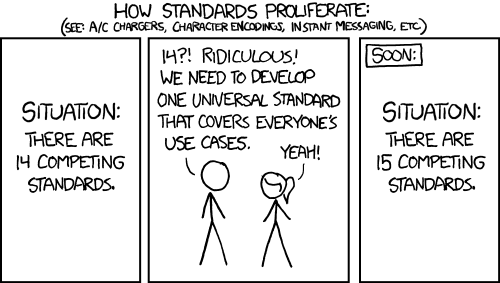
I can't seem to find what I am looking for in the existing landscape of web frameworks in Rust, so I am very tempted to use the lessons that I have learned over the past year(s) to create my own framework.
]]>Since I can remember, I've been fascinated with finding ways to organize my life. From task management to goal setting to periodic reviews, I've tried many things that promised to bring some order to the chaos. While I've discovered a few methodologies that work well for me, they often feel like pieces of a puzzle rather than a holistic view of my life and what I want to achieve.
In this blog post, I'll be discussing what my perfect task management app would look like.
TL;DR
The app aims to provide users with a comprehensive solution for managing their lives. It features a module to define and prioritize personal values, an OKR-based goal setting and tracking system, a task management module, and a Pomodoro-like timer with end-of-slice prompts to track focus, mood, and interruptions. Additionally, the app includes a dashboard for periodic reviews, allowing users to reflect on their progress and make adjustments as needed.
Philosophy
The app's core idea is to combine various methodologies and ideas to create a holistic view of one's life. It takes a top-down approach, starting with high-level goals and values and breaking them down into everyday tasks.
The app aims to consolidate all aspects of planning that are currently siloed into various physical notebooks and apps. This includes yearly reflections to reaffirm values and long-term goals, quarterly planning for mid-term accountability, and finally, task management for day-to-day activities. By connecting daily tasks to higher level goals and values, the app aims to enhance motivation and focus.
Moreover, the app utilizes data gathered daily to guide planning. Users can track their focus and mood during each task, the type of distractions that interrupt them, and how long each task takes to complete. This establishes a baseline against which users can compare any changes made to their process. It can also reveal any areas where they may not be making progress at all.
Modules
In order to achieve its core objective of creating a comprehensive system for planning, the app is designed to offer a variety of features that cater to different aspects of the user's life. These features are organized into six different modules, each with its own unique functionality. In this section, we will explore each module in detail, discussing how it works and how it contributes to the overall effectiveness of the app. By the end of this section, you should have a clear understanding of how the app can help you organize and manage your tasks, goals, and overall productivity.
Values
At the highest level of the app are the user's values. These are fundamental beliefs that shape who they are and who they want to be, and every task they perform is in some way related to or motivated by these values. To help users develop their values, the app offers different techniques, which are still under research.
For periodic reviews, the app utilizes the Wheel of Life. This tool visualizes various areas of the user's life that they've identified as important, along with their satisfaction level with each on a scale from 1-10. The Wheel of Life helps users maintain a healthy balance in their lives, ensuring they don't sacrifice important areas such as family and friends for their career or other goals.
Goals
After clarifying their values and identifying important areas in their life, the user can set specific goals that align with their values. Goals are specific results that they want to achieve in each area.
For setting goals, the app incorporates OKRs (Objectives and Key Results), which involve defining a qualitative Objective and a few quantitative Key Results. These OKRs are time-boxed, often for each quarter, making the deadline more tangible and motivating the user to be ambitious in achieving their objectives.
What makes OKRs a powerful tool is that they can be integrated into weekly reviews. Users can update the metrics of their key results and track progress towards their objectives, helping them stay focused and motivated.
Projects
Goals and projects are key components of achieving our values and long-term aspirations. Goals are specific results we aim to achieve, while projects are a set of tasks or activities that help us realize those goals.
Sometimes, goals can be achieved without breaking them down into smaller projects. For example, a goal of reading a certain number of books in a year might not require any additional planning beyond setting a reading target. However, for more complex goals, breaking them down into smaller, manageable projects can help us stay on track and make progress.
On the other hand, projects can also exist independently of goals, or might span across multiple goals. For instance, completing a software development project might take longer than a quarter, and might be part of multiple successive goals.
Tasks
The next module in the app is tasks. Tasks are specific activities that need to be done, such as writing a blog post about the to-do app. They can be related to a goal or a project, or simply stand alone.
I personally find the Getting Things Done framework helpful for managing tasks, although I haven't fully mastered it yet. One of the key ideas that has stuck with me is the importance of putting every thought into a trusted system, so that nothing slips through the cracks. Another key idea is making it easy to find the next actionable item. For example, when I'm on a train without internet access, I want to be able to quickly find all tasks that I can do offline. This helps me stay productive even when I don't have access to all my tools.
Another tool that has helped me in the past are Kanban boards, which visualize the work in progress. They have prevented me from starting too many things at once and have forced me to finish a task before starting something new. Kanban boards also work well with projects by giving a visual overview of the state of all tasks.
Tasks are an area of the app with many possibilities. There's a lot that can be done to make it easier to create, manage, find, and execute them.
Focus
The focus module is focused on the actual work of completing tasks. A popular technique to help with this is the Pomodoro Technique, which involves setting a time limit to work on a task with focused attention. Some people find it helpful to use a ticking timer to add an auditory cue to help switch the brain into focus mode.
Another tool for productivity is Vitamin-R, an app that offers a timer with an end-of-slice prompt. After each slice, it asks the user to track their focus level. My app additionally tracks the user's mood and any interruptions that may have occurred. Tracking these metrics can provide helpful insights into productivity trends and help with periodic reviews.
Reviews
For the review module, there are different options to consider.
One approach is to use the data collected during the execution phase to provide insights and trends. A dashboard could display progress on goals, focus levels, and mood over time.
Another option is to integrate reviews into the app, starting with weekly reviews to check on projects, define tasks, and increase accountability. The OKRs could be graded and reviewed within the app as well. A yearly review could also be useful to reflect on values and set high-level goals for the next year.
However, it's important to keep in mind that review processes vary, and it may not be ideal to have a rigid or inflexible system in the app.
Otterdone
I've been spending a lot of time thinking about project planning in general and specifically about an app that can help me with it. I might be overdoing things, which has inspired the name for the app – Otterdone.

It's just an idea in my head at the moment, and I'm not sure if I'll ever build it. There are many reasons not to do it, including the fact that the app's scope is massive, and the task management tool market is highly competitive. There are probably already two or three apps out there that do everything I've described above.
But building apps is fun, and I'm always looking for excuses to work on one. I've also realized that I need a tool that goes beyond a simple to-do list and helps me think about my life holistically.
If I were to build the app, I would want to start small and add features over time. The first thing I'd want to have is a timer to help me track my focus, mood, and interruptions afterward. It sounds like a simple enough feature to start with.
Stay tuned for more...
]]>For the past decade or longer, I have been running my own home server(s). Their scope and features always changed, depending on my own needs, interests, and resources. Sometimes it was all about experimentation and learning, while at other times I just needed things to work™.
Right now, my personal tech stack at home is quite small. I have a Synology NAS that is mostly used for backups, but that also runs some services in Docker. Pi-hole for DNS and adblocking, Home Assistant for some light home automation, a UniFi controller to manage my network.
While this setup is not perfect, it has worked well enough for the past few years. But two things have changed in my life that make me want to set up a new home server:
- Recent events have made me reconsider how much I want to rely on cloud services. There are some things that I'd like to run myself again so that I'm in full control of my data. I wrote about this recently.
- I just moved. This is a great chance to start from scratch, but I also need to redo some of my configuration. Home Assistant, for example, needs to be completely reset to match the new floor plan and the devices in the new apartment.
Before jumping into anything, I want to take a moment to consider what to run on the server and how to manage it.
Software
The most exciting part for me is deciding what I want to run on the server.
UniFi Controller
This one is maybe less exciting and more necessary. I need to run the UniFi controller in my local network so that I am able to manage my devices.

DNS
I want to run my own DNS server so that I can create DNS records for local devices. For example, it's much easier to access my Synology at synology.example.com than to remember its IP address.
Additionally, services like Pi-hole and AdGuard Home can block ads, trackers, and sometimes malware on the network level.


Home Assistant
I definitely want to run Home Assistant again to automate my home. It's an absolutely amazing tool with thousands of integrations, making it super easy to control all kinds of devices in the home.
 Home Assistant
Prometheus Stack
As a new addition, I want to run Prometheus with Grafana and Loki to monitor metrics, manage alerts, and collect logs. This is functionality that I have been missing in my current setup, and the lack of visibility into my IT operations has always bothered me.
 Prometheus
Tailscale
Another service that I want to add is Tailscale, both for remote access to some of my services but also as a way to secure my internet connections when I am travelling. This is not very high on the priority list, though.
 Tailscale
Others
There are more services that I find interesting, but I haven't decided if I want to actually run them in my own home. Sometimes the comfort of something like iCloud is just a bit too high, and other times the services are just not mature enough yet.


Operating System
As mentioned above, I am currently running most of my tech stack on a Synology NAS. This has worked well, but there are a few things that I am missing. Most importantly, it is very difficult to manage the server using Infrastructure-as-Code tools such as Terraform.
Over the past decade, I have learned how valuable it is to have the configuration as code and a tool that can quickly recreate the server. Software fails and hardware dies eventually. Being able to quickly restore a system is not only a luxury, it is absolutely necessary for services that I rely on.
At the same time, how software is deployed has massively changed as well. Ten years ago, Puppet, Ansible, and Chef were the tools of choice to provision a server and install software on it. Nowadays, everything is shipped as a Docker image.
For the new server, I am considering running everything in Kubernetes. The rough idea is to use Talos Linux as the operating system, install applications using Helm charts, and manage them using Terraform and its Helm provider.
Hardware
I have been considering different alternatives for the server's hardware. Ideally, I would have wanted a system with multiple disk and ECC memory for proper redundancy and safety. But I have the Synology for storage, and there are only a handful of consumer-grade systems that support ECC memory. In the end, all options were either too expensive, consumed too much energy, or were simply too loud for my small apartment.
So I decided to go with an Intel NUC. It's small, quiet, and doesn't consume much energy. Perfect for a home server.
 Intel
Intel
Data will still be stored on the Synology, so redundancy in the server was not that important. And since the server is now managed with Terraform, I can easily replace its SSD, provision it again, and mount the volumes from the Synology to get the system back to its previous state.
Next up, installing Talos Linux.
]]>Now more so than ever before, I find myself contemplating what my personal tech stack looks like. There are the devices that I use daily. Apps that have become integral parts of my routines and workflows. Cloud services that I rely on for data access, storage, and backup. Established over the past 10 years, my current setup is most of all convenient...
But it doesn't feel great.
For one, I have no idea how big my tech stack actually is. Over the years, I've installed so many apps, set up so many cloud services, and created so much digital clutter that it is impossible for me to keep an overview. 1Password has helped bring at least some order to the chaos by cataloging my accounts. But after a decade of growth and experimentation, my data is fragmented across platforms, accounts, and backups.
The other reason is my reliance on cloud services for critical parts of my digital life. If Apple decided tomorrow to delete my account, I don't know if I would be able to recover all the data that is stored somewhere in iCloud. Sure, some of it is stored locally as well. Some is on a backup somewhere else. But I'm sure there are documents and photos that only exist within that account. And that's just Apple. How many other companies do I rely on that could go bankrupt, become evil, or simply lose my data in a software glitch? Especially in times when billionaires buy and destroy companies just for their ego.
It is this loss of control over my data that concerns me the most.
Ten years ago, I decommissioned my last home server. I was tired of manually administrating Linux systems. I was looking something that just worked, that got out of my way, and that allowed me to focus on my productivity. So I replaced the server with a Synology NAS, switched from Ubuntu to macOS, and starting using iCloud to sync data between my devices. While this was definitely the right decision then, I feel that it's time to go back to my own home server now.
What has really inspired me recently is seeing @nova and folks run Hachyderm, a Mastodon instance. In Nova's streams on Twitch, you can see one of the servers sitting right behind her in her office. Running a decentralized social network from home is the perfect example of taking back control from big businesses and the cloud. And it's encouraging to see that people are actually doing it!


In the past ten years, both me and the environment have changed. I was a student back then, and now I am an experienced software and infrastructure engineer. I feel more confident in my ability to set up a system that is more robust and resilient than what I had before. Which also has to do with the maturity of tooling that is available today, from Terraform to NixOS and Kubernetes.
As I am contemplating my relationship with big tech, and the impact that especially social media has on our society at large, I feel that it is a necessary act of civil disobedience to cut ties with the cloud. Joining a decentralized social network and setting up my own home server seem like the obvious first steps on that journey.
]]>I am someone who is always thinking about something. More often than not, I am thinking about things that I would like to see in the world. I have written about a few of these, for example better tools for developers and a video game to practice programming. But there are more ideas. Way more.
Feeling overwhelmed by the constant buzzing of ideas in my head, I started looking for techniques to bring some order to the chaos. I read Getting Things Done (twice), and starting using OmniFocus to collect my projects in a single place. I used Bullet Journals for a year or two, tried to develop a meditation habit (and failed to do so), and read any article about productivity hacks that I came across.
One of the things that I read years ago, and then re-discovered recently, is the Pomodoro Technique. It divides work into timeboxed intervals, each of which focuses on a single task. I don't remember the first time that I tried the technique, and why it didn't stick. But when I tried it again a few weeks ago, it felt like the missing piece of the puzzle. Over the years, I had gotten better at collecting, organizing, and planning tasks. But I didn't feel like my execution had improved at a similar rate. I wasn't getting things done.
Adopting Pomodoro for the Digital Age
What I find attractive about the Pomodoro Technique is its simplicity. Theoretically, all you need is a kitchen timer. I found a simple app that I liked, put in the task that I wanted to work on, and listened to a soothing ticking sound for 25 minutes. By writing down the task, I knew exactly what I wanted to achieve in this time. And knowing that the time was limited both motivated me to focus, and helped me "reschedule" any distracting thoughts for later.
This has worked well for me many times, but equally as often it didn't. Either I forgot to set a timer, forgot to take a break, or changed what I was working on during the session. Making the Pomodoro Technique a habit has been difficult.
But I know myself. I like measuring things and then improving them. Show me a chart, and I'll make the line go in the right direction. So, to be more consistent with Pomodoro, I need to track my sessions and visualize them. Given the amount of apps that exist for the Pomodoro Technique or time tracking in general, this seems like an easy enough objective.
There's one problem, though. I don't want to change my process to fit a certain tool. I want a tool that fits my process.
Creating My Perfect Productivity Tool
The idea to create my own productivity tool has been floating around my head for a while. I think every developer has, at one point or another, the idea to create their perfect tool. Be it a code editor, a note-taking app, or any other piece of software that they touch every day. I don't know why be believe this, but we think that we can create better tools for ourselves. With more features and less issues.
So maybe it is hybris, but I do want to try create a tool that implements my own process. That works well for me. That interfaces with the other software that I use. The first step on that journey is building a simple command-line tool that supports the Pomodoro Technique.
Focusing on Progress
This is a good opportunity for myself to train my focus and productivity. Instead of getting lost in complex features and grand visions, I can practice to work on this tool in small slices. Only pick features that are relevant to me now, and that I can get done in a short amount of time. In a few 25 minute intervals, for example.
I am essentially dogfooding my own productivity tool.
This process is very much inspired by a great conference talk I saw at RailsConf 2019 called The Selfish Programmer by Justin Searls. In the talk, Justin argues that we can take more liberties when writing software for ourselves. We can focus on things that we find interesting or want to learn. And ignore practices that exist to enable efficient collaboration with others. I found the talk very inspiring, and this seems like a great project to try out some of its ideas.
Introducing WORK-E
I've decided to call my tool WORK-E, short for Work Organizer and Record Keeper: Earth-Class. The goal is to develop it into the perfect companion for myself, with all the weird requirements and idiosyncrasis that I find important. But, it will be developed in a very agile way, feature by feature without a long-term roadmap.
The first feature that is important to me is its support for the Pomodoro Technique. The feature set for the first iteration is rather small:
- Write down the task
- Start a timer
- Play a ticking sound during the session
- Ring an alarm when the session ends
- Store the session in a database for future analysis
For a second, I contemplated building this tool with Go and the awesome libraries that charm.sh provide. But then I remembered the talk by Justin, and decided to lean into Rust. It's my favorite programming language, and this project is a great opportunity to practice it as well. ❤️
The command-line interface is simple. It requires the user to pass in the name for the session, and allows them to optionally overwrite the session's duration:
work-e track --name "Write a blog post"When run, it blocks for the length of the duration and plays a ticking sound in the background. When the session ends, it is saved to a local SQLite database.
This is everything that I need to start using WORK-E to track my own work. And let me tell you, it's been a huge success! I don't know what it is in my brain that finds data so interesting, but knowing that each session is recorded somewhere has been super motivating. I am not doing anything with the data yet, but just knowing that it is there is enough.
There are a few small improvements to the CLI that I already identified. For example, it does not ring an alarm at the end of a session, which has caused me to miss the end of a session at least twice today. It also doesn't tell me how much time is still left in a session.
I will work on WORK-E and improve it as I go. It's liberating to think of it as a small project that I am doing purely for myself. And that allows me to be selfish...
]]>When I look back on the side projects that I started and abandoned over the past few years, and the notes and drawings that I added to my notebook, a clear pattern emerges. Some ideas got way more attention than others, and a handful actually came up again and again. I would spend a few weeks thinking about them, eventually putting them away, but a few months later they always returned.
In one way or another, these ideas were all focused on my experience as a software developer. As I was working on other projects, I always noticed things that could be easier or better. More efficient CI workflows, better local development environments, automation to help manage open source projects. Eventually, I would always get so fed up that I wanted to build a tool that would solve that problem for me.
A few times, I did start working on such a tool. But I never made a plan, set boundaries, or defined a goal. And as I got deeper into the problem space, I realized what else was possible. How this tool could be so much more than I initially thought. But as I enjoyed jumping from idea to idea, the scope of the projects grew in so many different directions that it would ultimately cause them to fail. I was more interested in intellectual stimulation than delivering something of value.
I don't know why and when, but this has changed recently. I feel like I did enough experimentation, and the next big thing for me to learn is to deliver and then operate a product. To talk with other developers and teams, and help them improve their workflows. This is the fundamental idea behind my new project, DEV x BOTS.


Automatons – Automation for Developers
The focus of DEV x BOTS is the development of an automation platform for software developers called automatons. Looking back at my failed ideas and projects, they were all trying to automate various parts of the software development process. But building bespoke automation is time consuming work, and it really shouldn't be.
Learning from past mistakes, the project is set up to deliver small, concrete results that build on top of each other. While the ultimate goal is to deliver an automation platform, the first step is to create a library. Then I want to create a few custom GitHub Apps, finally building some of the ideas that have been floating around my notes for years. Any feature that the apps need will find its way back into the library, slowly growing its scope and usability. And the apps need to run somewhere, which means another deliverable is a runtime for them. The combination of library and runtime will be the minimum viable product.
I expect to learn a lot during this process, which will influence the future direction of the project. But in a nutshell, I want to broaden the feature set of the framework and move away from bespoke apps. Developers should be able to automate workflows that go beyond just GitHub, for example integrate their project management in Linear. And creating an automation shouldn't involve a custom GitHub App, but maybe just a configuration file in a repository. Which would be cool to create using a visual flow-based builder, similar to Blueprints in Unreal Engine.
All of this will take time to build, which is why there is a focus on small steps and iteration. Slowly working towards the minimum viable product, and then figuring out the necessary features for a simple, lovable & complete product.
Committed to Open Source
The automatons framework is developed as open source, and the goal is to (eventually) offer self-hosted runtimes so that teams can run the full stack themselves. Check out DEV x BOTS's GitHub profile and the project:
Besides just being a fan of open source myself, I am doing this for three reasons:
- Developers should be able to trust the tool. This means that they can inspect the source code and ensure that it is safe to run.
- Developers should be able to rely on the tool. With open source, they will always be able to run the tool themselves, no matter what happens with me. There is no vendor lock-in, and less of a bus factor.
- Developers should be able to contribute and solve their own problems. My priorities might not be your priorities. But with everything being open source, you can solve your problem and contribute the solution back to the community.
The commitment to open source also covers the usage of the platform. I will run an instance of the service that open source projects can use for free. But contributions to cover the development and server costs are greatly appreciated:

Next Up
The next blog post will introduce the automatons framework itself, and the considerations that went into its design. We will look at its core library, and the prototype for an GitHub App that uses it. Until then, take care and have fun!
Blog: https://jdno.dev
GitHub: https://github.com/jdno
Twitter: https://twitter.com/jdno_dev
Twitch: https://twitch.tv/jdno_dev

The previous version was the first public release of the game. It featured two different colors for airplanes and airports, and new 2D assets that gave the game a new look.

What's Changed
The changes in 0.3.0 are all about the new Node SDK, which makes it simple to play the game with JavaScript or TypeScript. The SDK packages the auto-generated bindings for the game's gRPC API, and publishes them as an npm package.


Together with the SDK, a new tutorial has been published that shows players how to play the game with TypeScript. he tutorial covers the installation of the game through the itch app, setting up a new project for the bot, and interacting with the API to start a game and subscribe to events.

The code in the tutorial has been published on GitHub in the form of a template repository, which players can use to bootstrap a TypeScript bot:
jdnoPlans for 0.4.0+
The current version of the game has some known bugs that I'd like to fix for the next release. And then I need to make a decision whether to work on a new UI or on new game mechanics.
]]>
The previous version of the game, 0.1.0, was also its first release. This version was never released to the public, and only used internally for testing. It featured the first playable prototype of the game, but it was still missing many important features.
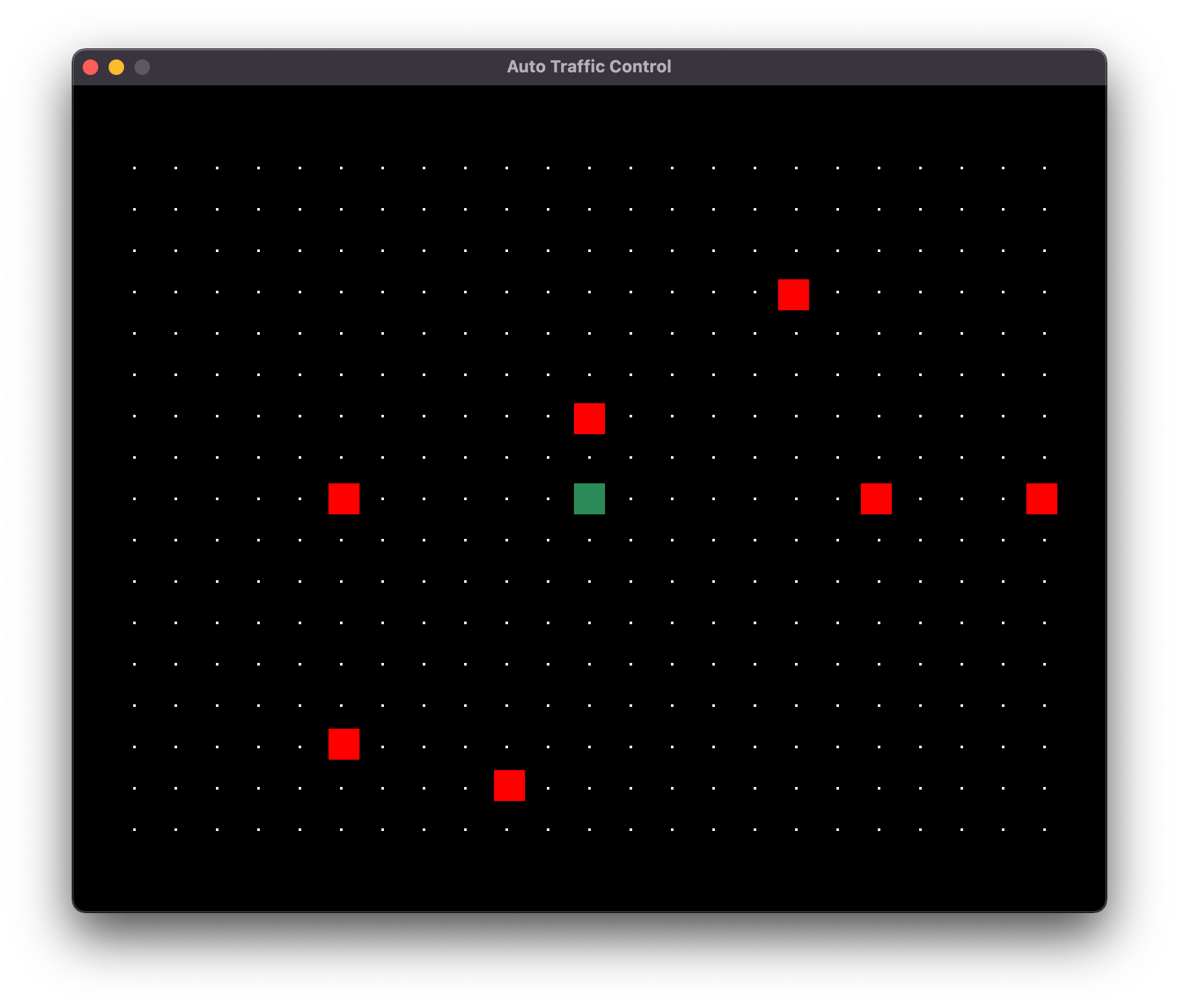
Version 0.1.0 had a single airport at the center of the map (green square), a routing grid, and planes (red squares) that spawned at random locations on the edge of the routing grid. The location of the airport was hard-coded, and my bot used simple Euclidean geometry to calculate a flight plan to the center of the map.
What's Changed
The most obvious change between version 0.1.0 and 0.2.0 are the graphics. The second release features simple sprites for the background, the airport, and the airplanes.
The game also introduced two different colors for airplanes and airports. Players have to route airplanes to the airport that matches their color to score a point. This made it easier to have more airplanes on the map, while avoiding congestion issues around the airport. And more airplanes make the game more dynamic and lively, which I believe will lead to more fun playing the game.

The introduction of two airports in different colors also required changes to the API. The map API in particular was extended significantly to allow players to query the map with the different airports and the routing grid.
Lastly, the release of the game is accompanied by a new website for the game. The website contains documentation on installing the game, its rules, and on its API with the different message types and services. A Quickstart guide is designed to help getting started with the game, although it is admittedly still very rough around the edges.
https://auto-traffic-control.com
Check out the full release notes for a comprehensive list of changes in this release: https://github.com/jdno/auto-traffic-control/releases/tag/v0.2.0
Plans for 0.3.0+
The focus for the next release of the game is the addition of a Node.js client library. This will make it easy to play the game in either JavaScript or TypeScript, or any other language with support for npm packages.
I also plan to improve the documentation with a tutorial for TypeScript. The tutorial will walk through the first steps in playing the game, from installation to first playthrough. This is a great test for the game's npm package, and it will make it easier for new players to get started.
After that the plans are a bit fuzzy. There are a few game mechanics that I'd like to implement, for example priority airplanes that have a fixed flight plan and that cannot be controlled by the player. I'd also like to experiment with different map features, e.g. cities over which airplanes are not allowed to fly. And the game needs a better UI, but how to build that is still a very big question mark. We'll see what to do after 0.3.0 is released...
Follow the Project
Check out Auto Traffic Control on itch.io:


If you're interesting in this game or programming games in general, make sure to follow along. I am not sure where the road will take us, but I am very excited for the journey!
Subscribe on my blog to receive weekly updates about the progress on the project.


I am also planning to stream some if not all of the development of this game on Twitch, so follow me there as well.


I really like automation in software development (and elsewhere). And since my personal projects are hosted on GitHub, I have fully adopted GitHub Actions as my continuous integration platform. When I push code, a handful of actions is started that lint the code, check its style, and run automated tests. When they all pass, it gives me confidence in the quality of my work.

For my upcoming game Auto Traffic Control, I wanted to use GitHub Actions again to create reproducible builds of the game with a predictable and consistent quality. The goal was to avoid human error by fully automating the process, from build to release on itch.io.

Create a New Action
I recommend creating a new action for this workflow. Especially if you want to build your game for multiple operating systems, the file will get pretty long as is. Go ahead and create a new YAML file in .github/workflows/itch.yml, and add the following content:
---
name: itch.io

env:
  itch_project: jdno/auto-traffic-control
Change the itch_project string to match your username on itch.io and the name of your project. If you like, you can also change the name of the action.
Trigger a Release
The setup that I have developed over the years for my GitHub Actions has one important feature: It has different actions for different workflows.
When I push code to GitHub, actions are started that check the quality of the code. These checks have to pass before I can merge the code into the main branch. Their purpose is to ensure a consistent code quality, not to create a release.

When I want to create a new release, I actually use the release feature on GitHub. I like writing a short summary of what's changed, and include a changelog in the release notes. It makes the release feel more "official", and like an actual achievement. When I create a release, another action is kicked off that builds the game in release mode, and then pushes the game to itch.io.
The following snippet is what I use to trigger my release workflow. It runs the action whenever a pre-release or release is published on GitHub:
"on":
  release:
    types:
      - prereleased
      - released
You can also build and publish the game every time code is merged into the default branch with a snippet like below. The choice is ultimately yours, and depends on what makes sense for your development workflow.
"on":
  push:
Build the Game
The build step depends on your game, and I cannot give you advice on it. The steps will look different based on the programming language or game engine that you use. On a high level, though, you want to do the following:
- Check out the code
- Set up a build environment
- Compile the game
The following examples assume that you also copy the binary and any resources/assets that the game needs into a dist folder. This is the folder that will be pushed to itch.io. What needs to go into this folder again depends on the game engine that you are using.
I create builds of my game for Linux, macOS, and Windows. Each operating system requires slightly different dependencies, so I decided to split the build into three different jobs: one for each operating system. Below is the Linux build as an example. The job installs the dependencies, checks out the code, sets up the Rust toolchain, and then builds the game.
jobs:
  linux:
    name: Publish Linux build
    runs-on: ubuntu-latest

    steps:
      - name: Install system dependencies
        run: |
          sudo apt-get update && sudo apt-get install -y \
          libx11-dev \
          libasound2-dev \
          libudev-dev

      - name: Checkout code
        uses: actions/checkout@v3

      - name: Set up Rust toolchain
        uses: actions-rs/toolchain@v1

      - name: Build release artifact
        uses: actions-rs/cargo@v1
        with:
          command: build
          args: --release
After these steps, the release artifact will be copied into the dist folder along with the assets that my game use. Theoretically, I can now run my game from this folder and it would work.
Publish to itch.io
The final step is publishing the game to itch.io. We will be using itch's butler, a tool that makes it easy to upload games to itch. This is the command to publish a new version of a game:
butler push directory user/game:channel --userversion versionThe command takes a directory as its argument, and uploads the contents of this directory to itch.io. This will be our dist directory. The next argument is the project, which we've set at the beginning in the itch_project variable, followed by the channel.
Channels are an important concept on itch.io, and the channel name can be used to automatically tag the game on the platform. For example, pushing to the linux channel will tag the game as a Linux executable.
Lastly, we pass the optional userversion argument. The goal is to use the same version number on GitHub and on itch.io.
I am getting these variables from the release that I created on GitHub. When a release is published and the action is started, GitHub will add the release to the action's context. This makes it possible, for example, to access the title of the release with github.event.release.name (which is 0.1.0 for this release). If you want to run the action on every commit (i.e. on: [push] above), you need to either hard-code them or find another way to provide them dynamically.
      - name: Set version
        run: echo "version=${{ github.event.release.name }}" >> $GITHUB_ENV

      - name: Set beta channel
        if: github.event.action == 'prereleased'
        run: echo "itch_channel=linux-beta" >> $GITHUB_ENV

      - name: Set release channel
        if: github.event.action == 'released'
        run: echo "itch_channel=linux-stable" >> $GITHUB_ENV
I am particularly proud of finding a way to support pre-releases. When a release is tagged as a pre-release on GitHub, the game will be pushed to the beta channel. This makes it easy for me to test a new version of the game, before making it generally available.
Now that we have set the variables that are required to run butler, we can first add the tool to our workflow and then run it. Pushing a build to itch.io requires an API key, which you can find here.
      - name: Set up butler
        uses: jdno/setup-butler@v1

      - name: Publish game to itch.io
        run: |
          butler push dist ${{ env.itch_project }}:${{ env.itch_channel }} --userversion ${{ env.version }}
        env:
          BUTLER_API_KEY: ${{ secrets.ITCHIO_API_KEY }}
A new version of your game is now available on itch.io.
Profit
This is admittedly an advanced action with some pretty complex steps. Getting it to work correctly for your project might require a few iterations. It took me many builds to get this right. But the results are great, and totally worth the effort!
Most importantly, you now have a reproducible build. Getting your game ready for release is not a dark art anymore, nor does it require finding the note with the instructions somewhere on your desk. You can just look at the action to see which steps are required to build and then push the game.
Because the build is automated, it is also guaranteed to produce consistent results. Your local development environment cannot break the build or the game in mysterious ways, because the build environment is always clean.
And you know that everything that is required to build the game is backed up on GitHub. All code and all assets are safely stored in a second place, with a version history.
Follow me
If you're interesting in my game Auto Traffic Control or programming games in general, make sure to follow along. I am not sure where the road will take us, but I am very excited for the journey!
Subscribe on my blog to receive weekly updates about the progress on the project.
Jan David Nose
I am also planning to stream some if not all of the development of this game on Twitch, so follow me there as well.


I have been thinking about a video game for programmers for a while now. What differentiates such a game from others is that it is played by writing code. The player cannot interact with the game world themselves but only through an API. Essentially, they create a program that plays the game for them.
Jan David Nose
The time has come to make this dream a reality and build a working game. I am working on Auto Traffic Control (ATC), a game in which players have to safely route airplanes to an airport.
Jan David NoseATC as a Distributed System
Over the past two years, I experimented with different ideas for the API and the architecture of the game. One prototype had a REST interface, another tried to wire RPC calls into the core loop inside the game engine, and there were a few that explored various asynchronous interfaces such as message queues. But all of them eventually ran into problems, with a root cause that in hindsight is totally obvious:
At its core, the game that I want to build is a distributed system.
There are three components that are independent of each other: the player's code, the API layer, and the game simulation. The player's code runs in its own process and is totally decoupled from the game. But even the API layer and the game simulation are only loosely coupled, and run in parallel in different threads. The result is a system in which all components run concurrently, and any attempt to introduce tight coupling between them is bound to fail.
Event Sourcing and CQRS
The architecture for the game takes a lot of inspiration from Event Sourcing and CQRS. The player sends a command to the API, which validates it and then puts it into a queue. The different systems that power the simulation inside the game take commands from the queue, and make the corresponding change to the simulation. The change in turn triggers an event, which is send back to the API via another queue. The API receives the event, and sends it over a stream to the player.

The diagram above visualizes this architecture inside the game. The API on the left has different services that each manage a single resource. The event source streams events to the player, while the airplane service allows players to interact with the airplanes in the game. The API is coupled with the simulation on the right through two queues: the event bus and the command bus. The game is built with the game engine Bevy, which runs many systems in parallel to simulate the game. All systems are connected to the event bus so that they can publish any change they make to the game world. And systems that can be influenced by the player are connected to the command bus as well.
This architecture has worked really well in experiments, and I can't wait to see how well it'll work for a full game. Stay tuned to learn more about that in the future!
Follow the Project
If you're interesting in this game or programming games in general, make sure to follow along. I am not sure where the road will take us, but I am very excited for the journey!
Subscribe on my blog to receive weekly updates about the progress on the project.
I also stream some if not all of the development of this game on Twitch, so follow me there as well.
A Video Game for Programmers
I have thought, talked, and written about programming and video games a lot over the past two years. The intersection of the two is still super interesting to me, and I truly believe that we can make software development as a field more accessible by making it more fun. The following piece captures a lot of my thoughts on the topic:
Jan David NoseAfter quite some exploration and experimentation, I think that I have learned enough to make a serious attempt at developing a small video game for programmers. The next four weeks are all about going from idea to prototype, and testing the hypothesis that video games for programmers can be fun!
Inspired by Flight Control
One inspiration for the game is the old school hit Flight Control, which was one of my favorite games on mobile. I still have a lot of very fond memories of spending hours playing the game on an iPad, back in 2012.
In Flight Control, the player is in control of an airport and its surrounding area. Airplanes enter the map from the side and fly around randomly. The player has to create a path for each plane that brings it safely to the airport. When two planes collide, the game ends. When a plane reaches the airport, it lands and disappears, and the player gets a point.

Flight Control had a few more features that made the games more fun and/or challenging. Most maps features three different kinds of aircraft: small planes, bigger planes, and helicopters. They had different speeds, and had to be routed to different runways. There was changing wind that determined which runways were open, requiring the player to ever so often redraw all routes. And there were high priority planes, which followed a fixed route that the player couldn't change. Instead, players had to move their own aircraft out of the way in time.
Inspired by Sector 33
Another game that I played on the iPad back in the days was Sector 33. It featured a similar setting, but with different game mechanics. Players controlled airplanes approaching the San Francisco airport, and had to change their routes and speed to get them safely in a queue and then to the ground.

I don't have as many memories of playing Sector 33 as I have of Flight Control. What I do remember is doing a lot of quick math in my head to perfectly queue up the aircraft. It was very rewarding to get the timing right and have planes slot in perfectly after each other on their approach to SFO.
Plus, it was just cool to play a video game developed by NASA.
Made for Programmers
Auto Traffic Control takes inspiration from Flight Control and Sector 33, and remixes these games for programming. Instead of drawing on a screen, players create flight plans through an API. And algorithms replace mental arithmetics, hopefully leading to less mid-air collisions than what my 18-year-old me was responsible for.
The core game loop is similar to Flight Control. The map features one or more airports, and planes fly onto the map from the sides. The player has to provide a flight plan for each plane that lands it safely at the right airport. Landing a plane yields a point, while collisions end the game.
The difference to Flight Control and Sector 33 is in how the player interacts with the game. Instead of drawing on the screen or pressing a button, they will call an API to update the flight plan of a plane.

The above wireframe shows an early concept for the game's routing grid. Three planes are approaching the airport at the center of the map. Their flight plans, the black dotted lines, follow the routing grid from node to node. The API to update a flight plan might end up looking like this:
const flight_number = "AT-3245";
const flight_plan = [
    [-2, 0],
    [-1, 0],
    [0, 0]
];

game.update_flight_plan(flight_number, flight_plan);
Based on previous experiments, the API will be built around event sourcing and CQRS patterns. The game will publish events about anything that changes in the simulation, e.g. a new plane entering the map. And players can control the game through commands, which themselves lead to changes that will trigger events. This creates an asynchronous coupling between the game's simulation, the API, and the player's code.
Roadmap
The goal is to have a working prototype ready by the end of March. The first two weeks will be focused on technical implementation:
- Develop a simulation that spawns, flies, and lands planes
- Interact with the game through a bi-directional API
Once these two tasks are done, players can observe the game and change its state through the API. This makes it possible to focus on the core game loop, and experiment with different ideas to make it engaging.
At the end of the month, I want to know if a game like this is feasible and fun. If so, I might want to turn the prototype into a polished game next. If not, time to go back to the drawing board and figure out where things went wrong.
Follow the Project
If you're interesting in this game or programming games in general, make sure to follow along. I am not sure where the road will take us, but I am very excited for the journey!
Subscribe on my blog to receive weekly updates about the progress on the project.

I am also planning to stream some if not all of the development of this game on Twitch, so follow me there as well.