It was so great seeing you at the Summit! I thought I’d share some of my YouTube content with you that is closely related to what I covered in my session. These are videos I’ve posted previously and others have found them useful. Let me know what you think!
]]>
Download your Free Instagram, TikTok and YouTube Shorts Overlays Here!

Do you need to download video from a site like YouTube or Vimeo? I’ve been using the SnapDownloader app for years! SnapDownloader allows you to download videos from website in a variety of file formats and resolutions just by copying and pasting the link to that video into Snap Downloader’s search field.
SnapDownloader also lets you:
- Download just sections of videos
- Download chapters from YouTube
- Schedule downloads to start at a later time
To see all the ways SnapDownload works, click the video above.
Please note that you shouldn’t be using other people’s content without their permission unless it falls under what’s called fair use. And fair use is a legal term and I am not a lawyer so you should investigate what falls under fair use on your own, either by reading about it online or talking to a licensed professional.
Get SnapDownloader using this link.
When you purchase products through links on my page, I may receive a small commission at no additional cost to you.
]]>As you’ve probably already noticed, vertical video is the latest trend on the rise. Why vertical video you may be asking? Well simply put it’s convenient. TikTok, Instagram, YouTube, Snapchat, and even DoorDash all have one thing in common, and that’s quick and easy access.
Quick and easy access
I have a phone, you have a phone, shoot even my dog has a phone. It’s just a sign of the times, so ask yourself “how am I holding my phone?” Well unless I missed the memo, phones are typically held vertically, so naturally forums of media that utilize vertical video would be prone to be more successful. I mean think about it, The mass majority of this generation spends over a third of their time on mobile devices right? So with that knowledge in mind, why produce something that’d go against that flow?
TikTok is a prime example of a company that has mastered the formula of vertical video. You don’t have to compromise your comfort for entertainment. TikTok among other apps promotes 15-30 second vertical videos that don’t require you to adjust your mobile device to watch. Not only is vertical video convenient, but it’s more likely to keep your audience engaged.
People Finish Vertical Videos
Numbers don’t lie, and research has proven that Vertical videos have a larger completion percentage than that of horizontal videos. Why is that you may ask? Well for starters there is no additional input required for vertical video. For instance, say you are on your phone when you stumble upon two videos. One requires you to turn your phone and maximize your screen in order to know what’s going on, and the other just plays from the palm of your hand. No additional work required. Most people would pick the option with less steps, from there it’s a question of whether the video keeps their engagement or not.
Target Audience
It’s Important to know who you are making videos for, and where said video is going. It’s not suggested to make vertical videos simply for the sake of making vertical videos. For a long period of time there was a stigma surrounding the art of vertical videos, as the aspect ratio wasn’t designed for larger devices like a tv or movie screens.
Case in Point:
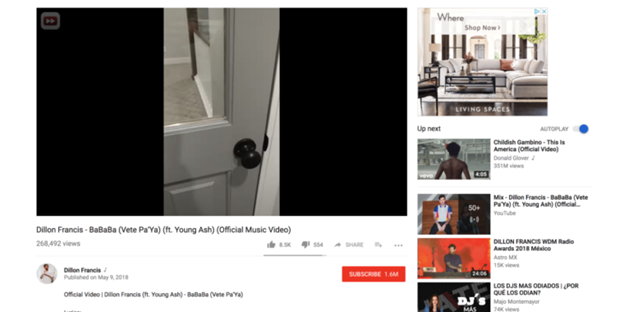
The vertical video side bars proved to provide a very jarring viewing experience and didn’t conform well to larger screens. However vertical video aspect ratios are typically suited to fill the screens of mobile devices.
What Should You Do?
You’ve paid attention to the trends and now you’re wondering on how to get in? Well I suggest you challenge yourself and get out there.
- Find the tools and mediums that are right for your service.
- If you’re accustomed to horizontal videos and want to try vertical may I suggest alternative plates for your camera. If shooting, on your phone maintain the proper aspect ratio in regards to the site you’re posting on.
- Do your research on the topic and know what you want prior to filming.
- Where is it going? Who is it for? What are my time constraints?
- Follow the trends.
- Stay consistent and follow the latest trends to keep your audience invested and engaged.
Learn more about Vertical Video and other tips:
]]>I’m going to show you the features of Synthesia and we’re going to decide together, is this cool? Or is it kind of creepy? Synthesia, like I said is a platform that lets you create an avatar, and have it say whatever it is you want and incorporate it into a video. You will see that there are a lot of avatars that are based on real people that they shot. I don’t know what kind of magic they do but you can make these people say pretty much whatever you want using Artificial Intelligence, or AI, voices. You can’t change what the person is wearing, or the color of their shirt, or their hairstyle, or anything. Because again these are based on real people.
Getting started in Synthesia
The program presents you with a vast array of templates to choose from. If you’re on the personal use version of Synthesia it’s only six slides at a time. You can replace your avatar, modify its position and even manipulate its scaling. You can even change the color of the background of that circle. Despite limiting you to six slides you get free range of the AI’s capabilities, allowing it to speak on one slide and stay silent on another. In order to make your avatar talk you’d have to create a script for the AI. Once that’s finished you’d actually have to generate the video and Synthesia would have to process it before it could show you how your avatar looks.
When you’re creating a video from scratch you can upload your own content as well as record your own screen, or upload your own background. There’s also a very small music library included in Synthesia with songs that are pre-licensed for you.
Looking deeper into Synthesia
Everything looks super realistic except for the mouth. The mouth doesn’t quite sync with what she’s saying and then the other funny thing that happens is this weird swallow she makes at the end. There’s no way in Synthesia to trim that out, it’s definitely something that I think if I wasn’t expecting to see an avatar in a video on someone’s website, or on YouTube, I would definitely take a second look.
Synthesia is constantly improving this technology so there is always something new that they’re developing. It’s in beta right now but Synthesia has made avatars loop from scene to scene. What that means is that when they’re finished talking their head will be in the exact same position it started in your scene, so that the scenes will be seamless and the avatar won’t jump. Synthesia is working to develop this emerging technology and make these avatars more and more realistic. I don’t know if that’s a good thing or not, it’s a little scary, but it’s also a little cool.
Extra Features in Synthesia
What if you wanted to be an avatar yourself? What if you wanted your face and your voice but you didn’t want to have to set up the camera and lights and do your hair and pick out an outfit every single time? Synthesia does offer a service where they allow you to create your own avatar and even incorporate your own voice in the menu of voices just on your own personal account. They don’t share your avatar with other people and they say that no one else will ever have access to it. In fact they have a whole page on their website where they talk about their commitment to the ethical use of this kind of technology, but it’s actually really expensive.
Final thoughts on Synthesia
So what do I think of Synthesia? I think this technology has a little bit of a way to go but it’s definitely getting pretty interesting and something to keep an eye on. Like I said, I definitely think there’s a little bit of a disconnect between what the avatar’s mouth is doing and the words that they’re saying. It looks a little bit out of sync and I think that these avatars are super realistic looking but I don’t think most people would be fooled for more than a few seconds. so I don’t think you’re going to be able to totally convince anyone that these are real people but maybe that’s kind of the appeal of it.
If you are interested in this platform, check it out here: https://www.synthesia.io/?via=jenn
Shop My Gear!
- Camera: https://amzn.to/330jcFP
- Lights: https://amzn.to/2G5Ztvm
- Microphone: https://amzn.to/30kyeFc
- Headphones: https://amzn.to/2RQhOPF
- Music Library: https://bit.ly/3raqXTU
For event bookings, sponsorships or collaborations email [email protected] For professional video production services, visit http://www.plumproductionsmedia.com
When you purchase products through links on my page, I may receive a small commission at no additional cost to you.
]]>Today we’re talking about a platform called WeVideo and Jenn Jager does a review and tutorial to give you a glimpse of what it can do. It is a live action video editor that is web based and it has templates but also some pretty robust editing capabilities.
Getting started in WeVideo
It’s important to know that you need the chrome browser to use WeVideo, and you can either start a video from scratch with a horizontal, square, or vertical aspect ratio. Or you can start with a template. There’s a bunch of templates in WeVideo. These templates are unique and different, each of these templates come with stock video that allow you to modify the text, or replace the video very easily with your own.
Tour of the WeVideo Interface
Now let’s start from scratch on how to build your own project on WeVideo, it’s important to note that stock media is not included in the unlimited plan and that it is an additional upgrade in order to be able to export videos that include the supplied stock media. So WeVideo may allow you to create a project with it but when you go to export your video it will notify you that if you want to use these clips you need to upgrade your plan.
Within the WeVideo interface, there are a number of editing templates and options tabs for you to choose from. Within the text tab are motion moving dynamic text templates that come with WeVideo. In order to preview them you just click over the thumbnail and then draw your attention over to the right side of the screen in the canvas. I have to say I really like the motion on these text templates. I think they’re very nice, they’re very modern, and there’s a lot of them. Additionally there will be a few more tabs which will include audio, where you can find pre-licensed music tracks that can be used in your project. Transitions, and Backgrounds for your video.
Extra features in WeVideo
WeVideo playback offers a low resolution option for faster preview. Since this is a web based video editor, videos are stored in the cloud. As a result the playback won’t be super high resolution. However once you export your media they are high resolution. This feature helps WeVideo run faster by showing you a lower resolution preview. The Timeline for WeVideo includes two video tracks and a separate audio track.
If you wanted to make modifications to your media, like do some light color correcting, or general edits. Just double click it and from there you get a lot of different options, the first one being transform. So you can flip the clip around, reverse it to make it upside down, or flip it back and forth. If your clip was not the right aspect ratio for your canvas you could force it to fit. You can also change the speed of your clip within the timeline, so you can either speed it up or slow it down.
They also present a color keying option which means if you had a green screen shot , and wanted to drop something into the background this is where you would do that.
Keying is hard and sometimes even if you do a really good job lighting your shot, depending on someone’s clothing or their hair. It’s really hard to get a clean cut out on a person. I don’t think this color keying feature has in my opinion enough controls and settings to really be able to fine-tune that color keying, so I wouldn’t say it’s amazing amazing amazing but it is nice to have this feature. So that is definitely a plus with WeVideo.
WeVideo Review: Final Thoughts
So for my final thoughts on WeVideo, I think this is a great live action editor. So If you are not a professional editor but have ideas and want to be able to execute your vision, I believe this is a great option for you.
There are a lot of templates, but if you want my honest opinion. I don’t think the value of WeVideo is in the templates. I think it’s in the functionality of the platform, that you can add multiple video and audio tracks, that you’re not locked into templates where you can’t really change like the font or the layout or anything like that. There’s so much flexibility in WeVideo, I love that very very much. I love that you can drag and drop your own media and that you can actually start editing with it right away, even if you’re still waiting for that media to finish uploading. You also have the option to export videos in 4k, which is something I don’t see a lot online. Videos do take a while to export, since all the rendering is done in the cloud. So things do move a lot slower than if you had been doing it on your desktop. Overall, I would say WeVideo is definitely a great platform for people looking to try something new.
Interested in trying WeVideo, you can find it here – https://wevideo.pxf.io/P0znDY
Other Reviews You Might Find Helpful:
NOTE: When you purchase products through links on my page, I may receive a small commission at no additional cost to you.
]]>Today we’re doing a Photo Vibrance Review video. It’s a brand new platform a very cool photo editing software that makes your photos look like they’re moving. Normally, I don’t look at a lot of photo editing apps here on my channel. But this one is brought to you by the same people who make Create Studio and you know how impressed I’ve been with Create Studio lately, so I definitely had to check it out. This article is not sponsored, these opinions are my own. I do have a link to Photo Vibrance at the end of this article if you want to check it out for yourself. And if you want to watch how I recreated the images that Photo Vibrance uses in their promotional materials, check out the video below.
Getting Started In Photo Vibrance
In Photo Vibrance there are two different styles of photo effects that you can create; Magic Motion and 3D Parallax. Let’s first talk about Magic Motion.
With Magic Motion you can make different textures in your photo look like they’re sort of rippling. This effect is super cool. It turns your photo into sort of like a looping video. You can choose what moves and what doesn’t move, you can adjust the direction of the thing that moves, and you can change the speed of the thing that moves.
If you have, lets say, a sky in your image, you can replace it with a moving shot of a sky that is already built into the Photo Vibrance platform. Photo Vibrance has a really nice “Draw Mask” feature that lets you paint out the existing sky in your photo in order to replace it with on of their moving ones. This is a really cool feature that could have a ton of applications. What if you wanted to make your photos look like ads? Photo Vibrance also has shapes and text options. You can change the color, the size, and the rotation of these elements.
Digging Deeper Into Photo Vibrance
Now let’s talk about the 3D Parallax feature. What the parallax effect is going to do is it’s going to almost feel like a pop-up book. Like certain images in our picture are in front of others. This effect uses a camera feature to really make things look three dimensional. This effect can be a little complicated, so you might need to spend some time here to figure out how it works.
The way the camera effect works in Photo Vibrance is by using keyframes. Some of you may be familiar with keyframes, and some of you may not be. Keyframes are just a way to set points between positions to create a movement. Pretty much all animation is done using keyframing.
A keyframe in Photo Vibrance basically tells the platform where I want the camera effect to zoom into or how I want it to move. You can modify how dynamic a move is, and you can also modify how much the camera move eases in or out. Since Photo Vibrance uses keyframing you can really add all kinds of really cool moves to the camera. You can zoom in or out, pan left or right, tilt up or down, or even rotate the camera.
Extra Features In Photo Vibrance
You can also add effects and objects to your images in Photo Vibrance. There are all kinds of effects in here, smoke, fire, hearts, rainbows, all kind of things. The objects they have are things like monkeys, airplanes, birds, pretty much anything you can think of. You can move these effects and objects around just like you would a shape or text. Photo Vibrance also has layers. That means you can add an effect under the portion of the image that you cut out to make some really awesome effects.
Photo Vibrance Review: Final Thoughts
So what do I think about photo of vibrance? Here are my honest thoughts. What I love about photo vibrance, obviously, is the end result of these projects. They are stunners. They are scroll stoppers. I mean, this is really an amazing platform. If you wanted to create this parallax effect before you would have to use two different programs. Photoshop to cut out your mountain and to clone in the part where you cut out, and then you would have to bring that into some sort of editor like Final Cut or iMovie or premiere to make that camera effect happen where you had things at different depths. That is something that you can do all in one platform with photo vibrance, and I love that.
I think to get the best results from photo vibrance is you really have to start with a photo where these kinds of effects make sense. So something where there’s a lot of sky you can cut out or water you can make move. In their demos, they have really cool effects with eyes and with animal fur. So you really definitely need to start with an image where you can do a lot with Photo Vibrance, and then it’s a little bit time consuming. You really have to spend the time to draw out exactly how you want the effect to play out. So you really have to dedicate some time to this. This is not the kind of thing where you just apply a filter and you’re done, but the end results are pretty spectacular.
One thing I do think photo vibrance is missing is the ability to edit or color correct your photos in this platform. There is no color correction feature at this time for your photos, so I do think they could add that. But this platform is truly amazing, and I know they are probably working on adding more features as I type this.
If you are interested in this platform, check it out here: https://aff.vidello.com/28994/35596
Other Reviews You Might Be Interested In:
Synthesia Review | HUMAN BEINGS OBSOLETE?!
NOTE: When you purchase products through links on my page, I may receive a small commission at no additional cost to you.
]]>Today, I’m gonna bust some myths about organic video marketing that may have been true in the past, but they ain’t true today. Are you ready?
Organic Video Marketing vs. Traditional Advertising
The first one is: “I need a traditional commercial.”
I don’t think traditional commercials are really ever going to go away. But they’re definitely losing steam in 2021 and into the future.
People don’t want to be advertised to, they want to be entertained, or informed. That’s why I talk a lot about content marketing on my channel, because that really is the wave of the marketing future. So if that’s not part of your strategy, you need to make it one.
Should I Bring In The Professionals?
The next myth is: “I should hire professional talent.”
Guess what? Today, authenticity sells. Think about the wave of advertising you’re seeing with real people with their real bodies. Realness is what’s in right now. People want to hear stories from real people. So you don’t need to hire a professional actor, or have a professional narrator. People want to see you and hear your voice. You do not need to hire professional actors in 2021.
What If Someone Steals My Ideas?
The next myth is: “I shouldn’t do content marketing, because I don’t want to show people how to do what only I know how to do.”
Literally, I had someone say this to me yesterday. This is such a mistake, because the information is already out there anyway. If anyone wants to know how to do anything in this world, they can just Google it, you have to get over that. And you might as well be the one telling them how to do these things, and become a resource to these people. Because when they run out of time to do it, or they can’t do it as well as you do, that’s when they pick up the phone and call you. Don’t be afraid to share knowledge, you make yourself valuable that way.
What About Other People In My Industry?
The next myth is: “I don’t want to be a thought leader in my industry, because I don’t want to show the other people in my industry how I do what I do.”
Have you seen my channel? Have you seen some of the videos where I show people how to use the software I use every day? Why would I do that? That sounds crazy, right? Let me explain why, and I’m telling you from personal experience that this works.
When you become a thought leader in your industry, you become like the go to expert. And who wants to hire the go to expert? Rich people, people with big budgets. That’s how you get the bigger clients, they see the value in what you bring to the table. Because if you’re teaching other people how to do something, you must be the best. And they only want to hire the best. So don’t be afraid to be a leader in your industry and talk about why you’re successful, because it actually makes you more desirable.
Should I Be On TikTok?
My last myth is: “I need to be on TikTok”.
You do not need to be on TikTok. As a business owner, you just don’t need to do it. When was the last time you searched for something and a TikTok result came up in Google? Never! You know what comes up? YouTube. YouTube comes up because YouTube is owned by Google. So I would say stay away from TikTok. In fact, I wouldn’t spread yourself too thin across every single social media platform. Pick one that makes sense for you and rock the heck out of it.
I obviously like YouTube for a lot of different businesses because you can do a really great content marketing strategy on YouTube. For some businesses, I do think Instagram is better. Let’s say you have something very visual, like you’re a fashion designer, or you own a nail or hair salon, or you have a restaurant so you have great food pics. Instagram is great for that. So pick the one channel that’s really gonna work for you and stick with it.
Video Marketing in 2021 looks a lot different than it did five or 10 years ago. And honestly, I think that’s a good thing. You can have so much more access to new people with the channels that are existing today. And if you just know how to work it right, you can really harness the power of video marketing.
]]>Interview lighting setups can be a little complicated, so I’m going to break it down for you step by step…how-to information about interview lighting. There are several items to think or consider before you unpack the lights. Let’s get into it.
Look at Your Interview Space
The first thing you want to do is assess your space. Is there a lot of natural light in the space? You’ll want to work with it. Or is there no natural light and all artificial lighting? You’re going to want to bring in a lot of your own.
The next thing to think about when you look at the space is the size of it. How much equipment can you fit into that room? That is definitely a consideration you’re going to want to make as soon as you see the space that you’re shooting in.
The next thing you want to do is find your angles. Believe it or not, you actually want the subject to be as far away from the background behind them as possible. That’ll make the background kind of blur out and fall away and make sure your subject is the star of your shot. After that, you want to set up your camera as far away from the subject as the room will allow. That way you can zoom in and further blur out that background. Now if you’re in a really, really tight space, here’s a hack for you. Set up your camera in the adjacent hallway and shoot through the doorway. That’ll give you more space between you and the subject and allow you to bring the subject forward and blur out that background even more.
Should Your Interviewee Sit or Stand?
Next, you want to decide if your subject is going to be sitting or standing. Standing is great if you want a really wide shot. But if you think you’re going to be tighter on your subject, I would definitely recommend having them sit, because they’ll be able to wiggle around less and you won’t have to worry about them moving out of the frame.
Now if you want a particular piece of art showing behind someone in your shot, you might not want them sitting in a traditional height chair. You may need to bring them up to a counter height, or a bar height stool or use what’s available.
How to Light the Interview
Okay, finally, let’s actually get to the light. The most traditional lighting setup is a three point lighting design. In this three point light setup, you have the key light, which is the main light lighting your subject space. The second light is what’s called the fill light. And this could be as bright as the key light or dialed down lower depending on how moody you want your shot to look. And the third light in a traditional three point light setup is the hair light. This lights the person’s head and shoulders and really helps them pop off the background.
So that’s the traditional configuration of a three point light setup, but you can make modifications to that if you need to. Sometimes you might have your three point light setup perfect, but then the background looks dark. In that case, you might want to take a fourth light and light up that background from the side. And if you’re in that situation where you have a dark background, but you do only have three lights, you can work around that as well. So set up your key light and your hair light and then take that fill light and use that to light up the background. And then take a reflector and use that as your fill, so you’re bouncing the light from your key light onto your subjects face from the side. It’s a more subtle lighting look, but it definitely works.
Another option is if you’re in a room with a lot of natural light, you can use that natural light as a hair light, fill light, or key light depending on how you orient your subject.
So now that you understand the basic lighting setup, let me give you a few tips that will help you along the way in different situations. So if you’re in a situation where it’s really important to see what’s outside of a window, I would expose your camera for the windows so you can see what’s going on out there, and then set up your lights to match that exposure. You’re really gonna have to blast your subject with a lot of light, but that is how I would approach that situation. Another thing you want to think about is whether or not there’s overhead lighting like in, let’s say, an office space. Overhead lighting is so unflattering, I would definitely turn those lights off and bring in your own lighting in that situation. Overhead lighting casts really ugly shadows on someone’s face, under the nose, maybe in the divots under the eyes. Nobody looks good with that overhead lighting, I would just do away with it entirely.
Is Color Temperature Important?
My next tip for you is to make sure you have uniform color temperatures throughout your shot, unless you’re going for a more stylized look. Traditionally you want all of your color temperatures to be the same. So my tip for you is to get bi-color LED lights where you can dial the light temperature to be either warmer to match a lamp or cooler to match daylight that might be coming in through a window, so you can really control your artificial lighting and match the existing lighting in your space. And then what you want to do is white balance to make sure that the color temperature in your shot is matched for whatever lightscape you have going on.
My last tip for you is to really think about the context of your video project when it comes to lighting. So remember, lighting isn’t just supposed to be flattering, it really can help you tell your story.
Other Topics You Might Be Interested In:
]]>Today, we’ve got seven steps to become an influencer. The first step is to actually know what being an influencer means. Believe it or not being an influencer isn’t about how many subs or followers you have. It’s about how much you can impact your viewers buying decisions. So if you recommend products will people buy it? Being an influencer isn’t about the number of subscribers you have, it’s actually about dollars.
Narrow Down Your Content Type
The second step is to niche down your content. Now I know it seems like if you have a very focused content area on your channel, you’re eliminating a lot of potentials for new subs or views. But remember, being an influencer isn’t about how many subs you have. It’s about how much you influence those subs and their purchasing decisions. So if you become the expert on one very particular thing, advertisers are going to want to reach your very particular audience. They don’t want to spend money reaching a broad audience on broad topic videos, they really want to drill down and reach a particular target audience and that is where you come in.
Here’s an example. Look at Nyma Tang. She’s a big beauty blogger on YouTube. Nyma is famous for her very deep complexion, so she reviews beauty products as someone who sometimes has a hard time finding makeup to match her skin tone. Now, Nyma has more than 1 million subs. Compare that to Tati Westbrook, another beauty blogger who has more than 9 million subs, or nikkietutorials, who has over 13 million subs, or James Charles with 20 million. Now, Nyma definitely has fewer subscribers, but she probably has a lot more influence over those subscribers because those people most likely also have a hard time finding makeup to match their skin tones. So when she recommends a product, you know they go out and buy it. So if you’re a company that makes products for people with deeper skin tones Nyma’s audience is much more valuable to you than, let’s say, Tati’s broader audience. So they’re willing to spend more to reach those targeted people, so don’t be afraid to be narrow.
Keep It Real
Step number three to influencer status is to be authentic. Listen, if brands wanted fake personas, they would hire actors like they used to. Influencer marketing is all about relatability and authenticity and vulnerability. So don’t be afraid to be vulnerable. Just be your dorky fabulous self because that is what sells.
How Do You Treat Yourself As A Business?
Step number four is to treat yourself as a business. If you want to be an influencer, you need to start seeing yourself as a product you need to sell. Make a website for yourself, get professional photos taken. Until now you’ve probably used social media as something fun, but I’m sorry to tell you those days are over my friend. Being an influencer means business.
How Will Brands Know You’re Open To Collaborating?
Step number five is to make sure that brands know that you’re open to collaborating and how they can reach you. Set up a separate email address for bookings or collab pitches. Make sure you include that email address in the description box under your YouTube videos, and that it’s really visible on your website.
Clean Up Your Online Presence
Step number six is to clean up your online presence. Before a brand tries to partner with you, they’re probably going to do a little bit of googling to see what they can find out about you online. So go back into your old social media posts, and delete anything that you’re not proud of or you think could jeopardize a deal with a brand.
Know When To Say No
Step number seven is to know when to say no. If a brand is asking you to say something you’re not comfortable with or it’s a product you don’t like or they don’t want to pay you enough for your time. Just say no. And also be really wary of signing any exclusivity deals unless someone’s really making it worth your while. Remember your start is on the rise and a better deal might come along in the future. So be really choosy and don’t say yes to everything.
Being an influencer is a lot of responsibility. It’s a lot of fun, but it’s also a lot of work. I wish you luck in your endeavors and becoming an influencer.
Other Topics You Might Be Interested In:
How To Optimize YouTube Videos on Mobile
How To Reach 4000 Watch Hours on YouTube
Watch More Jenn Jager on YouTube
]]>