Whether you are an instructor managing hundreds of learners or a developer optimizing backend performance, this LearnPress Update delivers significant improvements. We have listened closely to your feedback. As a result, this release focuses on improving learning engagement, giving instructors more control, and ensuring peak database performance.
In this comprehensive post, we will explore exactly what is new, how these tools function, and why this LearnPress Update is a game-changer for your online academy.
Why This LearnPress Update Matters for Your WordPress LMS Plugin
Managing a successful eLearning website involves two critical components: tracking your learners efficiently and rewarding them effectively upon completion. Historically, tracking exactly who was participating in a specific course required navigating through separate order menus or relying on third-party integrations. Additionally, generating certificates sometimes caused database bloat.
This LearnPress Update directly addresses both of these challenges. By updating to LearnPress Core v4.3.3 and LearnPress Certificate v4.2.0, you are not just getting a fresh coat of paint. You are receiving a massive architectural upgrade aimed at improving your WordPress LMS plugin performance, ensuring bulletproof code stability, and giving both instructors and learners a much smoother experience.
Let us dive deeply into the two main pillars of this release.
Effortless Course Management: The Native Enrolled Students List
Managing your learners just got a whole lot easier. We know that tracking class participation is vital for instructors to provide timely support and maintain engagement. Listening to your feedback, starting from LearnPress Core v4.3.3, we have officially integrated a dedicated enrolled students list directly into the core system.

This built-in feature gives you back your time and full control over your classroom. You no longer need to check individual WooCommerce orders to see who is actively studying. Here is what makes this new management screen a powerful addition to your daily workflow:
Advanced Filtering System
Stop scrolling endlessly through disjointed data. Instructors can now instantly filter their enrolled students list by specific courses. Furthermore, the dashboard includes a precise search bar to find a student’s name or email immediately. You can even sort the list by enrollment date ranges (Enrolled after or before specific dates), making cohort management incredibly simple.
Visual Progress Tracking
Keeping an eye on your students’ performance is easier than ever. The new dashboard features a clear, intuitive percentage progress bar. At a single glance, an instructor knows exactly how far along each learner is within their curriculum. This allows educators to identify students who might be falling behind and offer them proactive assistance, effectively lowering student drop-offs.
Real-time Status Tags
Clarity is crucial in course management. The new interface includes eye-catching status badges. You can instantly see if a student is currently “Enrolled” (in progress), has successfully “Completed” the course, or has unfortunately “Failed.” These visual cues streamline administrative tasks and improve reporting accuracy.
With native dashboard access on both the backend and the frontend profile page, managing your digital classroom has never been more intuitive.
The Massive Architectural Upgrade: LearnPress Certificate Builder V2.0
Rewarding learners for completing an entire course is an essential part of the educational journey. Certificates celebrate learner achievements and encourage higher completion rates. The heart of this new LearnPress Update is the entirely revamped LearnPress Certificate Builder (v4.2.0).
To ensure maximum stability and a lag-free drag-and-drop experience, our development team has completely rebuilt the interface from the ground up.
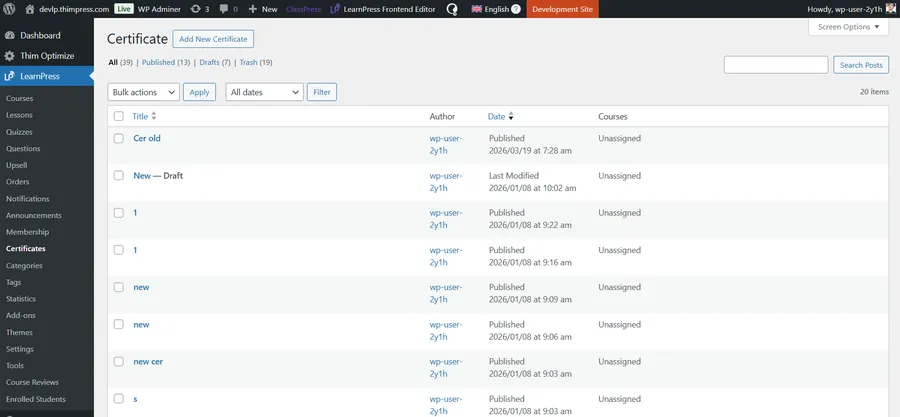
A Modular, Lightning-Fast User Interface
We have abandoned outdated dependencies. The new LearnPress Certificate Builder is built using pure Vanilla JS and the latest Fabric.js library. This means the JavaScript code is incredibly clean, module-oriented, and easy to reuse.
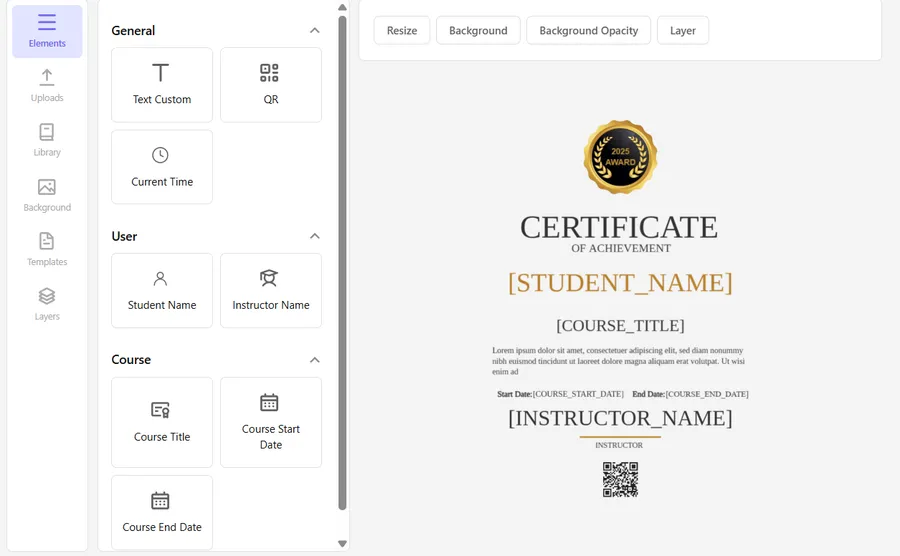
When you open the builder, you will immediately notice the smooth, responsive elements panel on the left. You can easily drag text layers, QR codes, dynamic student names, and course dates directly onto the canvas.

Furthermore, we introduced a powerful TemplateHook system. This ensures that the certificate user interface is highly adaptable. It can be seamlessly reused in multiple environments, including the Backend Admin, the Frontend Profile, and the Course Builder.
(Note for users: To ensure a smooth transition, the new V2.0 UI is currently displayed directly inside the existing certificate edit screen. We have kept your workflow familiar while upgrading the engine underneath).
The result? A highly professional, fully customized course completion certificate that your students will be proud to share with the world.
Massive Database Refactoring for Peak Performance
One of the most crucial technical changes in this LearnPress Update revolves around how data is stored. This is a massive win for website speed and scalability.
Previously, certificates were saved as standard WordPress posts. However, since certificates do not require frontend post views or search engine optimization like a regular blog post, keeping them in the standard wp_posts table caused unnecessary database bloat. For large academies issuing thousands of credentials, this could slow down the server.
To dramatically speed up WordPress, we are transitioning certificates to a dedicated, lightweight custom database table. The streamlined structure now handles data efficiently:
- ID (bigint)
- Title (varchar 255)
- Price (varchar 100)
- Extra (JSON) – This securely stores all layout configs, layers, and templates.
Converting old data from standard tables to this new custom table is a delicate process. Therefore, the actual database upgrade process will be executed cautiously. We ensure all core functionalities are thoroughly tested with the old data structure before proceeding with the final migration.
Under the Hood: Bulletproof Code Stability
For our developer community building upon our WordPress LMS plugin, you will be pleased to know that the new add-on strictly follows the WordPress PSR-4 coding standard.
To guarantee 100% backward compatibility and system stability, all new features have been written in completely new files. We have strictly avoided overriding any old code. This means your current customizations remain safe. Additionally, all PHP data handling is now processed securely and efficiently through LearnPress\Ajax\AbstractAjax rather than relying on external APIs. This significantly reduces server requests and improves security.
Summary of the LearnPress Update Changelog
Before you update your plugins, here is a quick recap of the technical changes introduced in these two major releases.
LearnPress Core v4.3.3 Highlights:
- New: Added native enrolled students list feature for better course management directly on the Profile Page and Backend Dashboard.
- Update: Improved data filtering and visual status tags for student progress tracking.
LearnPress Certificate v4.2.0 Highlights:
- New: Developed an entirely new UI for Certificate List management and the Create/Edit builder.
- New: Reusable TemplateHooks allowing implementation across multiple environments.
- New: Core strictly follows the PSR-4 coding standard using new files (no overriding).
- Update: Rebuilt frontend with Vanilla JS and the latest Fabric.js library for a modular codebase.
- Update: PHP data processing is handled securely via AbstractAjax.
- Optimization: Massive database refactoring to custom tables, preventing wp_posts bloat and improving site speed.
Next Steps: Upgrade and Optimize
This monumental LearnPress Update continues our commitment to making online learning more powerful, seamless, and scalable for both learners and instructors. From smarter course management tools to expanded, high-performance certification features, this update builds a rock-solid foundation for the future of your eLearning business.
We highly recommend updating to LearnPress Core v4.3.3 and LearnPress Certificate v4.2.0 today to experience a more complete, connected, and flexible way to teach.
Do you need a step-by-step guide on how to design your first certificate with the new builder or how to export your student data? Check out our official documentation and tutorials area for detailed walkthroughs.
Read more: 7 Best AI Powered LMS Innovations for Education
Contact US | LearnPress:
Website: https://learnpresslms.com/
Fanpage: https://www.facebook.com/learnpresslms
Email: [email protected]

Are you looking for learning how to design quiz qquestions
Watching videos or reading lessons alone rarely leads to deep understanding. What truly accelerates learning is active recall — the process of retrieving information from memory rather than simply reviewing it. Well-designed quizzes make this process possible.
Instead of being just a tool for assessment, quizzes can become powerful learning instruments that help students reinforce knowledge, identify gaps, and retain information longer. When course creators focus on thoughtful quiz design, they create opportunities for learners to think critically and apply what they’ve studied.
Why Quizzes Are Powerful Learning Tools
Many instructors see quizzes mainly as evaluation tools. However, research in educational psychology shows that testing itself improves learning. This phenomenon is often called the “testing effect,” where retrieving information strengthens memory pathways and improves long-term retention. Learning techniques that involve summarizing material can reinforce this process, which is why understanding how to write an effective summary can also support deeper comprehension and memory recall.
In online education, quizzes play several roles at once. They help learners reflect on what they know, identify misunderstandings, and reinforce concepts shortly after learning them. Well-structured quiz questions for online courses can turn passive lessons into active learning experiences. Instead of simply checking knowledge at the end of a module, quizzes can guide the learning journey and keep students mentally engaged.
Start with Learning Objectives
Before writing a single question, it’s essential to return to the course’s learning objectives. Every quiz should serve a clear educational purpose rather than simply filling space between lessons. When designing questions, ask yourself what students should be able to do after completing the lesson. Should they remember definitions, apply concepts, or analyze scenarios? Aligning quizzes with learning goals ensures that assessments reinforce the most important concepts in the course.
Focus on measurable outcomes
Each question should test a specific skill or concept. Instead of vague prompts, build questions that reflect the measurable outcomes defined in your lesson objectives. For example, if the objective is to explain a concept, the quiz should require learners to demonstrate understanding rather than recognize a definition. This alignment between lessons and quizzes makes assessments feel like a natural extension of the learning process rather than an interruption.
Write Questions That Encourage Active Thinking
Not all quiz questions contribute equally to learning. Questions that require deeper thinking tend to produce stronger retention and better understanding. In fact, prompts that ask “how” or “why” often encourage more cognitive effort than simple factual questions, which helps reinforce learning more effectively. Designing effective quiz questions means encouraging students to retrieve and process information instead of simply recognizing it.
Avoid overly simple recognition questions
Multiple-choice questions can be helpful, but they should be used thoughtfully. If the correct answer is obvious or easily guessed, the question won’t stimulate meaningful thinking. Instead, structure options so that learners must evaluate each possibility carefully.
Good question design might involve:
- Comparing two related concepts
- Applying a rule to a new example
- Identifying the best solution to a problem
- Analyzing a scenario
These approaches increase cognitive engagement and strengthen memory.
Use scenario-based prompts
Scenario-based questions are particularly effective in online quiz design. They ask learners to apply knowledge in a realistic context. For example, instead of asking for a definition, present a short scenario and ask students to choose the most appropriate action or explanation. This approach encourages deeper comprehension and prepares learners to use knowledge outside the course environment.
Keep Questions Clear and Focused
One of the most common mistakes in quiz design is writing questions that are unnecessarily complex or confusing. Even well-prepared students can struggle if a question is unclear. Clarity should always be a priority. Questions should focus on one concept at a time and avoid unnecessary wording. The goal is to assess understanding, not reading comprehension.
Avoid trick questions
Trick questions may seem challenging, but they often frustrate learners rather than support learning. If students feel that quizzes are designed to confuse them, their motivation can drop quickly. Instead, focus on fairness and transparency. Each question should test knowledge clearly and directly. Well-written quizzes challenge learners without misleading them.
Provide Immediate Feedback
Feedback is one of the most valuable elements of a quiz. Without it, learners may not understand why their answer was correct or incorrect. Immediate feedback allows students to correct misunderstandings while the material is still fresh in their minds. Studies show that retrieving information and then reviewing the correct answer helps strengthen memory and prepares learners for future learning.
Explain the reasoning behind the answers
Instead of simply marking answers as correct or incorrect, provide brief explanations. For example, if a learner chooses the wrong answer, the feedback can clarify why that option was incorrect and reinforce the correct concept. These small learning moments add significant educational value to quizzes.
Use Quizzes Throughout the Course
Quizzes are most effective when they appear regularly throughout a course rather than only at the end. Short quizzes placed after lessons help learners process information before moving forward. Frequent testing also supports retrieval practice, a learning technique that strengthens memory by repeatedly recalling information. Regularly testing knowledge can significantly improve retention compared to simply rereading material.
Use micro-quizzes for reinforcement
Micro-quizzes are short assessments with only a few questions. They are particularly effective in online courses because they keep learners engaged without overwhelming them. These quick knowledge checks help students stay focused while reinforcing key ideas. When used consistently, they create a rhythm of learning, practice, and reflection.

Mix Different Question Types
Variety is essential for maintaining engagement in online courses. Using multiple question formats prevents quizzes from becoming repetitive and keeps learners actively involved.
A well-designed quiz might include:
- Multiple-choice questions
- True or false statements
- Matching exercises
- Short answer prompts
- Scenario-based questions
Each format serves a slightly different purpose. For example, multiple-choice questions can quickly test recognition, while short-answer questions require deeper recall.
Balance difficulty levels
Another important factor when learning how to create quiz questions is managing difficulty. If questions are too easy, students won’t feel challenged. If they are too difficult, frustration can reduce motivation.
A balanced quiz typically includes:
- A few easier questions to build confidence
- Several moderate questions to reinforce understanding
- One or two challenging questions that require deeper thinking
This structure keeps learners engaged while encouraging progress.
Use Data to Improve Future Quizzes
One advantage of online learning platforms is the ability to analyze quiz performance.
By reviewing quiz data, instructors can identify patterns such as:
- Questions frequently answered incorrectly
- Concepts that confuse learners
- Sections where students drop out
This information provides valuable insights into how well quizzes support learning. If a question consistently produces incorrect answers, it may indicate that the concept needs clearer explanation or that the question itself needs revision. Over time, analyzing this data helps instructors refine their quizzes and improve course quality.
Design Quizzes as Learning Experiences
Ultimately, quizzes should be viewed as part of the learning process rather than separate from it. When designed thoughtfully, quizzes reinforce knowledge, build confidence, and encourage deeper engagement with course material. Strong quiz design combines clear objectives, thoughtful question structures, meaningful feedback, and strategic placement throughout the course.
By focusing on these elements, instructors can create assessments that truly support learning. Effective quizzes do more than measure progress — they actively help students learn faster, remember more, and apply knowledge with greater confidence.
]]>When you optimize your platform correctly, you don’t just sell a product; you build a high-converting sales funnel. By utilizing smart course upselling techniques, you can generate more profit without spending extra on ads. In this guide, we will dive deep into how to sell course bundles and implement an effective online course pricing strategy to scale your business.
LearnPress – WordPress LMS Plugin
We provide an amazing WordPress LMS plugin to create & sell online courses. Let’s find out!
Try NowWhy You Must Upsell Online Courses Today
Before exploring specific tactics, it is crucial to understand why you should maximize learner lifetime value. The primary goal is to increase your average order value (AOV). AOV measures how much money a single student spends during one transaction. By offering relevant upgrades on the checkout page, you instantly boost your profit margins.
Furthermore, guiding a student through a well-designed journey improves student retention. When you provide curated upgrades that genuinely help learners achieve their goals faster, you build trust. Establishing a community-driven eLearning platform ensures that happy students return for future purchases. Relying on the best online course software is the foundation for this success
5 Tactics to Increase Online Course Sales
If you want to stop leaving money on the table, you need to understand how to sell course bundles and position your offers correctly. Here are five tactics to increase online course sales effectively.
1. Implement One-Click Post-Purchase Upsells
The best time to upsell online courses is immediately after a customer has paid but before they leave. At this moment, the buyer’s intent is at its peak. By offering an upgrade on the “Thank You” page, you capitalize on this momentum.
For example, if a student just purchased a beginner’s class, you can use course upselling techniques to offer an advanced masterclass. Since their details are saved on the checkout page, they can accept it with one click. This frictionless experience is the fastest way to increase online course sales today.
2. Leverage High-Value Course Bundles
Many students don’t know exactly which classes they need. You can solve this by grouping related content. Learning how to sell course bundles is a fantastic way to provide massive value while increasing your AOV.
Instead of selling three separate classes, package them into an “Ultimate Mastery” bundle. By applying a slight discount, the student feels they are getting an incredible deal. Creating smart course bundles simplifies decisions, provides a clear path to improve learning outcomes, and naturally helps you upsell online courses in bulk.

3. Refine Your Online Course Pricing Strategy
How you present your prices influences the buyer’s decision. Offering only one price limits your potential. To increase online course sales, you must implement a tiered online course pricing strategy.
A highly effective online course pricing strategy is the Good-Better-Best approach. Give visitors three options: Basic, Pro, and Elite. When buyers see these side-by-side, many gravitate toward the middle tier. Testing a different online course pricing strategy allows you to capture varying budgets. This approach perfectly complements a well-planned course structure.
4. Use Order Bumps on the Checkout Page
An order bump is a small add-on presented right before the student clicks “Pay Now.” Unlike a major attempt to upsell online courses, an order bump is a low-cost, high-value extra.
If you want to increase online course sales, add a simple checkbox to your checkout page. For instance, if you sell online courses about design, an order bump could be a $15 resource checklist. This is a brilliant method of cross-selling that requires zero extra marketing effort.
5. Strategic Cross-Selling and Student Retention
The key to long-term success is student retention. You should not only upsell online courses at the start but also throughout the learner’s journey. Use cross-selling to recommend related modules within the student dashboard.
When you master these course upselling techniques, you turn one-time buyers into loyal advocates. If you don’t know how to create a course to kickstart this sales funnel yet, start today. Focus on bulk licenses for corporate clients; a professional online course pricing strategy for teams can skyrocket your revenue while lowering the acquisition cost per user.
Mastering Course Upselling Techniques with WordPress
Executing these strategies flawlessly requires the right technology. You do not want a sales funnel that makes the process clunky. This is where choosing the right WordPress LMS plugin truly shines. A robust platform empowers you to upsell online courses without advanced coding or relying on rigid course builders.
By utilizing specific course upselling techniques, such as automated email triggers, you can remind students of available upgrades. If you want the exact step-by-step technical guide on how to configure this, check out our blog about Offer More Courses Using LearnPress Upsell Integration.

Metrics to Track Your Upselling Success
To ensure you successfully increase online course sales, you must monitor your data. Pay attention to these vital sales funnel metrics:
- Average Order Value (AOV): Is the average student spending more now? If so, your course upselling techniques are working.
- Conversion Rate: Track how many people accept offers on your checkout page.
- Retention Rate: High student retention indicates that your online course pricing strategy delivered real value.
Conclusion: Elevate Your Academy
The digital education market is competitive. To thrive, you must maximize the value of every enrollment. By learning how to upsell online courses and implementing a smart online course pricing strategy, you can improve your financial health.
Stop letting administrative setups limit your growth. Master the best course upselling techniques, prioritize the experience on your checkout page, and watch your revenue reach unprecedented heights.
Read more: How to Upsell Online Courses: 5 Smart Ways to Double Revenue
Contact US | LearnPress:
Website: https://learnpresslms.com/
Fanpage: https://www.facebook.com/learnpresslms
Email: [email protected]
At the very center of this digital revolution is the ai powered lms. This technology represents a massive shift from passive learning to dynamic, highly interactive education. By integrating advanced algorithms and generative capabilities, these intelligent systems are set to redefine education automation for years to come.
In this comprehensive guide, we will explore the fundamental shifts in digital learning. We will examine essential smart platform features, discuss the primary advantages of intelligent software adoption, and help you identify the best-suited solution for your specific organizational needs.
LearnPress – WordPress LMS Plugin
We provide an amazing WordPress LMS plugin to create & sell online courses. Let’s find out!
Try NowWhat is an AI Powered LMS?
To understand the future of education, we must define the core technology driving it. An ai powered lms is an advanced learning management system that utilizes artificial intelligence to automate administrative workflows and personalize the educational journey. Unlike traditional platforms that rely entirely on static content and manual curriculum updates, this intelligent system adapts dynamically to each learner’s unique pace and individual learning style.
Furthermore, modern platforms now incorporate generative AI capabilities. Generative AI refers to intelligent systems that can actively create new content—including text, audio, and visual materials—based on specific user prompts and interactions. When you integrate this technology, the platform often functions as a dedicated lms ai assistant, actively tailoring the experience to meet exact employee or student preferences.
As organizations seek the best ai-powered lms platform, they prioritize solutions that blend traditional hosting, such as the best WordPress LMS, with these powerful, generative capabilities.

Exploring Essential AI-Powered LMS Features
Several groundbreaking capabilities make these platforms incredibly attractive to forward-thinking educators and corporate trainers. When evaluating the best ai-powered lms platform, you should actively look for the following ai-powered lms features.
1. Adaptive Learning Paths
One of the most critical ai-powered lms features is the ability to create customized educational journeys. AI algorithms actively analyze learner performance and personal preferences to customize the course content dynamically. This ensures the creation of personalized learning paths that adapt to the user’s current skill level, which is a major upgrade from traditional planning course structure methods.
2. Natural Language Processing (NLP)
The integration of Natural Language Processing allows the system to deploy an AI chatbot for WordPress or virtual assistant. An intelligent lms ai assistant can answer student questions instantly, acting as a real-time virtual tutor. This immediate guidance drastically improves overall accessibility and provides unmatched student support.
3. Content Recommendation Engines
Another vital entry among top ai-powered lms features is the smart recommendation engine. The ai powered lms can analyze a student’s quiz results and automatically suggest targeted supplementary resources. This ensures that learners receive materials tailored specifically to address their individual weak areas, thereby enhancing knowledge retention.
4. Scalable Content Creation
For administrators, the ability to automatically generate custom learning materials is revolutionary. The software can create quizzes, hands-on simulations, and role-playing exercises instantly. These tools perfectly complement your effective quiz design, making the platform flexible, highly efficient, and perfectly aligned with modern microlearning trends.
5. Automated Grading and Assessment One of the most time-consuming tasks for instructors is evaluating student work. Modern smart platforms can automatically grade complex assignments, quizzes, and even written essays with remarkable accuracy. This instant evaluation provides learners with immediate feedback to improve their skills, while freeing up educators to focus on more strategic teaching initiatives.
6. Predictive Analytics for Student Retention Keeping students engaged throughout a long curriculum is a constant challenge. By utilizing predictive analytics, these intelligent systems can monitor engagement metrics to identify early warning signs of learner burnout. Administrators receive real-time alerts about at-risk individuals, allowing for proactive interventions before a student abandons the course.
7. Multilingual Translation and Accessibility Reaching a global audience requires removing persistent language barriers. Advanced generative tools can instantly translate course materials, transcribe video lectures, and generate multi-language subtitles on the fly. This powerful innovation ensures your educational content is fully accessible, highly inclusive, and ready to scale for learners worldwide.
Understanding the Pros of AI-Powered LMS
Why are massive universities and global corporations transitioning to these intelligent systems? The pros of ai-powered lms adoption are extensive and impact both the learner and the administrator.
First, the pros of ai-powered lms include significant improvements in administrative efficiency. Education automation reduces the heavy burden on educators by handling routine, time-consuming tasks. The system streamlines automated grading, attendance tracking, scheduling, and standard reporting. This massive reduction in manual labor saves time and significantly reduces human error.
Second, organizations benefit from incredible scalability in online course creation. Developing engaging training materials traditionally requires vast amounts of time and effort. However, an AI course creator streamlines this process entirely, allowing Learning and Development (L&D) teams to produce high-quality courses rapidly.
Finally, the pros of ai-powered lms extend deeply into data analytics. The system provides highly detailed, data-driven insights into student engagement and progress. For example, the ai powered lms can accurately predict when a learner might struggle with a concept, proactively alerting instructors so they can intervene early. This level of real-time tracking allows organizations to make data-driven decisions that optimize their learning investments.
How an LMS AI Assistant Empowers Human Educators
As institutions explore the pros of ai-powered lms technologies, a common concern frequently arises: will artificial intelligence in education replace L&D professionals and traditional trainers?
The reality is that an ai powered lms serves as a powerful enabler, not a replacement. The goal of an lms ai assistant is to foster collaboration between human expertise and machine efficiency. While the lms ai assistant handles repetitive administrative duties and automates basic content creation, human trainers are freed to focus on high-impact, interpersonal areas.
Educators can dedicate their valuable time to facilitating group discussions, providing deep mentoring, and addressing nuanced learner needs that machines simply cannot understand. Instead of eliminating jobs, the ai powered lms creates new, exciting opportunities. Professionals can now specialize in managing AI tools, designing blended learning strategies, and leveraging analytics to enhance the organizational learning culture. Far from removing the human element, an lms ai assistant empowers trainers to deliver more meaningful instruction.
Finding the Best AI-Powered LMS Platform
Selecting the best ai-powered lms platform requires careful strategic planning. Organizations must navigate several challenges to ensure a successful implementation.
When evaluating top online course platforms, data privacy must be your top priority. Because generative AI relies on vast amounts of sensitive learner data to function correctly, ensuring robust security measures and transparent policies is absolutely critical. Additionally, institutions must ensure that the AI algorithms they choose do not reinforce existing historical biases, which is essential for maintaining fair and equitable education.
To find the best ai-powered lms platform, organizations should follow proven best practices. Experts recommend starting small by initiating a pilot program that targets specific use cases, such as employee onboarding or initial skill gap analysis. Furthermore, prioritize the user experience; the interface must be highly intuitive for both the administrators and the students. Finally, ensure that the platform allows humans to regularly review the AI outputs for accuracy, relevance, and alignment with core organizational values.
Real-World Applications of an AI Powered LMS
The transformative power of an ai powered lms is not just theoretical; it is currently driving success across multiple industries. Several prominent educational institutions and massive global companies have already integrated these systems to great effect.
In higher education, major universities utilize an ai powered lms to personalize their online courses. This strategic move has resulted directly in higher course completion rates and vastly improved student satisfaction. Similarly, massive open online course providers employ artificial intelligence to recommend specific learning materials based on historical user behavior. Language learning giants use adaptive AI to dynamically alter lessons, helping millions of users learn efficiently.
In the corporate sector, large organizations rely on the best ai-powered lms platform to deliver customized leadership training and strict compliance courses. Retail companies use the technology to create simulated customer interactions, allowing sales teams to practice their communication skills safely. In technical fields, the software generates hands-on coding exercises, while in healthcare, it produces complex scenario-based modules for medical staff to practice critical decision-making.
Conclusion: Preparing for the Future of Learning
The future of workplace education and academic instruction is fundamentally intertwined with artificial intelligence. An ai powered lms represents a significant, irreversible shift in how we approach human development. By offering deep personalization, reducing tedious administrative burdens, and providing actionable analytics, these platforms help educators support their students better than ever before.
As you prepare your organization for the coming years, embracing these technological advancements will be essential to remain relevant. Educators and administrators must take practical steps today. Evaluate your current systems to identify gaps, pilot new AI tools to gather feedback, and invest heavily in training your staff for AI literacy. Even if you are just transitioning your traditional classes online and need an intuitive LMS for beginners, building a flexible software foundation ready for future AI integration is a crucial first step.
By carefully evaluating the pros of ai-powered lms solutions and leveraging a dedicated lms ai assistant, your organization will gain a massive competitive edge. You will successfully foster a culture of continuous innovation, empowering both your learners and your professional trainers to achieve unprecedented success. Upgrading to a modern WordPress LMS for instructors ensures that you deliver the highest quality education in this rapidly evolving digital era.
Contact US | LearnPress:
Website: https://learnpresslms.com/
Fanpage: https://www.facebook.com/learnpresslms
Email: [email protected]
However, as their businesses scale, they soon realize that these basic options can heavily restrict their long-term growth. This is exactly why thousands of smart, independent creators are actively searching for the best sensei lms alternatives today. Finding the perfect fit means looking closely at your specific business model. You need software that works for you, not against you.
In this comprehensive guide, we will clearly compare sensei lms against the top competitors on the market. By the end of this article, you will know exactly which wordpress lms plugin handles your web traffic, student data, and curriculum best.
LearnPress – WordPress LMS Plugin
We provide an amazing WordPress LMS plugin to create & sell online courses. Let’s find out!
Try NowWhy Are Creators Leaving Their Current Platform?
Before we list the top plugins, we must honestly address why people choose to migrate away from their initial setups. The first major hurdle for most ambitious educators is sensei lms pricing.
At first glance, the core plugin appears highly accessible and budget-friendly. However, to run a fully functional digital school, you must purchase expensive premium extensions. Over time, this recurring sensei lms pricing model drains your profits heavily. For small business owners, paying hundreds of dollars annually just for basic quizzes and certificates is simply not sustainable. Figuring out your course pricing strategy is hard enough without having to sacrifice a huge percentage of your revenue just to keep the platform running.
The second massive issue is the rigid sensei lms woocommerce dependency. To successfully sell online courses, you cannot simply use lightweight, native checkout methods. You are strictly forced to install and configure WooCommerce. This deep sensei lms woocommerce connection makes your website incredibly bloated. It makes managing simple digital products much harder than it needs to be. You simply want reliable payment gateways, not a massive, complex e-commerce setup. Because of these distinct pain points, finding robust, standalone sensei lms alternatives is the most logical step for growing tutors.
The Top 6 Sensei LMS Alternatives Ranked
Let us thoroughly compare sensei lms with the market’s finest educational tools. Choosing among these sensei lms alternatives requires matching technical features to your exact teaching needs. We will look at price, site speed, and overall usability.
1. LearnPress (The Ultimate Choice)
When you research the sensei vs learnpress debate, the winner is incredibly clear for most standard users. LearnPress is a popular free LearnDash alternatives option that caters specifically to WordPress users. It is a great option if you are already running a WordPress website and want to add online courses without a significant investment.
LearnPress boasts a user-friendly interface with a drag-and-drop course builder, allowing you to easily structure your courses with lessons, quizzes, assignments, and other elements.
Here are some of the key features of LearnPress:
- Drag-and-drop course builder for intuitive course creation
- Multiple lesson formats including videos, quizzes, assignments, and downloadable materials
- Drip content to control the pace at which students access your course material
- Quiz creation with various question types to assess student learning
- Paid and free course options to monetize your courses or offer them for free
- Ecommerce integrations to accept payments through popular payment gateways
- Detailed reporting to track student progress and course performance
Furthermore, the platform has fully embraced modern technology. You can now use a powerful AI course creator to draft your syllabus and lesson plans in minutes, completely curing blank page syndrome. Additionally, integrating an AI chatbot helps you automate student onboarding and answer repetitive questions effortlessly.
Unlike the heavy e-commerce integrations forced by others, LearnPress gives you ultimate checkout freedom. It is undeniably the strongest choice among all sensei lms alternatives available today.

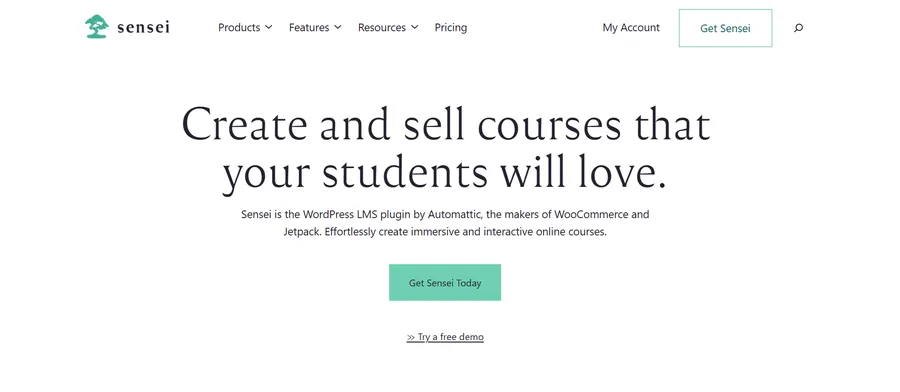
2. Sensei LMS (The Baseline Standard)
To fairly compare sensei lms with the competition, we must acknowledge its technical roots. It comes directly from the talented team behind Jetpack and WordPress.com. It allows you to build text lessons right inside the familiar WordPress block editor, making the initial learning curve relatively smooth.
To help you understand its core capabilities, here are its primary features:
- Seamless WordPress editor integration for direct course creation
- Multimedia support allowing you to easily embed videos and image galleries
- Quiz and assignment management with options for manual or automatic grading
- Real-time student interaction through instant messaging tools
- Basic certificate generation upon course completion
However, the highly restrictive sensei lms pricing for crucial premium add-ons often pushes users away as their academy grows. If you want professional certificates or advanced grading metrics, you must prepare to pay extra. Furthermore, you simply cannot escape the sensei lms woocommerce requirement to securely collect money. This limitation makes it significantly less flexible than the other sensei lms alternatives featured on this list.
3. MemberPress
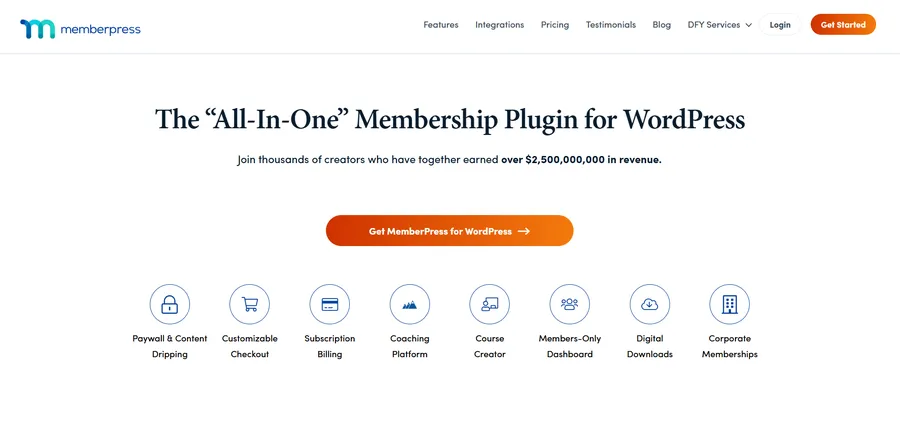
For those building strict, secure membership sites, MemberPress is a fantastic premium option. It ranks exceptionally high among the premium sensei lms alternatives. It offers an all-in-one membership solution complete with a highly praised, built-in Classroom Mode.
Here are the key features that make MemberPress stand out:
- Advanced access rules to strictly control content based on user membership levels
- Flexible monetization options including recurring subscriptions and one-time fees
- Built-in Classroom Mode that automatically styles your courses for a distraction-free experience
- Powerful content dripping to schedule lesson releases over a specific period
- Seamless integration with popular email marketing services to nurture your leads
This mode automatically styles your lessons and navigation elements. It ensures a beautiful elearning platform without requiring any custom CSS coding or developer fees. You can slowly release restricted video lessons over a specific period, keeping your students engaged for months. If you thoroughly compare sensei lms to MemberPress, the latter easily wins in pure access control and recurring subscription management.
4. LearnDash
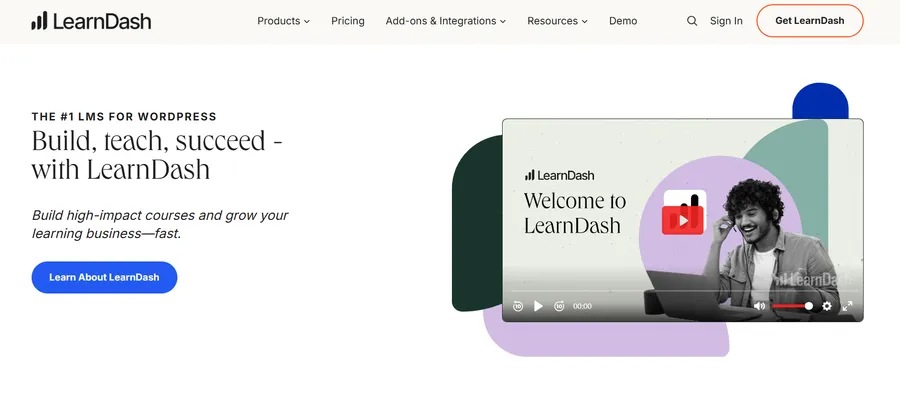
LearnDash is a premium, heavyweight contender in the digital education sector. It is widely considered one of the most robust online course platforms and feature-rich sensei lms alternatives available to serious academic institutions.
If you are looking for advanced academic tools, LearnDash offers the following features:
- Intuitive drag-and-drop course builder for structuring complex curriculums quickly
- Advanced quiz settings equipped with timers, limits, and randomized questions
- Dynamic student forums to encourage peer-to-peer interaction and community building
- Automated email notifications triggered by specific learner progress and actions
- Support for multiple pricing models including subscriptions and course bundles
- Detailed reporting tools to track student performance and enrollment statistics
One of its biggest technical advantages is the highly intuitive visual setup. When seeking an advanced online course builder, LearnDash provides tools to map out your entire curriculum—including main topics, complex quizzes, and varied lesson categories—in mere minutes. However, because of its premium cost, many users eventually look to migrate LearnDash to a more cost-effective system. LearnDash also provides dynamic, course-specific forums for excellent student interaction and peer review, creating a highly engaging virtual campus.
5. Thrive Apprentice
For marketing professionals and creators heavily focused on visual design, Thrive Apprentice is among the most attractive sensei lms alternatives. It places a heavy emphasis on conversion rates, sales funnels, and stunning user interfaces. It comes packaged with over 55 pre-made, highly optimized design templates so you never have to start from a blank canvas.
Here are the standout features for marketing-focused educators:
- Over 55 professional, pre-made course templates for rapid deployment
- Visual drag-and-drop editor providing complete design control over every page
- Advanced conditional display to show personalized content based on user behavior
- Flexible content dripping schedules customized for different user groups
- Customizable course completion pages featuring verifiable certificates with QR codes
It also features advanced conditional display technology. This allows you to show highly personalized content to specific users to drastically increase your sales and retention rates. When you compare sensei lms to Thrive Apprentice, Thrive offers vastly superior marketing and landing page features for independent instructors who want to scale their personal brands quickly.

6. Courses for MemberMouse
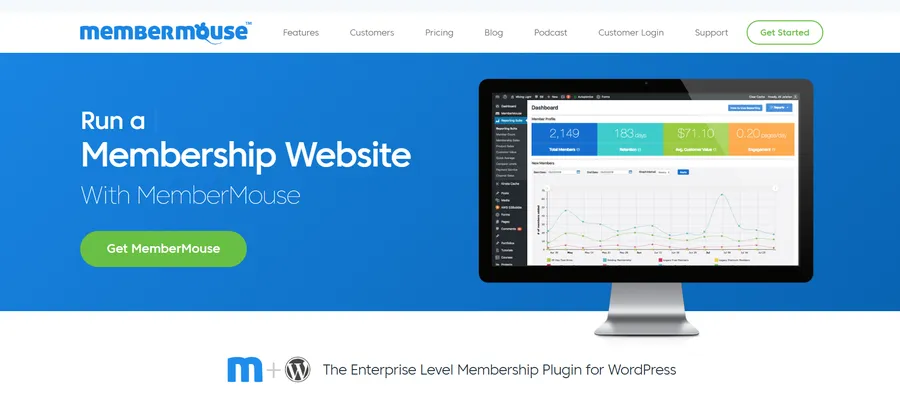
Rounding out our comprehensive list of the best sensei lms alternatives is Courses for MemberMouse. This unique tool is built specifically for enterprise-level operations, high-volume traffic, and massive user databases.
For large-scale academies, MemberMouse delivers these powerful features:
- Front-end visual course builder allowing you to design without touching custom code
- Smart tags for dynamically displaying personalized upsells and course bundles
- One-click upsell features located directly within the user dashboard
- Automated progress tracking combined with built-in quiz capabilities
- Deep integration with major payment gateways and enterprise-level CRM tools
If you run a large-scale membership site and want to seamlessly integrate premium course creation with aggressive upselling, this is your perfect solution. It utilizes a powerful 1-click upsell feature directly from the user dashboard. This removes buying friction completely, helping you scale revenue with minimal marketing effort. It keeps users inside your ecosystem effortlessly.
Deep Dive: Sensei vs LearnPress
To ensure you make the absolute best choice for your specific academy, let us expand on the sensei vs learnpress comparison. Why do so many users choose to migrate their massive student databases specifically to LearnPress?
First, it directly and effectively solves the ongoing sensei lms pricing problem. LearnPress gives you a highly robust, completely free core plugin. You only pay for the specific, niche add-ons you actually need. This makes it an incredibly budget-friendly option for startup academies and solo educators. You completely avoid the bloated pricing bundles that force you to buy features you will never utilize in your daily operations.
Second, it entirely eliminates the strict sensei lms woocommerce requirement. You have the ultimate administrative freedom. You can use native, lightweight checkout methods to keep your server fast and responsive. Alternatively, you can connect to WooCommerce later only if you truly want to expand into selling physical products. This unmatched technical flexibility is exactly why, in the ultimate sensei vs learnpress battle, LearnPress consistently comes out on top. It remains the premier choice and the most reliable option for digital entrepreneurs.
How to Make the Final Decision
Choosing the right platform requires careful consideration of your future goals. Ask yourself what your digital academy will look like in three to five years. If you want a lightweight setup that respects your budget, LearnPress provides the absolute best foundation. The sensei vs learnpress choice is easy when you value your financial resources and platform independence.
Always ensure your hosting environment can support the plugin you choose. Heavy plugins require strong servers, while lightweight options keep your website loading fast for students around the globe. Keep your focus on reducing complex setups, such as avoiding mandatory WooCommerce configurations if you only sell digital knowledge. Carefully weigh your upfront costs against your expected long-term revenue to make a strategic business decision.
Conclusion
In conclusion, you dedicate countless hours to creating valuable content, recording videos, and sharing your expertise with the world. You should never let rigid software configurations or common LMS website mistakes hold your digital academy back from reaching its full potential.
By actively researching reliable sensei lms alternatives, you are taking the vital first step toward reclaiming your business operations. You deserve a platform that scales elegantly with your growing student base without punishing you with hidden fees. Whether you want a more intuitive visual builder like the one explored in our Eduma vs Divi comparison, smarter AI integrations, or simpler checkout processes, the modern market has excellent options.
As the sensei vs learnpress comparison clearly demonstrates, LearnPress offers the best balance of flexibility, cost, and raw power, especially when paired with a dedicated LMS WordPress theme. It is absolutely time to upgrade your system with the best software available today and take your digital education business to the next level.
Contact US | LearnPress:
Website: https://learnpresslms.com/
Fanpage: https://www.facebook.com/learnpresslms
Email: [email protected]
If you run an online academy, your data is the lifeblood of your business. Your courses, quizzes, and student progress records are invaluable. For years, thousands of educators have relied on the “LearnPress Export/Import” plugin to manage this content.
However, the e-learning landscape is changing. Course creators are actively looking for ways to cut down on expensive annual renewal fees from premium online course platforms. They want the freedom and cost-effectiveness of LearnPress, but the technical fear of losing data holds them back.
Today, we are thrilled to announce a massive evolution of our plugin. We have officially rebranded to the LearnPress – Backup & Migration Tool.
Alongside this new name comes our most highly anticipated feature yet: a streamlined, automated way to migrate LearnDash to LearnPress.
If you want to escape high costs, explore better LifterLMS alternatives, or simply switch without losing a single student record, here is exactly why this update is the ultimate game-changer for your e-learning business.
LearnPress – WordPress LMS Plugin
We provide an amazing WordPress LMS plugin to create & sell online courses. Let’s find out!
Try NowWhy We Rebranded to “LearnPress – Backup & Migration Tool”
You might be asking, why change a name that people already know?
The answer is simple: “Export/Import” no longer captures the true power of what this add-on can do. We wanted a name that immediately tells you exactly how it protects and scales your business.
The new name highlights two distinct, powerful capabilities:
- Total Data Security: It functions as a comprehensive LearnPress Backup system. You can secure your entire course architecture, ensuring data recovery in case of system failures.
- Seamless Platform Transitions: It acts as a dedicated LearnPress Migration Tool, built to intelligently move massive amounts of complex educational data across different platforms with zero coding required.
By updating the name, we are making it incredibly easy for users to find the exact LMS migration plugin they need in the WordPress directory.
The Big Update: Migrate LearnDash to LearnPress Seamlessly
Over the past year, we have heard a recurring plea from the WordPress community: “I am tired of paying expensive yearly fees for LearnDash and its add-ons. I want to switch to LearnPress, but I have thousands of enrolled students. How can I move them safely?”
We heard you loud and clear. High operational costs should never hold your business hostage. That is why our development team engineered a cutting-edge cross-platform transfer feature. You can now migrate LearnDash to LearnPress with just a single click.
What Exactly Gets Transferred?
Data migration is traditionally terrifying, but we have optimized our LMS migration plugin to be completely automated and strictly reliable. When you initiate the process to migrate LearnDash to LearnPress, the tool intelligently maps and transfers:
- Courses & Curriculum: All course content, titles, descriptions, featured images, and your hard work in planning course structure are transferred accurately.
- Lessons & Media: Text, images, videos, attachments, and the time you spent formatting lesson content related to your lessons are migrated seamlessly.
- Quizzes & Assignments: Questions, answers, score settings, and grading data are perfectly preserved, maintaining the integrity of your assessments.
- Student Data: This is crucial. Student profiles, course enrollments, and real-time progress data are transferred so learners can pick up right where they left off.
- Instructors: Instructor profiles and course assignments are migrated, ensuring your teaching staff retains their roles.
- Categories & Tags: Your entire course organization remains intact.
You no longer need to hire expensive developers or spend weeks manually copying and pasting text. The LearnPress Migration Tool handles the heavy lifting, saving you immense time and effort.
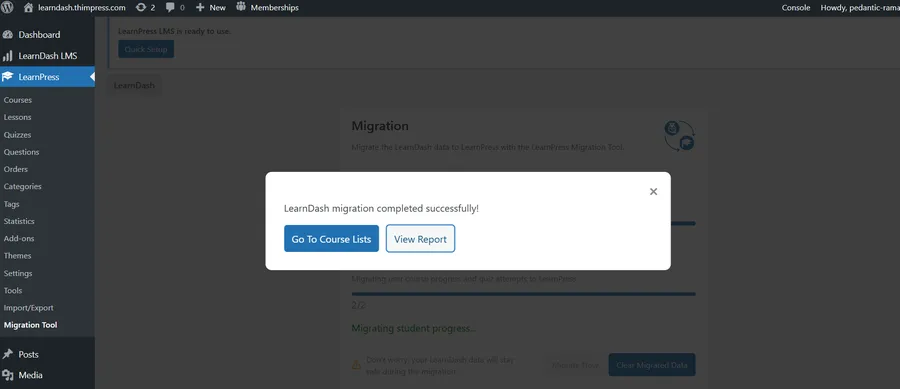
A Reliable LMS Migration Plugin You Can Trust
We know that when you decide to migrate LearnDash to LearnPress, you are moving your core business infrastructure. Trust is everything.
This feature was built with safety as the top priority. The automated data mapping ensures that different data structures between the two systems are perfectly aligned. Furthermore, the tool provides real-time progress tracking, allowing you to monitor the transfer step-by-step.
Best of all? Old LMS Data Preservation. When you use our LMS migration plugin, it maintains the data of your previous setup. If you ever need to restore the migration data, your original LearnDash content remains completely untouched and safe on your server.
Core Functionality Beyond Migration
While the ability to migrate LearnDash to LearnPress is our exciting new highlight, this plugin remains the ultimate utility belt for any LearnPress user.
Here is what else you can do with it:
- Reliable LearnPress Backup: Create full backups of your courses. This LearnPress Backup feature ensures quick recovery in case of accidental deletions or server crashes.
- Easy Course Duplication: Want to create a variation of an existing course? The LearnPress Migration Tool allows you to clone courses instantly, saving hours of setup time for course creators.
- Selective Export/Import: You do not always have to move an entire academy. You can selectively export or import specific elements, like a single quiz or a specific module.
- Site-to-Site Transfer: If you are moving your LearnPress site to a new server or domain, the tool simplifies the entire process.
How to Prepare for Your Migration
Are you ready to cut costs and migrate LearnDash to LearnPress? The process is remarkably user-friendly, even for those with no technical background.
- Install Both Plugins: Ensure both LearnDash and your new platform are active. If you are starting fresh, begin by properly installing LearnPress on your WordPress site.
- Run a LearnPress Backup: We always recommend creating a full website backup before executing major database changes.
- Ensure Stability: Make sure your hosting environment is stable, as migration time varies depending on the size of your data.
- One-Click Start: Navigate to the LearnPress Migration Tool dashboard within your LearnPress settings, select your source LMS, and click migrate.
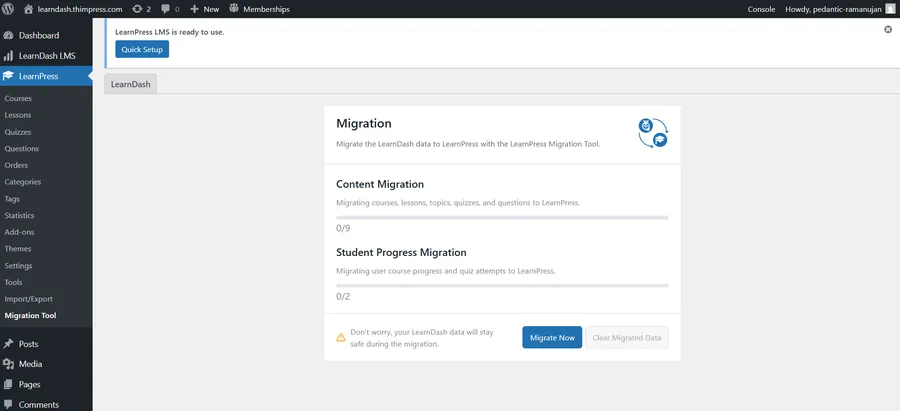
By automating this complex database manipulation, this free LMS migration plugin saves you thousands of dollars in developer fees.
Verification: Your courses are ready!
Once the process is finished, clicking “Go To Course Lists” will show you all your migrated content organized perfectly within the LearnPress dashboard. You can immediately see your curriculum structure—sections, lessons, and quizzes—just as they were in LearnDash. If you want more details, the “View Report” option provides a comprehensive log of every item successfully transferred, ensuring nothing was left behind.

It Is Time to Make the Switch
There has never been a better, safer time to take full ownership of your e-learning business and maximize your profit margins.
If you are tired of being locked into an expensive ecosystem, your escape route is officially here. It is time to migrate LearnDash to LearnPress and experience the flexibility of the world’s best WordPress LMS.
For our existing users, utilizing the robust LearnPress Backup functionality ensures your hard work is never lost.
Don’t wait! Update to the latest version of the plugin today, or download the new LearnPress – Backup & Migration Tool for free from the WordPress repository.
Contact US | LearnPress:
Website: https://learnpresslms.com/
Fanpage: https://www.facebook.com/learnpresslms
Email: [email protected]
If you pour your heart into creating educational content, seeing low completion rates is a deeply frustrating reality. Passive learning treats students as mere spectators. They sit, they watch, and they easily forget. As an educator, figuring out how to make online learning interactive is the key to overcoming this frustrating reality. To fix this, educators must shift their focus toward active participation by introducing diverse interactive learning activities into their curriculum.
In this comprehensive guide, we will explore the core concepts of interactive online learning. We will look at why it matters so much in the modern era, outline practical strategies to implement it, and explain how the best WordPress LMS plugin like LearnPress LMS can help you build highly successful courses.
LearnPress – WordPress LMS Plugin
We provide an amazing WordPress LMS plugin to create & sell online courses. Let’s find out!
Try NowWhat is Interactive Online Learning?
Interactive online learning is a modern educational approach that transforms passive viewers into active participants. It is a highly dynamic process. Learners interact directly with the course content, make real-time decisions, receive instant feedback, and shape their own educational journey.
Instead of reading a long PDF document or watching a two-hour lecture without pausing, students are required to perform actions. This contrasts sharply with traditional passive learning, where information is simply pushed out to the audience in a one-way stream.
When you introduce interactive online learning into your courses, you require the human brain to work harder and process information deeply. The student must analyze the data, apply it to a specific scenario, and produce a tangible result. This process of active participation is the essential foundation of modern digital education.

Why Interactive Online Learning Matters
Why is the shift to active education so crucial for your digital academy? Because interactive content fundamentally changes how a student interacts with your platform. When you understand how to make online learning interactive on your online course platform, you unlock the potential for skyrocketing completion rates and exceptional student satisfaction.
Skyrocketing Student Engagement
Passive content puts students to sleep. Conversely, interactive online learning captivates their attention. When students are asked to click, drag, answer, or solve problems during a lesson, their focus remains incredibly sharp. High student engagement leads to higher course completion rates and better organic reviews for your educational brand. Courses that utilize modern engagement techniques see a massive drop in student abandonment rates.
Dramatic Improvements in Retention
Active learning promotes deeper cognitive processing. When learners actually do something with the information provided, they remember it much more effectively. Various studies suggest that learners can forget up to 90% of information from traditional passive lectures within a single month. Interaction solves this retention crisis by forcing the brain to recall and use the data immediately.
Forging Real-World Skills
Simulations and virtual case studies provide a safe, risk-free environment for your students. Learners can practice applying their knowledge without real-world consequences or fear of failure. This builds the exact confidence they need to succeed in their actual careers.
How to Make Online Learning Interactive
Many educators understand the value of student engagement but struggle heavily with the technical execution. If you are wondering how to make online learning interactive, the answer lies in combining the right educational strategies with the right digital technology.
Here are the best, proven ways to upgrade your courses from passive to active.
1. Implement Interactive Learning Activities
You must design your courses with action in mind. Interactive learning activities are specific exercises that force the student to apply what they just learned immediately.
Integrating WordPress gamification plugins is a perfect example of this. By injecting fun and friendly competition through points, digital badges, and leaderboards, you motivate students to progress faster. Branching scenarios are another excellent format. These dynamic narratives allow the learner’s choices to shape their path through the content, offering a highly personalized experience.
Furthermore, you can use collaborative assignments. By integrating WordPress membership plugins, discussion forums and peer-to-peer reviews encourage learners to share insights and learn from one another, replicating a real classroom environment.
2. Utilize Modern Interactive Learning Tools
Creating these interactive learning activities requires the right software. You cannot build complex branching scenarios with just basic text. Interactive learning tools allow you to build complex, engaging elements without needing to write a single line of code.
For example, H5P is a highly popular, open-source tool that lets you build interactive videos, memory games, and digital flashcards directly within your web browser. With interactive videos, you can embed polls and clickable hotspots right into the video frame. This intentionally stops the video and forces the student to interact before they can continue watching the lesson.
3. Leverage Quizzes and Assignments
Testing should never just happen at the very end of a long course module. Frequent, low-stakes testing is a core pillar of interactive online learning.
Through effective quiz design and frequent quizzes and assignments, you provide instant feedback to the learner. They immediately know if they understood the previous lesson block. If they fail a short quiz, they know they need to review the material before moving forward. This immediate feedback loop is critical for long-term knowledge retention and overall course success.

Building Interactive Online Learning with LearnPress LMS
Knowing the educational theory is only half the battle. To bring these advanced concepts to life, you need a robust, flexible, and reliable platform. This is exactly where LearnPress LMS shines.
LearnPress is a user-friendly and feature-rich WordPress LMS plugin. It provides an ideal, affordable ecosystem for building, managing, and selling interactive courses. Let us look closely at how LearnPress helps you achieve superior student engagement.
The Intuitive Course Builder
At the heart of LearnPress is its famous drag-and-drop builder. You do not need deep technical expertise or a background in web development to structure a logical, engaging curriculum.
The online course builder allows you to seamlessly weave interactive learning activities into your lessons. You can easily alternate between standard text, an interactive video, and practical assignments within minutes. This cohesive structure keeps learners highly motivated and prevents cognitive overload.
Advanced Quizzes and Assignments Integration
LearnPress excels at assessment and student evaluation. It acts as a robust WordPress quiz plugin that provides built-in tools to create comprehensive quizzes and assignments. You can quickly set up multiple-choice questions, fill-in-the-blanks, and true-or-false scenarios to test your students.
More importantly, LearnPress allows you to automate the grading process and provide personalized feedback based on the student’s specific answers. When a student completes an interactive assignment, LearnPress helps you monitor their individual progress and offer tailored support when they begin to struggle.
Seamless Third-Party Integrations
A truly great WordPress LMS plugin must play well with other software. LearnPress integrates beautifully with various interactive learning tools, including H5P and Zoom for live sessions.
You can easily embed an H5P branching scenario or an interactive presentation directly into a standard LearnPress lesson. LearnPress provides the beautiful, structured educational environment, while tools like H5P provide the complex interactive content. Together, they create a flawless user experience that rivals premium university platforms.
Gamification and Powerful Add-ons
To further boost interactive online learning, LearnPress offers a vast, impressive library of add-ons. You can integrate points systems to automatically award digital certificates when students complete specific interactive tasks.
You can also use drip-feed content add-ons to release modules gradually. This prevents students from rushing through the material and keeps them curious and engaged over a much longer period.
The Future of Education is Active
The global shift towards interactive online learning is a fundamental evolution in digital education. As web technology advances, students expect much more than just digital textbooks and boring audio files. They expect immersive, engaging, and personalized experiences that respect their time and effort.
By moving beyond passive content delivery, you foster the active participation required for true, lasting skill acquisition. Utilizing a powerful WordPress LMS plugin makes this major transition smooth, cost-effective, and highly impactful.
If you have ever asked yourself how to make online learning interactive, the answer is right in front of you: leverage the right tools and strategies. Stop lecturing to an empty digital room and start engaging with your audience.
Explore the powerful, interactive features of LearnPress LMS today. By combining strong interactive learning activities with reliable interactive learning tools, you will successfully create online courses that students genuinely love and recommend to others. Embrace the true power of interactive online learning and elevate your digital education platform to incredible new heights.
FAQs About Interactive Online Learning
Q1: What is interactive online learning?
A: Interactive online learning is an educational approach where students actively engage with the course material rather than passively watching or reading. It requires learners to make decisions, solve problems, and participate in practical exercises. This active participation significantly boosts student engagement and helps improve long-term knowledge retention.
Q2: How to make online learning interactive using LearnPress?
A: To make online learning interactive with LearnPress LMS, you can utilize its intuitive course builder to mix text, videos, and assignments. You can easily integrate third-party interactive learning tools like H5P to add branching scenarios and clickable videos. Additionally, using built-in quizzes and gamification add-ons helps maintain a continuous feedback loop that keeps students motivated.
Q3: What are some effective interactive learning activities for my courses?
A: The most effective interactive learning activities include low-stakes quizzes, interactive videos with embedded polls, drag-and-drop memory games, and peer-to-peer discussion forums. Implementing these activities forces students to apply what they have just learned immediately, creating a much more dynamic and rewarding educational experience.
Contact US | LearnPress:
Website: https://learnpresslms.com/
Fanpage: https://www.facebook.com/learnpresslms
Email: [email protected]
Launching an online education platform is a significant investment. Whether you are an EdTech startup looking for a free online course setup or a corporate training manager, the biggest question you will face is: Should you buy a subscription, or is building a platform from scratch the right path?
The market is flooded with options. On one side, you have expensive agencies promising the world with specific coding. On the other hand, you have rigid Udemy alternatives that charge you monthly fees forever.
But in 2026, there is a third option that might save your budget. In this guide, we will break down the true costs of custom LMS software development, compare it with a professional Online Course Platform, and introduce the power of a Hybrid LMS like LearnPress.
LearnPress – WordPress LMS Plugin
We provide an amazing WordPress LMS plugin to create & sell online courses. Let’s find out!
Try NowWhat is Custom LMS Software Development?
Custom LMS software development refers to the process of building a Learning Management System entirely from scratch. Unlike buying a license for existing software, this approach involves hiring a team of engineers to design the architecture, write the code, and test every feature specifically for your organization.
Many large enterprises choose this route because it offers total control. You own the code, the data, and the intellectual property.
The Pros of Building From Scratch
- Tailored Features: You get exactly what you need, from unique gamification to HR integration.
- Full Ownership: You are not renting; you own the software as a company asset.
- Security: You control the servers, which is vital for highly regulated industries.
The Cons of Building From Scratch
- High Upfront Investment: This is the most expensive route.
- Time-Consuming: It can take 6 to 12 months before you launch. This delay can be frustrating, especially if you need an AI Course Creator to speed up your content production.
- Maintenance Burden: You are responsible for fixing bugs and updating the system forever.

The Real Truth About Cost
If you ask an agency about the price, they might give you a vague estimate. However, the reality is often shocking. A basic bespoke platform can start at $50,000. If you need advanced features, full custom LMS software development can easily exceed $200,000.
The Hidden Fees
The initial build is just the tip of the iceberg. When calculating the total cost, you must include:
- Server Costs: AWS or Google Cloud bills grow as your user base scales.
- Maintenance Teams: You will need to retain developers to fix bugs.
- Opportunity Cost: The months you spend building are months you are not selling. If you are struggling with pricing models, you might want to read about course pricing.
For 90% of businesses, these costs make building from scratch financially risky compared to a flexible Hybrid LMS.
Ready-Made LMS Solutions: The Quick Fix?
On the other end of the spectrum, we have ready-made LMS solutions (SaaS). These are cloud-based platforms where you pay a monthly or annual fee to access the software.
Why Choose Ready-Made?
- Speed: You can launch your academy in 24 hours.
- Lower Initial Cost: You only pay a small subscription fee to start.
- No Technical Skills Needed: The vendor handles all updates and hosting.
The Trap of SaaS
However, ready-made LMS solutions have a dark side known as “vendor lock-in.”
- Feature Bloat: You often pay for features you never use.
- Scaling Costs: As you add more students, the monthly price skyrockets.
- Limited Customization: You cannot change the core code. This often leads instructors to search for a more flexible WordPress LMS that offers more control.

The Hybrid LMS Solution: Why LearnPress Wins
In 2026, the smartest businesses are choosing a Hybrid LMS model. This approach combines the stability of a ready-made core with the flexibility of open-source customization.
This is where LearnPress shines. As the best WordPress LMS, it offers a unique advantage: you get a robust foundation (similar to ready-made LMS solutions), but you have full access to the source code.
1. Cost Efficiency
Unlike full custom LMS software development, this hybrid approach does not require building the core engine from scratch. The basic plugin is free, and premium add-ons are available for a one-time payment. You save tens of thousands of dollars in development.
2. Unlimited Customization
Because a Hybrid LMS like LearnPress is open-source, any developer can modify it. You can even enhance engagement by learning how to create multi-format questions directly within the platform.
3. Ownership and Scalability
With this model, you own your data. You are not renting a platform; you are building an asset on your own website. To manage this growth effectively, features like the LearnPress Gradebook update become essential to track students faster.
Comparing Your Options
| Feature | Custom Build | Ready-Made (SaaS) | Hybrid (LearnPress) |
| Initial Cost | Very High ($50k+) | Low ($50-$200/mo) | Low (Free – $500) |
| Setup Time | 6-12 Months | Instant | 1-2 Weeks |
| Customization | Unlimited | Very Limited | High |
| Data Ownership | 100% Yours | Vendor’s Data | 100% Yours |
When Should You Still Choose Custom Dev?
There are still specific scenarios where full custom LMS software development is the correct choice. If you are a massive corporation with unique internal workflows or building an entirely new type of VR educational technology, custom coding is necessary.
However, if your goal is to sell courses or train employees, a Hybrid LMS handles 99% of requirements. You can even streamline operations by implementing a Chatbot for Education for effortless student onboarding.
Key Factors Before You Decide
Before you sign a contract for a custom project, ask yourself these three questions:
- What is my timeline? If you need to launch next month, custom development is impossible.
- What is my budget? SaaS fees add up, and custom maintenance is expensive. A flexible hybrid solution often has the lowest TCO.
- Do I need unique features? If you need standard quizzes and certificates, do not pay for custom code. For more help, check out our expert tips on choosing a platform.
Conclusion
In conclusion, the choice between an expensive custom build and a rigid ready-made LMS solution is no longer a binary one. By leveraging a Hybrid LMS like LearnPress, you can enjoy the full scalability and professional control of a custom system without the prohibitive costs or the long-term technical debt of building from scratch. This smart solution allows you to own your platform, secure your data, and launch your academy in days rather than months.
Instead of worrying about complex coding or hidden fees, you can focus on what matters most: sharing your knowledge and growing your brand. For those who prefer a step-by-step walkthrough, you can also check our LearnPress Guide to see exactly how easy it is to get started and take command of your digital education empire today.
FAQs About Custom LMS Development vs Ready-Made:
1. How long does it take to develop a custom LMS?
Developing a system from scratch typically takes between 3 to 12 months, depending on the complexity of the features and the size of the development team. While a basic version might be ready in a few months, a fully tailored solution with advanced integrations often requires a year or more. In contrast, ready-made platforms can be integrated and ready for use in just a single day.
2. Which option is more cost-effective for a small business?
For small educational companies with a limited budget, purchasing a ready-made solution is generally more cost-effective as it requires much lower initial investments. However, as the organization scales, a Hybrid model or a custom system may save more money in the long term by eliminating recurring "per-user" licensing fees.
3. When should a company choose custom development over a ready-made platform?
Custom development is the ideal choice for large organizations or startups that have unique, complex requirements that standard software cannot satisfy. It is also the best path if you require total control over the infrastructure, data security, and long-term scalability to match organizational growth.
4. Can I migrate from a ready-made system to a custom or Hybrid one later?
Yes, though the complexity of the data transaction depends on the integration capacities of the existing system. Choosing a Hybrid solution like LearnPress from the start is often recommended because it provides the rapid deployment of a ready-made system while maintaining the open-source flexibility to customize as your needs evolve.
Contact US | LearnPress:
Website: https://learnpresslms.com/
Fanpage: https://www.facebook.com/learnpresslms
Email: [email protected]
What if you could skip the tedious manual replies entirely?
Imagine if you could simply train an AI assistant once and watch a chatbot for education handle thousands of student inquiries for you in minutes. This is not science fiction; it is the new standard for digital campuses and educational institutions using WordPress. To automate your student onboarding process is no longer a futuristic dream—it is a practical necessity for staying competitive.
In this guide, we will transform the way you approach student services. By combining the speed of automation with your unique institutional knowledge, you will learn how to use the Chatboz AI agent to boost student engagement in higher education and launch your automated onboarding flow in three effortless steps.
LearnPress – WordPress LMS Plugin
We provide an amazing WordPress LMS plugin to create & sell online courses. Let’s find out!
Try NowThe Shift: Why Every School Needs a Chatbot for Education
Before we dive into the “how,” we must address the “why.” Traditional student onboarding is slow. It often takes days for staff to reply to simple emails during peak enrollment season. By the time you answer a question about “Course Registration,” the class might already be full, leading to frustration and dropouts.
When you use a chatbot for education, you gain three massive advantages:
- Speed: You can turn a confused applicant into an enrolled student in minutes.
- Scalability: You can onboard thousands of students simultaneously without hiring extra staff.
- Consistency: A chatbot for educational institutions provides accurate answers every time, ensuring no student receives outdated information.
Let’s stop staring at the inbox and start automating. If you are new to this technology, start by reading What is an AI Chatbot? to understand the basics.
Step 1: Context and The “Director” Mindset
To successfully automate with AI, you must stop thinking like a support agent and start thinking like a director. Your job is not to type every answer; your job is to provide the knowledge base.
As noted by industry experts, the quality of your AI output depends entirely on the quality of the data you provide. An AI tool cannot read your mind, but it can follow clear documentation. This is crucial when using AI Chatbot for WordPress Tools tailored for automation.
Why Automate the Student Onboarding Process?
The first hurdle is always the resistance to change. Instead of spending budget on temporary call center staff, you can use digital student engagement solutions to do the heavy lifting.
Actionable Tips:
- Define the Role: Tell the AI exactly who it represents. For example, “Act as a Senior Admissions Advisor.”
- Define the Audience: Are you talking to anxious freshmen or busy post-grads?
- Set the Goal: Be specific. Instead of “Help students,” try “Guide new students through the 5-step registration process.”
When you input these parameters, you ensure that when the chatbot for education interacts with a student, the conversation is professional. The AI will follow a logical flow—Welcome, Identity Verification, and Document Submission—that you can review and approve instantly.
Step 2: Boosting Student Engagement in Higher Education with AI
This is the step where the magic happens. Once your chatbot is trained, you initiate the engagement process.
In the past, this was the “waiting” phase. You would send an email and wait for students to reply. Now, the bot takes charge.
How AI Engagement Works
Modern tools integrated into WordPress LMS solutions (like LearnPress) take your onboarding workflow and flesh it out. The chatbot for education engine works in the background to:
- Proactive Outreach: It sends welcome messages immediately after acceptance, ensuring high student engagement in higher education.
- Instant FAQ Resolution: It automatically answers questions about fees, maps, and schedules, reducing admin workload by up to 30%.
- Personalized Guidance: It suggests courses based on the student’s browsing history.
This process is incredibly fast. Case studies show that AI can reduce onboarding time significantly. For instance, Techworks used AI to reduce time-to-hire (similar to onboarding) by 60%.
The Advantage of “Native” WordPress Integration
Unlike external tools that require complex API coding, a native WordPress AI tool builds the chatbot directly on your site.
Many institutions initially look for expensive custom software. However, they soon realize that such platforms often lock you into high monthly fees. PhysCode allows you to sync WordPress data directly, giving you ownership of your data.
When you watch the chatbot for education work inside your WordPress dashboard, you are saving hours of administrative work. The student queries are logged, the answers are refined, and the student onboarding process runs on autopilot.
Pro Tip: Don’t fear the “Robotic” trap. By analyzing the “Top Questions” in your dashboard, you can refine how the bot speaks. If you’re using an AI chatbot for LearnPress, these analytics are built in to help solve your top five challenges.
Step 3: How to Setup Your Chatbot for Educational Institutions
The final step is where you transform a “good” bot into a “great” ambassador using the PhysCode plugin.
While it is impressive to see a chatbot for education handle queries automatically, the setup defines success. You are the subject matter expert. The AI provides the speed; you provide the data.
1. Sync Your Course Data
A unique feature of PhysCode is the ability to sync lp_course data directly.
- Go to Physcode Chatbot > Data Synchronization in your dashboard.
- Select the lp_course post type to sync your entire syllabus automatically.
- Click “Sync Selected Posts” to train the bot on your curriculum immediately.
2. Upload Onboarding Documents
Don’t type everything manually.
- Navigate to Data > Files.
- Upload your “Student Handbook” (PDF or DOCX).
- The system processes this data to answer complex policy questions.
3. Crawl Your Admissions Website
Ensure the student onboarding process is consistent with your website.
- Go to Data > Website and enter your admission URL.
- Click “Crawl” to let the bot learn your latest tuition fees and dates.
Enhancing with Multimedia
A chatbot for educational institutions provides excellent text, but students love visuals. You can use the “Chat History” to see where students get stuck and improve those answers. Learning Incorporating Video and Audio correctly can significantly boost engagement.
By focusing your energy here—on refinement and data syncing—rather than on typing basic directions, you maximize your value. You let the chatbot for education handle the logistics, while you focus on relationships.
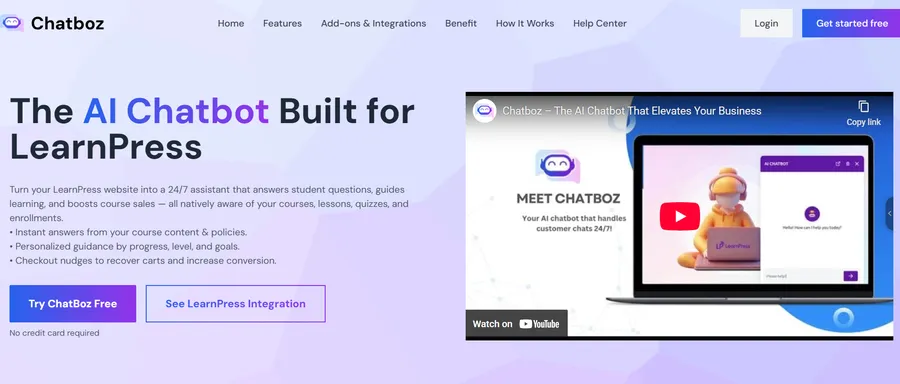
Why Schools Are Switching to Digital Student Engagement Solutions
The adoption of these tools is driven by necessity. In a fast-paced academic environment, support cannot lag behind student expectations.
Automating Onboarding vs. Manual Processing
| Feature | Manual Onboarding | Chatbot for Education |
| Response Time | 24 – 48 Hours | < 2 Seconds |
| Availability | Office Hours Only | 24/7/365 |
| Scalability | Limited by Staff | Unlimited Conversations |
| Cost | High (Salaries) | Reduces costs by 30% |
When you adopt a workflow where you let a chatbot for education manage onboarding, you are future-proofing your institution. You can update “Tuition Rates” instantly across thousands of conversations by re-syncing your data. This is crucial for maintaining a competitive edge against other universities using digital student engagement solutions.

Boosting Engagement After Launch
Once your onboarding bot is live, the work isn’t over. You need to ensure students actually complete the process.
- Gamification: Use WordPress Gamification Plugins to reward students with digital badges for completing enrollment steps.
- Community: Build a space for students to talk. Integrating WordPress Membership Plugins can turn a simple cohort into a thriving community.
- Support: Don’t let students feel abandoned. An online course builder with essential support features, including a clear escalation strategy, ensures that complex issues are properly addressed.
Real-World Success Stories
Does this actually work? Yes.
ThimPress, a leading WordPress education provider, integrated the PhysCode chatbot for education into their platform.
- Result: They achieved a 50% increase in user engagement within four months.
- Revenue: They saw a 15% growth in premium add-on sales.
This proves that improving student engagement in higher education directly impacts the bottom line and student satisfaction.
Conclusion: Start Your Automated Campus Today
The barrier to entry for AI in education has never been lower. The fear of complex coding, the exhaustion of manual replies, and the cost of hiring temporary staff are problems of the past.
We have entered a new era where you can confidently let a chatbot for education build a bridge between your institution and your students. A bot that is professional, accurate, and ready to serve 24/7.
You have the knowledge. The students are waiting for it. Don’t let manual labor stop you. Use student engagement in higher education strategies powered by AI as your secret weapon to launch your automated campus, streamline your student onboarding process, and share your educational mission with the world.
Ready to see it in action?
Download LearnPress and the PhysCode Chatbot today to experience the power of the chatbot for education integration firsthand. Your first automated onboarding flow is just 3 steps away. Don’t forget to check out our guide on 11 Proven Ways to Promote Your Online Courseonce you are live!
FAQs About Chatbot for Education:
1. Is the content unique when a chatbot for education answers questions?
Yes. The AI generates responses based entirely on your specific uploaded files, website data, and synced courses. Since no hai institutions have the same data or "Campus Culture," no two bots will sound exactly alike.
2. Can I use a chatbot for complex financial aid questions?
Absolutely. AI excels at retrieving specific data from dense handbooks. Whether it is clarifying "FAFSA Deadlines" or explaining "Scholarship Eligibility," the chatbot for education can break down heavy topics into simple, digestible answers for students.
3. Do I need technical skills to build a chatbot for education?
No. If you can upload a PDF document or paste a URL, you can train these tools. The interface handles all the complex processing in the background, making it accessible even if you have zero coding experience.
4. Is this better than traditional email chains?
For modern students, yes. While email still has its place for formal documentation, the instant nature of digital student engagement solutions aligns much better with Gen Z's communication preferences. It provides the immediate answers they expect without the friction of waiting for a reply.
Contact US | LearnPress:
Website: https://learnpresslms.com/
Fanpage: https://www.facebook.com/learnpresslms
Email: [email protected]