Training Modules
Our training sessions are split into one or several training modules. This helps to organise the course into an easily digestible units.
In-person training
Experience the full potential of LightAct with our immersive 2 or 3 day in-person training program.
Guided by a Lead LightAct Trainer and supported by an assistant, you’ll gain hands-on experience across the entire LightAct ecosystem.
This intensive course equips you with the practical skills and in-depth knowledge necessary to independently create and run complex LightAct shows.
Training dates
30.-31. March 2026 in Chicago
- Format: In-person training
- Modules: Essentials, Advanced, Projection
- Date: 30-31. March 2026
- Location: Show Sage in Chicago
- Price: $250
- Trainers: Connor Wright and Mitja Prelovšek
- Coordinators: Crystal Lee
- Available slots: ~10-12
23.-24. April 2026 in Belgium
- Format: In-person training
- Modules: Essentials, Advanced, Projection
- Date: 23.-24. April 2026
- AED Store in Willebroek, Belgium
- Price: Contact AED
- Trainers: Mitja Prelovšek
- Coordinator: Pieter-Jan Symons
- Available slots: ~ 15
Past in-person training sessions
Madrid / Spain in 2023, Las Vegas in 2024, Köln / Germany in 2025, Frankfurt / Germany in 2025, Ljubljana / Slovenia in 2025, New York / USA in 2025, Milton Keynes / UK in 2025, Tokyo / Japan in 2025, Warsaw / Poland in 2025, Beijing, Guangzhou, Huangzou / China in 2025, Las Vegas in 2025, Madrid / Spain in 2026, Chicago / USA in 2026, Willebroek / Belgium in 2026.
Online training
Master the LightAct Essentials module in a focused 8-hour online training.
This comprehensive program, including breaks and a live Q&A session, equips you to confidently run basic LightAct shows.
Upon completion, you’ll obtain Certified Operator – Essentials certification.
Training dates
Frequently asked questions
Besides attending one of our training sessions, LightAct Operator certification can also be obtained by sending us examples of projects you successfully completed using LightAct.
Please contact us if you already completed some projects using LightAct and would like to get certified.
If you cannot make it to any of the available dates, please subscribe to our newsletter or follow our social media.
You will immediately receive an email saying that we’ve received your application. After we go through the applications, you will receive another email about further details and instructions on how to secure your spot.
Only after you make the payment of the fee in full. As several people might make the payment at the same time, we reserve the right to cancel the admission and return the payment.
First, you need to tell us if you are applying as a business or as an individual. If you are applying as an individual, we will need to add a 22% VAT surcharge to the fee. If you are applying as a business and you are based in the European Union, please make sure to fill in the VAT ID field.
You can make the payment through PayPal with a credit card or as a regular bank transfer.
If you are paying through Bank Transfer, we will send you a Proforma Invoice with all the payment details.
If you are paying through PayPal we will send you a payment request. Due to PayPal fees, we will need to add a 10% surcharge to the fee.
Besides the training itself, we also usually provide some light refreshments during the day.
Lodging and travel costs have to be covered by yourself.
Unfortunately no.
We reserve the right to cancel the training. If this happens, we will refund your training fee.
Unless noted otherwise, all the trainings are in English language.
In order to successfully participate in your training:
- A capable laptop equipped with an Nvidia GPU
- Prepare your laptop using this tutorial.
- Make sure LightAct launches and runs on your laptop before the training begins.
- Bring a mouse with a mouse wheel. Using LightAct is easier with a mouse wheel.
- Install utility programs such as loopMidi and a timecode sender that can send MTC.
- If you want to follow along with the Unreal Engine section, you might want to download and install Unreal Engine 5.4
Apply for a training
After applying you will receive additional information. Applying does not yet guarantee admission.
Information for the hosting company
Here we are listing the requirements in terms of space and equipment for the training.
We’ve done training sessions in everything from small boardrooms to large warehouses.
Here are some general guidelines:
- it should be a comfortable space with standard room temperatures
- enough desks, chairs and power strips.
- it should be possible to dim or block the sunlight.
Here are some photos of the spaces we’ve done trainings in in the past:
There is no maximum number of participants, however if there are more than 20 there might need to be 2 trainers (Lead and Assistant).
If the hosting company has LightAct servers, then of course.
However, in most cases, the attendees do the training on their own laptops. The trainer is leading the training on a server provided by the hosting company (see below).
Even though we strongly suggest to every attendee to bring her own laptop, every now and then it happens that someone doesn’t do that.
In this case, it is advisable if the hosting company has some laptops or servers ready. Please note that if this happens, some additional time will be required to set it up.
To ensure the participants have a clear view of the Trainer’s GUI, in the past we’ve used one of these approaches:
- one or two large displays behind the Trainer mirroring trainer’s GUI.
- a projector projecting on a large screen
- a KVM with monitors on each desk
Of course, if a different arrangement suits the space better please let us know. As long as each participant has enough space and can easily and clearly see the trainer’s GUI, we should be good to go.
LightNet
To demonstrate LightNet (multi-machine) functionalities it is often advisable to have 2 large displays facing the attendees.
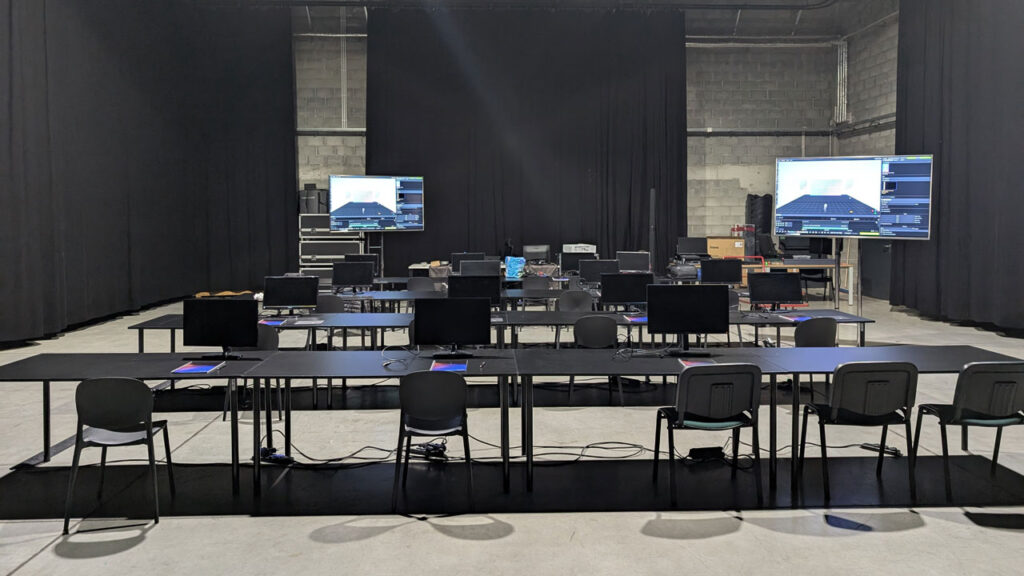
This way it is possible for one display to mirror the Primary server and the other to mirror the Secondary/Backup or Editor server.
- if the hosting company is managing applications, the trainer will need to get a list of participants with their emails 1 week in advance . This is in order to send an introductory email before the training and a thank you email after it.
- a server on which the Trainer will do the training. It can be any computer that meets the recommended system requirements for LightAct.
- ideally this server could be set up in advance either by the hosting company or by the trainer through remote access.
- a display that’s mirrored (see previous FAQ)
- a keyboard and a mouse
- if the space is big, a headset microphone might be good.
- coffee and water ☺️

The trainer usually brings one or several 3D prints on which she demonstrates the projection mapping features. The participants then split into groups and do the projection mapping exercise.
Therefore, there should be one or several projectors available for this part.
What kind of projectors are required?
- we prefer projectors with a relatively narrow FOV (relatively high throw ratio). This way we can then project better onto the 3D prints.
- ideally there would be 3-5 identical projectors, but if the group is small, we can manage with one as well.
- ideally the projectors would have a HDMI input so that the participants can easily connect to them with their laptops.
- Some extra HDMI, DP and network cables will come handy.
- Additional mice and keyboards can also be useful.
- Water and coffee for everyone 🙂
The trainer usually arrives 1 day before the training is scheduled to set everything up. This setup usually takes from 2-3 hours.
The trainer usually leaves the morning after the last day.
The training usually starts at 9am and ends at around 4:30pm.
The trainer usually arrives at 8:30am.


