One evening last month, my Apple Watch, iPhone, and Mac all lit up with a message prompting me to reset my password. This came out of nowhere; I hadn’t done anything to elicit it. I even had Lockdown Mode running on all my devices. It didn’t matter. Someone was spamming Apple’s legitimate password reset flow against my account—a technique Krebs documented back in 2024. I dismissed the prompts, but the stage was set.
What made the attack impressive was the next move: The scammers actually contacted Apple Support themselves, pretending to be me, and opened a real case claiming I’d lost my phone and needed to update my number. That generated a real case ID, and triggered real Apple emails to my inbox, properly signed, from Apple’s actual servers. These were legitimate; no filter on earth could have caught them.
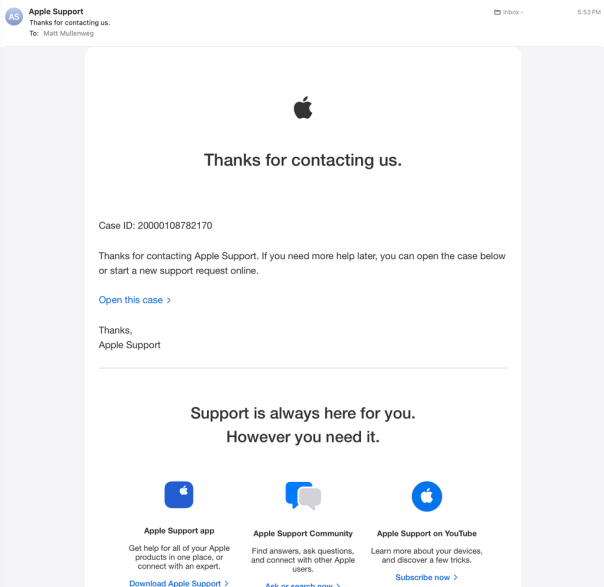
Then “Alexander from Apple Support” called. He was calm, knowledgeable, and careful. His first moves were solid security advice: check your account, verify nothing’s changed, consider updating your password. He was so good that I actually thanked him for being excellent at his job.
That, of course, was when he moved into the next phase of the attack.
He texted me a link to review and cancel the “pending request.” The site, audit-apple.com, was a pixel-perfect Apple replica, and displayed the exact case ID from the real emails I’d just received. There was even a fake chat transcript of the scammers’ actual conversation with Apple, presented back to me as evidence of the attack against my account. At the bottom of the page was a Sign in with Apple button that he told me to use.
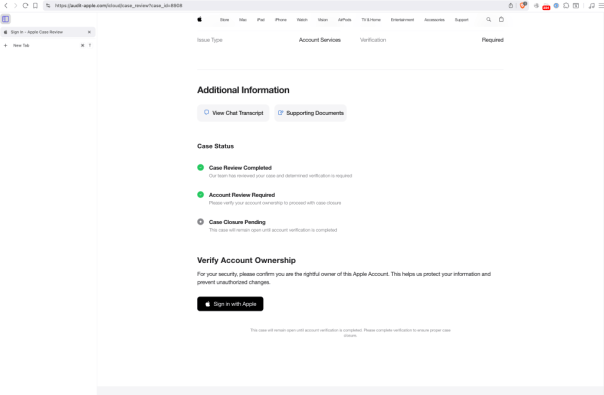
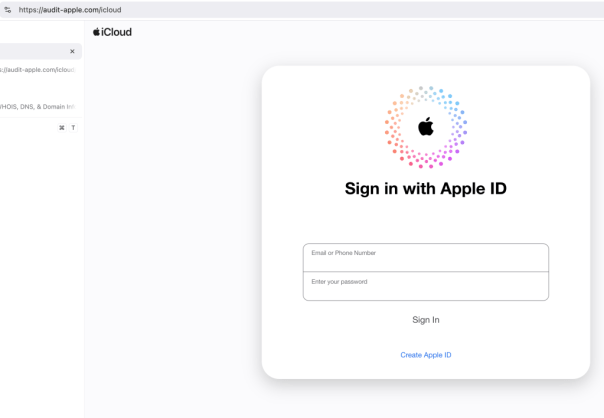
I started poking at the page and noticed I could enter any case ID and get the same result. Nothing was being validated. It was all theater.
“This is really good,” I told Alexander. “This is obviously phishing. So tell me about the scam.”
Silence. *Click*.
Once I’d suspected what was happening, I’d started recording the call, so I was able to save a good chunk of it, which Jamie Marsland used to make a video about the encounter. You can hear for yourself exactly how convincing “Alexander” was.
So let my almost-disaster help you avoid your own. Remember these rules.
- Don’t approve any password-reset prompts—those are the first part of the attack. Do not pass Go, just head directly to your Apple ID settings.
- Apple will never call you first.
- When you get an email from Apple—or, really, anyone telling you to complete a digital security measure—check the URL they’re trying to send you to. Apple Support lives on apple.com and getsupport.apple.com, nowhere else.
After all, the best protection is knowing what this looks like before it happens.
Thank you to Peter Rubin and Jamie Marsland for putting this all together.
]]>So I did, but nothing changed. However I deleted the account, reset it (hold down the top button), added the account back, set the prefix, reset again, and then all the folders started working. The advice I found worked, but there was some setting stuck somewhere that needed to be flushed out. Being able to file messages and read other folders from my iPhone is amazing. I was on the fence about the utility of the iPhone before, now I’m completely sold. It’s actually more fun than doing it in Thunderbird.
]]>