The post Role Based Email Addresses Limits & Benefits appeared first on Mailerio.
]]>Role based email addresses make it easier for businesses to handle customer inquiries, streamline internal communication, and maintain continuity when staff changes occur. However, while they offer clear organizational benefits, they also come with distinct limitations, from deliverability challenges to potential losses in personalization and accountability.
This article explores both sides of the coin: the benefits and limits of role based email addresses. You’ll learn when to use them, how they impact communication and marketing performance, and the best practices to make sure these addresses work for your business, not against it.
TL;DR
Role-based email addresses, such as support@, sales@, or hr@, are tied to departments or functions rather than individuals. They streamline team communication, maintain continuity during staff changes, and serve as reliable public-facing or internal contact points. However, they come with limitations: they can reduce personalization, create accountability gaps, increase management complexity, and pose higher bounce or spam risk in marketing campaigns. To use them effectively, assign clear ownership, implement structured workflows, and avoid sending campaigns to these addresses without proper email verification. Tools like Mailerio can detect role-based, disposable, or invalid emails, helping businesses protect their sender reputation and maximize deliverability. When used strategically and validated, role-based addresses provide organizational efficiency while minimizing communication risks.
What Are Role-Based Email Addresses?
Role based email addresses are email accounts created to represent a specific function, team, or department within an organization, not a person. They usually take forms like [email protected], [email protected], [email protected], or [email protected].
Instead of belonging to a single employee, these addresses are managed collectively by a team or routed through an internal system so that messages reach whoever is best equipped to respond. This setup ensures that communication continues smoothly even when team members go on vacation, change roles, or leave the company altogether.
Here are the most popular role-based email addresses companies use (it’s not exclusive). If you’re looking for a more comprehensive way to detect role based emails, check the Mailerio email validation tool.
| Role-based email address | Typical function/use |
|---|---|
| info@ | General inquiries or initial public contact. |
| contact@ / contactus@ | Alternative for general contact or customer enquiries. |
| sales@ | Sales queries, leads, business development. |
| support@ | Customer support, help desk, technical assistance. |
| help@ / helpdesk@ | Similar to support@: broader “help” function. |
| billing@ / payments@ | Invoices, payments, financial admin. |
| hr@ / careers@ / jobs@ | Human resources, recruitment, job applications. |
| admin@ | Administrative or system-level contact. |
| webmaster@ | Website administration, tech problems of site. |
| postmaster@ | Formal email admin contact (often required by standards). |
| abuse@ | Reporting abuse, security incidents, unauthorised use. |
| security@ | Security team, vulnerability reports, IT security. |
| marketing@ | Marketing department, promotional materials, campaigns. |
| media@ / press@ | Media enquiries, press office, public relations. |
| operations@ / ops@ | Operational matters, logistic or internal coordination. |
| office@ | General office inbox, administrative contact point. |
| noc@ | Network Operations Center; tech infrastructure issues. |

This structure makes role based email addresses particularly useful for organizations that rely on teamwork and continuity. They also help create a unified front. Customers see the brand communicating consistently, regardless of which team member replies.
However, while the concept seems simple, it’s important to understand that not all “shared” or “generic” inboxes are truly role-based. Some may act as aliases that forward messages to individual accounts, while others function as shared team inboxes where multiple users can access and respond within a centralized platform. Knowing the difference helps businesses choose the right setup for reliability, compliance, and deliverability. Learn more about other email types, like noreply email or catch-all emails.
Benefits of Role-Based Email Addresses
Using role based email addresses can offer organizations a wide range of advantages, from improving communication efficiency to ensuring business continuity. While often seen as simple administrative tools, these addresses can significantly strengthen internal workflows and customer experience when implemented correctly.

Here are the most important benefits:
1. Seamless Team Collaboration
Role based email addresses enable multiple team members to access and respond to messages from a single inbox. This shared visibility ensures that no inquiry slips through the cracks, even if one team member is out of office.
For example, [email protected] might be monitored by several agents, enabling faster responses and more consistent service.

Key benefit: Efficient collaboration and guaranteed coverage across shifts or time zones.
2. Business Continuity and Staff Turnover Protection
Unlike personal emails, role based email addresses stay constant even when employees leave or roles change. This ensures clients and partners always have a stable, working contact, avoiding the communication gaps that often occur during staff transitions.
Key benefit: Continuous customer communication despite staff changes.
3. Clear Departmental Identity
Role-based addresses communicate structure and professionalism. They help customers instantly identify the right department for their needs, for example, [email protected] for invoices or [email protected] for inquiries. This clarity builds trust and reduces confusion, especially in larger organizations.
Key benefit: Reinforces brand organization and customer confidence.
4. Efficient Routing and Workflow Management
Role-based inboxes make it easier to categorize, assign, and prioritize messages. When integrated with tools like CRM systems or help desks, they can automatically route emails to the right team member or queue. This automation shortens response times and supports scalable customer service processes.
Key benefit: Streamlined communication and faster resolutions.
5. Consistent Branding and Tone
With shared templates and signatures, messages sent from a role-based account maintain a consistent brand voice. Whether a customer emails support@ or sales@, they receive responses aligned with your brand’s tone and quality standards.
Key benefit: Strengthens brand consistency and professionalism.
6. Privacy and Security
Role-based email addresses reduce the exposure of personal employee emails to the public. This protects staff from spam and phishing attempts while ensuring that sensitive information (like billing or HR inquiries) is handled through monitored, secure inboxes.
Key benefit: Enhanced privacy and reduced security risk for individual employees.
7. Improved Customer Experience
Customers appreciate quick, reliable responses, and role-based emails make this possible. They also prevent communication dead ends, since multiple team members can see and act on the same message thread. When managed well, this setup boosts satisfaction and trust.
Key benefit: Faster responses and more reliable customer communication.
Limits of Role-Based Email Addresses
While role-based emails offer structure and continuity, they also come with several significant drawbacks, especially in areas like personalization, email deliverability, and accountability. Understanding these limitations helps businesses avoid common pitfalls and design smarter communication systems that balance efficiency with authenticity.
1. Impersonal Communication
The biggest drawback of role based email addresses is the loss of human touch. Messages from [email protected] or [email protected] can feel distant or robotic, especially when customers expect a personalized experience. Without a name or recognizable signature, emails may appear automated reducing open rates and engagement.
Impact: Lower response rates and weaker customer relationships.
2. Deliverability Challenges
Email service providers and spam filters often flag role based email addresses as higher risk especially in outbound campaigns. Platforms like Pipedrive and Mailchimp even restrict sending to certain addresses (admin@, sales@, info@) because these inboxes often serve multiple people and rarely provide valid opt-ins. If you want to make sure you’re not sending role-based emails, validate your lists before sending.
Impact: Increased bounce rates, potential spam filtering, and lower sender reputation.
3. Accountability and Ownership Gaps
When several people access the same inbox, it can become unclear who’s responsible for a particular message or follow-up. Without proper tracking systems, tasks may be duplicated, delayed, or missed entirely. This lack of personal accountability can lead to inefficiency and (sometimes) unhappy customers.
Impact: Slower response times and inconsistent customer service.
4. Overcrowded or Unmanaged Inboxes
Shared inboxes like info@ can quickly become cluttered with newsletters, spam, and general inquiries. If not actively filtered and managed, important messages risk being buried. Without automation or clear workflows, these inboxes often turn into digital “black holes.”
Impact: Lost messages, wasted time, and frustrated teams.
5. Limited Use for Marketing or Outreach
Because role-based email addresses aren’t tied to individuals, they’re usually unsuitable for direct marketing, lead nurturing, or cold outreach. That’s why, if you’re working with email marketing, remove role-based accounts from your list. Email automation tools may skip them entirely to comply with anti-spam regulations. Even when deliverable, role-based emails often lack engagement data (like open/click tracking by recipient).
Impact: Reduced marketing reach and unreliable analytics.
6. Security and Compliance Risks
When multiple team members share login credentials for a role based inbox, security becomes a concern. Without proper access control, it’s difficult to track who opened, deleted, or forwarded sensitive messages. This lack of visibility can create compliance problems especially in regulated industries (finance, healthcare, legal).
Impact: Higher risk of unauthorized access and data mishandling.
7. Maintenance Complexity
The more role-based addresses an organization uses, the harder it becomes to maintain them. Each new department or project may request its own address, leading to confusion over ownership, forwarding rules, and access permissions. Without centralized oversight, email management becomes messy and error-prone.
Impact: Administrative overhead and risk of miscommunication.
Specific “Limits” to Emphasize
While these email addresses can improve communication within an organization, they carry several specific risks that businesses, especially marketers and SaaS companies, must carefully manage. Below are the most critical limits, with practical insights and solutions.
1. Deliverability & Spam Risk
Role-based email addresses are more likely to trigger spam filters or bounce back messages because they are often shared, generic, or rarely monitored. Cold email software platforms often flag role-based emails (support@, info@, sales@) as higher risk due to their lack of individual engagement history.
Impact: High bounce rates, lower inbox placement, and potential damage to your sender reputation.
Solution: Validate email lists before sending. Tools like Mailerio detect role-based accounts in advance, allowing marketers to remove or treat them differently to maintain deliverability and campaign effectiveness.
2. Marketing & Cold-Email Issues
Many role addresses are not tied to real, opted-in recipients, which increases the likelihood of regulatory or deliverability problems. Pipedrive specifically blocks sending to certain role-based addresses to avoid spam complaints or compliance issues.
Impact: Sending campaigns to these addresses can harm your email domain reputation, reduce engagement rates, and even risk violations of anti-spam regulations.
Solution: Use Mailerio to filter out role-based accounts from marketing lists before launching campaigns. This ensures your outreach targets real subscribers and decision-makers, protecting your sender reputation.
3. Ownership, Visibility & Continuity
Shared role inboxes can create ambiguity in accountability:
- Who responded to a message?
- Who follows up on outstanding inquiries?
- What happens when a staff member leaves?
Without clear ownership, conversations can be lost, duplicated, or delayed, impacting service quality and internal workflows.
Solution: Assign clear responsibility and monitor usage of role-based addresses. When combined with email validation (Mailerio can flag potentially inactive or role-based accounts), you can maintain accurate records and continuity.
When Role-Based Email Addresses Make Sense
Not all email addresses are created equal. Understanding when to use role-based email addresses can save your team time, improve customer experiences, and protect your email reputation. While these addresses offer numerous operational benefits, their use must be strategic.
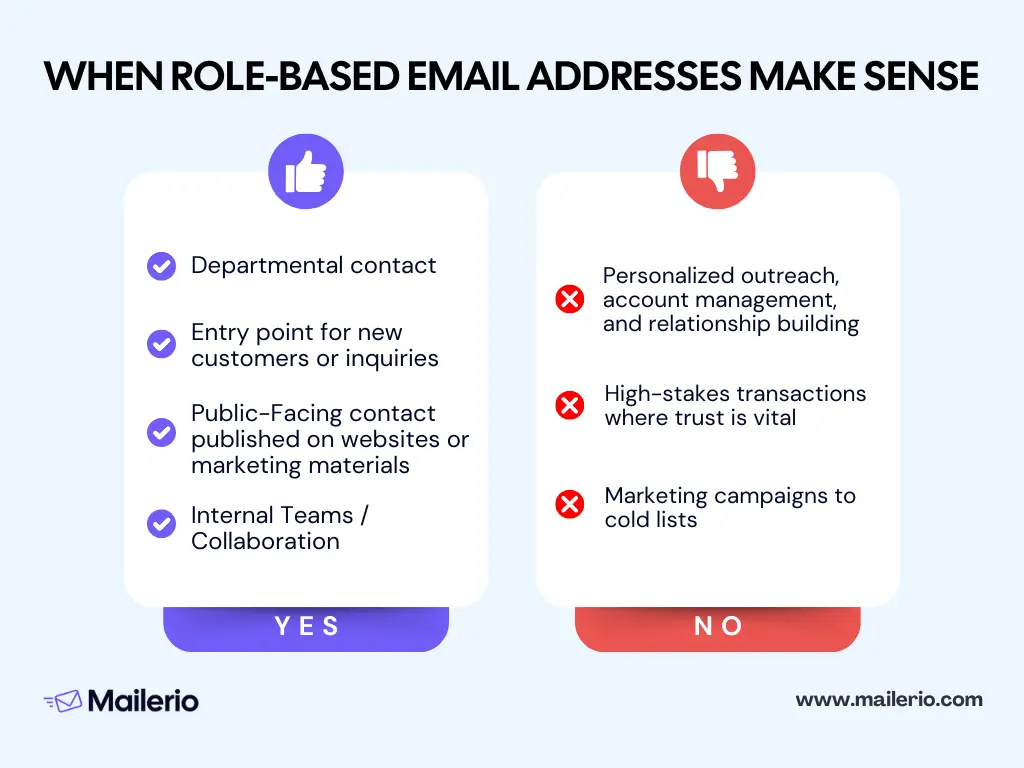
When Role-Based Emails Are Appropriate
1. Departmental Contact: role-based addresses work well for functional areas within a company, such as:
- [email protected] for human resources inquiries
- [email protected] for invoices and payment questions
- [email protected] for compliance or legal correspondence
- [email protected] for customer service requests
These addresses ensure inquiries are automatically routed to the right team and provide continuity even if individual staff members change roles.
2. Entry Point for New Customers or Inquiries: When the role is more important than the individual, role-based addresses serve as an ideal entry point.
For example, a sales@ or info@ inbox can act as the first point of contact for prospects or new customers, ensuring messages reach the correct department immediately.
3. Public-Facing Contact Published on Websites or Marketing Materials: role-based email addresses are ideal for general contact points that appear in public directories, websites, or brochures.
Using a consistent, departmental address like support@ or contact@ helps maintain brand professionalism and prevents personal employee emails from being exposed to spam or phishing attempts.
4. Internal Teams / Collaboration: shared role-based inboxes support internal teamwork by allowing multiple team members to monitor and respond to messages.
For example, a helpdesk@ inbox in IT or operations can be accessed by several employees, ensuring prompt response and reducing bottlenecks.
Learn more about other email types like catch-all, invalid emails, or abuse emails.
When Role-Based Emails Are Less Appropriate
1. Personalized Outreach, Account Management, and Relationship Building: role-based addresses are impersonal and can hinder relationship-building efforts.
For high-value clients, account managers, or recurring customers, a named email address ([email protected]) helps maintain trust, personalize communication, and encourage engagement.
2. High-Stakes Transactions Where Trust is Vital: in situations like legal correspondence, financial negotiations, or sensitive client communications, role-based emails may appear generic or untrustworthy. Direct, personalized emails help reinforce credibility and confidence.
3. Marketing Campaigns to Cold Lists: sending bulk emails to role-based addresses is risky. These addresses often do not represent real opt-in users and may be blocked by platforms or spam filters.
Mailerio and similar email validation tools are essential here. By pre-validating your list, you can identify role-based accounts and avoid sending campaigns to them, protecting your sender reputation and improving overall deliverability.
Role-Based vs Generic Emails Differences
When discussing role email accounts, terminology can get confusing. Many sources differentiate between generic and role-based email addresses, but the definitions often overlap, creating uncertainty for marketers, business owners, and IT teams.
Generic Email Addresses
Generic addresses are broad, non-personal email accounts typically used for public-facing or general inquiries. Common examples include:
Generic addresses are often the first point of contact for external communications, but may not map to a specific function or team. Because these inboxes are typically monitored by multiple people or forwarded internally, they can present deliverability risks, especially when used in outbound marketing or cold email campaigns.
Key point: Generic addresses are easy to find and widely published, but their lack of individual engagement can trigger spam filters, increasing bounce rates.
Role-Based Email Addresses
Role-based email addresses refer specifically to accounts tied to a department, function, or team within an organization, such as:
- [email protected] (Customer Support)
- [email protected] (Finance/Billing)
- [email protected] (Human Resources)
Unlike purely generic addresses, role-based emails indicate a specific functional responsibility, even if multiple people share the inbox. These addresses are designed to streamline communication workflows, improve internal collaboration, and provide continuity when staff changes occur.
Overlapping and Confusing Terminology
In practice, many sources use “generic” and “role-based” interchangeably, because:
- Both types are non-personal.
- Both may be monitored by multiple people.
- Both are frequently published publicly or used for inbound inquiries.
For clarity in this article, we define:
Role-based email addresses = departmental/function-based accounts, inclusive of generic/team inboxes.
This approach helps businesses focus on the functional purpose of the address rather than getting lost in semantics.
Deliverability & Usage Differences
Here are some important differences between generic and role-based addresses when it comes to email campaigns:
| Type | Deliverability Considerations | Usage Recommendations |
|---|---|---|
| Generic (info@, contact@) | Higher likelihood of spam filtering or bounce; low engagement tracking | Use for inbound inquiries or public contact points; avoid bulk outbound campaigns |
| Role-Based (support@, billing@) | Slightly better if tied to a monitored function, but still higher risk in marketing campaigns | Ideal for departmental routing, internal collaboration, and continuity; validate before sending emails |
Wrap Up
Role based email addresses offer clear organizational advantages, from streamlining team workflows to maintaining continuity when staff changes occur. They provide departments like support, sales, HR, and billing with a stable, shared communication channel that ensures inquiries are routed and responded to efficiently.
However, as we’ve explored, these addresses come with important limitations:
- Deliverability & Spam Risk: Role-based addresses are more likely to bounce or trigger spam filters, particularly in marketing campaigns.
- Personalization & Customer Relationships: Generic inboxes can feel impersonal, reducing engagement and trust.
- Ownership & Accountability: Shared access can create ambiguity over who responds to which messages.
- Scalability & Complexity: As the number of role-based accounts grows, managing them effectively becomes challenging.
When used thoughtfully, role based email addresses enhance organizational efficiency and customer service. By combining careful usage, workflow management, and email validation tools like Mailerio, businesses can maximize the benefits while minimizing risks to deliverability, reputation, and customer experience.
FAQ
Not always. Many role-based or generic addresses (like info@ or sales@) may not belong to a single recipient, increasing bounce and spam risk. Using an email validation tool like Mailerio helps identify these addresses before sending campaigns, protecting your sender reputation.
Monitoring depends on internal workflows. Some role-based addresses are actively managed by a team, while others may be infrequently checked. Audit your inboxes and set clear ownership to ensure timely responses.
Yes. Role-based addresses work well with ticketing systems, CRM routing, and internal collaboration tools. They help ensure messages are assigned and tracked even when team members change.
They can. Customers may perceive messages from generic inboxes as impersonal. A hybrid approach pairing role-based addresses with a named contact in the signature helps maintain a personal touch while keeping the benefits of shared inboxes.
Always validate your email lists before campaigns. Mailerio can detect role-based, disposable, or invalid addresses, so you can clean your list and focus on real, engaged recipients. This prevents bounces and spam complaints.
Yes. Industries that rely heavily on marketing campaigns, cold outreach, or compliance-sensitive communications (like SaaS, finance, or legal) should treat role-based addresses cautiously. Validation and monitoring are essential to avoid deliverability issues.
Yes, just make sure to assign responsibility for tracking conversations, use shared inbox tools or labels for organization, and combine with validation tools like Mailerio to ensure messages reach valid recipients.
The post Role Based Email Addresses Limits & Benefits appeared first on Mailerio.
]]>The post Invalid Email Address: How To Fix & Avoid appeared first on Mailerio.
]]>Understanding what makes an email address invalid and how to fix and prevent it is essential for anyone who relies on email to communicate, convert, or build relationships. In this guide, we’ll break down exactly what an invalid email address is, why it happens, how it affects deliverability, and most importantly, how you can fix and avoid it to keep your list clean, active, and profitable.
TL;DR
An invalid email address is one that can’t receive messages often due to typos, fake domains, or deleted inboxes. Sending to these addresses hurts deliverability, inflates bounce rates, and damages your sender reputation. To fix the issue, correct obvious typos, remove invalid entries, and re-engage inactive users. To avoid them in the future, use double opt-in, real-time validation, and maintain regular list cleaning. A clean, verified list means higher open rates, better inbox placement, and more reliable results.
What Is an Invalid Email Address?
An invalid email address is any email that can’t successfully receive messages. In other words, when you send to it, the message bounces back often with a “mailbox not found” or “domain doesn’t exist” error. These addresses look normal at first glance, but behind the scenes, something is broken: the format, the domain, or the mailbox itself. For a better explanation, here’s the anatomy of an email address:
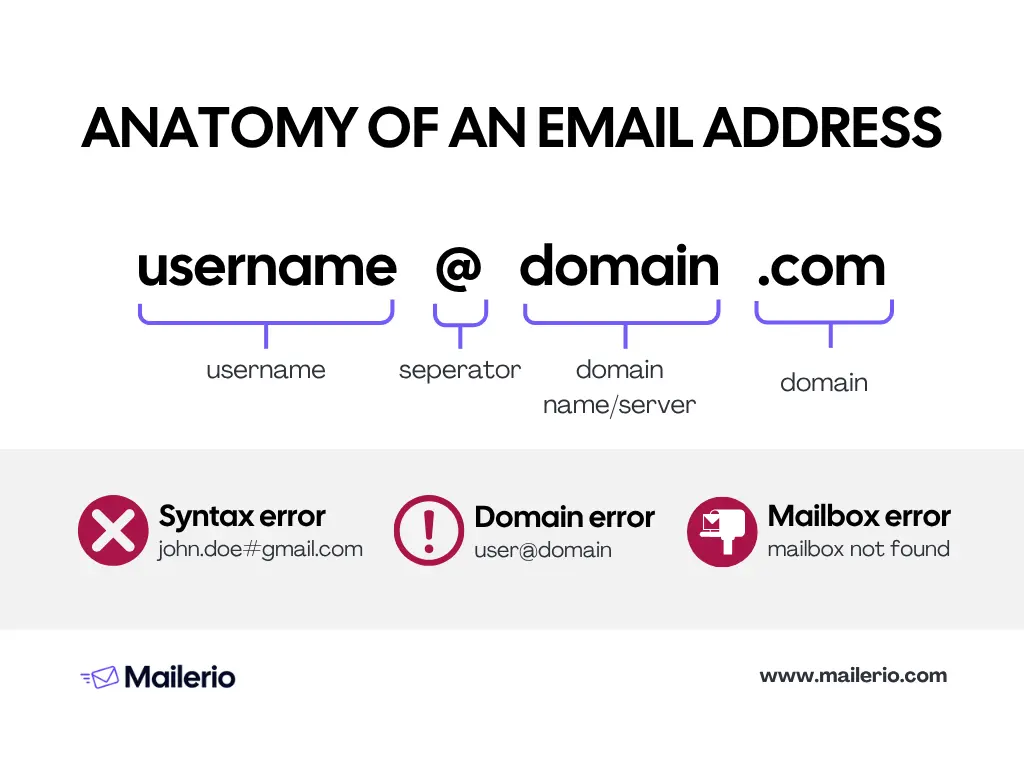
A valid email address, on the other hand, passes all the necessary checks it’s properly formatted, connected to a real domain, and linked to an active inbox. Maintaining a healthy ratio of valid vs invalid email addresses is critical for high email deliverability, strong sender reputation, and accurate analytics.
There are several common types of invalid email addresses:
- Syntax errors – Misspellings or formatting mistakes like
john.doe@@gmail.comoruser#domain.com. These errors prevent proper routing. - Domain errors – When the domain name (the part after @) no longer exists or has no MX records (mail exchange records) to accept mail.
- Mailbox errors – The user’s inbox has been deleted, suspended, or full, meaning emails sent there are rejected.
- Disposable or fake emails – Temporary addresses are often used to access free trials or avoid spam. They might work briefly, but soon become invalid.
- Role-based addresses – Emails like
info@,sales@, orsupport@that often don’t belong to a specific person. These can appear valid but often lead to poor engagement or bounce risk.
Understanding these categories helps you target the right fix, from correcting typos to running a full email validation process across your database. Regular email verification ensures you catch invalid addresses before they impact your marketing campaigns or sender reputation.
Why Invalid Email Addresses Are a Problem
An invalid email address doesn’t just fail silently, it actively undermines your email marketing and communication efforts in several key ways. Here’s a visual to quickly recap all the problems that emerge from invalid addresses:

Invalid addresses escalate a big chain of events that can hurt your domain reputation and make all your emails land in spam. We will share a breakdown of why invalid email addresses matter, and how using email verification tools can help you keep your list clean, your reputation strong, and your campaigns effective.
1. Higher bounce rates → damaged deliverability
When you send too many invalid email addresses, you’ll see a rise in hard bounces (emails rejected because the address is non-existent or undeliverable). High bounce rates tell internet service providers (ISPs) that you may not be maintaining a healthy list or are sending to stale contacts. That leads to worse inbox placement or even being filtered into spam.
Using a dedicated email validation solution helps you catch invalid addresses before you send, reducing your bounce rate and keeping your sender reputation intact.
2. Wasted budget and resources
Each email you send to an invalid address is a wasted send you’re paying for that send, consuming your quota, and getting zero return. Meanwhile, your metrics (opens, clicks) are depressed because the invalid addresses never engage. Building in email verification early (for example, via Mailerio’s bulk or real-time verification options) means you’re only paying to reach real inboxes.
3. Skewed engagement metrics
If a large slice of your list is filled with invalid or dead addresses, your open rate, click-through rate, and conversion rate all of those key metrics get distorted. This makes it harder to evaluate campaign performance, segment properly, or make data-driven decisions. Just take a look at how Ajelix experienced open rates as low as 6%, a high bounce rate, and abuse spam complaints before using Mailerio. By removing invalid email addresses, you ensure your engagement metrics reflect actual contacts, not ghost addresses.
4. Risk to sender reputation and list health
Continuing to send to invalid addresses is a red flag for ISPs. It signals poor list hygiene and can trigger delivery throttling, increased spam filtering, or worse, blacklisting.
5. Damaged brand perception
Imagine a scenario: you send out an important update or offer, and a significant portion of your list never receives it because the emails were invalid. That’s not only a lost opportunity, it’s a risk to brand trust. Your recipients may think you’re sloppy, or your messages become irrelevant or stale to your audience.
Verification tools like Mailerio help ensure you reach actual recipients who can see and react to your message, contributing to stronger relationships and better brand perception.
Note: Invalid email addresses aren’t a harmless by-product of list growth, they’re an active drag on your performance. The good news is: with a dedicated email verification tool like Mailerio, you can identify, filter, and prevent invalid addresses, ensuring your outreach reaches real people and drives real results.
Common Causes of Invalid Email Addresses
Understanding why invalid email addresses appear in your list is the first step toward fixing and preventing them. Several common factors contribute to invalid or undeliverable emails, and knowing them helps you implement better email validation and list hygiene practices.
1. Human error and typos
The most frequent cause of invalid email addresses is simple human error. People mistype their email during signup, for example:
- Missing or extra characters (
[email protected]instead ofgmail.com) - Missing “@” or dot (
john.doegmail.com) - Illegal characters or spaces (
jane [email protected])
Even small typos can lead to hard bounces and make your email list less reliable. Real-time validation using a tool like Mailerio can catch these mistakes instantly as users enter their email.
2. Invalid format or syntax errors
Beyond simple typos, some addresses are technically malformed:
- Multiple “@” symbols
- Consecutive dots (
[email protected]) - Invalid domain characters
These formatting issues prevent emails from routing correctly. Regular email validation ensures such addresses are flagged before they enter your database.
3. Domain issues
Even a correctly typed email can be invalid if the domain is problematic:
- Non-existent domain (
[email protected]) - Domain without proper MX (mail exchange) records
- Recently closed or decommissioned company domains
Tools like Mailerio perform domain checks to ensure the domain is capable of receiving email.
4. Mailbox issues
Some domains exist, but the individual mailbox does not or is no longer active:
- Deleted or suspended accounts
- Full inboxes that reject new messages
- Role-based addresses (e.g.,
[email protected]) that may not be monitored
Email list validation during email verification can help identify these invalid addresses and prevent bounces.
5. Disposable or temporary emails
Many users provide disposable addresses to access trials or avoid spam. These addresses are often valid only for a short period and can lead to high bounce rates later. Detecting and filtering disposable emails ensures your list contains real, long-term contacts. Learn more about how to block disposable addresses from entering your lists.
6. Purchased or third-party lists
Buying email lists is risky. They often contain outdated, invalid, or fake addresses. These lists may inflate your audience size, but reduce deliverability and damage your sender reputation. Verifying all new contacts, especially from external sources, is crucial.
7. List decay over time
Even a perfectly collected email list will naturally degrade. People abandon email accounts, change jobs, or stop using old addresses. Industry estimates suggest that email lists can decay by 20–30% per year if not maintained. Regular verification with tools like Mailerio keeps your list healthy and your campaigns effective.
By knowing these common causes, you can take proactive steps to prevent invalid email addresses from entering your system. In the next section, we’ll explore how to detect invalid emails and the tools you can use to maintain a clean, deliverable list.
How to Detect Invalid Email Addresses
Catching invalid email addresses early is essential to maintain deliverability, protect your sender reputation, and keep your email marketing campaigns, omnichannel marketing, or outbound lead generation effective. There are two main ways to detect invalid addresses: manual/basic checks and advanced/automated methods. While both can work, using a dedicated tool like Mailerio is faster, more accurate, and scalable.
1. Manual or Basic Checks
These are simple methods you can use without specialized tools:
- Syntax/format checks – Look for obvious mistakes like missing “@”, missing domain, or illegal characters. For example,
[email protected]orjanedoe@gmail,comare invalid. - Domain checks – Verify that the domain exists and can accept email. You can use tools like
nslookupto check MX records. But again, it’s time-intensive. - Manual research – Searching email addresses on social media or company websites to confirm existence, though time-consuming.
While these methods work for small lists or spot-checking, they are inefficient and error-prone for large databases.
2. Automated Methods
Automated email verification is the most efficient and reliable way to detect invalid email addresses. Tools like Mailerio perform multiple checks in seconds, including:
- Syntax validation – Checks format and illegal characters.
- Domain validation – Confirms the domain exists and has active MX records.
- Mailbox verification – Ensures the specific inbox exists and can receive emails.
- Disposable and role-based detection – Flags temporary emails or addresses like
info@orsupport@that may not engage. - Bulk verification – Instantly checks thousands of addresses without risking your sender reputation.
Using Mailerio saves hours of manual work, reduces human error, and ensures that your email list contains only valid, active addresses, improving both deliverability and ROI.
Step-by-Step Guide: Bulk Verifying Emails with Mailerio
Here’s how to quickly verify large email lists using Mailerio:
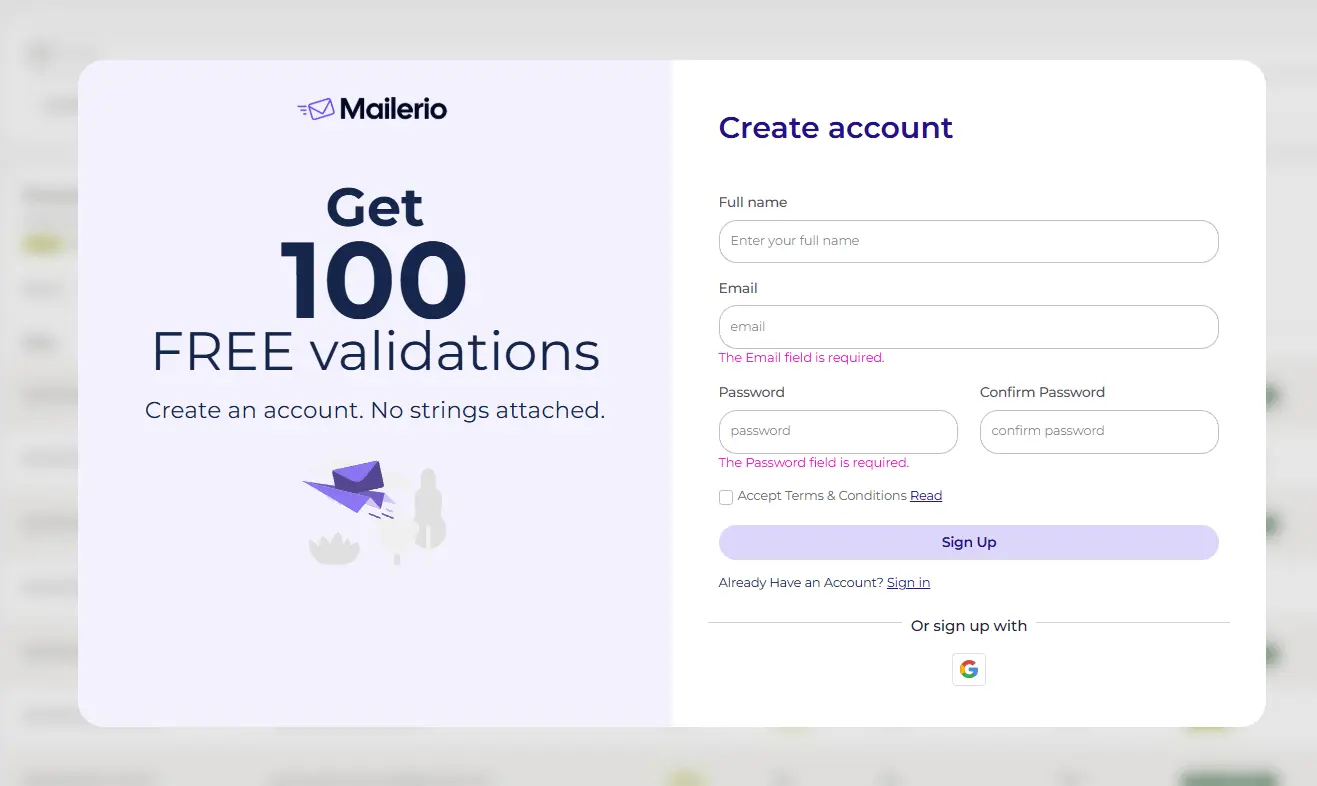
- Sign up / Log in
Go to Mailerio and create an account or log in to your existing account.
- Navigate to Bulk Verification
On the dashboard, select the “Bulk Email Verification” option.

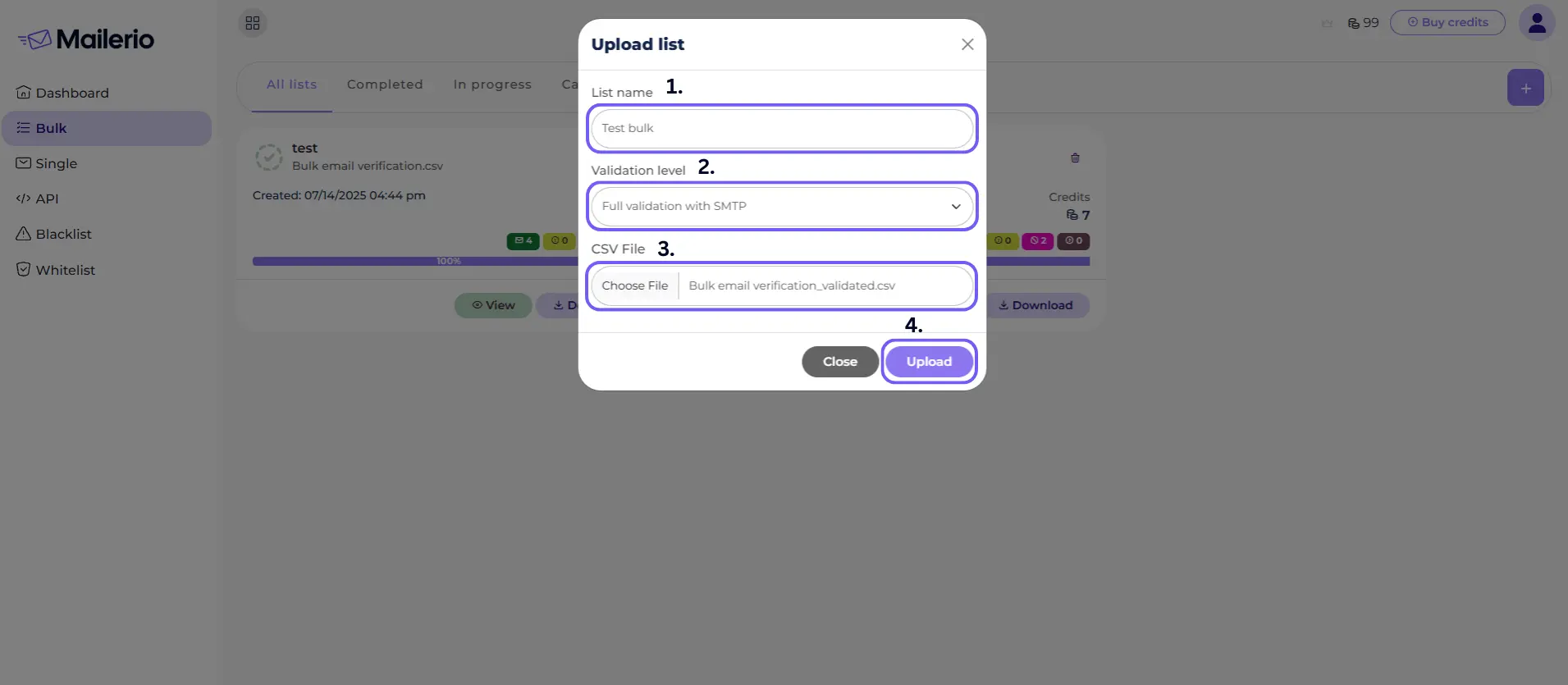
- Upload Your Email List
Upload a CSV file containing your email addresses. Make sure each email is in its own row. Click “Upload” to let Mailerio scan all emails. The tool will check syntax, domain, and mailbox validity in seconds.
- Review Results
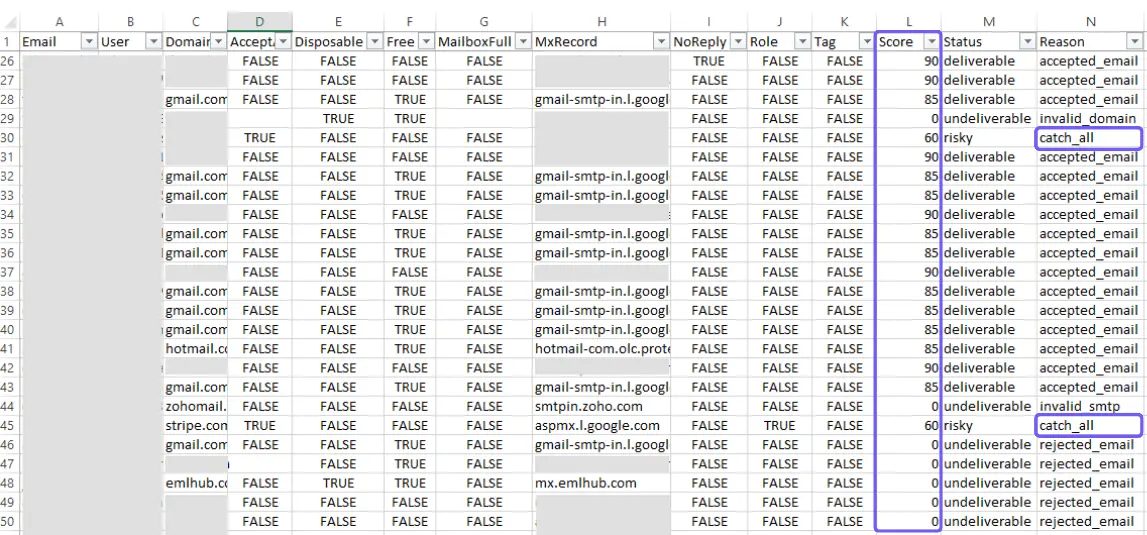
After verification, you’ll get a detailed report categorizing emails as deliverable, undeliverable, risky, no-reply, disposable, and other categories. You can either see the summary report or download a detailed CSV file.

- Download Cleaned List
Export your cleaned, verified list for use in your campaigns. You will get a full CSV file with all statuses, where you can easily filter out deliverable addresses, catch-all emails, or no-reply emails.
- Integrate Verification in Workflows (Optional)
For ongoing maintenance, consider using Mailerio’s real-time API to validate emails at signup or during import, preventing invalid addresses from entering your system in the first place.
Using this process, you can drastically reduce bounce rates, protect your sender reputation, and ensure your emails reach real recipients.
How to Fix Invalid Email Addresses
Identifying invalid email addresses is only half the battle the next step is fixing them to maintain a healthy, deliverable email list. Some invalid addresses can be corrected manually, while others require verification and cleanup. Here’s a practical guide to fixing invalid email addresses.
1. Correct Obvious Typos
Many invalid addresses are simple mistakes, such as:
gamil.cominstead ofgmail.com- Extra spaces or punctuation (
john.doe@ gmail.com) - Misspelled usernames (
[email protected])
Review verification reports or use basic syntax checks to identify these errors. Small typos can often be corrected manually.
2. Remove or Deactivate Unrecoverable Addresses
Some addresses cannot be fixed, such as:
- Non-existent domains
- Mailboxes that have been deleted or suspended
- Permanent bounces
Remove these addresses from your active mailing list to avoid high bounce rates and protect your sender reputation. Regular email verification helps identify these automatically.
3. Re-engage Inactive Subscribers
Sometimes an address is valid but not engaging (e.g., hasn’t opened emails in months). While not technically invalid, these addresses can reduce your engagement metrics.
Send a re-engagement campaign or confirmation email to verify activity. If no response is received, consider moving them to a separate list or unsubscribing them.
4. Implement Double-Opt-In
Double-opt-in ensures that every new subscriber confirms their email address by clicking a confirmation link. This prevents invalid emails from entering your list in the first place.
Integrate real-time validation at signup where possible, and enforce double-opt-in for all new users to prevent typos and fake addresses.
5. Regularly Clean Your List
Email lists naturally decay over time. Even valid addresses can become inactive or abandoned. A consistent cleaning routine prevents invalid emails from accumulating. A few things you can do:
- Schedule regular list audits (monthly or quarterly).
- Segment your list into valid, invalid, and risky addresses.
- Remove or re-engage addresses that repeatedly cause bounces.
6. Monitor Your Metrics
Regularly monitoring bounce rates, spam complaints, and engagement metrics helps identify problematic addresses before they damage your reputation. Make sure to:
- Track hard bounce spikes and investigate trends.
- Use verification reports or bounce feedback to clean your list proactively.
Note: Fixing invalid email addresses requires a combination of correction, removal, and prevention. Regular list maintenance and verification ensure your email campaigns reach real, engaged recipients, protecting deliverability and maximizing results.
Conclusion
Invalid email addresses may seem like a small issue, but over time, they can quietly erode your marketing performance, increasing bounce rates, lowering deliverability, and damaging your sender reputation. Fortunately, keeping your email list healthy isn’t complicated when you follow a few consistent best practices.
By now, you know how to:
- Identify invalid email addresses and understand why they occur
- Fix common issues such as typos or inactive mailboxes
- Avoid invalid entries through real-time validation and double opt-in
- Maintain ongoing list hygiene through periodic cleaning and monitoring
A clean list doesn’t just mean fewer bounces, it means more real people receiving and engaging with your messages. It leads to higher open rates, stronger deliverability, and better results from every campaign you send.
Frequently Asked Questions (FAQ)
An invalid email address is one that cannot receive messages. This could be due to a typo, a non-existent domain, a deleted mailbox, or a temporary/disposable address. Sending emails to invalid addresses often results in hard bounces and can harm your deliverability.
An invalid email address cannot receive messages (e.g., wrong syntax, deleted mailbox), whereas an inactive email address is still valid, but the user isn’t engaging (e.g., hasn’t opened emails in months). Inactive addresses don’t cause bounces, but can lower engagement metrics.
Hard bounce is a permanent delivery failure due to an invalid email, but soft bounce is a temporary delivery failure (e.g., inbox full, server issues). Soft bounces may resolve automatically, whereas hard bounces require cleaning.
It’s recommended to clean your list every 3–6 months, depending on how frequently you send emails. Regular cleaning removes invalid addresses, reduces bounce rates, and keeps engagement metrics accurate.
Yes, for small lists you can manually check for obvious typos, syntax errors, or domain issues. However, for large lists, automated verification is much more efficient and reduces the risk of human error.
Not immediately, disposable or temporary emails may work for a short time. However, they often stop receiving messages after a short period, making them unreliable for long-term campaigns.
Email verification dramatically reduces the number of invalid addresses entering your list, especially when combined with double-opt-in and real-time validation. However, it can’t guarantee 100% accuracy, since addresses can become invalid over time.
Sending to invalid emails increases hard bounces, which ISPs interpret as poor list hygiene. This can hurt your sender reputation, reduce inbox placement, and even lead to blacklisting.
Yes. A verification tool helps you efficiently identify invalid, risky, or disposable addresses, protecting your deliverability and engagement metrics while saving time compared to manual checks.
The post Invalid Email Address: How To Fix & Avoid appeared first on Mailerio.
]]>The post Abuse Emails: Why People Hit Spam & How To Avoid That appeared first on Mailerio.
]]>Understanding abuse emails is essential for any organization that relies on email marketing. By identifying why recipients hit the “spam” button and taking steps to prevent it, you can protect your campaigns, maintain trust with your audience, and improve engagement rates.
Table of Contents:
In this article, we’ll cover what abuse emails are, why people mark emails as spam, how abuse complaints impact your sender reputation, and actionable strategies to avoid abuse emails in your campaigns. You’ll also learn how to leverage tools and best practices to keep your email list healthy and complaint-free.
TL;DR
Abuse emails are addresses that frequently mark messages as spam, damaging your sender reputation and reducing deliverability. People mark emails as spam for reasons like irrelevant content, too-frequent sends, lack of clear unsubscribe options, or presence of spam traps. To prevent abuse emails:
- Maintain a high-quality, verified email list using tools like Mailerio.
- Send relevant, personalized content to engaged subscribers.
- Keep sending frequency consistent.
- Use feedback loops to monitor complaints and remove complainers promptly.
- Follow email marketing regulations and provide easy unsubscribe options.
What Are Abuse Emails?
Abuse emails refer to addresses or recipients that frequently report emails as spam. When a recipient marks your email as spam, it signals to internet service providers (ISPs) that your content or sending practices may be unwanted or abusive.
Key Characteristics of Abuse Emails
- High complaint rates: These addresses have a history of marking messages as spam.
- Potential to harm deliverability: Sending to abuse-prone addresses can lower your sender reputation.
- Impact on campaigns: Emails sent to abuse addresses are more likely to be filtered into spam folders, reducing overall engagement.
Here’s a flow on what it looks like when a recipient clicks spam:

Why Each Abuse Email Report Matters
Even a small number of abuse complaints can have a disproportionate effect on your campaigns. ISPs monitor complaint rates closely, and consistently high rates may result in:
- Emails being automatically routed to spam folders.
- Reduced deliverability for all future campaigns.
- Possible blacklisting by email service providers.
Each ISP has its own abuse reports, where you can track your domain health and reports. I strongly suggest signing up for these reports and monitoring them regularly so you don’t end up in spam.

Understanding and identifying abuse emails is the first step toward protecting your sender reputation and maintaining a healthy email list. This is something the Ajelix team had to deal with for over a year. Even though they are a SaaS that mostly sends transactional emails to people who sign up, they experienced abuse reports. You can learn more about their journey and how they fixed it with Mailerio here.
Common Reasons Why People Mark Emails as Spam
Understanding why recipients mark emails as spam is crucial for preventing abuse complaints and maintaining a healthy sender reputation. People don’t hit the “spam” button arbitrarily (at least not always); there are common reasons behind it.
- Unsolicited emails: recipients often mark emails as spam if they never opted in to receive them.
- Irrelevant content: emails that don’t match the recipient’s interests, preferences, or past interactions are more likely to be flagged.
- Lack of clear unsubscribe options: if recipients cannot easily unsubscribe, they may use the spam button instead.
- Email frequency: sending emails too often can overwhelm recipients, increasing the likelihood of complaints.
- Spam traps in your list: spam traps are email addresses hidden by ISPs or anti-spam organizations to detect senders who use poor list hygiene. If your campaign sends to a trap, your domain/IP may get flagged, increasing the chance of future emails being blocked or routed to spam
- Disposable addresses: bots or abusive actors may generate false or throwaway addresses, which, when included in lists, increase risk.
- Advanced spam / security filters that flag or block your messages before they reach the inbox (based on domain reputation, sending patterns, or content)
Author’s note: As you can see from this list, you don’t have to send malicious or phishing emails to land in an inbox. It’s pretty easy for your emails to land in spam if you don’t observe basic email hygiene principles. That’s why I would recommend revisiting the best email deliverability practices our team has compiled based on the experience in the market.
Psychological Factors
- People are increasingly sensitive to inbox clutter and may quickly mark unwanted emails as spam to maintain a clean inbox.
- Perception matters: even legitimate emails can be flagged if they appear intrusive, irrelevant, or misleading.
Also, ISPs make it easy to mark an email as spam once you have done something wrong as a sender. Take a look at this email below. The copy is solid, the sender is a well-known SaaS product, yet their email lands in Gmail spam.

By understanding these reasons, you can adjust your strategy to reduce complaints, improve engagement, and protect deliverability. Ultimately, not landing in the spam box EVER.
The Impact of Abuse Emails on Your Sender Reputation
Abuse emails might seem like a small issue at first, just a few people clicking “mark as spam.” But even a tiny percentage of abuse complaints can seriously damage your sender reputation and email deliverability. Internet service providers like Gmail, Outlook, and Yahoo use complaint data to decide whether to trust or block your messages. (We already added the screenshots from Gmail Postmaster above. Make sure to follow the statuses regularly.)
1. Lower Deliverability Rates
Every time someone marks your email as spam, your sender score drops. ISPs track this activity across campaigns, and once your complaint rate exceeds 0.1%-0.2%, your messages are more likely to land in spam folders or be blocked altogether.
2. Damaged Sender Reputation
High complaint rates tell ISPs that your emails may be unwanted or irrelevant. This harms your domain and IP reputation, making it harder for even legitimate, well-crafted campaigns to reach the inbox. Over time, this can:
- Reduce open and engagement rates.
- Increase bounce rates.
- Trigger automated filtering systems that classify your emails as risky.
This is super vital! It’s easier to lose your reputation than to earn it back.
3. Increased Risk of Blacklisting
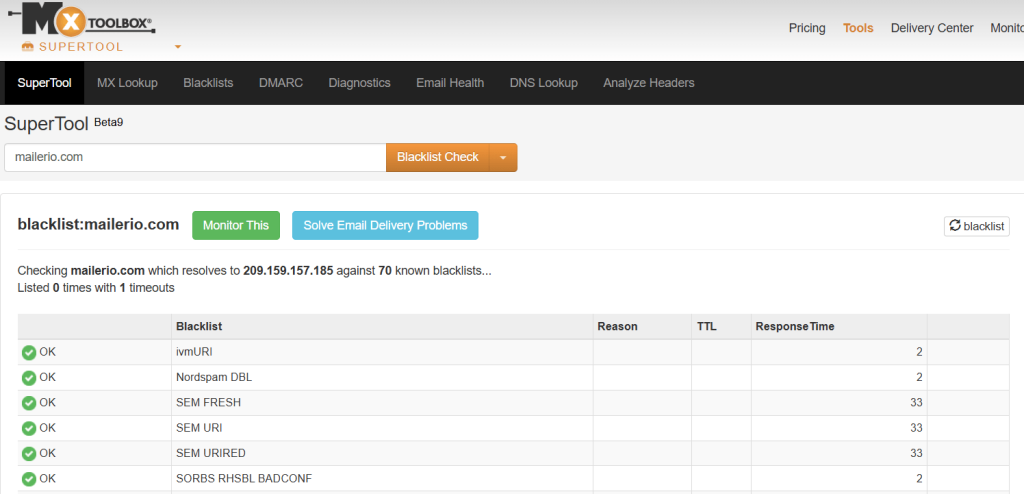
If abuse complaints persist, your domain or IP address can end up on email blacklists maintained by organizations like Spamhaus or Barracuda. Once blacklisted, your emails will be rejected or automatically sent to spam folders across multiple providers sometimes until manual delisting occurs. You can check whether your domain or IP has been blacklisted using the MXToolbox checklist here.
4. Poor Customer Perception
Frequent spam complaints signal poor audience targeting or untrustworthy practices. Even beyond technical deliverability issues, this can damage your brand’s credibility and make customers hesitant to open future emails.
5. Campaign Inefficiency and Revenue Loss
When deliverability drops, so does ROI. Your marketing team, whether it’s omnichannel marketing or outbound lead generation, spends time, money, and effort crafting emails that never reach their audience. The hidden cost of abuse emails is lost opportunity, fewer conversions, fewer responses, and reduced customer engagement.
How To Avoid Abuse Emails and Being Marked as Spam
Avoiding abuse emails and minimizing spam complaints starts with one principle quality over quantity. The better your email list, content, and sending practices, the lower your chances of being marked as spam. Here’s how to stay in the safe zone:
1. Focus on the Quality of Your Email List
Your email list is the foundation of deliverability. Poor-quality or outdated contacts often lead to higher complaint rates and lower engagement.
- Build your list organically, avoid buying or scraping addresses.
- Remove inactive, invalid, or risky contacts regularly.
- Verify your contacts with a reliable service like Mailerio, which marks high-risk addresses.
Mailerio’s reports include 14 detailed statuses that help you filter out problematic leads and focus only on engaged, trustworthy recipients.
2. Keep Your Sending Volume Consistent
ISPs and spam filters monitor sending behavior. Sudden spikes in email volume can trigger suspicion and lower your sender reputation.
- Maintain steady sending patterns across campaigns.
- Warm up new sending domains gradually before large sends.
- Segment lists and distribute sends over time instead of sending everything at once.
Consistency signals reliability to both email providers and recipients.
3. Use Real-Time Verification to Prevent Future Issues
Prevent abuse emails, catch-all, no-reply, or disposable emails from ever entering your system by integrating Mailerio’s API. This allows you to:
- Verify emails in real time during sign-ups or imports.
- Block high-risk or abuse-prone addresses automatically.
- Keep your CRM clean and reduce the chance of future spam complaints.
4. Prioritize Relevant, Valuable Content
Recipients are more likely to engage and less likely to hit “spam” when your emails feel useful and personalized.
- Send content that matches user interests or behaviors.
- Avoid clickbait or misleading subject lines.
- Use a familiar “From” name and clear branding to build trust.
5. Make Unsubscribing Easy
It’s better for someone to unsubscribe than to mark your email as spam.
- Always include a visible and one-click unsubscribe link.
- Honor opt-out requests immediately.
- Avoid re-adding unsubscribed contacts to your list.
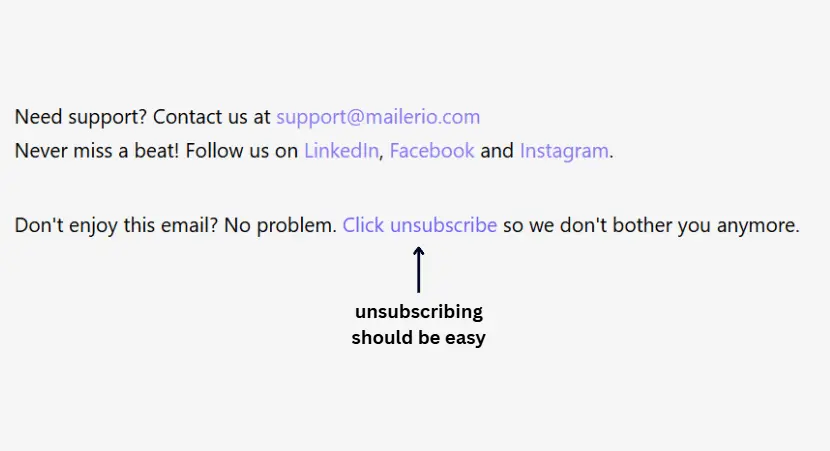
It’s always better to ease the unsubscribe process rather than annoy readers by making them click unsubscribe.
6. Monitor Engagement and Complaint Rates
Keep an eye on key metrics like opens, clicks, and spam reports. If you notice a rise in complaints:
- Reverify your list using Mailerio before sending again.
- Pause and audit your campaigns.
- Review recent list additions or content changes.
- ISPs like Yahoo and Microsoft offer feedback loops that notify you when users mark emails as spam. Subscribe to these loops and remove complainers immediately.
- Track your complaint rate, keeping it below 0.05% is ideal.
- Review recurring complaints to identify problematic campaigns or audiences.
7. Set Clear Expectations From the Start
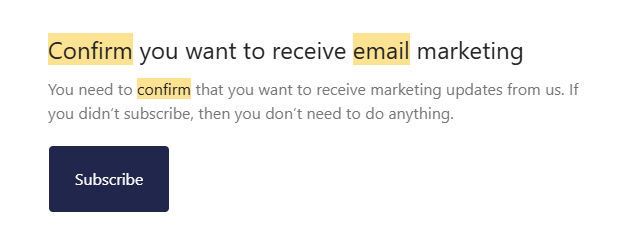
Make sure subscribers know exactly what they’re signing up for. Make sure to use a double opt-in process to confirm interest and reduce accidental sign-ups. Here’s an example of how this email looks for a newsletter:
- Be transparent about the type of content and frequency of your emails.
- Include a short reminder in your emails, like “You’re receiving this because you subscribed to…” to reduce confusion.
8. Personalize and Segment Your Campaigns
Generic, irrelevant emails are a top reason people mark messages as spam.
- Segment your audience by interests, purchase history, or behavior.
- Personalize content using names, relevant recommendations, or tailored offers.
- Send value-driven content that feels intentional and timely.
9. Maintain a Positive Sending Reputation
Your sender domain and IP reputation directly affect whether your emails reach inboxes. You can check your email settings here to make sure you have the technical setup in order.
- Authenticate your emails with SPF, DKIM, and DMARC records.
- Use a consistent “From” address that subscribers recognize.
- Avoid sudden changes in volume or sender details, which can trigger spam filters.
10. Test Before Sending
A simple test can prevent a lot of trouble.
- Run content through spam testing tools to check wording, links, and formatting.
- Avoid spam-trigger keywords like “free,” “guaranteed,” or “limited time only.”
- Preview your email on multiple clients and devices to ensure proper rendering.
11. Maintain Compliance With Email Regulations
Following email marketing laws not only protects your business but also builds trust.
- Comply with CAN-SPAM, GDPR, and CASL requirements.
- Include your company’s physical address and a working unsubscribe link.
- Honor unsubscribe requests immediately delays can lead to complaints.
12. Engage Regularly but Respectfully
Stay active with your audience to maintain recognition and trust.
- Don’t disappear for months, then suddenly send a flood of emails.
- Maintain a steady, predictable sending cadence.
- Re-engage inactive subscribers carefully consider a separate “win-back” campaign instead of forcing re-opt-ins.
Preventing abuse emails is about more than filtering complaints; it’s about earning trust, maintaining consistency, and respecting user preferences. When combined with ongoing verification through Mailerio and proper monitoring, these practices form the backbone of a strong deliverability strategy that keeps your messages in the inbox where they belong.
Feedback Loops and Monitoring Complaints
Even when you follow all the right email marketing practices, some users will inevitably hit the “mark as spam” button. The key is not to panic but to track, analyze, and respond to these signals effectively. Feedback loops and complaint monitoring are your best tools for doing exactly that.
1. What Are Feedback Loops (FBLs)?
Feedback loops (FBLs) are systems offered by major email providers like Yahoo, AOL, and Microsoft that notify you whenever a recipient marks your message as spam. When configured correctly, these alerts allow you to:
- Instantly identify users who have filed complaints.
- Remove those addresses from your list.
- Prevent future sends to the same contacts, protecting your reputation.
By integrating feedback loops into your email infrastructure, you stay one step ahead of ISP spam filters and minimize further damage to your sender score.
2. Why Monitoring Complaints Matters
Spam complaints are among the most important deliverability metrics. Even a 0.1% complaint rate can trigger filtering or temporary blocks from ISPs. Monitoring helps you:
- Detect problems early (e.g., poor targeting or frequency issues).
- Refine your audience segmentation and content strategy.
- Build a data-driven approach to reduce complaint rates over time.
3. How to Implement Feedback Loops
- Register with ISPs: Sign up for FBL programs offered by Microsoft, Yahoo, and others.
- Use your ESP’s built-in tools: Many email service providers (like Mailchimp, SendGrid, and Brevo) have automated FBL integrations.
- Automate removals: Once a complaint is received, ensure your system automatically unsubscribes or suppresses that contact from future sends.
4. Combine Feedback Loops with Verification Tools
Before sending any new campaign, verify your list with Mailerio to remove abuse-prone or inactive contacts that are likely to complain. Then, use feedback loops to monitor real-time complaint behavior.
This two-step approach ensures:
- High-quality lists going out.
- Real-time complaint data coming back in.
Together, they form a complete protection cycle against reputation damage.
Pro Tip: Combine Mailerio’s verification reports with ongoing FBL monitoring to maintain a clear view of list health and complaint sources. This data-driven loop helps you refine content, clean your lists, and ensure consistent inbox placement.
Frequently Asked Questions (FAQs)
Abuse emails are addresses or recipients that frequently mark emails as spam. Sending messages to these contacts can harm your sender reputation and reduce overall deliverability.
Recipients may hit the spam button because they never opted in to receive your emails, your content is irrelevant or off-topic, there is no clear or easy unsubscribe option, emails arrive too frequently, their ISP or security filters flag your messages, or the presence of spam traps or low-quality addresses in your list.
Even a few complaints can significantly impact deliverability rates (more emails landing in spam folders), sender reputation (lower trust with ISPs), and ROI (fewer opens, clicks, and conversions).
To prevent abuse, emails maintain a high-quality email list (avoid purchased or scraped addresses). Use Mailerio or similar verification tools to detect risky contacts. Segment your audience and send relevant, personalized content. Keep sending frequency consistent and reasonable. Include clear unsubscribe options and honor requests promptly.
No. Even with best practices, a small number of users may still mark emails as spam. The goal is to keep complaint rates below critical thresholds (generally below 0.05–0.1%) and continuously optimize campaigns.
Feedback loops (FBLs) notify you when recipients mark your emails as spam. Using FBLs helps you identify and remove complainers, monitor trends in complaints, and protect your sender reputation and improve future deliverability.
Wrap Up
Abuse emails, addresses or recipients that frequently mark messages as spam are a major threat to email deliverability and sender reputation. Even a small number of complaints can reduce engagement, trigger spam filters, and damage your campaigns’ effectiveness. Avoiding abuse emails is a combination of high-quality data, careful audience targeting, engaging content, and ongoing monitoring.
By using verification tools like Mailerio, maintaining consistent practices, and proactively addressing complaints, you can protect your sender reputation, improve deliverability, and ensure your emails consistently reach the inbox.
The post Abuse Emails: Why People Hit Spam & How To Avoid That appeared first on Mailerio.
]]>The post What Is Noreply Email And When Should You Use It appeared first on Mailerio.
]]>At first glance, a do not reply email might seem like a practical solution to reduce inbox clutter and manage communication more efficiently. After all, not every message needs a reply, right? However, while noreply emails offer convenience for senders, they can also create friction for recipients, harm engagement rates, and even impact deliverability if misused.
Table of contents:
- What Is a Noreply Email?
- Why Organizations Use Noreply Addresses
- Pros & Cons of Noreply Email Addresses
- When Should You Use a Do Not Reply Address (and When Not To)
- Verification & Safety: Avoid Sending to Noreply Addresses Mistakenly
- Best Practices & Recommendations
- Frequently Asked Questions (FAQs)
- Conclusion & Takeaways
In this article, we’ll break down what a noreply email is, why organizations use them, and when it makes sense or doesn’t to rely on one. We’ll also explore best practices for using noreply addresses responsibly and show you how to verify your email lists to ensure you never accidentally send campaigns to noreply addresses that block responses or hurt your sender reputation.
TL;DR
A noreply email is an address that can send messages but does not accept replies, commonly used for automated notifications, system alerts, or transactional emails. While they reduce inbox clutter and streamline communication, overusing them especially in marketing or customer-facing emails can frustrate recipients, lower engagement, and impact deliverability.
To use noreply emails effectively:
- Reserve them for automated or transactional messages.
- Provide alternative contact channels for recipients.
- Detect and manage noreply addresses using tools like Mailerio, via bulk list uploads or API integration, to ensure you only send to responsive, qualitative leads.
What Is a Noreply Email?
A noreply email (often formatted as [email protected]) is an email address that’s set up to send messages but not receive replies. In other words, it’s a one-way communication channel recipients can get messages from it, but their responses are typically ignored, blocked, or bounce back with an automated message like “This inbox is not monitored.”
These types of addresses are commonly used for automated or transactional communications, such as:
- Order confirmations and receipts
- Password reset links
- Shipping notifications
- System alerts or reminders
- Subscription renewals and invoices
Here’s a no-reply email example from the Mailerio team:
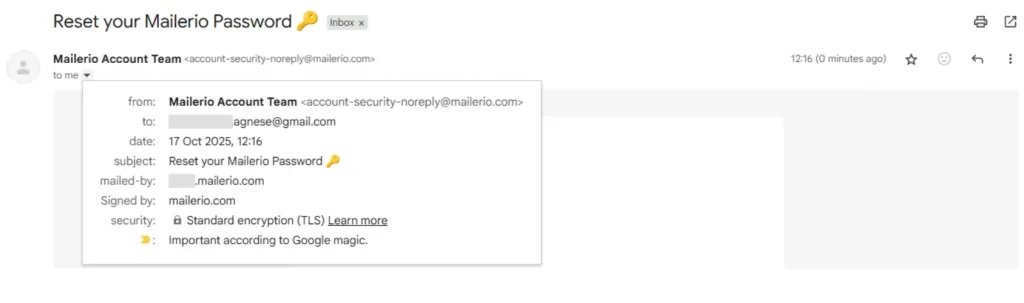
The noreply email address is usually configured on a mail server to discard any incoming replies. This prevents the mailbox from getting flooded with out-of-office replies, spam, or irrelevant customer responses.
However, there’s an important distinction to make:
- A noreply email is not inherently bad, but it’s designed for specific use cases where no direct response is needed.
- In marketing or customer communication, using a noreply address can come across as impersonal or frustrating, signaling that you don’t want to hear back from your audience.
In short, a noreply email is a technical and administrative tool useful when applied strategically, but potentially damaging to engagement and trust if overused or misused.
Why Organizations Use Noreply Addresses
Many companies rely on noreply email addresses to streamline communication, reduce noise, and maintain clean inbox management. These addresses help teams manage large-scale automated email systems without being overwhelmed by unnecessary replies. Before we dive into practical reasons why companies use these addresses, let’s see how a no-reply address works:
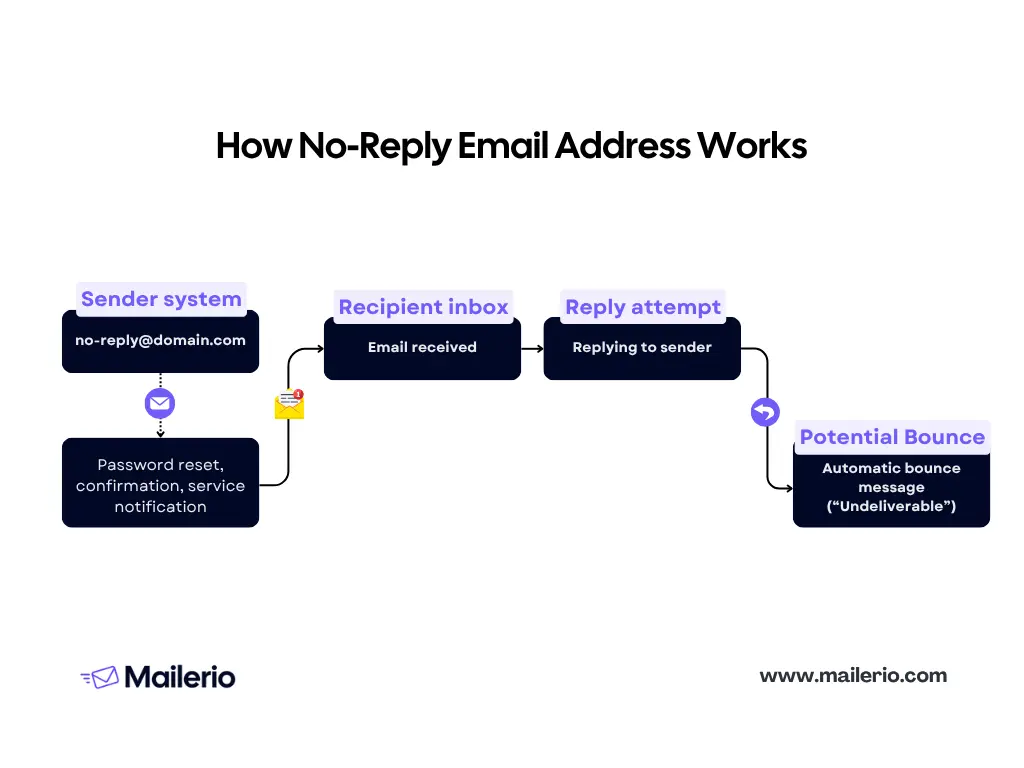
Most of the time, if you reply to a no-reply address, you will receive a bounce back message from the mailer daemon. In some cases, the companies might set up a different server for these types of emails, so you will not always receive a bounce-back message. Anyway, let’s take a look at the most common reasons organizations use these addresses:
1. Reducing Inbox Overload
Transactional systems like those sending password resets, notifications, or invoices can generate thousands of messages daily. If all recipients replied, even unintentionally (e.g., “thanks” or “unsubscribe”), it would flood the sender’s inbox. A noreply email prevents that chaos by automatically rejecting or discarding replies.
2. Limiting Spam and Auto-Responses
Automated replies, such as out-of-office messages, “mailbox full” alerts, or spam, can clutter your system. Using a noreply address helps filter out this noise, keeping server loads lighter and workflows cleaner.
3. Maintaining Security and Privacy
By disabling replies, companies reduce the risk of receiving potentially malicious attachments or phishing attempts disguised as customer responses. This adds a layer of safety, especially for high-volume email senders.
4. Streamlining Automated Communications
For purely informational messages: order confirmations, alerts, billing reminders, or system notifications, a noreply address is efficient. These messages don’t require human handling, and automation keeps the process smooth and predictable.
5. Enforcing Communication Boundaries
In some cases, organizations use noreply emails to guide users toward specific support channels such as chatbots, ticketing systems, or help centers rather than direct email replies. This ensures questions are properly tracked and resolved through the right system.
While noreply addresses serve practical purposes, they also come with drawbacks, especially for customer engagement and email deliverability. That’s what we’ll explore next.
Pros & Cons of Noreply Email Addresses
Using a noreply email can make email communication more efficient, but it also comes with significant trade-offs. Especially when you’re using omnichannel marketing strategies and tools. Understanding the advantages and disadvantages helps organizations decide when and how to use them effectively.
Pros of Using No-reply Addresses
- Reduced inbox overload
- Prevents automated replies, out-of-office messages, or unnecessary responses from filling up your inbox.
- Keeps support or administrative teams focused on meaningful interactions.
- Lower risk of spam and auto-responses
- Minimizes the volume of auto-replies and spam that can trigger server load or clutter.
- Helps maintain clean mailing lists and more accurate analytics.
- Streamlined automated communication
- Perfect for transactional messages, system alerts, or informational notifications that don’t require a reply.
- Keeps workflows predictable and organized.
- Security and privacy benefits
- Limits exposure to potentially harmful attachments or phishing attempts sent to the inbox.

Cons of Using Noreply Email Addresses
- Poor user experience
- Recipients may feel frustrated or ignored if they try to reply.
- Can create a perception of impersonal or unresponsive communication.
- Reduced engagement
- Marketing emails sent from a noreply address may have lower open, click, or reply rates.
- Limits the opportunity for feedback, questions, or customer interaction.
- Potential deliverability issues
- Some email providers may flag noreply addresses as less trustworthy, which can affect inbox placement.
- Users may mark emails as spam if they cannot reply.
- Missed feedback opportunities
- You lose the chance to capture customer insights, suggestions, or error reports sent via reply.
Another important aspect of using noreply addresses is when you send email campaigns, and you accidentally have no-reply addresses in your email list. That can lead to high bounce rates and hurt your sender reputation. So before sending, always make sure to validate your email lists through Mailerio or other verification tools.
Verification & Safety: Avoid Sending to Do Not Reply Email Addresses Mistakenly
Sending emails to do not reply addresses, disposable addresses or other inexistent emails by accident can waste resources, harm deliverability, and frustrate your campaigns. Proper verification ensures that your messages reach recipients who can actually interact with them.
Why Verification Matters
- Some users may provide noreply addresses as their contact, either intentionally or by mistake.
- Marketing or transactional campaigns sent to these addresses cannot generate replies, meaning missed engagement or lost opportunities.
- Over time, sending to unresponsive noreply addresses may impact sender reputation and deliverability.
How to Detect Noreply Email
- Pattern Recognition
- Look for common formats like
[email protected],[email protected],[email protected].
- Look for common formats like
- Domain and Mailbox Verification
- Check MX records or use SMTP verification tools to identify mailboxes that reject incoming messages.
- Email Validation Tools
- Modern email verification services (like Mailerio) can:
- Detect if an email is a noreply address
- Flag high-risk or non-interactive emails
- Provide detailed reports for both single and bulk addresses
- Integrate via API to automatically validate new leads or subscribers
- Modern email verification services (like Mailerio) can:
How to Detect Noreply Email Addresses Using Mailerio
Detecting noreply email addresses before sending campaigns is essential to maintain engagement, protect deliverability, and avoid wasted effort. Mailerio offers powerful tools to help you identify and manage these addresses efficiently.
1. Bulk List Upload
Mailerio allows you to upload your entire email list in bulk for verification. Here’s how it works:
- Sign up or log in to your Mailerio account.
- Navigate to the bulk verification section.
- Upload your list of emails (CSV, Excel, or other supported formats).
- Mailerio will process the list and generate a detailed report.
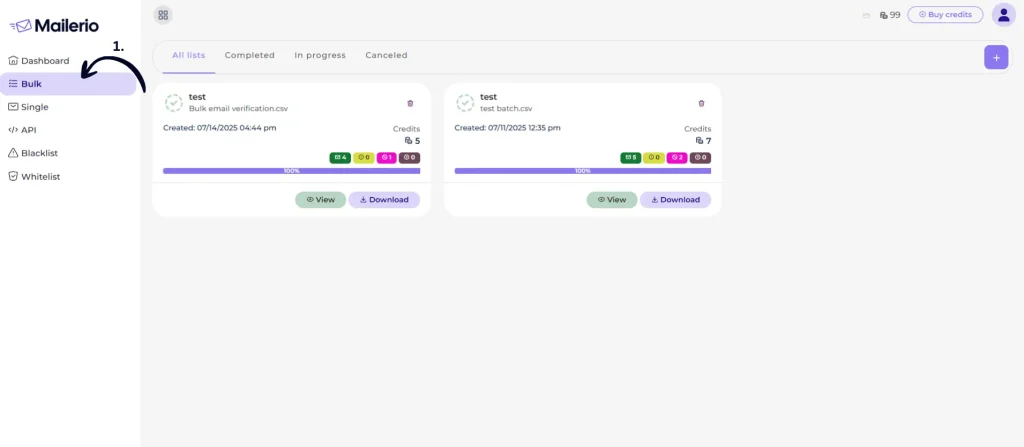
The report includes 14 different statuses, helping you categorize each email based on quality, deliverability, and type. Here’s the example of report after validation.

Among these statuses, noreply addresses are clearly flagged, allowing you to:
- Filter out unresponsive or high-risk addresses
- Focus only on qualitative leads that can engage with your campaigns. Be extremly careful with this if you do outbound lead generation startegies
- Ensure that your emails are reaching real recipients, not dead inboxes
2. API Integration for Real-Time Verification
To prevent noreply emails from entering your CRM or marketing lists in the first place, Mailerio provides a powerful API:
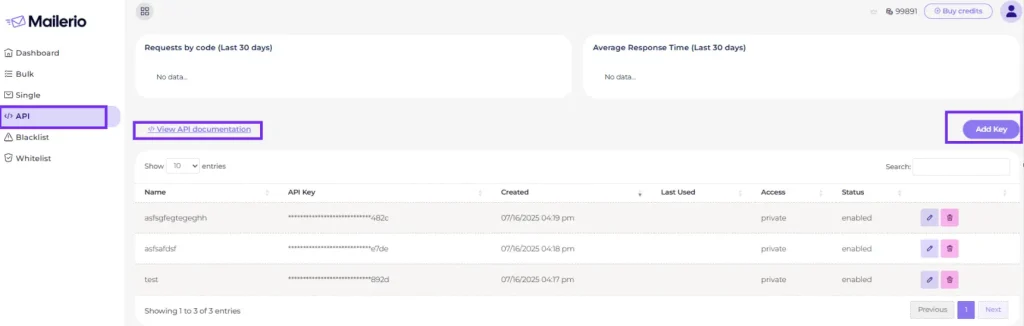
- Connect your CRM, sign-up forms, or lead capture systems to Mailerio via API.
- Every new email submitted is automatically verified in real time.
- Noreply addresses and other low-quality leads are flagged immediately, so they never make it into your system.
- You can automate workflows to either reject, quarantine, or tag these addresses for review.
3. Benefits of Using Mailerio for Noreply Detection
- Time-saving: Automatically verify thousands of emails in minutes. Mailerio offers lighting-speed validation up to 10K emails will take up to 3 minutes.
- Data-driven decisions: Use the 14-status report to filter leads and segment your audience.
- Protect deliverability: Avoid sending campaigns to addresses that cannot respond or it’s unclear who will recieve the email, like with catch-all addreses, reducing the risk of low engagement or spam complaints.
- Seamless integration: The API ensures that your CRM or email lists remain clean in real time.
Best Practices & Recommendations
Using noreply email addresses strategically ensures you can automate communications while still maintaining a positive user experience and protecting your email deliverability. Here are key best practices:
- use noreply only when necessary
- provide an alternative contact
- segment and monitor noreplay addresses
- verify your lists before sending
- avoid overusing noreply addresses
- transparency and user communication
- test and iterate
1. Use Noreply Only When Necessary
Reserve noreply addresses for automated, transactional, or system emails where replies aren’t expected. Avoid using them for newsletters, marketing campaigns, or any message where recipient feedback is valuable.
2. Provide an Alternative Contact
Always include a monitored reply-to address or support link in your message. Example: “This is a no-reply email. For questions, contact [email protected].”
3. Segment and Monitor Noreply Addresses
Use tools like Mailerio to detect and segment noreply addresses from your lists. Monitor engagement metrics separately to understand their impact on overall campaign performance.
4. Verify Your Lists Before Sending
Run bulk verification with Mailerio to flag noreply addresses, low-quality leads, and invalid emails. Filter out unresponsive addresses to focus on contacts that can engage. Integrate Mailerio’s API for real-time verification so noreply emails don’t enter your CRM or marketing lists.
5. Avoid Overusing Noreply Addresses
Frequent use can damage trust and reduce engagement. Use them only for messages where a reply is unnecessary or would overwhelm your inbox.
6. Transparency and User Communication
Clearly inform recipients when an email is from a noreply address. Offer alternative channels for support, feedback, or communication.
7. Test and Iterate
Run small-scale tests with noreply emails to assess engagement and deliverability. Adjust your strategy based on performance metrics and feedback.
Authors note: The most effective strategy is balance: use noreply addresses for automation and transactional messages, but maintain transparency and provide alternatives for recipients. Verification and segmentation with tools like Mailerio ensure that your campaigns target active, responsive contacts, protecting both engagement and deliverability.
Frequently Asked Questions (FAQs)
A noreply email is an email address set up to send messages but not receive replies. Examples include [email protected] or [email protected]. These addresses are commonly used for automated notifications, transactional emails, or system alerts.
No. Replies to noreply addresses are typically discarded or bounced, meaning the sender will not see the response.
Yes, if overused. Some email providers may penalize noreply addresses in marketing campaigns, and recipients may mark them as spam if they cannot reply. However, when used for transactional or automated messages, they are generally safe.
You should avoid using noreply addresses for marketing emails or newsletters, customer support communications, feedback or survey requests, recipients who expect to interact with these emails, and blocking replies can hurt engagement.
You can use email verification tools like Mailerio to upload lists in bulk and flag noreply addresses.
Generate reports with 14 different statuses for segmentation or integrate via API to prevent noreply addresses from entering your CRM in real time.
Yes. Noreply addresses are best suited for transactional emails, system alerts, and notifications where replies are unnecessary. Always provide alternative contact information for support or questions.
Not automatically, but sending marketing emails to noreply addresses is discouraged due to poor engagement and the inability to track replies. Verification and segmentation help identify which addresses are suitable.
Conclusion & Takeaways
Noreply emails are a powerful tool for automating communication, managing large volumes of messages, and reducing inbox clutter. However, they come with trade-offs, especially when used in marketing, newsletters, or customer support contexts where engagement and replies matter.
By using noreply emails strategically, verifying your lists, and following best practices, you can automate critical communications without sacrificing deliverability, engagement, or customer trust. Proper detection and management, especially with tools like Mailerio allow you to maximize efficiency while protecting your sender reputation.
The post What Is Noreply Email And When Should You Use It appeared first on Mailerio.
]]>The post What Is Catch-all Email & How To Verify It appeared first on Mailerio.
]]>But there’s a catch.
While catch-all addresses ensure delivery to the domain, they bring uncertainty. You might be sending messages that never reach a real person, hurting engagement, increasing bounce rates, and potentially damaging your sender reputation.
Table of contents:
- What Is a Catch‑all Email?
- Why Organizations Use Catch‑all Email Addresses
- How Catch‑all Emails Affect Email Marketing & Deliverability
- Can You Verify a Catch‑all? (Challenges & Constraints)
- Step-by-Step: How to Verify & Manage Catch‑all Addresses
- Best Practices & Decision Criteria
- Frequently Asked Questions (FAQs)
- Conclusion & Takeaways
In this article, we’ll break down exactly what catch‑all emails are, why organizations use them, the risks they pose for email marketing, and, most importantly, how you can verify and manage them to protect your campaigns. By the end, you’ll know how to confidently handle catch-all addresses and make smarter decisions for your email list.
TL;DR
Catch‑all emails are mailboxes or server setups that accept all emails sent to a domain, even if the specific address doesn’t exist. While they prevent bounces and ensure messages aren’t lost, they introduce uncertainty because you can’t know if an actual recipient will see the email.
For marketers:
- Catch-all addresses can reduce bounces but may lower engagement and impact deliverability.
- Verification is tricky, but tools like Mailerio can detect catch-all domains, provide risk scores, and generate detailed reports to guide your sending strategy.
- Best practices include segmenting catch-all addresses, testing with small campaigns, monitoring engagement, and maintaining list hygiene.
- Use Mailerio’s single, bulk, or API validation to make data-driven decisions on whether to send to each address.
In short, catch-all emails can be valuable leads if managed strategically, but careless sending can hurt your sender’s reputation. Verification and careful monitoring are key.
What Is a Catch‑all Email?
A catch‑all email, sometimes called an accept‑all email, is a special type of mailbox or server configuration that accepts every email sent to a domain, regardless of whether the specific recipient address actually exists. In simpler terms, if someone sends an email to a mistyped or non-existent address at that domain, the catch‑all setup ensures the message still lands somewhere, usually in a designated mailbox.
How It Works
Normally, when you send an email to a nonexistent address, the server returns a bounce-back message indicating the address is invalid. With a catch‑all, the server silently accepts the email and delivers it to the catch-all inbox, preventing a bounce.

For example, imagine a domain example.com with a catch‑all configured:
| Sent To | Exists? | Outcome |
|---|---|---|
| [email protected] |  Yes Yes | Delivered to John’s inbox |
| [email protected] |  No No | Delivered to catch-all inbox |
| [email protected] | No | Delivered to catch-all inbox |
This mechanism ensures that emails to typos or unknown recipients don’t get lost, but it also introduces uncertainty for senders trying to verify addresses. So if you’re looking for a way to send emails only to real addresses, start validating emails now.
Catch‑all vs. Other Email Types
It’s important to distinguish catch‑all addresses from similar email setups:
- Alias / Forwarding: Redirects a specific, valid address to another mailbox. Unlike catch-all, it won’t accept random addresses.
- Role-based Addresses: Generic addresses like
info@orsupport@. They are specific and intended for group handling, not for catching all mail. - Disposable / Temporary Emails: Short-lived addresses created for one-time use, often ignored in verification. Learn more about disposable email addresses in our article.
Here’s a visual representation of how different types of emails work 

Why Catch‑all Exists
Organizations use catch-all setups for several reasons:
- Prevent Lost Emails: Typos or misaddressed emails still reach someone in the organization.
- Centralized Management: Smaller organizations can route all unexpected mail to a single inbox for review.
- Compliance or Archival: Ensures no incoming email is missed for audit, legal, or customer support purposes.
A catch‑all email ensures no message is rejected at the domain level, but it also creates ambiguity. From an email marketing perspective, sending to catch-all addresses carries uncertainty: you may reach a real user, or you may simply send mail into a void. This is especially important for outreach or omnichannel marketing, where businesses depend on deliverability.
Why Organizations Use Catch‑all Email Addresses
Catch‑all email addresses might seem like a minor technical detail, but they serve important purposes for many organizations. Understanding why businesses set up catch‑all addresses helps marketers grasp both the potential benefits and the risks when sending emails to these domains.
1. Prevent Losing Emails from Typos or Variations
People frequently mistype email addresses: missing letters, swapped characters, or forgotten dots are common. A catch‑all ensures that even these incorrectly addressed emails reach the organization, preventing potential leads or critical messages from being lost.
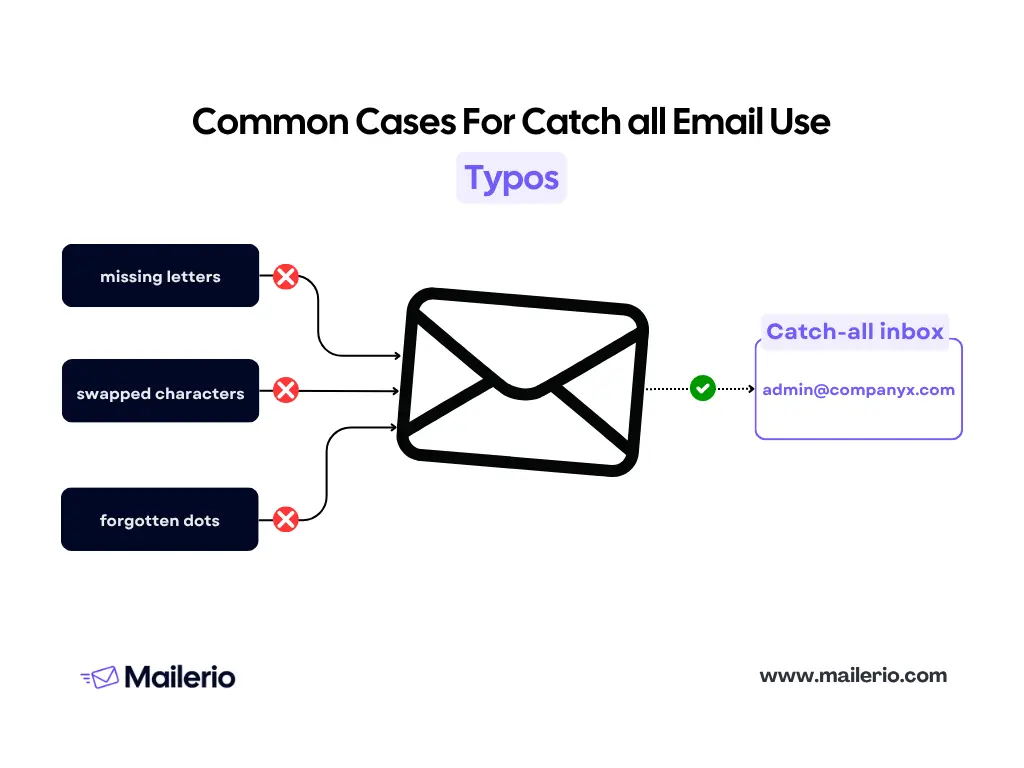
For example, an email sent to [email protected] might be intended for [email protected]. With a catch-all, the server accepts the message, giving the organization a chance to see it and redirect if necessary.
2. Centralized Email Management
Smaller organizations often don’t have the resources to manage dozens of individual inboxes. A catch‑all allows them to funnel all misaddressed or unexpected emails into a single mailbox. This simplifies email management and ensures nothing slips through the cracks.
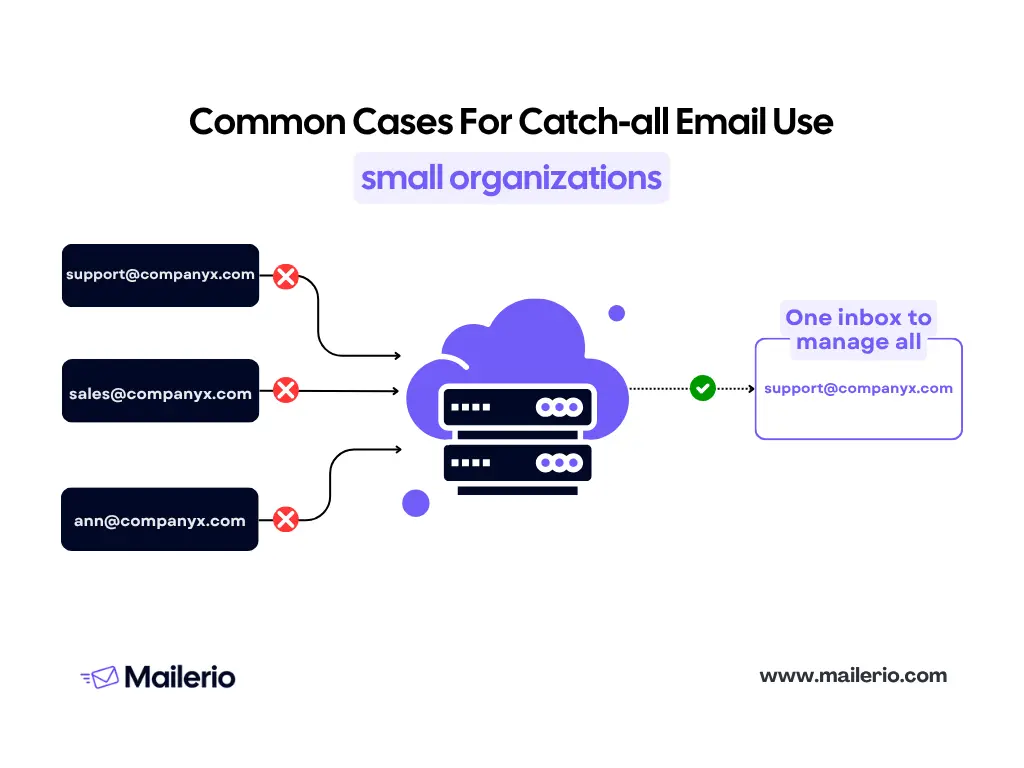
3. Compliance, Logging, and Archival
Certain industries require strict record-keeping of communications for legal, regulatory, or auditing purposes. Catch-all addresses help organizations archive every email sent to the domain, even if it was addressed to a non-existent mailbox. This ensures full visibility and accountability.
4. Security and Monitoring
Catch-all addresses can also serve as a safety net for monitoring email activity. They help identify unusual or suspicious email patterns, including spam or phishing attempts targeted at non-existent addresses. Some organizations even use catch-all mailboxes as honeypots to detect malicious activity.
5. Trade-offs and Considerations
While catch-all addresses provide these advantages, they come with trade-offs:
- Increased spam: Since every email is accepted, spam can flood the catch-all inbox.
- Noise in the inbox: Valuable emails can get buried among unwanted messages.
- Maintenance burden: Regular monitoring and filtering are required to manage the incoming flow.
Organizations use catch-all email addresses as a safety net, a centralization tool, a compliance mechanism, and even a security measure. For marketers, this means that while catch-all addresses increase the chance that an email is delivered, they also introduce uncertainty about who actually reads it, a factor that directly impacts email verification and deliverability strategies. Hence, you need to validate emails before sending.
How Catch‑all Emails Affect Email Marketing & Deliverability
For email marketers, catch‑all addresses are a double-edged sword. On one hand, they prevent bounces from typos or unknown addresses. On the other hand, they introduce uncertainty that can harm your campaigns if not managed carefully.
1. Advantages of Sending to Catch‑all Addresses
- Minimized Bounces: Since catch-all domains accept all incoming emails, your campaigns see fewer immediate bounce messages. This is particularly useful when targeting new leads through outbound or unverified lists.
- Opportunity to Reach Legitimate Users: Some catch-all addresses do correspond to real recipients. Sending to them could capture valid leads you might otherwise miss.
- Maintains Sender Reputation in the Short Term: A lower bounce rate can help preserve your sender score, at least initially, as email providers track bounces as a negative signal.
2. Disadvantages and Risks
While catch-all addresses appear safe, they carry hidden risks:
- Uncertain Deliverability: Catch-all servers accept emails at the domain level but might silently discard them or reject them later, making true delivery unpredictable.
- Low Engagement Rates: Many catch-all inboxes are not actively monitored, leading to few opens, clicks, or replies. Low engagement signals can hurt your sender’s reputation over time.
- Reputation Damage: Continuously sending emails to unengaged catch-all addresses can increase the likelihood of being marked as spam or blacklisted.
- Wasted Resources: Sending large volumes to uncertain addresses can waste budget, time, and bandwidth, especially in large campaigns.
3. Edge Cases and Nuance
Not all catch-all domains are problematic. Some are maintained by organizations that actively monitor their catch-all inboxes, meaning your emails may still reach a real person. Conversely, some domains may disable their catch-all configuration later, converting what was once a safe address into a potential bounce.
4. Metrics to Watch
To manage catch-all addresses effectively, focus on these key metrics:
- Bounce Rate: Over time, a rising bounce rate can indicate non-engaged catch-all addresses or changing server behavior. Learn more about bounce rate benchmarks here.
- Open and Click Rates: Low engagement signals potential issues.
- Spam Complaints: Even catch-all inboxes can report emails as spam, damaging sender reputation.
- Domain Reputation: Track domain-level feedback from email service providers (ESP) to ensure your list quality is maintained.
Catch-all addresses reduce immediate bounce risk but increase long-term uncertainty. Email marketers as well as cold outreach experts need to balance the opportunity to reach potential leads against the risk of low engagement, reputation damage, and wasted resources. Managing catch-all domains effectively requires monitoring metrics, segmenting addresses, and adopting verification strategies.
Can You Verify a Catch‑all? (Challenges & Constraints)
Verifying email addresses is a standard step in email marketing to ensure best email deliverability practices and protect sender reputation. However, catch-all addresses pose a unique challenge.
1. Why Verification Is Hard for Catch‑all Emails
Normally, email verification involves checking whether an email address exists on the server using SMTP protocols. For most standard addresses, this process works well: the server either confirms the address exists or returns a bounce message.
With catch-all domains, the situation is trickier:
- The server accepts all emails, whether the recipient exists or not.
- SMTP checks will always return a “valid” response, even if the mailbox is inactive or ignored.
- This means traditional verification methods cannot reliably determine whether an email actually belongs to a real, active user.
In other words, a catch-all domain may appear “valid” during verification, but the email may never reach an actual recipient. That’s why you should always carefully determine if you want to send to a catch-all address or not. Mailerio’s validation tool will always show whether the email is a “catch-all” or not and mark it as risky, as you never know if the recipient will get your email, so you can end up wasting your budget.

2. What Verification Tools Can Do
Although traditional methods have limitations, modern email verification tools provide ways to identify catch-all addresses and manage their risks:
- Detection: Tools like Mailerio can detect whether a domain is configured as catch-all.
- Risk Scoring: These tools can assign confidence levels or scores, helping marketers decide whether it’s worth sending emails to these addresses.
- List Segmentation: Once detected, catch-all emails can be separated from your main list, allowing for careful testing or cautious campaign targeting.
Remember that sending emails to undeliverable addresses will hurt your sender reputation and eventually make your emails land in the spam box.
3. Additional Heuristics Used by Verification Tools
Beyond simple SMTP checks, sophisticated tools analyze:
- MX and DNS records
- Domain age and history
- Engagement metrics (opens, clicks, replies)
- Patterns in email activity
By combining these signals, verification tools provide actionable insights for managing catch-all addresses — even if they can’t guarantee a mailbox is actively monitored.
You cannot fully verify a catch-all email in the traditional sense, because the server will accept all emails. However, using modern email verification tools like Mailerio can help you:
- Detect catch-all domains
- Assess risk and engagement potential
- Make informed decisions about sending campaigns
This approach allows marketers to minimize wasted effort and protect their sender reputation while still taking advantage of potential leads behind catch-all domains.
How to Verify Catch‑all Addresses
Managing catch-all addresses effectively requires a systematic approach. Since these addresses can be unpredictable, following a structured workflow helps protect your sender reputation and ensures your campaigns reach real users.
- Identify Catch‑all Domains
The first step is to detect which addresses in your list are catch-all. Modern verification tools like Mailerio make this easy:
– Users can sign up for Mailerio and access its verification dashboard.
– You can run single email checks, bulk validations, or integrate Mailerio via API for automated verification.
– The platform will identify catch-all domains and provide a detailed report, helping you understand which addresses are uncertain or high-risk.
- Segment and Label Catch‑all Addresses
Tag catch-all emails separately in your CRM or email marketing platform. Create a dedicated segment for these addresses to prevent accidental inclusion in high-volume campaigns. This segmentation allows for cautious testing while protecting your main email list. Or just extract these emails from your sending list.
- Test Cautiously
Before sending large campaigns, send small, low-risk test emails to a subset of catch-all addresses. Track opens, clicks, and replies to see which addresses are genuinely active. Mailerio’s detailed reports can help you interpret engagement potential and decide whether it’s worth sending to each address.
- Monitor Engagement and Bounce Behavior
Keep an eye on engagement metrics over time. If a catch-all address consistently shows no activity or bounces, consider flagging it as low-value and removing it from your list. Addresses showing engagement can be promoted to your main campaign list.
- Make Informed Decisions
Using Mailerio, you can review comprehensive reports on each catch-all address or domain.
Decide whether to send emails based on risk, engagement potential, and business priorities.
Prioritize high-confidence addresses while minimizing exposure to unmonitored or inactive catch-all inboxes.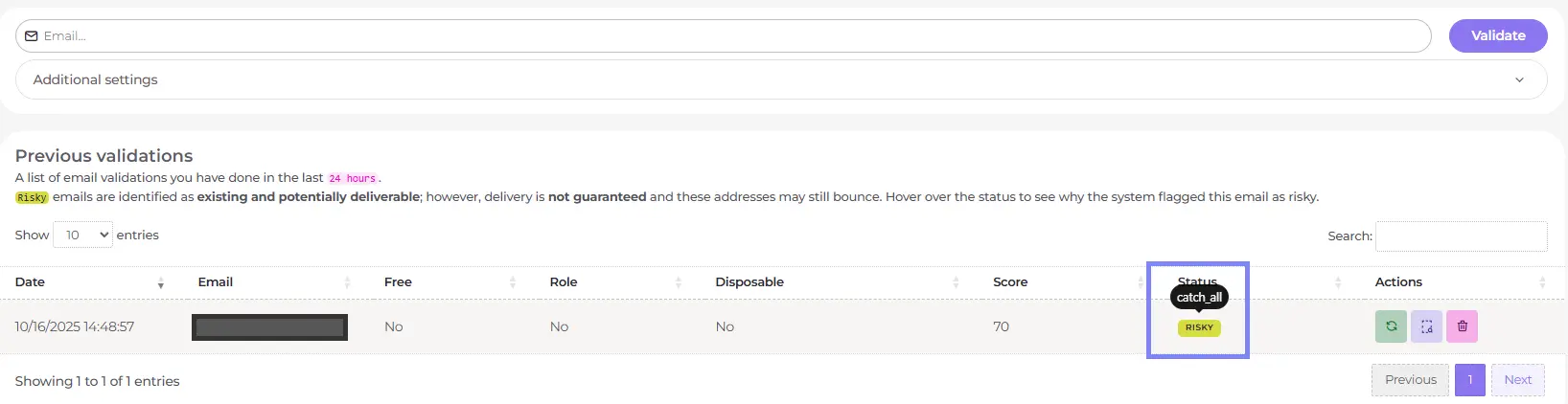
- Automate and Integrate
Integrate Mailerio via API to automatically validate new sign-ups or leads in real time. Set up workflows to auto-flag or segment catch-all addresses for future campaigns. Periodically re-validate your email list to maintain hygiene and accuracy.

By using a structured approach and leveraging tools like Mailerio, marketers can confidently handle catch-all addresses. Detection, segmentation, testing, and detailed reporting allow you to send emails strategically, minimizing risk and maximizing engagement while protecting your sender reputation.
Best Practices & Decision Criteria for Catch‑all Emails
Managing catch-all addresses requires a balance between opportunity and risk. By following best practices and using reliable tools like Mailerio, you can make informed decisions that protect your sender reputation and maximize campaign performance.
1. When Not to Send to Catch-all Addresses
There are situations where sending to catch-all addresses is too risky:
- If your campaign has strict deliverability goals, such as critical transactional emails.
- When budget or resources are limited, and every send must count.
- If the catch-all domain shows low engagement or high risk in previous campaigns.
2. Sending Strategically
When sending to catch-all addresses is justified:
- Segment these addresses separately and start with small test campaigns.
- Use Mailerio to validate and score these addresses before sending. Mailerio’s detailed reports provide insights into risk, engagement potential, and domain health, helping you make smarter decisions.
- Gradually increase sending volume to high-confidence catch-all addresses that show real engagement.
3. Maintaining List Hygiene
- Regularly audit your email list to remove stale or inactive catch-all addresses.
- Use Mailerio’s bulk verification feature to refresh your list periodically and flag new catch-all domains.
- Keep your suppression lists updated to avoid repeated sending to unresponsive or risky addresses.
4. Using Verification Scores
- Tools like Mailerio provide risk scores and detailed insights for each email or domain.
- Use these scores to decide whether to send, delay, or avoid sending to specific catch-all addresses.
- Prioritize high-scoring addresses for campaigns, and treat low-scoring addresses cautiously.
5. Automate Whenever Possible
- Integrate Mailerio via API to automatically validate new leads or sign-ups.
- Set rules to auto-segment or flag catch-all addresses, minimizing manual effort and reducing human error.
6. Monitor Performance Continuously
- Track opens, clicks, and replies for catch-all addresses to identify engaged contacts.
- Remove or suppress addresses that show no engagement over time.
- Adjust your sending strategy based on Mailerio reports and campaign metrics.
The best approach to catch-all addresses is strategic and data-driven. Use segmentation, testing, engagement monitoring, and verification tools like Mailerio to make informed decisions. This helps you maximize opportunities from catch-all emails while minimizing risk to email deliverability and sender reputation.
Frequently Asked Questions (FAQs) About Catch‑all Emails
Catch-all email: Accepts all emails sent to a domain, even if the specific mailbox doesn’t exist. Alias: Redirects emails from one valid address to another. Only specific addresses are forwarded. Role-based address: Generic addresses like info@ or support@ intended for groups, not for catching all emails.
Typically, catch-all domains are not spam traps. However, sending to unverified addresses on catch-all domains can still trigger spam complaints or affect your sender reputation, so caution is required.
Not necessarily. Catch-all addresses reduce immediate bounce rates but increase uncertainty about who receives or engages with your emails. Poor engagement or repeated sending to inactive catch-all addresses can eventually harm deliverability.
Regularly auditing your list is recommended. Tools like Mailerio make this easier by offering single, bulk, or API-based validations, providing updated reports and risk scores to guide your sending strategy.
If a domain removes its catch-all configuration, previously accepted emails may start bouncing. Regular revalidation with tools like Mailerio can help you detect such changes and adjust your list accordingly.
Yes. Catch-all addresses are more common in small businesses and startups, which may centralize emails into a single mailbox. Large organizations often avoid catch-all setups to reduce spam and maintain stricter inbox management.
Email Service Providers (ESPs) monitor engagement metrics and bounce rates. High numbers of low-engagement catch-all addresses can lower your sender reputation, trigger spam filtering, or reduce inbox placement. Using verification tools like Mailerio helps mitigate this risk.
Yes, if segment and test catch-all addresses separately, use verification tools like Mailerio for scoring and detailed reports. And monitor engagement and remove unresponsive addresses over time.
Conclusion & Takeaways
Catch‑all email addresses are a unique part of the email ecosystem. They accept all messages sent to a domain, providing organizations with a safety net for misaddressed emails, centralized inbox management, and compliance tracking. For marketers, they present both opportunities and challenges, reducing immediate bounces but introducing uncertainty about engagement and deliverability.
Key Takeaways:
- Catch-all emails are unpredictable.
- They accept all messages at the domain level, but you can’t guarantee the email will reach a real or engaged recipient.
- Verification is essential.
- Traditional SMTP checks aren’t enough. Tools like Mailerio allow you to detect catch-all domains, assign risk scores, and generate detailed reports to guide your decisions.
- Segment and test before sending.
- Keep catch-all addresses separate from your main list. Start with small test campaigns and monitor engagement before scaling up.
- Use data-driven decision making.
- Analyze reports from verification tools like Mailerio, track opens, clicks, and replies, and prioritize high-confidence addresses for your campaigns.
- Maintain list hygiene.
- Regularly revalidate your list, remove inactive or low-engagement addresses, and automate verification via Mailerio’s single, bulk, or API options.
- Balance opportunity with risk.
- Catch-all addresses can be valuable leads, but sending indiscriminately can harm your sender reputation. Strategic use ensures you maximize potential without unnecessary risk.
By understanding catch-all emails, leveraging verification tools like Mailerio, and following best practices, you can confidently manage your email campaigns, protect your deliverability, and make informed decisions about which addresses to engage.
The post What Is Catch-all Email & How To Verify It appeared first on Mailerio.
]]>The post Best Tools For Omnichannel Marketing 2025 appeared first on Mailerio.
]]>Table of Contents:
- What Is Omnichannel Marketing?
- Why Omnichannel Marketing Matters
- Key Features to Look for in Omnichannel Tools
- Comparison Table: Top Omnichannel Marketing Tools
- 12 Best Omnichannel Marketing Tools
- Honorable Mentions & Emerging Solutions
- Why Deliverability & List Hygiene Matter (and How Mailerio Helps)
- How to Choose and Integrate Your Omnichannel Stack
- Quick-Start Checklist for Omnichannel Readiness
- User Stories: Success with Omnichannel + Mailerio
- Expert Tips for Omnichannel Success
- FAQs
- Conclusion
This guide unpacks top tools designed to weave your customer interactions into a cohesive journey, driving loyalty and growth. Dive in to transform your approach and keep up with ever-evolving expectations.
TL;DR
Facing challenges in unifying customer interactions? Omnichannel marketing tools such as Mailerio, Shopify, HubSpot, Omnisend, and Klaviyo ensure seamless communication across email, social media, and SMS. For 2025, optimize engagement and boost ROI with platforms that integrate customer journeys. Key strategies include maintaining list hygiene, leveraging data for personalization, and choosing tools that integrate with your existing systems. Ready to enhance customer engagement? This guide has you covered.
What Is Omnichannel Marketing?
Omnichannel marketing is creating a cohesive customer experience across various channels. These channels can include email, SMS, social media, web, and even in-store interactions. Unlike traditional marketing strategies that keep these channels separate, omnichannel marketing integrates them into a seamless journey.
Omnichannel vs. Multichannel
It’s easy to confuse omnichannel with multichannel marketing, but there’s a crucial difference. Multichannel marketing utilizes multiple channels to reach customers, but these channels often operate independently of one another. Omnichannel marketing connects these channels, providing a unified experience. Take a look at the visual below to see the differences in how these channels work.
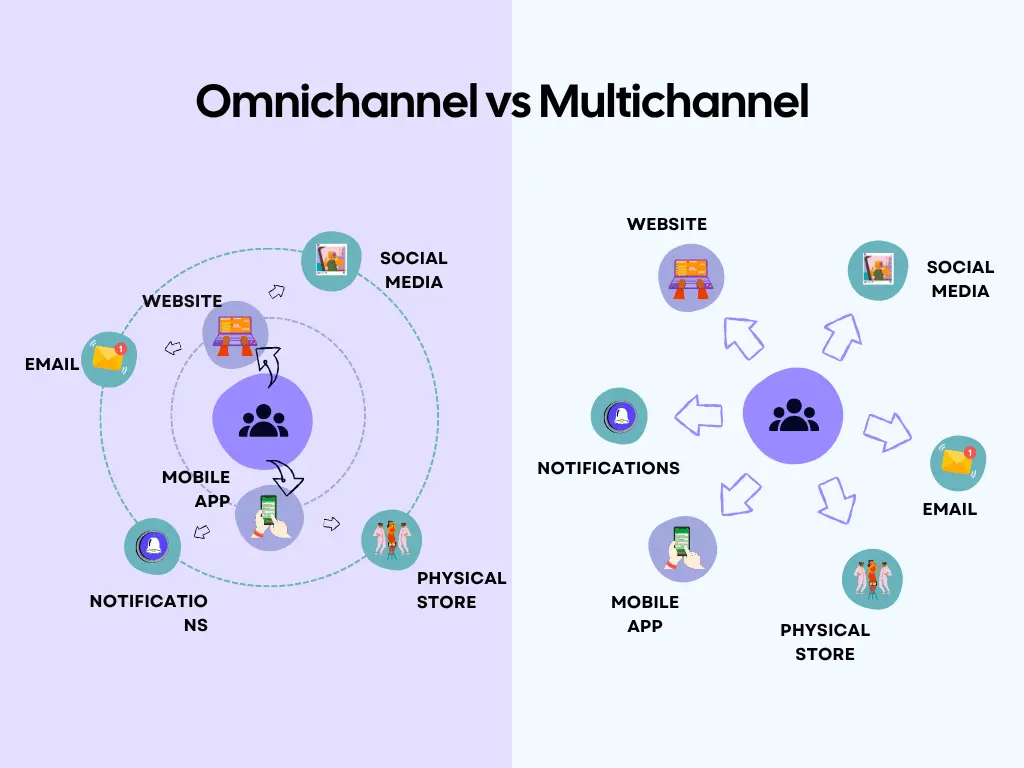
This distinction matters for growth. Integrated campaigns across multiple channels often outperform single-channel efforts, doubling campaign ROI and boosting retention.
Author’s note: Based on recent research, customer satisfaction plays a crucial mediating role between omnichannel integration and customer loyalty. The study concluded that among all dimensions, synchronization, real-time, integrated interactions are the most critical, shaping how customers perceive their experience. While omnichannel efforts may not directly drive loyalty, they strongly influence it through satisfaction, emphasizing the importance of aligning business strategies with customer expectations (Analysing the Effectiveness of Omnichannel Marketing Strategies on Customer Experience in Jordan, Journal of Ecohumanism, 3(7), 2024, DOI:10.62754).
Typical Omnichannel Use Cases
SaaS Founders: For SaaS companies, omnichannel platform marketing can streamline the onboarding process. By using email and in-app messaging, founders can guide users through setup and feature adoption seamlessly.
E-commerce: In the e-commerce sector, omnichannel software enhances customer shopping experiences. Whether users browse online, receive personalized offers via SMS, or shop in-store, the journey remains consistent and personalized.
B2B: For B2B marketing, omnichannel strategies nurture leads. Integrating various touchpoints like webinars, email campaigns, and social media interactions ensures a cohesive engagement and higher conversion rates.
Take, as an example, this onboarding flow for B2B customers. The funnel consists of four phases: convert, activate, retain, and expand. You can see that the onboarding flow is created using software omnichannel marketing methods, such as welcome video, best practice docs, webinar invite, re-engagement email, training, cross-sell webinar, and tooltip tour.
Adopting an omnichannel approach can transform how your business interacts with the audience, leading to significant growth and improved customer loyalty.
Why Omnichannel Marketing Matters
Consumers interact with brands across multiple touchpoints, with nearly three-quarters (73%) using more than one channel to complete a purchase. Research by Moengage shows that customers who engage through an omnichannel experience not only spend around 30% more but are also more likely to develop long-term loyalty. There are four main reasons why omnichannel marketing is important:
- Connecting the customer journey
- Fluid communication expectations
- Data-driven personalization
- Compliance and data privacy shifts
Let’s take a look at each benefit more closely.
Connecting the Customer Journey
Customers expect a unified experience across multiple channels, whether they’re engaging via email, SMS, chat, social media, support, or push notifications. Omni channel marketing platform ties these interactions together, enhancing the customer journey from discovery to purchase and beyond.
Fluid Communication Expectations
Customers demand seamless communication. An effective omnichannel communication platform allows businesses to interact with users fluidly, meeting expectations for real-time support and personalized interactions. Validating emails with Mailerio helps maintain this fluidity by ensuring your messages are delivered to active, receptive inboxes.
Data-Driven Personalization
Omnichannel strategies leverage data to personalize and engage audiences more effectively. By analyzing behavior across channels, businesses can tailor their messaging to individual preferences, resulting in higher conversion rates and customer satisfaction.
Compliance and Data Privacy Shifts
As data privacy regulations evolve, companies must adapt their omnichannel strategies to remain compliant. Respecting user privacy while delivering personalized experiences is a delicate balance, but essential for building trust and avoiding penalties.
Key Features to Look for in Omnichannel Marketing Platforms
Choosing the right omnichannel marketing platform can make or break your marketing strategy. Here’s what to look for:
Unified Dashboard for Channel Orchestration
Having a single dashboard to coordinate all channels is essential. It lets you seamlessly manage and optimize every customer interaction, ensuring consistency and efficiency across platforms.
Automation and Workflow Triggers
Omnichannel automation should include workflow triggers that react to customer actions. This feature saves time and enhances personalization by delivering the right message at the right moment without manual intervention.
Data Sync & Real-Time Reporting
Real-time data synchronization and reporting are critical. They provide insights into customer behavior and campaign performance, allowing you to make informed decisions quickly. This is essential for adapting strategies on the fly.
Integrations
The best tools integrate effortlessly with CRM systems, e-commerce platforms, and APIs. They should also include integrations with services like Mailerio for list cleaning. Keeping your email lists clean ensures better engagement and reduces spam risks.
Deliverability and Sender Reputation Safeguards
Effective list validation is crucial for protecting your sender reputation. It can reduce bounce rates from the typical 5-10% to less than 2%, significantly boosting deliverability, as noted by Demand Experts).
Focusing on these features ensures your omnichannel strategy is robust, efficient, and ready to drive growth.
Comparison Table: Top Omnichannel Marketing Tools
| Tool | Best For | Main Channels | Automation | CRM | Pricing | Mailerio Compatible | Notable Feature |
|---|---|---|---|---|---|---|---|
| Shopify | Omnichannel eCommerce platform | Email/SMS/Web | Yes | Yes | $$ | Yes | Storefront + POS |
| HubSpot | All-in-one marketing | Email/Web/Social | Yes | Yes | $$$ | Yes | Deep CRM/automation |
| Omnisend | Ecommerce automation | Email/SMS/Push | Yes | Basic | $$ | Yes | Prebuilt workflows |
| Klaviyo | Advanced segmentation | Email/SMS | Yes | Basic | $$ | Yes | Powerful analytics |
| Zendesk | Customer support | Chat/Email/Social | Yes | Yes | $$ | Yes | Multichannel support |
| ActiveCampaign | SMBs automation | Email/SMS/Web | Yes | Yes | $-$$ | Yes | Dynamic content |
| Brevo | SMB/email automation | Email/SMS/Web | Yes | Yes | $-$$ | Yes | Transactional emails |
| GetResponse | Marketing automation | Email/Webinar/SMS | Yes | Yes | $-$$ | Yes | Webinar marketing |
| Freshmarketer | CRM & support | Email/Chat/Web | Yes | Yes | $$ | Yes | Built-in CRM |
| Tidio | Live chat & chatbots | Chat/Email | Yes | Basic | $-$$ | Yes | AI-powered chat |
| JivoChat | Support & engagement | Chat/Call | Limited | Yes | $ | Yes | Multichannel inbox |
| Mailerio | List hygiene & validation | Yes | API | $ | – | Advanced validation |
This table highlights top tools tailored for omnichannel marketing. Each tool excels in unique areas, whether it s deep CRM capabilities, powerful analytics, or seamless support integration. Explore these options based on your specific business needs and gain the benefits of a well-integrated marketing strategy.
12 Best Omnichannel Marketing Tools
1. Mailerio
Mailerio offers a powerful email validation tool to ensure deliverability and enhance the effectiveness of your email marketing strategy.
Main Features:
- Email Validation: Verify email addresses in real time to reduce bounce rates and improve sender reputation.
- Bulk Verification: Process large lists efficiently to maintain clean and reliable email databases.
- API Integration: Seamlessly integrate with your existing platforms for automated email verification.
- Detailed Reports: Gain insights into validation results to help refine email strategies.
Pros:
- Ensures high email deliverability rates by reducing invalid email addresses.
- Easy integration with popular marketing platforms.
- User-friendly interface for managing and validating large lists.
Cons:
- Focused specifically on email validation; additional marketing features are not included.
- May require additional tools for broader marketing needs.
Pricing:
- Flexible pricing plans based on the number of verifications required.
- Start verifying small lists as low as $7 for 1000 emails. Check detailed pricing here.
Who Is Mailerio Suited For?
Mailerio is perfect for businesses that rely heavily on email marketing and need to maintain high deliverability rates. It’s particularly beneficial for those looking to clean their email lists and ensure their marketing efforts reach the right audience.
2. Shopify

Shopify is a leading e-commerce platform that supports businesses in creating and managing online stores. Its omnichannel capabilities allow you to streamline customer interactions across various touchpoints.
Main Features:
- Multi-Channel Selling: Integrates with Amazon, eBay, social media, and more.
- Customer Management: Offers built-in CRM tools for effective customer tracking.
- Marketing Automation: Automates email campaigns and personalized marketing.
- Comprehensive Analytics: Provides detailed insights into sales and customer behavior.
Pros:
- Easy to set up and use, even for beginners.
- Extensive app ecosystem to enhance functionality.
- Robust support and community resources.
Cons:
- Transaction fees unless using Shopify Payments.
- Limited customization with lower-tier plans.
Pricing:
- Basic plans start at $27 per month.
- Advanced features available in higher-tier plans.
Who Is Shopify Suited For? Shopify is ideal for small to medium-sized businesses seeking to establish or enhance their online presence. It’s particularly beneficial for retailers looking to integrate online and offline sales channels seamlessly.
3. HubSpot
HubSpot is a comprehensive inbound marketing, sales, and service platform designed to help businesses grow through robust omnichannel strategies.
Main Features:
- CRM and Sales Tools: Manage customer relationships and automate sales processes.
- Marketing Hub: Includes email marketing, landing pages, and social media management.
- Customer Service Hub: Offers ticketing and helpdesk features for seamless support.
- Analytics and Reporting: Provides detailed insights into campaign performance and customer behavior.
Pros:
- Intuitive interface with extensive training resources.
- A robust ecosystem that integrates with numerous third-party apps.
- Free tier available with essential features.
Cons:
- Can become costly as you add premium features.
- Some users may find the setup process complex.
Pricing:
- Free tier available with basic features.
- Paid plans for more advanced tools start at $9 per seat/month. But it really depends on your needs and size of the business.
Who Is HubSpot Suited For? HubSpot is suitable for businesses of all sizes looking to implement cohesive marketing, sales, and service strategies. It’s particularly effective for companies that prioritize automation and detailed customer insights.
4. Omnisend

Omnisend is designed to streamline your e-commerce marketing efforts with its powerful omnichannel capabilities, helping businesses engage customers across multiple platforms.
Main Features:
- Email & SMS Marketing: Customize campaigns and automate workflows to connect with your audience effectively.
- Seamless Integrations: Easily connects with popular e-commerce platforms like Shopify, BigCommerce, and WooCommerce.
- Audience Segmentation: Target specific customer groups with personalized messaging.
- Push Notifications: Engage users with browser-based notifications for promotions and updates.
Pros:
- User-friendly interface with drag-and-drop editing.
- Strong focus on e-commerce, offering tailored solutions for online retailers.
- Effective automation features enhance campaign efficiency.
Cons:
- Limited customization for email templates compared to some competitors.
- Advanced features might require a learning curve for new users.
Pricing:
- Free plan available for smaller operations, focusing on basic email marketing.
- Paid plans start at $16 per month, scaling with features and list size. Details are available on their pricing page here.
Who Is Omnisend Suited For?
Omnisend is ideal for e-commerce businesses seeking to unify their marketing efforts across channels. It’s particularly beneficial for those looking to boost customer engagement with seamless emails, SMS, and push notifications.
5. Klaviyo
Klaviyo focuses on empowering e-commerce brands with advanced omnichannel marketing features, offering a data-driven approach to customer engagement.
Main Features:
- Email & SMS Marketing: Deliver personalized messages based on customer behavior and preferences.
- Customer Data Platform: Leverage comprehensive data insights to tailor marketing strategies.
- Customizable Automations: Build complex automation workflows using customer data.
- Integration Capabilities: Seamlessly integrates with platforms like Shopify, Magento, and Salesforce.
Pros:
- Highly customizable and data-focused, perfect for targeted marketing.
- Strong emphasis on automation for enhanced operational efficiency.
- Detailed analytics for performance tracking and strategy refinement.
Cons:
- Pricing can increase with a growing contact list.
- Some users may find the learning curve steep, particularly with complex features.
Pricing:
- Offers a free plan for up to 500 email sends.
- Pricing plans start at $45 per month, with scaling based on contact volume and features. Full pricing details are available here.
Who Is Klaviyo Suited For?
Klaviyo is well-suited for e-commerce brands aiming to harness the power of data for personalized marketing. Ideal for businesses seeking detailed analytics and robust automation, helping to cultivate deeper customer relationships.
6. Zendesk
Zendesk is a comprehensive platform designed to enhance customer service and support through effective omnichannel communication.
Main Features:
- Support Ticketing System: Efficiently manage customer inquiries and issues.
- Live Chat and Messaging: Engage customers in real time across multiple channels.
- Help Center and Community Forums: Empower customers with self-service resources and community interactions.
- Analytics and Reporting: Gain insights into support performance and customer satisfaction.
Pros:
- User-friendly interface with customizable workflows.
- Extensive integration options with CRM and other applications.
- Scalable solutions catering to both small businesses and large enterprises.
Cons:
- Pricing can escalate with additional features and users.
- Initial setup may be complex for some users.
Pricing:
- Offers a free trial for new users.
- Paid plans start at $25 per agent/month, varying with advanced features and support needs. Explore full pricing details here.
Who Is Zendesk Suited For?
Zendesk is ideal for businesses focused on enhancing customer support and engagement across channels. It’s particularly suited for companies needing scalable solutions to manage growing customer service demands efficiently.
7. ActiveCampaign
ActiveCampaign combines email marketing, automation, and CRM tools to boost customer engagement with an omnichannel approach.
Main Features:
- Email Marketing Automation: Create personalized email campaigns with advanced automation sequences.
- CRM Integration: Manage and develop customer relationships directly within the platform.
- Multichannel Automation: Connect with customers via email, SMS, and social media.
- Advanced Segmentation: Target specific audiences based on behavior and preferences.
Pros:
- Robust automation features that enhance marketing efficiency.
- User-friendly interface with comprehensive templates and customization options.
- High scalability suitable for both small businesses and larger enterprises.
Cons:
- Pricing increases with additional features and contact growth.
- Some users may require time to fully utilize complex automation capabilities.
Pricing:
- Free trial available for new users.
- Paid plans start at $15 per month (billed annually), scaling with the number of contacts and features required. Complete pricing information is available here.
Who Is ActiveCampaign Suited For?
ActiveCampaign is perfect for businesses seeking to integrate email marketing, automation, and CRM into a cohesive strategy. It’s ideal for those prioritizing advanced automation and personalized customer journeys across multiple channels.
8. Brevo (Sendinblue)
Brevo, formerly known as Sendinblue, is a versatile platform that caters to a wide range of marketing needs with its strong focus on omnichannel communication.
Main Features:
- Email and SMS Marketing: Design personalized campaigns with ease.
- Marketing Automation: Automate workflows to engage customers more effectively.
- CRM System: Manage customer relationships seamlessly within the platform.
- Chat and Inbox Features: Provide real-time support and interaction with customers.
Pros:
- Intuitive interface with a drag-and-drop editor for easy use.
- Cost-effective solutions catering to small and medium-sized businesses.
- Diverse range of features beyond just email marketing.
Cons:
- Some advanced features might not be as robust as specialized tools.
- Reporting capabilities could be more detailed for in-depth analysis.
Pricing:
- Free plan available with essential features for up to 300 emails per day.
- Paid plans start at $7 per month, varying with the number of emails and advanced functionalities. Detailed pricing options can be found here.
Who Is Brevo Suited For?
Brevo is ideal for small to medium-sized businesses looking for an all-in-one marketing solution. It’s particularly suited for those wanting to integrate email, SMS, and CRM into their marketing strategy efficiently.
9. GetResponse
GetResponse is a comprehensive marketing platform that enhances customer interaction through its robust omnichannel capabilities.
Main Features:
- Email Marketing: Craft targeted email campaigns with customizable templates.
- Marketing Automation: Develop complex workflows to nurture leads and grow business.
- Webinars: Host online webinars to engage and educate your audience.
- E-commerce Tools: Enhance online sales with conversion-optimized tools.
Pros:
- Versatile toolset catering to a wide range of marketing activities.
- Strong emphasis on automation and lead nurturing.
- Offers unique features like webinars for broader engagement.
Cons:
- Interface may be overwhelming for new users.
- Advanced features could require time and training to master.
Pricing:
- A free trial is available for 14 days, including premium features.
- Paid plans start at $16 per month, adjusting based on contact list size and additional features. Explore full pricing options here.
Who Is GetResponse Suited For?
GetResponse is perfect for businesses searching for an all-inclusive marketing platform that offers email, automation, and webinars. It’s particularly beneficial for those looking to integrate diverse marketing strategies in a single platform.
10. Freshmarketer
Freshmarketer is an intuitive tool designed to streamline marketing automation and customer engagement across multiple channels.
Main Features:
- Email Campaigns: Create and manage personalized email marketing campaigns effortlessly.
- Marketing Automation: Automate workflows to enhance customer interactions and conversions.
- Conversion Rate Optimization: Tools to analyze and boost website performance.
- CRM Integration: Seamlessly connect with Freshworks CRM for unified customer data management.
Pros:
- Easy-to-use interface with a visual automation builder.
- Strong focus on customer journey optimization.
- Integration with Freshworks products provides a cohesive ecosystem.
Cons:
- Limited features compared to some larger platforms.
- The learning curve for advanced functionalities may require additional effort.
Pricing:
- Free trial for 21 days to explore different features and plans.
- Paid plans start at $11 per month, with pricing based on the chosen features and scale. Find detailed pricing information here. But it really depends on the functionality you need, as there are more than 8 different pricing plans.
Who Is Freshmarketer Suited For?
Freshmarketer is ideal for businesses aiming to enhance marketing efficiency through automation and customer journey mapping. It suits companies already utilizing Freshworks products, providing an integrated approach to customer engagement.
11. Tidio
Tidio focuses on delivering seamless customer communication through its integrated omni channel platform.
Main Features:
- Live Chat: Engage website visitors in real time with customizable chat options.
- Chatbots: Automate responses and interactions to enhance customer service.
- Email Integration: Manage email communication directly within Tidio.
- Multichannel Support: Connect with customers via chat, email, and Messenger.
Pros:
- Easy setup and intuitive interface suitable for all user levels.
- Effective chatbot functionality that enhances customer support.
- Free plan available for small teams and startups.
Cons:
- Advanced features could lack depth compared to larger platforms.
- Limited integrations outside standard e-commerce platforms.
Pricing:
- Free plan available with up to 50 billable conversations and basic features.
- Paid plans start at $59 per month, varying with additional features and user requirements. Explore comprehensive pricing here.
Who Is Tidio Suited For?
Tidio is perfect for small businesses and startups focusing on improving customer communication. It’s particularly beneficial for those seeking an easy-to-use platform with live chat and chatbot capabilities to enhance customer experience.
12. JivoChat
JivoChat is a versatile tool that enhances customer communication through efficient omnichannel support.
Main Features:
- Live Chat: Real-time engagement with website visitors for improved customer interaction.
- Multichannel Communication: Connect with customers through chat, phone, email, and social platforms.
- CRM Integration: Seamlessly manage customer data within the chat interface.
- Chatbots: Automate responses to streamline customer support processes.
Pros:
- Wide-reaching multichannel capabilities that expand customer engagement.
- User-friendly interface designed for quick deployment.
- Free plan available for teams starting with customer communication tools.
Cons:
- Some advanced features may require additional setup time.
- Limited advanced analytics compared to larger platforms.
Pricing:
- Free plan available, ideal for small teams.
- Paid plans start at $28 per agent/per month (if billed annually), adjusting based on features and scale. Detailed pricing can be found here.
Who Is JivoChat Suited For?
JivoChat is ideal for businesses aiming to improve customer service through efficient and straightforward communication tools. It suits companies looking for a multichannel approach to engage customers in real time.
Honorable Mentions & Emerging Solutions
As omnichannel marketing takes center stage, several tools are leading the charge in delivering integrated and seamless customer experiences. Here are some notable mentions and emerging solutions:
Iterable
Iterable is a growth marketing platform designed for cross-channel engagement. It allows brands to create personalized experiences based on user interactions across email, mobile, social, and more. Iterable’s robust automation and customization capabilities make it a favorite among marketers aiming to enhance customer journeys.
MoEngage
MoEngage focuses on customer analytics and marketing automation for a truly unified experience. With its AI-driven insights, marketers can understand customer behavior and deliver personalized content. MoEngage excels in real-time engagement and personalized messaging across multiple touchpoints.
Insider
Insider combines AI and machine learning to offer predictive insights and personalized experiences. This platform is particularly strong in web personalization and customer segmentation, ensuring that brands can deliver the right message at the right time, enhancing conversion rates and customer satisfaction.
Customer.io
Customer.io empowers marketers to send targeted and automated messages to customers. With its flexible API and powerful segmentation, it allows for personalized communication across email, push notifications, SMS, and more. This precision helps brands nurture and retain their audience effectively.
User.com
User.com offers a comprehensive suite for customer communication and marketing automation. Its platform includes tools for email marketing, live chat, CRM, and analytics, providing a seamless omnichannel experience. User.com is particularly adept at managing customer data to foster personalized interactions.
These solutions stand out by empowering businesses to create cohesive and engaging experiences across multiple channels, driving growth and improving customer loyalty.
Why Deliverability & List Hygiene Matter
Deliverability and list hygiene are critical components of successful marketing efforts. Invalid emails don’t just lead to bounces; they can disrupt multiple marketing channels. When bad data lurks in your email list, it clogs up SMS, push notifications, and CRM omnichannel systems. This inefficiency impacts automations and customer support, leading to unnecessary costs and time wastage.
A poor sender reputation can also lead to your domain being blacklisted across various platforms. This can cripple your marketing efforts, reducing visibility and engagement significantly.
Solution
This is where Mailerio comes in. By cleaning your email lists before syncing or running campaigns on any omnichannel marketing software, you can avoid these pitfalls. Using Mailerio for validation typically reduces bounce rates to around 2% and boosts inbox deliverability to 98-99%. This improvement drastically reduces wasted sends and enhances overall campaign performance.
With cleaner lists, you’ll see higher open rates, better engagement, and an improved ROI. More importantly, your sender reputation will remain strong, ensuring your messages consistently reach your audience. Using Mailerio isn’t just about avoiding problems it’s about optimizing your entire marketing strategy.
How to Choose and Integrate Your Omnichannel Stack
Selecting the right omnichannel stack can make or break your marketing strategy. There are several considerations you should think about:
- Business Size: Smaller businesses might need an agile, cost-effective solution, while larger enterprises require more robust features.
- Technical Resources: Assess your team’s capability. Do you need user-friendly platforms, or can you manage complex integrations?
- Main Channels: Identify the key channels your audience engages with, like web, email, SMS, or social media.
- Integration Needs: Ensure your new tools can communicate seamlessly with existing systems like your CRM or e-commerce platform.
- Budget: Balance your budget with the features and scalability your business demands.
Before you bring data into any platform, make sure your email lists are clean. Using Mailerio for validation is crucial. Validate through real-time API or batch upload before importing to your stack.
- Export Email List: Get your list from your CRM, sales, or marketing tool.
- Set up a real-time email validation API so data gets automatically validated natively in your workflow.
- Use Mailerio for Validation: Upload or connect directly for thorough validation.
- Import the Cleaned List: Bring your cleaned data back to your omnichannel solution provider.
Why validate? Real-time validation can cut down invalid signups by 90%. Platforms like Shopify benefit from ensuring only genuine leads make it to your CRM, as seen in our user case studies. This not only maintains the integrity of your data but also enhances engagement rates, ultimately boosting your ROI.
Quick-Start Checklist for Omnichannel Readiness
Creating an effective omnichannel marketing strategy can feel like a daunting task, but breaking it down into manageable steps makes it more achievable. Here’s a quick-start checklist to get you moving in the right direction:
- Identify Primary Customer Channels
Start by understanding where your customers spend most of their time. Are they more active on social media, or do they prefer email updates? Knowing this helps you focus your efforts where they will have the biggest impact. Your primary goal is to map your customer journey to understand what truly drives results. As the customer purchasing journey can be complex, consider the Gartner B2B buying journey. How on earth can you create an omnichannel marketing strategy if you don’t understand your customer?
- Shortlist Omnichannel Marketing Tools/Platforms
Research and select tools that align with your strategy. Look for platforms that offer seamless integration across channels, whether it’s email, SMS, web, or in-store systems.
- Validate and Clean Your Contact Lists
Ensure your message reaches the right people by cleaning your contact lists. Using Mailerio helps you validate email addresses, reducing bounces and ensuring your communications reach their intended recipients.
- Map Automation/Journey Flows for Each Channel
Design customer journeys that make the most of each channel. Plan out how communications and interactions should flow based on customer actions and preferences to create a seamless experience.
- Sync Data and Test for Workflow/Trigger Accuracy
Accurate data synchronization is crucial. Test everything to ensure workflows and triggers function correctly across all channels. This prevents any hiccups that could disrupt the customer experience.
- Monitor Sender Reputation and Engagement Analytics
Keep an eye on your sender reputation and engagement metrics. After cleaning your lists with Mailerio, bounces typically fall below industry thresholds, maximizing your inbox placement rates. Monitoring these metrics helps you maintain a healthy sender reputation.
- Iterate Based on Performance Results
Finally, analyze the performance of your omnichannel efforts. Look at what’s working and what needs improvement. Use this data to refine your strategies and drive better results over time.
By following this checklist, you’ll be on your way to creating an effective omnichannel marketing automation strategy that aligns with your business goals and enhances customer engagement.
Expert Tips for Omnichannel Success
To truly thrive in omnichannel marketing, there are some essential practices you need to adopt. These not only safeguard your campaigns but also enhance their effectiveness.
Never Skip Email List Validation
Before launching any workflow automations, ensure you validate your email list. Sending emails to invalid addresses can harm your sender reputation and deliverability. By using a reliable email validation tool, you can filter out inactive or incorrect emails, ensuring your messages reach real users. Just take a look at Ajelix co-founder’s story on how their SaaS got almost broken due to high bounce rates and how their transactional emails didn’t even land in the inbox.

Don’t treat your contact validations as “nice to have,” it’s a critical part of your business, and you should keep an eye on.
Re-validate Lists Quarterly
It’s crucial to keep your email lists clean over time. Re-validate them quarterly or whenever you plan a major campaign. This proactive approach prevents bounces, reduces spam complaints, and maximizes your campaign efficiency.
Leverage Mailerio API
Enhance your onboarding process by integrating the Mailerio API for real-time email protection on sign-up forms. Some businesses have reported open rate increases of 3X with real-time validation. This ensures that subscribers enter valid emails, improving engagement from the start.
Cross-check Sender Scores Monthly
Don t overlook the importance of monitoring your sender score. Cross-check it monthly across all channels to maintain a strong reputation. A high sender score increases the likelihood your emails will land in inboxes rather than spam folders, ensuring your messages are seen.
Following these expert tips will not only protect your marketing efforts but also boost their overall effectiveness, contributing to your omnichannel success.
FAQs
An omnichannel marketing platform is a tool that integrates multiple customer touchpoints into a unified strategy. It allows businesses to deliver a consistent experience across channels like email, social media, SMS, and in-store interactions.
Unlike multichannel tools, which often operate independently, omnichannel tools provide an integrated approach. This ensures that customer interactions are seamless and connected across all channels, leading to better engagement and higher ROI.
Bad data, such as outdated or incorrect email addresses, can significantly harm deliverability. It leads to higher bounce rates, damages sender reputation, and ultimately reduces the effectiveness of campaigns.
Top omnichannel marketing tools offer seamless integration capabilities. They can connect with various customer data platforms and CRMs to ensure a fluid data flow and synchronized customer interactions.
Look for software that provides strong integration capabilities, user-friendly interfaces, and robust analytics. Features like real-time tracking, personalized customer journeys, and flexible automation rules are crucial for maximizing the impact of your campaigns.
Conclusion
Omnichannel marketing focuses on unified, data-driven customer engagement. It s about creating a seamless experience across all touchpoints, ensuring your message is consistent and effective.
The right tool stack is essential for achieving this. Integrating vigilant email list validation through Mailerio ensures your campaigns reach real people. This helps maintain a high sender reputation and keeps your business off blocklists.
Don’t risk your ROI. Taking small steps like cleaning your lists with Mailerio can enhance all your omnichannel efforts, ensuring both efficiency and success.
The post Best Tools For Omnichannel Marketing 2025 appeared first on Mailerio.
]]>The post 12 Email Deliverability Best Practices appeared first on Mailerio.
]]>Table of Contents:
- What Is Email Deliverability & Why Does It Matter?
- How to Check Your Email Deliverability
- Key Email Deliverability Metrics
- 12 Best Practices to Improve Email Deliverability
- Authenticate with SPF DKIM DMARC (and BIMI)
- Clean and Validate Your Email Lists Regularly
- Monitor and Manage Sender Reputation
- Maintain List Hygiene and Engagement
- Optimize Sending Practices
- Craft Relevant Non-Spammy Email Content
- Make Unsubscribe Simple and Visible
- Use Pre-Send Audits and Testing
- Protect Data Privacy and Compliance
- Employ Feedback Loops and Monitor Spam Complaints
- Regularly Run Deliverability Audits
- Leverage Automation But Avoid Common Pitfalls
- How to Conduct an Email Deliverability Audit (Step-by-Step)
- Troubleshooting Guide: Common Deliverability Problems & Solutions
- Real-Life Success Stories: Overcoming Email Deliverability Challenges
- Top 8 Email Deliverability Services (Comparison)
- FAQ
- Wrap Up
By understanding and implementing key email deliverability best practices, you can boost your campaign performance. In this guide, we’ll explore practical strategies to optimize your email deliverability, leveraging tools like Mailerio to maximize ROI.
TL;DR
Email deliverability measures whether your emails actually land in recipients’ inboxes, not just whether they’re sent. High deliverability boosts engagement, ROI, and sender reputation. Key factors affecting it include sender reputation, email authentication (SPF, DKIM, DMARC, BIMI), list hygiene, content quality, sending practices, and engagement metrics.
What Is Email Deliverability?
Email deliverability is the measure of how successfully your emails reach your recipients’ inboxes (not just their mail servers). It goes beyond whether your email was “sent” it’s about whether it avoids spam folders, gets past filters, and actually lands where your audience will see it.
Why care? High deliverability directly impacts engagement, ROI, and maintains a good sender reputation. With current inbox-placement rates soaring to the mid-90% range, ensuring your emails land where they should be is crucial for maximizing returns and staying compliant with regulations.
Factors That Affect Email Deliverability:
- Sender Reputation: ISPs (like Gmail, Outlook, Yahoo) track whether your emails get opened, ignored, or marked as spam.
- Email Authentication: Proper setup of SPF, DKIM, and DMARC signals to ISPs that your emails are legitimate.
- List Hygiene: Sending to valid, engaged subscribers improves reputation; sending to invalid or unengaged addresses hurts it. This is where Mailerio email validation service comes in handy.
- Content Quality: Spammy wording, misleading subject lines, or poor HTML practices can trigger filters.
- Sending Infrastructure: Whether you’re using a trusted ESP (email service provider), dedicated IP, or shared IP pool affects deliverability.
- Engagement Metrics: High opens, clicks, and replies tell ISPs your emails are wanted.
Interestingly, there’s been a 44% drop in spam classification rates from 2020 to 2023 (Selzy: Industry Spam Rates), highlighting how important effective email practices have become. With improved strategies, more of your emails can successfully reach their intended targets, making deliverability a central part of your marketing efforts nevertheless whether you use multi-channel or omnichannel marketing.
Email Deliverability vs Email Delivery
Email delivery is whether an email is successfully accepted by the recipient’s mail server (i.e., it didn’t bounce). Email deliverability is about whether that accepted email actually makes it into the recipient’s inbox instead of going to spam, junk, or being filtered out. Here’s a visual for better clarity:
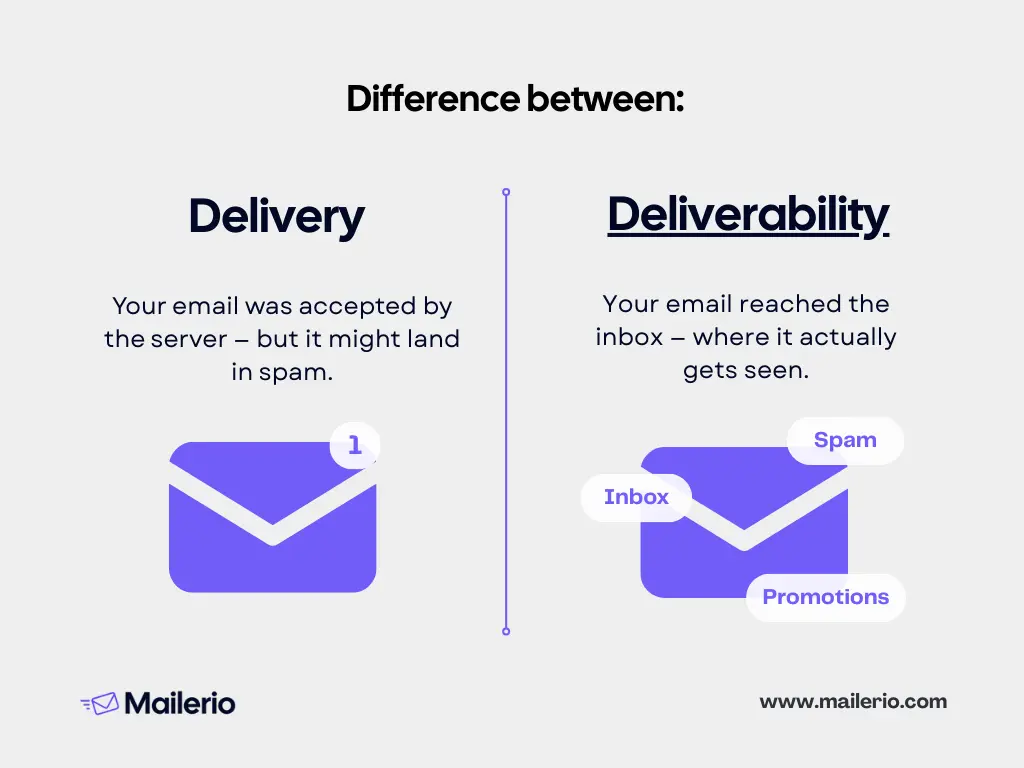
In short:
- Delivery = Did it get there? (server acceptance)
- Deliverability = Where did it land? (inbox vs spam vs junk)
| Email delivery | Email deliverability |
|---|---|
| Successful server transmission | Targets inbox placement |
| Watch for high bounce rates to indicate issues | Influenced by sender reputation and engagement rates |
| Ensure mail server configuration is correct | Avoid spammy content to improve placement |
12 Best Practices: How To Improve Email Deliverability
Getting your emails accepted by mail servers is only half the battle, the real challenge is ensuring they land in the inbox where your audience can actually read them. Internet service providers (ISPs) use complex filters and reputation scores to decide which emails deserve inbox placement and which should be sent to spam. Let’s take a look at best email deliverability practices to make sure your emails land in inbox:
- Authenticate your emails
- Maintain a clean email list
- Monitor and manage sender reputation
- Maintain list hygiene and engagement
- Optimize sending practices
- Write relevant, non-spammy content
- Provide a clear unsubscribe option
- Warm up your IP/Domain
- Use pre-send audits and testing
- Protect data privacy and compliance
- Employ feedback loops and monitor spam complaints
- Regularly run deliverability audits
- Leverage automation but avoid common pitfalls
1. Authenticate with SPF, DKIM, DMARC, and BIMI
Getting your emails authenticated is crucial. This ensures that internet service providers recognize your emails as legitimate, massively improving your chances of landing in the inbox, not the spam folder. Setting up SPF, DKIM, and DMARC forms a solid foundation.
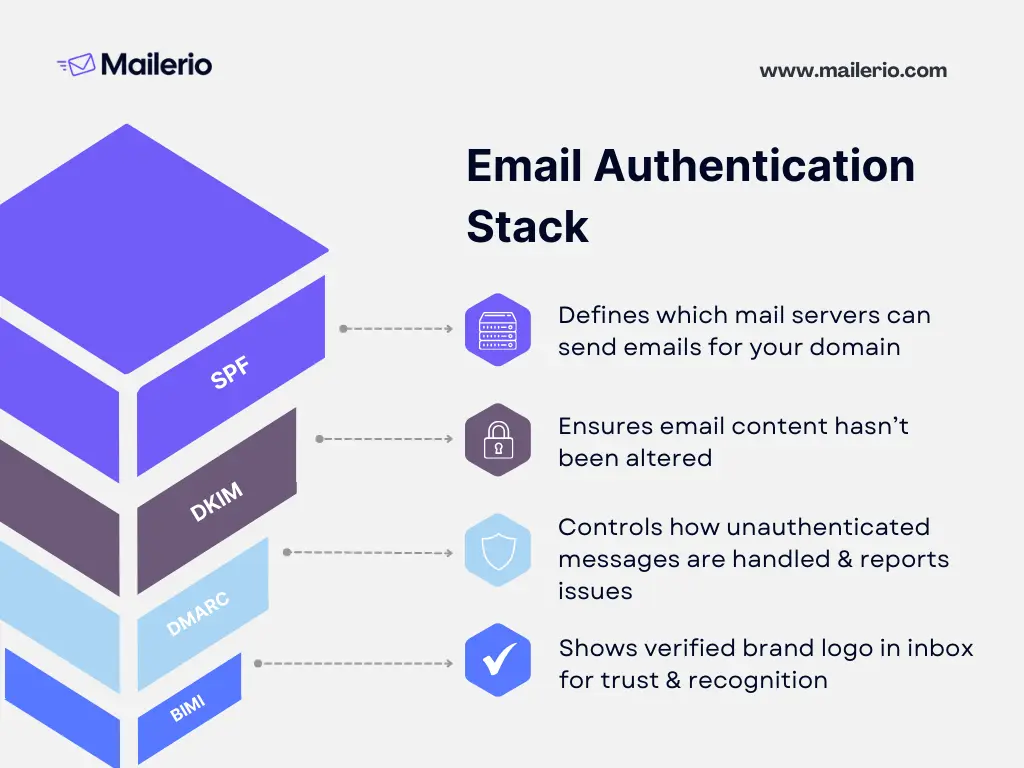
- SPF (Sender Policy Framework): Defines which mail servers are authorized to send email on behalf of your domain.
- DKIM (DomainKeys Identified Mail): Uses an encrypted signature to verify that your email content hasn’t been altered in transit.
- DMARC (Domain-based Message Authentication, Reporting & Conformance): Builds on SPF and DKIM, giving you control over how unauthenticated messages are handled, while providing detailed reporting.
- BIMI (Brand Indicators for Message Identification): Displays your verified brand logo next to authenticated emails, reinforcing trust and improving recognition.
Regularly auditing these settings helps maintain your sender reputation and consistently yields better inbox results. In case you need email deliverability services, you can always get in touch with our team.
2. Clean and Validate Your Email Lists Regularly
Maintaining a healthy email list is crucial for strong deliverability. Sending to invalid, inactive, or unengaged addresses can harm your sender reputation and trigger spam filters.
- Remove Invalid Emails: Regularly eliminate addresses that bounce or produce errors to prevent deliverability issues.
- Prune Inactive Subscribers: Identify contacts who haven’t engaged in months and consider re-engagement campaigns or removal.
- Use List Validation Tools: Employ automated services to check for typos, role-based addresses (like info@ or admin@), and disposable emails. You can do that with Mailerio using free trial.
- Segment Based on Engagement: Focus your campaigns on active, interested subscribers to maximize opens, clicks, and overall engagement.
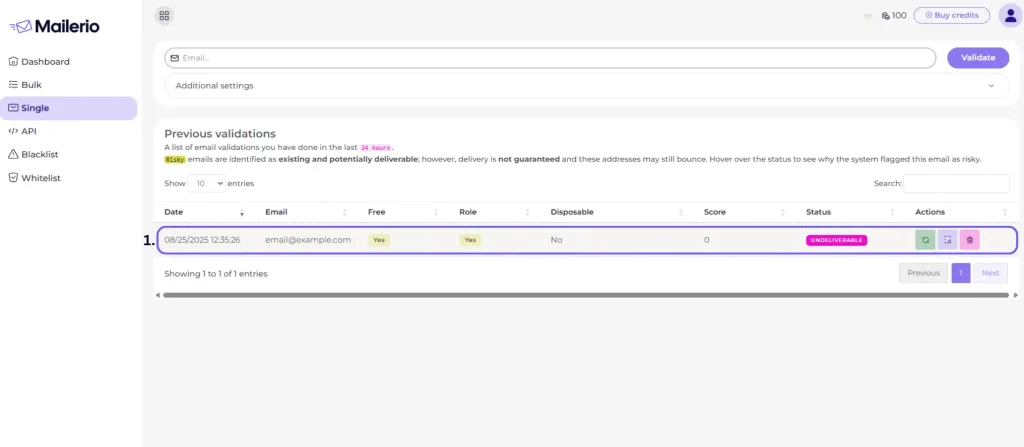
Keep those lists spotless. Implement a double opt-in process, steer clear of purchased lists, and automate cleaning whenever possible. Tools like Mailerio can speed up this process with bulk checking and API integrations. Research suggests that effective list hygiene significantly reduces bounce rates, improving overall deliverability.
3. Monitor and Manage Sender Reputation
Your sender reputation is like your credit score for emails. Warm up new domains or IPs slowly, maintain a consistent sending volume, and use suppression lists. Regular audits and removing risky addresses are key strategies to keep your inbox placement rates above 95%, backed by ESP benchmark reports. To maintain and improve your sender reputation, consider these steps:
- Use Email Validation Tools: Regularly clean your email lists with tools like Mailerio to minimize bounce rates. Email validation ensures you’re contacting real, active email addresses, which enhances your sender score.
- Track Engagement Rates: Pay attention to open rates, click-through rates, and unsubscribe rates. Low engagement can signal to ISPs that your emails aren’t relevant, negatively impacting your reputation. Tools like Google Analytics can help you track these metrics effectively.
- Maintain Consistent Sending Patterns: Sudden spikes in email volume can raise red flags. Gradually increase your sending volume and maintain a consistent schedule to build trust with ISPs.
- Monitor Blacklists: Regularly check if your IP or domain is on any blacklists using tools like MXToolbox. If you find yourself listed, take corrective actions promptly to restore your reputation.
- Provide Easy Opt-outs: Make it simple for recipients to unsubscribe if they wish. A clear opt-out process reduces spam complaints, which can damage your reputation.
4. Maintain List Hygiene and Engagement
Remove inactive or bounce-prone contacts and regularly engage your subscribers with re-engagement campaigns. Real-life cases show significant savings and efficiency improvements, as neglecting this can lead to losing up to 30% of potential revenue due to bad data.
Keeping your email list clean and ensuring high engagement are crucial for maintaining strong email deliverability. Here’s how to do it effectively:
- Regularly Clean Your List: Use email validation tools like Mailerio to regularly scrub your list of invalid, dormant, or duplicate email addresses. This reduces bounce rates and keeps your list fresh.
- Segment Your Audience: Divide your list into segments based on engagement levels, demographics, or purchase history. This allows you to tailor content to specific groups, increasing relevance and interaction.
- Engage Inactive Subscribers: Implement re-engagement campaigns to win back inactive subscribers. If they still don’t respond, consider removing them to focus on more engaged contacts.
- Personalize Content: Personalized emails that are relevant to the recipient’s interests and past behavior tend to have higher open and click-through rates. Leverage data to make emails more engaging.
- Encourage Interaction: Include clear calls-to-action (CTAs) and interactive elements to prompt engagement. The more your audience interacts with your emails, the better it will be for your sender reputation.
- Monitor Feedback Loops: Set up feedback loops with ISPs to receive reports on spam complaints. Address complaints promptly to prevent further issues.
Maintaining list hygiene and focusing on engagement not only improves deliverability but also enhances customer relationships. A clean, active list is your best asset in any email marketing deliverability strategy. Verify email address without sending email, and don’t be afraid to remove inactive emails.
5. Optimize Sending Practices
Choosing the right times and frequency for your emails can make a huge difference. Stick to a steady sending schedule and take advantage of insights from Gmail and Yahoo’s latest policy updates. Experts agree that consistent sending volumes paired with list hygiene maximize deliverability. Ensure your emails hit the inbox effectively:
- Use a Dedicated IP Address: If you’re sending a high volume of emails, consider using a dedicated IP. This isolates your sending reputation from other senders, giving you more control over your deliverability.
- Warm Up Your IP: Before sending large volumes of emails from a new IP. Start small and scale up as your reputation improves. We will cover this topic in more detail below.
- Test Email Timing: Experiment with sending emails at different times and days to see what works best for your audience. Optimal timing can improve open rates and engagement.
- Limit Email Frequency: Avoid overwhelming your subscribers with too many emails. Find the right balance in frequency to maintain engagement without increasing unsubscribe rates.
- Avoid Spam Triggers: Carefully craft your subject lines and email content to avoid words and phrases that could trigger spam filters. Avoid overuse of capitalization and excessive punctuation.
- Implement Throttling: For large lists, consider throttling your send rate. This means sending emails in batches instead of all at once, which prevents server overload and helps maintain a smoother delivery process.
By optimizing these sending practices, you’ll not only improve deliverability but also enhance the overall experience for your subscribers. Consistent, thoughtful sending establishes trust and fosters lasting relationships.
6. Craft Relevant, Non-Spammy Email Content
Personalize your messages and structure them wisely to avoid spam-trigger words. Test sends can prevent potential issues before your email reaches a wider audience, ensuring your content remains engaging and relevant. Tips to ensure your messages hit the mark:
- Understand Your Audience: Tailor your content to meet the specific needs and interests of your audience. The more relevant your content, the more likely it is to engage your readers.
- Write Compelling Subject Lines: Your subject line is the first thing recipients see. Keep it clear, concise, and intriguing without using spammy phrases or excessive punctuation.
- Focus on Quality: Prioritize useful, informative, and engaging content. Avoid generic messages and focus on providing value to your readers, which encourages interaction and reduces spam complaints.
- Use a Clean Design: Ensure your email design is clean and mobile-friendly. A cluttered design can be overwhelming and may lead to higher unsubscribe rates.
- Avoid Spam Trigger Words: Words like “free,” “guarantee,” or “urgent” can trigger spam filters. Choose your words wisely to ensure your emails reach the inbox.
- Include a Clear Call-to-Action: Guide your readers towards the desired action with a clear and compelling CTA. Make it easy for them to engage with your content.
7. Make Unsubscribe Simple and Visible
A clear unsubscribe option not only improves user experience but also positively impacts your sender reputation. It reduces the chances of recipients marking your emails as spam.
- Place Unsubscribe Links Clearly: Make sure your unsubscribe link is easy to find, typically at the footer of your emails. Avoid hiding it or using tiny fonts.
- Use Clear Language: Clearly label the unsubscribe option. Phrases like “Unsubscribe” or “Manage Preferences” make it obvious what the link does.
- Allow One-Click Unsubscribe: Simplify the process by allowing users to unsubscribe with a single click. Complicated processes lead to frustration and potential spam complaints.
- Offer Preference Management: Provide subscribers with options to adjust their email preferences instead of unsubscribing entirely. This can help retain some level of engagement.
- Respect Unsubscribe Requests Promptly: Process unsubscribe requests immediately to comply with regulations and avoid causing dissatisfaction.
All of Mailerio’s emails contain an unsubscribe button. Here’s the standard Unsubscribe button example on the email footer:

Making the unsubscribe process simple and visible demonstrates respect for your subscribers’ preferences. It can reduce spam complaints and contribute to a positive sender reputation, ultimately boosting your email deliverability.
8. Warm Up Your IP/Domain
Warming up your IP or domain is a crucial step to establishing a positive sending reputation with Internet Service Providers (ISPs). When starting to send emails from a new IP or domain, begin by sending a small volume of emails to your most engaged subscribers. This helps build trust with ISPs and proves that your emails are wanted and engaging. I think this visual perfectly shows the correlation between emails sent and how it affects the sender’s reputation.
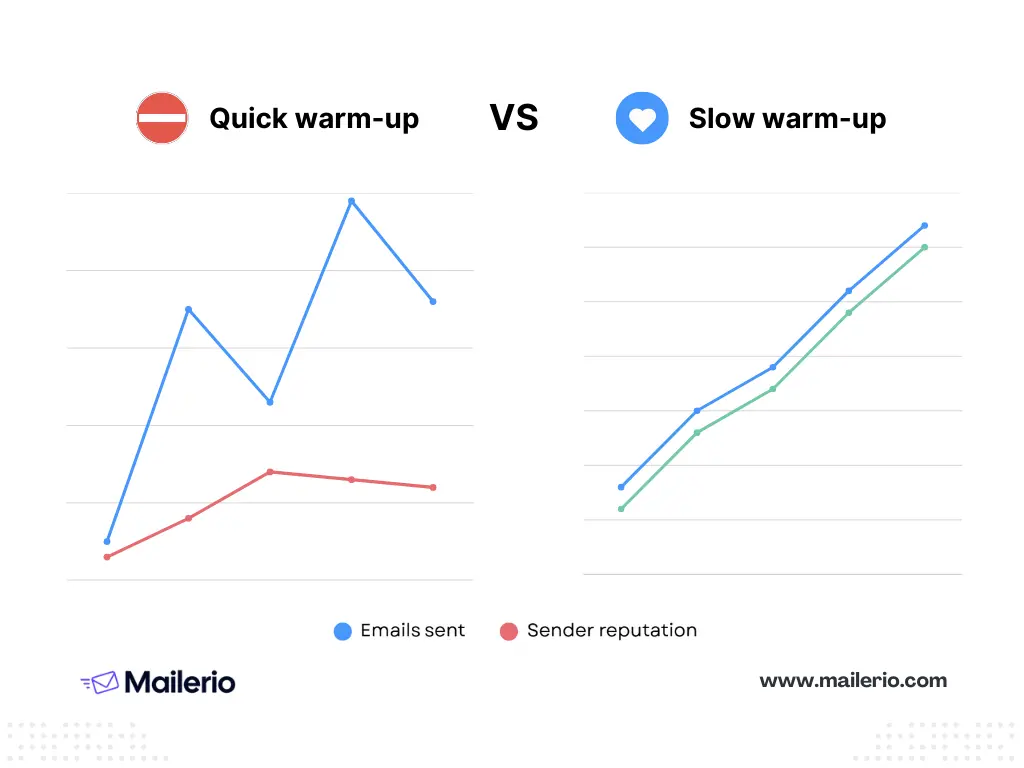
Gradually increase your email volume over a period of weeks. This steady ramp-up allows ISPs to recognize your sending patterns and improve your reputation without triggering spam filters.
Monitor your metrics closely during the warm-up period. Pay attention to open rates, bounce rates, and spam complaints. High engagement signals to ISPs that your emails are valuable, thus enhancing deliverability. This visual perfectly captures the steps you need to take to warm up an IP or a domain.
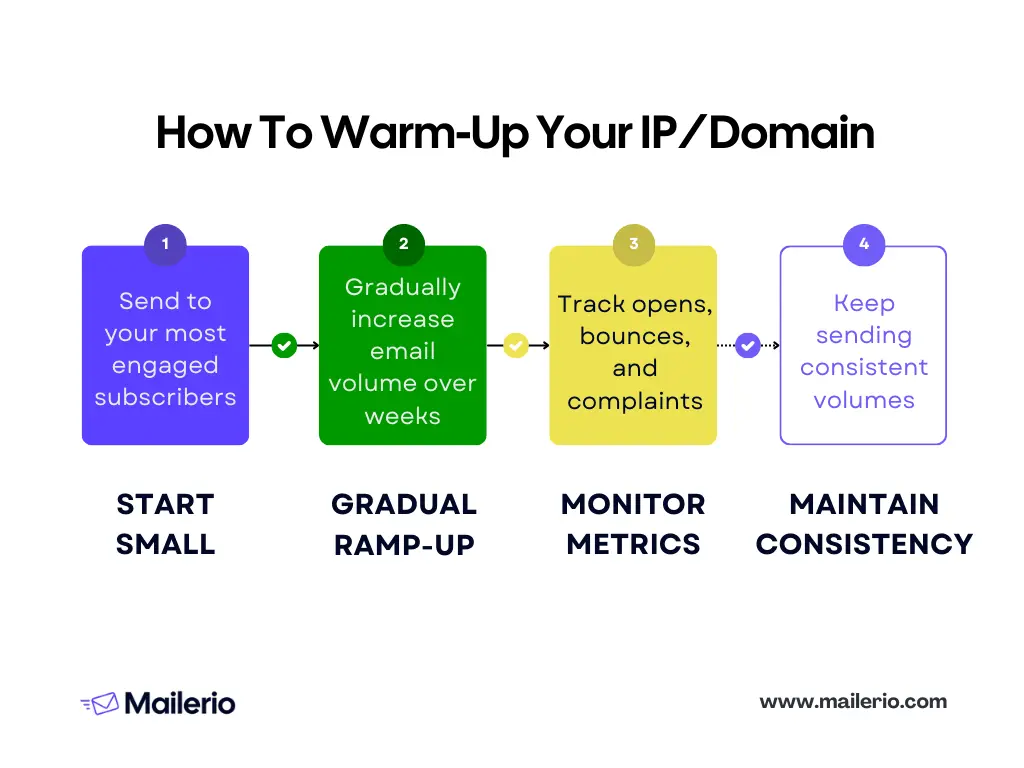
Maintain consistent sending practices once the warm-up phase is complete. Sudden spikes or dips in volume can negatively impact your established reputation.
9. Use Pre-Send Email Deliverability Audits and Testing
Conducting thorough pre-send audits and testing is essential for ensuring your emails reach your audience effectively. Make the most of these practices:
- Check Email Content and Design: Review your email for errors in content, links, and overall design. Ensure it displays correctly across different devices and email clients.
- Test Deliverability: Use tools to send test emails and check their deliverability. Look for any issues that could lead to spam filtering or delivery failures.
- Verify Links and CTAs: Ensure all links and calls-to-action (CTAs) lead to the correct destinations and function as intended. Broken links can frustrate recipients and reduce engagement.
- Assess Load Times: Make sure your email loads quickly. Large images or too many elements can slow it down, leading to a poor user experience.
- Review Personalization and Dynamic Content: Double-check any personalized or dynamic content fields to ensure they pull in the correct data for each recipient.
- Create A/B Tests: Experiment with different subject lines, content variations, or send times to see what resonates best with your audience. This helps you optimize future campaigns for better performance.
10. Protect Data Privacy and Compliance
Stay updated with GDPR, CAN-SPAM, and regional opt-in requirements. Compliance protects your reputation and ensures your emails aren’t penalized by mailbox providers.
- Understand Regulations: Familiarize yourself with relevant regulations such as GDPR, CAN-SPAM, and CCPA. Compliance is not only a legal requirement but also a part of building trust with your audience.
- Obtain Explicit Consent: Always collect email addresses with explicit consent. Use clear and transparent opt in email marketing for deliverability forms to ensure subscribers know what they’re signing up for.
- Implement Secure Data Practices: Safeguard subscriber data with robust security measures. Encrypt sensitive information and regularly update security protocols to prevent breaches.
- Be Transparent in Data Use: Clearly communicate how you collect, store, and use subscriber data in your privacy policy. Transparency builds trust and reassures subscribers.
- Provide Access and Control: Allow subscribers to easily access and manage their information. Offer options to update preferences or delete their data if desired.
- Review Third-Party Compliance: Ensure any third-party services you use also comply with data protection regulations. This includes email service providers and analytics tools.
Trustworthy practices lead to stronger relationships and improved deliverability.
11. Employ Feedback Loops and Monitor Spam Complaints
Feedback loops and monitoring spam complaints are vital for maintaining a strong sender reputation and ensuring your emails reach the inbox. Set up feedback loops with major Internet Service Providers (ISPs) to get these notifications. To quickly identify problematic email addresses or campaign issues and make necessary adjustments.
Spam complaints can negatively impact your sender reputation. Consistently monitoring these complaints is essential. Analyze the complaints to understand why recipients might be marking your emails as spam. It could be due to irrelevant content, too frequent messaging, or unclear unsubscribe options.
Once you’ve identified issues, take proactive steps to address them. Review your email content and sending practices to ensure alignment with subscriber expectations. Implementing changes based on feedback can significantly reduce future complaints.
12. Regularly Run Deliverability Audits
Stick to a consistent audit schedule, be it monthly or quarterly. Routine checks help identify issues early, enabling you to maintain a high inbox placement and reducing spam rates significantly over time.
Start by examining key metrics such as bounce rates, open rates, and spam complaints. These indicators can reveal underlying problems with your email campaigns or list hygiene. Make sure to check Gmail Postmaster tools every once in a while. As this is the place where you can track spam hits, reputation score, and other metrics
Check your sender reputation using tools that provide insight into how ISPs perceive your sending practices. A poor reputation might signal the need for immediate action to prevent emails from landing in spam folders.
Review your authentication protocols, including SPF, DKIM, and DMARC, to ensure they’re correctly configured and up to date. Misconfigurations can hinder deliverability and damage your reputation.
Test different aspects of your email campaigns, from content to timing, using A/B testing. This helps identify what resonates best with your audience and can improve engagement rates.
Assess and adjust your strategies based on audit findings. Address any issues promptly, whether it’s cleaning up your email list or refining your content strategy.
13. Leverage Automation But Avoid Common Pitfalls
Email automation can enhance efficiency and personalization, but it’s vital to implement it cautiously to avoid common pitfalls. Start by setting clear objectives for your automated campaigns. Whether it’s nurturing leads through outbound or re-engaging inactive subscribers, having well-defined goals ensures your automations serve a purpose.
Personalization is key with automation. Use data to tailor content to each recipient. However, avoid over-personalization that might come off as intrusive. Ensure your data is accurate to prevent embarrassing errors, like incorrect names.
Avoid overwhelming subscribers with too many automated emails. Balance frequency to prevent fatigue, and provide value in every message to keep engagement high.
Keep an eye on performance metrics. Evaluate the effectiveness of your automations regularly, and be prepared to adjust based on what’s working and what isn’t. Automation can streamline processes, but it’s important to pair it with validation methods like Mailerio’s real-time API to prevent fake signups.
How to Check Your Email Deliverability
To effectively assess your email deliverability, you need to track specific metrics that reveal how your campaigns are performing.
- Review Key Email deliverability rates: The first step is to monitor key performance indicators like bounce rates, spam placements, and inbox placement rates. These metrics give you insight into how many emails land in your recipient’s inbox versus being rejected or marked as spam.
- Open Rates: Indicates the percentage of recipients who open your emails. High open rates suggest effective subject lines and a strong reputation.
- Click Rates: Measures how many recipients click on your email links. A good click rate means your content is engaging and relevant.
- Bounce Rates: Reflects undeliverable emails. Keeping this low is essential for maintaining a healthy sender reputation.
- Spam/Junk Rates: High rates here indicate issues with email content or sender reputation.
- Unsubscribe Rates: Indicates how many recipients opt out of your emails. High rates are a red flag for relevance and frequency.
- Domain/IP Reputation: Your reputation impacts deliverability. Monitoring it helps maintain consistent inbox placement.
- Inbox Placement Rate: Shows the percentage of emails reaching the inbox versus spam or junk folders.
- Deliverability Rate: Combines all metrics to show overall success in reaching your audience.
- Set Up a Workflow: Establish a process for regular checks. Create a workflow or use a chart that includes monitoring tools, metrics to review, and a schedule for audits. Consistent evaluation helps you quickly identify and resolve issues.
- Use Recommended Tools: Leverage tools to streamline the process. Mailerio can be invaluable for email validation. It helps ensure your list remains clean and that emails reach their destination.
- Benchmark Against Industry Averages: Compare your results with industry standards to evaluate your performance. Hard-bounce rates typically hover around 2%, while spam-folder placements for well-maintained lists range between 1-5%. This comparison can highlight areas needing improvement.
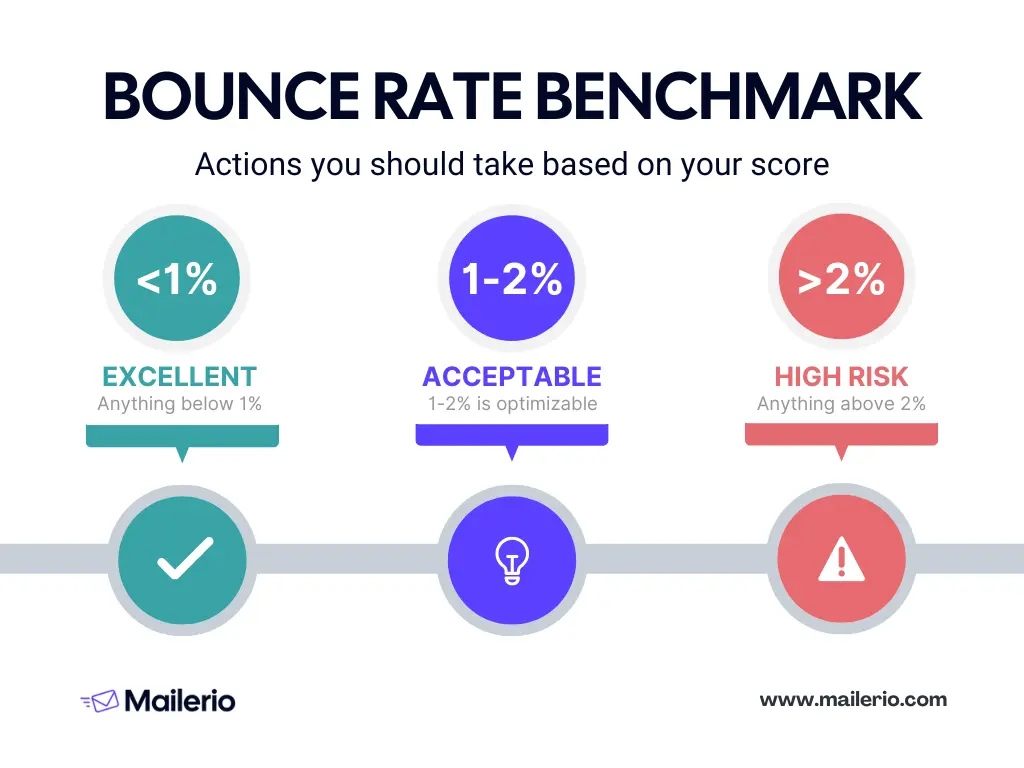
By following these steps, you’ll gain a clearer picture of your email deliverability and can take proactive steps to improve it.
Notably, industry data highlights that companies that systematically clean and validate lists see 20–30% higher engagement rates and above-average inbox placement, according to Gartner. This emphasizes the importance of regular list hygiene to boost marketing success.
How to Conduct an Email Deliverability Audit (Step-by-Step)
Conducting regular email deliverability audits is crucial to ensure that your emails reach the inbox.
Monthly/Quarterly Review Checklist
- Authentication Checks: Verify SPF, DKIM, and DMARC setups to ensure they are correctly configured.
- Bounce Rate Analysis: Review bounce back logs and address any patterns of undeliverable emails.
- Engagement Metrics: Evaluate open, click, and unsubscribe rates to gauge user interaction.
- Sender Reputation: Use tools to check your domain and IP reputation for any red flags.
Example Audit Action Plan
- Step 1: Begin by verifying email authentication protocols. Adjust SPF, DKIM, or DMARC settings if needed.
- Step 2: Analyze recent bounce reports to pinpoint problematic addresses. Use this insight to clean up your list.
- Step 3: Assess engagement metrics and create a plan to improve content strategies based on findings.
Integrating Mailerio in Your Workflow
Mailerio can streamline your auditing process by validating email lists and monitoring deliverability. Use Mailerio to conduct real-time email verifications, reducing the chances of bounces and protecting sender reputation.
Troubleshooting Guide: Common Deliverability Problems & Solutions
Encountering deliverability issues can feel frustrating, but with the right approach, you can solve them. Here are common problems and how to tackle them:
Getting Blacklisted: Steps & Recovery
If you find your domain blacklisted, it’s crucial to act fast. First, identify the blacklist your domain is on. Use online tools, like MXtoolbox, to check your domain or IP status.
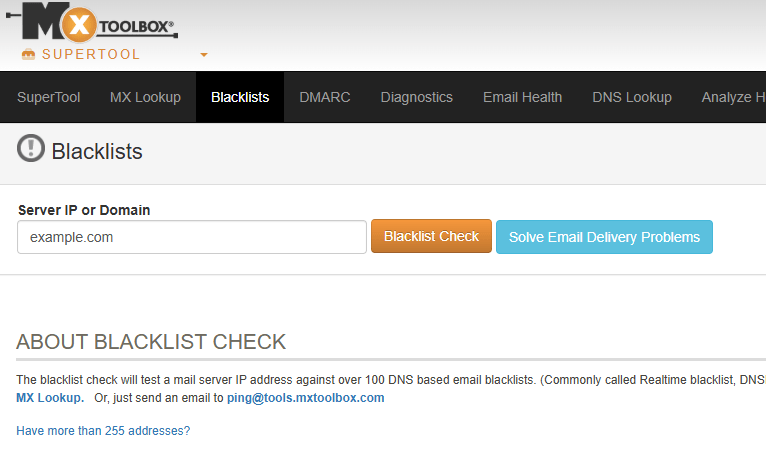
Once identified, reach out to the blacklist provider to understand the reason. Clean up any issues, such as spam complaints or bad data, and request removal.
Low Inbox Placement (Gmail/Outlook/Other)
Gmail and Outlook can have stringent filters. Ensure your emails are authenticated with SPF, DKIM, and DMARC. Focus on email content and engagement rates to improve placement. Monitoring your sender score can offer insights into potential improvement areas.
Spam Folder/Promotions Tab Issues
Landing in the spam or promotions tab instead of the primary inbox can hinder your open rates. Follow email deliverability best practices outlined in this article to maintain healthy engagement. Testing emails before sending them out, using tools that simulate different inbox placements, helps identify issues early or avoid them entirely.
Sudden Dips in Send Metrics
A sudden drop in open or click rates can be alarming. Check your email lists for validity and engagement. Ensure your technical setup hasn’t changed unintentionally. Regularly updating your list hygiene practices reduces the chances of such dips.
How to Get Expert Help
When in doubt, seek expert help. Mailerio offers support to help diagnose and resolve deliverability issues. Our team can guide you through tricky configurations and provide strategies for maintaining a good sender reputation.
Real-Life Success Stories: Overcoming Email Deliverability Challenges
For nearly a year, the Mailerio founding team faced one of the most frustrating challenges as a SaaS company: our emails weren’t landing in inboxes for our 1st SaaS, Ajelix. This wasn’t just about poor marketing metrics; it was a barrier to growth.
Our journey began when transactional emails like registration confirmations and password resets didn’t reach our users. Initially dismissed as a technical glitch, it soon impacted our ability to engage and convert users. With alarmingly high bounce rates and deteriorating sender reputation, we realized the issue was more profound than just deliverability, it was endangering our growth.
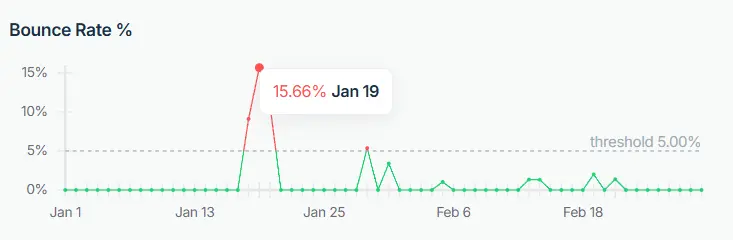
Despite trying multiple solutions: switching providers, warming up IPs, and setting up authentication, nothing worked. Even reaching out to consultants and sharing our struggles on LinkedIn yielded no specific guidance. Our turning point came when we identified the true problem: invalid and fake email addresses in our database.
We shifted focus to building a tool tailored to our needs: Mailerio. This email validation tool reduced spam complaints by 93%, increased open rates from 20% to 67%, and dramatically dropped our bounce rate to 0.2%. Suddenly, our emails were reaching real inboxes again. Read the full case study here.
Our experience isn’t unique. Many SaaS companies face similar issues due to systemic flaws in handling email as a secondary concern. Recognizing this, we launched Mailerio publicly to help other teams overcome these challenges with a solution rooted in real-world success.
If your emails are landing in spam or if you’re struggling with high bounce rates, consider exploring Mailerio. It’s designed by a team that has navigated this terrain and emerged stronger, turning a challenge into an opportunity for growth. We invite you to be part of this solution and regain control over your email deliverability.
Top 8 Email Deliverability Services (Comparison)
Choosing the right email deliverability tool can significantly impact your campaign success. Here’s a look at some of the top contenders, including what they each bring to the table.
Leading Solutions Overview
- Mailerio: Known for high-accuracy email validation and real-time API integration, Mailerio helps maintain stellar deliverability rates.
- Postmark: Focuses on ensuring transactional emails land in the inbox quickly and reliably.
- SendForensics: Provides comprehensive deliverability audits and insights into sending habits.
- GlockApps: Offers inbox placement tests and analytics to optimize deliverability.
Feature Comparison Table
| Service | Features | Pricing Model | Ideal For | Key Benefit |
|---|---|---|---|---|
| Mailerio | Email validation, real-time API | Pay-as-you-go or subscription | SaaS Teams, Marketers | Customizable and cost-effective |
| SendGrid | Email delivery infrastructure | Subscription-based | Large Enterprises | Reliable infrastructure |
| Mailgun | Inbound routing, analytics | Subscription-based | Developers, Enterprises | Comprehensive features |
| SparkPost | Predictive engagement, analytics | Subscription-based | Enterprises | Advanced predictive analytics |
| Postmark | Transactional email focus, real-time delivery | Subscription-based | Startups, Small Businesses | Speedy transactional emails |
| Amazon SES | Bulk email sending | Pay-as-you-go | Cost-Conscious Organizations | Cost-effective, scalable option |
| MailChimp | Marketing automation, A/B testing | Subscription-based | Small to Medium Businesses | User-friendly marketing features |
| Constant Contact | Email marketing, list management | Subscription-based | Small Businesses | Easy-to-use marketing tools |
FAQ
Poor deliverability often stems from inadequate list hygiene, missing authentication, and poor reputation management. Data indicates that those in the top tier for hygiene, authentication, and monitoring maintain inbox placement rates of 95% or higher.
Quarterly list verification is recommended by industry surveys. Staying proactive helps avoid spam complaints, blacklisting, and drops in engagement.
Shared IPs are used by multiple senders, which can affect your reputation based on others’ practices. Dedicated IPs are used solely by you, giving you full control over reputation but requiring more management.
Yes, implementing regular list cleaning, proper authentication, and routine audits can improve Gmail/Outlook inbox placement by up to 12 percentage points, as shown in studies.
Yes, opt-in practices ensure your audience genuinely wants your content, which reduces spam complaints and boosts engagement.
Mailerio excels with its affordable, high-accuracy email validation. It offers easy bulk uploads and real-time API integration, supporting founders and marketers to achieve top-notch deliverability and list quality.
List cleaning, supported by tools like Mailerio, is crucial for maintaining low bounce rates and adhering to industry spam benchmarks. It ensures that your emails reach real recipients and keeps your sender reputation strong.
Wrap Up
Consistent audits, a solid technical setup, and active list hygiene aren’t just nice-to-haves; they’re essential for ensuring your emails reach the inbox. Implementing these practices will help increase email deliverability and enable you to achieve your business goals in the long term. As deliverability rates have climbed to over 96%, it’s proof that following best practices makes a difference.
If you’re ready to take your email campaigns to the next level, explore Mailerio’s free credits. Start auditing your lists and see real improvements.
With clear evidence that list hygiene and regular audits boost ROI, now’s the perfect time to sharpen your email strategy. Implement these best practices and watch your deliverability.
The post 12 Email Deliverability Best Practices appeared first on Mailerio.
]]>The post 7 Outbound Lead Generation Strategies That Get Results appeared first on Mailerio.
]]>Table of contents:
- What is Outbound Lead Generation?
- 7 Top Outbound Lead Generation Strategies
- How Outbound Lead Generation Works
- Outbound Lead Qualification: Turning Leads Into Revenue
- Personalization & Next-Level Automation
- Outbound Tech Stack Comparison Table
- Why Deliverability & Data Hygiene Matter More Than Ever
- Common Outbound Mistakes & How to Avoid Them
- Trends & The Future of Outbound Lead Gen
- Conclusion
- FAQ: Outbound Lead Generation
Let’s explore outbound strategies that truly deliver results.
TL;DR
Outbound lead generation actively reaches out to potential customers through various channels like email, calls, and social media. Success lies in strategies such as cold emailing, cold calling, social selling, and account-based marketing. Having clean, accurate data is crucial. Tools like Mailerio play a vital role in protecting sender reputation, boosting deliverability, and increasing ROI.
Bad data can drain up to 30% of your revenue. Verified lists, on the other hand, can drastically reduce bounce rates to below 2% and deliverability up to 98-99%.
This guide includes workflows, metrics, and tech recommendations tailored for founders, SaaS leaders, and outreach experts.
What is Outbound Lead Generation?
Outbound lead generation is reaching out to potential customers rather than waiting for them to come to you. This approach contrasts with inbound strategies, where prospects are drawn in through content and various engagement tactics.
Outbound vs. Inbound
Inbound marketing focuses on attracting people by providing valuable and relevant content, while outbound marketing relies on pushing messages to a broad audience in order to capture attention.
Inbound works like a magnet, pulling customers in when they are ready and interested, whereas outbound functions more like a loudspeaker, broadcasting messages whether the audience is receptive or not.
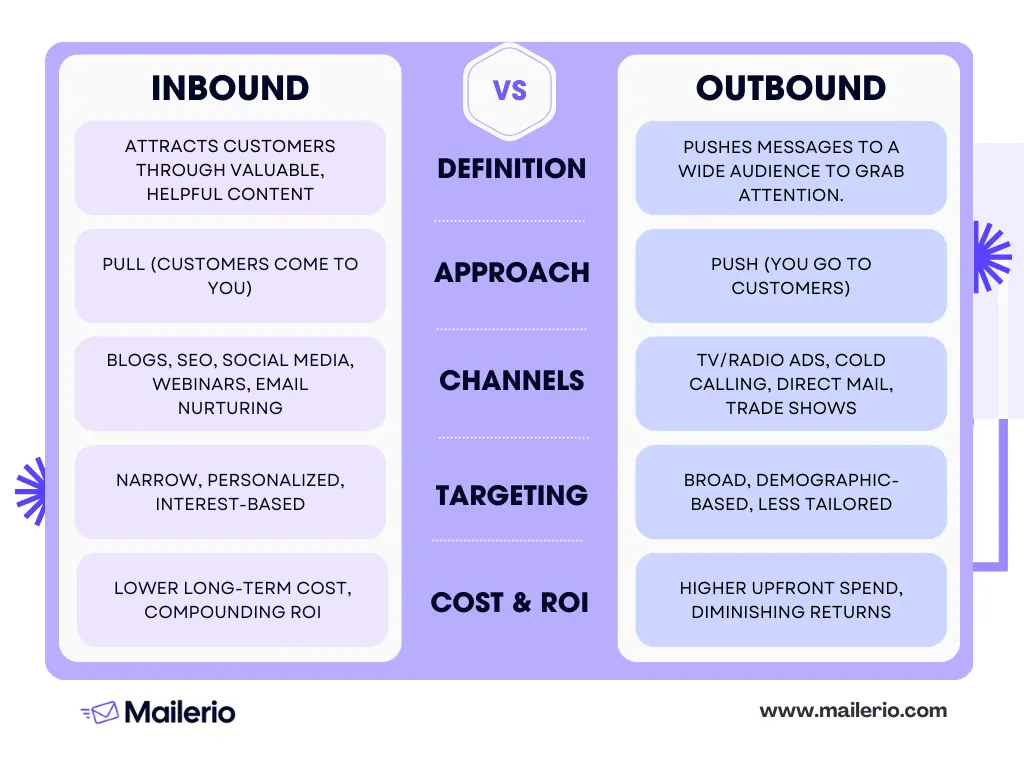
Both channel strategies also differ significantly. Inbound thrives through blogs, SEO, social media, webinars, and nurturing email campaigns, while outbound makes use of TV and radio ads, cold calls, direct mail, trade shows, and display advertising. When it comes to targeting, inbound is narrow, interest-based, and highly personalized, while outbound takes a broader, demographic-driven approach that is less tailored to individual needs.
Outbound Examples From Industries
For SaaS companies, outbound lead generation might involve cold email campaigns, targeting specific niches or decision-makers within a company. Agencies might focus on partnerships, while ecommerce businesses often use phone prospecting to engage with larger retail clients.
In the B2B, LinkedIn remains a powerhouse for engagement. Outreach data shows LinkedIn messages can achieve reply rates around 20%, significantly outperforming cold emails, which average 5–6%, and cold calls, which succeed only 2–3% of the time. This makes social channels an integral part of effective modern outbound strategies.
7 Top Outbound Lead Generation Strategies
Here’s a curated list of what industry experts advise on the best outbound lead generation strategies.
#1 Cold Emailing
The first one to land on the list is cold emailing. Which is no surprise. The success lies in personalization; there’s no point in sending 1000 messages that are not even interested in your services or can’t even understand what you want from them.
Craft engaging subject lines and tailor your cadences to speak directly to your prospects. We researched the internet to find out what experts and Reddit have to say about this. And we found some really great subject lines you could also use:
- XX, am I off here?
- XX, (problem / pain point you solve for) initiatives for (company name)?
- XX, improving (problem / pain point) at (company name)?
- XX, can I get your feedback here?
- XX, ABC referred me (if you get a referral)
Always keep your ICP in mind and personalize the email to increase the chances of your prospect opening the email. There’s no one magic formula, so test it out and find what works best for you. Here’s just one example of how it would look in the mail:
Always validate the emails before sending, so you wouldn’t end up in a spam box! Especially, if you’re using lead tools, the emails you find there aren’t always able to receive your email, and you can end up getting a hard bounce. Validating your email list with a tool like Mailerio is crucial. This ensures your emails land where they should, keeping bounce rates under the 2% mark that ISPs prefer for good sender reputation and excellent inbox delivery.
#2 Cold Calling
Timing is everything. Target the times decision-makers are most likely to answer. Early afternoons or mid-week can be optimal, as people tend to be less busy compared to Monday mornings or Friday afternoons.
Despite its potential, cold calling has evolved. With a success rate of around 2–3%, it’s less effective than some digital methods. However, it remains a valuable part of a diverse sales strategy, offering a personal touch that emails may lack.
Cold calling also requires persistence and adaptability. Prepare for rejections, but use them to refine your approach. Collect insights from these interactions to improve scripts and strategies, turning cold calls into more than just numbers on a list—they become learning opportunities.
#3 Social Selling
Platforms like LinkedIn and X offer huge opportunities. Craft compelling LinkedIn messages and strategic X outreach. LinkedIn InMails, for instance, boast nearly a 20% reply rate, outperforming standard cold emails or calls. LinkedIn is a powerful channel that works like a charm if used correctly.
Here’s a comment from Chris Cozzolino:
Our clients generate $15M+ in pipeline every quarter using these fundamentals. You’re not failing at LinkedIn. You’re failing at following the process.

#4 Multi-Channel Outreach
A single touchpoint won’t cut it. Combining emails, phone calls, and social media interactions increases reach and response. Experts confirm that multi-channel strategies lead to better engagement than relying on one method alone.
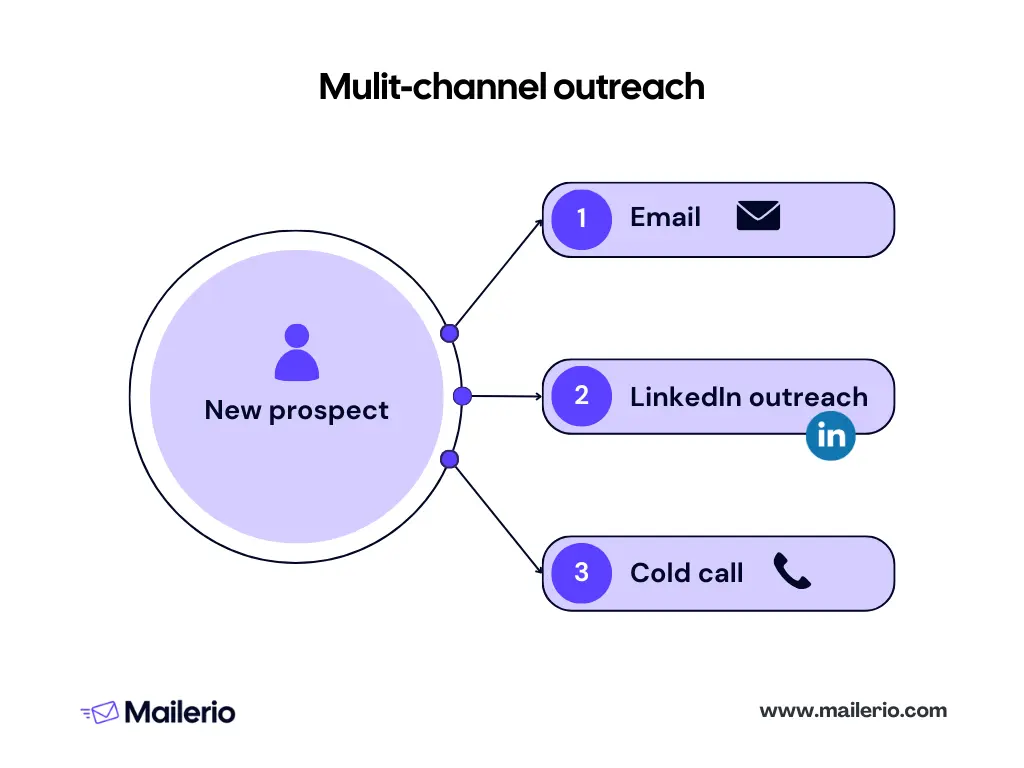
While email open rates are dropping, using a multi-channel approach guarantees better results and coverage over your ICP. A unified approach allows you to meet prospects where they are. Some might respond better to emails, while others are more comfortable on social media or via phone calls. By diversifying, you increase the odds of making a connection.
#5 Pay-Per-Click (PPC) for Outbound
Pay-Per-Click (PPC) is a smart way to re-engage prospects who’ve previously shown interest but didn’t convert. By using PPC, you can strategically place your brand back in front of these potential customers, reminding them of what they found compelling in the first place.
It helps reignite interest by targeting those who are already somewhat familiar with your product or service, potentially inching them closer to making a decision. This method efficiently pulls outbound leads back into your sales funnel, giving you another shot at conversion.
Here’s an example of a Google ad suggestion to upload customer match lists to target ads more precisely.
For this, you can use Meta, LinkedIn, or Google Ads to upload prospect lists and create lookalike audiences or target people who have already engaged with your business.
#6 Account-Based Marketing (ABM)
Account-based marketing is a focused approach where personalization is key. Instead of casting a wide net, zero in on high-value accounts. Each interaction is customized to align with their unique goals and requirements, making every touchpoint relevant and impactful.
By doing this, you build stronger relationships and increase the chances of converting these targeted accounts into loyal customers. This personalized experience resonates more with decision-makers, as it demonstrates a deep understanding of their business needs.
ABM also allows for more efficient resource allocation. Concentrating efforts on accounts that are most likely to yield significant returns ensures that the energy and resources spent are well worth the investment. Based on the ABMLA study, 76% of marketers report that ABM drives higher ROI than any other form of marketing, like omnichannel. This targeted approach often results in higher conversion rates, making it a favorite strategy among marketers aiming for quality over quantity.
#7 Event & Cold Approaching
Offline still works very well, especially in the AI-generated content era. Attend networking events, conferences, and engage in direct, face-to-face outreach. These personal connections can lead to fruitful relationships; it’s a great way to grow your audience or meet people who you would never be able to reach with email or socials. Plus, these connections are more valuable.
Here’s just one example of our COO, Agnese, speaking at a local event. These kinds of events are amazing for trust and can lead to opportunities and warm prospects.

How Outbound Lead Generation Works

Time needed: 20 days
Implementing outbound lead generation involves a structured approach. There are six steps involved in this practice, but the process can vary from company to company and internal process. Let’s take a closer look at the email outbound lead generation process in more detail.
- Define Target Customer Profile
Start by clearly identifying who your ideal customer is. This includes demographics (industry, company size, location), firmographics (annual revenue, headcount), and psychographics (pain points, goals).
Tip: Use existing customer data, interviews, and market research to build a detailed profile. Tools like LinkedIn Sales Navigator, Apollo.io, or Clay can help narrow down your target audience. - Value Proposition for Campaign
Create a compelling value proposition that addresses the needs and pain points of your target customer. It should explain how your product or service solves their problem better than alternatives.
Tip: Focus on outcomes (time saved, revenue increased, risks reduced) rather than features. Craft 2–3 variations to test messaging effectiveness. - Build Targeted List
Gather a list of potential prospects who match your customer profile. This could involve using lead databases (mentioned above), LinkedIn, or manual research.
Tip: Prioritize quality over quantity. Use enrichment tools (like Apollo, ZoomInfo, or Clearbit) and verify email addresses with tools like Mailerio to reduce bounce rates. - Draft Emails
Write personalized outreach emails that are short, relevant, and engaging. The goal is to spark interest and start a conversation, not close the deal.
Tip: Keep the subject line concise, use personalization tokens (name, company, recent achievement), and always end with a clear call to action (CTA), like scheduling a quick call. - Prepare Follow-Up Material
Develop additional content (case studies, whitepapers, blog posts) that supports your message and nurtures prospects after the initial email.
Tip: Anticipate common objections and prepare materials that address them. For example, if prospects often ask about ROI, have a one-pager with proof points ready. - Send Cold Emails
Begin your outreach by sending cold emails to your targeted list. Make sure they are personalized and spaced out over time to avoid spam filters.
Tip: Use email automation tools (like Outreach, Salesloft, or Lemlist) to manage campaigns while maintaining personalization. Track open and reply rates to refine subject lines and messaging. Make sure to validate emails before sending to avoid bounce rates and protect your sender reputation. - Manage Responders
Monitor and respond promptly to replies, whether positive, negative, or neutral. Quick and thoughtful responses increase your chances of moving prospects forward.
Tip: Set up an organized system (CRM or sales engagement tool) to categorize leads into hot, warm, or cold for easier follow-up. - Schedule Call
When a prospect shows interest, the next step is to schedule a discovery call. The purpose is to understand their pain points and assess if they’re a good fit.
Tip: Use scheduling tools like Calendly to reduce back-and-forth. Prepare a list of open-ended questions to uncover challenges and goals. Here’s what a Calendly schedule looks like. It’s simple, and prospects can choose the best time without the need to spend time back and forth aligning times.
- Send Follow-Up Materials
After the call, send relevant materials that reinforce your value proposition, such as product sheets, case studies, or a recap of the discussion.
Tip: Tailor the content to what was discussed on the call. If the prospect mentioned a specific challenge, send a success story related to that exact issue. - Schedule Demo
If the lead is qualified, invite them for a demo to showcase your solution in action.
Tip: Keep the demo focused on solving the prospect’s problems, not showing every feature. Personalize it with real-life use cases and data relevant to their industry. - Hand-Off to Sales
Once the prospect has engaged and shown serious interest, pass them over to the sales team to close the deal.
Tip: Provide sales with a detailed hand-off, including call notes, objections raised, and resources already shared. This ensures a smooth transition and avoids repeating conversations.
Outbound Lead Generation Qualification: Turning Leads Into Revenue
Turning outbound leads into revenue hinges on effective lead qualification. The magic trio: Intent, Fit, and Engagement plays a pivotal role.
- Intent: grasp what the prospect truly needs and their intent. This understanding sets the stage for meaningful interaction.
- Fit: ensure there’s a solid alignment between the prospect and your offering.
- Engagement: engage them thoughtfully, making each interaction valuable.
By focusing on these aspects, you can prioritize leads that are most likely to convert, optimize your sales efforts, and improve ROI.

If you’re doing an email outreach, make sure your email lists stay clean by validating emails before sending. This will help you protect the email sender’s reputation and avoid bounce backs.
Personalization & Next-Level Automation
Personalization is key to effective outbound lead generation. By using AI and dynamic content, you can tailor each message to resonate with your prospects. But it goes further than simply inserting a name into an email, it’s about using data to craft content that speaks directly to the recipient’s needs and interests.
To take it a step further, setting up intent triggers and automated sequences saves time and enhances efficiency. Imagine your outreach adjusting in real-time based on a prospect’s interactions, pretty powerful, right?
Author’s note: Now, before you automate anything, make sure the manual process is set up properly. Before sending batches of emails, implement list cleaning by using real-time validation tools like Mailerio to ensure your messages land where they should, in the inbox. This strategy not only maintains your sender reputation but also maximizes your outreach success.
Maja Voje, the author of GTM Strategist, wrote about outbound in the AI era in her latest newsletter. How we’re shifting marketing approaches, rather than just spraying thousands of emails, we should create a process with a vision. Here’s the go-to market intelligence platform she wrote about

She explains that signals are different events that can happen to a business, like product launches, leadership hires, etc. These events are signals that you have to act instead of waiting for someone to come to you from inbound channels.
Personalizing and automating your outbound approach is a must, but make sure you have a solid system in place, backed by robust validation to keep you ahead of the curve.
Outbound Lead Generation Tech Stack Comparison Table
In outbound lead generation, having the right tools is crucial. Selecting tools goes beyond just functionality. It’s about choosing solutions that integrate seamlessly and enhance the effectiveness of your campaigns. For CRM, look for platforms that offer robust integrations and automation capabilities. When it comes to outreach, multi-channel tracking is key to understanding and optimizing your engagement strategies.
| Category | Tools | Key Features |
|---|---|---|
| CRM | Salesforce, HubSpot, Pipedrive, Zoho | Lead & account management, pipeline tracking, reporting, integrations with marketing/sales tools |
| Sales Engagement Platforms | Outreach, SalesLoft, Apollo.io, Groove | Multi-channel sequencing (email, calls, LinkedIn), task automation, analytics, rep productivity tools |
| Data Providers & Enrichment | ZoomInfo, Lusha, Clearbit, Apollo.io | B2B contact databases, company enrichment, intent signals, integration with CRM/engagement tools |
| Dialers & Calling Platforms | Aircall, RingCentral, CloudTalk, Dialpad | VoIP calling, power dialers, call recording, CRM integrations, call analytics |
| Email & Deliverability Tools | Mailerio, SendGrid, Postmark, Lemlist | High-volume sending, deliverability optimization, warm-up, email tracking |
| SMS & Messaging Platforms | Twilio, Podium, Sakari, WhatsApp Business API | SMS campaigns, 2-way texting, WhatsApp & voice APIs, integration with CRM/marketing tools |
| Marketing Automation | HubSpot Marketing Hub, Marketo, Pardot (Salesforce), ActiveCampaign | Automated campaigns, email marketing, lead nurturing, landing pages, analytics |
| Conversation Intelligence & Analytics | Gong, Chorus, ExecVision, Avoma | Call recording, AI insights, conversation analytics, deal coaching |
| Video Prospecting & Demos | Vidyard, Loom, Hippo Video, BombBomb | Personalized video outreach, screen recording, tracking engagement with prospects |
| Advertising & Outbound Marketing | LinkedIn Ads, Google Ads, Metadata.io, RollWorks | Targeted ads, account-based marketing (ABM), retargeting, lead gen |
| Collaboration & Communication | Slack, Microsoft Teams, Zoom, Google Meet | Team messaging, video meetings, file sharing, workflow integrations |
Data accuracy and compliance are non-negotiable in the data segment. Tools like Apollo and Cognism provide rich datasets, while Mailerio ensures the data’s validity. For email validation, Mailerio stands out with no subscription fees, offering affordability without compromising on performance. Choose these tools to build an efficient, results-driven outbound strategy that maximizes every outreach effort.
Why Deliverability & Data Hygiene Matter More Than Ever
Handling dirty lists can seriously undercut your email deliverability, leading to wasted effort and missed opportunities. Sending to invalid addresses not only harms your sender reputation but also slashes your ROI. Gartner’s research highlights a critical point: organizations can lose up to 30% of revenue due to poor data hygiene and dirty email lists that include disposable or temporary emails.
This is where Mailerio comes into play. By offering bulk list cleaning before campaigns and real-time validation via API for forms and CRMs, Mailerio acts as a crucial foundation for your email success.
Common Outbound Mistakes & How to Avoid Them
Outbound lead generation can be tricky. Here are some common pitfalls and how to navigate them:
- Over-automation and Impersonal Messaging: Automating everything might seem efficient, but it can make your messages feel robotic. Strike a balance between automation and a human touch to keep your outreach personable and engaging.
- Outdated or Dirty Email Lists: Using old or inaccurate lists wastes time and resources. Automate validation with tools like Mailerio. Clean lists significantly cut the risk of blacklistings and prevent wasted sends. After proper cleaning, bounce rates typically drop under 2%, improving overall deliverability.
- Ignoring Reply Management: Not managing responses effectively can mean missed opportunities. Ensure that someone is actively engaging with replies to nurture relationships and move leads through the funnel.
- Not Tracking Sender/Domain Health: Keeping an eye on your sender and domain health is crucial. Regular monitoring helps maintain a strong reputation, ensuring your messages land where they should.
- Relying on a Single Channel: Putting all your eggs in one basket limits reach. Embrace a multi-channel approach by combining emails, calls, and social media. This increases your chances of connecting with prospects effectively.
Avoiding these mistakes will strengthen your outbound strategy, leading to better engagement and higher ROI.
Trends & The Future of Outbound Lead Gen
Outbound lead generation is evolving rapidly, with several key trends reshaping the landscape. Intent-based outreach is gaining traction, allowing businesses to target prospects based on behavior and signals. Predictive lead scoring is also becoming essential, using data to prioritize leads that are most likely to convert.
Automation is accelerating, particularly in messaging, with AI-written content helping teams scale personalized outreach. However, the backbone of all these advancements is clean, real-time data validation. Tools like Mailerio ensure your contact lists remain accurate, reducing bounce rates and protecting sender reputation.
Experts anticipate that as ISPs and compliance standards evolve, leveraging automation alongside impeccable data hygiene will be crucial. This combination will future-proof outbound efforts, ensuring your campaigns remain effective and compliant. Check out more insights on data hygiene from Suped.
KPIs & Metrics That Matter
Tracking the right metrics is key to optimizing your outbound efforts. Let’s dive into the numbers that truly make an impact.
- Open, Reply, and Conversion Rates: These are the lifeblood of any campaign. High engagement metrics indicate that your messaging resonates with your audience and guides you on what works.
- Validation Metrics: Pay attention to bounce rate benchmarks and inbox placement.
- Improving Performance: Use these metrics to refine your outreach strategy. Visual tools like tables and infographics can help you track progress over time, making it easier to notice trends and adjust tactics.
Understanding and acting on these KPIs ensures your outbound lead generation strategies are not only effective but also continually improving.
Wrap Up
Outbound lead generation thrives on intent, persistence, and quality data. Getting these elements right can redefine your success metrics. A strong sender reputation, backed by validated lists, forms the backbone of sustainable ROI. It’s not just about sending emails—it’s about making sure they land where they should.
Why not see the difference yourself? Try Mailerio for free. Validate a sample list or get a personalized deliverability report to start boosting your results.
FAQ: Outbound Lead Generation
Outbound leads are prospects reached through proactive methods like cold emails, calls, and social media. In contrast, inbound leads come to you via channels like content marketing and SEO.
Qualifying involves assessing factors like intent, fit, and engagement. This ensures your efforts focus on prospects most likely to convert.
Most modern CRMs support integration with email validation tools like Mailerio. This ensures real-time updates and maintains clean, reliable data across the board.
Yes. According to Gartner research, B2B businesses can lose up to 30% of revenue due to bad data. Proper validation boosts deliverability to 98–99%, improving ROI.
Yes, ensuring that your data practices comply with regulations like GDPR is crucial. Always obtain proper consent and manage data responsibly.
Mailerio offers affordability, high accuracy, and seamless integration without requiring a subscription, making it a smart choice for maintaining top-notch data hygiene.
The post 7 Outbound Lead Generation Strategies That Get Results appeared first on Mailerio.
]]>The post Verify Email Address Without Sending Email appeared first on Mailerio.
]]>Not only does this kill your confidence, but it quietly nukes your sender reputation, torpedoes ROI, and gets you on the wrong side of mailbox providers.
In this guide, I’ll cover:
- Importance of Email Verification
- Methods to Test an Email Address Without Sending
- How to Verify Email Address Without Sending Email
- Benefits of Using Mailerio for Email Validation
- Conclusion
- FAQs
If you’re running a SaaS, sending cold emails, or trying to grow your mailing list, it’s important to verify email addresses before you use them. By doing this, you can avoid bounces, maintain a healthy sender reputation, and even save money on unqualified leads while ensuring your messages reach real inboxes.
TL;DR
Checking emails before sending helps you avoid bounces, fake sign-ups, and deliverability issues. Simple checks, such as syntax validation, DNS lookup, and SMTP verification, can confirm if an address is real and can receive emails. Blocking disposable emails at sign-up and maintaining clean lists helps protect the sender’s reputation. With Mailerio, you can verify emails instantly.
Importance of Email Verification
Sending emails to unverified addresses isn’t just careless; it can slow down your business. Fake or invalid email addresses raise bounce rates, and email providers quickly take notice. According to HostingAdvice, if your bounce rate climbs above 2%, your messages are at risk.
Mailtrap suggests that anything beyond 5% is critical. It can push your messages into the spam folder or even block you. Fake sign-ups make things worse.
They clutter your CRM, distort your reports, squander email credits, and create a false sense of growth while actual engagement slides. That kind of dirty data leads teams to chase numbers, not real progress.
Here’s a quick visual to help you understand what’s considered a good or bad email bounce rate
Disposable email addresses add another layer of loss: they sneak past your sign-up forms, but they rarely become real customers. This is a serious business risk. Handling poor-quality data often means losing between 10% and 30% of revenue, as suggested by Eular.
Verifying emails from the start protects your sender reputation, saves your budget, and keeps your campaigns running smoothly. Clean data ensures your messages actually reach people who want to hear from you.
Methods to Test an Email Address Without Sending
Verifying email addresses doesn’t always require sending test emails. In fact, sending test emails to unverified addresses risks bounce rates that damage your sender reputation.
Instead, there are several tools and methods you can use to confirm validity before any campaign goes live. These methods keep your lists clean, reduce wasted spend, and ensure higher email deliverability. Learn more information on the best email deliverability practices.
1. Syntax Validation
The first step is to ensure that an email address is written correctly. Syntax validation checks for the “@” symbol, a proper domain, and the absence of invalid characters.
For example, [email protected] or name@domain would fail. This step quickly removes typos and obvious errors, saving time by filtering out addresses that are unlikely to be valid.
2. Domain & MX Record Validation
Just because an address looks valid doesn’t mean the domain accepts emails. Domain validation confirms whether the domain actually exists, while MX (Mail Exchange) validation checks if it has active mail servers ready to receive messages.
Without MX records, delivery isn’t possible. This is especially important for business emails, since domains can expire or be misconfigured. You can do this by using email validation tools, like Mailerio.
3. SMTP (Without Sending)
SMTP is one of the most reliable checks that don’t involve sending a message. The process mimics delivery by contacting the recipient’s mail server to confirm if the inbox exists, without sending mail.
Think of it like knocking on a door without going inside. This gives quick confirmation of whether an address is real and safe to include in your email list.
4. Disposable Email Detection
Temporary emails, often used to bypass sign-ups or free trials, are a common problem for SaaS and marketers. They exist briefly, then disappear, leaving no real engagement.
Nearly half (46%) of disposable domains now fall into the “hyper-disposable” category. These domains exist for only a few hours or days. Their short lifespans make them harder to detect, yet highly impactful, facilitating millions of fraudulent sign-ups and billions of dollars in losses each year.
Disposable detection spots these throwaway domains as they’re entered, helping keep your list clean, protecting reports, and ensuring contacts are genuine.
5. Role & Generic Address Filtering
Finally, not all deliverable addresses add value. Role-based inboxes, such as [email protected] or support@, are typically shared and rarely lead to meaningful engagement.
Filtering these out helps target individuals who can make decisions rather than general inboxes, maximizing response rates and ROI. This is another task that Mailerio can do.
How to Verify Email Address Without Sending Email
Verify Gmail address without sending an email. Important to ensure that the email is valid, active, and safe to use, without sending an actual email. Here’s how you can do it with Mailerio:
Verify Single Email Address
Time needed: 10 minutes
Follow these steps to verify a single email address quickly and accurately.
- Go to the Single Validation Section
From the left-hand menu, click on “Single”. This section allows you to validate one email address at a time.
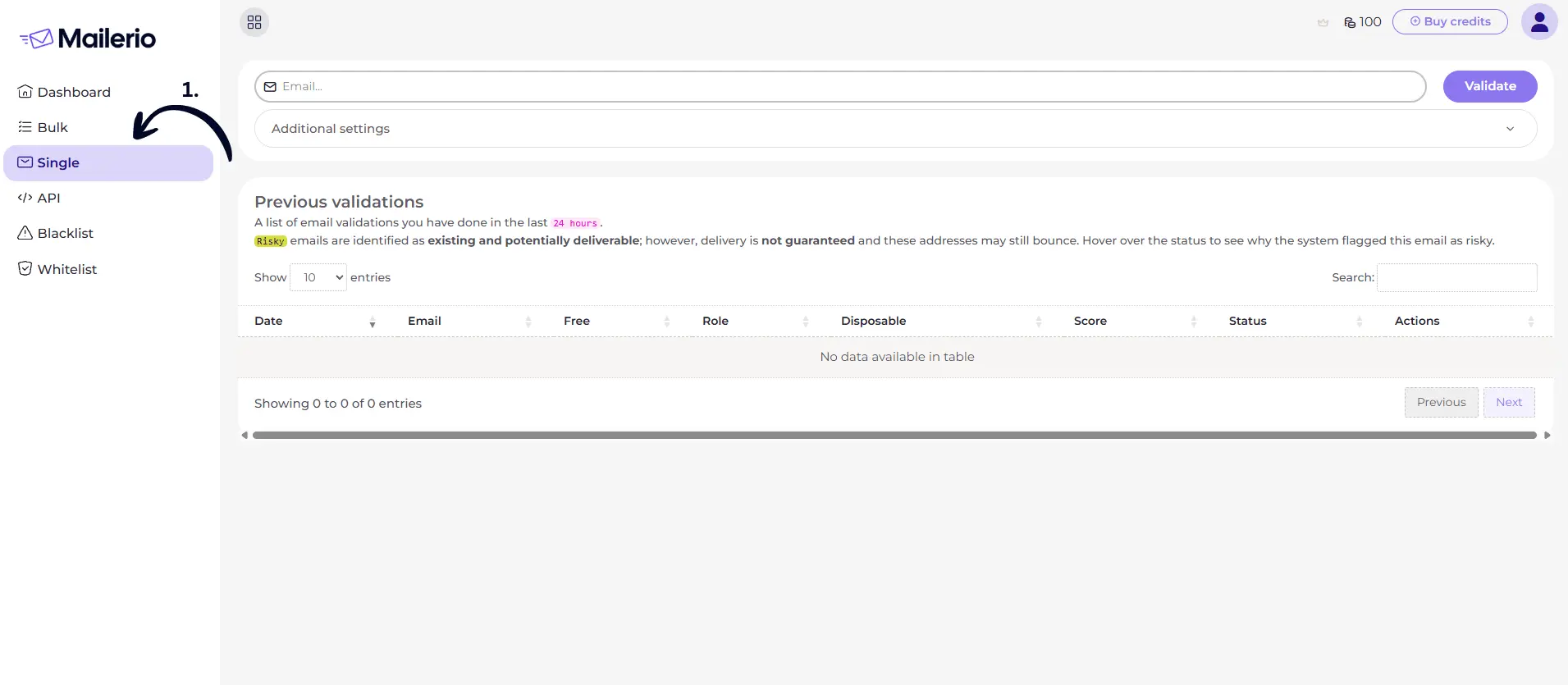
- Enter the Email Address & validate
In the input field at the top, type the email address you want to check. Example: [email protected]. Click on the “Validate” button. Mailerio will now analyze the email address without sending a message.
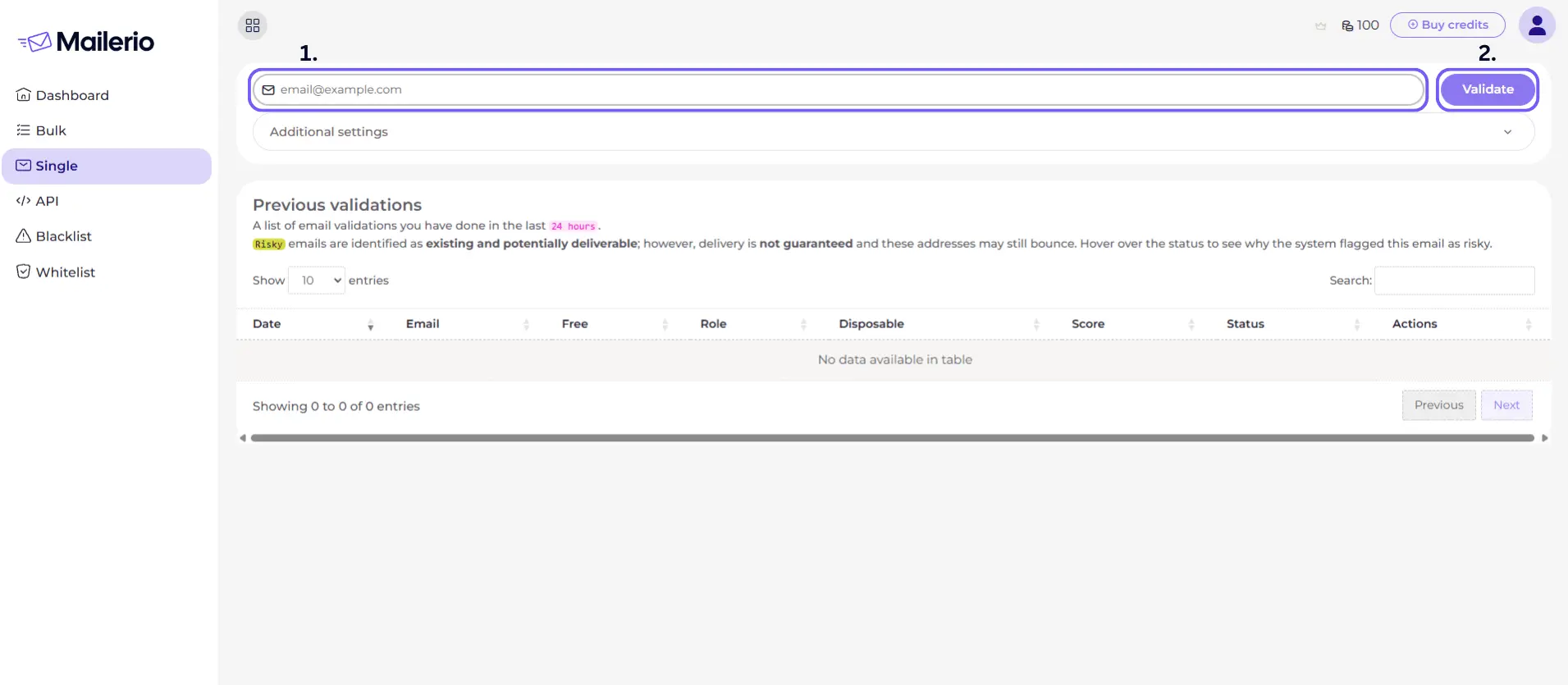
- Review the Validation Results Table
Once the process is complete, the email address will appear in the Previous Validations table.
You’ll see details such as:
Free: Whether the domain is from a free provider (like Gmail).
Role: Whether it’s a role-based address (support@, info@).
Disposable: If it’s temporary.
Score: Deliverability confidence.
Status: Whether it’s deliverable, risky, or undeliverable.
- View Detailed Validation Information
For deeper insights, click the “eye” icon under the Actions column.
A Details window will pop up, showing:
SMTP Provider check results.
Status (e.g., deliverable, undeliverable).
Reason (e.g., invalid domain, full mailbox).
Additional flags like “Free,” “Disposable,” or “Accept All.”
Example: This email is marked undeliverable because of an invalid domain.
- Action Based on the Results
Deliverable → Safe to use.
Risky → May work, but could bounce or fail.
Undeliverable → Do not use invalid or inactive emails.
You’ve now successfully verified an email address without sending an email!
Verify Emails in Bulk
If you have an extensive list of email addresses, you can validate them all at once. Follow these steps to clean your entire list efficiently:
Step 1: Go to Bulk Section
- From the left menu, click bulk.
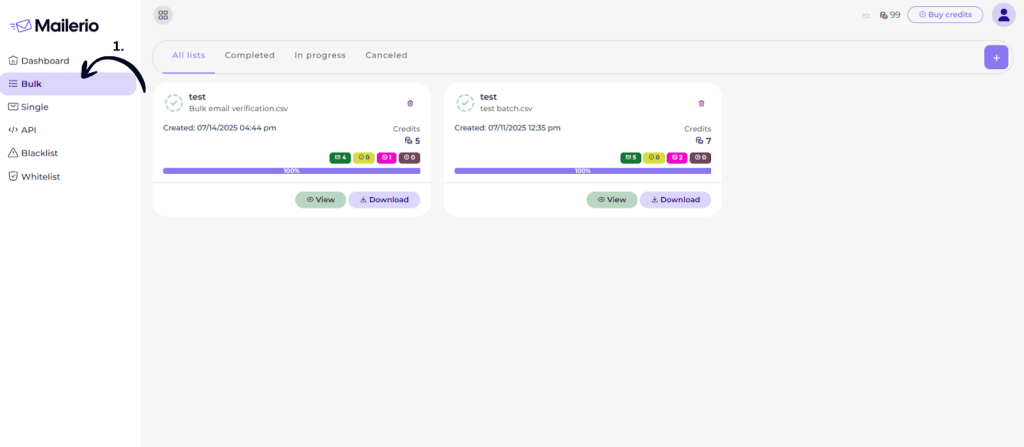
- Then click the Upload File (+ button).
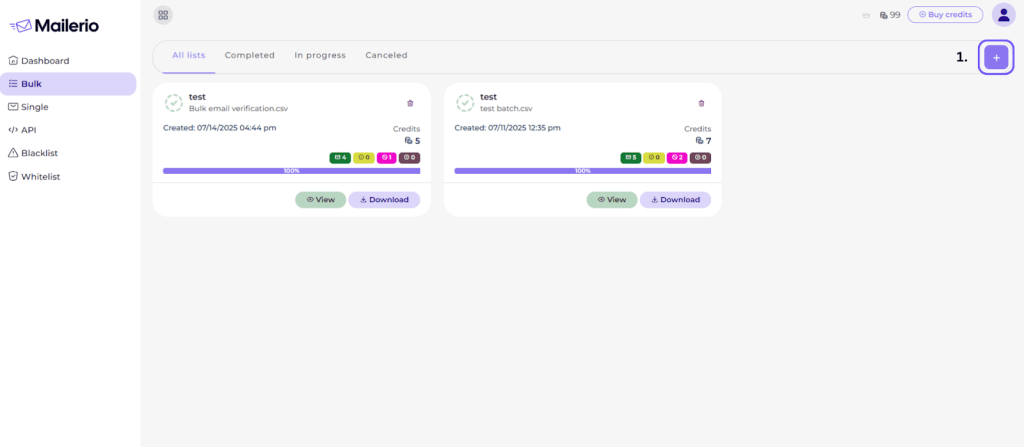
Step 2: Upload Your File
- Enter List name.
- Choose Validation level (Recommended to choose Full validation with SMTP).
- Select your CSV file with email addresses.
- Click Upload.
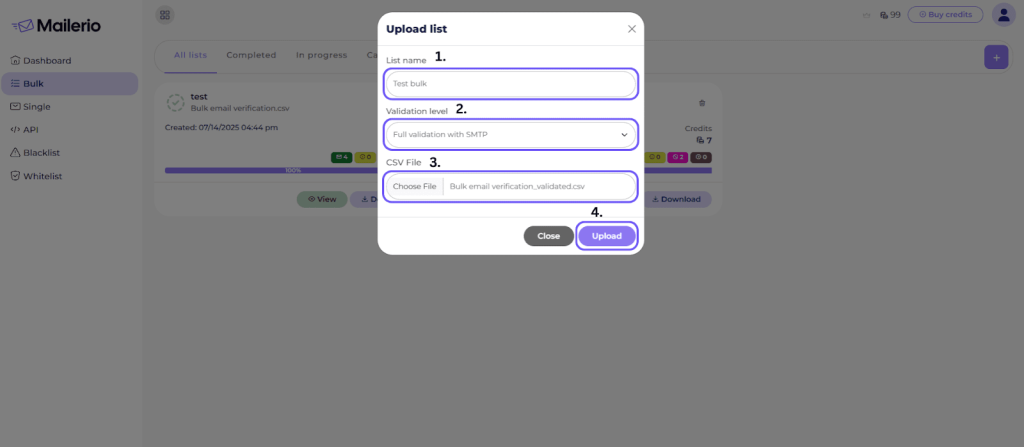
Step 3: Monitor Processing
- Your file will appear under the All lists tab.
- Once complete, click View to see the results.
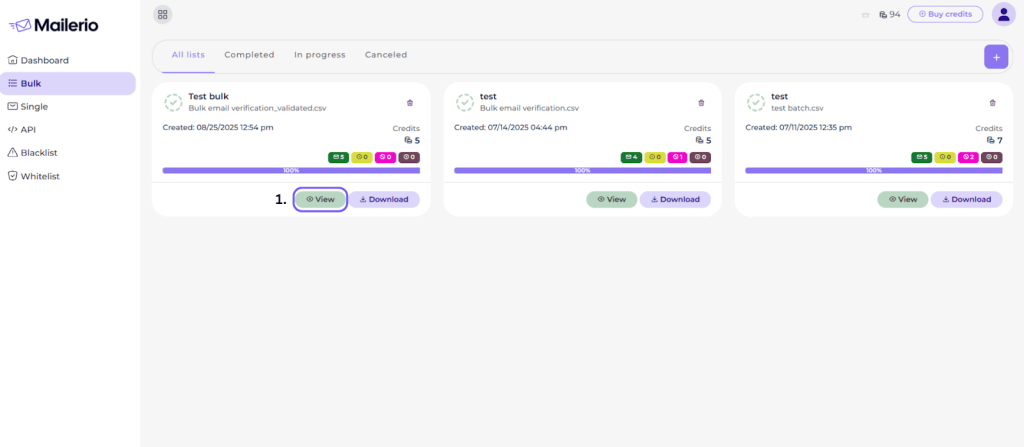
Step 4: View Bulk Results
- The dashboard shows how many emails are valid, risky, or undeliverable.
- Use this to filter out bad addresses.
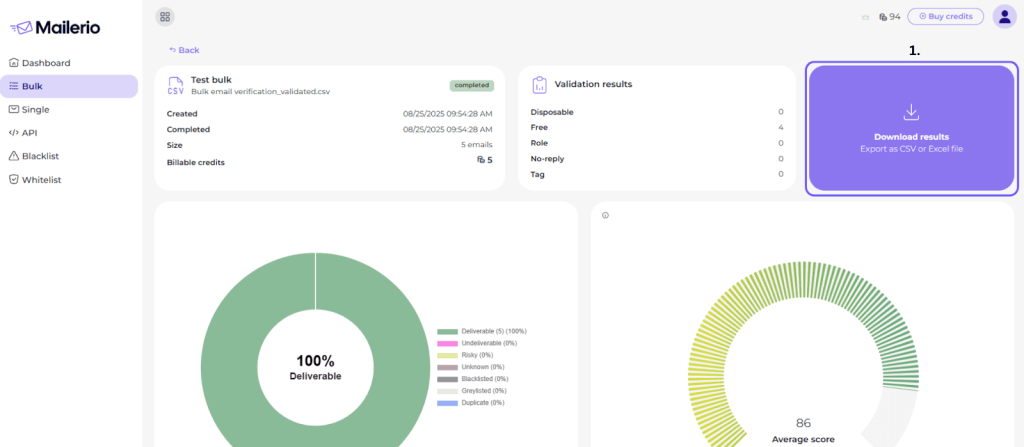
Step 5: Download Results
- Click Download to export the cleaned list with all verification details.
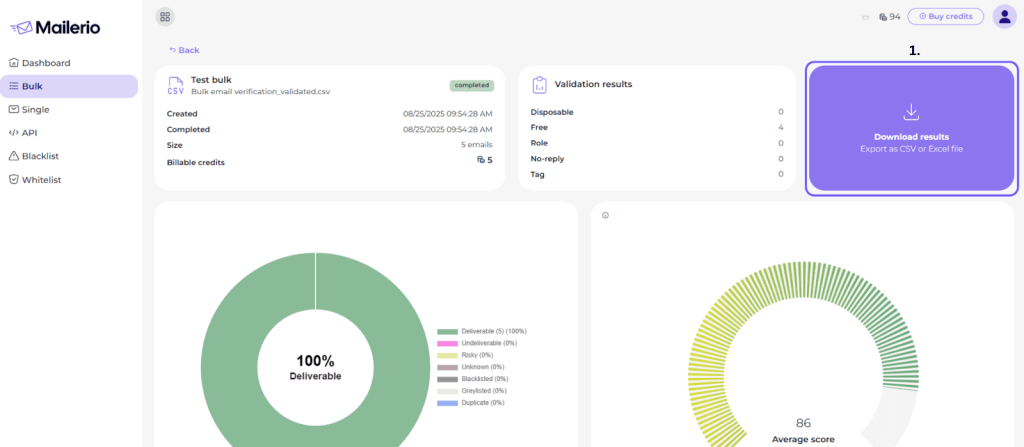
You are done! Now, you can verify bulk emails without sending a message, keeping your list clean and bounce-free.
Benefits of Email Validation
In email marketing and outbound lead generation, everything starts with the quality of your list. A clever subject line or a beautifully designed template won’t help if your emails never reach real inboxes.
That’s why checking and cleaning your list is so important. Mailerio makes this process simple and dependable, helping every campaign perform better.
Protect Sender Reputation
Your reputation as a sender determines whether emails end up in the inbox or in spam. High bounce rates, fake sign-ups, and disposable addresses can quickly damage your reputation.
Even a high bounce rate above 1% signals to mailbox providers that your list may be unhealthy. This can drive your deliverability downward.
Mailerio filters these out before they become a problem, keeping your sending history clean and your deliverability strong.
Save Marketing Budget
Every email sent to a bad address wastes your budget. Platforms charge per send, so invalid emails quietly drain resources. In the U.S. alone, undelivered emails cost businesses more than $164 million every day, totaling $59.5 billion annually.
By filtering them out early, Mailerio ensures you only pay to reach genuine prospects. For startups and lean teams, this efficiency directly lowers costs while maximizing omnichannel marketing impact or outbound strategies.
Boost ROI
When emails actually reach the people who use their inboxes, engagement increases. Opens, clicks, and conversions all improve because you’re speaking to real contacts.
Mailerio highlights risky addresses, such as disposable or generic inboxes, so your focus remains on genuine leads that can turn into customers.
Reduce Bounce Rates
Bounces serve as warning signs to ISPs that your lists are not being maintained. Too many, and your domain could be flagged. Mailerio prevents this by catching invalid and inactive addresses before they are sent. This helps your messages consistently reach the inbox.
Conclusion
Verifying emails without sending is not optional but critical for sustainable growth. Whether you are running a software business, scaling cold outreach, or managing large marketing campaigns, clean data is the backbone of success.
Invalid or fake emails not only waste money but also compromise security. They also harm your sender reputation and reduce your chances of reaching real customers.
Instead of risking poor deliverability, email verification helps ensure your messages reach genuine inboxes. With tools like Mailerio, you can instantly validate addresses, clean lists in bulk, and prevent disposable sign-ups from reaching your database.
Keep your email lists clean, reduce bounce rates, and protect your sender reputation with Mailerio’s real-time validation tool. Sign up now and get 100 free credits to start verifying smarter today.
FAQ
Yes. Proper verification tools only check the basics of an email. This includes its structure, whether the domain exists, and whether the server can receive messages. They don’t open inboxes or touch personal information, so your data stays private. With trusted platforms like Mailerio, verification is safe and meets compliance standards.
By removing invalid, fake, or disposable addresses, you can reduce the number of bounces. This protects your sending reputation, which email services use to determine whether your emails are sent to the inbox or the spam folder. A cleaner list means your messages are more likely to reach real, active users.
Maintaining unverified addresses frequently results in bounces, spam complaints, and reduced engagement. Over time, mail providers may view your domain as unreliable and push your emails to spam or even block them altogether. This makes it more challenging for future campaigns to reach your audience effectively.
The post Verify Email Address Without Sending Email appeared first on Mailerio.
]]>The post How To Block Disposable Email Addresses appeared first on Mailerio.
]]>Those addresses tank your sender reputation, spike your bounce rate, and can even get your account suspended by your ESP. I learned this the hard way when my emails started landing in spam, and eventually, we built Mailerio to make sure no one else has to.
In this guide, I’ll break down:
- What disposable emails are and why people use them.
- Why should you care?
- Disposable email types
- Why do people use disposable addresses?
- Why they’re so dangerous for marketers and SaaS businesses.
- How to block disposable emails using strategies I personally rely on (including Mailerio’s blacklist feature, which doesn’t burn your credits).
- Which emails should you block and which not?
If you care about deliverability, conversions, and keeping your ESP happy, read on. This is the exact playbook I wish I had when I started.
TL;DR
Disposable (temporary/throwaway) email addresses inflate bounce rates, pollute funnels with junk signups, and trigger negative reputation signals with mailbox providers. Block them at capture (API), maintain an always‑fresh disposable domain blacklist, enforce opt‑in, and scrub regularly. Using Mailerio, you can avoid sending to disposable email addresses to protect your sender reputation.
What Is a Disposable Email Address?
A disposable email address is a short‑lived mailbox (minutes, hours, days) created primarily to receive mail temporarily and then expire, forward elsewhere, or be abandoned. They’re also called temporary, throwaway, burner, or 10‑minute emails. Services like Temp Mail, 10MinuteMail, and EmailOnDeck exist specifically to generate these addresses on demand so users can bypass forms, claim offers, or shield their primary inbox.
Disposable addresses may:
- Auto‑expire after a timer (true throwaways).
- Forward mail to a hidden underlying inbox (relay/privacy mask).
- Persist but remain anonymous / non‑owned (shared inboxes many users read publicly).
All three behave differently for email deliverability, more on that below.
Why You Should Care?
A few years back, we launched Ajelix, which went viral, and in a relatively short period, more than 200K users registered on our SaaS platform. Agnese Jaunosane, co-founder @ Ajelix, shared this in detail on Maja Voje’s newsletter, GTM Strategist. You can read more about how Ajelix grew to 280K+ users here. When we started sending onboarding emails after several months, we noticed that our average open rate had sunk to 6%. (including transactional emails).
Which only means that people can’t even receive vital emails such as “confirm email” or subscription upgrade emails. It was a disaster. When we audited the data, nearly 18% of the new addresses were from disposable domains (plus a healthy dose of typos). That cost us months of domain warm‑up and reputation repair. That pain became the seed for Mailerio’s disposable filtering & blacklist automation.
Author’s Note: If you’ve ever watched a pristine sending domain get throttled because of one dirty list import, you know the stomach drop I’m talking about. Don’t wait for that moment, bake disposable filtering into your forms now.
Clean acquisition is cheaper than emergency remediation. Industry data keeps reminding us that inbox access is getting tougher: global spam placement is decreasing every year (Source: Statista), which also correlates with email providers such as Gmail, Yahoo raising email sending security settings.

Either way, it’s getting harder to land emails in the inbox. So you should make sure to follow the best practices, including avoiding sending messages to disposable email addresses, as that will affect your bounce rate, and make sure your email bounce rate benchmarks are in place to avoid hurting sender reputation.
Disposable Email Types: Throwaway, Alias, Forwarding / Relay
There are three popular disposable email types people use, each has its own mission:
- Throwaway / Time‑Limited Mailboxes: Generated and destroyed by services (e.g., classic 10‑minute style). After expiry, mail hard‑bounces. High risk for list quality.
- Alias / Plus‑Addressing / Provider‑Native Variants: Users extend an existing mailbox (e.g.,
[email protected], or provider UI to create tagged aliases). These are deliverable because they route into a real account so you shouldn’t automatically block them. Instead normalize or store canonical form for dedupe. - Forwarding / Relay & Privacy Masking Services: Apple’s “Hide My Email,” Firefox Relay, and similar tools create alternate addresses that forward to the user’s real inbox. These can remain valid indefinitely, but users can disable them, creating sudden soft or hard bounces. Treat with caution: consider progressive profiling or engagement gating rather than blanket blocking.
Here’s a visual schema on how throwaway, alias, and forwarding disposable email work and how it can affect the sender:
What this visual makes clear is that not all disposable emails cause damage in the same way or at the same time. Throwaway addresses are the most obvious culprits: they work for a few minutes or hours, then vanish, turning into hard bounces that hurt your sender reputation. But forwarding services introduce a quieter risk. These addresses may look valid and even deliver initially, only to bounce days or weeks later when the user disables the relay. That’s why it’s important to verify the email address before hitting send.
Even aliases, while generally safe, can create issues if your system treats them as distinct users, skewing your engagement tracking and deduplication logic.
At Mailerio, we built our detection engine to distinguish between these types. That means you can automatically reject the riskiest ones, intelligently normalize or monitor the rest, and avoid the hidden costs of “valid-looking” but ultimately harmful emails.
Why People Use Disposable Emails
People aren’t (usually) trying to hurt you, they’re protecting themselves or gaming incentives:
- Privacy / Spam Avoidance: Users don’t trust you yet; they want the lead magnet without the ongoing marketing, whether it’s multi-channel or omnichannel marketing strategies.
- Trial / Coupon Abuse: Multiple free trials, stacking discount codes, or bypassing usage limits.
- Bot & Fraud Signups: Automated account creation to launder bad activity, manipulate metrics, or stage attacks.
- Testing & QA: Developers (yes, us!) spin up temp inboxes to test flows. That data sometimes leaks into production lists if you’re not segmenting test sends.
Knowing the intent helps you choose the right mitigation block outright, allow but segment, or challenge (CAPTCHA, email confirmation, usage limits).
Why Marketers & SaaS Teams Should Care
Every disposable email that slips into your marketing funnel is basically a hand grenade for your KPIs. You’re paying to acquire leads, whether it’s from outbound lead generation or other channels, the cost, sometimes $20, $50, or even $200 per signup, and a big chunk of that is getting wasted on temp emails that were never going to convert.
And it doesn’t stop at wasted ad spend or junk data in your CRM. When those throwaway addresses bounce or never open your onboarding, your sender reputation tanks, your deliverability nosedives, and you’re suddenly fighting to get even legit emails out of the spam folder. ESPs can (and do) throttle senders who rack up bad stats.
For SaaS teams, that means customers might miss receipts, password resets, security alerts, you name it. In short: disposable emails sabotage both your growth metrics and your customer experience, and fixing the mess after the fact is way more expensive than blocking them up front.
Why Marketers & SaaS Teams Should Care About Blocking Disposable Emails:
- Sky-high Bounce Rates Kill Your ROI: Every disposable address that expires means an undelivered email and a hard bounce. That tanks your sender score and wastes your campaign budget.
- ESP Reputation & Inbox Placement At Risk: Enough bounces and fake signups signal to tools like Gmail, Outlook, and your ESP that you’re reckless, so your legit messages end up in the spam tab.
- Polluted Funnels = Wasted Time & Metrics: When 10–20% of your “new users” are actually burner addresses, your open/click rates nosedive and onboarding triggers fire into the void breaking your analytics.
- Skewed Conversion Data & False Positives: Disposable signups inflate your pipeline, MRR projections, and even investor dashboards setting you up for bad decisions and embarrassing churn digests.
- Support & Billing Nightmares: Trying to recover abandoned carts, verify billing, or re-engage a dormant user? Good luck if the only address you have self-destructed last month.
- Fraud, Abuse & Incentive Loopholes: Attackers and cheapskates love disposables to farm free trials, hoard promo codes, or test attack vectors. It’s a tax on your CAC that gets worse at scale.
- Wasted Deliverability Warmup: One “dirty” blast to a disposable-heavy list can undo weeks of careful warmup and cost months’ worth of inbox trust, even if you fix it later.
- Customer Experience Hit: Your real users miss onboarding sequences or don’t get receipts because their valid emails are buried among hundreds of fakes, causing false deliverability alarms.
The earlier you plug this leak, the healthier your list, the higher your conversions, and the safer your brand’s reputation will be.
(And if you’re running cold outreach? Hitting a disposable domain is the fastest way to get your domain flagged as spam, it’s a career-limiting move.) That’s exactly why we made disposable detection the default setting at Mailerio.
How To Identify Disposable Emails?
Time needed: 2 days
Below is the layered approach we recommend (and built into Mailerio). You can keep up this system on your own or simply use a solution that does it for you, as it’s a pretty complex process.
- Domain Intelligence (Known Lists)
Maintain a rolling list of domains operated by disposable / temp mail providers. Open‑source repos like
disposable-email-domainsand curated blocklists from anti‑fraud vendors can jump‑start your coverage. Update frequently; new domains appear daily. (Here’s one list you can use from GitHub).
Author’s Note: We seed our internal dataset from multiple community lists, commercial feeds, and live traffic signals (like MX patterns). If you roll your own, automate updates to avoid that. I would suggest using a tool that does this for you.
- Real‑Time Verification API
Call an email validation API at the point of capture (signup form, checkout, gated asset). A good API will check syntax, domain DNS, MX, SMTP response, disposable status, role account, catch‑all, and more, and return guidance before you accept the submission. Solutions like Mailerio (my team), UserCheck, and others highlight disposable detection specifically to block junk signups.
We also have a great API documentation you can use to implement Mailerio’s API easily. - Bulk List Validation / Reverification
Import large email lists (legacy CRM, webinar leads, tradeshow scans) into a validator, like Mailerio, before sending. Catch expired throwaways before they bounce back.
For example, here’s the report you can get from Mailerio after validating a bulk list. You can also download all the results easily into CSV or Excel and filter the results based on your needs.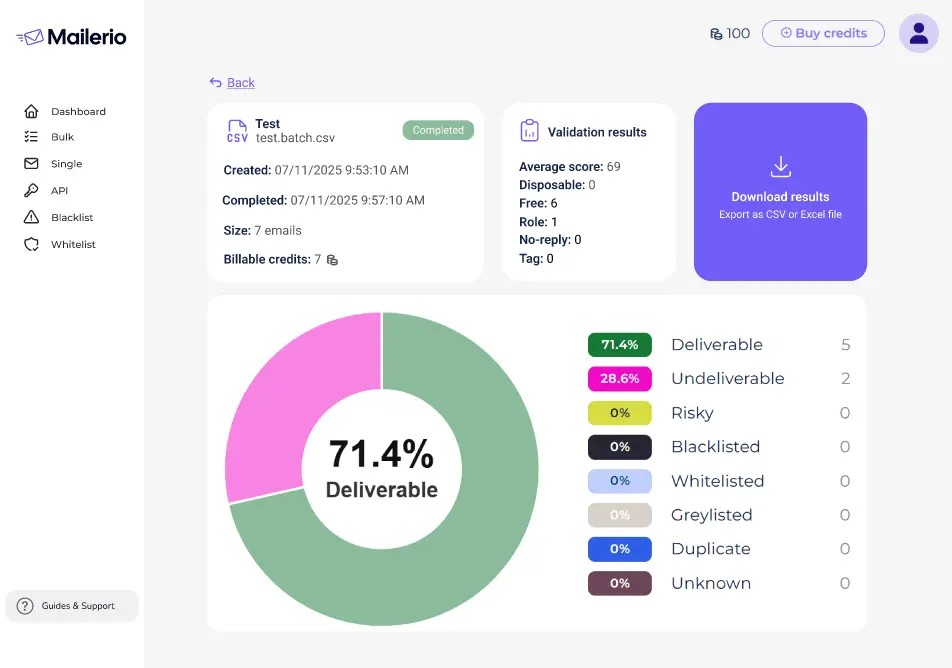
- Engagement & Activity Signals
Disposable leads rarely engage. Segment new signups and watch opens/clicks first 7–14 days; auto‑suppress unengaged segments before main blasts. List hygiene resources underline engagement as a reputation signal providers care about.
- Progressive Profiling & Domain Type Rules
Treat consumer freemail, business domains, privacy relays, and known throwaways differently. Ask for the company domain on B2B flows: challenge suspicious domains with secondary verification.
Should You Block All Disposable Emails? A Decision Grid
Not every temp‑ish pattern deserves an instant block. Use intent + risk + business model to decide.
| Domain Type | Example | Risk to Deliverability | Business Risk | Recommended Action |
|---|---|---|---|---|
| Classic throwaway (10‑minute) | [email protected] | High (expires fast → hard bounce) | Low lead quality; coupon abuse | Block at form. |
| Public inbox / shared temp | [email protected] | Medium‑High | Fraud / duplicate signups | Block or challenge. |
| Privacy relay (Apple Hide My Email) | Randomized @privaterelay.appleid.com | Low‑Med (stays valid until user disables) | Lower identity fidelity | Allow but segment; require double opt‑in. |
| Plus alias (user+tag@domain) | Gmail style | Low | None, real user | Allow; normalize canonical address. |
| Corporate temp subdomain | [email protected] | Varies | Could be legit QA | Allow in dev; filter from prod sends. |
Measure the Impact of Blocking Disposable Emails
Don’t just implement, measure.
Core KPIs to Track Before vs After:
- Hard bounce % (30‑day rolling).
- Spam complaint % (Gmail Postmaster Tools; keep <0.30%, shoot for <0.10%).
- Inbox placement vs spam placement (seed tests + deliverability platforms; note global trend of rising spam placement).
- Engagement velocity (opens/clicks in first 7 days), improved list hygiene, correlates with better engagement.
Suggested Experiment Framework:
- Baseline 30 days of current acquisition (no block).
- Enable real‑time disposable detection + blacklist drop.
- Track delta in accepted signups, confirmation completions, hard bounces after 14 days, and engagement.
- Model revenue per net engaged lead; expect fewer signups but a higher conversion rate.
Maintenance Cadence (Quarterly Hygiene Calendar)
| Month | Action | Notes |
|---|---|---|
| Q1 Week 1 | At least semi‑annual; high‑volume senders, quarterly works better. | At least semi‑annual; high‑volume senders, quarterly works better. |
| Monthly | Sync new domains discovered in logs to blacklist; download fresh community list | GitHub disposable domain repo + vendor feeds. |
| Continuous | Real‑time API on all capture points | Mailerio API / equivalent. |
| Quarterly | Review engagement segments; sunset non‑openers | List hygiene best practice. |
Frequently Asked Questions
<1% is excellent; 1–2% needs optimization; >2% is a red flag and merits immediate list cleanup. Benchmarks compiled in Mailerio’s 2025 bounce rate benchmark guide and broader industry deliverability research show top senders hovering well under 1.5% global bounce.
Not automatically. These often reach real, engaged users; treat as a distinct segment and monitor engagement. Only suppress if abuse occurs. Hygiene frameworks recommend segmentation over blanket bans.
Regex helps catch obvious patterns but can’t keep pace with new disposable domains and DNS behaviors. Combine regex with an updated domain dataset or API. The UserCheck tutorial explicitly contrasts DIY/regex against managed APIs; community blocklists (GitHub) fill gaps but require maintenance.
Minimum every 6 months; quarterly if you acquire leads aggressively or run paid acquisition. VerifiedEmail advises semi‑annual at minimum, quarterly for fast‑growing lists; Mailerio’s own data shows quarterly cleaning reduces bounce spikes in SaaS.
Yes. Confirmed opt‑in prevents many fake signups; easy unsubscribe reduces spam complaints — both factors mailbox providers (incl. Gmail) highlight in sender guidelines.
Next Steps
- Activate real‑time validation on every form. (Mailerio API quick‑start in docs.)
- Schedule quarterly list cleanups. Set a calendar reminder; future‑you will thank present‑you.
- Monitor bounce dashboards weekly. Early detection beats emergency remediation.
Want Help?
If you’d like me (or someone from our team) to review your current acquisition flow and suggest disposable filtering rules, reach out from the dashboard or reply to your onboarding email.
The post How To Block Disposable Email Addresses appeared first on Mailerio.
]]>