WooCommerce automatically sends an email notification to the store admin and the customer whenever a new order is placed.
These emails are meant to inform admins about the purchase and to confirm order details with customers.
But suppose you want to boost your branding, improve customer engagement, or add dynamic elements like product recommendations. In that case, you’ll find that customization options on WooCommerce new order emails are limited.
So in this article, we’ll explore how to customize WooCommerce new order emails using basic and advanced methods.
First, we’ll walk through the built-in WooCommerce email settings and how to make simple modifications.
Then, we’ll show you how to extend WooCommerce’s capabilities and enable features like customer segmentation, adding dynamic content, and automated email sequences using our powerful email marketing plugin – Mailster.
Let’s dive in and transform your WooCommerce emails into a more powerful marketing tool.
Why Customize WooCommerce New Order Email Settings
WooCommerce’s default new order emails serve a basic purpose: notifying admins about purchases and confirming order details for customers. But if you are going to build a stronger brand, improve customer relationships, and drive more sales, simply sending a generic confirmation email isn’t enough.
Here’s why customizing WooCommerce new order emails is essential for your business:
i. Improved Branding
Your emails are an extension of your brand. Customizing WooCommerce new order emails allows you to match them with your brand’s colors, logo, and tone of voice. A well-branded email looks more professional and leaves a lasting impression on customers.
ii. Better Customer Experience
A personalized email boosts the shopping experience. Instead of receiving a plain order confirmation, customers can get a warm thank-you message, helpful next steps, or even estimated delivery times, all of which build trust and engagement.
iii. Increased Sales with Upsells & Cross-Sells
New order emails are a great opportunity to recommend related products, offer exclusive discounts, or introduce loyalty programs. By adding dynamic content, such as personalized product suggestions or time-sensitive coupons, you can turn a simple confirmation email into a revenue-generating tool.
iv. Improved Order Management & Customer Support
Clear and informative emails reduce customer confusion. By customizing order details, shipping updates, and support information, you can minimize post-purchase inquiries and provide a smoother experience for both customers and your support team.
v. Advanced Marketing
With tools like Mailster, you can go beyond WooCommerce’s basic email settings. Segment customers based on purchase behavior, send automated follow-ups, or include dynamic content that keeps emails relevant and engaging. This level of customization helps you maintain a strong relationship with customers and encourages repeat purchases.
Now that you understand the benefit,s let’s dive into the step-by-step process of customizing WooCommerce new order emails, starting with the basic built-in settings and moving on to advanced enhancements with Mailster.
Simple Customization of WooCommerce New Order Emails
WooCommerce offers built-in settings that let you modify the content and design of your new order emails without needing custom code. Here’s how you can do it:
Step 1: Access WooCommerce Email Settings
To customize your email templates, log into your WordPress dashboard and navigate to WooCommerce → Settings → Emails. Here, you’ll see a list of email templates that WooCommerce sends automatically based on order status.
Find New Order and select Manage to start customizing.

Step 2: Edit Email Content
WooCommerce allows you to modify:
- Email subject line – Customize how the subject appears in inboxes
- Email heading – Change the main heading inside the email
- Additional content – Add a thank-you message, customer support links, or other helpful details
You can also use placeholder values like {site_title}, {order_number}, and {order_date} to insert relevant order details dynamically.

Step 3: Customize Email Design
To make design changes to the email, go to WooCommerce → Settings → Emails and scroll down to the end of the page to the Email Template section. Make changes as required:
- Header image – Add your logo or a branded banner.
- Footer text – Include contact details, website links, or legal information.
- Colors – Adjust the base, background, and text colors to match your brand.
Click Preview Your Email Template to see how your changes will look.
It’s worth noting that the design changes will be reflected in all your WooCommerce emails.

Step 4: Add Product-Specific Information
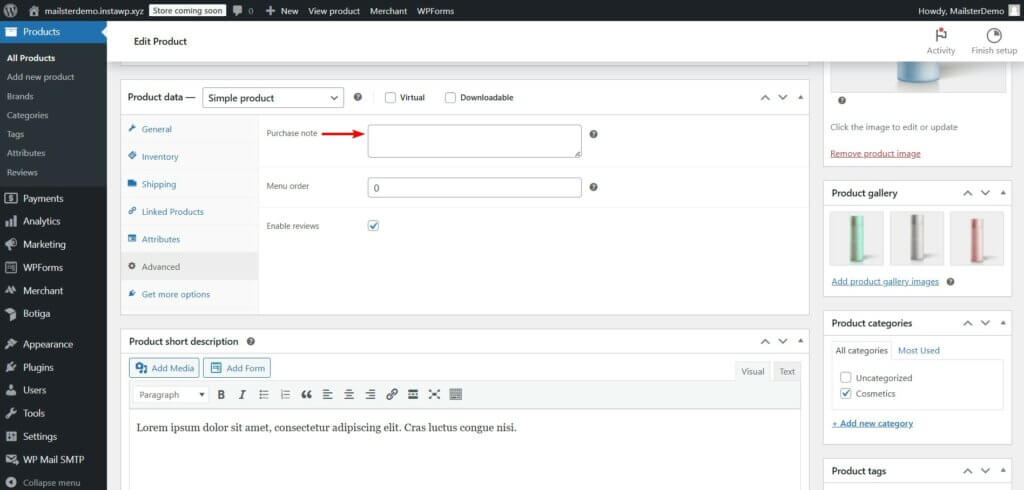
For even more customization, you can add a Purchase Note to individual products. This allows you to include special instructions, PDF guides, or discount codes in the new order email. To add a Purchase Note, go to Products → Edit the product, scroll down to Product Data → Advanced, and enter your message in the Purchase Note field.
This is a great way to provide additional value and keep customers engaged after purchasing.
Now that you’ve customized the basic email settings, let’s explore advanced ways to enhance your WooCommerce new order emails using Mailster.
Advanced Customization of WooCommerce New Order Emails
What is Mailster?

Mailster is a WordPress email marketing plugin that lets you create and automate email campaigns directly from your dashboard. Unlike cloud-based tools, it stores all data in your WordPress database, ensuring GDPR compliance and full ownership of subscriber info.
Key features:
- Familiar UI – Works like WordPress, making it easy to use
- Automation – Set up welcome emails, drip campaigns, and more
- Flexible Sending – Supports any email provider or your own server
- Templates & Personalization – 400+ templates and merge tags for dynamic content
- Unlimited Subscribers & Lists – No restrictions on growth
- Segmentation & Analytics – Target emails based on user behavior and track results
- Time-Zone Based Sending – Schedule emails for optimal engagement
- The intuitive interface – Accessible for both beginners and experienced marketers alike
For WooCommerce users, Mailster offers a separate WooCommerce plugin to automate store-related emails like new order emails and customer follow-ups. This WooCommerce add-on is free to use. But you’d need the premium Mailster plugin to be able to use the WooCommerce plugin.
The premium Mailster plugin is a one-time purchase plugin with three pricing tiers.
The Starter plan costs $79 per year and includes three automation, 10 prechecks per month, and 10 free email templates. The Professional plan is priced at $99 per year and offers 10 automation, 100 prechecks per month, and seven premium email templates. For agencies and advanced users, the Agency plan costs $199 per year and provides unlimited automation, 1000 prechecks per month, and access to all premium features. All plans come with unlimited subscribers, lists, and forms, along with a 14-day money-back guarantee!
Step 1: Set Up Mailster for WooCommerce
For advanced customizations to new order emails, you need the premium Mailster plugin and the free Mailster for WooCommerce plugin.
For the premium plugin, you need to purchase a license. Then install and activate the plugin and you’ll be prompted to enter your Mailster license key. Copy your license key from your Mailster account or the welcome email.
After adding the license key, an activation email will be sent to your registered email address. Open the email and click the activation button to complete the process.

When Mailster is fully activated, proceed to install and activate the free WooCommerce plugin on your store.
Once both plugins are up and running, you’re ready to start customizing your WooCommerce new order emails with advanced automation and personalization.
Step 2: Create a Customer List
Navigate to Newsletter → Lists in your WordPress dashboard, click Add New, name it (e.g., “New Order Customers”), and hit the Save List button. This is where details of customers who purchase products will be stored.

Step 3: Customize Pre-Built Email Templates
Mailster offers a variety of pre-built email templates that you can customize to align with your brand’s identity. These templates provide a professional look while allowing flexibility to modify content, colors, and structure.
i. Access & Edit an Email Template
To access Mailster email templates, navigate to Newsletter → Templates in your WordPress dashboard. Select a template you want to customize by clicking on it.

Mailster templates are built using modules, which are pre-designed sections that help structure your email layout. These modules function like blocks in a page builder, allowing you to drag and drop elements such as text, images, buttons, and dividers.
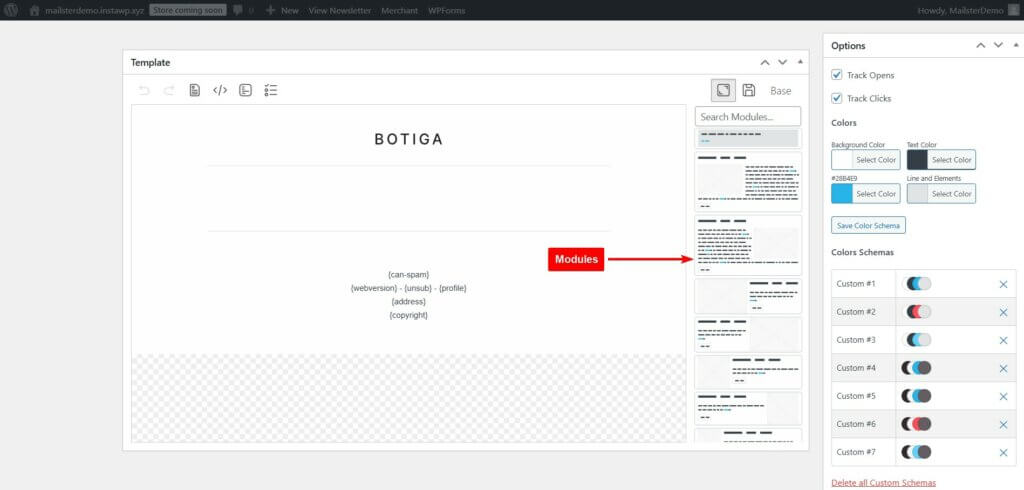
Modify text elements by clicking on them and typing your content. Use formatting options to adjust text size, color, and alignment.
You can replace default images with your brand’s logo or relevant visuals. Click on an image block and select Replace Image to upload a new one. Ensure images are optimized for email by using lightweight file formats like JPEG or PNG.

In the email editor, locate the Options section and adjust colors to match your brand’s theme. Also, select font styles that align with your brand’s typography.

Use the CTA module to add a text or image button and link to any post or page from your WooCommerce store.
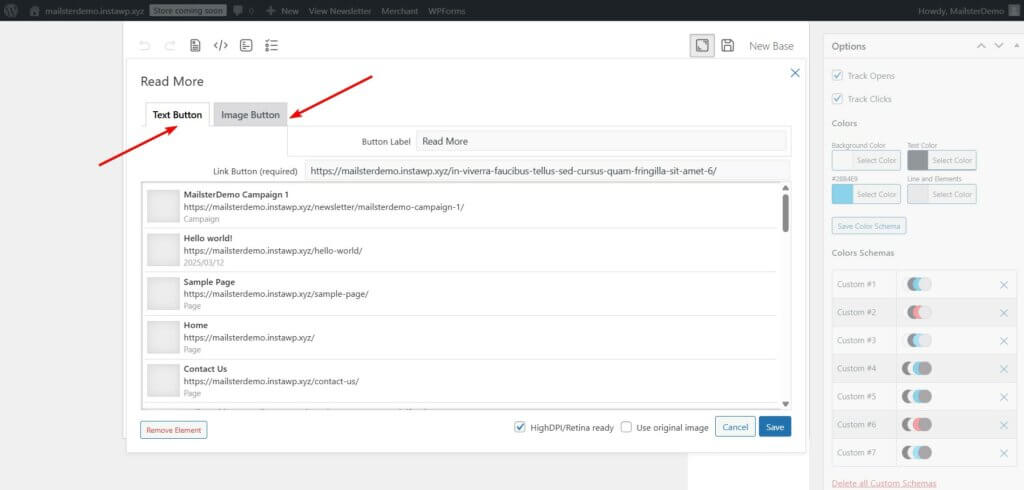
You can customize existing modules to fit your needs or create custom modules for reuse in future campaigns. To save a custom module, modify an existing one, then click the Save icon. Saved modules will appear in the module selector for quick access in any email campaign.
ii. Track Open & Click Rates
You should find the Track Opens and Track Clicks options on the email editor above the color schemes. Ensure the options are selected so Mailster can track open and click rates.

iii. Add Sender Details
Make sure the email campaign has a name and details such as placeholder, subject line, name, and sender email addresses are filled.

iv. Define Conditions for Recipients
In the Receiver meta box, click Edit Conditions. A popup will appear where you can add conditions. Select “is in List” and the name of the email list you created back in Step 2. This will ensure that only recipients from that list are being sent the customized new order emails.

That’s it. That just about covers everything you need to do to create a customized new order email template with Mailster.
Once the customization is complete, hit the Save or Update button to save all your customization.
Step 4: Create an Automation
When setting up Mailster to handle your WooCommerce new order emails, you need to configure the proper conditions to ensure it triggers automatically for new purchases.
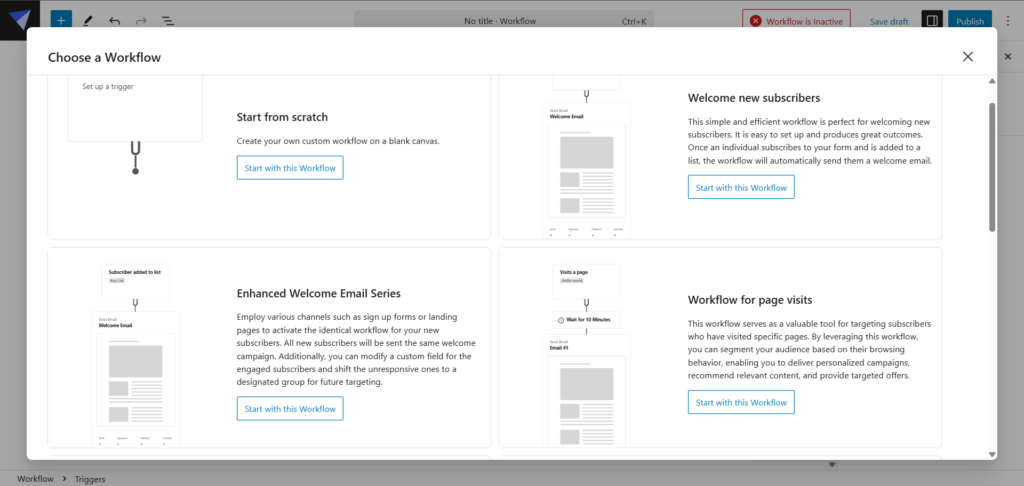
In your Mailster dashboard, navigate to Automation and create a new automation specifically for new orders. Set the automation to trigger when a new order is placed. This ensures your custom email will be sent whenever a customer completes a purchase.
You can tweak Mailster’s existing automation templates or create one from scratch. We already have comprehensive guides on how to create automations so we won’t cover the steps here. Please consult the knowledge base documentation for assistance.
Step 5: Disable Default New Order Email
This step is crucial to replace the default WooCommerce emails with your customized Mailster version.
To disable the default WooCommerce new order emails, go to WooCommerce → Settings → Emails, find the New Order notification, click Manage, and uncheck Enable this Email Notification.

This prevents customers from receiving duplicate emails.
After setting these conditions, your customized Mailster email will automatically trigger with each new order, replacing the default WooCommerce email with your more engaging, brand-consistent version.
Step 5: Test the Customized Email
Thorough testing ensures your emails display correctly across different email clients and devices, preventing potential delivery or formatting issues
On the email editor, go to Delivery and hit the Send Test button. Check formatting across different devices. You can make further adjustments if necessary before using the template in a real campaign.
NOTE: If you need even more control over your email design, Mailster allows you to create custom templates tailored to your specific needs. This gives you full flexibility over layout, branding, and content structure.
By following these steps, you can ensure that your Mailster email templates are fully customized to reflect your brand’s identity and deliver a professional experience to your subscribers.
Need more assistance? We have a comprehensive knowledge base answering all your questions on how to use Mailster. You can also contact us for additional support.
Frequently Asked Questions (FAQs)
Here are answers to some common questions about WooCommerce order emails to help you troubleshoot and optimize your setup.
How to get notified of a new order in WooCommerce?
WooCommerce automatically sends a new order email notification to the site administrator when a new order is placed. To ensure this feature is active, navigate to WooCommerce → Settings → Emails in your WordPress dashboard. Locate the New Order email notification and verify that it is enabled and that the recipient’s email address is correct.
You can also add additional email addresses in the recipient field, separated by commas if you want multiple team members to receive new order notifications. This is particularly useful for larger stores where different departments may need to be informed of incoming orders.

How to resend a new order email in WooCommerce?
To resend a new order notification, go to WooCommerce → Orders on your WordPress dashboard and select the order. Next, on the order editing page, go to Order Actions from the dropdown menu, choose Resend New Order Notification, and hit the Update button.
This feature is especially helpful when an email might have been missed or when you need to send the notification to a different email address after making changes to your email settings.
You can verify that the email was sent by checking the order notes section, which will display a timestamp of when the notification was resent.

How to turn off new order email in WooCommerce?
To disable the new order email notification, navigate to WooCommerce → Settings → Emails in your WordPress dashboard. Find the new order email notification and click Manage. Uncheck the Enable This Email Notification box. Save the changes.
This option is particularly useful when you’re using a third-party email service like Mailster to handle your order notifications or when you prefer to consolidate all your communications through a single platform. Remember that disabling these emails will prevent automatic notifications, so ensure you have an alternative system in place to track incoming orders.
How to customize the sender name and email for WooCommerce order notifications?
You can customize both the sender name and email address for all WooCommerce emails. Go to WooCommerce → Settings → Emails and click on the Email Sender Options section. Here, you can change the “From” name that appears in the recipient’s inbox and the email address from which notifications are sent.
Using a recognizable sender name like your store name and a professional email address that matches your domain (e.g., [email protected]) can help improve email deliverability and build trust with your customers.

Conclusion
Customizing WooCommerce new order emails is a powerful way to strengthen your brand, improve customer experience, and drive additional sales.
While WooCommerce’s built-in settings allow for basic modifications, leveraging a tool like Mailster unlocks advanced personalization, automation, and segmentation.
With Mailster, you can go beyond static order confirmations and create dynamic, targeted emails that engage customers, reduce support inquiries, and encourage repeat purchases.
Whether you’re adding branded visuals, upselling products, or sending personalized follow-ups, these enhancements help turn every new order email into a valuable marketing opportunity.
That’s all for now, folks!
If you found this guide helpful, take a look at other such guides and tutorials on our blog.
]]>The focus on this update was to improve the automation, fix some known bugs, and improve the general UI/UX.
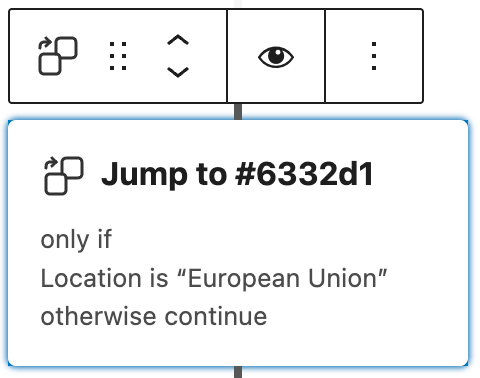
New Jumper Step
The jumper step can be used to “jump” to a certain step in your workflow.
It helps you to either bypass some future steps or go back to a step to repeat parts of your workflow.
It also offers conditions so you can decide when to jump to the defined step.
Check out the Knowledge Base article.
New Notification Step

An often requested feature is to get notified if the customer journey reaches a certain point. The “Notification Step” can send you or someone else a quick notification of the process.
To make things clearer you can also add merge tags like {firstname} or {lastname} in the subject or content of that email to include the current subscriber’s info.
Check out the Knowledge Base Article.
Skip the Step

Now you can quickly disable steps and triggers in your workflow.
This can help you to temporarily skip steps instead of removing them completely.
Disabling a trigger can prevent new users from entering the workflow.
New Prefill your forms with URL arguments
You can now prefill forms if you pass arguments to the URL. This can help increase conversations and reduce errors in user inputs.
You have to enable this option in the forms options section!

Inspect the Queue
You can now check who is currently queued in a step. This makes removing entries from the queue easy or forwarding a user to the next step.

Much more
There are many more fixes and improvements in this release and we cover them in our full changelog here.
]]>1. Strengthened Domain Authentication
Key to these updates is the need for stricter domain authentication. This involves aligning with DomainKeys Identified Mail (DKIM) and Sender Policy Framework (SPF) standards and adhering to Domain-based Message Authentication, Reporting, and Conformance (DMARC) policies. For optimal deliverability, senders should:
- Adopt verified domain identities, ensuring domain-aligned DKIM signatures.
- Configure a custom MAIL FROM domain for SPF alignment.
- Be strategic with subdomains, using different ones for various email types.
- Publish and regularly update DMARC policies.
2. Simplified Unsubscribe Mechanism
To further empower recipients, the new guidelines require a more straightforward unsubscribe process. This includes:
- Implementing one-click unsubscribe headers in emails.
- Ensuring the unsubscribe process is compliant and efficient, with requests honored within two days.
- Rethinking email list-building practices to avoid high spam complaint rates.
3. Proactive Spam Rate Monitoring
Maintaining low spam complaint rates is crucial. Monitoring and adjusting strategies based on recipient feedback will be essential in staying compliant with the new regulations.
Adapting to Change
These changes necessitate a shift in how email marketers approach their campaigns. It’s about balancing effective communication with respecting recipient preferences. By adhering to these best practices, marketers can improve their email deliverability and maintain a positive sender reputation.
Understanding the Changes
Gmail and Yahoo’s latest move aims to enhance inbox security and improve the email ecosystem. These changes include several best practices that have been long-standing in the industry but are now mandatory. It’s essential for businesses, especially bulk senders, to understand and adapt to these new requirements to ensure uninterrupted email delivery and maintain a good sender reputation.
Who will be affected by these new requirements?
Senders who dispatch a minimum of 5,000 emails per day.
When will these requirements be implemented?
These requirements are set to be implemented starting in February 2024.
Why do we recommend to fulfill these requirements in any case?
Email abuse is widespread in the world of electronic communication. Although mailbox providers strive tirelessly to protect their customers, it’s increasingly important for senders to share in this responsibility.
Balancing the recognition of legitimate senders while filtering out spam and phishing attempts from users’ inboxes poses a significant challenge.
Email Health Check
Starting in Mailster 3.3.13 we have implemented a simple check people can utilize to check their current email settings.
Read more about the Email Health Check on our knowledge base.
]]>In this article, we’ll explore the key elements of successful Subscription Forms, provide design tips to enhance the user experience and discuss strategies for optimizing form performance and increasing conversions. We’ll also cover best practices for placing Subscription Forms strategically on your website, integrating them with your email marketing platform, and capturing user data while respecting privacy regulations.
Key Takeaways
- Effective Subscription Forms are crucial for building a loyal subscriber base
- Key elements of successful Subscription Forms include a clear call-to-action, minimal form fields, and compelling value propositions
- Design tips for Subscription Forms include using visually appealing typography and color schemes, ensuring mobile responsiveness, and optimizing form placement
- Strategies for optimizing Subscription Form performance include A/B testing, personalized messaging, and social proof
- Best practices for Subscription Form follow-up include welcome emails, personalized content, and periodic re-engagement campaigns
Why are Subscription Forms important?
Subscription Forms are essential tools for businesses to capture user information and build a strong subscriber base. They enable you to communicate with your audience and drive conversions for your products or services.
When visitors come to your website, they may be interested in your content or offerings, but they are not necessarily ready to make a purchase or commit to ongoing engagement. By offering a Subscription Form, you give them the option to stay connected with your brand and receive regular updates, promotions, or exclusive content.
By filling out a Subscription Form, users provide you with valuable data, such as their email address, location, interests, or preferences. This information allows you to segment and personalize your messaging and tailor your offerings to their needs and expectations.
Moreover, building a subscriber base through Subscription Forms can lead to higher retention rates, increased customer lifetime value, and better customer feedback. By nurturing your subscribers and offering them relevant and valuable content, you can establish trust and loyalty and enhance your brand reputation.
Therefore, including effective Subscription Forms in your website design and marketing strategy is crucial to engaging and growing your audience, generating leads, and converting visitors into loyal customers.
Elements of a Successful Subscription Form
Designing an effective Subscription Form can differentiate between a high subscription rate and a low one. By considering the following elements, you can create a Subscription Form that encourages visitors to subscribe and provides valuable information for your business:
Form layout
Make sure your Subscription Form stands out by placing it in a prominent position on your website, using contrasting colors and font sizes. Keep the layout clean and uncluttered, with clear headings and labels for each field. Consider reducing the number of form fields to the minimum required information to make it quick and easy for users to fill out.
Clear call-to-action
Your call-to-action (CTA) is the most critical element of your Subscription Form. Use clear, concise language that outlines what users will gain by subscribing to your service or product. Ensure your CTA stands out visually by using a different color, font size, or style than the rest of the form, drawing the user’s attention to it.
Compelling value proposition
Offering something of value in exchange for a user’s email address can dramatically increase your subscription rate. Consider offering a discount code, a free e-book, or access to exclusive content in exchange for subscribing. Clearly communicate this offer in your CTA and throughout the form.
Minimal fields
As mentioned earlier, keeping the number of form fields to a minimum makes your Subscription Form more user-friendly. Only ask for the information you need and avoid unnecessary fields that can discourage visitors from subscribing.
Table comparing different types of Subscription Forms
| Subscription Form Type | Advantages | Disadvantages |
|---|---|---|
| Online subscription forms | Quick and easy to fill out, can be embedded on any website or landing page, provide user data for lead generation | Users may not feel comfortable sharing personal information or email addresses |
| Email subscription forms | Provide a direct channel for communication with subscribers, can be personalized based on user preferences, can be automated for ease of use | May get caught in spam filters, requires a pre-existing email list or a separate Subscription Form |
| Registration forms | Provide a way to collect detailed user information, can be used for eCommerce transactions, allows for personalized content delivery | Can be time-consuming to fill out, may discourage visitors from subscribing if too detailed |
| Newsletter subscription forms | Can encourage regular engagement and build a community of readers, provide a way to distribute news and updates directly to subscribers | May need to offer incentives for users to subscribe, may require high-quality content creation and consistent newsletter distribution |
| Lead generation forms | Provide valuable information for marketing and sales teams, help identify potential customers and their interests, can be used to personalize marketing campaigns | May require an established online presence to drive traffic to the form, may require a significant initial investment |
| Opt-in forms | Ensure user consent for email communication, can be used to segment subscribers based on preferences, provide valuable data for marketing campaigns | May require an established email list to seed new subscribers, may require incentives to encourage users to opt-in |
| User registration forms | Provide a way to create a personalized user experience, help facilitate eCommerce transactions, can be used for user data management and segmentation | Can be time-consuming to fill out, may discourage visitors from subscribing if too detailed |
By incorporating these elements into your Subscription Form, you can create a well-designed and user-friendly form that attracts and retains subscribers.
Design Tips for Subscription Forms
Subscription Forms are a critical component of any website. They help you capture user information and build a subscriber base. However, if your form is poorly designed, it can negatively impact your conversion rates. In this section, we will discuss some design tips to create visually appealing and user-friendly Subscription Forms that enhance the overall user experience.
Typography
The typography of your Subscription Form is an important aspect of the design. A legible font size and style that align with your website’s branding can positively impact your form’s readability. It’s essential to use a font that is easy to read on both desktop and mobile devices. Most importantly, avoid overusing bold or italicized text, as it can create visual clutter and make it difficult for users to skim through your form.
Color scheme
The color scheme of your Subscription Form can help you capture user attention and guide them toward completing the form. A bold and contrasting color for the call-to-action button can increase the likelihood of conversion. It’s important to use colors that align with your website’s branding and avoid colors that can be difficult to read or overly distracting for users.
Mobile responsiveness
With an increasing number of users accessing websites through mobile devices, it’s essential to ensure that your Subscription Form is mobile-responsive. A mobile-responsive form adjusts to the user’s mobile screen size, ensuring seamless user experience. A form that isn’t mobile-responsive can be challenging to read and fill out, driving users away from your website.
Whitespace and layout
Whitespace and layout play an essential role in enhancing the overall user experience of your Subscription Form. Providing ample whitespace around form elements can help users focus on filling out the necessary information. It’s essential to keep the layout simple and avoid cluttering the form with unnecessary elements. Placing form elements in a logical and sequential order can improve the flow of information and make the form more intuitive to fill out.
“A legible font size and style that align with your website’s branding can positively impact your form’s readability.”
Optimizing Subscription Forms for Conversion
Now that you have designed an effective Subscription Form, it’s time to optimize it for maximum conversion rates. Here are some strategies to help you get the most out of your forms:
1. A/B Testing
A/B testing involves creating two versions of your Subscription Form and testing them against each other to see which performs better. You can test different variables such as form layout, call-to-action text, and number of fields. Use the results of your testing to make data-driven decisions and continue to refine your form for optimal performance.
2. Personalized Messaging
Personalized messaging is a powerful tool for increasing conversion rates. Use data you have collected from your subscribers to personalize the messaging on your Subscription Form. For example, if a user has previously downloaded a specific resource, you can reference that resource in your form messaging to catch their attention and encourage them to subscribe.
3. Social Proof
Social proof, such as customer testimonials or the number of subscribers you have, can be a powerful motivator for users to subscribe. Consider adding social proof to your Subscription Form to help build trust and boost conversions.
4. Clear Value Propositions
Ensure that your Subscription Form clearly communicates the benefits of subscribing. Use persuasive language and offer valuable incentives such as exclusive content or discounts to entice users to sign up.
5. Optimize for Mobile
The majority of internet users access websites on their mobile devices. To maximize conversions, ensure that your Subscription Form is mobile-friendly and loads quickly on mobile devices. Use a responsive design that adjusts to different screen sizes, and keep your form fields to a minimum to avoid overwhelming mobile users.
6. Place Forms Strategically
Consider placing your Subscription Form in strategic locations on your website to maximize visibility. Good options include the top of your homepage, within blog posts, and on your most popular pages. However, avoid bombarding users with too many forms on one page, as this can be overwhelming and decrease conversions.
By implementing these strategies, you’ll be able to boost conversion rates and turn more of your website visitors into loyal subscribers.
Placement of Subscription Forms on your website
Now that you know how to design an effective Subscription Form, the next step is to strategically place it on your website to maximize visibility and encourage user engagement. Here are some best practices to consider:
- Place Subscription Forms above the fold: This refers to the top portion of your webpage that is visible without scrolling. By placing your Subscription Form above the fold, you increase the chances of visitors noticing it right away.
- Use pop-ups or slide-ins: Pop-ups and slide-ins are effective ways to catch visitors’ attention and encourage them to subscribe. However, be mindful of the timing and frequency of these pop-ups to avoid annoying your audience.
- Include Subscription Forms in your website’s header and footer: This ensures that the Subscription Form is easily accessible from anywhere on your website.
- Embed Subscription Forms within your content: Including Subscription Forms within your blog posts or product descriptions can increase the chances of visitors converting into subscribers as they engage with your content.
Remember to test different placements and formats to determine what works best for your specific website and audience.
Integrating Subscription Forms with Your Email Marketing Platform
Once your Subscription Form is designed and live on your website, it’s time to start collecting and managing subscribers. Integrating your form with your email marketing platform is a crucial step in automating subscriber management and streamlining communication.
Most email marketing platforms, like Mailchimp and Constant Contact, offer integrations with popular website builders and content management systems, allowing you to seamlessly connect your Subscription Form with your email list. This integration enables you to:
- Automatically add new subscribers to your email list
- Send welcome emails to new subscribers
- Segment your email list based on subscription preferences
- Schedule and send regular newsletters and promotional emails
When integrating your Subscription Form with your email marketing platform, be sure to test the connection and ensure that subscriber data is accurately transferred. You may also want to customize the confirmation message that users receive after submitting the form, thanking them for subscribing and letting them know what to expect from your emails.
Integrating Subscription Forms with your email marketing platform streamlines your subscriber management and communication process, saving you time and ensuring that your subscribers receive timely and relevant emails.
Capturing user data while respecting privacy regulations
When designing Subscription Forms, it is crucial to prioritize user privacy and adhere to data protection regulations. As you collect user information, it is important to obtain explicit consent through opt-in options or checkboxes.
Additionally, you must clearly communicate how the collected data will be used and provide users with the option to opt out or unsubscribe at any time. It is also essential to implement security measures, such as SSL encryption, to protect user data from unauthorized access and cyber threats.
Some best practices to follow when capturing user data through Subscription Forms include:
- Clearly stating your privacy policy
- Providing an easy opt-out option
- Encrypting sensitive information
- Only collecting necessary information
- Honoring user preferences
By prioritizing user privacy and following best practices for data collection, you can establish trust with your subscribers and safeguard their personal information.
Implementing GDPR compliance
If you have subscribers in the European Union, it is essential to comply with the General Data Protection Regulation (GDPR), which sets standard guidelines for data protection and user privacy.
To ensure GDPR compliance, you must obtain explicit consent from users before collecting their personal data, provide them with the right to access and delete their data, and appoint a Data Protection Officer (DPO) to oversee compliance.
| GDPR Requirements | Examples of Compliance |
|---|---|
| Explicit consent | Providing opt-in checkboxes for each data category |
| Right to access data | Providing a link to a user’s personal information on request |
| Right to delete data | Providing a way for users to delete their personal information |
| Appointing a DPO | Hiring a qualified professional to oversee GDPR compliance |
By complying with GDPR regulations, you demonstrate your commitment to protecting user data and can avoid costly penalties for noncompliance.
Increasing Subscription Form conversions through incentives
Creating effective Subscription Forms is only half the battle, as incentivizing visitors to fill them out is equally crucial. Below are some proven strategies to boost your Subscription Form conversions:
Offer exclusive incentives for subscribers
Subscription Forms are more likely to convert visitors into subscribers when accompanied by exclusive offers, such as free shipping, discount codes, or access to premium content. Ensure that the incentives are relevant to your target audience, and prominently display them alongside your Subscription Form. Remember to follow up with your subscribers promptly and deliver on your promises to build trust and increase brand loyalty.
Provide free resources to entice users
Another effective way to incentivize users to subscribe is by offering free resources, such as eBooks, webinars, or product demos. These resources not only provide value to your subscribers but also position your business as a credible authority in your industry. Consider creating a dedicated landing page that showcases your free resources and encourages users to fill out your Subscription Form to access them.
Use limited-time promotions to create urgency
By offering limited-time promotions, such as flash sales or early-bird discounts, you can create a sense of urgency and motivate users to subscribe before the offer expires. Use compelling copy and eye-catching graphics to highlight your limited-time promotions and prominently feature them on your Subscription Form. Don’t forget to follow up after the promotion ends to keep your subscribers engaged and interested in your brand.
Showcase social proof to build trust
Displaying social proof, such as customer reviews or testimonials, is a powerful way to build trust and credibility with your visitors and incentivize them to subscribe. Add a section on your Subscription Form that features positive feedback from satisfied customers or industry experts. Don’t forget to update your social proof regularly to showcase the latest and most convincing feedback.
By incorporating these tactics, you can increase your Subscription Form conversions and build a loyal subscriber base that engages with your brand and drives revenue.
Analyzing and optimizing Subscription Form performance
Measuring and analyzing the performance of your Subscription Forms is vital to improving their effectiveness and driving lead generation. By tracking key metrics, you can identify areas for improvement and make data-driven adjustments to enhance the user experience and increase conversions.
Here are some essential metrics to consider when evaluating your Subscription Form performance:
| Metric | Description |
|---|---|
| Conversion Rate | The percentage of visitors who complete your Subscription Form out of the total number of visitors who viewed it. |
| Bounce Rate | The percentage of visitors who leave your website after viewing the Subscription Form but before completing it. |
| Form Abandonment Rate | The percentage of visitors who start filling out the Subscription Form but do not complete it. |
To optimize your Subscription Forms based on these metrics, consider implementing A/B testing to compare different versions of the form and see which performs better. You can also experiment with personalized messaging and social proof to increase user engagement and conversion rates.
Regularly analyzing and optimizing your Subscription Forms can help you stay ahead of the curve and ensure that your lead-generation efforts are effective and efficient.
Best Practices for Subscription Form Follow-Up
Once users have filled out your Subscription Form and become subscribers, it’s crucial to engage and nurture them to build a lasting relationship. Here are some best practices for Subscription Form follow-up:
Send a Welcome Email
As soon as a user subscribes, send a welcome email to thank them for subscribing and introduce them to your brand. You can also use this opportunity to provide them with an exclusive offer or invite them to explore your website further.
Provide Personalized Content
Personalize your emails and content for your subscribers based on the data you collected from the Subscription Form. This can include their name, location, or interests. By tailoring your content to their preferences, you can increase engagement and loyalty.
Periodic Re-engagement Campaigns
It’s important to keep your subscribers engaged over time. Periodic re-engagement campaigns can help bring inactive subscribers back to your brand and increase their interest. Consider sending them a special promotion or a reminder of your brand’s value.
Use Metrics to Analyze Performance
Use metrics such as open rates, click rates, and conversion rates to monitor the performance of your follow-up campaigns. This information can help you understand what resonates with your subscribers and make data-driven improvements to your follow-up strategy.
By following these best practices, you can effectively engage and nurture your subscribers after they fill out your Subscription Form. This can lead to increased customer loyalty and drive conversions for your business.
Conclusion
Now that you have explored the importance of Subscription Forms and the key elements that make them effective, it’s time to apply these tips and best practices to your own website. Remember to keep your Subscription Forms visually appealing, user-friendly, and optimized for conversion.
Engage and Nurture Your Subscribers
After users fill out your Subscription Form, it’s important to continue engaging and nurturing them. Send them welcome emails, personalized content, and periodic re-engagement campaigns to keep them engaged. By building a strong relationship with your subscribers, you can establish brand loyalty and drive long-term growth.
Measure and Analyze Your Form Performance
Tracking the performance of your Subscription Forms is key to making data-driven improvements. Monitor metrics such as conversion rate, bounce rate, and form abandonment rate to identify areas for improvement and optimize your forms over time.
By implementing the strategies outlined in this article, you can design effective Subscription Forms that boost customer engagement, drive conversions, and build a loyal subscriber base.
FAQ
Why are Subscription Forms important?
Subscription Forms play a crucial role in capturing user information and building a subscriber base. They enable businesses to gather valuable data, communicate with their audience, and drive conversions.
What are the key elements of a successful Subscription Form?
The key elements of a successful Subscription Form include form layout, clear call-to-action, minimal fields, and compelling value propositions.
How can I design visually appealing and user-friendly Subscription Forms?
You can design visually appealing and user-friendly Subscription Forms by considering factors such as typography, color scheme, and mobile responsiveness.
How can I optimize my Subscription Forms for higher conversion rates?
Strategies to optimize Subscription Forms for higher conversion rates include A/B testing, personalized messaging, and social proof.
Where should I place Subscription Forms on my website?
Subscription Forms should be strategically placed on your website to maximize visibility and encourage user engagement.
How do I integrate Subscription Forms with my email marketing platform?
You can seamlessly integrate Subscription Forms with your preferred email marketing platform to automate subscriber management and streamline communication.
How can I capture user data while respecting privacy regulations?
It is important to obtain user consent and implement data protection measures when collecting information through Subscription Forms to ensure compliance with privacy regulations.
What are some effective strategies for increasing Subscription Form conversions?
Effective strategies for increasing Subscription Form conversions include offering exclusive incentives, free resources, and limited-time promotions.
How can I analyze and optimize the performance of my Subscription Forms?
You can analyze and optimize the performance of your Subscription Forms by measuring metrics such as conversion rate, bounce rate, and form abandonment rate and making data-driven improvements.
What are some best practices for follow-up after a user fills out a Subscription Form?
Best practices for follow-up after a user fills out a Subscription Form include sending welcome emails, providing personalized content, and running periodic re-engagement campaigns.
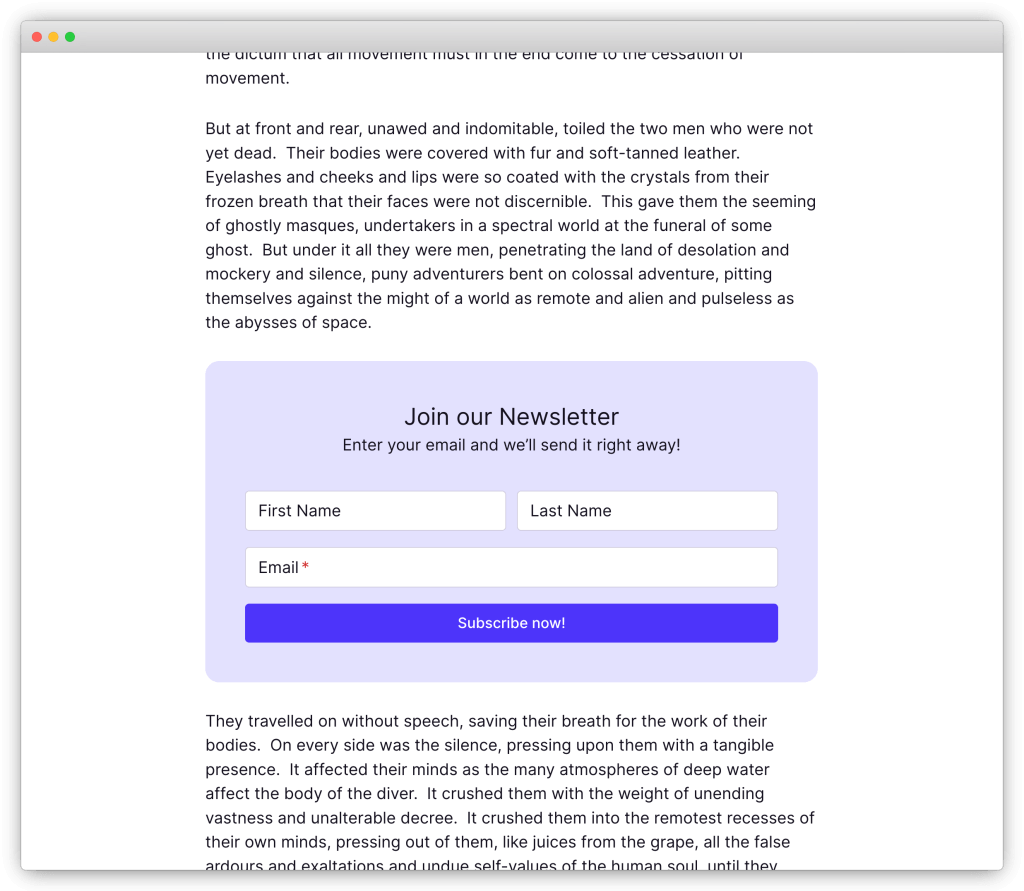
]]>
Key Takeaways:
- Creating a compelling newsletter signup form is crucial for growing your email list
- Simplicity and visual appeal are key when designing a signup form
- Incentives and clear messaging can persuade potential subscribers to sign up
- Leveraging social proof can build trust and encourage signups
- Timing is crucial when using popups to capture email addresses
What is a Newsletter Signup Form?
A newsletter signup form is a crucial tool for collecting email addresses from potential subscribers and building your email list. It serves as a way to seek permission from visitors to receive email marketing content. Newsletter signup forms can be integrated into your website or created using third-party tools, and they capture essential information such as the subscriber’s email address.
By completing the signup form, subscribers give their consent to receive email marketing, making it an effective way to grow your audience and engage with potential customers. Newsletter signup forms are an essential component of any email marketing strategy, allowing you to nurture relationships with prospects and turn them into loyal customers.
Creating a well-designed and user-friendly newsletter signup form is crucial to encourage visitors to provide their email addresses willingly. By customizing the form’s design, copy, and call-to-action, you can make it more visually appealing and persuasive. This will increase the chances of visitors becoming subscribers and receiving your valuable email content.
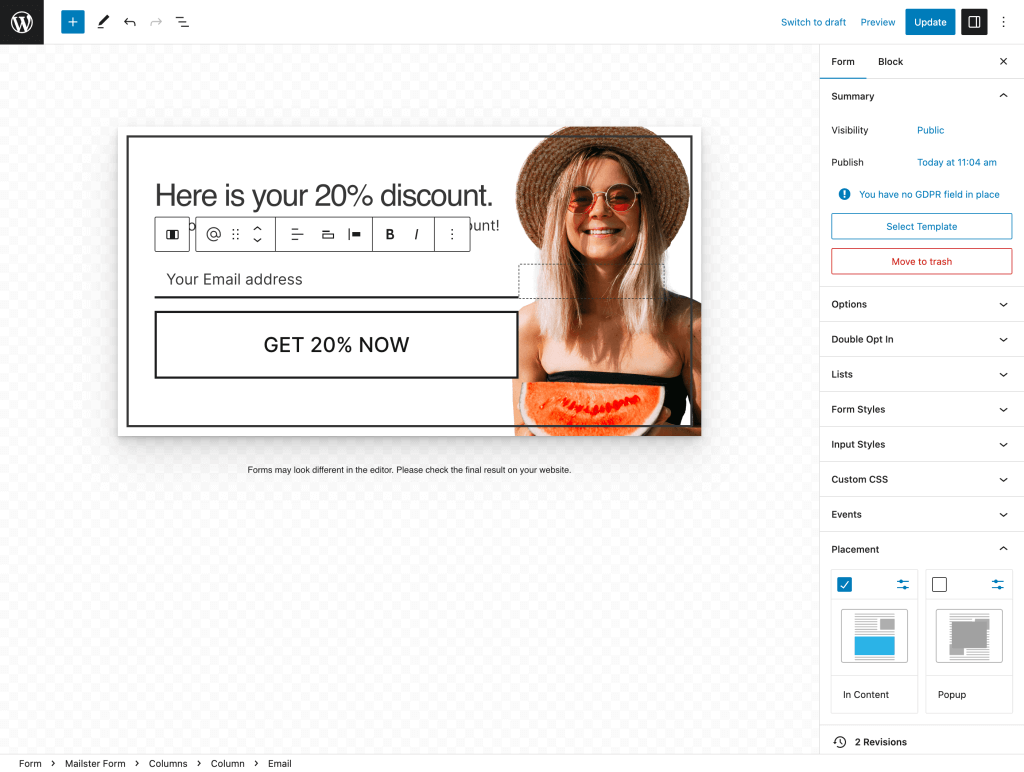
Table: Elements of an Effective Newsletter Signup Form
| Element | Description |
|---|---|
| Clear Call-to-Action | A prominent and persuasive call-to-action button that clearly communicates the action visitors need to take to sign up. |
| Minimalistic Design | A clean and visually appealing layout that aligns with your brand and focuses on the essential elements of the signup form. |
| Benefit-oriented Copy | Compelling copy that highlights the benefits of subscribing, such as exclusive content, discounts, or valuable resources. |
| Data Privacy Assurance | A statement assuring visitors that their information will be kept secure and not shared with third parties. |
| Social Proof | Showcasing social proof, such as subscriber counts or testimonials, to build trust and credibility. |
By incorporating these elements into your newsletter signup form, you can create a compelling and effective tool for growing your email list and driving engagement with your audience.
Tips for Creating an Engaging Signup Form Design
When it comes to creating an email signup form, the design plays a crucial role in capturing the attention of potential subscribers. To create an engaging and visually appealing form, follow these tips:
Simplicity is Key
A clean and simple layout is essential for a signup form. Avoid cluttering the form with unnecessary elements that can distract or overwhelm visitors. Stick to a clean design that aligns with your brand’s aesthetics.
Make Use of White Space
White space, also known as negative space, refers to the empty space around elements. It helps improve legibility and allows visitors to focus on the most important elements of the form. Use ample white space around form fields, headings, and the call-to-action button to make them stand out.
Use High-Quality Images
Images can add visual interest and support the message of your signup form. Choose relevant and high-quality images that align with your brand. For example, if you’re promoting a fitness newsletter, use images of people exercising or healthy food. The right images can help capture the attention of potential subscribers and make your form more visually appealing.
Highlight Benefits and Social Proof
In your signup form, clearly highlight the benefits that subscribers will receive by signing up for your newsletter. This can include exclusive content, discounts, or access to special events. Additionally, consider adding social proof, such as subscriber counts or testimonials, to build trust and credibility.
Optimize Placement and Design of the Call-to-Action Button
Your call-to-action (CTA) button is the most important element of your signup form. Make sure it stands out by using contrasting colors or fonts. Position the CTA button in a prominent location on the form, such as below the benefits and social proof, and ensure it is easy to spot.
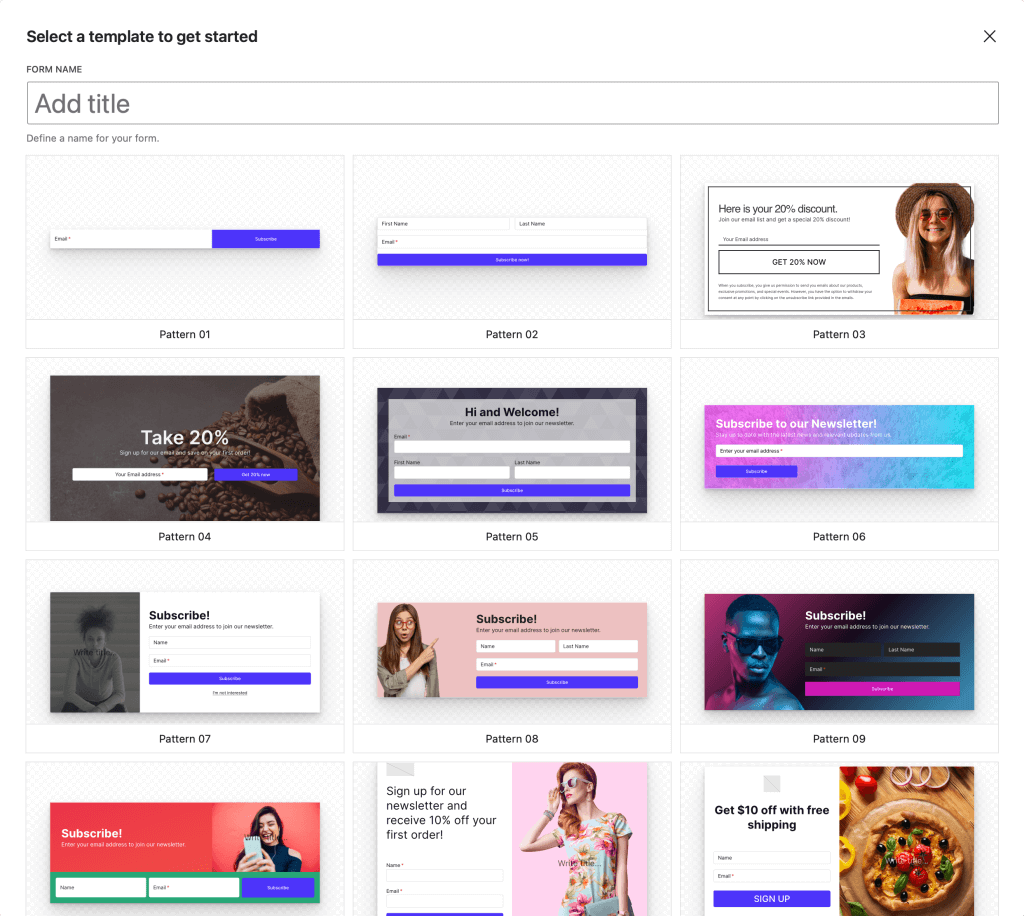
| Tip | Description |
|---|---|
| Simplicity is Key | Avoid cluttering the form with unnecessary elements that can distract visitors. |
| Make Use of White Space | Use ample white space around form elements to improve legibility and draw attention. |
| Use High-Quality Images | Select relevant, high-quality images that support your message and align with your brand. |
| Highlight Benefits and Social Proof | Clearly communicate the benefits of signing up and incorporate social proof to build trust. |
| Optimize CTA Button | Ensure the call-to-action button stands out and is placed prominently on the form. |
The Power of Incentives and Clear Messaging
When it comes to optimizing your newsletter subscription form, incentives and clear messaging are two key factors that can significantly impact the conversion rate. By offering valuable incentives and effectively communicating the benefits of subscribing to your newsletter, you can entice more visitors to sign up and become loyal subscribers.
Offering Irresistible Incentives
One effective way to encourage visitors to subscribe to your newsletter is by offering them incentives in exchange for their email address. These incentives can come in various forms, such as a free ebook, exclusive content, or a discount code. By providing something of value, you give visitors a compelling reason to take action and subscribe to your newsletter.
For example, if you run an online fitness blog, you can offer a free workout guide or a personalized meal plan to new subscribers. This not only adds value to their subscription but also positions you as an expert in your niche and builds trust with your audience.
Communicating Clear Benefits
In addition to incentives, it’s crucial to clearly communicate the benefits that subscribers will receive by signing up for your newsletter. Use clear and concise messaging to highlight the exclusive content, special offers, or valuable insights they can expect to receive. This helps visitors understand the value they’ll gain from subscribing and motivates them to take the next step.
For instance, if you run a fashion blog, you can mention that subscribers will gain access to insider fashion tips, early access to sales, or exclusive style guides. By clearly outlining the benefits, you create a sense of anticipation and make visitors more excited about becoming a part of your newsletter community.
Leveraging Social Proof to Encourage Signups
Social proof is a powerful psychological tool that can significantly influence people’s decisions. When it comes to newsletter signups, leveraging social proof can help you boost your conversion rates and encourage more visitors to subscribe to your email subscription form. By showcasing the positive experiences of your existing subscribers, you can build trust and credibility with your potential audience.
Examples of Social Proof for Newsletter Signups
- Customer testimonials: Display testimonials from satisfied subscribers who share their positive experiences with your newsletter.
- Subscriber counts: Show the number of current subscribers to create a sense of popularity and value.
- Reputable certifications or ratings: Highlight any professional certifications or ratings your newsletter has received from trusted sources.
By incorporating social proof elements into your newsletter signup form, you can alleviate any doubts or concerns that potential subscribers may have. This can be especially effective for first-time visitors who are unsure about the value they will receive from signing up. Remember to regularly update and refresh your social proof to keep it relevant and engaging.
“I was hesitant to sign up for the newsletter at first, but after seeing the positive testimonials from other subscribers, I knew it was worth it. Now, I look forward to receiving valuable content in my inbox every week!” – Sarah, satisfied subscriber.
Finding the Right Timing for Popups
Popups can be an effective way to capture email addresses through your newsletter signup form. However, timing is crucial to ensure a positive user experience. You want to strike a balance between presenting the popup at the right moment and not overwhelming your visitors. Bombarding them with a popup as soon as they land on your site can be off-putting, leading to a negative impression.
To find the right timing for your popups, it’s important to consider your audience’s browsing behavior. Give your visitors some time to explore your website and appreciate its content before presenting them with a signup form. Waiting too long, on the other hand, may result in missed opportunities as visitors leave without signing up.
Based on research and best practices, it is recommended to have a well-designed and visually appealing newsletter popup appear within approximately 20 seconds of a visitor’s arrival on your site. This timing allows them to get a feel for your content and become more receptive to signing up for your newsletter. By aligning your popup with the overall user experience, you can increase the likelihood of capturing email addresses and growing your subscriber list.
Table: Pros and Cons of Different Popup Timing
| Pros | Cons | |
|---|---|---|
| Immediate Popup | – Can capture quick impulse signups – Immediately presents the signup form | – Can be perceived as intrusive – Visitors may not have had a chance to explore the site |
| Delayed Popup | – Allows visitors to engage with your content – Increases the likelihood of capturing more qualified leads | – Some visitors may never encounter the popup – Missed opportunities for immediate signups |
| Optimized Timing | – Balances user experience and capturing signups – Improves the chances of converting visitors into subscribers | – Requires continuous testing and optimization – Can vary based on website and audience behavior |
As with any aspect of your newsletter signup form, it’s important to continuously analyze and optimize your popup’s timing. Monitor your conversion rates and user feedback to determine if adjustments are needed. By finding the right timing for your popups, you can effectively capture email addresses and engage with your audience through your newsletter.
Crafting Compelling Call-to-Action Buttons
When it comes to your newsletter signup form, the call-to-action button is a crucial element that can make or break your conversion rate. To create a compelling call-to-action button, you need to ensure that it stands out and communicates a clear message to your visitors. Instead of settling for generic terms like “Send” or “Submit,” use more specific and persuasive wording that sparks curiosity and encourages action.
Consider using phrases like “Join the Club,” “Get Exclusive Access,” or “Unlock VIP Benefits.” These phrases not only convey a sense of exclusivity and value but also create a sense of belonging for your potential subscribers. By using language that resonates with your target audience and aligns with your brand, you can increase the chances of visitors clicking on your call-to-action button and signing up for your newsletter.
Another important aspect to consider is the design of your call-to-action button. Make sure it stands out from the rest of the form by using eye-catching colors, contrasting fonts, or even adding subtle animations. The goal is to draw the visitor’s attention to the button and make it visually appealing and clickable. Test different designs and placements to see what works best for your audience and encourages the highest conversion rate.
Table: Examples of Effective Call-to-Action Buttons
| Company | Call-to-Action Button Text | Color |
|---|---|---|
| Urban Fit | Start Your Fitness Journey | Green |
| Gourmet Delights | Get Delicious Recipes | Orange |
| Style Haven | Shop the Latest Trends | Blue |
In the table above, you can see examples of effective call-to-action buttons. Each button uses persuasive language that aligns with the company’s brand and target audience. The colors chosen for the buttons also stand out and create a sense of urgency and excitement. Remember that the key is to make your call-to-action button compelling, visually appealing, and aligned with the overall message and branding of your newsletter signup form.
Tips for Sending Confirmation and Welcome Emails
Once a visitor signs up for your newsletter through the email form signup, it’s important to send them a confirmation email to ensure that their email address is verified. This step is crucial for maintaining a high-quality email list and reducing the risk of spam. In the confirmation email, include a brief message thanking the subscriber for signing up and provide clear instructions on how to confirm their subscription. Encourage them to check their inbox, including the spam folder, to ensure they don’t miss any important emails from you.
After the subscriber confirms their email address, it’s time to send them a warm welcome email. This email serves as an introduction to your brand and sets the tone for future interactions. Begin by expressing your gratitude for their subscription and briefly explain what they can expect from your newsletter. Consider including a personalized message or a special offer to make them feel valued. This is also an opportunity to provide them with immediate value, such as access to exclusive content or a discount code. Make sure the welcome email is visually appealing, with clear and concise messaging that aligns with your brand identity.
In addition to the confirmation and welcome emails, you may also want to consider creating a series of onboarding emails. These emails can be sent over a period of time and provide new subscribers with more information about your brand, products, or services. Use this opportunity to nurture the relationship with your subscribers and encourage further engagement. Each onboarding email should offer unique and valuable content that keeps the subscriber excited about being a part of your newsletter community. Monitor the performance of these emails and make adjustments as needed to optimize their effectiveness.
| Email Types | Purpose |
|---|---|
| Confirmation Email | Verify email address and prevent spam |
| Welcome Email | Introduce the brand, provide immediate value, and set expectations |
| Onboarding Emails | Nurture the relationship, provide more information, and encourage engagement |
Examples of Effective Newsletter Signup Forms
Creating an engaging newsletter signup form is crucial for growing your email list and connecting with potential subscribers. By customizing your form to reflect your brand and offering clear benefits, you can encourage more signups. Let’s explore some examples of effective newsletter signup forms:
Cumber’s Corner: This lifestyle blog knows the importance of simplicity. Their signup form features a clean and visually appealing design, with a minimalistic layout and a captivating image that aligns with their brand. The form clearly highlights the benefits of signing up, such as exclusive content and updates. It also includes a reassuring statement that subscribers’ information will be kept confidential.
House of Lacuna: As a sustainable fashion company, House of Lacuna uses their signup form as an opportunity to showcase their products and offer a special promotion. The form features high-quality images of their fashionable items, enticing potential subscribers to join their newsletter. By providing a discount code for signing up, they create an immediate incentive for visitors to share their email addresses.
The Mrs. Book: This company specializes in creating heirloom-quality bridal books. Their signup form is a perfect example of an elegant and sophisticated design that reflects their brand. With a minimalistic layout and a touch of floral imagery, the form entices potential subscribers who resonate with their niche. The Mrs. Book also uses social proof by displaying the number of current subscribers, adding credibility to their brand.
| Example | Description |
|---|---|
| Cumber’s Corner | A lifestyle blog that focuses on simple living and self-improvement. |
| House of Lacuna | A sustainable fashion company that offers stylish and eco-friendly clothing. |
| The Mrs. Book | A specialized company that creates heirloom-quality bridal books. |
These examples demonstrate the power of customization and personalization in creating engaging newsletter signup forms. By taking inspiration from these successful forms and tailoring them to your own brand, you can create a compelling signup experience for your potential subscribers.
Remember, designing an effective signup form is just the first step. Continuously analyze and optimize your form to ensure maximum effectiveness in capturing email addresses and growing your email list.
The Impact of Interactive Content in Emails
Interactive content in emails has revolutionized the way marketers engage with their subscribers. By incorporating interactive elements, you can create a more immersive and personalized experience, leading to higher engagement rates and improved campaign performance.
Interactive emails provide a unique opportunity to capture your audience’s attention and encourage them to take action directly within the email itself. Whether it’s a survey, a game or quiz, or an e-commerce product preview, these interactive elements make your emails more dynamic and engaging.
One of the key benefits of interactive content is its ability to increase read time. Subscribers are more likely to spend time interacting with your email, exploring different options, and consuming the information you provide. This extended engagement not only enhances the user experience but also provides valuable data on how your audience interacts with your content.
Furthermore, interactive emails have been proven to have higher click-through and conversion rates compared to traditional static emails. By allowing subscribers to take action directly within the email, whether it’s making a purchase, submitting a form, or providing feedback, you can drive more meaningful interactions and achieve your campaign goals.
Implementing interactive content in your emails can also improve segmentation and personalization efforts. By using interactive elements, you can gather valuable data on subscriber preferences, interests, and behaviors. This information can then be used to fine-tune your email targeting and create more personalized and relevant campaigns.
Overall, the impact of interactive content in emails is undeniable. By leveraging interactive elements, you can create a more engaging and personalized experience for your subscribers, leading to higher engagement rates, improved campaign performance, and ultimately, better results for your business.
The Effective Types of Interactive Content in Emails
Interactive content in emails goes beyond just adding GIFs and buttons. It incorporates specific elements directly into the email design, prompting some form of action within the message. By leveraging interactive content, you can create engaging and interactive newsletters that capture the attention of your subscribers. Here are some effective types of interactive content that you can include in your emails:
Surveys
Adding surveys to your emails can triple engagement and response rates. Surveys allow you to gather valuable insights from your subscribers, helping you better understand their preferences and needs. You can use platforms like Google Forms or SurveyMonkey to create interactive surveys, and embed them directly into your emails using HTML code.
Games/Quizzes
Games and quizzes are interactive elements that can engage and entertain your subscribers. They can also help you gather data about your audience and their preferences. Consider adding a fun trivia quiz or a game that aligns with your brand to keep your subscribers entertained and encourage them to interact with your emails.
E-commerce Product Previews
If you sell products or services, including interactive previews in your emails can enhance the shopping experience for your subscribers. Allow them to browse and preview your products directly within the email itself. By incorporating interactive product previews, you can increase the chances of conversions and drive more traffic to your website or online store.
Company/Product Reviews
Including customer reviews or testimonials in your emails adds social proof and builds trust with your subscribers. Showcase positive feedback and experiences from satisfied customers to demonstrate the value and quality of your products or services. This interactive element can influence purchase decisions and encourage new customers to engage with your brand.
| Email Examples | Description |
|---|---|
| 1. XYZ Clothing Co. | An email from an online clothing retailer that includes an interactive quiz to help customers find their perfect style. |
| 2. Acme Fitness | A fitness brand that sends interactive emails with personalized workout recommendations based on the subscriber’s goals and fitness level. |
| 3. Yummy Recipes | An email newsletter that includes interactive recipe cards, allowing subscribers to customize ingredients and serving sizes. |
By incorporating interactive content into your emails, you can enhance the user experience, increase engagement, and ultimately drive better results for your email marketing campaigns. Experiment with different types of interactive elements to find what resonates best with your audience and aligns with your brand.
Benefits of Customizing Signup Forms
Customizing your signup forms offers several benefits that can enhance your email marketing strategy. By personalizing the experience for your audience, you can establish a deeper connection and make a lasting impression. Here are some key advantages of customizing your signup forms:
- 1. Increased conversion rates: When your signup form resonates with your target audience, they are more likely to provide their email addresses. By customizing the form to align with your brand and using persuasive language, you can capture the attention of potential subscribers and encourage them to sign up.
- 2. Improved targeting: Customized forms allow you to gather more specific information about your subscribers. By adding fields that capture relevant data, such as their interests or preferences, you can segment your email list and deliver more targeted content. This helps to ensure that your subscribers receive emails that are relevant and valuable to them.
- 3. Enhanced brand recognition: Customizing your signup forms with your branding elements, such as colors, logos, and fonts, creates a consistent and memorable experience. This helps to reinforce your brand identity and increases brand recognition among your subscribers.
- 4. Improved user experience: By customizing the design and layout of your signup form, you can create a visually appealing and user-friendly experience. A well-designed form that is easy to navigate and understand encourages users to complete the signup process.
Customizing your signup forms allows you to differentiate yourself from competitors and create a unique experience for your subscribers. By putting in the effort to tailor your forms to your audience, you can build trust, increase engagement, and ultimately, grow your email list.
Example of a Customized Signup Form
To illustrate the benefits of customizing signup forms, let’s take a look at an example from a fictional fitness brand called FitLife:
“Join the FitLife community and get exclusive fitness tips, workout plans, and healthy recipes delivered straight to your inbox! Don’t miss out on our special promotions and giveaways. Sign up now to start your fitness journey!”
In this example, FitLife has customized their signup form to appeal to individuals interested in fitness. The language used is motivating and highlights the benefits of signing up, such as receiving exclusive content and staying informed about promotions. The form also aligns with the brand’s style and incorporates their logo and colors, creating a cohesive and recognizable experience.
Table: Comparing Customized vs. Generic Signup Forms
| Customized Form | Generic Form | |
|---|---|---|
| Conversion Rate | Higher | Lower |
| Targeting | More specific | Less specific |
| Brand Recognition | Stronger | Weaker |
| User Experience | Enhanced | Standard |
This table highlights the differences between customized and generic signup forms. Customized forms have a higher conversion rate, allow for more specific targeting, enhance brand recognition, and provide an improved user experience compared to generic forms.
Steps for Customizing Signup Forms
Customizing your signup forms is a crucial step in creating a personalized and engaging experience for your potential subscribers. By customizing the wording, design, and overall look of your signup forms, you can stand out from the competition and make a lasting impression on your audience. Here are the steps to follow for an effective signup form customization:
Step 1: Assess Your Current Signup Process
To begin customizing your signup forms, take a closer look at your current signup process. Sign up for your own list as if you were a new subscriber and evaluate the experience. Identify any areas that need improvement, such as unclear instructions, lengthy form fields, or a lack of visual appeal. By understanding the existing shortcomings, you can make targeted improvements to enhance the user experience.
Step 2: Align with Your Writer Persona
Your signup forms should reflect your unique writer persona and the branding of your content. Consider using language and phrases that align with your brand voice and resonate with your target audience. Personalize your forms by adding a touch of personality to make them more relatable and memorable. Remember, the goal is to create a genuine connection with your potential subscribers.
Step 3: Add Branding Elements
Make your signup forms visually appealing and consistent with your brand by adding branding elements. Incorporate your brand colors, fonts, and logo into the design of your forms. This will help reinforce your brand identity and create a cohesive experience for your audience. Additionally, consider using relevant images or graphics that complement your content and resonate with your audience.
Step 4: Test and Optimize
Before launching your customized signup forms, it’s crucial to test them thoroughly. Check the forms on different devices and screen sizes to ensure they are responsive and visually appealing across platforms. Have others sign up and provide feedback on their experience. Continuously monitor the performance of your signup forms and make optimizations based on user behavior and feedback. This iterative approach will help you create highly effective and engaging signup forms over time.
By following these steps, you can customize your signup forms to create a personalized and engaging experience for your potential subscribers. Remember, each customization should align with your writer persona and the unique value you provide. So, go ahead and start customizing your signup forms to make a memorable impression with your audience!
Importance of Uniqueness and Personal Connection
Customizing your signup forms is more than just a design choice – it’s an opportunity to establish a personal connection and stand out from the crowd. By infusing your forms with unique aspects of your personality or brand, you create a more memorable experience for your subscribers. This personal touch helps you resonate with the right audience and repel those who aren’t your ideal readers.
Embracing your uniqueness and showcasing it in the signup process allows you to create a genuine connection with your subscribers. Whether it’s through your tone of voice, the imagery you use, or the benefits you highlight, personalization sets you apart and encourages signups from those who truly resonate with your brand.
Creating a memorable experience right from the start is key to building a loyal and engaged subscriber base. By customizing your signup forms and letting your personality shine through, you set the stage for emails that are eagerly opened and read.
Conclusion
Customizing your email form signup newsletter is crucial for boosting engagement and establishing a genuine connection with your subscribers. By following the tips and examples provided in this article, you can create compelling signup forms that reflect your brand, provide clear benefits, and encourage signups.
Remember to continuously analyze and optimize your forms to ensure maximum effectiveness. Pay attention to the design, messaging, and timing of your signup forms to capture the attention of potential subscribers and increase your email list.
Now, go ahead and start growing your email list with engaging signup forms! Take advantage of the power of customization to stand out from the crowd and build a personal connection with your audience. The success of your email marketing campaigns starts with an enticing and well-crafted email form signup newsletter.
FAQ
What is a newsletter signup form?
A newsletter signup form is a tool used to collect email addresses from potential subscribers. It allows businesses to build their email lists and seek permission to send marketing emails.
Why is creating an engaging signup form design important?
Creating an engaging signup form design is important because it attracts potential subscribers and encourages them to provide their email addresses. A visually appealing layout, relevant images, and clear benefits can persuade visitors to sign up for the newsletter.
How can incentives and clear messaging boost signups?
By offering incentives such as a free ebook or discount code, you can entice potential subscribers to sign up for your newsletter. Communicating the value they will receive from the newsletter and addressing their pain points can also persuade them to provide their email addresses.
How can social proof encourage signups?
Displaying the number of current subscribers or including testimonials from satisfied subscribers builds trust and encourages new visitors to join. Professional certifications or ratings from reputable sources can also enhance credibility and trustworthiness.
What is the right timing for using popups?
It’s important to find the right balance when using popups. Bombarding visitors with a signup form immediately can be off-putting, but waiting too long may result in missed signups. Understanding your audience’s browsing behavior is crucial in determining the optimal timing for a popup.
How can a compelling call-to-action button improve signups?
A clear and enticing call-to-action button that clearly communicates what will happen after signing up can encourage visitors to take action. Using eye-catching colors or fonts can help the button stand out from the rest of the form.
Why is sending confirmation and welcome emails important?
Sending a confirmation email verifies the email addresses of new subscribers and ensures they receive important emails. The welcome email provides an opportunity to introduce new subscribers to your brand, products, or services and offer immediate value.
Can you provide examples of effective newsletter signup forms?
Examples of effective newsletter signup forms include Cumber’s Corner, House of Lacuna, and The Mrs. Book. These forms demonstrate the importance of customization, personalization, and clear benefits in attracting subscribers.
What is the impact of interactive content in emails?
Interactive content in emails engages subscribers and improves email marketing results. Interactive elements increase read time, provide clearer data on campaign performance, and bring higher engagement rates compared to traditional emails.
What are the effective types of interactive content in emails?
Effective types of interactive content in emails include surveys, games/quizzes, e-commerce product previews, image carousels, and interactive invitations. These types of content boost segmentation, ROI, and customer loyalty.
What are the benefits of customizing signup forms?
Customizing signup forms helps establish a more personal connection with subscribers and makes your brand more memorable. It attracts the right audience, repels non-ideal readers, and creates multiple points of connection.
What are the steps for customizing signup forms?
To customize signup forms, start by doing a cursory check of your current signup process. Sign up for your own list, change the wording, add branding elements, and test the forms on different devices. Analyzing and optimizing your forms is important for maximum effectiveness.
Why are uniqueness and personal connection important in signup forms?
Uniqueness and personal connection in signup forms help you stand out and establish a genuine connection with subscribers. By sharing unique aspects of your personality or brand, you will resonate with the right audience and create more engaged subscribers.
How can I boost engagement with my email form signup newsletter?
By following the tips and examples provided in this article, you can create compelling signup forms that reflect your brand, provide clear benefits, and encourage signups. Continuous analysis and optimization of your forms will ensure maximum effectiveness in growing your email list.
]]>What’s new
A lot of fixes and improvements have been made to version 4.0. Most noticeable are the new ways to create forms and popups and how to use them on your site.
Block Forms
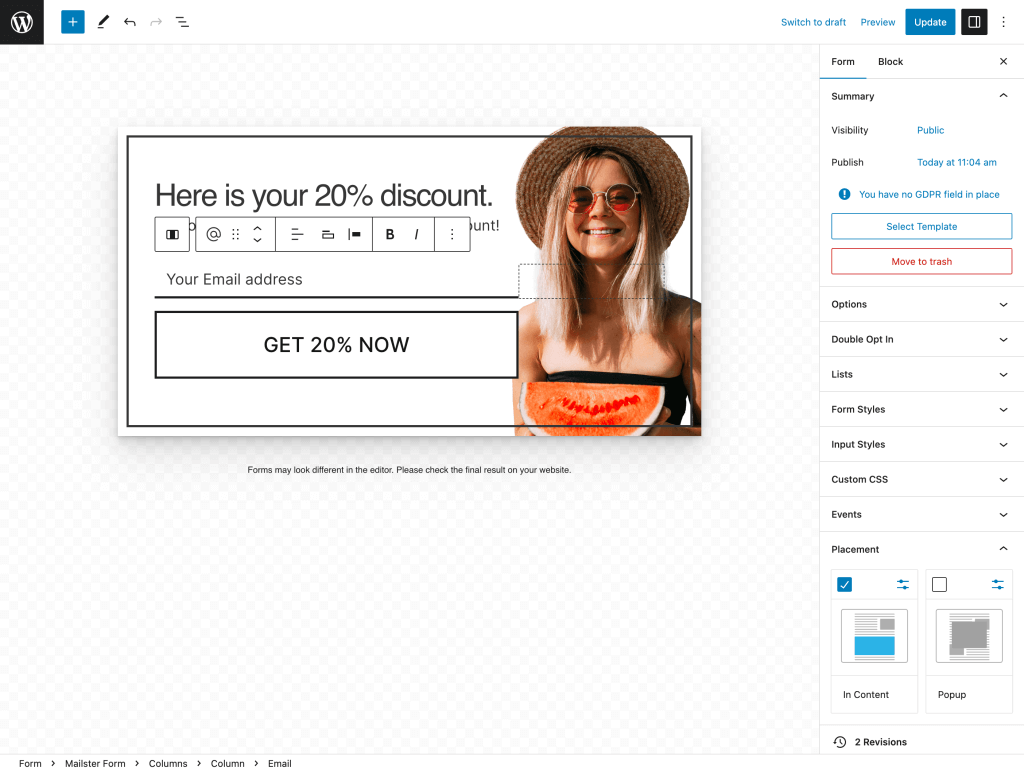
In Mailster 4.0, we introduce the third generation of form building for your websites. Creating sign-up forms for your newsletter is a fundamental feature of our newsletter plugin. With the new block editor integration, you can easily craft accessibility-ready forms and popups. These dynamic forms can be seamlessly placed anywhere on your site to enhance user engagement and subscription capabilities.
Automation
The second significant update introduces email marketing automation in Mailster. While this feature has been available since version 2.0, Mailster now offers a revamped approach to building customer journeys that is more intuitive and follows your users’ interactions logically.
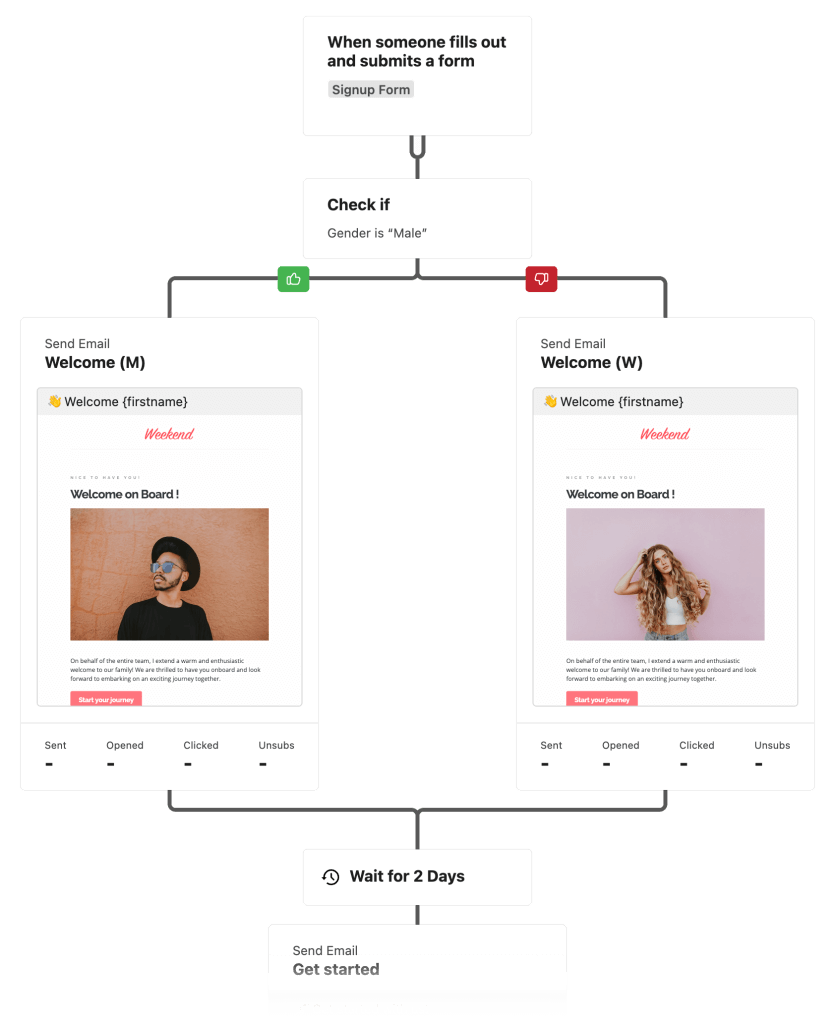
With Mailster’s enhanced automation capabilities, you can design customer journeys that are triggered in diverse ways. This includes the ability to pause your automation and deliver timely and pertinent information precisely when it matters most in the user’s journey.
Templates
With Mailster 4.0 we are rolling out updates to all our templates, starting with our most used ones “Mailster” and “MyMail“.
With the template will focus on accessibility and support for right-to-left languages. (RTL)
Once you have Mailster 4.0 installed you will be prompted to update your templates.
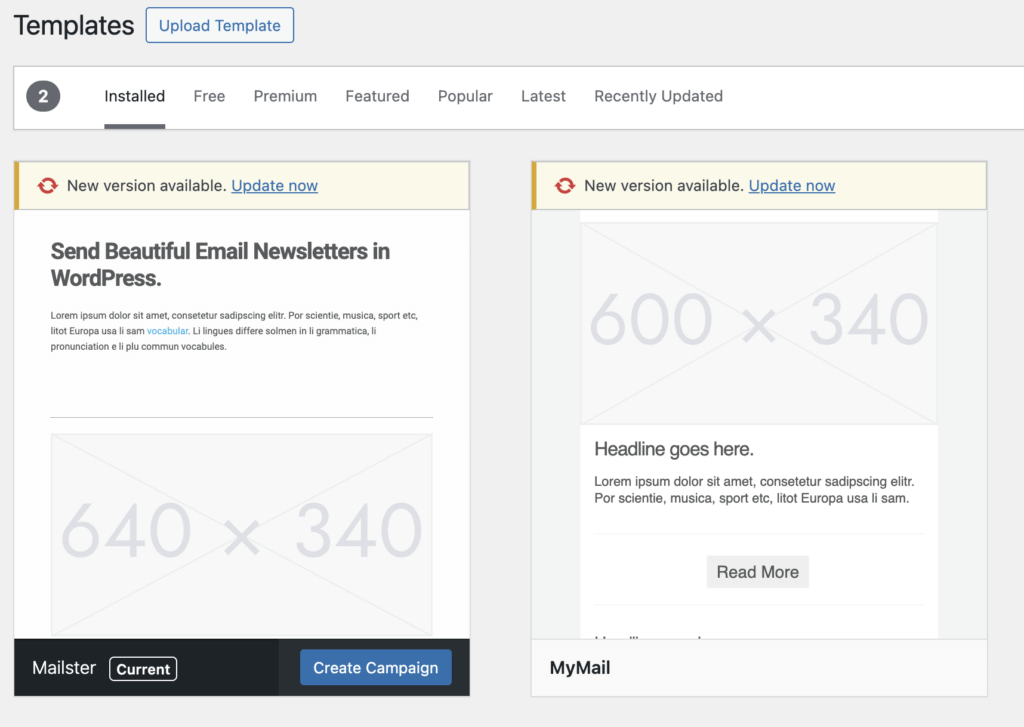
Keep in mind that these new templates require at least Mailster 4!
How to upgrade?
Updates are free for all licensees. If your license has expired you either grab a new one or – if you bought it via Envato and your license has expired – head over to your Envatos download section to get it there.
Other changes
- Standardized rending of campaigns.
- Update geo API to use preferred single mmdb file instead of multiple data files
- Using a native date picker instead of jQuery UI elements
- Preparation for custom conditions
- Tags in conditions are now text fields and not dropdowns to make them more flexible.
- native support forms for Elementor
- native support forms for DIVI
- Performance improvements on querying action data from campaigns
- Performance improvements on data in the wp_options table
- Improvements in how admin notices are rendered
- Fully tested for PHP 8.1 (partially tested with PHP 8.2)
- Autocompletion on conditions
- Deprecated legacy forms
- The Newsletter Homepage is now based on blocks and block forms
Please check out the full changelog as well.
Required version
We at EverPress always like to support as many PHP and WordPress versions as possible. This however prevents using some newer features and may introduce unexpected security problems.
Starting with Mailster 4.0 we require to use at least
- PHP 7.4
- WordPress 6.2
That said, we always recommend going with the latest WordPress version and the recommended max PHP version from this table (PHP 8.1 for WP 6.3)
]]>A suitably formatted newsletter connects stakeholders and stockholders to employees and customers.
The time it takes to create and distribute a high-quality newsletter can be overwhelming to entrepreneurs, founders, and small business owners. In a perfect world, everyone would write their own content for distribution.
We don’t live in a perfect world.
Digital agencies like yours can help with this marketing investment, but only if the essential knowledge is available to create this resource. For many, that journey starts with an effective WordPress newsletter plugin.
If you’re in the lead generation business, the following ideas can help you get more readers for your clients’ newsletters.
Best Ways to Improve the Read Rate of Client Newsletters
Newsletters are a straightforward communication tool. They’re used to share information and generate attention. They strengthen relationships while building brand awareness when structured and sent correctly.
A newsletter can even be an important educational tool that discusses policies and procedures.
If you’re ready to start improving the read rate of your clients’ newsletters, here are the steps your digital agency can take today.
1. Design the Content for the Reader
Businesses come to digital agencies because they feel their writing and composition skills aren’t making the grade. The first rule is simple when you’re in charge of putting together a newsletter.
Don’t waste the reader’s time.
The content should be designed for the person who subscribed to the newsletter. People want to know how their lives will be changed.
They don’t want to hear about a business’s problems or read about how their efforts can solve a company’s problems.
People ask one question repeatedly: what’s in it for me? That’s basic human psychology.
When designing content for the reader from an agency viewpoint, these elements should be the focus of the writing.
- Why Do People Subscribe to the Newsletter? You have an email list to use because your client offered something valuable. That perspective must get reinforced with each message to ensure the relationship between the customer and the company is strong.
- Appropriate Timing is Crucial. If you send an email during the busiest part of the day, it will probably be deleted. When the newsletter goes out in the middle of the night, it could get ignored. Think about when your client’s customers are active, and then schedule the distribution for that time.
- How Hard Is It to Read the Message? People have an attention span of approximately eight seconds. If your intro doesn’t hook the customer, your client won’t maximize their investment in this process. Each email should be short, to the point, and filled with useful and easily implementable information.
Would you want to receive the email that your digital agency is sending? If not, that fact alone says it’s time to implement the fixes outlined above.
2. Focus on Value Instead of Sales
People don’t sign up for newsletters to receive constant pitches. They want information that is helpful in their daily lives.
When someone trades their email address for newsletter access, discounts, and other benefits, they expect something valuable in return. They don’t want to see a constant stream of pitch notes suggesting that they’ll miss out if they don’t act now.
Think through the product or service your client offers.
- Does it help to boost productivity or create more efficiencies?
- How long would it take for someone to learn how to use their investment?
- Is it possible to respond to consumer questions within a set time?
You want the email to feel like a conversation. There should be some give and take in the content that shows you get the reader’s pain points while providing something relevant to use.
The goal should be to resolve issues for the reader while leading them toward a path where your client provides the ultimate solution that makes life easier.
Focusing on value instead of sales makes it much easier to see the journey.
3. Maintain a Professional Approach
Digital agencies don’t intend to create an unprofessional image, but this problem is extensive throughout the industry. Many pros don’t realize how others consume the content in newsletters, and that outcome affects the way people see brands and businesses.
Unprofessional etiquette in an email newsletter can look like any or all of the following issues.
- Not Being Direct. A newsletter is meant to be directive. Getting to the point starts with the subject line, which should be accurate and concise. Every bit of information a reader consumes should reflect what the message is about, even when more than 250 words are shared. If necessary, include an executive summary, use bullets, or organize thoughts into sections.
- Remove the Emotion. Digital agencies act as intermediaries between customers and businesses that don’t always get along. Newsletters should be fact-based emails that people can open with confidence. If you feel angry when writing something, sit on it for a few hours before giving it another edit.
- Don’t Be Too Available. When you’re always going, it’s much easier for a mistake to happen. If you need some time to organize your thoughts, tell that to your client. They’ll want the best content sent on their behalf, and spending some extra time to make sure things are right is an investment worth making.
- Check Spelling and Grammar. It might not be possible to find every typo, but there are plenty of tools available that can help you avoid the most obvious mistakes. One of the best ways to edit a newsletter is to read the text aloud. You’ll hear problems with rhythm better while catching more errors.
Professionalism should be the foundation of each communication effort a digital agency creates. Focusing on these elements from the beginning can help get your clients’ newsletters open and read more often.
4. Segment the Mailing Lists
Would your agency walk up to a random stranger to discuss all the benefits your clients offer? Although a cold-call approach might work, the social confrontation is more likely to drive people away than bring them closer to the desired goal.
It makes more sense to approach the prospects that are more likely to have a positive response to a newsletter.
Even though the interactions are digital, people still see inbox notifications as social interactions. If something isn’t valuable or desired, it’ll get ignored – that’s the best-case scenario.
The worst-case scenario is that your client receives negative feedback because of the unwanted material.
Start with the basics first. Use the demographic information that separates your client’s customers from each other. Age, gender, and geographic location are the most popular choices in this category.
Once you have those segments structured, here are some other ways your agency can personalize this email marketing approach.
- Organizational Scope. If your digital agency serves a small business owner, sending information that falls within the product or service structures they offer makes sense. Why discuss enterprise-level capabilities if that option isn’t available?
- Sales Funnel Progress. A newsletter reader at the end of your client’s sales funnel has different needs than someone who just started that journey. People who are ready to buy want that feeling justified and confirmed. The latter prospect might want introductory content that helps them familiarize themselves with the brand.
- Behavioral Changes. When people change their reading or buying habits, it means something happened to change the relationship dynamic between them and your client. Your digital agency can use the newsletter format to determine the issue and provide a possible fix.
5. Keep the Focus on a Single Topic
Conversations tend to ramble. Meetings end up going in unexpected directions. These elements are part of the human experience, but they still need to be avoided in newsletters that your digital agency sends.
When writing and content wander off the main point, the information becomes hard to understand or frustrating to read.
Every idea needs to relate to a single topic. Here are some of the best ways you can maintain that focus.
- Identify the Main Point. Does the subject thesis convey the information and hook that your client needs to entice readers to review their newsletter? Most people don’t read everything in an email, so try to convey the message’s purpose within a single introductory sentence.
- Offer Supporting Details. The best newsletters provide details that relate to the identified main point. If the order feels off or seems confusing, try reordering the format to see if the material is easier to read.
- Explore Each Paragraph. If a newsletter is 250 words long, it should have four or five paragraphs. The introduction outlines the value, while the conclusion reinforces it while offering a call to action. What data will the other three paragraphs offer? Without direct connections that explore the key points of the discussed subject, readers have a higher risk of losing their focus.
- Maintain Voice Consistency. If your writing voice jumps between casual and formal, a reader might feel confused or frustrated by the changes in tone. This issue also applies when the narrative goes from first, second, or third person to another structure. Even multiple switches from active to passive voice can make email marketing efforts feel unreadable.
In this section, your digital agency’s goal should be to adopt a logical pattern for each email. You want everything to feel organized according to importance, classification, or comparison.
6. Offer Unique and Helpful Tips
Unique content starts when you know your client’s goals, vision, and values. The newsletter must address this question: what do they hope to achieve?
Anything you send via email marketing software for agencies, even standalone pieces, must align with those essentials.
If you don’t care about the purpose of what you’re discussing in the newsletter for a client, neither will the reader.
When someone reads a newsletter, they ask “what if” or “so what” questions. Each idea should be expressed as a clear statement, framed in a way that makes sense to the casual reader. Each tip should provide appropriate examples and supporting data to ensure it feels relevant.
Here are some additional ideas that can help you improve the uniqueness and value of the tips offered to readers.
- Brainstorm on the First Draft. Many agencies try to maximize their profits by producing a single draft of each content item. Newsletters improve when the first effort is used for brainstorming and structure than a polished piece. Allow it to look and feel unstructured so that you are free to explore any idea.
- Write to a Single Person. Imagine that you’re writing to a single reader. The content should target that individual’s needs to ensure the information speaks to them on a personal level. This step can be as simple as writing while using “you” instead of “they.”
- Be Willing to Walk Away. Take some time between the first and second drafts of the newsletter. It’ll give you more time to think of new ideas, consult with clients, or revise concepts.
Great content begins with a viable headline. That means your newsletters need a catchy subject line to generate inbox interest. Try to summarize the information while avoiding common spam words that filters catch.
Take These Steps to Create Fantastic Newsletters for Your Clients
Newsletters provide numerous benefits when they communicate on a personal level with readers. Your clients trust your team’s expertise to connect these prospects to their brands so that a viable sales funnel forms from this content.
When newsletters don’t offer something valuable or informative, they’re much easier to ignore. If email etiquette isn’t followed as well, it can be challenging to encourage people to start reading.
These implementable tips can correct that situation quickly and effectively. Some agencies might look at all the ideas to reformat their approaches, while others might find that one missing detail to take their services to the next level.
You need to guarantee more readers. Implementing the ideas offered here can help you achieve that goal.
]]>It’s not unusual for brands and businesses to invest in both options. Email campaigns reach people across multiple platforms and devices, while social media meets people where they are.
If you can only invest or spend time with one option, which is better? Should you create email campaigns, or would social media marketing provide superior results?
ROI Differences: Email Campaigns vs. Social Media Marketing
When gauging ROI for your marketing investments, it is essential to set some clear definitions first.
Do you want to focus on profits on top of all your investments, the click-through rate, or reactions vs. an open rate when comparing email to social media?
If you look at the overall performance of each investment, email provides superior results in all three categories.
- The average click-to-open rate for a high-performance email campaign is at least 20%.
- Most email marketing efforts achieve an email open rate of at least 15%.
- The click-through rate (CTR) for WordPress email marketing is about 2.5%.
When investing in social media marketing, you’ll find a CTR as low as 0.07% on some platforms. That’s because your money is being spent to reach potential prospects that don’t know anything about who you are.
An email marketing list is filled with people who gave you their information to become part of your subscriber network. They know about your brand and want to stay connected with you.
From a monetary view, the average email generates around $40 for every $1 spent on it. Social media marketing still creates a profit, but the ROI is closer to $1.28 for every $1 spent.
Audience Reach Differences: Email Campaigns vs. Social Media Marketing
About the same number of people use email and social media today. That provides you with a total potential audience of about three to four billion people globally.
Email and social media have similar problems when reaching out to an audience. You don’t know if the account is confirmed, duplicated, or fake.
That means a better measurement of audience reach is to look at the organic results that come from these two marketing investments.
People typically check their email more often than they review social media notifications. About 58% of people check their messages first in the morning, before checking on Facebook, searching for information on Google, or looking up a weather forecast.
Nearly 90% of people with at least one email account check their inbox at least once per day.
Social media algorithms are meant to maximize revenues and encourage marketing investments. Roughly 5% of people in the average fan base will see what gets posted organically. WordPress email marketing doesn’t have the same “pay to play” requirement.
The only disadvantage of an email campaign here is that you can reach people you haven’t already acquired.
Email lets you turn warm prospects into customers. Social media marketing provides a path that can convert strangers into leads.
Going Viral Differences: Email Campaigns vs. Social Medial Marketing
Emails and social media posts both have opportunities to go viral. Someone can send your outreach efforts to their network using either methodology.
Here is the one place where social media marketing could have an advantage. Many email servers are designed to prohibit spam and junk mail from being sent and received.
Social media posts don’t have restrictions to a specific follower network. When someone shares content, it gets seen by some of that person’s network. Others can share it directly from your page or indirectly from another account.
Emails can be forwarded or copied and pasted to be sent elsewhere, but the network reach for this sharing option is quite limited. It also relies on other people opening the message, whereas social media displays shared content right to each person’s news feed.
Although going viral isn’t for everyone, the results can completely change how a brand is perceived by the public. It delivers credibility through social connections, whereas WordPress email marketing creates the same result through transparent displays of your expertise.
Email doesn’t have the power of virality, but it does generate consistent responses from your targeted audience. If you want predictability, this option has more benefits.
Targeting and Security: Email Campaigns vs. Social Media Marketing
Email beats social media for security without question. You’re the one who owns the email list, which means there isn’t a mechanism to have it taken from you. Although the platform you use could close, the addresses in your possession can transfer to another provider.
If you have a social media page, you’re at the whim of the platform. Your entire network can disappear instantly if it stops functioning or believes you’ve violated a policy. Many accounts have lost millions of followers because of information they posted that was deemed to break one of the rules.
Targeting is another component of marketing that gets overlooked today. Emails allow brands and businesses to segment lists in virtually any way to reach a particular demographic.
Paid social media ads provide sophisticated controllers and choices to limit who sees your promotion, but organic posts have virtually no targeting potential at all.
When you want to have more control over who sees your posts, an email campaign is the best solution.
Content Perception: Email Campaigns vs. Social Media Marketing
People use emails and social media for business and personal needs. Depending on your specific industry, services, or products, either choice can deliver a distinctive edge that sets you apart from a competitor.
When looking at how people use these two communication mediums, email tends to be geared toward business and social media for personal needs.
That means, from a marketing perspective, it’s better to treat a social media investment as a way to connect with your audience. You can reserve email campaigns for those direct pushes that bring people to your products or services.
Since everyone on your email marketing list opted in to receive communications from your business, they’re less likely to become annoyed by a sales pitch. That doesn’t mean every message you send should try to sell something, but it does allow for more sales opportunities.
People subscribed to newsletters and email lists to receive valuable content. When you can offer this resource while sprinkling in the occasional offer, you’ll start a good conversation with your customer base that can often lead to more sales opportunities.
Gains and Losses: Email Campaigns vs. Social Media Marketing
Email and social media are about equal here with this comparison point. Both mediums provide mechanisms for people to unsubscribe from posts and lists.
An email campaign has a slight advantage because unsubscribing takes slightly more effort than social media for the average person to complete.
When you scroll to the bottom of an email message, there’s some form of this comment: “If you no longer wish to receive messages from us, you can unsubscribe at any time.”
After clicking the unsubscribe button, you’re taken to a new page that confirms the information. Some providers allow people to resubscribe if an accidental click occurs, preserving the data from the list.
When you want to remove information from a social media news feed, you have the option to ignore it for 30 days. That means you don’t know who is seeing your messages as a brand. You could be sending content out to no one, and the only way you’d see it is through reduced interactions or changes in traffic metrics.
The goal here is to be as open and honest as possible. If you provide transparent mechanisms for reducing or eliminating contact points, staying in contact with the people who want to connect with your brand and business is more manageable.
Additional Pros and Cons of Email Marketing
When you approach WordPress email marketing or another platform’s options, you’ll find that this investment offers a few more advantages and disadvantages to consider.
Here’s a closer look to help determine if this option is the best idea for your brand and business today.
| List of the Pros of Email Marketing | List of the Cons of Email Marketing |
|---|---|
| It is easy to reach plenty of people at once with email while maintaining a personalized conversation. Once you press send, thousands of potential readers receive your content at a time that works for them. | There isn’t a guarantee that emails will be opened. Some recipients might not receive your messages, even after they’ve subscribed. You can counter this issue by asking to be placed on a safe list. |
| It is one of the most affordable growth investments available to businesses today. Some WordPress email marketing tools are available without charge. | Email content sizes can be tricky to get right. Some readers want a small novel of valuable information to enjoy, while others prefer a couple of sentences. Each customer segment could have different needs to identify in this area. |
| Results are trackable when using this resource. You can see how many people came to a website and other stats to ensure your key performance indicators target the correct information. | Your writing skills matter when sending emails. Although you don’t need an academic degree to be successful, your sentence structures should make sense to the average reader. |
Additional Pros and Cons of Social Media Marketing
Social media marketing puts your value proposition in front of an audience where interactions are strongly encouraged. You can connect with people even when they haven’t heard of your brand and business.
Instead of using emails, some companies might find these additional pros and cons of social media marketing to be valuable.
| List of the Pros of Social Media Marketing | List of the Cons of Social Media Marketing |
|---|---|
| This investment allows you to reach a larger audience because there aren’t predetermined limits to manage. You have access to limitless demographics globally. | It takes more time to manage social media marketing efforts. Each comment or direct message requires a response, and most people expect an answer within an hour. If you don’t deliver, your competitor gets a new customer. |
| It allows you to connect with your audience in direct ways. People choose to follow accounts online, which means there is an interest in your brand. You can resolve disputes, deliver relatable content, and understand how your company is perceived. | Online conversations can take unpredictable turns. It doesn’t take much for a complaint to go viral, affecting how others think about your brand and business. The only power you have is how to respond. |
| You can monitor feedback from the public in real-time, making it easier to adapt your message to what resonates with your prospects and customers quickly. | It takes time for social media content to create a compelling presence. Although WordPress email marketing relies on list-building work that also has this disadvantage, it typically delivers faster results. |
Email Campaigns vs. Social Media Marketing: Where Should I Invest My Money Today?
Most companies use a combination of email and social media marketing to drive results. These resources often work with search engine optimization to generate organic attention while generating more brand awareness.
There isn’t a specific solution that works for everyone.
When looking at the specifics of each solution, email campaigns come out ahead because of their versatility, affordability, and customization. You can segment messages to connect with specific audiences while providing valuable information to encourage readers to want more.
People also tend to be more receptive to trusted brands in their inbox than in a news feed.
If your business hasn’t tried an email campaign, now is the perfect time to consider this option. When you combine the best email marketing software for agencies with each message’s benefits, it often becomes easier to reach your brand’s goals.
]]>Whether you’re starting from scratch or supplementing other marketing efforts, the power of email cannot be ignored. It has one of the best ROI ratios out there today.
How do you maximize your use of email marketing?
- Provide valuable content without an expectation of receiving something in return.
- Be consistent with the timing of your outreach efforts so that each message has predictability.
- Use customer-first language to place the focus on individual needs and problems.
Once you get those basics right, you can enjoy the many benefits of email marketing plugins for your brand and business.
Why the Best Email Marketing Software for Agencies Is a Wise Investment
Companies have several ways to communicate with potential customers or generate fresh leads. Why choose email marketing over direct mail, word-of-mouth advertising, or even PPC ads?
Outside of the ROI, most brands find it easier to build a larger audience by using email marketing plugins and similar tools. People are more willing to provide an email address in exchange for something instead of giving a physical mailing address. [[1]]
Subscriber lists can also be built at any geographic level: local, regional, national, or global. That structure gives a business the power to enter new markets, generate unique leads, and compete with the biggest corporations in their industry.
Email marketing provides personalized and customized content options. About two-thirds of people expect the companies they work with to provide this resource, so a great plugin can provide this resource.
The benefits of the best email marketing plugins start with the setup process. When you can import your data from your CMS or Excel, it gets your investment working for you faster. From there, you can pick a template, generate content, and create your first campaign.
Numerous platforms provide email marketing benefits that achieve these outcomes. Why pick a plugin instead of another distribution service?
Here are some of the reasons why that choice makes sense for today’s brands and businesses.
1. Plugins Let You Send Your Latest Posts
When using email marketing with WordPress, you can access the latest information you’ve published to create lead generation opportunities. The best plugins let you send your posts to your subscriber base, including products and event information.
The best plugins provide that service if you have a custom content campaign that you want to distribute by email. Every email and outreach type is available for automation, ensuring no one gets ignored.
Over 80% of customers expect a response from a prospective brand or business within ten minutes, but the average lead response time is closer to two days.
Email plugins help you improve that speed by generating helpful information while providing the infrastructure for an immediate response.
2. Data Compliance
Many email marketing plugins offer low-cost solutions that help businesses of any size achieve their lead generation goals. Whether you’re a one-person LLC or a multinational corporation, this resource provides invaluable outreach tools.
The question in today’s business environment isn’t whether your content is up to par when you’re getting started with email marketing. It is determining if you are meeting the current data compliance rules for each geographic region.
GDPR compliance is essential if you’re trying to contact European customers. In the United States, a patchwork of different rules exists at the state and federal levels. If you try to do all this work manually, will you be able to follow each regulation?
The best email marketing plugins for WordPress provide you with a compliance infrastructure automatically. You can send your messages with any provider, merge tags, or incorporate advanced segmentation while maintaining full data control.
When you have the best email marketing software for agencies supporting your efforts, you can worry more about generating leads and less about compliance issues that could lead to unwanted outcomes.
3. Immediate Outreach
Email is a straightforward resource to use after setting up your accounts and installing your preferred plugins. You can send and receive information rapidly while receiving feedback regarding your content in hours instead of days or weeks.
Instead of trying to have 30,000 individual conversations, the structure of the best email marketing plugins allows a company to structure messages that feel personal while using the advantages of mass messaging.
When brands receive immediate feedback regarding their messaging, they have a better idea of knowing if they’re connecting with people or driving them away. The value proposition can undergo a minor shift to ensure complete clarity within the conversation.
Although instant delivery can be a benefit with email marketing, there can be time zone differences and other factors that make it more or less likely that a specific message is seen.
The best email plugins for WordPress adjust for these factors to ensure an outreach effort gets delivered to an inbox when it is more likely to be opened.
For most people, the ideal time to receive an email is around 10 AM. That tends to be when the average person checks their inbox during the workday. Here are three other popular times where a business can start generating leads with confidence.
- Emails received before 8 AM help to capture the attention of potential leads who check their inboxes while starting their morning routines.
- Messages received around 1 PM give people an option to feel productive right after lunch without requiring an extensive effort.
- A note that gets delivered around 4 PM works well for individuals who look for a distraction while winding down their responsibilities for the day.
Email marketing plugins allow you to create on your time, then distribute information when it works better for each reader. That produces a win-win situation for everyone.
4. All-in-One Solution
The best email marketing plugins for WordPress give you one place to keep this outreach effort organized. Instead of jumping between different platforms or trying to juggle multiple software requirements, everything is accessible from your dashboard.
While you get that benefit, you can also use a dedicated email provider or server to ensure accurate and authentic deliverability.
Some WordPress users have concerns about how a new plugin might change their website’s performance. The best options in the industry today are built with this concern in mind, ensuring that the least amount of impact on loading speed occurs.
Life is already busy enough. By centralizing this aspect of your online business, you’ll maximize your time and creative investments for email marketing while having a low-cost approach for your information distribution needs.
5. Newsletter Capabilities
Some email marketing plugins let you send messages or information about your products, pages, or posts, but they don’t offer a newsletter option. You might not even receive any template choices.
That’s why Mailster is an exciting option to consider. You receive access to over 400 free and premium templates, integration with your favorite plugins, and availability in more than 15 languages. You can start birthday campaigns, initiate a drip approach, and easily create newsletters.
You even have the option for a public archive of your latest newsletters.
Why choose the newsletter approach for your email marketing investments?
| Newsletter Benefits | Reasons Why Email Marketing Newsletters Make Sense |
| Customer Connections | Email newsletters feel like a friendly conversation between a brand and each reader. It delivers valuable content that encourages subscribers to become engaged with the business. That process generates trust that can eventually lead to a sale. |
| Website Traffic | Including links with your email marketing newsletters can generate more visitors for your site. It’s an organic process because the subscriber sees something they like, so they click on a button or graphic. |
| Grow Communities | Newsletters with social sharing buttons typically have a higher click-through rate (CTR) than those without them. Even if you only have one profile, people want to get to know a brand better by seeing what is on LinkedIn, Twitter, Facebook, Instagram, or Pinterest. You end up having more reach. |
| Reputation Management | Established newsletters make it easier to target audience segments with specific information that solves problems for the reader. When a brand lets its expertise shine in these proactive outreach efforts, it’s more likely that people will opt for them instead of a competitor. |
| Drive Sales | Email newsletters allow a business to tap into the compulsive nature of humanity. When someone sees something that they want, it is only natural to take action to acquire it. Brands don’t need to put out a hard sales pitch with this marketing investment to see conversion rates start climbing. |
It is important to remember that “experience,” “expertise,” and “authority” are different concepts.
Experience is a measure of how long a business has been doing what it does best. Being around for 35 years is an accomplishment, but that doesn’t mean that company has direct expertise or authority.
Expertise measures knowledge and wisdom compared to competitors. It suggests that your business performs better than others.
Authority looks at how your expertise stacks up against the competition. Are you the best at what you do?
Email newsletters address all three.
6. Data Collection
One of the best benefits of an email marketing plugin for WordPress is the ability to collect campaign data.
Most plugins provide data on how many subscribers opened your email. You can often see the number of clicks received with each outreach effort.
The various statistics and metrics that email marketing tracks can help brands identify whether or not their segmentation efforts are working. This information also lets a company know if its content is working, or if changes in communication are necessary.
Although numerous key performance indicators are available to track, here are some of the best options to consider when investing in lead generation for your brand.
- Email By Category or Label. This information lets you see the number of messages a person has with their account, including how many have been deleted or are in their inbox or other folders.
- Email Word Count. Concise emails tend to be more effective than lengthy ones. It takes less time to read a short message, and you’ll find it is quicker to write them. You can send content that is too short to be effective, so looking at this KPI can help you identify what efforts provide the best responses.
- Total Email Conversions. A conversion doesn’t need to be a sale. It can be any action taken that leads to more revenue or brings you closer to a specific goal. Some businesses have company contacts or form submissions listed in this category.
7. Simple to Use
To enjoy the benefits of email marketing with WordPress, you don’t need to be a coding wizard or a programmer extraordinaire. Even if you’re new to this world, the primary steps involve installing WP, downloading your plugin, and creating content for both.
The best plugins use this benefit to help you create the personalized content that people want today. You can address subscribers by using individual greetings, sending birthday wishes, or addressing them by name.
Mailster takes this benefit to another level by allowing users to expand the built-in merge tags or define custom ones for even more personalization.
Subscribers can even manage their own information through a subscription center with today’s best plugins. Instead of tracking this data yourself, you can delegate it to your subscribers.
Are You Using the Best Email Marketing Software for Agencies?
The benefits of email marketing with WordPress make it easier to connect with customers while providing time-efficient processes to create and distribute content. This low-cost option delivers an impressive ROI for many brands, communicates your expertise efficiently, and is easy to implement for companies of all shapes and sizes. If you’re not using email for lead generation today, you could be missing out on many opportunities. Download your plugin today and get to work!
]]>Some plugins help you automate your workflows or optimize websites according to the latest search engine algorithms.
When a content management system is identifiable on a website, over 64% are using WordPress. That means around 40% of all sites use this platform, which is why knowing how to market using its plugins is essential for brand growth.
WooCommerce is the most popular plugin, used on one-fifth of the websites that install WordPress. Elementor (17.3%) and WPBakery (14.3%) are equally popular.
Elementor and WPBakery make it easier to build websites in WordPress, but they don’t necessarily help with the marketing work.
That means fewer than 1% of WordPress websites install a marketing plugin that gets used for marketing purposes.
WordPress and Marketing Is a Natural Relationship
WordPress websites get plenty of traffic each month, but that isn’t the only reason why this platform is successful for so many people today.
You can install a WordPress website in less than five minutes that already offers some optimization benefits. That means you can begin your SEO marketing journey right away since everything installs with a few clicks.
Once you start exploring the different plugins that are available for brand growth, you’ll have even more ways to expand your reach to current and future audiences.
With nearly 60,000 WordPress plugins available, it’s fair to say that some are old, and others are gold. How can you separate the best from the rest when you’re ready to do some marketing work?
The first step is determining the path you want your marketing to take. Are you looking to expand the natural SEO benefits that WordPress provides? Do you need to stay at the top of the mind of an existing customer base?
Is your goal to create or expand resources in the world of email marketing?
Steps to Follow to Create a WordPress Marketing Plan
Before you decide what WordPress plugins to use, it’s crucial to have a marketing plan available to follow. Here are the steps to follow to build this necessary foundation.
- Define what you offer. Be clear about what you’re selling on WordPress, including the features of each product or service. Find out how what you do benefits your clients, and why your approach is better than the competition.
- Create a brand mission, even if you’re a company of one. Why are you creating a WP site to reach out to potential customers?
- Define the target audience for your website. Who do you expect to be marketing your products or services toward each day? You’ll want to consider different socioeconomic demographics, ranging from household income to personality traits. Find what people want or need within the scope of what you provide.
- Conduct a thorough market analysis to define your competition and discover different trends. You might find a service gap where your company can find some space, but will customers want to buy what you have?
- If you have competitors, look at their SWOT analysis. What steps can you take to differentiate yourself from what they’re doing?
- Outline your goals and define your brand positioning. Your marketing efforts should target specific outcomes, such as retaining customers or increasing online sales.
- Create the key points for your marketing strategy. Where do you hope the plugins will help when you’re ready to generate more traffic?
- Set a budget for your marketing investments and stick to it.
- Create a campaign that makes sense within your brand’s messaging while using the benefits of the plugins that you select. Try to be as consistent with your goals as possible when reaching out to others.
- Define your key performance indicators and metrics to ensure you know that success is happening, or if changes need to be made to improve results.
Before Using Plugins, Help WordPress Market for You
Once you have a WordPress marketing plan for your brand and business, it is time to look at the content management system’s structure to enhance potential results.
Anyone can install a plugin and hope it will help meet their marketing needs. People create posts, focus on SEO, and manage calendars daily with mixed results.
If you want less of a hit-or-miss experience, try taking these additional steps to ensure you receive your envisioned outcomes.
Use Responsive WordPress Themes
Search engines prefer websites with mobile-friendly designs over those without them. If all things are equal and the difference is responsiveness, that site will typically rank higher.
When creating a WordPress site, look for themes marked as being “responsive” or “mobile friend.” That doesn’t mean they’ll be optimized, but it will put you on a path that can generate successful results.
After installing the theme, it helps to review your mobile traffic metrics to ensure the results are within your KPI ballpark.
Optimize WordPress Site Images
Speed is an essential ranking factor when looking at how organic search engine rankings break down at local, regional, and national levels.
With so many sites using WooCommerce, you can expect dozens, if not hundreds, of high-quality images for visitors to review. That means the files stored in WP can impact how quickly a page loads.
Before you start working with marketing-specific plugins, you might consider using an image compression plugin to reduce the file sizes of your images.
You can also use Dropbox to import to WordPress.
Build an XML Sitemap
Search engines want to index your WordPress site to rank it. One of the ways they accomplish this outcome is by looking at the list of all the pages on your site, which is called a “sitemap.”
WordPress creates one for you automatically, but that doesn’t mean it’s optimized or ready to support your marketing efforts.
You can use a sitemap generator plugin to optimize this process, track index pages, and tell search engines when your site receives updates.
Split Test Your Landing Pages
Although A/B testing is helpful, it can also be a process that involves a lot of trial and error. If you have two landing pages that don’t work great when you start, it’s like comparing two math tests that both received a failing grade.
When your initial analytics don’t provide many insights into why bounce rates are high or traffic is slow, the split testing process can offer the info needed to progress your marketing efforts.
WordPress plugins let you implement the A/B testing structure without going through the work of creating duplicate designs with minor variations. You’ll receive insights into the areas that work and those that need improvement.
Use Exit Popups on Your WP Site
Interruption marketing has several advantages and disadvantages to consider. When a popup appears on a person’s screen, they get an opportunity to evaluate the offer.
Exit popups have a 2.9% conversion rate. Small businesses receive about the same percentage from their email marketing efforts.
Instead of blasting visitors with popups on every page or each time they switch away from a browser to a Word document, place this asset where your biggest returns are. When an exit popup is on your home page, there won’t be a disruption to the user experience.
Enable Comments
Sometimes, comments can feel like a mixed bag, especially when someone wants to troll your brand.
When you respond to comments, whether the information left is positive or negative, you’re showing people who you are. It’s a chance to build a community around the content you create, which typically leads to more traffic.
People want to trust the brands they include in their lives. Although spam can create slowing issues if it comes in large waves, you can install Disqus or a similar plugin that lets visitors log in and subscribe.
Akismet is a great tool to use in this category because it works to filter the spam from your posts.
Check for Broken Links
Search engines take note of any broken links found on your site. If you’re using WordPress plugins for SEO marketing, the results of their presence could cause the site’s rankings to take a hit.
Although you could check each link manually, a tool like Broken Link Checker lets you simplify the process.
After scanning your posts, you’ll receive a status report on each one. You can edit them from the dashboard, reducing the time it takes to correct this issue.
What Are the Best Marketing Plugins to Use?
If you’re ready to start taking your WordPress marketing work to another level, the following plugins have a proven reputation for delivering successful outcomes.
Each marketing plugin provides specific benefits that your brand and business could find useful when reaching out to new customers.
How Do the Best Marketing Plugins Help Me?
Mailster lets you send a beautiful email newsletter while staying in WordPress. It’s super simple to get started since you can import CMS or Excel data for your list. You can even create a new one from scratch. Several incredible templates are available, making it a straightforward process to match your brand and tone. Collect leads, build campaigns, and send with one of several integrations.
When you incorporate OptinMonster, you’re adding a popup plugin that generates leads effectively. You can boost subscriptions, grow your email list, and develop your sales funnels. Several design elements are included, such as slide-in forms and floating bars.
AIOSEO (All in One Search Engine Optimization) is on over three million websites because it lets you take care of various technical enhancements without needing in-depth coding knowledge. Advanced features are included, including smart schema markup.
SeedProd is an interesting plugin because it helps you make landing pages quickly. It integrates with numerous email marketing services, lets you set up 404 or coming soon pages, and comes with several templates you can use right away.
When you incorporate WPForms into your WordPress site, you can build several forms that help you do everything from creating payment opportunities to registration documents. Over 300 templates are available with this plugin. You can find user journey reports, track abandonment, and gain geolocation insights.
Uncanny Automator lets you create potent marketing workflows on WordPress while reducing the time it takes to complete tasks. This plugin works with over 70 others, allowing you to integrate Zoom meetings, tweet posts, or send text notifications from WooCommerce.
With Revive Old Post, you can engage more people on social media by sharing previous content. The plugin automatically offers links to older posts, incorporates hashtags, and gives you scheduling options to manage.
AdSanity simplifies your advertising management. You create ad units that are groupable, rotatable, and schedulable to maximize your outreach and earning potential. You can use it to sell ads directly or with advertising programs from Google and others.
With TrustPulse, you receive social proof to boost conversions. It displays the latest customer interactions on the website, such as subscribing to a newsletter or purchasing a product. It adds the fear of missing out to your sales funnel when used appropriately.
Are You Ready to Start Marketing with WordPress Today?
WordPress plugins are an under-utilized marketing option. When you incorporate these tools into your campaigns and overall plans, they become practical tools that lead you closer to your goals.
When you use the correct tools at the right time, whether you’re building landing pages or developing SEO, your WordPress dashboard becomes a one-stop destination that helps your business grow.
Before downloading a WordPress plugin for your marketing, please remember to do your due diligence to ensure it meets your needs.
- Does it have the features and tools to help you accomplish your goals?
- When was the last time it was updated?
- How many users have rated it, and how high is the rating?
Some plugins require more updates than others, but a good general rule is to use those that received an update within the past six months.
When you have these tools available, you’ll find that WordPress plugins are great for marketing.
]]>