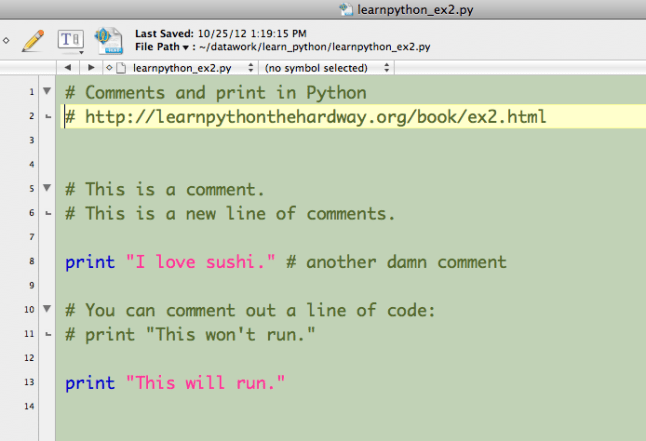
Here is a Python assignment from a journalism class at Stanford:
Go ahead, look at it. Don’t get scared. Just look at it and try to understand the concepts.
You could actually DO this assignment. You could.
Here is a Python assignment from a journalism class at Stanford:
Go ahead, look at it. Don’t get scared. Just look at it and try to understand the concepts.
You could actually DO this assignment. You could.
This post has two purposes: (1) To present an example of interactive journalism that I recommend; and (2) To allow you to reply with a new link to an example of interactive journalism that YOU recommend.
It is optional for you to post a link. If you do, it counts toward extra credit (provided it meets the criteria). You can read the details on the Required Work page, under the subheading “Extra credit.” See previous example posts by clicking the Examples link in the sidebar.
Your link and reply must meet the requirements spelled out on the Required Work page.
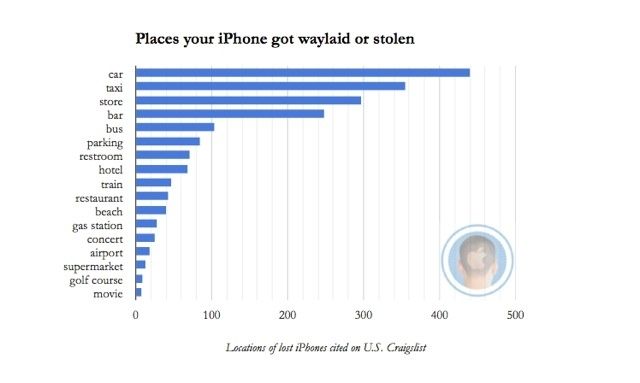
My example for you this week — Here’s Where Your iPhone Got Lost Or Stolen — is NOT interactive, but it shows you how a journalist used Python to collect data (from Craigslist) and then write a totally original story, with charts. (Your examples still need to be interactive ones.) The charts here could be more beautiful, in my opinion. But the story’s the thing, and the reporter got this story with Python.
BONUS: The journalist, Nicole Martinelli, wrote a separate account of how she used Python to get these data.

Leave a comment on this post to submit your example for this week.
Make sure your link is correct and functional.
Include the title or headline of the example you are linking to.
Write one sentence about why we should appreciate it.
This is the week with the Dr. Martin Luther King, Jr., holiday on Monday. So we don’t get to meet in class on Monday. However, you have the same amount of work to do as in any other week. You will meet with me in person on your usual day and the usual time. I expect you to read AND DO everything on Zed’s pages, including the “Study Drills.”
Your benchmark for our individual meetings Jan. 21–23 is on the Course Schedule under the Week 3 heading.
NOTE: Reviewing my own files for these exercises, I see that I wrote LOTS of comments for myself. Those comments are very helpful, because I have not done much importing or writing files since last February. My comments help me remember what I learned and then forgot.
Some of you asked me for helpful Python resources. I usually do a Google search first, starting with the word python (e.g., python import modules), then scan the results for links to Stack Overflow, tutorialspoint, or somebody’s blog. Check and make sure they are NOT talking about Python 3.0 (we are using 2.7), because the syntax is different.
Email me at my JOU.UFL address if you have a question that cannot be posted in E Learning or here, on this blog post.
SPECIAL BONUS: If you want to try the original “Adventure” game, play it here. (Zed mentions this in ex. 14.) To get you started: first, go east. To do so, type just the letter e, then Return/Enter. To pick up the items, type take and the item’s name, such as, take keys. To see what’s nearby, type look.

You’ll be getting started on Zed Shaw’s Learn Python the Hard Way (LPTHW) this week.
You may certainly wait until after the first class meeting to begin. However, you would be smart to do the stuff on this page before the first class.
It is important that you do what Zed tells you to do. I chose this book for our class after I looked at dozens of books and online courses and videos about how to learn programming. Zed is awesome.
To get the benefits from Zed’s book, though, you really must do what he says. So:
You will be doing some of this in class. There will be hand-holding and advice. If you miss any of the first week of class, you are going to be behind. Very much behind. So don’t miss class. If you add this course at the end of drop/add, you’ll just have to try to catch up. No whining!
Your benchmark for Week 1 can be seen on the Course Schedule page. The benchmark indicates a reasonable or fair achievement for the week.
For the first week, you should do everything in the list above, and make sure to work through all of Zed’s exercises — up to and including 12. You should do this for an hour a day, every day, for seven days from Monday through Sunday, before our first class meeting in Week 2.
Your due date for completing the assigned work is your scheduled meeting time.
Your scheduled meeting time: During Week 1, you will schedule a time for Week 2 when you will sit down with me, your instructor, and show your work. This will be a time we agree on, student and professor, and we will meet at that time EVERY week. You will always bring your laptop to this meeting. Your grade depends on this meeting. Read about it in Required Work.
One goal in this course is for you to learn how to solve problems ( I do NOT mean math problems). If you get really stuck in an exercise in LPTHW, move on to the next exercise. Or search for help online. DO NOT let someone else do the work for you! Take a rest, take a break, and then — come back to it later.
I know you’re not a computer science major. This class is for you. It’s designed to help you learn how to learn.
In our scheduled meeting, you must show your work. Your code must include comments, written exactly as Zed explains to write them. Your code must be well organized. Your files must be well organized.
Above all, you must be able to explain what you did. If you got stuck, you must be able to explain what you did to try to get unstuck.
Your weekly grade depends on how you worked, what you produced, what you can show, and how you explain it.
There is a Q&A discussion for Python questions already set up in our e-Learning space (log in to e-Learning here) — let’s keep code-specific questions in that space, please.
If you have a question about this week’s work, the benchmark, or what you should be doing to get your 1 or 2 points, please post that kind of question here, as a reply to this blog post.
I try to avoid making too many posts on the course blog, because I know some students find it annoying. Usually I will post only once a week, now that we are under way with the course — but this is an exception.
How to Properly Comment Your Code is a handout from an MIT course called A Gentle Introduction to Programming. You should look at it.

Comments in your code are not for me, the instructor. They are for YOU. When we learn a new programming language, we must figure things out as we go along. Writing clear, helpful comments will help you learn.
In professional code, comments are also useful for coders who come later and need to use or revise the code that someone else wrote. That will not be the case with your early code exercises, but you should know that comments are not only for beginners.
You’ll be getting started on Zed Shaw’s Learn Python the Hard Way (LPTHW) this week.
You may certainly wait until after the first class meeting to begin.
It is important that you do what Zed tells you to do. I chose this book for our class after I looked at dozens of books and online courses and videos about how to learn programming. Zed is awesome.
To get the benefits from Zed’s book, though, you really must do what he says. So:
You will be doing some of this in class. There will be hand-holding and advice. If you miss any of the first week of class, you are going to be behind. Very much behind. So don’t miss class. If you add this course at the end of drop/add, you’ll just have to try to catch up. No whining!
Your benchmark for Week 1 can be seen on the Course Schedule page. The benchmark indicates a reasonable or fair achievement for the week.
For the first week, you should do everything in the list above, and make sure to work through all of Zed’s exercises — up to and including 12. You should do this for an hour a day, every day, for seven days from Monday through Sunday, before our first class meeting in Week 2.
Your due date for completing the assigned work is your scheduled meeting time.
Your scheduled meeting time: During Week 1, you will schedule a time for Week 2 when you will sit down with me, your instructor, and show your work. This will be a time during the scheduled class hours on Monday, Tuesday or Thursday. We will meet in our classroom. You will bring your laptop to this meeting. Your grade depends on this meeting. Read about it in Required Work.
One goal in this course is for you to learn how to solve problems — and I do NOT mean math problems. If you get really stuck in an exercise in LPTHW, move on to the next exercise. Or search for help online. DO NOT let someone else do the work for you! Take a rest, take a break, and then — come back to it later.
I know you’re not a computer science major. This class is for you. It’s designed to help you learn how to learn.
In our scheduled meeting, you must show me your work. Your code must include comments, written exactly as Zed explains to write them. Your code must be well organized. Your files must be well organized.
Above all, you must be able to explain what you did. If you got stuck, you must be able to explain what you did to try to get unstuck.
Your weekly grade depends on how you worked, what you produced, what you can show, and how you explain it.
There is a Q&A discussion already set up in our e-Learning space (log in to e-Learning here) — let’s keep code-specific questions in that space, please.
If you have a question about the week’s work, the benchmark, or what you should be doing to get your 1 or 2 points, please post that kind of question here, as a reply to this blog post.
 Advanced Online Media Production