This is a blog post, and the pasted text makes it a long one. As you run across this directly or in your RSS reader, it will be easy to skim over and go to the next site. But I encourage you to sit down, grab some tea, and really read this. I’ve bolded the ones that Alec highlighted. Even if you do skim this text, be sure to linger on those bolded entries.
Declaration of Independence
The unanimous Declaration of the thirteen united States of America, When in the Course of human events, it becomes necessary for one people to dissolve the political bands which have connected them with another, and to assume among the powers of the earth, the separate and equal station to which the Laws of Nature and of Nature’s God entitle them, a decent respect to the opinions of mankind requires that they should declare the causes which impel them to the separation.
We hold these truths to be self-evident, that all men are created equal, that they are endowed by their Creator with certain unalienable Rights, that among these are Life, Liberty and the pursuit of Happiness. —That to secure these rights, Governments are instituted among Men, deriving their just powers from the consent of the governed, —That whenever any Form of Government becomes destructive of these ends, it is the Right of the People to alter or to abolish it, and to institute new Government, laying its foundation on such principles and organizing its powers in such form, as to them shall seem most likely to effect their Safety and Happiness. Prudence, indeed, will dictate that Governments long established should not be changed for light and transient causes; and accordingly all experience hath shewn, that mankind are more disposed to suffer, while evils are sufferable, than to right themselves by abolishing the forms to which they are accustomed. But when a long train of abuses and usurpations, pursuing invariably the same Object evinces a design to reduce them under absolute Despotism, it is their right, it is their duty, to throw off such Government, and to provide new Guards for their future security.–Such has been the patient sufferance of these Colonies; and such is now the necessity which constrains them to alter their former Systems of Government. The history of the present King of Great Britain is a history of repeated injuries and usurpations, all having in direct object the establishment of an absolute Tyranny over these States. To prove this, let Facts be submitted to a candid world.
- He has refused his Assent to Laws, the most wholesome and necessary for the public good.
- He has forbidden his Governors to pass Laws of immediate and pressing importance, unless suspended in their operation till his Assent should be obtained; and when so suspended, he has utterly neglected to attend to them.
- He has refused to pass other Laws for the accommodation of large districts of people, unless those people would relinquish the right of Representation in the Legislature, a right inestimable to them and formidable to tyrants only.
- He has called together legislative bodies at places unusual, uncomfortable, and distant from the depository of their public Records, for the sole purpose of fatiguing them into compliance with his measures.
- He has dissolved Representative Houses repeatedly, for opposing with manly firmness his invasions on the rights of the people.
- He has refused for a long time, after such dissolutions, to cause others to be elected; whereby the Legislative powers, incapable of Annihilation, have returned to the People at large for their exercise; the State remaining in the mean time exposed to all the dangers of invasion from without, and convulsions within.
- He has endeavoured to prevent the population of these States; for that purpose obstructing the Laws for Naturalization of Foreigners; refusing to pass others to encourage their migrations hither, and raising the conditions of new Appropriations of Lands.
- He has obstructed the Administration of Justice, by refusing his Assent to Laws for establishing Judiciary powers.
- He has made Judges dependent on his Will alone, for the tenure of their offices, and the amount and payment of their salaries.
- He has erected a multitude of New Offices, and sent hither swarms of Officers to harrass our people, and eat out their substance.
- He has kept among us, in times of peace, Standing Armies without the Consent of our legislatures.
- He has affected to render the Military independent of and superior to the Civil power.
- He has combined with others to subject us to a jurisdiction foreign to our constitution, and unacknowledged by our laws; giving his Assent to their Acts of pretended Legislation.
- For Quartering large bodies of armed troops among us.
- For protecting them, by a mock Trial, from punishment for any Murders which they should commit on the Inhabitants of these States.
- For cutting off our Trade with all parts of the world.
- For imposing Taxes on us without our Consent.
- For depriving us in many cases, of the benefits of Trial by Jury.
- For transporting us beyond Seas to be tried for pretended offences.
- For abolishing the free System of English Laws in a neighbouring Province, establishing therein an Arbitrary government, and enlarging its Boundaries so as to render it at once an example and fit instrument for introducing the same absolute rule into these Colonies.
- For taking away our Charters, abolishing our most valuable Laws, and altering fundamentally the Forms of our Governments.
- For suspending our own Legislatures, and declaring themselves invested with power to legislate for us in all cases whatsoever.
- He has abdicated Government here, by declaring us out of his Protection and waging War against us.
- He has plundered our seas, ravaged our Coasts, burnt our towns, and destroyed the lives of our people.
- He is at this time transporting large Armies of foreign Mercenaries to compleat the works of death, desolation and tyranny, already begun with circumstances of Cruelty & perfidy scarcely paralleled in the most barbarous ages, and totally unworthy the Head of a civilized nation.
- He has constrained our fellow Citizens taken Captive on the high Seas to bear Arms against their Country, to become the executioners of their friends and Brethren, or to fall themselves by their Hands.
- He has excited domestic insurrections amongst us, and has endeavoured to bring on the inhabitants of our frontiers, the merciless Indian Savages, whose known rule of warfare, is an undistinguished destruction of all ages, sexes and conditions.
In every stage of these Oppressions We have Petitioned for Redress in the most humble terms: Our repeated Petitions have been answered only by repeated injury. A Prince, whose character is thus marked by every act which may define a Tyrant, is unfit to be the ruler of a free people.
Nor have We been wanting in attentions to our Brittish brethren. We have warned them from time to time of attempts by their legislature to extend an unwarrantable jurisdiction over us. We have reminded them of the circumstances of our emigration and settlement here. We have appealed to their native justice and magnanimity, and we have conjured them by the ties of our common kindred to disavow these usurpations, which, would inevitably interrupt our connections and correspondence. They too have been deaf to the voice of justice and of consanguinity. We must, therefore, acquiesce in the necessity, which denounces our Separation, and hold them, as we hold the rest of mankind, Enemies in War, in Peace Friends.
We, therefore, the Representatives of the united States of America, in General Congress, Assembled, appealing to the Supreme Judge of the world for the rectitude of our intentions, do, in the Name, and by Authority of the good People of these Colonies, solemnly publish and declare, That these United Colonies are, and of Right ought to be Free and Independent States; that they are Absolved from all Allegiance to the British Crown, and that all political connection between them and the State of Great Britain, is and ought to be totally dissolved; and that as Free and Independent States, they have full Power to levy War, conclude Peace, contract Alliances, establish Commerce, and to do all other Acts and Things which Independent States may of right do. And for the support of this Declaration, with a firm reliance on the protection of divine Providence, we mutually pledge to each other our Lives, our Fortunes and our sacred Honor.


Original article: A Declaration of Independence Re-Read.
]]>A hot topic on “Teh Socials” over the past six months has been Meshtastic. Just this past week, I’ve had four separate conversations about Meshtastic, Meshcore, and the small mesh radios that power these networks.
The background for a lot of these conversations is framed around the off-grid, independent-infrastructure nature of the radios. These conversations echo an unspoken fear around commercial infrastructure falling apart (whether natural disaster or an intentional shutdown). No internet, no mobile network, no way to get messages in or out. In this context, the LoRa hardware Mesh* networks are certainly convenient and easy to buy off-the-shelf. But they’re also untested and unproven in real disaster situations. The established path is to get yourself a Technician Class ham radio license and learn your local repeater frequencies.
I have to admit to being an “Advanced Beginner” when it comes to both of these mesh networks and the hardware. Everything I write here is based on my own personal observations and experience over the past several months. I am not an expert and may very well be doing or representing something wrong. But I’m doing my best. I am also in the Pacific Northwest, so my situation may vary from the rest of the country. Feel free to leave a comment or ping me privately if you have something to add.
The two networks, Meshtastic and Meshcore, both use LoRa radios attached to microcontrollers. For Makers and hardware hackers, these are typically ESP32-based boards. Some of the hardware also has GPS, so you can share position. Without GPS in the device, you can still use that in your smartphone when pairing.
There are two main modes to run the Mesh* hardware. The first is to use a fully self-contained device that is highly reminiscent of the BlackBerry. This would be something like the Lilygo T-Deck or Lilygo eInk T-Deck Pro. The other mode is to Bluetooth tether it to your smartphone. You load an app on your Android or iOS phone, which gives you the full UI experience. Once installed, it doesn’t talk across the internet. It’s paired with the mesh device over Bluetooth, acting as the device’s screen and keyboard. In old-skool terms, the mesh radio is the modem and your smartphone is the dumb terminal. And if I’m going to be honest, the BlackBerry-looking hardware looks super cool! But if I’m going to continue to be honest, the smartphone interface is considerably more responsive, more intuitive, and has full Unicode/emoji support. The all-in-one devices have an extremely limited UI and can only render emoji as either skinny rectangles (▯) or upside-down question marks (¿). And people use a lot of Unicode, both in messages and usernames. For example, scrolling vertically to see the message history on the T-Deck Pro is not only sluggish, once you click on a message, you have to wait for it to horizontally marquee-scroll the text to read the full message. You can’t just skim the last 20 messages, you have to click each one and wait for the full text to slide across.


Comparisons
Marketing! — Meshtastic seems to have better marketing / mindshare than Meshcore. But you should consider both. In fact, in almost all cases, the same hardware can be flashed with firmware for either network. If you can get two sets of hardware, I would highly encourage you to try both and see which feels best for your situation and geographic region.
Pairing — As far as this Bluetooth pairing between phone and radio goes, the Meshcore app lets you set up multiple devices and switch between them. Meshtastic assumes it’s strictly 1:1 in the app. For both, from the hardware’s point of view, you can only pair the radio to one phone. You can’t share a radio between two people’s phones. You make the radio yours and nobody else’s. But with Meshcore, you can have multiple radios.
Here I am hand-waving past Meshcore’s ability to flash Room Server firmware or use it as a USB-tethered device (which allows for running a BBS, bot, or really anything that can talk through the Python API library).
Range — Range dovetails into some fundamental theory about how the radios work. All networks consist of two things: clients and routers/repeaters. A client is a person wanting to send a message on the network and a repeater helps spread that message to others. On the Meshtastic side of the fence, a radio acts as both an individual client AND a repeater. This means the clients ARE the mesh network. Out of the box, Meshtastic is set up to send a message 3 hops, though folks in the Portland area often have their radios set up to the maximum of 7 hops. Infrastructure is quite dynamic, but not long-reaching. As long as there are enough folks around (but not too many), Meshtastic functions 100% off-grid. Meshcore, on the other hand, requires more fixed infrastructure. A radio must be configured ONLY as a client (which can send/receive as an individual) or a repeater (which is a piece of infrastructure that you can only pair your smartphone to edit configuration, but not actually send or receive messages). Client radios can’t and won’t act as repeaters. Repeaters can’t and won’t act as clients. But if you get enough repeaters together, messages can make up to 64 hops!
The Meshtastic network in Portland can reach Eugene, Vancouver (Washington), and very occasionally Seattle. Meshcore routinely reaches from Eugene up to Vancouver (British Columbia). BUT you have to keep in mind the properties of packet radio on both of these protocols. Some of that is one-directional. You may be familiar with Ethernet: you send a packet out and receive an ACK (acknowledgement) in return. Without the ACK, the packet retries. All communication is symmetric. In these mesh networks, packets get radioed out into the world. Depending on protocol details, you may or may not expect a response. Communication is not necessarily symmetric. A strong transmitter in Seattle can reach Portland, but if Portland doesn’t have a strong signal to Seattle, we’re stuck in “read only” mode and can lurk but not send a message out. As the network grows, this will only improve.


Case in point: with a radio on the 2nd floor, with a high-gain antenna, I can send a message to my friend Michael, about a mile away, but I can’t get a response. I can send a strong enough signal for him to receive, but he can’t reach my radio.
With both networks, I also have difficulty sending messages from my office, downtown, to my home in SE Portland. There are A TON of Meshtastic nodes between here and there, but because of the geometry and 3 (or 7) hop-limits, messages peter out before reaching their destination because they have to take a roundabout route. Meshcore doesn’t yet have good infrastructure between the two, despite having infrastructure to reach Seattle and BC.
GPS — Both protocols let you use GPS to add your location as metadata to your messages. Meshtastic has a config option for fuzzing that location, so you don’t accidentally dox yourself. Meshcore just uses the location as-is, which can potentially reveal too much information to the rest of the network. Both allow you to not share GPS.
GPS also enables clock sync, which I believe helps with repeaters and public/private keys. But I’m a bit vague in this area.
Public Chat — Both Meshtastic and Meshcore have public channels for everyone to chat. The Meshcore public channel seems more chatty than Meshtastic. It’s unclear to me if that’s because there are more people on Meshcore or if the people are just more loquacious. On the Meshtastic public channel, I’ve seen a whole bunch of gaps that appear as one-sided conversations. Replies always show up in the UI to indicate they’re replies to previous messages. But many of the replies I see are to “empty” messages. Presumably messages I never received.
Channels/Subchannels — Meshcore uses hashtags to partition the public channel into subchannels. These work the same way as you might be familiar with in Slack or Discord. These are things with names like #testing, #bots, or #MeshMonday. This was partly inspired by Meshcore spanning from top to bottom of the UK, but with lots of messaging about London, which folks up north are less interested in. Being able to self-confine those conversations to #London within the greater UK mesh network was beneficial for everyone.
Practical Usage — This is highly dependent on your location, situation, and existing infrastructure. If you have a handful of friends who are completely autonomous — for example camping or at a weekend festival — you can’t rely on a set of Meshcore repeaters being around. With Meshtastic being short-range and a combination of client and repeater, this is probably a good choice. But honestly a better choice would be to use a set of off-the-shelf business-band walkie-talkies. I have a set from Midland that work fine. This kind of radio lets you talk with your voice, does not need a paired phone, and has a long battery life. They also have emergency weather alerts.
Meshcore seems better for a larger spread across an urban landscape. The protocol itself is much more scalable. BUT — there is a certain amount of volunteer infrastructure required to make it happen. This DOES happen, but requires volunteer work. Meshtastic, since every client is a repeater and there are a limited number of hops, is better for smaller groups in a smaller geographic area. For instance, camping or festivals. See also: https://www.austinmesh.org/learn/meshcore-vs-meshtastic/
If you are in the Pacific Northwest, I think Meshcore is probably the right choice for you unless your experience shows otherwise. There is a wide range of volunteers running repeaters, including solar stations on mountaintops. Although this is technically “infrastructure,” and the goal is to avoid infrastructure, these are run by volunteers and hobby enthusiasts, much like ham radio repeaters are set up and maintained.
Elsewhere in the country, I couldn’t say what’s best for you. I spent a week in Dallas and my Meshcore radio was silent the entire time.
Emergency Response — Portland has a citywide volunteer Neighborhood Emergency Team (NET). They have nodes on Meshtastic, but I haven’t seen any on Meshcore.
Getting Help — Meshtastic has an overall Discord instance as well as a Portland-specific one. Meshcore has a Discord. They both have some pretty extensive getting-started documentation. Meshtastic has online docs. Meshcore has an extensive wiki. Additionally, Meshcore has a dedicated manual for installing on the Lilygo devices
Paywalls — Meshtastic is 100% free. Some advanced Meshcore features for the standalone radios are locked behind paywalled serial numbers. The paywall is relatively low (about $10USD) and helps fund further development. These registration codes are for the standalone BlackBerry-like devices, which I’d previously urged you to avoid in favor of tethering to a phone.
Remote Admin, Public/Private Keys — Both systems assign public/private keys to your device. Those can be lost when re-flashing to new firmware or firmware for different networks. Be sure to back them up if you’re doing more than just experimenting. I never got true remote administration to work. On Meshcore, I can administer a router with a direct connection from my client radio, but I haven’t been able to do so with a “flood” (multi-hop) connection.
Desktop App — Both have a decent desktop app on the Mac. In fact, I think both are just a repackaged version of the iPad app. Note that due to the 1:1 pairing of each, you can connect EITHER your phone or your desktop/laptop to a radio.
Firmware Updates — You’ll need Google Chrome. But both have a web-based firmware updater that is convenient and easy. The initial flashing of Meshcore seems to default to EU/UK radio settings. You need to go in and change the config to US settings if you are here in the US.
Hardware Hacking — Meshtastic seems more low-level hardware hackable. Its configuration allows for connecting GPIOs to alerts and MQTT message queues. I know very little about how to exercise these features.
Miscellaneous — Out of the box, Meshcore auto-adds any client it sees on the network to your contacts. In the Portland area, that’s a lot of nodes! There is a limit of 300 contacts in the app, so once that fills, you’re unable to add contacts of any friends you’d actually want to connect with. I’d possibly suggest disabling the auto-add feature, then using the purge function to remove all contacts you haven’t already friended. From that point forward, only use the “Discover Contacts” feature to manually add contacts that your radio has seen.
What Should I Get?
If you’re just starting out, I’d suggest a simple Heltec with antenna and case. You can get a Meshnology Heltec v3 for about $35. I’d also suggest upgrading the wimpy little antenna to a 10dB whip antenna. The battery is a little anemic and lasts about a day. If you have a little extra cash, I might suggest one of each. That way you can run both Meshtastic and Meshcore side-by-side and get a feel for what works best for you and your region. If you eventually decide to go with Meshcore, you can reflash the Meshtastic radio into a repeater — helping the community grow.
I a Heltec on my office desk, but with a 3D printed desktop case to make it look a little more nice.

For about $10 more, you can get a Wio Tracker L1 with GPS, which includes a GPS and a battery that lasts about 3 days.
If you’re looking to set up a repeater to help with the Meshcore infrastructure, either of the previous are great. For extra robustness, you can add in an AC-charging USB battery backup, which will allow the node to run for quite some time in a power outage. Another great option, which I’m setting up at our Past Lives makerspace, is a solar node.


I hope this information helps you. Go forth and mesh!


Original article: Meshtastic and Meshcore in the Pacific Northwest.
]]>First, these super sweet aluminum buttons I picked up a few weeks ago.

Second, the fact that the Aeropress coffee maker needs to be plunged after 30 seconds, and it’s really annoying and error-prone to set a 30-second timer. Oops, I’m tired and I hit zero too many times. That’s a 3-minute (3:00) timer. I typed in 3-0 correctly, but hitting the start button didn’t quite register. Siri misheard. Siri took 10 seconds to respond about a 30 second timer.
So I went extra. I designed and built a dedicated 30-second timer around the Adafruit Trinket M0. This is basically an inexpensive Arduino-alike (it also can do Circuit Python if that’s your thing). It has a handful of GPIO pins, some of which can be PWM analog outputs. The electronic design of this timer is dead-simple. It’s a button wired to ground on Pin 0 (using an internal pull-up resistor) and a piezoelectric buzzer wired to Pin 1. I’d hoped to do interesting things with the buzzer by feeding it PWM-powered analog-ish power, but it seems to behave in a very binary fashion. Either it has enough power to get over the threshold to make noise, or it doesn’t. A pictographic schematic looks a bit like this:

At first, I’d planned to put it in a small laser-cut wooden box. My Glowforge broke after cutting a cardboard prototype, so I shelved that idea. (I’ve since fixed it!) I instead drafted something quick on OpenSCAD to print on the Ultimaker (scad file, stl file). I think this worked out a little better because of the integrated clip for the buzzer, plus it’s a single unibody piece and not glued-together panes of wood or acrylic.


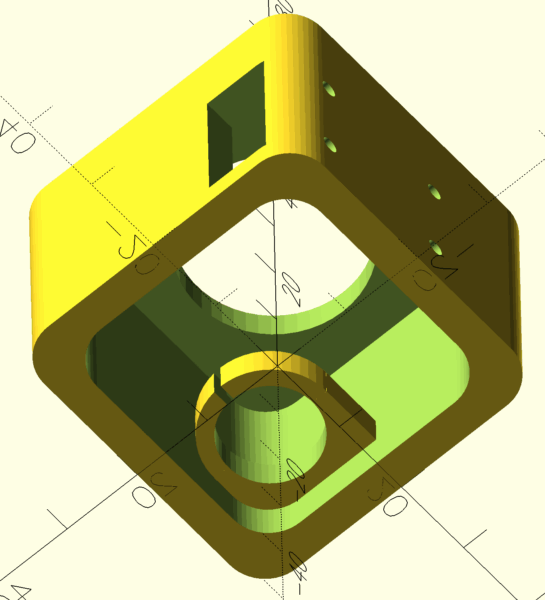
The Trinket board has a USB connector. In both designs, the board is flush with the side opening, exposing the USB, for power. This has a side effect in that the light from the Neopixel RGB LED on the Trinket shines out the slot and onto the kitchen counter.
Yes, this could have been battery powered, but then it would have been a more complex project: LiPo battery charging circuit, some way to indicate the battery needs charging, code that puts the processor in deep sleep, to be woken up by interrupt when the button is pressed. I won’t even mention tolerances of the Trinket’s clock and whether delay(1000) is really truly 1 second. This was meant to be a “couple hours on a weekend afternoon” project. You have to plug it in. It might be a few hundred milliseconds in error. Corners have been cut.
The code itself is also simple, though I added a few flourishes. I don’t drive the buzzer at annoying levels. It’s a little trill to let you know you’ve hit the button, and a quick burst of chirps at the end to let you know 30 seconds has elapsed. It blinks the Neopixel LED every second as a visual indicator that it’s counting. It has a power-on test of the LED (which helped me to see I originally had the Green and Red values reversed).
I didn’t feel it worth throwing on Github, so here’s the code inline:
#include <Adafruit_DotStar.h>

const int PIN_BUTTON = 0;
const int PIN_BUZZER = 1;
//const int PIN_LED = 13;
Adafruit_DotStar strip(1, 7, 8, DOTSTAR_BGR);

void setup()
{
    pinMode(PIN_BUTTON, INPUT_PULLUP);
    pinMode(PIN_BUZZER, OUTPUT);
    pinMode(13, OUTPUT);
    digitalWrite(PIN_BUZZER, LOW);
    strip.begin();
    strip.setBrightness(255);
    colorTest();
}

void colorTest()
{
    unsigned int COLORS[] = {
        strip.Color(0, 0, 0),
        strip.Color(255, 0, 0),
        strip.Color(0, 0, 0),
        strip.Color(0, 255, 0),
        strip.Color(0, 0, 0),
        strip.Color(0, 0, 255),
        strip.Color(0, 0, 0)
    };
    digitalWrite(13, HIGH);
    for (int i = 0; i < 7; i++)
    {
        strip.setPixelColor(0, COLORS[i]);
        strip.show();
        delay(100);
    }
    digitalWrite(13, LOW);
}

void loop()
{
    const int TIMER_DURATION = 30;
    //const int TIMER_DURATION = 5;
    waitForButton();
    startBeep();
    for (int seconds = 0; seconds < TIMER_DURATION; seconds++)
    {
        strip.setPixelColor(0, strip.Color(0, seconds % 2 == 0 ? 0 : 255, 0));
        strip.show();
        delay(1000);
    }
    endBeep();
    strip.setPixelColor(0, strip.Color(0, 0, 0));
    strip.show();
}

void waitForButton()
{
    int previousButtonState = HIGH;
    int lastDebounceTime = 0;
    int debounceDelay = 30;
    while (true)
    {
        int buttonState = digitalRead(PIN_BUTTON);
        digitalWrite(13, buttonState == HIGH ? LOW : HIGH);
        if (buttonState != previousButtonState)
        {
            lastDebounceTime = millis();
            previousButtonState = buttonState;
        }
        if ((millis() - lastDebounceTime) > debounceDelay)
        {
            if (buttonState == LOW)
            {
                return;
            }
        }
    }
}

void startBeep()
{
    digitalWrite(PIN_BUZZER, HIGH);
    delay(40);
    digitalWrite(PIN_BUZZER, LOW);
}

void endBeep()
{
    for (int i = 0; i < 3; i++)
    {
        digitalWrite(PIN_BUZZER, HIGH);
        delay(20);
        digitalWrite(PIN_BUZZER, LOW);
        delay(250);
    }
}
And that’s it. The timer sits in the kitchen and is easy for a sleepy, pre-caffinated Brian to hit in the morning.


Original article: Minimum Viable Arduino Project: Aeropress Timer.
]]>


This year has left me feeling a bit more politically-motivated. In fact, earlier this year:

But it feels time to just release source files for these new ones. They need to see more of the world. In my situation, I use a laser printer and vinyl sticker paper for longer-lasting stickers. I also use a fancy paper slicer — the modern, more finger-safe version of those paper-slicing guillotines we had in primary school. But if you want to make these stickers, you do you. Print them on adhesive paper labels if you want.

Each of these is a PDF sized to regular 8.5×11 letter paper. For the rectangular stickers, use the registration marks to slice off the right and left edges, then the top and bottom. Slice out that rotated vertical strip on the right. Slice the main section into rows. Now, just slice each row into 3″ wide stickers. For the square stickers, also slice off the right/left and then bottom/top. Slice into rows, then slice into 2″ squares.
Fuck Elon and the Felon

Handle With Rage

Rainbow Antifa

Friends Everywhere
“I have friends everywhere” is a sort of in-the-know phrase used in the Star Wars political thriller Andor. These are designed to have some bleed when cut with a 54mm button punch.

Portland Frog
The Portland Protest Frog. Also designed with some bleed to be cut on a 54mm button punch.

That’s it for now. Happy stickering.

Original article: Political Stickers for 2025.
]]>The Tangara takes a full-size SD card, so I have to copy my music on there anyway. So instead of using the Finder or the cp command or rsync or something similar, I decided I should write a small Python script. This script takes a source folder (my Plex music library) and a destination folder (the SD card) and:
- If the destination file already exists, skip it. Assume it’s already been written successfully and we don’t need to overwrite or update it.
- If the source file is an mp3, just copy it.
- If the source file is an m4a, then transcode it to mp3 into the destination folder.
It’s a basic script, just under 100 lines of code. It has a few prerequisites, namely: python 3, ffmpeg, and knowing how to edit a python config file and run a python script. But honestly it’s helped me automate what would have otherwise been a tedious and boring task.
You can find it at: https://github.com/BrianEnigma/TangaraCopy


Original article: Copying M4A Files to the Tangara.
]]>About a year ago, in January of 2024, Laura Hall approached Sean Stacey and I with an idea. Sean is the owner of Unfiction. I was a moderator and had run a half-dozen wikis for ARGs in the day and have been working on scripts to freeze a copy of MediaWiki into a static capture as a way to step off that upgrade treadmill and move down to cheaper hosting. She wanted to know if we could get the forum archives back online. There was some discussion around how to best make that happen as well as some life-gets-in-the-way dropping the ball, but eventually we worked out that I’d try to get the forums running long enough to take a static snapshot of all the pages. And that’s what I did. Eventually.
This blog post will serve as a loose recounting of the technical details behind that capture. It includes the steps and missteps. Along the way, I only took loose notes. A lot of this is from memory. You can blame anything conflicting or deviating from reality on faulty memory. There are two parts to the process: getting the forums running followed by taking the snapshot.
Running an Outdated phpBB
The initial work started in May of 2024. This wasn’t a full-time project. I have a full-time job. I also help run a nonprofit that produces monthly events. I spend a couple nights a week with a Vespa club. I have a century-old house that needs maintenance. Not to mention a certain amount of distraction by shiny things, at the expense of longer ongoing projects. I probably worked on the Unforums a couple of hours at a time every few weeks.
In order to take a static snapshot of the forums, I had to get them running, at least temporarily. This wasn’t an easy task. The version of Ubuntu of the era — the one we think the server ran on — was v10.04. I forget how I managed to find or make an AMI of this fifteen-year-old operating system, but getting it running in the AWS cloud was a no-go. “ClientError: Unsupported kernel version 2.6.32-38-server”. It was just too old for the hypervisor. I switched to running on a local VM, but quickly realized that the package repository is long dead, returning 404 errors. So. If I have no packages, then I’m going to have to compile server software from source. And if I’m compiling from source, the specific version of Unix distribution and the kernel shouldn’t matter much for these specific services. Let’s start with something modern and work backward in versions where required.
I spun up Amazon Linux 2023, thinking I’ll try everything on there as-is, with a modern MySQL, modern Apache, and modern PHP. It would be a miracle if it all magically worked, but would also be a massive time-saver. The database backup mostly loaded fine. There were some UTF-8 / Code-Page issues. I forget where exactly I solved them: the database config, the PHP config, the phpBB code, or a combination. Apache was just fine — it only acts as a conduit between the outside world and PHP. The PHP interpreter was absolutely and horribly angry at the ancient phpBB codebase. With all the customizations the Unforum had, upgrading to a modern phpBB seemed like a much more difficult task than downgrading the PHP version. (I think Sean had done some earlier research and some of the plugins and/or themes simply were no longer compatible nor available for the latest phpBB versions.)
I lined up the Ubuntu release dates to the PHP release dates. PHP 5 seemed the most likely match for the era. By comparison, we’re on PHP 8 today. Version 8 has added a lot of modern programming concepts (proper classes, named arguments, and type checking) and has also removed some earlier language features, including iterating through lists with the each() function. This was a pretty common PHP practice back in the day.
I ended up manually compiling PHP5, including MySQL support. There were also some required module dependencies that the forums needed. This included libraries such as libxml and ImageMagic (for post attachments). I then manually loaded the PHP module into the Apache config. The communication between the two was using a plain CGI connection and not FastCGI. A single-threaded web spider doesn’t need the high transactions-per-second that FastCGI provides. I then had to lock down external access. I’ll let you guess how many CVEs there are against an ancient version of PHP. Also set the hostname and faked a DNS entry for forums.unfiction.com that points to 127.0.0.1.
The Unforum code wasn’t stock phpBB. There were a lot of customizations as well as a custom theme template. I had to make a couple of tweaks for PHP 5, making me wonder if this was originally running on PHP 4. Fortunately, there were not too many tweaks. This is also where I might have made some UTF-8 related tweaks to correlate with the database.
I then hacked the phpBB permissions model and template. If the bulletin board recognizes the incoming connection as a bot, such as Google making a capture of the website, it assigns a “bot” permission to the session. This prevents it from getting to the login pages, making posts, and similar operations. I forced it to assume every connection was always a bot.
I also had to make some template changes. The things that come to mind are:
- Changed the donation box to describe the website restoration project.
- Changed the rotating tips box to text marking the snapshot date.
- Disabled the sticky announcements. (“Help save Unfiction!”)
- Removed various links to create an account, log in, preferences, edit profile, private messages, etc.
- Probably some other tweaks I can no longer remember.
Some file attachments were missing from the backup we had. This might have been because the database dump and the filesystem backup were taken at different times. It could have been corruption in backups. We actually combined two different backups and found that some attachments were present in one but not the other and vice-versa. The union of both backups covered most of the file attachments, but there were still some referenced in the database that didn’t exist in either backup. The stock phpBB kicked back a 404 error for missing attachments. I wanted something a little more friendly and descriptive of the situation, so I hacked the php code to present a visible apology that the file isn’t present in the archives instead of an error page.
Finally, I got the site in a state that we all agreed looked good enough to encase in amber.
Taking a Static HTML Snapshot of an Outdated phpBB
I use wget for a lot of web-client tasks, including taking snapshots of pages and sites. It has a very robust set of “mirror” features. It can spider its way through a collection of pages. It can parse a page it’s downloaded and also retrieve its dependencies (images, CSS, JavaScript). When saving pages to disk with specific filenames (such as adding an “html” extension or using Windows-friendly filenames), it will rewrite any links that point to those pages. Overall, wget is a great Swiss Army knife.
The command I used to capture the site looked like this:
wget \
    --user $MY_USERNAME \
    --password $MY_PASSWORD \
    --mirror \
    --page-requisites \
    --recursive \
    --no-parent \
    --quota=0 \
    --no-verbose \
    --adjust-extension \
    --convert-links \
    --restrict-file-names=windows \
    http://forums.unfiction.com
Pro Tip: run your capture in a tmux session, so that it can continue running in the background, even after you disconnect, and you can later pop in and check up on it.
I kicked off the first capture and crossed my fingers. I checked back every day, since I wasn’t sure how long it would take. Unfortunately it never ended. There was some trail you could take through the website that constructed URLs that continually added an extra slash between the folder and the filename. For example forums/viewpost.php would eventually become forums//viewpost.php and then on a later pass, forums///viewpost.php, etc. Each time through, it added another slash. Although the web server doesn’t care and normalizes multiple slashes into a single, wget acting as a client web browser treats these as uniquely separate pages. I casually poked around the site, looking for where this extra slash was being constructed but ultimately hacked it into the Apache server using mod_rewrite to detect multiple slashes and force a redirect to a single slash. That made wget happy with the situation.
So I kicked off another capture and crossed my fingers. This one also never ended. I could pop into the tmux session and look at the URLs that wget was capturing and found it was just spidering its way off into eternity through calendar.php. You see, the Unforums had a calendar plugin. When I was actively a user and moderator, I don’t think I ever looked at the calendar, but I think the theory was you could put game launches or expected incremental updates in there. Some ARGs had a very strict schedule, like an “update Tuesday” that players would look forward to. The problem was that the calendar part of the website just let you keep clicking on previous/next month — presumably out to infinity. And that is exactly what the wget spider was doing.
After some discussion with Sean and Laura, I removed the calendar plugin completely. It was easier than trying to hack in limits and none of us could think of any strong value the calendar provided. At the same time that I hacked out the calendar, I noted that the “bot” session profile also excluded user profile pages. Since I figured these were a fun peek into the personalities of the citizens of the bulletin board, I hacked the permissions model to allow bots to look at profile pages.
So I kicked off another capture and crossed my fingers. After several days, my 100GB capture volume ran out of disk space. Who could have guessed I’d be collecting more than 100GB of html files? I attached a much larger EBS volume to the instance.
So I kicked off another capture and crossed my fingers. This one actually ran to completion. It took about 5 days.
My copy/paste of text to replace the donation box missed a later email in the chain, where we discussed tweaks to the format/style of the site. We’d all overlooked my copypasta error when proofing the site, just before starting the capture. The forums are “Unforums” and not “unForums.” I didn’t want to kick off another 5-day capture for such a small change (yet a small change across 1,267,025 files). To be safe, I duplicated the entire capture folder and performed a little rewrite-in-place command line magic that involved grep | xargs | sed to make the edits directly. I also updated the corresponding PHP in case we needed to redo a capture in the future.
Finally, as a validation step, I copied the entire static archive to an S3 bucket configured for static hosting. I also shut down the web server to confirm that external resources weren’t accidentally being referenced somehow. This looked good.
From there, I transferred the files to Sean’s hosting provider and also downloaded a copy onto a USB SSD. Sean pointed the old forums subdomain to his new static hosting.
The final stats are:
- 134 GB of content
- …which can be compressed to 14 GB of content (as
.tar.bz2). - There is presumably a ton of repeated content such as header, footer, and assorted other template text that can be easily compressed due to the repetition.
- …which can be compressed to 14 GB of content (as
- 1,304,691 total files (1,267,025 HTML pages + 37,666 other files)
- 1,045,728 posts.
- About five days for each capture. I might have improved on this by making wget more aggressive and/or using a more powerful (but therefore more expensive) EC2 instance. I might have also increased speed by binding Apache to only 127.0.0.1 and dropping the basic auth. I’m not sure if wget reuses the connection between pages or if it has to re-handshake authentication each request. The caching provided by FastCGI may have also increased speed.
And while I’m dropping stats, I’ll end with this little chart I generated from the database of posts over time. I’ll leave it as an exercise for the reader to determine which ARGs corresponded to which spikes.


Original article: Reviving the Unfiction Forums.
]]> ]]>
]]>On the plus side, instead of wasting time on Facebook/Insta on the bus in the morning, I’ve gotten better at building the habit of reading ebooks. My Mastodon usage hasn’t changed, but I’ve created a Pixelfed account and have been active there. In theory, Pixelfed is an open replacement for Instagram, and they’ve gotten $72K in donations so far, but if/until more of my social graph moves over there, it’s fairly quiet.
Going forward, I will be using a tool to delete my Facebook/Instagram history. I don’t need Surveillence Capitalism having that much information about me and also potentially using it to train AI. Last month, I signed up for Incogni, which also helps scrub my private information from the internet. I likely will only post to the open alternate services, leaving my FB/insta as fairly blank slates, using them strictly to read up on folks/clubs and occasionally post comments. I may also keep ScreenZen installed on my phone, but loosen up the restrictions from “never” to a couple of times a day, for a limited duration.
After surveying a dozen different tools that purport to delete Facebook history en masse, I finally found a Chrome plugin that actually works. Out of the box, it will delete 20 posts, to show you it works. After that it’s $10 to continue. With all of the wasted time searching for a deleter that works, I figured the price was worth it. Overall, it is a little bit funky/flaky. It’s also very slow and you have to keep the browser window open the whole time. And I’m not sure, but I think it goes out to lunch if you switch to another tab or lock the screen. It took over an hour to delete all of 2008, but in those years I had Twitter connected to Facebook and I probably tweeted between 1 and 10 times a day, so there was a lot to delete. I’m slowly making my way up to modern times.
I haven’t yet found an Instagram deleter.
Original article: On Boycotting Meta For A Week.
]]>Internally, they’re publishing new guidelines for moderators. This includes information such as “a trans person isn’t a he or she, it’s an it.” The new hate speech guidelines allow “allegations of mental illness or abnormality when based on gender or sexual orientation, given political and religious discourse about transgenderism and homosexuality and common non-serious usage of words like ‘weird.’” Their public guidelines state “we remove dehumanizing speech,” which is a little ironic given that internal policy. Pretty much anything vaguely political, no matter how untrue or misinformed will be allowed. Pro-Trump, anti-vax, qanon, conspiracies, interfering Russian and Chinese content mills — all the actually-fake news is fair game now.
Facebook (and likely Instagram and Threads) is going to become more of a shitshow than it already is. This has led to a grass-roots Lights Out Meta movement (NBC News Article).

The primary goal is to boycott Meta properties for the week, starving them of advertising money. Secondarily, maybe you’ll find alternatives you can get into.
Me? To keep myself honest during this time, I’m adding blocking rules to my WiFi router and to my phone’s ad blocker. I’m fairly entrenched in Mastodon already, which has gotten significantly more user-friendly since it was last in the spotlight. Bluesky has captured a ton of attention. I’m not on it much (I only cross-post there with Croissant), but I keep hearing it has the feel of early Twitter. I’m dipping my toes into Pixelfed as an Instagram replacement. It’s had a large number of people join recently, and has some growing pains in the form of slow connections, but is starting to get traction. Unfortunately I don’t know many people there yet, so it feels a little empty in my feeds. I also have some private Slack and Discord instances for specific friend groups — a lot more manageable than a group text chain.
I have a couple of groups that only post to Instagram and/or Facebook. That’s going to be a little tough. A couple of them have Discords that are either brand-new-and-not-well-established or are pre-existing-but-barely-touched. I may have to cheat a bit and peek in to see where certain meetups are.
Blocking: Some Technical Details
On my phone and iPad, I can add custom rules to my ad blocker, 1Blocker, to keep me off of Meta properties, whether I’m at home or on the go. Those rules look fancy, but really all I did was type in Update: While 1Blocker is able to block ads and certain kinds of things within apps (by masquerading as an on-device VPN), the custom rules only apply to the Safari web browser and don’t actually block access via the Facebook, Instagram, and Threads app. Read the next section for how I actually accomplished this kind of blocking.facebook.com into the Custom Rules section, and it came up with all the correct (regex) code to match Facebook properties. Same for Instagram and Threads.

On iOS, macOS, and Android you can find ScreenZen, an app that lets you set up blocking rules for accessing selected applications. I don’t know about the other platforms, but on iOS, it integrates with Screen Time and is able to do some really deep integration into the operating system. Once installed, you can select specific apps or whole groups of apps (such as social, games, or entertainment) and rules around how many times and for what duration you’d like access. It can even throw up interstitial “are you sure?” screens before you can actually get to the app. I put in ludicrously low limits (interstitial screen for 30 seconds, one launch of one minute per day) to curb me from reflexively launching the apps out of habit. Which I keep doing.


On your home screen, the apps appear greyed out with an icon in front of the name as a reminder. When you attempt launch, you’ll get the interstitial screen.


My home router, from Ubiquiti, has a built-in mechanism for blocking specific apps and websites. It’s meant to block specific devices (like a kid’s iPad) from hitting up social media or streaming video during disallowed hours, but you can configure it to block Meta for every computer on the WiFi network for an unlimited duration.

Conclusion
I hope you’ll follow suit and also boycott Meta properties. And heck, maybe you’ll find nice alternatives. Hit me up on one of them:
- @[email protected] (Mastodon)
- BrianEnigma (Bluesky)
- BrianEnigma (Pixelfed)

Original article: Blocking Meta For A Week.
]]> ]]>
]]>
For months, I’ve had a thought that I could use Boxes.py to laser-cut a bracket that spans the two shelf lips, has a hole for the tissue box, and some guides to keep it centered and in place. Today I finally sat down, generated the box (really, just the fingers and slots) and then edited the box design down to the “open face” box I wanted. I started with a box with a base:

After deleting three sides and playing around with dimensions and tabs, I had the simplified design I was looking for:

A quick cardboard test for fit showed me that the upper measurement was a little off, but the offset circle was in just the right place.

The final design looked good. I used some poster putty to secure it to the shelf lips, and everything’s now good.


The whole thing took about 20 minutes of design time, 5 minutes for each cut (cardboard and wood), and a short time for glue and assembly. And that short bit of time removes an annoyance I’ve had for half a year.
That’s it. That’s the blog post. I often have little life-simplifying projects like this that are quick builds, but I just-as-often don’t think to write them down.
Original article: Quick Make: Horizontal Tissue Bracket.
]]> ]]>
]]>There may be a time, especially in the upcoming presidency, when you find yourself wanting to use online resources but not leaving any sort of digital “paper trail” behind. People in China do this to read news on websites that are blocked by the Great Firewall of China — news content that may differ from the approved government-run news sources within the country. As the US starts its possible slide into authoritarianism and fascism, there may be a time when looking up abortion resources or digitally talking openly with queer people carries risk.
Everything you do on the web leaves a footprint. On your local machine, you have bookmarks, browser history, and browser cache. The path between your browser and the web server you are looking at is almost always encrypted these days. This means that what you read and type is private, but the metadata — what you connected to and when — is visible to anyone in-between, whether it’s the IT department at work, the other WiFi patrons at the coffee shop, or your ISP. They won’t know what you’re looking at or signing up for at Planned Parenthood, but they can see you were connected to the PP server. The website itself logs the IP address of everyone that connected. This is often used for stats about traffic, but search warrants can obtain those addresses and correlate them back to who was using that address at that time. And finally, websites are often not just a single entity — they pull resources from elsewhere. You may trust a given website, but if they serve ads from an ad network or include a Facebook/Twitter/Tumblr like button or single-sign-on button or even employ 3rd party JavaScript libraries for functionality, those other entities will also have your IP address in a log somewhere, with the same risks. In fact, there may be greater risk, since advertisers can be unscrupulous about the data they collect, and will do their best to correlate it into a profile on you.
There is a spectrum of threat-actors you might want to hide your internet traffic from. Maybe you want to learn about binders and gaff without parents or advertising networks knowing. Maybe you’re in an abusive relationship with someone paranoid and overbearing and you need to research an escape plan. Maybe you’re in a state where abortions are illegal, the state government offers a bounty for turning in anyone involved with helping get an abortion, and so you need to make covert plans. Maybe you’re helping organize a protest along the lines of BLM or Occupy. Or maybe you’re a whistle-blower and need cover while passing along sensitive files.
Each of these carries a level of risk and a level of required diligence and security. This blog post isn’t meant for people who need defense against nation-states. If the FBI/CIA/NSA/KGB have an interest in you, this might be one facet of an overall protection plan, but this guide isn’t written for the Edward Snowdens of the world. But it might be the right guide for you if your governor is issuing broad threats against gender/identity/whatever groups you may identify with, if you suspect your ISP is monitoring for certain kinds of traffic, if you worry about advertisers building a dossier on you, or if you have a parent/roommate/partner who may not be on your side. If these describe you, read on.
Tails and ToR: Theory and Understanding
The Onion Router, or ToR, is a way of bouncing your web browsing through the internet. If you’ve seen movies where a hacker has a world map up on a big screen with lines showing how they’re routing traffic from their location through Brazil, then over to Egypt, then up to Italy, then over to Pakistan, through the Cayman Islands, before it finally reaches the Gibson supercomputers that power the bank’s deposit and withdrawal system — well, that’s movie magic. But ToR is sort of like that. It’s a little more automatic and hands-off, but it bounces your traffic through several anonymizers in such a way that no one point along that chain has visibility into who’s making the request and where that request ends up. Someone on the local network might see that you’re connecting into ToR, but they can’t observe what website you’re talking to or what you’re saying. Because you’re talking to real websites on the real internet, that encrypted path needs to “exit” somewhere — that is it stops taking anonymous hops and actually connects to Planned Parenthood or Wikipedia or BBC World News. That so-called exit node can see where the request is going, but it can’t see the content of the request nor the origin (who requested it). And because that exit node is likely serving dozens if not hundreds of people using ToR, your request to view a web page is going to be muddled up with that of many other folks.
There is also a “Dark Web” aspect of ToR. There are some flaws with how web servers and domain names work. Those have been exploited by law enforcement. For instance, the federal government has been known to impound domain names. The domain name is a mapping from a simple-to-understand name, like example.com, to a numeric address that’s less intuitive but more computer-friendly, like 192.168.42.128 or even 2001:0db8:85a3:0000:0000:8a2e:0370:7334. So they don’t have to take down the web server — they may not even have jurisdiction to do so if it is housed in another country — all they have to do is “steal” the domain name and redirect it to a web page showing a takedown notice. Nobody is going to remember the original numeric address. There are special domain names within ToR, ending with the suffix .onion (instead of .com or .edu or whatnot) that are fortified against this sort of takedown. There are quite a few websites that can be served up by both a regular dot-com style domain name AND ALSO respond to the dot-onion dark web name. These include things like Duck Duck Go and BBC News. And then there are some that can ONLY be served up using a dot-onion domain. These would be places where the default (in)security of the public internet isn’t enough and the administrators want to require you to use ToR, to have that extra security and anonymity by default. One example of this would be the New York Times SecureDrop site, where whistleblowers can leave tips and documents.
While ToR itself is a communications stack that you can run on your own computer or laptop, it leaves some pretty telltale signs. There’s an app with an onion icon. There’s a new Firefox-like web browser. It’s also vulnerable to anything that might already be installed on your operating system, whether or not you’re aware of that presence. Net-Nanny type software may be able to see what you’re connecting to or capture periodic screenshots. Software keyloggers can record everything you type. A virus could be doing any of the above and relaying it to a third party. An abusive partner could have installed secret monitoring software (like a Net-Nanny, but more hidden).
To address these problems, a bootable USB thumb drive exists. Tails, which was created and maintained by the same nonprofit that does ToR, packages up the web browser and ToR network into a simple bootable flash drive. The goals of Tails are to Leave No Trace and to have Amnesia. The thumb drive is fully self-contained. Your computer boots from it and all actions you perform are contained within its realm. The “host” computer and operating system are never involved and never know about what happens while using Tails. Tails won’t be affected by any parental-control software, keyloggers, or viruses that might be on the host computer. Although there is a way to save a few things between boots (such as browser bookmarks), many other things (cache, cookies) never persist between boots. And the default is to never save anything — to boot from a fresh state each time.
And finally, a clever thing about Tails is that if you yank out the flash drive while it’s running, it immediately shuts down the computer. If you’re reading about queer culture and your parents are about to walk in, you can pull the USB stick, triggering an emergency shutdown, and no one’s the wiser.
Obtaining Tails
Tails only runs on an Intel-based computer. For most people, that means a Windows desktop or laptop. On older Mac laptop might work, but not if it has a newer processor (M1, M2, M3, or M4) or a newer version of macOS. Tails’ official policy is that it might work, but no guarantees. In theory a Chromebook could work, but there’s extra setup involved. You have to set up the laptop as a Developer Device and, in my small and dated experience with Chromebooks and Tails, that both leaves a footprint behind and requires you to jump through a couple of hoops each time you want to boot from the thumb drive.
So, ideally, you’d have a Windows machine. If you were dedicated to using Tails frequently, and not in a position where the existence of another laptop would spark suspicion (such as with an abusive partner who snoops), you might consider getting a dedicated “burner” laptop. You can find basic ones brand new in the $300-$500 range. You can find used ones cheaply at places such as Free Geek. You don’t need a dedicated laptop, but it’s certainly nice to have if you have the money and freedom for it to not raise suspicions in your living situation.
It also requires a thumb drive. Because I have a garbage laptop I’ve dedicated to Tails, I use a low-profile thumb drive that I leave plugged in all the time. If you’re on a shared machine, you might want something a little more chunkier and easier to yank out. If you’re on a budget, whatever you have available would work, as long as it’s big enough.

If you are in a safe environment, you can follow the instructions for downloading Tails and writing it to a thumb drive. You’ll need an 8GB or larger thumb drive, you’ll have to install an app to write the image file to the drive, and they suggest a smartphone to read the instructions you’ll need to follow after you’ve booted to the thumb drive.
If you are not in a safe environment, your best bet would be to have a trusted friend create the thumb drive for you. Alternately, you can try following the instructions but then manually delete traces — delete the thumb-drive writer software, delete the downloaded image file, remove the Tails (and related) websites from the browser history, clear cache — but there is going to be a level of risk involved there.
Using Tails
You’ll need to boot from the thumb drive. Most computers are set up so that if they see a bootable USB device plugged in, they’ll default to that instead of booting to their internal hard drive. This may not always be the case, and the specifics depend on your exact computer and its BIOS. Usually there’s a helpful message like Press F12 to select boot device. Sometimes it’s F2 or F8. Sometimes it doesn’t have a message and you have to just hit one of those keys and see what works. On an older Intel Mac, you hold down the Option key while booting.
When the computer has successfully booted from the thumb drive, you’ll see a boot menu like the following. You can hit Return or just wait a few seconds to select the default.

Once booted, you’ll have to option to create persistent storage. This saves things between boots such as your WiFi network name and password, your browser bookmarks, and any documents you create. (There are apps similar to Word and Excel as well as graphics and sound editors.) It also remembers any extra software you installed beyond the base packages. This persistent storage is contained on the thumb drive and is encrypted by a password. This means that if someone takes your thumb drive, they won’t be able to see what you’ve stored on there (beyond the fact that Tails is installed). You don’t have to create this persistent storage, and you don’t have to enable it every single time you boot, but I’d advise you to at least create one so that you have the option to use it in the future.
You basically flip the switch to create it, then give it a password. When you boot from the flash drive again in the future, you can use the password to activate the persistent storage. Or you can choose not to, in which case you get a fully anonymous Tails.


Once it’s created, you can choose what to automatically store there. The Personal Documents folder is the only thing enabled by default. I’d advise you to also enable “Network Connections” and “Tor Browser Bookmarks.”


Once tails has booted, you’ll have to select a WiFi network — unless you’ve already done this, saved it to persistent storage, and enabled persistent storage with your password this boot.

Your next boot won’t have the switch to create persistent storage. You’ll instead have an option to enter the encryption password. If you leave it blank, you won’t get that storage. If you enter it, you’ll get a few additional settings. I won’t get into the specifics of those settings, just leave them as defaults. The key thing is that if you see them, then you’ve successfully connected to your persistent storage area.


Using the Tor Browser
Once Tails has booted and you’re connected to WiFi, a Tor dialog pops up. You’ll need to follow through its steps to connect to the ToR network and have your traffic anonymized. In the toolbar in the upper-right, you’ll note a grayed-out onion icon with an X in the corner. This shows that you ARE NOT connected to the ToR network yet.

It’ll take about a minute, but finally you’ll be connected. You’ll see the onion icon in the upper-right toolbar at full brightness, without the X. This means your traffic is being sent through the network.

Click the button to start the browser. (You can also start the browser through the Applications menu in the toolbar, in case you close it at some point.) It will open to a Tails welcome page.

At this point, you can go to the regular internet with the knowledge that your network traffic is being bounced through several intermediaries before it reaches the destination.
One thing I would advise doing, if you have persistent storage enabled, is to change the homepage. One that I’ve found (somewhat) useful is The Hidden Wiki. It has some introductory articles, resources, and links useful for a Tor browsing session.

It can be accessed through two URLs:
- https://thehidden-wiki.org on the normal public internet.
- http://zqktlwiuavvvqqt4ybvgvi7tyo4hjl5xgfuvpdf6otjiycgwqbym2qad.onion/ (note the dot-onion) when using the Dark Web. Your best bet is to use the dot-onion version because if you’re not connected to ToR, this site will very obviously not load.
PLEASE NOTE that there are a lot of links in there. I do not and cannot endorse any or all of them. There are links to cryptocurrency and financial schemes, both of which could be scammy and full of fraud. There are links to places to buy things (guns, drugs, hacking services). There are links to unsavory message and image boards. People do a lot more than just activism and getting around internet filters on the ToR network’s Dark Web.
But I will point the sections on “Darknet Versions of Popular Sites.” This has the privacy-focused DuckDuckGo search engine, for example:
- Normally accessed by https://duckduckgo.com
- On the Dark Web at https://duckduckgogg42xjoc72x3sjasowoarfbgcmvfimaftt6twagswzczad.onion/
You’ll also find New York Times, BBC, and ProtonMail. There is a whole section on Whistleblowing and another for File Uploaders.
But again, use anything listed here at your own peril. Approach everything with an initial attitude of distrust and skepticism. If it feels scammy or illegal, it probably is.


General Safety and Security Hygiene
There are multiple levels of action you can take through Tor, and you’ll have to use common sense to keep safe.
- Passive reading is the safest. Any footprint you’re leaving behind is through the ToR anonymizer.
- Posting or organizing adds risk. If you’re writing text, you might be giving yourself a pseudonym or inadvertently revealing some level of personal information like the city or neighborhood you live in. If you’re uploading photos, those often have embedded metadata (EXIF) that will tell what camera or phone was used to take the picture and possibly also GPS coordinates. If you’re uploading audio, some files keep metadata about the recording device or the user ID of who downloaded commercial music.
- Making reservations can add more risk. For instance, a hotel or AirBnb reservation might require you to make an account, which would require an email and mailing address. You’ll be paying by credit card, which leaves a paper trail. Signing up for a doctor appointment will likely require a name and medical history, if not up-front payment.
- Whisteblowing can add tremendous risk, since you’re potentially in an adversarial relationship with a company or government with large resources.
 IMPORTANT: DON’T CROSS THE STREAMS
A key concept is that each time you boot up Tails, put yourself in a specific compartmentalized persona. Don’t use it to check your personal mail. Don’t use your phone’s browser to look at a message board you only post to from Tails. If you create accounts (email, AirBnb, etc) in your Tails “persona,” then ONLY check them there. Actions that “cross the streams” can leave breadcrumbs that a persistent (or just observant) adversary can use to connect, for instance, your activism account to your personal email account.
If you’re doing two different activist things, such as helping organize a protest in one place and organizing a union in another, reboot Tails in between. Each activity can leave breadcrumbs, and even though you’re anonymous and not directly traceable, an adversary may be able to connect that Anonymous Person A and Anonymous Person B are the very same person. The protest organizer and the union organizer are the same person, even if they don’t know who that person is.
Using coffee shop WiFi is a good extra level of security over home or office WiFi, but be mindful of shoulder surfers. A Fine Upstanding (Ass-Kissing) Citizen may be observing your activity and call the cops. You don’t want to end up like Luigi at McDonalds.
And Finally…
This blog post is not meant to be an exhaustive or comprehensive manual on ToR and Tails. It’s also not meant to teach you everything there is about security and privacy hygiene. Additional resources that you might find useful include:
- Poke around the How Tails Works documentation.
- Read the Tails Documentation.
- The Electronic Frontier Foundation (EFF) has a great guide on Surveillance Self-Defense:
- Start with the Basics.
- Assess your threat model with Your Security Plan.
- Going to a protest? Check their guide.
- Be aware that a VPN is about trust. It’s like a single-hop ToR network. The entry and exit node are one-in-the-same, which means they know who you are and who you’re talking to. If the VPN provider has business, financial, or legal incentive to turn you in, they will.
Original article: Using the Internet Without Leaving a Trace: a How-To Guide.
]]>