I’m Deleting Google Photos

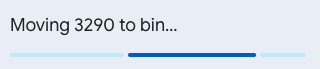
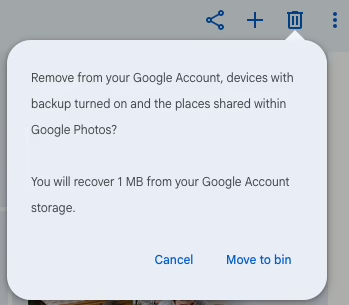
popup dialog saying "Moving 3290 to bin..." with a progress meter

If you look at r/googlephotos on Reddit you’ll come across several posts from people who have had their accounts banned because of photos they have in their accounts. Most of the time it’s because of family photos of children. I have also seen posts from people who unwisely backed up their WhatsApp images folder, or backed up a drive without looking at what was on it first. Remember that researcher who lost their Google account because they had WWII Nazi documents in their Google Drive?

I have photos there going back to the year 2000, but I never regarded Google Photos as a backup service. It was a fabulous photo-sharing site, but I have barely used it since 2024 and now have my own self-hosted Immich server instead.

Last week I did a Google Takeout of everything, just in case, as it will also download any photos I saved from shared albums.

Today I went to the large photos and videos page and deleted almost every item off that page.

Unfortunately, there isn’t a “delete everything from Google Photos” button. You’ll have to visit photos.google.com and select an image and then scroll down, and down and down… and then with shift pressed, click on the last image to delete. It then may take some time for Google to mark the images as deleted.
Honestly, I expect that the automatic CSAM detection they’re using has already scanned every single photo I’ve uploaded so I’m not worried about that. I’m not uploading anything else there either, but I’ve been meaning to move off Google Photos entirely for a long time.

It is really difficult to do. In my head I know that I have a Takeout backup of everything. I know that all the original photos are on my computer at home, and they’re on Immich now, but selecting photos of familiar smiling faces, of birthday parties, of holidays and festivals, and then clicking DELETE is hard.

They’re my photos. It was nice knowing you Google Photos.

If you want an alternative, self-host Immich or use Pixel Union, a hosted version of Immich where you get 16GB free before you have to pay for more storage. It’s also hosted in the EU, which is even better! I have an account there. I uploaded a few recent photos in this album for you to see what it looks like.

I’m a little tired after walking home

A screenshot of Google Fit showing the path from Amsterdam to Cork as the app recorded it.
The text "Morning walk" is below, showing a I did 14 heart points and 5,571 steps during the flight.

It’s good to be back in Cork today, even with Storm Kathleen on the way. I forgot to end my tracked walk when I got to Gate 26 in Schiphol Airport, and Google Fit somehow managed to pick up GPS signals every now and again as we flew home. So, it looks like I walked from Amsterdam to Cork. 🙂

I’ve no idea how I walked 2km off the coast of Ireland, somewhere south of Waterford. There was some bad turbulence on the flight, but we weren’t quite bouncing up and down in our seats!

“Verify this email is yours” spam

Yesterday I got an unusual email spam. It hit my inbox on Fastmail, coming from my Google account. The spam link was embedded in the actual email address, using the plus notation that Gmail supports. On Fastmail, the link wasn’t clickable, but on Gmail it was. When I checked Gmail, the email had been moved into Spam, so I guess they were dealing with many copies of this. Surprisingly, the link is still clickable, even with the email in the Spam folder.

I thought I hadn’t received spam like this before but looking at it again, I think I did. Just once.

The email came from “Google <[email protected]>”, and the spammers used some online service that requires verification. They stuffed the spam link into the email address. Here’s what it looks like on Gmail:

A spam email I received. I have obscured the spam link in this ALT text:

Verify this email is yours
[my email]+~New~messages~Read-[spam link]#@
googlemail.com
This email address was recently entered to verify your email address.
You can use this code to verify that this email belongs to you.
793352
If this wasn't you, someone may have mistyped their email address. Keep this code to yourself, and no other action is needed at this moment.
The Google Accounts team

They added a “#” character at the end of the link, so the @googlemail.com part of the email would become an anchor tag. Pretty clever, pretty devious. The link goes to a 404 now, but had an image with a link yesterday.

So, be careful if you get any email verification emails. Especially if you weren’t expecting it. It’s probably spam.

Backup your social media accounts

I’ll keep this short. You should download your Twitter data, Facebook data, and as you probably have that too, your Google data. You never know when you might be banned from using them, even accidentally.

After you’ve saved that data, go to Instagram and Reddit and do the same!

Twitter

Download your data from Settings->Your Account->Download an archive of your data.

Facebook

Download your Facebook data from Settings->Privacy->Your Facebook Information->Download your information. I like that they offer HTML and JSON options.

Google Takeout

Google Takeout is where you download your Google data. There is a lot there. At the time of writing, it shows 53 products, which includes YouTube, Gmail and Google Photos.

Instagram

Download your Instagram data from their Privacy and Security page where you will find the request page.

Reddit

And finally, Reddit. You can download your data from their data-request page.

Keep that data safe. Don’t leave it in your download directory. It potentially has lots of private information you won’t want to be shared with anyone who uses your computer.

Google lets you schedule up to 6 data downloads per year, but it might be worth setting a calendar reminder to do this at least once a year. Store your downloads in dated directories to make it easy to keep track of when they were downloaded.

The old Nik Collection is still free

After the sunset, edited in Silver Efex Pro 2

Nik Collection 4.0 was announced recently but comments here say that if you have a previous version it always shows an update warning that can’t be turned off.

Within a couple weeks of usage, I received the on-screen notification when launching the software below telling me to update. However, clicking on that “Install Now” button neither downloads nor installs a software update but instead, takes me back to the DxO website and prompts me to purchase brand new software.

If you’re curious, the original Nik Collection that was made free by Google in 2016 still works. You can grab it on Mac and Windows from this page at archive.org.

Google Photos ends free storage tomorrow

That photo taken today is a helicopter rotor

Google Photos will start counting your uploads against a storage limit from tomorrow. Make sure you upload anything you’ve been meaning to upload in the next few hours!

Also go into your shared albums and click the “Save photos” button if you want “local” copies of any photos shared with you.

I’m sticking with Google Photos. The ease of sharing photos and AI search make it worth while, but I will be disabling automatic upload off my phone. I take too many snapshots that I don’t care enough about to pay for them.

Google remembers they own Feedburner

Google sent out an email today to Feedburner users with the ominous subject, “Upcoming changes to Feedburner”.

It’s Google so my first thought was that they were about to shut it down. No, it’s not quite that bad, but they are shutting down parts of the service.

Starting in July, we are transitioning FeedBurner onto a more stable, modern infrastructure. This will keep the product up and running for all users, but it also means that we will be turning down most non-core feed management features, including email subscriptions, at that time.

This blog and my photoblog each have email subscribers through Feedburner. If you are reading this through one of those emails come visit the site and scroll to the end of the page. There’s a “Subscribe via Email” form you can use to join the 9,145 others who read whatever it is I post here. (How is that number so large? Is that accurate? Reply here please if you are one of them. It’s WordPress stuff you’re looking for isn’t it? Sorry, I haven’t been posting much about that in a long time!)

If you’re reading this through a Feedburner URL and I know there are a few of you out there it might be safer to use https://odd.blog/feed/ instead. You know, just in case Google kills it off. I know it’s unlike them to do that but you never know.

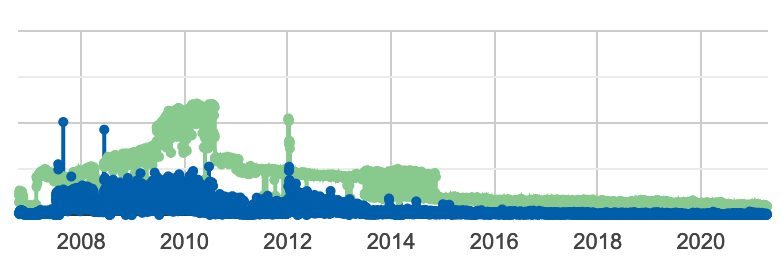
Google Takeout doesn’t include a “Feedburner” directory either. I must export the Feedburner stats and take a look at them. Here’s the tiny graph they show you. Look at that in 2010. Whoah! It’s all been downhill since then. If you’re still reading this blog since then, thank you. I really appreciate your attention since you now have Twitter and Facebook to distract you.

When is Android Pay coming to Ireland?

I’ll admit I haven’t been too excited about the whole “paying for things with my phone” hype. I think I may have used a contactless terminal in Mc Donalds once. But there was a system update for my Galaxy S7 Edge yesterday and early this morning I noticed a new application, Android Pay. Despite the early hour I quickly went through the setup process but adding the credit card from my Google account brought me to this screen:

Android Pay

Various searches on Google haven’t thrown up anything useful or hopeful. It’s anyone’s guess when Android Pay will go live here. Anyone know?