The post Hyperlight Nanvix: POSIX support for Hyperlight Micro-VMs appeared first on Microsoft Open Source Blog.
]]>The Cloud Native Computing Foundation’s (CNCF) Hyperlight project delivers faster, more secure, and smaller workload execution to the cloud-native ecosystem—achieving hardware isolation with extremely fast cold starts by eliminating the operating system entirely. The challenge: without system calls, applications must be specially written for Hyperlight’s bare-metal environment.
Hyperlight and the Nanvix microkernel project have now combined efforts to solve this final constraint. By adding a POSIX compatibility layer, the integration enables Python, JavaScript, C, C++, and Rust applications to run with full hardware isolation and extremely rapid cold starts—much closer to meeting all three requirements.
This post explains the serverless trilemma and walks through how we attempt to break through it.
The serverless trilemma: pick two?
When building serverless infrastructure, architects have traditionally faced a painful trade-off. You can have any two of the following, but not all three:
- Fast Cold Start—containers and WebAssembly sandboxes prioritize startup speed over security isolation. They rely on software protection boundaries (seccomp, namespace isolation, WebAssembly imports/exports) rather than hardware boundaries. These software boundaries can be bypassed if vulnerabilities exist in the kernel or runtime, whereas hardware boundaries are immutable and enforced by the processor itself.
- Secure Isolation—traditional virtual machines (VMs) provide battle-tested hypervisor isolation, but they require booting an entire operating system (OS), leading to cold starts measured in hundreds of milliseconds.
- Runtime Compatibility—running existing applications typically requires a full POSIX environment with system calls, file systems, and standard libraries—something that bare-metal micro-VMs don’t provide.
With Hyperlight, we showed that it’s possible to create micro-VMs in low tens of milliseconds by eliminating the OS and virtual devices. But this speed came at a cost: Hyperlight guests have no system calls available. Instead, they’re statically linked binaries that communicate only through explicit host-guest function calls. That’s secure and fast, but it limits what applications you can run.
Nanvix: an OS for cloud-native apps
Nanvix is a Rust-based microkernel created by the Systems Research Group at Microsoft Research. Unlike traditional OSes, Nanvix was co-designed with Hyperlight from the ground up. It’s not a general-purpose OS—it’s a minimal OS tailored specifically for ephemeral serverless workloads. Here are some highlights of Nanvix:
- Microkernel Design Philosophy—Nanvix implements only the essential kernel services needed for serverless functions. Everything else runs in user space or is handled by the host.
- POSIX Compatibility—Nanvix provides over 150 POSIX system calls, enabling support for Python, JavaScript, WASI, Rust, and C/C++ applications without code changes.
- Cloud-Optimized Services—OS services are tailored specifically for ephemeral serverless workloads, not long-running processes.
- Memory Safety—written in Rust.
The result? You can now run real applications—with file systems, system calls, and language runtimes—inside a Hyperlight micro-VM, while maintaining hypervisor-grade isolation and achieving double-digit-millisecond cold starts.
Toward breaking the trilemma: Hyperlight and Nanvix
The combination of Hyperlight and Nanvix addresses the trilemma by splitting responsibilities. Hyperlight controls everything the guest VM can do on behalf of the trusted host, providing hardware-enforced isolation. Nanvix’s optimized microkernel runs inside the Hyperlight guest, providing the POSIX system calls and file system int erface that applications expect. Together, they enable hardware-isolated execution of Python, JavaScript, C, C++, and Rust applications with double-digit millisecond-order cold starts.
How it works: the split OS design
The magic of Hyperlight-Nanvix lies in its split OS design. Rather than running a monolithic OS inside the VM, it splits responsibilities between two groups of components:
- Ephemeral components (run inside the Hyperlight VM)—These are the components that require hardware isolation: the application code, language runtime, POSIX compatibility layer, and the Nanvix kernel itself. Everything executing untrusted or tenant-specific code runs inside the VM boundary.
- Persistent components (on the Host)—I/O, networking, and shared state are managed by the host system. The Hyperlight VMM mediates all communication between the guest and these services.
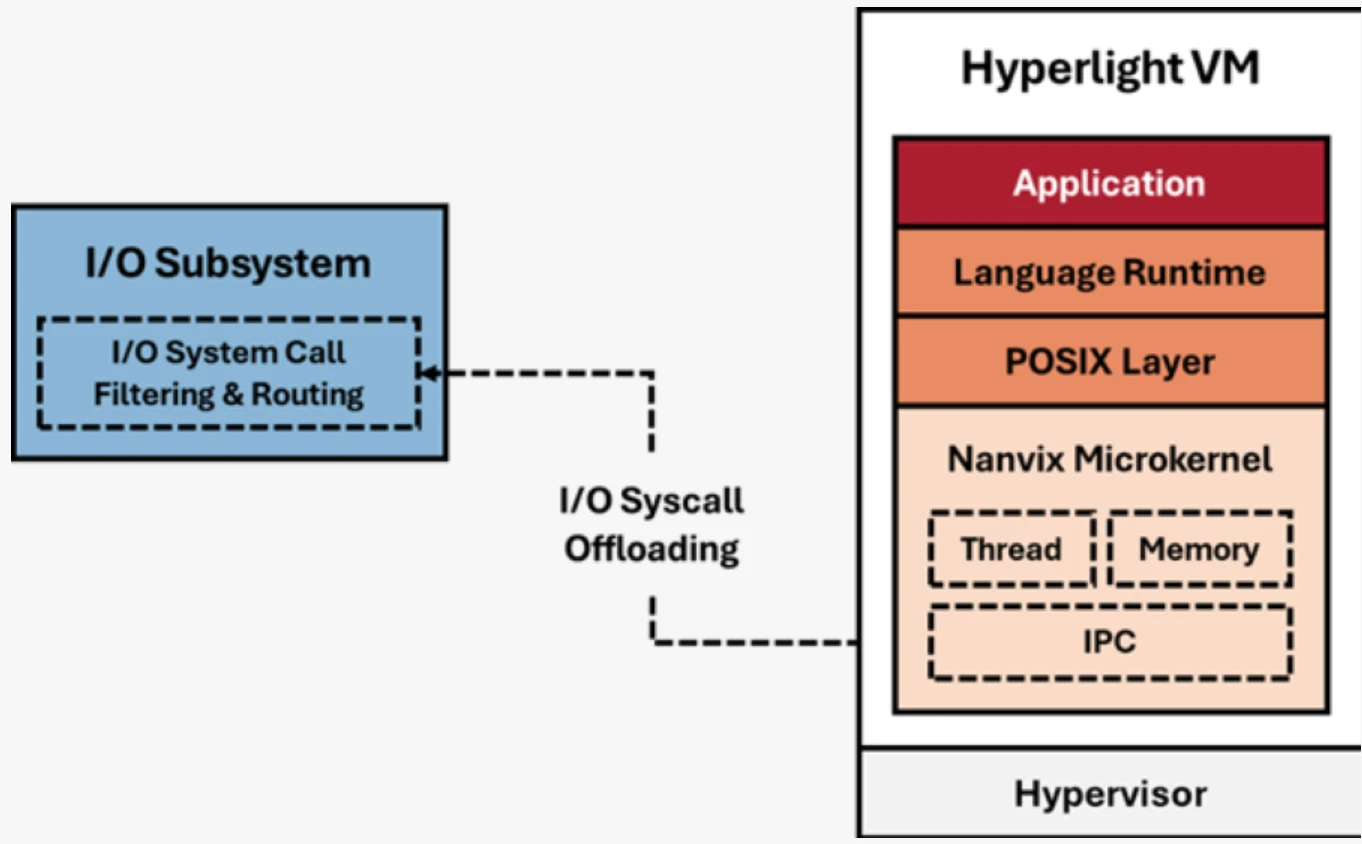
This split architecture means we get the best of both worlds. Applications see a familiar POSIX environment, but the actual I/O operations are handled by the host—enabling high density, fast cold starts, and shared state across invocations when needed.
System call interposition: security at the system call boundary
One of the most powerful features of the Hyperlight-Nanvix integration is system call interposition. When a guest application makes a system call (like openat to open a file), the request flows through Nanvix, across the VM boundary via Hyperlight’s VM exit mechanism, and to the host. At this boundary, the host can:
- Accept—allow the system call to proceed
- Intercept—transform system call arguments or return values
- Block—deny specific system calls entirely based on security policy
This gives you fine-grained control over what untrusted code can do, even when that code expects a full OS underneath it. Want to allow file reads but block network access? You can enforce that at the system call level without modifying the guest application.
Deployment modes: flexibility for different threat models
Hyperlight-Nanvix delivers all three requirements—hardware isolation, fast cold starts, and application compatibility. But different use cases have different security requirements. The integration supports three deployment architectures that let you optimize for your specific threat model.
Across all three modes, the Hyperlight VM remains identical. What changes is how the I/O subsystem is deployed: whether it runs in the same process as the VMM, in a separate process, or in a separate VM entirely. Each architecture offers different trade-offs between isolation strength, performance, and resource density.
Single process architecture
The simplest deployment model runs the I/O subsystem and the Hyperlight VMM in a single host process. The VMM thread manages the Hyperlight VM, while an I/O thread handles system call interposition. This provides the same threat model as Hyperlight without Nanvix—fast and simple, ideal for running small, untrusted workloads with hardware isolation.

Multi-process architecture
For improved isolation, you can separate the VMM and I/O handling into different host processes. The VMM process manages the Hyperlight VM, while a separate system process handles I/O operations. This constrains the blast radius if a vulnerability is exploited—an attacker who escapes the VM still can’t access I/O resources directly. The system I/O process can also be shared across multiple concurrent instances for the same tenant, improving both density and deployment time.

Disaggregated architecture
The most isolated deployment runs two separate VMs on the host hypervisor (using Hyper-V or KVM). The System VM handles all I/O system calls and can serve as a shared backend for multiple Hyperlight VMs. The Hyperlight VM forwards I/O requests across the hypervisor boundary to the System VM, providing defense-in-depth with multiple hypervisor boundaries.

Performance: fast cold starts with real applications
We’ve tested Hyperlight-Nanvix against other isolation technologies using real-world applications. Our early benchmarks show very promising results:
- Double-digit millisecond-order cold starts when booting the Nanvix kernel, loading a language runtime, and executing application code
- Significantly faster than traditional VM solutions for the same deployment model
- High memory efficiency with hundreds of instances per GiB of memory
- Fast enough for per-request VM isolation without sacrificing security
How far did we get to breaking the trilemma? We’re preparing a detailed benchmark analysis that we’ll share in a follow-up post, including methodology, reproducible test cases, and comparative data across different workloads. This will give you the data and tests you need to decide for yourself.
Language support: from C to Python
Because Hyperlight-Nanvix provides a POSIX compatibility layer, you can run applications in virtually any language, among them:
- C and C++—compiled directly against the Nanvix toolchain
- JavaScript—using QuickJS or other embedded JS engines
- Python—with an embedded Python interpreter
- Rust—native support with the Hyperlight guest library
The key insight is that language runtimes themselves are just applications. By providing system calls and a file system, Nanvix enables you to embed interpreters like QuickJS or CPython inside the micro-VM. Your JavaScript or Python code runs normally—it has no idea it’s executing inside a hardware-isolated sandbox.
This approach also explains why Hyperlight-Nanvix achieves better performance than general-purpose operating systems: Nanvix is optimized for workloads you want to spin up, execute, and tear down as quickly as possible—the exact pattern cloud-native serverless functions demand.
Use case: running AI-generated code safely
One compelling use case for Hyperlight-Nanvix is executing AI-generated code. As large language models become more capable of writing code, we need secure environments to run that code without risking our infrastructure.
AI-generated code should be treated as untrusted and potentially malicious. With Hyperlight-Nanvix, you can:
- Spin up an isolated micro-VM in tens of milliseconds
- Execute the generated code with strong language support
- Interpose on system calls to enforce security policies (no network, limited file access)
- Destroy the VM after execution, leaving no persistent state
The hypervisor boundary means that even if the generated code contains an exploit targeting the language runtime, the attacker still faces a hardware-enforced wall. And because cold starts are so fast, you can afford to create a fresh VM for every code execution—no need to reuse potentially compromised sandboxes.
Getting started
The hyperlight-nanvix wrapper provides out-of-the-box support for running JavaScript, Python, C, and C++ programs inside Nanvix guests.
git clone https://github.com/hyperlight-dev/hyperlight-nanvix
cd hyperlight-nanvix

# Download the Nanvix toolchain and runtime
cargo run -- --setup-registry

# Run scripts directly
cargo run -- guest-examples/hello.js    # JavaScript
cargo run -- guest-examples/hello.py    # Python
For C and C++ programs, you’ll need to compile them first using the Nanvix toolchain (via Docker). See the repository README for compilation instructions.
Example: running workloads from Rust
use hyperlight_nanvix::{Sandbox, RuntimeConfig};

#[tokio::main]
async fn main() -> anyhow::Result<()> {
    let config = RuntimeConfig::new()
    .with_log_directory("/tmp/hyperlight-nanvix")
    .with_tmp_directory("/tmp/hyperlight-nanvix");

    let mut sandbox = Sandbox::new(config)?;

    // Works with any supported file type
    sandbox.run("guest-examples/hello.js").await?;
    sandbox.run("guest-examples/hello.py").await?;
    sandbox.run("guest-examples/hello-c").await?;

    Ok(())
}
Example: system call interposition
use hyperlight_nanvix::{Sandbox, RuntimeConfig, SyscallTable, SyscallAction};

unsafe fn custom_openat(
    _state: &(),
    dirfd: i32,
    pathname: *const i8,
    flags: i32,
    mode: u32,
) -> i32 {
    println!("Intercepted openat call - auditing file access");
    // Forward to actual system call or block based on policy
    libc::openat(dirfd, pathname, flags, mode)
}
#[tokio::main]
async fn main() -> anyhow::Result<()> {
    let mut system_call_table = SyscallTable::new(());
    system_call_table.openat = SyscallAction::Forward(custom_openat);

    let config = RuntimeConfig::new()
        .with_system_call_table(Arc::new(system_call_table));

    let mut sandbox = Sandbox::new(config)?;
    sandbox.run("guest-examples/hello-c").await?;

    Ok(())

}
The repository also includes a Node.js/NAPI binding, allowing you to create sandboxes directly from JavaScript. Check out examples/ai-generated-scripts/ for a complete example of safely executing AI-generated code. This example requires additional setup—see the README in that directory.
Get involved with Hyperlight and Nanvix
Hyperlight is a CNCF Sandbox project, and we’re excited to see the community build on this foundation. The integration with Nanvix represents the next step in our vision: making hardware-isolated serverless execution practical for real-world applications.
- Explore Hyperlight-Nanvix Integration GitHub
- Join the community and bi-weekly meetings
- (Wednesday at 9 AM PST/PDT)
- CNCF Slack: #hyperlight channel
- Learn more about Hyperlight GitHub
- Learn more about Nanvix GitHub
The post Hyperlight Nanvix: POSIX support for Hyperlight Micro-VMs appeared first on Microsoft Open Source Blog.
]]>The post Preserving code that shaped generations: Zork I, II, and III go Open Source appeared first on Microsoft Open Source Blog.
]]>A game that changed how we think about play
When Zork arrived, it didn’t just ask players to win; it asked them to imagine. There were no graphics, no joystick, and no soundtrack, only words on a screen and the player’s curiosity. Yet those words built worlds more vivid than most games of their time. What made that possible wasn’t just clever writing, it was clever engineering.
Beneath that world of words was something quietly revolutionary: the Z-Machine, a custom-built engine. Z-Machine is a specification of a virtual machine, and now there are many Z-Machine interpreters that we used today that are software implementations of that VM. The original mainframe version of Zork was too large for early home computers to handle, so the team at Infocom made a practical choice. They split it into three games titled Zork I, Zork II, and Zork III, all powered by the same underlying system. This also meant that instead of rebuilding the game for each platform, they could use the Z-Machine to interpret the same story files on any computer. That design made Zork one of the first games to be truly cross-platform, appearing on Apple IIs, IBM PCs, and more.

Preserving a piece of history
Game preservation takes many forms, and it’s important to consider research as well as play. The Zork source code deserves to be preserved and studied. Rather than creating new repositories, we’re contributing directly to history. In collaboration with Jason Scott, the well-known digital archivist of Internet Archive fame, we have officially submitted upstream pull requests to the historical source repositories of Zork I, Zork II, and Zork III. Those pull requests add a clear MIT LICENSE and formally document the open-source grant.
Each repository includes:
- Source code for Zork I, Zork II, and Zork III.
- Accompanying documentation where available, such as build notes, comments, and historically relevant files.
- Clear licensing and attribution, via MIT LICENSE.txt and repository-level metadata.
This release focuses purely on the code itself. It does not include commercial packaging or marketing materials, and it does not grant rights to any trademarks or brands, which remain with their respective owners. All assets outside the scope of these titles’ source code are intentionally excluded to preserve historical accuracy.
Running Zork I-III today
More than forty years later, Zork is still alive and easier than ever to play. The games remain commercially available via The Zork Anthology on Good Old Games. For those who enjoy a more hands on approach, the games can be compiled and run locally using ZILF, the modern Z-Machine interpreter created by Tara McGrew. ZILF compiles ZIL files into Z3s that can be run with Tara’s own ZLR which is a sentence I never thought I’d write, much less say out loud! There are a huge number of wonderful Z-machine runners across all platforms for you to explore.
Here’s how to get started running Zork locally with ZILF. From the command line, compile and assembly the zork1.zil into a runnable z3 file.
"%ZILF_PATH%\zilf.exe" zork1.zil
"%ZILF_PATH%\zapf.exe" zork1.zap zork1-ignite.z3
Then run your Z3 file in a Zmachine runner. I’m using Windows Frotz from David Kinder based on Stefan Jokisch’s Frotz core:

Or, if you’re of a certain age as I am, you can apply a CRT filter to your Terminal and use a CLI implementation of a Zmachine like Matthew Darby’s “Fic” written in Python:

Continuing the journey
We will use the existing historical repositories as the canonical home for Zork’s source. Once the initial pull requests land under the MIT License, contributions are welcome. We chose MIT for its simplicity and openness because it makes the code easy to study, teach, and build upon. File issues, share insights, or submit small, well-documented improvements that help others learn from the original design. The goal is not to modernize Zork but to preserve it as a space for exploration and education.
Zork has always been more than a game. It is a reminder that imagination and engineering can outlast generations of hardware and players. Bringing this code into the open is both a celebration and a thank you to the original Infocom creators for inventing a universe we are still exploring, to Jason Scott and the Internet Archive for decades of stewardship and partnership, and to colleagues across Microsoft OSPO, Xbox, and Activision who helped make open source possible.
The post Preserving code that shaped generations: Zork I, II, and III go Open Source appeared first on Microsoft Open Source Blog.
]]>The post What’s new with Microsoft in open-source and Kubernetes at KubeCon North America 2025 appeared first on Microsoft Open Source Blog.
]]>Since my last update at KubeCon + CloudNativeCon Europe 2025, we have continued our investments in growing existing CNCF projects, strengthening the foundations of Kubernetes while launching new projects where the community has seen need. From improving reliability and performance to advancing security and AI-native workloads, our goal remains the same: make Kubernetes better for everyone.
We’re also introducing practical improvements across Azure and Azure Kubernetes Service (AKS) that make running cloud-native and AI workloads even simpler and more resilient. These updates aren’t just features; they reflect real-world feedback from customers and the community, and they’re designed to help you scale Kubernetes with confidence.
Our ongoing commitment to building in the open
Previously, I have shared why building in the open matters to our teams at Microsoft—not just for transparency, but for driving real progress in cloud-native technologies. That commitment continues. We’re proud to work alongside the Cloud Native Computing Foundation (CNCF) and the broader ecosystem to help define the new Kubernetes AI Conformance program, aimed at ensuring interoperability and portability for AI workloads. AKS has already met these conformance requirements, reflecting our commitment to open standards. We believe AI conformance will unlock greater choice across open-source tooling and platforms, and we are also contributing to new open-source AI platforms that run on Kubernetes where we see strong community and customers adoption.
Our collaborations span key areas of AI infrastructure. With NVIDIA, we’re scaling multi-node LLM inference with NVIDIA Dynamo. We are also collaborating on Ray (now part of the PyTorch foundation) as a distributed compute engine with a set of AI libraries that accelerate machine learning workloads. AKS is also now recognized as one of thellm-d project’s well-lit infrastructure providers, ensuring robust support for large-scale AI deployments.
We’re bringing AI to the world of Kubernetes observability with the Inspektor Gadget Model Context Protocol (MCP) server, and we’ve open-sourced Wassette, a security-oriented runtime for WebAssembly Components via MCP. In the Kubernetes AI Toolchain Operator (KAITO), we have added multi-node distributed inference for large models, Gateway API Inference Extension (GAIE) integration, and OCI artifact support to vastly reduce model pull time. AIKit has also joined the KAITO project, making it easier to fine-tune, build, and deploy open-source LLMs.
Security remains a top priority. We’re addressing community demand for stronger dataplane and software supply chain protections by contributing multicluster support for Istio’s Ambient mode, donating the Dalec as a sandbox project to the CNCF for secure package and container creation, and enhancing Copa with multi-platform support and end-of-life detection for direct image patching. We have also introduced the Headlamp plugin for Karpenter to improve scaling and visibility.
In Kubernetes v1.34, Microsoft engineers helped lead the stable feature releases of structured authentication and Dynamic Resource Allocation (DRA), including DRA’s integration with cluster autoscaler. We also collaborated to bring Headlamp under SIG UI and Kube Resource Orchestrator (kro) under SIG Cloud Provider, strengthening governance and collaboration.
For the past three years, Azure has been the top cloud provider in CNCF contributions, and our focus remains on advancing open source through partnership and shared innovation. These efforts reflect our belief that leadership in cloud-native means listening, contributing, and building together with the community. You can meet many of our contributors in the Azure booth and Project Pavilion at KubeCon!
Advancing AKS for what’s next
In addition to our work in the upstream community, I am happy to share several new capabilities in Azure Kubernetes Service that reflect where customers are headed: stronger security and governance, improved performance at scale, AI-powered operations, and simplified management.
Secure by design
Security isn’t an afterthought in AKS, it’s foundational. We’ve focused on making clusters resilient by design, starting with the node layer. Flatcar Container Linux introduces an immutable filesystem that prevents configuration drift and simplifies recovery from incidents. For organizations operating across clouds, Flatcar’s CNCF roots ensure consistency and portability.
Building on that principle, Azure Linux with OS Guard takes host security even further. This next-generation container host enforces immutability and code integrity using technologies like SELinux and Integrity Policy Enforcement (IPE), upstreamed in Linux kernel 6.12. With Trusted Launch enabled by default, OS Guard locks down the boot process and user space, ensuring only trusted binaries run. It’s the same hardened foundation that powers Microsoft’s own fleet, now available for your workloads.
Governance also matters. Azure Kubernetes Fleet Manager’s new Managed Namespaces feature gives platform teams a way to enforce resource quotas, networking policies, and RBAC across clusters without manual intervention. Immutable configurations mean tenants can’t override security baselines, helping organizations maintain compliance and control at scale.
Performance at scale
Networking is central to Kubernetes performance, and AKS is evolving to keep clusters fast and reliable. LocalDNS speeds up DNS resolution by handling queries locally on each node, eliminating bottlenecks and insulating workloads from upstream outages.
For high-scale and latency-sensitive applications, eBPF host routing moves routing logic into the kernel for fewer hops and higher throughput, while local redirect policy ensures traffic stays node-local whenever possible. We’ve also strengthened traffic control and observability in Azure Container Networking Services (ACNS) with Layer 7 policy for fine-grained application-level enforcement and container network metrics filtering to cut data noise and costs. These improvements, combined with new options like Pod CIDR expansion and cluster-wide Cilium policies, give operators the tools to scale without compromise.
AI-powered operations
AI workloads need more than GPU capacity—they need operational intelligence. We’re bringing agentic reasoning directly into the CLI with az aks agent, so operators can describe an issue in natural language and get targeted diagnostics and actionable fixes without hopping across tools. We’ve also streamlined model serving with integrated Model Context Protocol to connect models with external tools and data in real time. For teams running GPU fleets, built‑in GPU metrics and a managed device plugin reduce the toil of provisioning and monitoring, while scheduler profile configuration helps place the right workload on the right node for performance and cost.
To give customers more choice in how they run distributed AI, we also recently announced a partnership with Anyscale to deliver a managed Ray service on Azure, bringing a Python‑native engine for training, tuning, and inference to AKS‑backed clusters without the burden of control‑plane management.
Advancing AKS for what’s next
In addition to our work in the upstream community, I am happy to share several new capabilities in Azure Kubernetes Service that reflect where customers are headed: stronger security and governance, improved performance at scale, AI-powered operations, and simplified management.
Secure by design
Security isn’t an afterthought in AKS, it’s foundational. We’ve focused on making clusters resilient by design, starting with the node layer. Flatcar Container Linux introduces an immutable filesystem that prevents configuration drift and simplifies recovery from incidents. For organizations operating across clouds, Flatcar’s CNCF roots ensure consistency and portability.
Building on that principle, Azure Linux with OS Guard takes host security even further. This next-generation container host enforces immutability and code integrity using technologies like SELinux and Integrity Policy Enforcement (IPE), upstreamed in Linux kernel 6.12. With Trusted Launch enabled by default, OS Guard locks down the boot process and user space, ensuring only trusted binaries run. It’s the same hardened foundation that powers Microsoft’s own fleet, now available for your workloads.
Governance also matters. Azure Kubernetes Fleet Manager’s new Managed Namespaces feature gives platform teams a way to enforce resource quotas, networking policies, and RBAC across clusters without manual intervention. Immutable configurations mean tenants can’t override security baselines, helping organizations maintain compliance and control at scale.
Performance at scale
Networking is central to Kubernetes performance, and AKS is evolving to keep clusters fast and reliable. LocalDNS speeds up DNS resolution by handling queries locally on each node, eliminating bottlenecks and insulating workloads from upstream outages.
For high-scale and latency-sensitive applications, eBPF host routing moves routing logic into the kernel for fewer hops and higher throughput, while local redirect policy ensures traffic stays node-local whenever possible. We’ve also strengthened traffic control and observability in Azure Container Networking Services (ACNS) with Layer 7 policy for fine-grained application-level enforcement and container network metrics filtering to cut data noise and costs. These improvements, combined with new options like Pod CIDR expansion and cluster-wide Cilium policies, give operators the tools to scale without compromise.
AI-powered operations
AI workloads need more than GPU capacity—they need operational intelligence. We’re bringing agentic reasoning directly into the CLI with az aks agent, so operators can describe an issue in natural language and get targeted diagnostics and actionable fixes without hopping across tools. We’ve also streamlined model serving with integrated Model Context Protocol to connect models with external tools and data in real time. For teams running GPU fleets, built‑in GPU metrics and a managed device plugin reduce the toil of provisioning and monitoring, while scheduler profile configuration helps place the right workload on the right node for performance and cost.
To give customers more choice in how they run distributed AI, we also recently announced a partnership with Anyscale to deliver a managed Ray service on Azure, bringing a Python‑native engine for training, tuning, and inference to AKS‑backed clusters without the burden of control‑plane management.
Simplifying the Kubernetes experience
Running Kubernetes shouldn’t feel like a maze. We’re streamlining operations with features like one-click Cloud Shell in a VNet for private clusters, removing the need for custom VM setups, and enhancing scheduling flexibility with profile configuration for advanced workload placement.
We’re also continuing to invest in making AKS Automatic the easiest Kubernetes experience for developers and operators. Expect more updates at Microsoft Ignite next week, where we’ll share enhancements that make it even easier to get started with AKS.
See you at KubeCon + CloudNativeCon
I’m looking forward to connecting in Atlanta and hearing what’s top of mind for you. Here’s where you can find us:
- Keynotes to catch:
- Scaling Smarter: Simplifying Multicluster AI with KAITO and KubeFleet with Jorge Palma, on November 13 at 9:49am.
- Cloud Native Back to the Future: The Road Ahead with Jeremy Rickard on November 13 at 9:56am.
- Expo Theater demo:
- HolmesGPT: Agentic K8s troubleshooting in your terminal with Pavneet Singh Ahluwalia and Arik Alon (Robusta) on Wednesday Nov 12, 2:15pm-2:45pm.
- Visit our booth (#500): Watch live demos, chat with experts, enjoy cool swag, and compete in Kubernetes Trivia for exclusive prizes!
- Sessions worth bookmarking:
- Smarter Together: Orchestrating Multi-Agent AI Systems With A2A and MCP on Container
- Shaping LTS Together: What We’ve Learned the Hard Way
- Rage Against the Machine: Fighting AI Complexity with Kubernetes simplicity
- OpenTelemetry: Unpacking 2025, Charting 2026
- AI Models Are Huge, but Your GPUs Aren’t: Mastering multi-mode distributed inference on Kubernetes
- Drasi: A New Take on Change-driven Architectures
- How Comcast Leverages Radius in Their Internal Developer Platform
- Beyond ChatOps: Agentic AI in Kubernetes—What Works, What Breaks, and What’s Next
- GitHub Actions: Project Usage and Deep Dive
- Open Policy Agent (OPA) Intro & Deep Dive
- …and many more.
If you’re at the event, come say hello! We’d love to hear what you’re building and where Kubernetes needs to go next.
The post What’s new with Microsoft in open-source and Kubernetes at KubeCon North America 2025 appeared first on Microsoft Open Source Blog.
]]>The post DocumentDB goes cloud-native: Introducing the DocumentDB Kubernetes Operator appeared first on Microsoft Open Source Blog.
]]>When it comes to distributed databases, there is no one-size-fits-all solution. Database-as-a-Service (DBaaS) options may not always meet customers’ data sovereignty or portability needs. On the other hand, managing database clusters manually is complex and resource intensive.
What’s needed is a balanced approach: one that automates routine tasks like updates and backups, while simplifying operations such as scaling, failover, and recovery. This is precisely where Kubernetes excels—bridging automation with operational simplicity.
However, unlike stateless applications that can be easily scaled and replaced, running stateful workloads in Kubernetes has always posed unique challenges. The DocumentDB Kubernetes Operator addresses these by using the operator pattern to extend Kubernetes, making it possible to manage DocumentDB clusters as native Kubernetes resources.
This approach creates a clear separation of responsibilities:
- The database platform team can focus solely on system health.
- App developers enjoy a DBaaS-like experience, without the need to build custom automation between container orchestration and database operations.
- The operator handles the complexity of PostgreSQL cluster orchestration, MongoDB protocol translation, and other critical operations.
- Application development teams can integrate services using MongoDB-compatible drivers and tools, thereby simplifying the process of migrating existing workloads to DocumentDB, or building new cloud-native applications.
DocumentDB operator architecture overview
DocumentDB joins the Linux Foundation
Read moreTo understand how this works, let’s take a look under the hood, to explore the key components and architecture that make this seamless Kubernetes integration possible.
A DocumentDB cluster deployed on Kubernetes consists of multiple DocumentDB instances that are orchestrated by the operator. A DocumentDB instance consists of the following core components that run inside a Kubernetes Pod:
- PostgreSQL with DocumentDB Extension: This is the core database engine enhanced with document storage and querying capabilities.It is deployed in customer application namespaces on Kubernetes worker nodes.
- Gateway Container: A protocol translator that runs as a sidecar container, converting MongoDB wire protocol requests into PostgreSQL DocumentDB extension calls.
By default, the DocumentDB instance is accessible within the cluster. If configured, the operator creates a Kubernetes Service for external client applications to connect to the DocumentDB cluster (via the Gateway) using any MongoDB-compatible client or tooling.
CloudNative-PG operator for PostgreSQL orchestration
The DocumentDB operator uses the CloudNative-PG (CNPG) operator for PostgreSQL cluster management. CNPG is a Cloud Native Computing Foundation (CNCF) Sandbox project that provides an open-source Kubernetes operator for managing PostgreSQL workloads. The CNPG operator runs in the cnpg-system namespace on Kubernetes worker nodes. Behind the scenes, the DocumentDB operator creates the required CNPG resources to manage the lifecycle of PostgreSQL instances with the DocumentDB extension.

The operator also includes a CNPG Sidecar Injector component, which is an admission webhook that automatically injects the DocumentDB Gateway container into PostgreSQL pods during deployment. Thanks to the extensibility of CNPG, the DocumentDB gateway container is implemented as a CloudNativePG Interface (CNPG-I) plugin.
“DocumentDB is addressing a real need as an open-source, document-oriented NoSQL database built on PostgreSQL. By offering MongoDB API compatibility without vendor lock-in, it tackles a long-standing challenge for developers. We are thrilled to see the DocumentDB Kubernetes Operator joining the Linux Foundation, and proud that under the hood, it’s powered by CloudNativePG, a CNCF Sandbox project. The future of PostgreSQL on Kubernetes just got even brighter!”
—Gabriele Bartolini, Vice President, EDB
Getting started with DocumentDB Kubernetes Operator
Ready to try it out? Getting started with the operator is straightforward. You can use a local Kubernetes cluster such as minikube or kind and use Helm for installation.
First, execute the commands below to install cert-manager to manage TLS certificates for the DocumentDB cluster:
helm repo add jetstack https://charts.jetstack.io

helm repo update

helm install cert-manager jetstack/cert-manager --namespace cert-manager --create-namespace --set installCRDs=true
Next, install the DocumentDB operator using the Helm chart:
helm install documentdb-operator oci://ghcr.io/microsoft/documentdb-operator --namespace documentdb-operator --create-namespace
This will install the latest version of the operator. To specify a version, use — version.
Wait for the operator to start. Run this command to verify its status:
kubectl get pods -n documentdb-operator
You should see an output like this:
NAME                                 READY   STATUS    RESTARTS  AGE

documentdb-operator-65d6b97878-ns5wk 1/1     Running   0         1m
Now, create a Kubernetes Secret to store the DocumentDB credentials. This should have your desired administrator username and password (make sure to note them down):
cat <With the credentials in place, create a single-node DocumentDB cluster:
cat <Wait for the DocumentDB cluster to be fully initialized, and run this command to verify that it is running:
kubectl get pods -n documentdb-preview-ns
You should see an output like this:
NAME                   READY   STATUS    RESTARTS   AGE

documentdb-preview-1   2/2     Running   0          1m
Once the cluster is running, you can connect to the DocumentDB instance directly through the Gateway port 10260. For both minikube and kind, this can be easily done using port forwarding:
kubectl port-forward pod/documentdb-preview-1 10260:10260 -n documentdb-preview-ns
With port forwarding active, you can now connect using any MongoDB client or tool. For example, from a different terminal, try connecting with mongosh (MongoDB shell):
mongosh 127.0.0.1:10260 -u k8s_secret_user -p DemoPwd --authenticationMechanism SCRAM-SHA-256 --tls --tlsAllowInvalidCertificates
Join us in our mission to advance the open-source document database ecosystem
The DocumentDB Kubernetes Operator represents an important milestone in our broader mission and our commitment to vendor-neutral, community-driven development that puts developer needs first.
We invite you to join the community and help shape the future of cloud-native document databases.
Get started by exploring the GitHub repository, documentation, or participate in discussions on our Discord community. As the project continues to evolve under Linux Foundation governance, you can expect to see contributions that expand functionality and integrate with other Kubernetes and CNCF projects.
The post DocumentDB goes cloud-native: Introducing the DocumentDB Kubernetes Operator appeared first on Microsoft Open Source Blog.
]]>The post 9 open-source projects the GitHub Copilot and Visual Studio Code teams are sponsoring—and why they matter appeared first on Microsoft Open Source Blog.
]]>These nine projects—ranging from browser extensions to semantic code editors—are not just experiments, they’re the scaffolding for a new generation of AI-native workflows. Let’s dive into some of the exciting MCP-powered innovations on GitHub based on community engagement.
From semantic code editing to new dev tools
1. Upstash/context7: Up-to-date documentation for LLMs and AI code editors
Upstash’s Context7 MCP server allows developers to easily pull up-to-date, version-specific documentation and provides code examples straight from the source. From there, the MCP includes them directly into your prompt for easily understandable context for your LLMs and AI applications.
2. Tadata/fastapi_mcp: FastAPI, meet MCP
FastAPI-MCP turns your FastAPI endpoints into MCP tools with authentication that needs minimal configuration. The MCP preserves schemas, documentation, and authentication logic, creating a seamless way to expose APIs to AI agents.
3. Oraios/serena: Semantic code editing for agents
Serena is a fully featured coding agent toolkit that integrates language servers with MCP. It provides semantic retrieval and editing capabilities for code retrieval, editing, and shell execution. This makes coding agents smarter and more efficient and can even turn a vanilla LLM into a true IDE assistant.
4. Czlonkowski/n8n-mcp: Let AI agents build n8n workflows for you
This project brings n8n’s powerful automation engine into the MCP ecosystem. By bringing in comprehensive access to n8n node documentation, validation tools, and direct n8n instance access, agents can now trigger, monitor, and manipulate workflows programmatically. Though details are sparse, early adopters are already integrating it with GitHub Actions, Discord bots, and data pipelines.
5. Justinpbarnett/unity-mcp: AI agents in game dev
Unity-MCP exposes Unity’s game engine APIs to MCP clients. Agents can inspect and modify game objects, scenes, and prefabs. It’s a bold step toward AI-assisted game development, with potential for debugging, level design, and UI generation.
6. Antfu/nuxt-mcp: Nuxt dev tools
Created by ecosystem veteran Anthony Fu, Nuxt-MCP lets agents interact with Nuxt apps via MCP. It supports route inspection, component analysis, and SSR debugging. If you’re building with Nuxt and want AI-native tooling, this is your launchpad.
7. MCPJam/inspector: MCP server testing and evals
The MCPJam inspector is an open-source testing and debugging tool for MCP servers – Postman for MCP. It can test your MCP server’s tools, resources, prompts, and authentication, and also has an LLM playground to test your MCP server against different models. Bonus: MCPJam has a CLI tool for MCP evaluation.
8. Steipete/Peekaboo: Swift code analysis via MCP
Peekaboo brings Swift codebases into the MCP fold. It uses language servers to expose symbol-level tools for agents, enabling code navigation, editing, and refactoring. Built by Peter Steinberger, it’s a must-have for iOS developers.
9. Instavm/coderunner: Run code safely and locally
Coderunner is a sandboxed MCP server for executing code snippets. It supports multiple languages and isolates execution for safety. Agents can test hypotheses, run scripts, and validate outputs—all without leaving the IDE.
Why GitHub and VS Code are sponsoring these projects
These projects aren’t just cool—they’re helping accelerate the MCP community and provide tools that developers use and care about. GitHub Copilot and VS Code teams are sponsoring these projects to promote open-source software and open standards like MCP, accelerate agent-native development workflows, and give developers more power to build, debug, and deploy with AI.
Want to help support these projects? Sign up for GitHub Sponsors today and join us in sponsoring them or other open-source projects you care about.
Dive into the MCP ecosystem and start building the future of AI-native development and explore how MCP x VS Code and GitHub Copilot can increase your productivity and creativity!
The post 9 open-source projects the GitHub Copilot and Visual Studio Code teams are sponsoring—and why they matter appeared first on Microsoft Open Source Blog.
]]>The post Marking Drasi’s first anniversary: introducing GQL support for Continuous Queries appeared first on Microsoft Open Source Blog.
]]>Since then, Drasi has evolved from an early open-source project to a Cloud Native Computing Foundation(CNCF) Sandbox project with a growing community. We’ve welcomed contributors from different organizations, refined Drasi’s core concepts of Sources, Continuous Queries, and Reactions, and established the foundation for building a new category of systems that are natively change-driven.
As we celebrate Drasi’s one-year anniversary, I’m excited to share another important milestone: Drasi now supports the Graph Query Language (GQL).
Why GQL matters
In the world of databases, languages matter. Structured Query Language (SQL) changed how developers worked with relational databases, providing a standard way to query, update, and reason about structured data. For nearly four decades, SQL has been the dominant database language standard. The landscape expanded in April 2024, when ISO/IEC officially released GQL (Graph Query Language) as the first new international database language standard since SQL.
Documented in ISO/IEC 39075, GQL (not to be confused with GraphQL) is specifically designed for property graphs that represent entities (nodes) and the relationships (edges) between them.
Why is this significant? Property graphs are increasingly central to modern data management. They allow developers to capture context-rich connections between entities, transactions, or events that relational tables alone struggle to represent efficiently. GQL enables developers to model, query, and modify data in graph-based systems with a consistent, standardized syntax without relying on vendor-specific extensions. Backed by the same ISO process that governs SQL, GQL provides a common language for graph-based systems to converge on, strengthening interoperability and ensuring long-term adoption.
Just as SQL provided a universal language for relational data, GQL represents a leap forward for graph data, with the potential to unify the graph ecosystem. By adopting GQL early, Drasi aligns with this standard, giving the community a future-proof foundation for building change-driven solutions with confidence.
From the beginning, our vision has been to make Drasi open, extensible and developer-friendly, allowing developers to work with the tools and languages that fit their needs. We know that no single query language or paradigm fits every scenario. That’s why this release is not about replacing what came before but about expanding choice. Drasi now supports queries written in both GQL—the new ISO standard for property graphs—and openCypher, a widely adopted query language supported by many existing graph users.
This dual support gives developers more choice for building Continuous Queries in Drasi. Developers already familiar with openCypher can continue to use it without interruption and those looking to adopt GQL for standards alignment can do so immediately within Drasi. In addition, organizations gain flexibility; they can evolve their systems at their own pace rather than committing to a single language prematurely. In practical terms, Drasi becomes a more inclusive platform, meeting developers where they are while also providing a clear path toward the future of graph query standards.
Drasi at one year: building the foundation
Drasi’s one-year milestone is about more than adding support for another query language. It reflects the steady growth and maturation of Drasi over its first year. Over the past twelve months, we’ve seen the project evolve from a core team–driven effort into an active open-source initiative with external contributors shaping its direction. We’ve delivered technical enhancements such as SDKs for building custom Sources and Reactions, integrations with Dapr, and we were welcomed into the CNCF Sandbox, an important recognition of Drasi’s potential role in shaping the cloud-native ecosystem.
The addition of GQL support is an important step forward, but it is just one part of a broader journey. Our goal remains the same—to make it simple for developers to build systems that natively react to change. And as we reflect on our first year, one theme stands out: the importance of community and collaboration. Drasi’s progress has been made possible by the support of contributors, partners, and early adopters who have shared their time, expertise, and ideas. As we look ahead to year two, we’re excited to continue that journey together and see what you will build with Drasi.
Learn more about Drasi
If you’d like to dive deeper into Drasi’s support for GQL, here is a companion technical blog post, that includes examples of GQL queries in action and details on Drasi’s multi-language support architecture. You can also get started right away by exploring the official Drasi documentation on GQL and openCypher.
Join the Drasi community
We’re grateful to everyone who has contributed to Drasi’s first year whether through code, feedback, documentation, or conversation. With your continued involvement, next year promises to be even more exciting. Join us in the following forums:
- Drasi’s Discord server for discussions, announcements, feedback, and connecting with the Drasi community.
- Drasi’s website for in-depth documentation and tutorials to help get you started.
- Drasi GitHub repos where the project code is freely available under the Apache 2.0 license.
- Drasi’s YouTube for educational content.
- Drasi’s social channels on BlueSky and X.
Get started with Drasi
Drasi makes it easy and efficient to detect and react to changes in databases
The post Marking Drasi’s first anniversary: introducing GQL support for Continuous Queries appeared first on Microsoft Open Source Blog.
]]>The post Accelerating AI and databases with Azure Container Storage, now 7 times faster and open source appeared first on Microsoft Open Source Blog.
]]>Today, we’re announcing the next major release of Azure Container Storage – v2.0.0. Compared to prior versions, it delivers up to 7 times higher IOPS, 4 times less latency, and improved resource efficiency. With built-in support for local NVMe drives, Azure Container Storage now delivers our fastest, most powerful Kubernetes storage platform on Azure. It’s now also completely free to use, and available as an open-source version for installation on non-AKS clusters. Whether you’re running stateful applications in production, scaling AI workloads, or streamlining dev/test environments, this major release’s performance will give your workloads a considerable boost.
Get started with Azure Container Storage documentation
What’s Azure Container Storage?
Before we dive into the latest enhancements, let’s take a moment to revisit what Azure Container Storage is and how developers run stateful workloads on Kubernetes with speed, simplicity, and reliability.
Azure Container Storage is a cloud-native volume management and orchestration service specifically designed for Kubernetes. It integrates seamlessly with AKS (Azure Kubernetes Service) to enable provisioning of persistent volumes for production-scale, stateful workloads.
Azure Container Storage’s vision is to serve as the unified block storage orchestrator for Kubernetes workloads on Azure, providing a consistent experience across multiple storage backends for simplified volume orchestration via Kubernetes APIs. This v2.0.0 release focuses specifically on breakthrough performance with local NVMe storage, bringing enterprise-grade performance with cloud-native simplicity. Later this year, we’ll be debuting support for Azure Container Storage to integrate with Elastic SAN.
Azure Container Storage delivers optimized performance and efficiency with low-latency storage for high throughput stateful applications, along with built-in orchestration and automation that allows Kubernetes to manage storage pools, persistent volume lifecycles, snapshots, and scaling—all without switching contexts or managing individual CSI (container storage interface) drivers.
What’s new?
There’s quite a bit to unpack here, so let’s take a deeper dive into some of the key benefits that Azure Container Storage v2.0.0 delivers:
Pricing changes
As before, you’ll continue to pay for the underlying storage backend you use. But Azure Container Storage versions 2.0.0 and beyond will no longer charge a per-GB monthly fee for storage pools larger than 5 TiB for both our first party managed and open-source version, making the service now completely free to use. Provision as much storage as you need without worrying about additional management fees. This means you get enterprise-grade storage orchestration and breakthrough performance without any additional service costs—just pure value for your Kubernetes workloads.
Enhanced performance with reduced resource consumption
This release of Azure Container Storage is optimized specifically for local NVMe drives provided with a variety of VM families. This focus unlocks the fastest possible I/O performance for your most demanding workloads while reducing infrastructure costs.
Perhaps most exciting, this latest version of Azure Container Storage on local NVMe is now faster than ever before. We’ve rebuilt our architecture from the ground up—from the kernel level to the control plane—to push the limits of our storage orchestrator. This dramatic speed improvement comes with an equally impressive reduction in cluster resource consumption. Previously, Azure Container Storage on local NVMe had three performance modes that could consume 12.5%, 25%, or 50% of your node pool’s CPU cores. Azure Container Storage v2.0.0 no longer has performance tiers. Instead, it delivers superior performance while using fewer resources than even our previous lowest-impact setting. This translates directly to cost savings—you get better performance while freeing up CPU capacity for your applications to perform even faster.
Let’s look at the benchmarks. On fio (Flexible I/O Tester), the open-source industry standard for storage testing, Azure Container Storage on NVMe delivers approximately 7 times higher IOPS and 4 times less latency compared to the previous version.
I O P S comparison, higher is better.
Latency comparison, lower is better.
Throughput comparison, higher is better.
But how does this translate to real workloads? We tested our own PostgreSQL for AKS deployment guide and found that PostgreSQL’s transactions per second improved by 60% while cutting latency by over 30%. For database-driven applications, this means faster query responses, higher throughput, and better user experiences.
Transactions per sec, higher is better.
Latency comparison, lower is better.
All in all, Azure Container Storage delivers a significant performance boost for I/O-demanding workloads out of the box without additional configuration needed, offering developers a simple yet powerful tool in their cloud-native arsenal.
Accelerated AI model loading and KAITO Integration
For AI and machine learning workloads, model loading time can be a significant bottleneck. Azure VMs equipped with GPUs have local NVMe drives available. With the latest NVMe enhancements in the new v2.0.0 version, Azure Container Storage takes advantage of this hardware by dramatically accelerating model file loading for AI inferencing workloads. With our recent integration with KAITO, the first Kubernetes-native controller for automating AI model deployment, you can now deploy and scale AI models faster than ever, reducing time-to-inference and improving overall AI application responsiveness.
Diagram of KAITO distributed inference with A C Stor.
Above: Azure Container Storage providing fast NVMe-backed storage for model files
We loaded Llama-3.1-8B-Instruct LLM and found a 5 times improvement in model file loading speed with Azure Container Storage v2.0.0, compared to using an ephemeral OS disk.
A graph of data being used
More flexible scaling options
Azure Container Storage previously required a minimum of three nodes when using ephemeral drives. It now works with clusters of any size, including single-node deployments. This flexibility is particularly valuable for applications with robust built-in replication or backup capabilities, development environments, and edge deployments where you need high-performance storage without the overhead of larger clusters. The elimination of minimum node requirements also reduces costs for smaller deployments while maintaining the same high-performance capabilities.
Open source and community support
We recognize how important the open-source community is to the health and spirit of the Kubernetes ecosystem. Azure Container Storage version 2.0.0 is now built on our newly created open-source repositories, making it accessible to the broader Kubernetes community.
Whether you need the Azure-managed version for seamless AKS integration or prefer the community open-source version for self-hosted Kubernetes clusters, you get the same great product and features. The open-source approach also means easier installation, greater transparency, and the ability to contribute to the project’s evolution.
Explore our open-source repository (local-csi-driver), and learn more about our related block storage products:
Azure Container Storage enabled by Azure Arc
Use Container Storage Interface (CSI) driver for Azure Disk on Azure Kubernetes Service (AKS)
In summary
This major update to Azure Container Storage delivers a faster and leaner high-performance Kubernetes storage platform. Here’s what you get:
Included out of the box: This release focuses on ephemeral drives (local NVMe and temporary SSD) provided with select VM families, including storage-optimized L-series, GPU-enabled ND-series, and general-purpose Da-series.
Enhanced workload support: Optimized for demanding applications like PostgreSQL databases and KAITO-managed AI model serving.
Superior performance: 7 times improvement in read/write IOPS and 4 times reduction in latency, with 60% better PostgreSQL transaction throughput.
Open source: Built on open-source foundations with community repositories for easier installation on any Kubernetes cluster.
Flexible scaling: Deploy on clusters with as few as one node—no minimum cluster size requirements.
Zero service fees: Completely free to use for all storage pool sizes—you only pay for underlying storage.
Getting started
Ready to experience the performance boost? Here are your next steps:
New to Azure Container Storage? Start with our comprehensive documentation.
Deploying specific workloads? Check out our updated deployment guide for PostgreSQL.
Want the open-source version? Visit our GitHub repository for installation instructions.
Have questions or feedback? Reach out to our team at [email protected].
Regardless of your workload, Azure Container Storage provides the performance and ease you expect from modern cloud-native storage. We’re excited to see what you build—and we’d love to hear your feedback. Happy hacking!
The post Accelerating AI and databases with Azure Container Storage, now 7 times faster and open source appeared first on Microsoft Open Source Blog.
]]>The post Bringing BASIC back: Microsoft’s 6502 BASIC is now Open Source appeared first on Microsoft Open Source Blog.
]]>For decades, fragments and unofficial copies of Microsoft’s 6502 BASIC have circulated online, mirrored on retrocomputing sites, and preserved in museum archives. Coders have studied the code, rebuilt it, and even run it in modern systems. Today, for the first time, we’re opening the hatch and officially releasing the code under an open-source license.
Microsoft’s first products: From the Altair to the Commodore 64
Microsoft BASIC began in 1975 as the company’s very first product: a BASIC interpreter for the Intel 8080, written by Bill Gates and Paul Allen for the Altair 8800. That codebase was soon adapted to run on other 8-bit CPUs, including the MOS 6502, Motorola 6800, and 6809. You can learn more about this time and hear directly from Bill Gates on the Microsoft Learn Website’s History of Microsoft video series or by visiting Bill Gates’ blog.
The 6502 port was completed in 1976 by Bill Gates and Ric Weiland. In 1977, Commodore licensed it for a flat fee of $25,000, a deal that placed Microsoft BASIC at the heart of Commodore’s PET computers and, later, the VIC-20 and Commodore 64. That decision put Microsoft’s BASIC at the heart of Commodore’s machines and helped millions of new programmers learn by typing:
- 10 PRINT “HELLO”
- 20 GOTO 10
This is BASIC M6502 8K VER 1.1, the 6502 BASIC lineage that powered an era of home computing and formed the foundation of Commodore BASIC in the PET, VIC-20, and the legendary Commodore 64. This very source tree also contains adaptations for the Apple II (“Applesoft BASIC”), built from the same core BASIC source. The original headers still read, “BASIC M6502 8K VER 1.1 BY MICRO-SOFT”—a time capsule from 1978.
The version we are releasing here—labeled “1.1”—contains fixes to the garbage collector identified by Commodore and jointly implemented in 1978 by Commodore engineer John Feagans and Bill Gates, when Feagans traveled to Microsoft’s Bellevue offices. This is the version that shipped as the PET’s “BASIC V2.” It even contains a playful Bill Gates Easter egg, hidden in the labels STORDO and STORD0, which Gates himself confirmed in 2010.
The enduring appeal of the MOS 6502 CPU
The MOS 6502 was the CPU behind the Apple II, Commodore 8-bit series, Atari 2600, Nintendo Entertainment System, and many more. Its simplicity, efficiency, and influence still inspire educators, hobbyists, and hardware tinkerers today.
In 2025, interest is as strong as ever. The retro-computing scene is thriving, with FPGA-based re-creations, emulator projects, and active development communities. The Commodore brand has returned with the announcement of a new FPGA-powered Commodore 64, the first official Commodore hardware in decades.
Reconstructing and preserving Microsoft BASIC
Over the years, dedicated preservationists have reconstructed build environments and verified that the historical source can still produce byte-exact ROMs. Notably, Michael Steil documented and rebuilt the original BASIC process for multiple targets. He has ported the code to assemblers like cc65, making it possible to build and run on modern systems.
This open-source release builds on that work, now with a clear, modern license. It follows Microsoft’s earlier release of GW-BASIC, which descended from the same lineage and shipped in the original IBM PC’s ROM. That code evolved into QBASIC, and later Visual Basic, which remains a supported language for Windows application development to this day.
From the blinking cursor of 1977 to FPGA builds in 2025, BASIC still fits in your hand. Now, for the first time, this influential 6502 version is truly yours to explore, modify, and share.

“Altair Basic Sign” by Swtpc6800, public domain via Wikimedia Commons.
The post Bringing BASIC back: Microsoft’s 6502 BASIC is now Open Source appeared first on Microsoft Open Source Blog.
]]>The post DocumentDB joins the Linux Foundation appeared first on Microsoft Open Source Blog.
]]>Why join the Linux Foundation?
The project’s mission statement and overarching principles remain the same—building a truly open source, vendor-neutral, developer first document database on top of Postgres. Contributing to Linux Foundation continues Microsoft’s commitment to open source as one of the top contributors to the Foundation. Joining the foundation is the next step in that commitment, as well as eventually creating an open standard for NoSQL databases. While the value proposition of document datastores over relational databases is clear, establishing a standard like the ANSI SQL standard for relational databases would be invaluable. Joining the Linux Foundation will create an independent identity for DocumentDB and provide a conduit for any database provider to contribute to our mission. In addition, Postgres continues to be hailed as the overwhelming favorite platform of choice and will continue to serve as the project’s backbone. For DocumentDB, open-source Postgres will be favored over a forked version of Postgres. The Linux Foundation will ensure these governing principles are adhered to by DocumentDB to maintain consistency.
Developer first
From its inception, DocumentDB has been built with developer freedom in mind. Under the MIT license, users have the utmost freedom to use the project as they please. Developers can interact with DocumentDB via PostgreSQL and benefit from stronger JSON support and document queries it provides. Developers can also leverage their existing MongoDB expertise to interact with DocumentDB using MongoDB drivers and tools. We are committed to relying on PostgreSQL and PostgreSQL extensibility. Similarly, we are committed to 100% compatibility with MongoDB drivers to ensure the document database ecosystem thrives. Joining the Linux Foundation will only further our developer-first mindset by ensuring these principles are followed.
Growing community, growing structure
One of our most exciting developments has been the number of organizations who expressed interest in both adopting the extension, as well as contributing to the project’s code base. Some had already built a significant presence in the open-source Postgres community and were looking to expand the scope of their projects. Others were seasoned vets in providing managed database services and curious to incorporate DocumentDB into their products. With the project’s origin rooted in the Microsoft organization on GitHub, a central and neutral home was needed for more open collaboration. In addition, with a growing list of enthusiastic contributors, we needed more structure. A Technical Steering Committee (TSC) was formed to guide executive decisions on the vision and roadmap, along with being the face of the project. A coterie of maintainers was created to gatekeep check-ins and uphold the project’s standards. Contributing to the foundation accelerated these improvements.
AWS is excited to contribute to the open source DocumentDB project, now stewarded by the Linux Foundation. DocumentDB, a permissively licensed database for implementing the MongoDB API, and an extension to PostgreSQL, the world’s leading open source database, advances a future where developers can rest assured that their applications are portable and compatible.
—Adam Abrevaya, Director, Amazon DocumentDB.
Document databases play an important role in customers’ database estates and ensuring customers have sufficient choice in this area is important. It is great to see the DocumentDB project joining the Linux Foundation which assures customers and the community have an openly-governed, open-source option available to them.
—Sailesh Krishnamurthy, Vice President, Engineering, Google Cloud.
By contributing DocumentDB to the Linux Foundation, Microsoft is ensuring the community’s ownership of the project. This move underscores our shared commitment to advancing open-source innovation and empowering developers with powerful, flexible tools built on PostgreSQL. Collaborating with Microsoft on the DocumentDB extension for Yugabyte has been an exciting project, and we look forward to joining the technical steering committee and continuing to contribute to the roadmap of distributed document databases together.
—Karthik Ranganathan, Co-Founder and CEO, Yugabyte.
What’s next?
As DocumentDB enters its next chapter with the Linux Foundation, we’re carving out a path where document databases are open, interoperable, and standardized—built with the flexibility of NoSQL and the reliability of Postgres. This move isn’t just symbolic; it reflects a concrete shift in how we build and govern the project moving forward. We’ve launched a new GitHub organization, documentdb, which will serve as the project’s new home. All development, issues, and discussions are now happening in the repo under the new org: https://github.com/documentdb/documentdb.
Be sure to update your bookmarks and forks accordingly. Whether you are looking for a NoSQL database solution, eager to contribute, or simply want to check us out—star our GitHub repo to stay updated, and join our community on Discord to ask questions and communicate directly with our Technical Steering Committee.
Let’s continue building together.
The post DocumentDB joins the Linux Foundation appeared first on Microsoft Open Source Blog.
]]>The post Microsoft’s open source journey: From 20,000 lines of Linux code to AI at global scale appeared first on Microsoft Open Source Blog.
]]>Innovate faster with open source on Azure
Timeline beginning with 2009: Linux Kernal Contributions. Microsoft contributes 20,000 lines of code to the Linux kernel, a pivotal early step in embracing open source. 2015: Visual Studio Code Launch. Release of Visual Studio Code, a free open-source code editor, which grows into the world’s most popular developer environment with tens of millions of users. 2018: GitHub Acquisition. Microsoft acquires GitHub. CEO Satya Nadella proclaims “Microsoft is all-in on open source…” and urges the community to judge by our actions.
Embracing open source: Key milestones in Microsoft’s journey
2009—A new leaf: 20,000 lines to Linux. In 2009, Microsoft contributed more than 20,000 lines of code to the Linux kernel, initially Hyper‑V drivers, under General Public License, version 2 (GPLv2). It wasn’t our first open source contribution, but it was a visible moment that signaled a change in how we build and collaborate. In 2011, Microsoft was in the top 5 companies contributing to Linux. Today, 66% of customer cores in Azure run Linux.
2015—Visual Studio code: An open source hit. In 2015, Microsoft released Visual Studio Code (VS Code), a lightweight, open-source, cross-platform code editor. Today, Visual Studio and VS Code together have more than 50 million monthly active developers, with VS Code itself widely regarded as the most popular development environment. We believe AI experiences can thrive by leveraging the open-source community, just as VS Code has successfully done over the past decade. With AI becoming an integral part of the modern coding experience, we’ve released the GitHub Copilot Chat extension as open source on GitHub.
2018—GitHub and the “all-in” commitment. In 2018, Microsoft acquired GitHub, the world’s largest developer community platform, which was already home to 28 million developers and 85 million code repositories. This acquisition underscored Microsoft’s transformation. As CEO Satya Nadella said in the announcement, “Microsoft is all-in on open source… When it comes to our commitment to open source, judge us by the actions we have taken in the recent past, our actions today, and in the future.” In the 2024 Octoverse, GitHub reported 518 million public or open-source projects, over 1 billion contributions in 2024, about 70,000 new public or open-source generative AI projects, and about a 59% year-over-year surge in contributions to generative AI projects.
Open source at enterprise scale: Powering the world’s most demanding workloads
Open-source technologies, like Kubenetes and PostgreSQL, have become foundational pillars of modern cloud-native infrastructure—Kubernetes is the second largest open-source project after Linux and now powers millions of containerized workloads globally, while PostgreSQL is one of the most widely adopted relational databases. Azure Kubernetes Service (AKS) and Azure’s managed Postgres take the best of these open-source innovations and elevate them into robust, enterprise-ready managed services. By abstracting away the operational complexity of provisioning, scaling, and securing these platforms, AKS and managed PostgreSQL lets organizations focus on building and innovating. The combination of open source flexibility with cloud-scale reliability allows services like Microsoft 365 and OpenAI’s ChatGPT to operate at massive scale while staying highly performant.
COSMIC: Microsoft’s geo-scale, managed container platform powers Microsoft 365’s transition to containers on AKS. It runs millions of cores and is one of the largest AKS deployments in the world. COSMIC bakes in security, compliance, and resilience while embedding architectural and operational best practices into our internal services. The result: drastically reduced engineering effort, faster time-to-market, improved cost management, even while scaling to millions of monthly users around the world. COSMIC uses Azure and open-source technologies to operate at planet-wide scale: Kubernetes event-driven autoscaling (KEDA) for autoscaling, Prometheus, and Grafana for real-time telemetry and dashboards to name a few.
OpenAI’s ChatGPT: ChatGPT is built on Azure using AKS for container orchestration, Azure Blob Storage for user and AI-generated content, and Azure Cosmos DB for globally distributed data. The scale is staggering: ChatGPT has grown to almost 700 million weekly active users, making it the fastest-growing consumer app in history.1 And yet, OpenAI operates this service with a surprisingly small engineering team. As Microsoft’s Cloud and AI Group Executive Vice President Scott Guthrie highlighted at Microsoft Build in May, ChatGPT “needs to scale … across more than 10 million compute cores around the world,” …with approximately 12 engineers to manage all that infrastructure. How? By relying on managed platforms like AKS that combine enterprise capabilities with the best of open source innovation to do the heavy lifting of provisioning, scaling, and healing Kubernetes clusters across the globe.
Consider what happens when you chat with ChatGPT: Your prompt and conversation state are stored in an open-source database (Azure Database for PostgreSQL) so the AI can remember context. The model runs in containers across thousands of AKS nodes. Azure Cosmos DB then replicates data in milliseconds to the datacenter closest to the user, ensuring low latency. All of this is powered by open-source technologies under the hood and delivered as cloud services on Azure. The result: ChatGPT can handle “unprecedented” load—over one billion queries per day, without a hitch, and without needing a giant operations team.
Deploy containers on Azure Kubernetes Service
What Azure teams are building in the open
At Microsoft, our commitment to building in the open runs deep, driven by engineers across Azure who actively shape the future of open-source infrastructure. Our teams don’t just use open-source technologies, they help build and evolve them.
Our open-source philosophy is straightforward: we contribute upstream first and then integrate those innovations into our downstream products. To support this, we play a pivotal role in upstream open-source projects, collaborating across the industry with partners, customers, and even competitors. Examples of projects we have built or contributed to include:
Dapr (Distributed Application Runtime): A CNCF-graduated project launched by Microsoft in 2019, Dapr simplifies cloud-agnostic app development with modular building blocks for service invocation, state, messaging, and secrets.
Radius: A CNCF Sandbox project that lets developers define application services and dependencies, while operators map them to resources across Azure, AWS, or private clouds—treating the app, not the cluster, as the unit of intent.
Copacetic: A CNCF Sandbox tool that patches container images without full rebuilds, speeding up security fixes—originally built to secure Microsoft’s cloud images.
Dalec: A declarative tool for building secure OS packages and containers, generating software bill of materials (SBOMs) and provenance attestations to produce minimal, reproducible base images.
SBOM Tool: A command line interface (CLI) for generating SPDX-compliant SBOMs from source or builds—open-sourced by Microsoft to boost transparency and compliance.
Drasi: A CNCF Sandbox project released in 2024, Drasi reacts to real-time data changes using a Cypher-like query language for change-driven workflows.
Semantic Kernel and AutoGen: Open-source frameworks for building collaborative AI apps—Semantic Kernel orchestrates large language models (LLMs) and memory, while AutoGen enables multi-agent workflows.
Phi-4 Mini: A compact 3.8 billion-parameter AI model released in 2025, optimized for reasoning and mathematics on edge devices; available on Hugging Face.
Kubernetes AI Toolchain Operator (KAITO): A CNCF Sandbox Kubernetes operator that automates AI workload deployment—supporting LLMs, fine-tuning, and retrieval-augmented generation (RAG) across cloud and edge with AKS integration.
KubeFleet: A CNCF Sandbox project for managing applications across multiple Kubernetes clusters. It offers smart scheduling, progressive deployments, and cloud-agnostic orchestration.
This is just a small sampling of some of the open-source projects that Microsoft is involved in—each one sharing, in code, the lessons we’ve learned from running systems at a global scale and inviting the community to build alongside us.
Open Source + Azure = Empowering the next generation of innovation
Microsoft’s journey with open source has come a long way from that 20,000-line Linux patch in 2009. Today, open-source technologies are at the heart of many Azure solutions. And conversely, Microsoft’s contributions are helping drive many open-source projects forward—whether it’s commits to Kubernetes; new tools like KAITO, Dapr, and Radius; or research advancements like Semantic Kernel and Phi-4. Our engineers understand that the success of end user solutions like Microsoft 365 and ChatGPT rely on scalable, resilient platforms like AKS—which in turn are built on and sustained by strong, vibrant open source communities.
Join us at Open Source Summit Europe 2025
As we continue to contribute to the open source community, we’re excited to be part of Open Source Summit Europe 2025, taking place August 25–27. You’ll find us at booth D3 with live demos, in-booth sessions covering a wide range of topics, and plenty of opportunities to connect with our Open Source team. Be sure to catch our conference sessions as well, where Microsoft experts will share insights, updates, and stories from our work across the open source ecosystem.
1 TechRepublic, ChatGPT’s On Track For 700M Weekly Users Milestone: OpenAI Goes Mainstream, August 5, 2025.
The post Microsoft’s open source journey: From 20,000 lines of Linux code to AI at global scale appeared first on Microsoft Open Source Blog.
]]>