Authenticating git and gh-cli using GitHub Apps in GitHub Actions
06 Mar 2026 | ci GitHub CLI gitIn a previous post I wrote a bit about how I authenticated the Renovate Bot using a GitHub App, to allow it to gain access to private packages in GitHub Packages. This approach is also useful in general for automated workflows in GitHub as using the token available in GitHub Actions workflows has its limitations.
Some of the limitations are, for instance, when a PR is created in a workflow. All the checks that are normally executed on this PR are not being run. This prevents infinite loops where checks trigger workflows that create PRs, which in turn trigger more checks.
So to work around this you have a few options in GitHub Actions. You can either
- Create a Personal Access Token, either classic or the new ones with fine grained scopes
- If you only need to make commits, create a SSH key you can use for auth
- Create a GitHub App with limited scopes to what the workflow is allowed to do
Options 1 and 2 are fairly straight forward. Whereas option 3 requires a bit of setup. However, it is powerful in terms of reusability across repos, you don’t have to manage GitHub Action secrets. And the tokens created for a GitHub App are considered more secure as they are short lived.
Set up your GitHub App
You can create GitHub Apps for either your own user or for an organization, by visiting
- For your own user
https://github.com/settings/apps - For your organization
https://github.com/organizations/<orgname>/settings/apps
From here you can create your new App.
For simple CI use cases, minimal information is required during creation. Simply a name, website for the App, and disable webhooks. Last but not least, select the fine grained scopes for the App.
For this post I will select:
| Permission | Access | Description |
|---|---|---|
| Contents | Read & Write | Allows you to read and write to your repositories |
| Pull Requests | Read & Write | Allows you to create and manage Pull Requests |
You can add additional permissions later, if you do so you will need to go to each project the App is installed in, to review and approve the additional permissions.
Private key
After creating the App you will also need to create a private key. This private key in combination with the App Id, which you can find at the top of the App page is the information needed for later when authenticating the App.
The private key you can save its contents to a GitHub Action Secret either for your organization or for each separate project that we will want to authenticate the App.
Installing the App
Creating the App is not enough to start using it. You will have to install the App after App creation. You can do this from the App page, in the side bar there will be a Install App section, you can also find this
on the public facing page of the App as well.
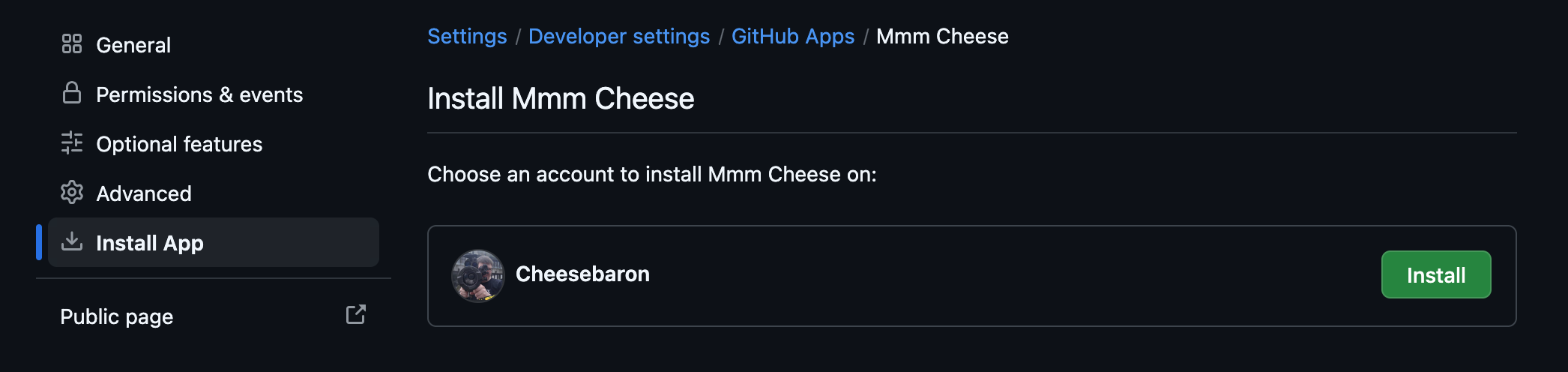
Clicking it will prompt you where to install the App. Depending on what you selected at the bottom of the App creation when creating the App it can be limited to on your own user or org or publicly available on GitHub.

Additionally you can select which repositories you want to install the App for. This means the App will only have access to make actions on those repositories, using the set of permissions you’ve defined when creating the App.
Using the App in GitHub Actions
With the App Installed you can now start using it in your GitHub Actions workflows. To authenticate you can add the step:
- name: Get token
  id: github-app-token
  uses: actions/create-github-app-token@29824e69f54612133e76f7eaac726eef6c875baf # v2.2.1
  with:
    private-key: ${{ secrets.GHAPP_PRIVATE_KEY }}
    app-id: ${{ vars.GHAPP_ID }}
    owner: ${{ github.repository_owner }}
    repositories: |
      MyRepository
      MyOtherRepository
This step will authenticate the GitHub App against the specified repositories. If you don’t specify repositories it will authenticate all the repositories it has been installed into.
With this action you will now have a token available as steps.github-app-token.outputs.token, which you can use in the rest of your workflow.
For instance to authenticate checking out code and other git operations:
- uses: actions/checkout@8e8c483db84b4bee98b60c0593521ed34d9990e8 # v6.0.1
  with:
    token: ${{ steps.github-app-token.outputs.token }}
    persist-credentials: true
To authenticate the gh cli tool as this App you can set the environment variable GH_TOKEN:
- name: List Pull Requests
  run: |
    gh pr list
  env:
    GH_TOKEN: ${{ steps.github-app-token.outputs.token }}
If you want to make commits I recommend setting git author information with:
- name: Get GitHub App User ID
  id: get-user-id
  run: echo "user-id=$(gh api "/users/${{ steps.github-app-token.outputs.app-slug }}[bot]" --jq .id)" >> "$GITHUB_OUTPUT"
  env:
    GH_TOKEN: ${{ steps.github-app-token.outputs.token }}

- name: Configure Git
  run: |
    git config --global user.name '${{ steps.github-app-token.outputs.app-slug }}[bot]'
    git config --global user.email '${{ steps.get-user-id.outputs.user-id }}+${{ steps.github-app-token.outputs.app-slug }}[bot]@users.noreply.github.com'
Now it is up to you to find a good use of GitHub Apps. This post only shows a fraction of its powers.