Here are the key methods to find assistance, divided into In-App Help (for immediate answers) and Online Resources (for training and support).
Part 1: Immediate Help (Inside Paratext)
Use these tools for quick answers without leaving the software.
1. The Search Box: The Quickest Route

The fastest way to find answers is by using the Search menus and help box located on the main title bar.
- How to use it: Click inside the search box, type your query (e.g., “Interlinear” or “Send/Receive”), and wait for results. Note: don’t press Enter after typing your query, unless you want to only see matching help topics, the lower pane shown here).
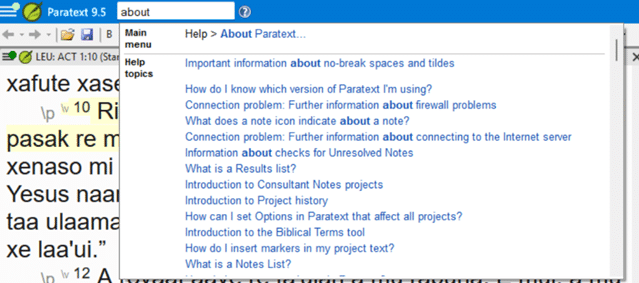
- Understanding Results:
- Commands (Top): Clicking these opens the menu item or tool immediately.
- Help Topics (Bottom): Clicking these opens documentation explaining the feature.
2. The Built-in Help Window

When you open a Help Topic, the dedicated window provides detailed documentation.
- Blue Text: Clickable links to related topics.
- Green Back Button: Navigates to the previous page.
- Navigation: Scroll to explore additional headers and concepts.
3. Contextual Guides

For complex tasks, Paratext offers “Contextual Guides”—panels that appear to the right of specific dialog boxes to walk you through a process step-by-step.
- To Hide: Click the red X to close the guide if you need more screen space.
- To Restore: Click the “Show guide” button on the dialog box to bring it back.
Part 2: Deep Dive Support (Paratext.org)
Use these resources for training, community support, and troubleshooting.
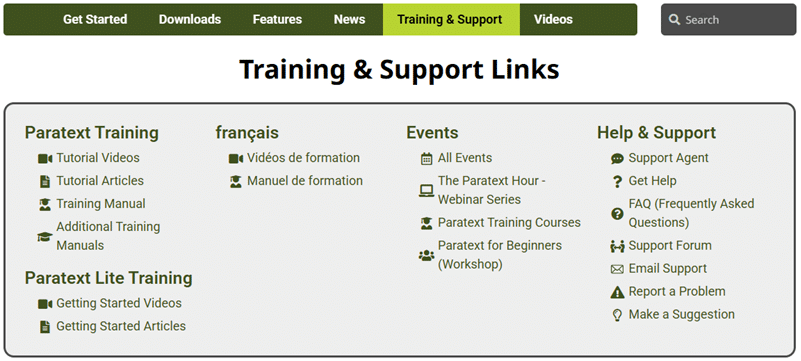
4. Video Training Library
The Paratext website hosts a vast library of short, topic-specific videos. These are excellent for visual learners who want to see a feature in action.
- Where to find it: Go to the “Videos” section on Paratext.org.
- Offline Access: You can download these videos all together and watch them without an internet connection—crucial for remote teams. See instructions here.
5. Training Manuals & Courses
If you prefer structured learning, Paratext provides comprehensive manuals and course materials.
- PDF Manuals: Downloadable guides that cover every stage of the translation process, from drafting to consultant checking. https://manual.paratext.org/Overview/
- Structured Courses: The “Paratext Training” section offers modules for different roles, such as translators, administrators, or consultants. https://paratext.org/videos/en/paratext-9/
6. Support Agent
Our AI powered support agent has been trained on all of the documentation about Paratext and can answer most questions. It can even speak 95 different languages, so you can direct your team mates to go there for solutions, and it may be able to interact with them in their language. You’ll find the agent in the bottom right corner of paratext.org.
Note that it gets things wrong at times, so it can’t be relied on 100%.

7. The Support.Bible Forum

Sometimes the best help comes from other users. The Support.Bible forum is an active community where you can ask questions and see how others have solved similar problems. You will need to make an account and log in to view answers or to post a question.
- Best for: Niche questions, workflow advice, and “how-to” scenarios that aren’t covered in the standard manual.
8. Direct Support & Feedback
If you encounter a technical bug or have a feature request, you can contact the developers directly through the website.
- Give Feedback: Use link on the main Paratext menu to report software crashes or bugs.
- Have an idea for a new feature? You can use the same link to provide suggestions to the development team.
- Last, but not least, you can send a direct email to [email protected]. Just be warned… we may point you right back to the resources listed above!
Users of Paratext will be familiar with our mission: equipping Bible translators with software that enables them to reach every tribe, tongue, and nation. The Paratext team is happy to announce the release of Paratext 10 Studio Preview 2 and to share the next stage in the journey of the world’s leading Bible translation software.
This new release builds on the foundation of Preview 1, which introduced a refreshed user interface, compatibility across Windows, Mac, and Linux, Send/Receive with Paratext 9, and access to Bible resources through the Digital Bible Library. Preview 2 expands those capabilities with features designed to make your translation work faster, smarter, and more accurate.
 Watch this video for an overview of Paratext 10 Studio Preview 2.
A Word About Preview 2
It’s important to note that Preview 2 is not yet a full release. This version is still under development and isn’t yet ready for full translation projects. But it is ready for exploration. You can download the Preview, test out new features, and provide feedback that directly shapes the future of Paratext.
Though you can Send/Receive between Paratext 10 Studio and Paratext 9, there are some project safety steps you should take in order to ensure your project stays secure.
To test out Paratext 10 Studio, we recommend that you do NOT use an active project. Instead, try one of these options:
- Use a test or training project.OR
- Use a copy of an active translation project.
To learn more about getting started with Paratext 10 Studio, please visit our wiki pages.
Demo Videos
To give you a closer look, members of our development team recorded three short demo videos of the newest features in Paratext 10 Studio.
Hebrew & Greek Dictionaries
Accuracy and depth are essential in translation. With Preview 2, Paratext 10 Studio gives you access to the Semantic Dictionaries of Biblical Hebrew and Greek, a foundational feature to the Enhanced Resources utilized throughout your translation.


These dictionaries are our first step towards a full Enhanced Resources feature that provides detailed lexical insights right inside the software, supporting translators with the foundational tools needed to ensure clarity and faithfulness in the text.
Watch this video to explore the new dictionary tools.
Manage Extensions
Flexibility is at the heart of Paratext 10 Studio. The new Manage Extensions tool lets you discover, enable, and control the extensions you need—while disabling the ones you don’t.


Whether it’s Auto Drafts from Scripture Forge, dictionary tools, text collections, or wordlists, you choose the setup that works best for your workflow.
Watch this video to learn how Manage Extensions puts you in control.
Need Help?
If you encounter any issues with Paratext 10 Studio, here are some ways you can get help:
- Email [email protected] with a description of the issue you are facing with Paratext 10 Studio Preview 2. The more detail you can provide the better!
- Ask a question on support.bible
- For more technical questions, join the Discord channel
Ready to Take a Look?
Watch the videos linked above or download Preview 2 to experience a first glimpse of the future of Bible translation software with Paratext 10 Studio.
We invite you to help shape the future of our software by exploring Paratext 10 Studio Preview 2! Dive into the new interface and test the latest features—your insights are crucial to our development. While you discover what’s new, please keep using Paratext 9 for your primary translation work. For additional information and technical notes, please visit our wiki pages. We look forward to your feedback!
For more information, please visit the Paratext 10 Studio website.
May the Lord bless your Bible translation work, so that every people group can hear the Gospel in their own language!! 
The Paratext Team
]]>Paratext 9.5 Feature Videos
Paratext 9.5 was released earlier this year! Feature highlights include:
- Support for Whitespace & Invisible Characters for more precise editing
- Improved Study Bible Additions (SBA) workflow and tracking
- Inventory Tool Enhancements
- Dozens of smaller fixes and UI refinements
Check out these videos demonstrating some of the new features in Paratext 9.5.
Inventories and Biblical Terms:
Whitespace and Non-printing Characters:
To see a full list of what’s new, check out What’s New in Paratext 9.5. We encourage you to update to 9.5 as soon as possible.
Paratext 10 Studio Preview
Paratext 10 Studio—the next generation of Paratext—entered its first public beta in April. This beta release, primarily aimed at extension developers, proves that the new “Studio” platform is up and running across Windows, macOS, and Linux and can already share projects seamlessly with Paratext 9. Over the coming months, two further betas will add everyday translation features such as Project Notes, Biblical Terms, richer resources, and real-time collaboration. Each stage is designed so teams can test the new version without risking their current work.
For most translators, the message is simple: keep using Paratext 9 for daily tasks, but be encouraged—steady progress is being made. By roughly mid-2026, Paratext 10 Studio is expected to offer everything you rely on today, plus a more flexible framework that will grow with future needs. We will keep you informed as the betas mature so you can plan a smooth transition when the time is right.
Learn More:
- Watch the Beta 1 Launch Webinar
- Go to studio.paratext.org and see the 2025 Paratext 10 Roadmap
Paratext Metrics: Gain Insight into Your Projects
SIL Global has developed a tool for Paratext project administrators and organizations to track project progress with precision. Instead of relying on self-reported updates, Paratext Metrics provides real-time insights based on actual team activity.
How Does It Work?
Every Paratext project maintains a detailed history of activities on the Send/Receive server. By analyzing this data, Metrics reveals the true status of your project. For example, when a new verse appears, it indicates drafting has occurred. Other project stages are similarly tracked through creative analysis of team activities.
If you’re a Paratext organization or project administrator, we encourage you to explore the Metrics site. Currently, access is limited to Paratext Registry accounts linked to a Google domain. If your account qualifies, log in at https://metrics.paratext.org to get started.
Also, check out our training/demo videos to learn how these metrics will be useful for you and your teams.
Login and Choose Role:
All Paratext Metrics training videos:

Do You Appreciate Paratext?
The Paratext team is looking for real-life stories from translators, consultants, and others using Paratext—stories of transformation, community impact, or personal testimony. These stories are powerful and important, and we’d be honored to help you share the amazing work you’re doing.
If you’d like to share your Paratext story or have questions, please email [email protected]. If you need to stay anonymous, that’s no problem—names and locations can be changed or left out.
Thank YOU for being a part of bringing God’s Word to the nations! May God greatly bless and multiply your translation work!
James (for the Paratext team)
]]>
Our amazing partner, The Digital Bible Library (DBL), is stepping up in a new phase of their ministry. The launch of a major update to the DBL is planned for July 14th, 2025 so DBL service will be down on Sunday, July 13th, 8 am EST (12 pm/noon, UTC) to allow for this upgrade. It will not be possible to download Paratext resources until the upgrade is completed.
The DBL is expected to be back in service on Tuesday, July 15th, 8 am EST (12 pm/noon, UTC).
If you’ve been thinking about downloading and installing resources from the internet, we recommend that you do it by the end of Saturday.
For more detailed information about the launch timing and progress, subscribe to Digital Bible Library release updates.
]]>
Download Paratext 9.5
You can download Paratext 9.5 from the downloads page today!

What’s New in Paratext 9.5?
Support for whitespaces and invisible characters*
Paratext 9.5 introduces better support for displaying and entering whitespace and invisible characters. Any project can turn the display of these characters on and off. Projects that use a variety of whitespace and invisible characters will benefit from opting into or “enabling” the feature.
This feature allows teams to view and edit whitespace and invisible characters in these areas:
- Text editor
- Wordlist
- Spell checking dialogs
- Results list
- Scripture Reference Settings
- Numbers Settings
- Character inventory
- Quotation Rules
*Opt-in only
- Before enabling the new whitespace and invisible characters feature in a project, all project members must upgrade to 9.5. As this changes the project data, it will no longer be backward compatible with 9.4 or previous versions.
- See this help topic: How do I enable whitespace and invisible characters for my project? for more info.
Study Bible Additions (SBA) Improvements
- SBA now includes support for Assignments and Progress tracking!
- Adds support for displaying figures in footnotes and sidebars.
- Scripture Reference Settings within SBA projects can now override the settings of the base project.
- Improved checking features, ensuring more accurate and efficient review processes.
- It is now possible to add extended notes and sidebars for added or replaced content.
- Base project additional books (GLO, etc.) are incorporated in a SBA project.
- Handling of whitespace and invisible characters is supported in a SBA project.
- Adds an option for the default location of extended note callers.
- SBA-specific spelling discussion notes can be created in the Wordlist.
- Improvements to extracting a Legacy Study Bible into an SBA.
Improvements to Inventories
- The appearance and behavior of inventory panels is now consistent with those of the Wordlist.
- Inventory panels can now be docked.
- Content approval is based on location, whether in verse text, non-verse text, or study content within SBA projects.
- Support for filtering to help users easily find and organize inventory items.
- Support for undo and redo actions.
Additional Improvements
We’ve also made these additional improvements:
- Added the ability to display multiple gloss languages in Biblical Terms windows.
- Added filter buttons to the Download/Install resources window.
- Simplified the process of creating and editing Interlinearizer settings.
- Added an “Unread and unresolved” filter to the Project notes list.
- Provided support for the new format of Flora, Fauna, and Realia in the Enhanced Resource Encyclopedia tab.
- Provided support for multi-language Flora, Fauna, and Realia.
- Added a Help link for apparatus abbreviation in GRK Source Language Text.
- Improved UI localization implementation.
- Improved merging changes for project data.
- Allowed changing inventories and settings for Transliteration projects.
- Added ability to automatically format references when Scripture Reference settings are updated.
- Provided a built-in Paratext annual survey invitation.
- Many bug fixes.
Please see the What’s new in Paratext 9.5? Help topic for more info about these improvements.
How to Install Update Patches
After installing Paratext 9.5, update patches will be available from within Paratext.
- Go to the Paratext menu > Help
- Expand to Full menus if necessary.
- Enable Automatically update Paratext OR
- Use Check for updates.
Compatibility with Previous Paratext versions
Paratext 9.5 is fully compatible with 9.0 – 9.4, although the new features will only be accessible from the newer versions.
If a project has opted in to using (or “enabled”) whitespace and invisible characters, all team members must update to 9.5. Once this is done the project cannot be opened and edited in 9.4 or earlier versions of Paratext.
Note: If you had a previous version of Paratext installed, installing Paratext 9.5 will replace it.
Plugin Compatibility
If you use any manually installed plugins with Paratext 9.4, Paratext 9.5 should see them by default, but we cannot guarantee that they will continue to work as expected.
If your plugin does not work in Paratext 9.5, please report a problem to the Paratext development team and to the plugin developers.
Thank you for your support!
Please let us know how Paratext 9.5 works for you. From within Paratext, you can go to Main menu > Help > Give Feedback, fill out the form, and click “Send” to let us know how we are doing. Your feedback is invaluable in identifying and fixing bugs. Positive feedback is also very valuable for team morale and for partnership development. So, please share your thoughts.
We are grateful to the many translation teams who work hard to make the Word of God available to all people throughout the world. May this software bless your work!
Soli Deo Gloria!
Yours in Christ,
The Paratext Development Team
]]>Training Videos Are Now Available in Arabic!
The Arabic team has been hard at work, creating a brand new set of training videos in Arabic. They have completed more than 65 videos, with more to come (pending additional funding ).
Please share the Arabic training videos with your colleagues working in Arabic speaking areas.
New Training Videos in Other Languages
Our teams have also made many new training videos in other languages in the last year or so.
- **简体中文** (50+ new videos)
- 繁體中文 (50+ new videos)
- português (18 new videos)
- français
- español
- русский язык
- Bahasa Indonesia
Would you please take a moment to share relevant videos with your co-workers?
Critical Funding Needed for Training Videos
In the last 4 years, the Paratext videos have been viewed over 64,000 times by a total of over 9,000 users!
We’ve reached a critical moment and need $35,000 in funding to complete these training videos in Arabic and Chinese, two of the most highly used languages of the world.
If you or someone you know is available to help with this need, please contact us!
Paratext is 30 years old!! 
From humble beginnings to becoming the most trusted Bible translation software available, Paratext has helped translate Scripture into over 3,220 languages over the last 30 years!! Dive into Paratext’s history and pray with us for what the next 30 years holds.
Paratext 9.5 Beta Released
Paratext 9.5 Beta adds support for viewing and editing whitespace and invisible characters in key areas, along with improvements to Study Bible Additions (which now includes support for Assignments and Progress tracking). Inventory features now support undo/redo, dockable panels, and filtering. There are also improvements to Biblical Terms glosses, Interlinearizer settings, as well as various bug fixes.
See our full 9.5 Beta article to learn more.
Key Terms of the Old Testament (KTOT) Updates
Key Terms of the Old Testament (KTOT) updates are now available from within Paratext.
Instructions to download/update KTOT are available on the KTOT webpage.
May the Lord bless your translation work tremendously!
James, for the Paratext Team 
Download and Install 9.5 Beta
You can download Paratext 9.5 Beta from the downloads page today!

What’s New in Paratext 9.5 Beta?
Support for whitespaces and invisible characters*
This feature allows teams to view and edit whitespace and invisible characters in these areas:
- Text editor
- Wordlist
- Results list
- Scripture Reference Settings
- Numbers Settings
And coming soon in a 9.5 beta patch:
- Character inventory
- Spell checking dialogs
- Quotation Rules
*Opt in only
- Project members must all upgrade to 9.5 to enable the whitespace and invisible character features. As this changes the project data, it will no longer be backward compatible with 9.4 or previous versions.
- See this help topic: How do I enable whitespace and invisible characters for my project? for more info.
Study Bible Additions (SBA) Improvements
- SBA now includes support for Assignments and Progress tracking!
- Adds support for displaying figures in footnotes and sidebars.
- Scripture Reference Settings within SBA projects can now override the settings of the base project.
- Improved checking features, ensuring more accurate and efficient review processes.
Inventories
- Provides support for undo and redo actions.
- Inventory panels can now be docked.
- The appearance and behavior of inventory panels is now consistent with those of the Wordlist.
- Content approval is managed based on its location, whether in verse text, non-verse text, or study content within SBA projects.
- Includes support for filtering to help users easily find and organize inventory items.
Additional Improvements
We’ve also made these additional improvements:
- Added the ability to display multiple gloss languages in Biblical Terms windows.
- Added filter buttons to the Download/Install resources window.
- Simplified the process of creating and editing Interlinearizer settings.
- Added an “Unread and unresolved” filter to the Project notes list.
- Many bug fixes.
Please see the What’s new in Paratext 9.5? Help topic for more info about these improvements.
How to Install Update Patches
After installing Paratext 9.5 beta, update patches for will be available from within Paratext.
- Go to the Paratext menu > Help
- Expand to Full menus if necessary.
- Enable Automatically update Paratext
OR - Use Check for updates.
Compatibility with Previous Paratext Versions
It is possible to run both Paratext 9.4 and Paratext 9.5 beta on your computer at the same time.
However, for a project administrator to opt in to the Whitespaces and invisible character support features implemented in 9.5 beta, all team members must update to 9.5. Once this is done the project cannot be edited in 9.4 or earlier versions of Paratext.
Plugin Compatibility
If you use any manually installed plugins with your Paratext 9.4, 9.5 beta version won’t see them by default.
To use these plugins in 9.5 beta:
- Copy the plugins folder from C:\Program Files\Paratext 9\
- Paste the plugins folder to C:\Program Files\Paratext 9 beta\
If your plugin does not work after those steps, please report a problem to the Paratext developers team and to the plugin developers.
Thank You for Being Supportive!
We hope that you can take the time to try out this beta offering.
Please let us know how it goes for you. From within Paratext, you can go to the Paratext menu > Help > Give Feedback menu option, fill out the form, and click “Send” to let us know how we are doing. Your feedback is invaluable in identifying and fixing bugs. Positive feedback is also very valuable for team morale and for partnership development. So, please share your thoughts.
We are grateful to the many translation teams who work hard to make the Word of God available to all people throughout the world. May this software greatly bless your work!
Yours in Christ,
The Paratext Development Team
]]>
It is easy to get overwhelmed with all the possibilities. However, the default settings are typically adequate for a quality draft printout, though you may want to make a few adjustments.
To help you get started printing drafts using PTXprint, we have produced a series of short videos. We’ll also introduce each of the videos below.

Introduction to PTXprint
The introductory video discusses an overview of printing draft translations using PTXprint. It advises you to run basic checks first. It also gives you an overview of the other videos in this series:
- How to Install PTXprint: A step-by-step installation guide.
- Make Initial PDF: Introduction to getting started with PTXprint.
- Adjust Settings in PTXprint, Rerun: Tips for fine-tuning settings and optimizing the layout.
- Booklet Printing: Instructions for using PTXprint to create booklets.
- Reopen a PDF to Reprint: How to locate and print additional copies of a PDF.
1 – How to Install PTXprint
This video outlines the steps for exporting a draft translation in Paratext, installing PTXprint (if necessary), and setting up PTXprint for quality draft exports.
2 – Print an Initial Draft
After installing PTXprint, you are ready to create a PDF draft. Go to the Project menu > Export Draft PDF (PTXprint) to get started.
PTXprint uses the settings and fonts specified in Paratext to easily create well-formatted PDFs of Scripture.
3 – Adjust Settings
After generating an initial PDF, you can customize specific settings to make your draft appear exactly as you want. For example, you can easily adjust margins and add custom footer text. Changes you make here will be saved for the next time you print this draft.
Use the search function in PTXprint to find various settings, or hover over the controls to see detailed tips about that setting.
Once you’re happy with the result, print the PDF!
4 – Print a Booklet!
PTXprint also makes printing booklets user-friendly! What used to be a hassle is now simplified, thanks to PTXprint.
5 – Print (or Share) Additional Copies
Printing additional copies of a book is also simple with PTXprint. You can also share the PDF file via email or USB drive as needed.
Print Advanced Copies Too!
PTXprint can be used to create very nice-looking “simple” drafts. It can also be used for more complex tasks, like publishing a full diglot New Testament with minimal effort!


How to Update PTXprint
PTXprint continues to be developed with regular updates. Updates are released on the PTXprint website, and you can keep an eye out for the little “updates available” icon that appears to let you know there’s a new version available.

We encourage you to download the latest version as you are able.
Note: Clicking the button will take you to the PTXprint website, but will not download or install it for you automatically. You will need to choose to download/install the update yourself.
PTXprint Resources
The PTXprint website is also a valuable resource to find training resources, learn how to use PTXprint effectively, and stay up-to-date with the latest insights for using PTXprint.
These additional resources are also available:
We encourage you to give this fantastic software a try! It’s easy to use, and we really think you’ll appreciate it!
Pssst… you might even want to print a draft of your whole New Testament using PTXprint!

Happy drafting!
James, for the Paratext team
]]>The integration of Paratext and FieldWorks (FLEx) received an upgrade with Paratext 9.4! You now have the option to use your FLEx lexicon to offer suggestions in the Paratext Interlinearizer.
Here is a brief video demonstrating this new functionality:
To learn more about this and other ways to integrate Paratext and FieldWorks, stay tuned for recording of the Paratext – FieldWorks Integration webinar.

We plan to make the recorded webinar available on the Paratext website and on the Language Technology Webinars page.
In Him,
The Paratext Team
]]>Paratext 9.4 – Auto-update scheduled for Jan 29
Paratext 9.4 is available now, with updates and improvements to many different features:
-
- Projects and resources update notification
- Improved Right-to-Left interface
- Improved quotations checking
- Export/Import Biblical Terms lists
- Improved Study Bible authoring*
- Improved Paratext-FLEx integration
- And more…
Auto-updates are scheduled to start next week (January 29).
Paratext 9.3 users with auto-updates turned on should start to receive update notices next week. While we encourage teams to use the latest version of Paratext, if you need to stay on an older version, please turn OFF automatic updates in the Paratext menu. See the older versions page for more info.
*The Study Bible Additions (SBA) features implemented in 9.4 requires that the SBA project be migrated, due to a data format change. The new 9.4 SBA data format is NOT compatible with the PT 9.3 version. In order to use the new SBA features, all project members should move to PT 9.4 and the project administrator should migrate the SBA project.
New Training Videos
Our training video collection continues to grow and develop. Check out these new/updated videos, with insights and tips for how to do various tasks in Paratext.
Quick Reference Window:
Getting Started for Administrators – Video Series
Our Getting Started for Administrators series has been expanded with new videos as well.
Create/Add Books:
Import Formatted Books:
Import Unformatted Books:
We have also started localizing our training videos into Hindi and Arabic. Please be in prayer for these efforts, as the enemy does NOT want this work to happen and has been actively fighting against it.
Paratext Product Owners
As Paratext grows and expands, the Paratext team is growing and expanding with it!
Vladimir Vdovikov (United Bible Societies) is now the product owner for Paratext 9, responsible for updates, bug fixes, and new versions.
After many years as the Paratext 9 owner, Glenn Pruitt has stepped into a new role as the product owner for Platform.Bible and Paratext.Bible (the next generation of Paratext, currently in development).
Thank you to both Vladimir and Glenn for their service and leadership in these essential roles.
Paratext in New Languages!
The hard work of these language teams has paid off! You can now use Paratext in these additional languages. Please let your colleagues who use these languages know.
- Khmer, Telugu, and Vietnamese are now available in Paratext.
- Vietnamese is available in the latest version of Paratext Lite!
May God bless you in your translation work. May Christ be lifted high and brought to every tribe, tongue, people, and nation!
Until next time
James (for the Paratext team)
]]>