This tutorial shows how to create a secure PHP login form with MySQL database, password hashing and session authentication.
Login functionality is required in most web applications.
We will build a simple and secure PHP login system using a MySQL database.
The example includes a login form, password verification, session authentication and a protected dashboard page.
The code is written using MySQLi and standard PHP functions so it can run easily in any PHP hosting environment.
Reading time: 6 minutes
Quick Answer
To create a PHP login system with MySQL:
- Create a users table in the database.
- Build a login form with email and password fields.
- Validate the form input.
- Query the database using prepared statements.
- Verify the password using password_verify().
- Create a session after successful login.
- Redirect the user to a protected dashboard page.
PHP Login System Summary
This tutorial demonstrates a simple PHP login system using MySQL.
Technology used
- PHP 8
- MySQL database
- MySQLi prepared statements
- password_hash() and password_verify()
- PHP sessions for authentication
Features
- Login form with validation
- Secure password verification
- Session based authentication
- Protected dashboard page
- Logout functionality
This example is beginner friendly and can run in any PHP hosting environment such as XAMPP or MAMP.
Example Login Verification Code
$email = $_POST['email'];
$password = $_POST['password'];

$query = "SELECT id, password FROM users WHERE email = ?";
$stmt = mysqli_prepare($connection, $query);

mysqli_stmt_bind_param($stmt, "s", $email);
mysqli_stmt_execute($stmt);
mysqli_stmt_bind_result($stmt, $userId, $hash);

if (mysqli_stmt_fetch($stmt) && password_verify($password, $hash)) {
    $_SESSION['user_id'] = $userId;
}
The following example shows a complete PHP login example with database authentication.
Example Output
The following screenshots show the login page and the dashboard page after successful authentication.
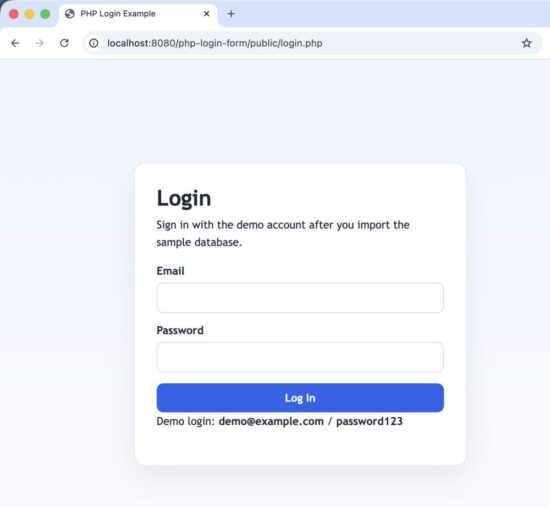
PHP Login Form
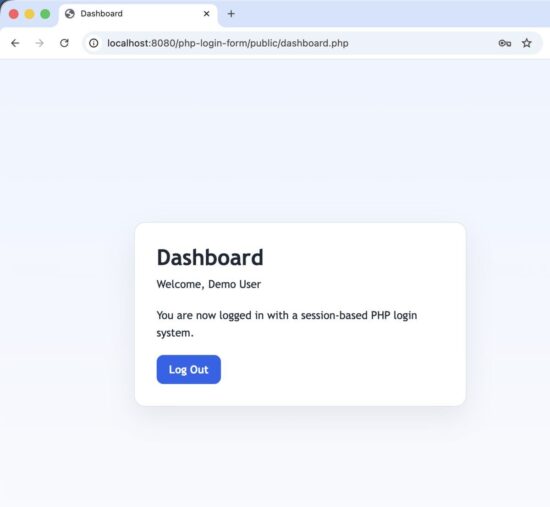
User Dashboard after Login
Key Features of This Implementation
This example login system demonstrates the following features.
- Secure password hashing using password_hash().
- Password verification using password_verify().
- MySQL database authentication using MySQLi.
- Prepared statements to prevent SQL injection.
- Session-based login system.
- Protected dashboard page.
- Simple structure that is easy for beginners to understand.
How the Login Flow Works
Before looking at the code, it is useful to understand the login flow.
The authentication process works like this.
- The user opens the login page.
- The user enters email and password.
- The form sends the data to process-login.php.
- PHP queries the database for the user record.
- The password is verified using password_verify().
- If the password is correct, a session is created.
- The user is redirected to the dashboard page.
- The dashboard page checks the session before allowing access.
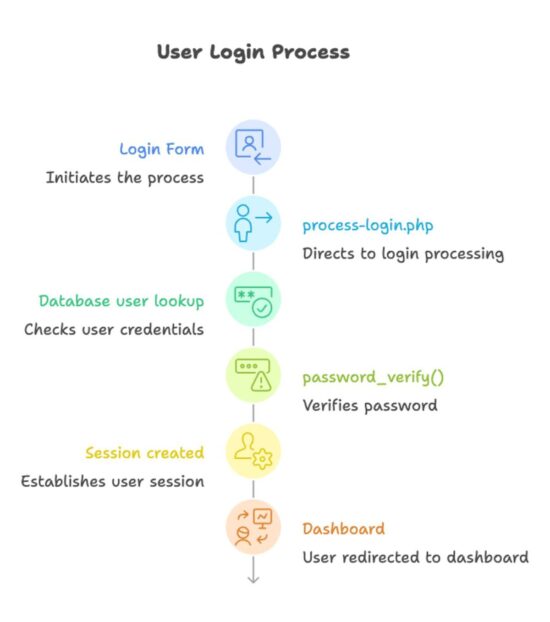
User Login Process
Project File Structure
php-login-example/
├── config/
│ └── database.php
├── includes/
│ ├── auth.php
│ └── functions.php
├── public/
│ ├── index.php
│ ├── login.php
│ ├── process-login.php
│ ├── dashboard.php
│ └── logout.php
├── assets/
│ └── style.css
└── database.sql
config/database.php
Contains the MySQL database connection.
includes/functions.php
Contains helper functions used in the project.
includes/auth.php
Handles session checking and protects restricted pages.
public/login.php
Displays the login form.
public/process-login.php
Processes the login request and verifies credentials.
public/dashboard.php
A protected page that is visible only after login.
public/logout.php
Destroys the session and logs the user out.
database.sql
Creates the database table and inserts a demo user.
The project structure is intentionally simple so it can be extended for user registration, password reset and remember-me login features.
Create the Database Table
First create the database and users table.
The users table stores the user name, email address and the hashed password.
CREATE DATABASE IF NOT EXISTS php_login_example
CHARACTER SET utf8mb4
COLLATE utf8mb4_unicode_ci;

USE php_login_example;

CREATE TABLE users (
id INT AUTO_INCREMENT PRIMARY KEY,
name VARCHAR(100) NOT NULL,
email VARCHAR(150) NOT NULL UNIQUE,
password VARCHAR(255) NOT NULL,
created_at DATETIME NOT NULL DEFAULT CURRENT_TIMESTAMP
);
Passwords must never be stored as plain text.
PHP provides the password_hash() function to securely hash passwords before storing them in the database.
During login, password_verify() is used to check the entered password against the stored hash.
The SQL script supplied with this example download (given at the end) comes with a default record.
You can use the following credentials to test the login form.
Email: [email protected]
Password: password123
Database Connection
The login system needs a connection to the MySQL database.
Create a file named `database.php` inside the `config` folder. This file creates a MySQLi connection that will be used across the project.
<?php

function getDatabaseConnection()
{
    static $connection = null;

    if ($connection !== null) {
        return $connection;
    }

    // Update these settings to match your local MySQL server.
    $databaseHost = 'localhost';
    $databaseName = 'php_login_example';
    $databaseUser = 'root';
    $databasePassword = '';

    $connection = mysqli_connect($databaseHost, $databaseUser, $databasePassword, $databaseName);

    if (!$connection) {
        exit('Unable to connect to the database. Please update config/database.php with your MySQL details.');
    }

    mysqli_set_charset($connection, 'utf8mb4');

    return $connection;
}
This connection file will be included wherever database access is required.
Create the Login Form
Next create the login form.
Create a file named `login.php` inside the `public` folder. This page displays the login form and shows validation errors if the login fails.
<?php

require_once __DIR__ . '/../includes/auth.php';

redirectIfLoggedIn();

$errors = getFlashData('errors', []);
$oldInput = getFlashData('old_input', []);
$loginError = getFlashData('login_error', '');
$emailValue = $oldInput['email'] ?? '';
?>
<!DOCTYPE html>
<html lang="en">
<head>
    <meta charset="UTF-8">
    <meta name="viewport" content="width=device-width, initial-scale=1.0">
    <title>PHP Login Example</title>
    <link rel="stylesheet" href="proxy.php?url=../assets/style.css">
</head>
<body>
    <main class="page">
        <section class="card">
            <h1>Login</h1>
            <p class="intro">Sign in with the demo account after you import the sample database.</p>

            <?php if ($loginError !== ''): ?>
                <div class="message error"><?php echo escape($loginError); ?></div>
            <?php endif; ?>

            <form action="proxy.php?url=process-login.php" method="post" class="form">
                <div class="form-group">
                    <label for="email">Email</label>
                    <input
                        type="email"
                        id="email"
                        name="email"
                        value="<?php echo escape($emailValue); ?>"
                        autocomplete="username"
                        required
                    >
                    <?php if (isset($errors['email'])): ?>
                        <p class="field-error"><?php echo escape($errors['email']); ?></p>
                    <?php endif; ?>
                </div>

                <div class="form-group">
                    <label for="password">Password</label>
                    <input
                        type="password"
                        id="password"
                        name="password"
                        autocomplete="current-password"
                        required
                    >
                    <?php if (isset($errors['password'])): ?>
                        <p class="field-error"><?php echo escape($errors['password']); ?></p>
                    <?php endif; ?>
                </div>

                <button type="submit" class="button">Log In</button>
            </form>

            <p class="note">Demo login: <strong>[email protected]</strong> / <strong>password123</strong></p>
        </section>
    </main>
</body>
</html>
Process the Login Request
The login form sends the user input to `process-login.php`.
This file validates the input, checks the database and creates the login session if the credentials are correct.
<?php

require_once __DIR__ . '/../includes/auth.php';
require_once __DIR__ . '/../config/database.php';

if ($_SERVER['REQUEST_METHOD'] !== 'POST') {
    redirect('login.php');
}

$email = trim($_POST['email'] ?? '');
$password = $_POST['password'] ?? '';
$errors = [];

if ($email === '') {
    $errors['email'] = 'Email is required.';
} elseif (!filter_var($email, FILTER_VALIDATE_EMAIL)) {
    $errors['email'] = 'Enter a valid email address.';
}

if ($password === '') {
    $errors['password'] = 'Password is required.';
}

if (!empty($errors)) {
    setFlashData('errors', $errors);
    setFlashData('old_input', ['email' => $email]);
    redirect('login.php');
}

$connection = getDatabaseConnection();
$query = 'SELECT id, name, password FROM users WHERE email = ? LIMIT 1';
$statement = mysqli_prepare($connection, $query);

if (!$statement) {
    exit('Unable to prepare the login query.');
}

mysqli_stmt_bind_param($statement, 's', $email);

if (!mysqli_stmt_execute($statement)) {
    mysqli_stmt_close($statement);
    exit('Unable to run the login query.');
}

mysqli_stmt_bind_result($statement, $userId, $userName, $hashedPassword);

if (mysqli_stmt_fetch($statement) && password_verify($password, $hashedPassword)) {
    mysqli_stmt_close($statement);

    session_regenerate_id(true);
    $_SESSION['user_id'] = $userId;
    $_SESSION['user_name'] = $userName;

    redirect('dashboard.php');
}

mysqli_stmt_close($statement);

// Keep the message generic so the form does not reveal which field failed.
setFlashData('login_error', 'Invalid email or password');
setFlashData('old_input', ['email' => $email]);
redirect('login.php');
Create the Dashboard Page
The dashboard page is visible only after login.
Create `dashboard.php` inside the `public` folder.
<?php

require_once __DIR__ . '/../includes/auth.php';

// Only logged-in users should be able to view this page.
requireLogin();

$userName = $_SESSION['user_name'] ?? 'User';
?>
<!DOCTYPE html>
<html lang="en">
<head>
    <meta charset="UTF-8">
    <meta name="viewport" content="width=device-width, initial-scale=1.0">
    <title>Dashboard</title>
    <link rel="stylesheet" href="proxy.php?url=../assets/style.css">
</head>
<body>
    <main class="page">
        <section class="card">
            <h1>Dashboard</h1>
            <p class="welcome">Welcome, <?php echo escape($userName); ?></p>
            <p class="intro">You are now logged in with a session-based PHP login system.</p>
            <a href="proxy.php?url=logout.php" class="button button-link">Log Out</a>
        </section>
    </main>
</body>
</html>
Logout Script
To log the user out, destroy the session and redirect to the login page.
<?php

require_once __DIR__ . '/../includes/auth.php';

session_unset();
session_destroy();

redirect('login.php');
Security Considerations
A login system must always handle passwords carefully.
Passwords should never be stored in plain text. PHP provides the password_hash() function to securely hash passwords before storing them in the database.
This example uses password_hash() to store passwords securely in the database. During login, password_verify() is used to compare the entered password with the stored hash.
The login query uses prepared statements. Prepared statements help prevent SQL injection attacks. You can read more in this guide on preventing SQL injection in PHP.
PHP sessions are used to maintain login state between requests. The session ID is regenerated after a successful login using session_regenerate_id(). This helps prevent session fixation.
In production systems, login forms should also include CSRF protection to prevent forged requests.
You can also review the OWASP Authentication Cheat Sheet for additional authentication best practices.
These small practices make the login system much safer for real applications.
Common Login Errors and Fixes
Sometimes the login form may not work as expected. The following are common issues.
Login always fails
Make sure the password stored in the database is created using password_hash().
Session not working
Check if session_start() is called before accessing session variables.
Database connection error
Verify the database credentials in database.php.
Invalid email format error
Make sure the email entered in the form is valid.
Developer FAQ
Can I use PDO instead of MySQLi?
Yes. PDO is another popular option for database access. The login logic remains the same.
How can I add a registration system?
You can create a registration form that inserts new users into the database using password_hash().
How can I add a forgot password feature?
Most login systems also include a password reset feature. A password reset system can be added using a secure token sent through email. See this tutorial on implementing a forgot password system in PHP.
Should passwords be stored as plain text?
No. Passwords must always be stored using password hashing functions like password_hash().
How can I add a remember me option?
If you want to keep users logged in across sessions, you can implement a secure remember me login system.
Run the Example Locally
You can run this login example in a local PHP environment.
- Download the project source code.
- Import the database.sql file into MySQL.
- Update the database credentials in config/database.php.
- Place the project inside your web server directory (for example htdocs in XAMPP).
- Open the login page in your browser.
You can then login using the demo credentials.
Email: [email protected]
Password: password123
Conclusion
In this tutorial we created a simple PHP login system using MySQL.
The example shows how to validate the login form, verify passwords and create a session after authentication.
The structure is simple so it can be extended easily for real applications.
You can download the complete PHP login script below and run it in your local development environment.
Download Source Code
The complete source code for this example is available below.
Download the project and run it in a local PHP environment such as XAMPP or MAMP.


Thanks a lot
All your script are awesome, simple and beautifull! ;)
Thanks
Welcome Bob.
It would be great if you create a tutorial on how to login and register with Google and Facebook on a website
Hi Erick,
I have already written tutorials on them. Please use the search bar in the header and you will land in it easily. Thanks.
Madam,
Excellent Code madam. What type of Encryption is used for storing the password in this example ? (like md5)
Thank you Bala.
This example does not use MD5 or any custom encryption.
Passwords are stored using PHP’s password_hash() function. By default, this uses the bcrypt hashing algorithm.
bcrypt is a secure one-way hashing algorithm designed specifically for storing passwords. It automatically includes a salt and uses a configurable cost factor to make brute-force attacks harder.
During login, the entered password is verified using password_verify(), which compares the plain password with the stored hash.
So in this example:
Hashing algorithm: bcrypt
PHP functions used: password_hash() and password_verify()
Using bcrypt through password_hash() is the recommended approach for storing passwords in modern PHP applications.
Hi, how do i set my own hashpassword?
Hi Tracey,
You can generate a password hash for example “admin123” using PHP’s built-in password_hash() function.
Create a small PHP file like this:
[email protected]
Password: admin123
Always generate password hashes using password_hash(). Do not try to manually create the hash. PHP automatically uses a secure algorithm.
Thank you very much! your explanation of and your code was a huge help. I am learning (self-taught with some college) and your example was a huge help with my practice page, I guess you would call it.
Welcome David!
I really liked your work, happy to follow your advice; greetings from Mexico!
Thank you Salo.