I've build few custom keyboards, know how to program them using commonly known tools like easyEVR / QMK / ZMK / whatever, so I'm not total noob. But I'm little bit butthurt about what was delivered, so whole review will have this tone in background.
This post is edited when there are updates to the situation, for now:
12.11.2025 - Finally got switches, touch module died while waiting for replacement of tune.
11.09.2025 - Tune module died, ongoing with support, most likely unrecoverable. Ordered new switches still didn't arrived.
15.07.2025 - After week of fetching e-mails with support in relation to wrong switches shipped, I've ordered new ones from website)
05.12.2025 - both switches and naya tune replacement were received. Typing is now passable, I've started using the touch typing tutor to get used to the keyboard. Tune module works. Touch module died in the meantime. Battery recovery mode didnt helped.
08.01.2025 - Replaced tune module developed coil whine when connected via ONLY ONE WORKING dual usb-c cable. Doesnt happen on non-working shipped cable. Tinnitus mode wasn't part of the deal.
13.01.2025 - After deassembling dead tune and dead touch module, and using lab power supply to slowly jolt the baterries to life, both are working. Both procedures voided the warranty, but i couldn't give a fuck anymore. At this point I've officially concluded the adventure of naya create is over, and it'll work until it breaks.
I like nice things. I like gimmicky things. I often try to find arguments to buy some cool looking device, and with Naya Create it was no different - My work relies heavily on 3d design, and on my desk I have 3d connexion controller (you can read about it here), xencelabs keys+track wheel (here), and of course UHK keyboard, since for some reason Im getting older with every year passing, and my wrists start to hurt - hence split keyboard, heavily tented (a little about it here).
Wanted to always update my setup, I've caught a nice looking kickstarter campaign in early 2023 - Naya Create. Oh wow! Modular, split, tented keyboard, wireless, and with 3d dongle AND turning wheel replacement! What could go wrong!
Being unreasonably price'y (after all the taxes and shipping, it ended up being ~1k usd / 4k pln at the time of writing this (below 385EUR is keyboard only - they sold modules separately on their site, not through kickstarter) - I think thats the median net monthly salary in Poland at this moment btw It was dominand NET salary in Poland in ~2024 apperently), which is fine - I use my PC to earn money, so if something can make the process of earning money smoother and more comfortable - I can pay for it. (Or at least thats one of the arguments to explain my shopping habits). But like with all the kickstarters, I've picked my favorite, tactile type switches, all four modules (tune - turning wheel, track - trackball, touch - touchpad, and float - 3d mouse-style device), paid for everything, and forget about it for... 2 years, until Naya developers finally started shipping the keyboards after delays. Just pay additional taxes (haha poland privilige), And it'll be sent to you.
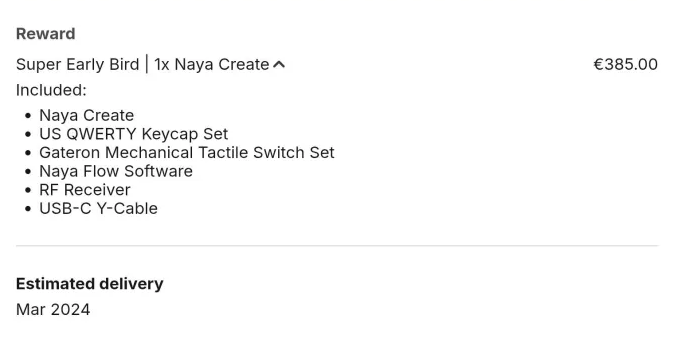
(edit: keep in mind this is keyboard only, no modules/additional switches (more about it later)/taxes/shipping for everything)

Hey, at least they're shipping something, so its good - its not vaporware/scam, at least at this point. I should be happy, right?
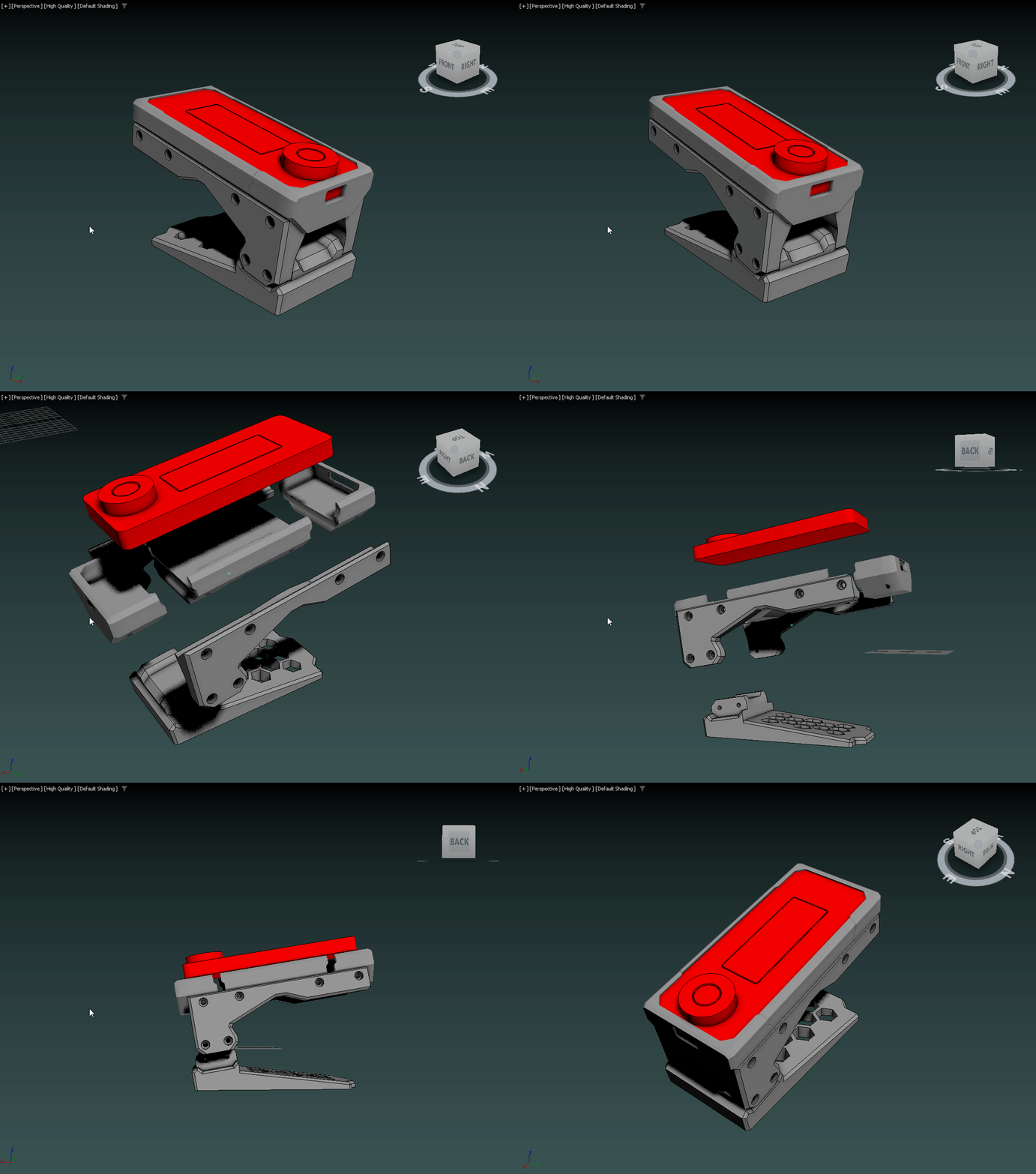
Some photos of the insides:


So, let me start with the usual kickstarter issues, that are somehow acceptable. Mentioned delays - the usual, no biggie - UHK was delayed half a year later as well.
Lack of 3d module also no biggie, even if it was one of main reasons to get an upgrade - some development problems, want to refine experience, yadda yadda - alright, make it good.
Problems started right after opening the package - and touching the keyboard for the first time, pressing one button - NO CLICK
NO. CLICK.
I've triple checked my order - TACTILE, Gateron:

What was under the black, shiny caps:
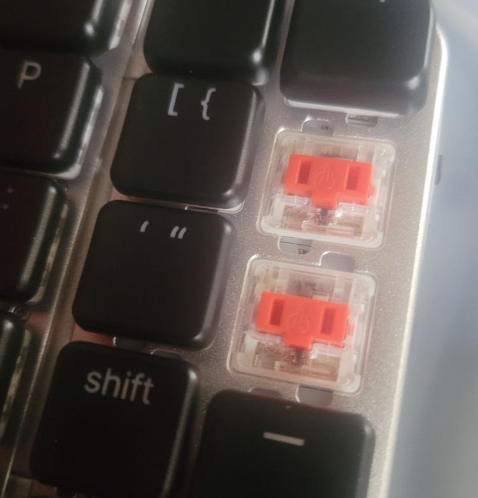
I can't stress enough how much I dislike red linear switches. Hate them. Don't like them. Don't want to type on them. I need that tactile feedback under my fingers. Currently being ignored on discord (which for some reason is main way to get any information/help/support related to the device - I guess were living in dickord times now, where documentation is obsolete), I've wrote support about that.
I dont have high hopes, because apperently (and this is again a thing I had to read on discord, maybe it was in one of the e-mails, but thats not the biggest issue) devs decided to change the tactile switches to linears, because of reasons. Some feedback from testers. Great, so I've got completely different thing I've wanted.
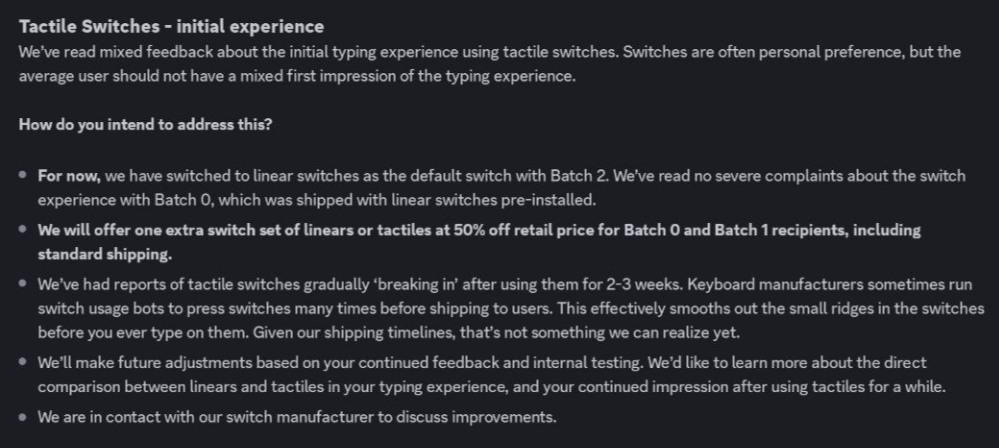
i don't think that's legal, I'm not a lawyer - But I'm sure that's a dick move. Message was sent 6 June 2025, my unit has been sent in batch 2.2 in 1 June 2025. Even if I saw the message earlier, my unit has been ALREADY SENT. With wrong switches. Cool.
But hey, its hot swap switch keyboard, so just blow up another 50 bucks on low profiles, and no problems, right? I have already bags of switches, so not even a purchase/wait for delivery thing, no problem, right?
Of couse naya have custom switches - you cant buy them from any place other than their shop - their pinout/footpring is different. Thats another great hackability/sustainability trait of the keyboard.
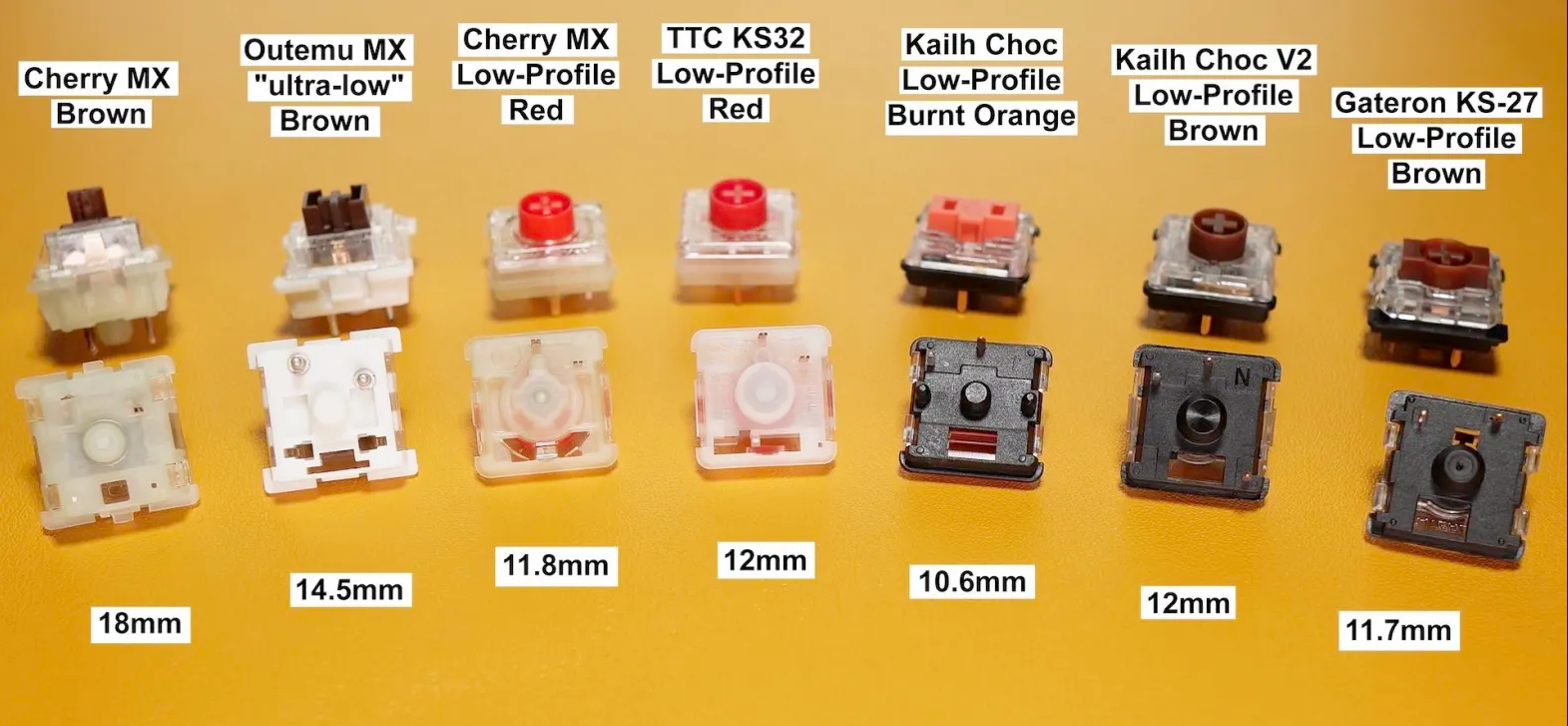
NONE of the above types will fit - pinout is slightly different, apperently theyre custom Kailh OEMs now, that cant be purchased easily anywhere. It's almost like they never researched their target audience.
Heres the difference between propertiary switch (right) and Choc Robin (left), one of species of well-known low-profile keys:

And I'm in batch 2.2, so no discount code, no nothing. Pay up piggy, you've paid 1k for keyboard, you can pay 65 bucks for bag of switches you wont ever use again.
Kindly reminding, no support was given or explanation except "we've decided to swap it, suck it up".
Okay, enough of me bitching about switches as its annoying even me - be an adult, learn to type on reds while cursing under your nose, no big deal that you didn't got what you paid for, right?
From what I've saw on discord, there's fair share of dissapointed users that can't use their favorite switches. Some tried modding the provided switches, but everything seems like a chore and a band-aid on a bigger issue that was unnecessary and artificially created in the name of... what? Corporate-style product lock-in? Maximising profits from selling propertiary switches? Silly, silly decision.
Let me continue with the experience.
Quality-built, its on acceptable kickstarter product level. From distance it looks a bit (hardcore soy redditors skip next word) chinky (hardcore soy redditors may continue reading) aliexpress chinese keyboard quality, but from up close, its much better. Probably because of glossy caps and lightly-brushed aluminium. See pictures below:


Its... Acceptable. Seen worse.
Overall, hinges are sturdy, we'll see in a year. Some users were plagues with dead modules, some hack was developed to jolt them with higher current to re-start battery charging - mine worked alright, only one was dead but charged without issue (Modules have wireless charging coils on bottom, I've used samsung wireless charger to fill them up. Your experience may be different).
Ok, but it works, right?
Well... Kinda. Software at this moment is in very development stage - breaks connection, ignores changes, dont allow you to configure modules (theyre blinking annoyingly with RGB lights, all of them), set their function or speed other than default (There are some pre-built functions for tune you control through keyboard shortcuts, but its barely acceptable).
Anyway - after connecting the keyboard for first time, it glows like a rainbow - you know these cheap aliexpress RGB keyboards? That's the experience. You CAN'T control the rgb as for now from the software, nor fine-tune them - you need to rely on keyboard shortcuts to do so:

Screenshot from the software - notice how sharp and hard to read the text is - get used to it. Very early development stages.
After setting it to pure non bliking non breathing non exploding non spazzing white and testing the keys (gross red switches, bleh), lets flash the firmware. Using attached Y-type cable (usbC -> 2x usbC) and finding the right USB port (not every of them will work, best is to connect it to usb controller itself - its very picky about any interference, and you do not want to brick the keyboard), and clicking UPDATE LEFT HALF and then UPDATE RIGHT HALF, we flash new firmware.
Another surprise - after flashing firmware, keys are dead.
It lights, system shortcuts (lights or connection type) doesn't work. Of course first thought is - Oh yeah, I've bricked it. After asking on discord (because that's what cool kids do now, get groomed look for documentation on glorified IRC clients) I got informed that it sometimes does that, and i need to re-flash the keymaps. Ok, how do I do that?
By using this arrow, dummy:

Assuming keyboard hold the connection long enough not to make the software drop it. Which happened a lot of times. And if it does that, you can still click it, It'll think a bit, and give you zero information about what happened (unless you enable debugging). Thats what I did before asking, and expected it to work.
After flashing, it started working.
OH YEAH BABE
I CAN TYPE NOW
So, next logical thing is to check the keymaps, make neccessary modifications, set up modules, and push your profile to keyboard, right?
Yeah, almost.
As mentioned, modules cant be configured for now. None of them. You cant check the battery level, cant disable annoying rgb light (i know i know, update will fix it), cant set up touchpad sensitivity/speed. Or fix the bindings. Or gestures. Or track rotation issues.
Worst thing is however, it drops your profiles - you'll make new one (probably by duplicating the default one), configure it the way you want, set is as onboard default, flash it - and it wont get recognised. Or keymap will be missing. Or it wont detect changes for next 5,8,10 flashes. And then start working.
Why? No idea. Software related, hopefully. If you edit and flash the default one, it'll work fine, learned it hard way.
Some of the issues above are to be adressed in future software updates, or it is promised to. First hand experience is very meek though. "Kickstarter things"?
Provided Speedlink adapter doesnt work yet. So no wireless, unless you use bluetooth.
Of course documentation doesn't mention that, I had to ask on discord to get informed its not me being technically retarded, but it just doesn't work by default. Bluetooth It requires some luck pairing, as it didn't want to do it for the first 3 or 4 times, but after that, works fine right after turning on. Oh, and check the software bindings, as documentation refers to nonexistend (yet?) binds related to connectivity:


Now, lets complain some about modules:
As mentioned - they tend to die, for first batches. Probably will be fixed for normal customers, but be aware of that.
Naya Track - Trackball - tends to scratch the ball on the case. Nice, big. Buttons bit uncomfortable to use, but thats no biggie. Cant remap them for now. Biggest issue with how the trackball works, detecting sometimes ball horizontal rotation as a scroll, when youre doing vertical rotation (to move cursor). Shines RGB that you cant disable, yet.
Naya Tune - the encoder wheel. Looks nice. By default is very expensive volume wheel, can be configured using keyboard shortcuts (no software support at this point) to be very expensive screen brightness wheel, or very expensive mouse wheel. Last option seems most usable.
Top surface is supposed to be gesture-enabled, however I did not managed to get a consistent functionality out of it - sometimes it minimises windows, sometimes tries to show desktop, sometimes moves the window to left side of the screen. Just don't touch it for now, it'll be fine. Shines RGB that you cant disable, yet.
Naya Touch - touchpad - so far the least flawed from the pack (maybe for exception of "nonexisting" trait of Naya Float) - just works, Very fast compared to mouse/trackball, cant configure atm. Some users reported extreme jagginess on 144hz screens, Can't verify this. Shines RGB that you cant disable, yet.
Naya Float - nonexistent, promised to be shipped for free "when its done". I bet it shines RGB light too. But software will allow you to disable it, I promise :^
After all, I'm not completely dissapointed with the purchase - long waiting time made me forget about initial payment, so all I had to pay were taxes. With exception of bad software, wrong switches, issues with profiles and not working 100% modules, nonexistent documentation, its still nice keyboard, especially in tenting mode that my wrists like. I cope hope that software will fix most of flaws, and the 3d dongle will be delivered somewhere in the next two years, so I'll be able to fullfill my initial plan of replacing my current keyboard, 3d mouse and xencelab keys/trackwheel.
Short summary:
Pros:
- Looks nice and futuristic
- Half of the flaws should be fixed by software
- Modules have high quality feel
- Solid hinges allows you to tent the keyboard
- Modules have separate wireless charging capabilities
Cons:
- Expensive for what it delivers
- Propertiary switches
- Average quality keycaps that you wont replace
- terrible first-hand experience with flashing
- terrible support edit: barely acceptable support
- terrible documentation (nonexistent, and PDFs have wrong/old HW version on it)
- Reported dead modules
- No float module, lack of module support from the start.
Question is - should you buy it?
Unless you have disposable income that you're willing to spend and don't regret it, probably no, there's ton of better keyboards rich in features, that are much more modding friendly, have better support (QMK / ZMT / easyAVR), allows you to swap any switches you want, or keycaps you want. If you want good out of box experience, you can always buy UHK with modules. If you want good hackability - you can get some halcyon or ergodox or any other out of many splits on the market.
Edit as for 15.07.2025 - after e-mailing support back and forth, after I've bought blue and brown set of switches (adding another ~125usd to whole deal), they mercifully told me they'll apply 60% off for one set of them.
Look, I wont complain since I've already ordered them, but whole situation would be avoided if you didn't switch them first place, and notify me after my unit was shipped.
From the good things, I can see development of the software, and less things get broken.
Oh btw, I still hate red switches - tried to type on them for 15 minutes, had around 4-7 WPM - contrary to normal ~95 WPM the loss is absurdly big to ignore.
Except some posts in future about experience with more matured version of software, and hopefully exchanged switches.
Edit as for 11.09.2025 - naya tune died while I've waited for switches - new software update dropped, I've decided to take the keyboard out of box and flash new firmware to everything and charge it, turns out Tune module (the metal wheel thingy) died. In contact with customer support, but for now it looks like its dead and unrecoverable.
Edit as for 12.11.2025 - another update, slightly optimistic one.


Switches were successfully delivered, two sets of them. after swapping, it is now possible to type on the darn thing.
WHO
THOUGHT
IT
WAS
GOOD DECISION
TO SWAP THEM TO REDS
it makes no sense to me. I''ve started typing on it already, using some teaching websites (I really like https://www.keybr.com ), having a stunning 35wpm speed - but hey, I'll reach my 75-80 boomer speed in no-time.
In the meantime of last 3 months:
- Ive been told "near future" when asked for delivery status,
- found one of the devs to harass him to get my broken tune module replaced after confirming that electronics broke (thanks dude, without you support would ignore me for another 3 months),
- touch module died (probably same issue as tune),
- got told the supplied Y splitter cable is bad from the start and its my problem, i can buy new one,
- and most funny enough - kailh, the supplier of switches, made v2 of the tactile/clicky ones, so i got the suboptimal experience batch of switches - allegedly there are supposed to be free replacements at the cost of shipping, but based on current experiences, it might take a while.
To be fair, after ~10months, 40+ emails and 3 email chains involving at least 4 people, getting gaslighted (i fucking hate that word, and there is no better one for the situation) by some smartasses on discord that "i shouldnt complain the product is wrong and broken it makes them read that negativity" - eat a bowl of dick you dumdum, I got somewhat what I've paid for.
Except working software, including macros, app profiles, rgb control and more advanced module control.
And no naya float, the 3d dongle - The one thing i wanted the most, to replace three devices on my desk.
But fuck me, I like the typing on the keyboard now, so probably in next 10 months ill even say I'm happy when finally everything from the 2023 kickstarter is there!
]]>