Jupyter Chatbook Cheatsheet

Quick reference for the Python Jupyter extension “JupyterChatbook”.
(Links: PyPI.orgGitHubnotebook.)


0) Load extension in notebook

%load_ext JupyterChatbook

This registers the magics and runs automatic initialization (init.py + personas JSON if configured/found).


1) New LLM persona initialization

A) Create persona with %%chat (and immediately send first message)

%%chat -i assistant1 --conf ChatGPT --model gpt-4.1-mini --prompt "You are a concise technical assistant."
Say hi and ask what I am working on.
# Hi! What are you working on?

B) Create persona with %%chat_meta --prompt (create only)

%%chat_meta -i assistant2 --prompt --conf ChatGPT --model gpt-4.1-mini
You are a code reviewer focused on correctness and edge cases.
# Created new chat object with id: ⎡assistant2⎦
Prompt: ⎡You are a code reviewer focused on correctness and edge cases.⎦

You can use prompt specs from LLMPrompts, for example:

%%chat_meta -i yoda --prompt
@Yoda
# Created new chat object with id: ⎡yoda⎦
Prompt: ⎡You are Yoda.
Respond to ALL inputs in the voice of Yoda from Star Wars.
Be sure to ALWAYS use his distinctive style and syntax. Vary sentence length.

The Python package “LLMPrompts” (GitHub link) provides a collection of prompts and an implementation of a prompt-expansion Domain Specific Language (DSL).


2) Notebook-wide chat with an LLM persona

Continue an existing chat object

Using the --format option:

%%chat -i assistant1 --format markdown
Give me a 5-step implementation plan for adding authentication to a FastAPI app.

Magic cell parameter values can be assigned using the equal sign (“=”):

%%chat -i=assistant1 --format=markdown
Now rewrite step 2 with test-first details.

Default chat object (NONE)

%%chat
Does vegetarian sushi exist?
# Yes, vegetarian sushi does exist. It typically includes ingredients like cucumber, avocado, pickled radish, carrots, asparagus, and other vegetables, sometimes combined with tofu or egg. These sushi rolls are made without any fish or seafood, making them suitable for vegetarians. Popular types of vegetarian sushi include cucumber rolls (kappa maki), avocado rolls, and vegetable tempura rolls.

Using the prompt-expansion DSL to modify the previous chat-cell result:

%%chat
!HaikuStyled>^
# Rice and seaweed wrap,
Avocado, crisp cucumber,
Nature's gift in rolls.

3) Management of personas (%%chat_meta)

Query one persona

%%chat_meta -i assistant1
prompt
# You are a concise technical assistant.
%%chat_meta -i assistant1
print
# Chat ID:
# ------------------------------------------------------------
# Prompt:
# You are a concise technical assistant.
# ------------------------------------------------------------
# {'role': 'user', 'content': 'Say hi and ask what I am working on.\n', 'timestamp': 1773319484.288686}
# ------------------------------------------------------------
# {'role': 'assistant', 'content': 'Hi! What are you working on?', 'timestamp': 1773319485.7126122}
# ------------------------------------------------------------
# {'role': 'user', 'content': 'Give me a 5-step implementation plan for adding authentication to a FastAPI app.\n', 'timestamp': 1773319485.780502}
# ------------------------------------------------------------
# {'role': 'assistant', 'content': "Here is a 5-step implementation plan for adding authentication to a FastAPI app:\n\n1. Choose Authentication Method: Decide on the type of authentication (e.g., OAuth2 with Password, JWT tokens, API keys).\n\n2. Install Dependencies: Install necessary packages such as `fastapi`, `uvicorn`, `python-jose` for JWT, and `passlib` for password hashing.\n\n3. Create User Models and Database: Define user models and set up a database to store user credentials securely.\n\n4. Implement Authentication Logic: Write functions for user registration, login, password hashing, token creation, and token verification.\n\n5. Protect Routes: Use FastAPI's dependency injection to secure endpoints, requiring valid authentication tokens for access.", 'timestamp': 1773319488.981312}
# ------------------------------------------------------------
# {'role': 'user', 'content': 'Now rewrite step 2 with test-first details.\n', 'timestamp': 1773319489.01122}
# ------------------------------------------------------------
# {'role': 'assistant', 'content': 'Step 2 (Test-First): Write tests that verify the presence and correct installation of required authentication packages (`fastapi`, `uvicorn`, `python-jose`, `passlib`). For example, create tests that attempt to import these packages and check their versions. Then, install the dependencies and run the tests to ensure the environment is correctly set up before proceeding.', 'timestamp': 1773319490.414032}

Query all personas

%%chat_meta --all
keys
# ['python', 'html', 'latex', 'ce', 'assistant1', 'assistant2', 'yoda', 'NONE']
%%chat_meta --all
print
# {'python': {'id': '', 'type': 'chat', 'prompt': "'You are Code Writer and as the coder that you are, you provide clear and concise code only, without explanation nor conversation. \\nYour job is to output code with no accompanying text.\\nDo not explain any code unless asked. Do not provide summaries unless asked.\\nYou are the best Python programmer in the world but do not converse.\\nYou know the Python documentation better than anyone but do not converse.\\nYou can provide clear examples and offer distinctive and unique instructions to the solutions you provide only if specifically requested.\\nOnly code in Python unless told otherwise.\\nUnless they ask, you will only give code.\\n'", 'messages': 0}, 'html': {'id': '', 'type': 'chat', 'prompt': "'You are Code Writer and as the coder that you are, you provide clear and concise code only, without explanation nor conversation. \\nYour job is to output code with no accompanying text.\\nDo not explain any code unless asked. Do not provide summaries unless asked.\\nYou are the best HTML programmer in the world but do not converse.\\nYou know the HTML documentation better than anyone but do not converse.\\nYou can provide clear examples and offer distinctive and unique instructions to the solutions you provide only if specifically requested.\\nOnly code in HTML unless told otherwise.\\nUnless they ask, you will only give code.\\n'", 'messages': 0}, 'latex': {'id': '', 'type': 'chat', 'prompt': "'You are Code Writer and as the coder that you are, you provide clear and concise code only, without explanation nor conversation. \\nYour job is to output code with no accompanying text.\\nDo not explain any code unless asked. Do not provide summaries unless asked.\\nYou are the best LaTeX programmer in the world but do not converse.\\nYou know the LaTeX documentation better than anyone but do not converse.\\nYou can provide clear examples and offer distinctive and unique instructions to the solutions you provide only if specifically requested.\\nOnly code in LaTeX unless told otherwise.\\nUnless they ask, you will only give code.\\n'", 'messages': 0}, 'ce': {'id': '', 'type': 'chat', 'prompt': "'Perform basic copy editing on the following text, correcting errors in grammar, spelling and punctuation; improvements to style and clarity may also be made, but do not make more significant changes to content or structure: \\n\\n'", 'messages': 0}, 'assistant1': {'id': '', 'type': 'chat', 'prompt': "'You are a concise technical assistant.'", 'messages': 6}, 'assistant2': {'id': '', 'type': 'chat', 'prompt': "'You are a code reviewer focused on correctness and edge cases.'", 'messages': 0}, 'yoda': {'id': '', 'type': 'chat', 'prompt': "'You are Yoda. \\nRespond to ALL inputs in the voice of Yoda from Star Wars. \\nBe sure to ALWAYS use his distinctive style and syntax. Vary sentence length.\\n'", 'messages': 0}, 'NONE': {'id': '', 'type': 'chat', 'prompt': "''", 'messages': 4}}

Delete one persona

%%chat_meta -i assistant1
delete
# Dropped the chat object assistant1.

Clear message history of one persona (keep persona)

%%chat_meta -i assistant2
clear
# Cleared 0 messages of chat object assistant2.

Delete all personas

%%chat_meta --all
delete
# Dropped all chat objects ['python', 'html', 'latex', 'ce', 'assistant2', 'yoda', 'NONE'].

%%chat_meta command aliases / synonyms:

  • delete or drop
  • keys or names
  • print or say

4) Regular chat cells vs direct LLM-provider cells

Regular chat cells (%%chat)

  • Stateful across cells (conversation memory stored in chat objects).
  • Persona-oriented via --chat_id + optional --prompt.
  • Backend chosen with --conf (default: ChatGPT).

Direct provider cells (%%chatgpt%%openai%%gemini%%ollama%%dalle)

  • Direct single-call access to provider APIs.
  • Useful for explicit provider/model control.
  • Do not use chat-object memory managed by %%chat.

Examples:

%%chatgpt --model gpt-4.1-mini --format markdown
Write a regex for US ZIP+4.
%%gemini --model gemini-2.5-flash --format=markdown
Explain async/await in Python using three point each with less than 10 words.
%%ollama --model gemma3:1b --format markdown
Give me three Linux troubleshooting tips. VERY CONCISE.
%%dalle --model dall-e-3 --size landscape
A dark-mode screensaver digital painting of a lighthouse in stormy weather.

5) LLM provider access facilitation

API keys can be passed inline (--api_key) or through environment variables.

Notebook-session environment setup

%env OPENAI_API_KEY=YOUR_OPENAI_KEY
%env GEMINI_API_KEY=YOUR_GEMINI_KEY
%env OLLAMA_API_KEY=YOUR_OLLAMA_KEY

or:

import os
os.environ["OPENAI_API_KEY"] = "YOUR_OPENAI_KEY"
os.environ["GEMINI_API_KEY"] = "YOUR_GEMINI_KEY"
os.environ["OLLAMA_API_KEY"] = "YOUR_OLLAMA_KEY"

Ollama-specific defaults:

  • OLLAMA_HOST (default host fallback is http://localhost:11434)
  • OLLAMA_MODEL (default model if --model not given)

The magic cells %%chat%%chatgpt, and %%ollama take as argument --base_url. This allows to use LLMs that have ChatGPT compatible APIs. The argument --base_url is a synonym of --hostfor magic cell %%ollama.


6) Aliases

The Jupyter notebook framework allows to define magic cell aliases with %alias_magic. Here a new magic cells that “shortcuts” the access of a locally-run LLaMA (llamafile) model via %%chatgpt:

%alias_magic -c -p "--base_url=http://127.0.0.1:8080/v1 --max_tokens=8192 --format=markdown" llama chatgpt
# Created `%%llama` as an alias for `%%chatgpt --base_url=http://127.0.0.1:8080/v1 --max_tokens=8192 --format=markdown`.

Here is an invocation:

%%llama
How many people live in Brazil?

Remark: The above results are computed with the llamafile (LLaMA model) “google_gemma-3-12b-it-Q4_K_M.llamafile”.


7) Notebook/chatbook session initialization with custom code + personas JSON

Initialization runs when the extension is loaded.

A) Custom Python init code

  • Env var override: PYTHON_CHATBOOK_INIT_FILE
  • If not set, first existing file is used in this order:
  1. ~/.config/python-chatbook/init.py
  2. ~/.config/init.py

Use this for imports/helpers you always want in chatbook sessions.

B) Pre-load personas from JSON

  • Env var override: PYTHON_CHATBOOK_LLM_PERSONAS_CONF
  • If not set, first existing file is used in this order:
  1. ~/.config/python-chatbook/llm-personas.json
  2. ~/.config/llm-personas.json

Supported JSON shapes:

Shape 1: object (keys become chat_id)

{
"writer": {
"conf": "ChatGPT",
"prompt": "@CodeWriterX|Python",
"model": "gpt-4.1-mini",
"max_tokens": 4096,
"temperature": 0.4
},
"editor": "You are a strict copy editor."
}

Shape 2: list of persona specs

[
{
"chat_id": "python",
"conf": "ChatGPT",
"prompt": "@CodeWriterX|Python",
"model": "gpt-4.1-mini",
"max_tokens": 8192,
"temperature": 0.4
}
]

Recognized persona spec fields include:

  • chat_id (or idname)
  • prompt
  • conf (or configuration)
  • modelmax_tokenstemperaturebase_url
  • api_key
  • evaluator_args (object)

Verify pre-loaded personas:

%%chat_meta --all
keys

NLPTemplateEngine vignette

This blog post describes and exemplifies the Python package “NLPTemplateEngine”, [AAp1], which aims to create (nearly) executable code for various computational workflows.

Package’s data and implementation make a Natural Language Processing (NLP) Template Engine (TE), [Wk1], that incorporates Question Answering Systems (QAS’), [Wk2], and Machine Learning (ML) classifiers.

The current version of the NLP-TE of the package heavily relies on Large Language Models (LLMs) for its QAS component.

Future plans involve incorporating other types of QAS implementations.

This Python package implementation closely follows the Raku implementation in “ML::TemplateEngine”, [AAp4], which, in turn, closely follows the Wolfram Language (WL) implementations in “NLP Template Engine”, [AAr1, AAv1],
and the WL paclet “NLPTemplateEngine”, [AAp5, AAv2].

An alternative, more comprehensive approach to building workflows code is given in [AAp2]. Another alternative is to use few-shot training of LLMs with examples provided by, say, the Python package “DSLExamples”, [AAp6].

Remark: See the vignette notebook corresponding to this document.

Problem formulation

We want to have a system (i.e. TE) that:

  1. Generates relevant, correct, executable programming code based on natural language specifications of computational workflows
  2. Can automatically recognize the workflow types
  3. Can generate code for different programming languages and related software packages

The points above are given in order of importance; the most important are placed first.

Reliability of results

One of the main reasons to re-implement the WL NLP-TE, [AAr1, AAp1], into Python (and Raku) is to have a more robust way of utilizing LLMs to generate code. That goal is more or less achieved with this package, but YMMV — if incomplete or wrong results are obtained run the NLP-TE with different LLM parameter settings or different LLMs.


Installation

From PyPI ecosystem:

python3 -m pip install NLPTemplateEngine

Setup

Load packages and define LLM access objects:

from NLPTemplateEngine import *
from langchain_ollama import ChatOllama
import os
llm = ChatOllama(model=os.getenv("OLLAMA_MODEL", "gemma3:12b"))

Usage examples

Quantile Regression (WL)

Here the template is automatically determined:

from NLPTemplateEngine import *
qrCommand = """
Compute quantile regression with probabilities 0.4 and 0.6, with interpolation order 2, for the dataset dfTempBoston.
"""
concretize(qrCommand, llm=llm)
# qrObj=
# QRMonUnit[dfTempBoston]⟹
# QRMonEchoDataSummary[]⟹
# QRMonQuantileRegression[12, {0.4,0.6}, InterpolationOrder->2]⟹
# QRMonPlot["DateListPlot"->False,PlotTheme->"Detailed"]⟹
# QRMonErrorPlots["RelativeErrors"->False,"DateListPlot"->False,PlotTheme->"Detailed"];

Remark: In the code above the template type, “QuantileRegression”, was determined using an LLM-based classifier.

Latent Semantic Analysis (R)

lsaCommand = """
Extract 20 topics from the text corpus aAbstracts using the method NNMF.
Show statistical thesaurus with the words neural, function, and notebook.
"""
concretize(lsaCommand, template = 'LatentSemanticAnalysis', lang = 'R')
# lsaObj <-
# LSAMonUnit(aAbstracts) %>%
# LSAMonMakeDocumentTermMatrix(stemWordsQ = Automatic, stopWords = Automatic) %>%
# LSAMonEchoDocumentTermMatrixStatistics(logBase = 10) %>%
# LSAMonApplyTermWeightFunctions(globalWeightFunction = "IDF", localWeightFunction = "None", normalizerFunction = "Cosine") %>%
# LSAMonExtractTopics(numberOfTopics = 20, method = "NNMF", maxSteps = 16, minNumberOfDocumentsPerTerm = 20) %>%
# LSAMonEchoTopicsTable(numberOfTerms = 10, wideFormQ = TRUE) %>%
# LSAMonEchoStatisticalThesaurus(words = c("neural", "function", "notebook"))

Random tabular data generation (Raku)

command = """
Make random table with 6 rows and 4 columns with the names <A1 B2 C3 D4>.
"""
concretize(command, template = 'RandomTabularDataset', lang = 'Raku', llm=llm)
# random-tabular-dataset(6, 4, "column-names-generator" => <A1 B2 C3 D4>, "form" => "table", "max-number-of-values" => 24, "min-number-of-values" => 24, "row-names" => False)

Remark: In the code above it was specified to use Google’s Gemini LLM service.

Recommender workflow (Python)

command = """
Make a commander over the data set @dsTitanic and compute 8 recommendations for the profile (passengerSex:male, passengerClass:2nd).
"""
concretize(command, lang = 'Python', llm=llm)
# smrObj = (SparseMatrixRecommender()
# .create_from_wide_form(data = dsTitanic, item_column_name='id', columns=None, add_tag_types_to_column_names=True, tag_value_separator=':')
# .apply_term_weight_functions(global_weight_func = 'IDF', local_weight_func = 'None', normalizer_func = 'Cosine')
# .recommend_by_profile(profile=(passengerSex:male, passengerClass:2nd), nrecs=8)
# .join_across(data=dsTitanic, on='id')
# .echo_value())

How it works?

The following flowchart describes how the NLP Template Engine involves a series of steps for processing a computation specification and executing code to obtain results:

Here’s a detailed narration of the process:

  1. Computation Specification:
    • The process begins with a “Computation spec”, which is the initial input defining the requirements or parameters
      for the computation task.
  2. Workflow Type Decision:
    • A decision node asks if the workflow type is specified.
  3. Guess Workflow Type:
    • If the workflow type is not specified, the system utilizes a classifier to guess relevant workflow type.
  4. Raw Answers:
    • Regardless of how the workflow type is determined (directly specified or guessed), the system retrieves “raw
      answers”, crucial for further processing.
  5. Processing and Templating:
    • The raw answers undergo processing (“Process raw answers”) to organize or refine the data into a usable format.
    • Processed data is then utilized to “Complete computation template”, preparing for executable operations.
  6. Executable Code and Results:
    • The computation template is transformed into “Executable code”, which when run, produces the final “Computation
      results”.
  7. LLM-Based Functionalities:
    • The classifier and the answers finder are LLM-based.
  8. Data and Templates:
    • Code templates are selected based on the specifics of the initial spec and the processed data.

Bring your own templates

0. Load the NLP-Template-Engine package (and others):

from NLPTemplateEngine import *
import pandas as pd

1. Get the “training” templates data (from CSV file you have created or changed) for a new workflow (“SendMail”):

url = 'https://raw.githubusercontent.com/antononcube/NLP-Template-Engine/main/TemplateData/dsQASParameters-SendMail.csv'
dsSendMail = pd.read_csv(url)
dsSendMail.describe()

2. Add the ingested data for the new workflow (from the CSV file) into the NLP-Template-Engine:

add_template_data(dsSendMail, llm=llm)
# (ParameterTypePatterns Defaults ParameterQuestions Questions Shortcuts Templates)

3. Parse natural language specification with the newly ingested and onboarded workflow (“SendMail”):

cmd = "Send email to [email protected] with content RandomReal[343], and the subject this is a random real call."
concretize(cmd, template = "SendMail", lang = 'WL', llm=llm)
# SendMail[<|"To"->{"[email protected]"},"Subject"->"this is a random real call","Body"->RandomReal[343],"AttachedFiles"->None|>]

4. Experiment with running the generated code!


References

Articles, blog posts

[AA1] Anton Antonov, “DSL examples with LangChain”, (2026), PythonForPrediction at WordPress.

[Wk1] Wikipedia entry, Template processor.

[Wk2] Wikipedia entry, Question answering.

Functions, packages, repositories

[AAr1] Anton Antonov, “NLP Template Engine”, (2021-2022), GitHub/antononcube.

[AAp1] Anton Antonov, NLPTemplateEngine, Python package, (2026), GitHub/antononcube.

[AAp2] Anton Antonov, DSL::Translators, Raku package, (2020-2025), GitHub/antononcube.

[AAp3] Anton Antonov, DSL::Examples, Raku package, (2024-2025), GitHub/antononcube.

[AAp4] Anton Antonov, ML::NLPTemplateEngine, Raku package, (2023-2025), GitHub/antononcube.

[AAp5] Anton Antonov, NLPTemplateEngine, WL paclet, (2023), Wolfram Language Paclet Repository.

[AAp6] Anton Antonov, DSLExamples, Python package, (2026), GitHub/antononcube.

[WRI1] Wolfram Research, FindTextualAnswer, (2018), Wolfram Language function, (updated 2020).

Videos

[AAv1] Anton Antonov, “NLP Template Engine, Part 1”, (2021), YouTube/@AAA4Prediction.

[AAv2] Anton Antonov, “Natural Language Processing Template Engine” presentation given at WTC-2022, (2023), YouTube/@Wolfram.

DSL examples with LangChain

Introduction

This blog post (notebook) demonstrates the usage of the Python data package “DSLExamples”, [AAp1], with examples of Domain Specific Language (DSL) commands translations to programming code.

The provided DSL examples are suitable for LLM few-shot trainingLangChain can be used to create translation pipelines utilizing those examples. The utilization of such LLM-translation pipelines is exemplified below.

The Python package closely follows the Raku package  “DSL::Examples”, [AAp2], and Wolfram Language paclet “DSLExamples”, [AAp3], and has (or should have) the same DSL examples data.

Remark: Similar translations — with much less computational resources — are achieved with grammar-based DSL translators; see “DSL::Translators”, [AAp4].


Setup

Load the packages used below:

from DSLExamples import dsl_examples, dsl_workflow_separators
from langchain_core.output_parsers import StrOutputParser
from langchain_ollama import ChatOllama
import pandas as pd
import os

Retrieval

Get all examples and retrieve specific language/workflow slices.

all_examples = dsl_examples()
python_lsa = dsl_examples("Python", "LSAMon")
separators = dsl_workflow_separators("WL", "LSAMon")
list(all_examples.keys()), list(python_lsa.keys())[:5]
# (['WL', 'Python', 'R', 'Raku'],
['load the package',
'use the documents aDocs',
'use dfTemp',
'make the document-term matrix',
'make the document-term matrix with automatic stop words'])

Tabulate Languages and Workflows

rows = [
{"language": lang, "workflow": workflow}
for lang, workflows in all_examples.items()
for workflow in workflows.keys()
]
pd.DataFrame(rows).sort_values(["language", "workflow"]).reset_index(drop=True)
languageworkflow
PythonLSAMon
PythonQRMon
PythonSMRMon
Pythonpandas
RDataReshaping
RLSAMon
RQRMon
RSMRMon
RakuDataReshaping
RakuSMRMon
RakuTriesWithFrequencies
WLClCon
WLDataReshaping
WLLSAMon
WLQRMon
WLSMRMon
WLTabular
WLTriesWithFrequencies

Python LSA Examples

pd.DataFrame([{"command": k, "code": v} for k, v in python_lsa.items()])
commandcode
load the packagefrom LatentSemanticAnalyzer import *
use the documents aDocsLatentSemanticAnalyzer(aDocs)
use dfTempLatentSemanticAnalyzer(dfTemp)
make the document-term matrixmake_document_term_matrix()
make the document-term matrix with automatic s…make_document_term_matrix[stemming_rules=None,…
make the document-term matrix without stemmingmake_document_term_matrix[stemming_rules=False…
apply term weight functionsapply_term_weight_functions()
apply term weight functions: global IDF, local…apply_term_weight_functions(global_weight_func…
extract 30 topics using the method SVDextract_topics(number_of_topics=24, method=’SVD’)
extract 24 topics using the method NNMF, max s…extract_topics(number_of_topics=24, min_number…
Echo topics tableecho_topics_interpretation(wide_form=True)
show the topicsecho_topics_interpretation(wide_form=True)
Echo topics table with 10 terms per topicecho_topics_interpretation(number_of_terms=10,…
find the statistical thesaurus for the words n…echo_statistical_thesaurus(terms=stemmerObj.st…
show statistical thesaurus for king, castle, p…echo_statistical_thesaurus(terms=stemmerObj.st…

LangChain few-shot prompt

Build a few-shot prompt from the DSL examples, then run it over commands.

from langchain_core.prompts import FewShotPromptTemplate, PromptTemplate
# Use a small subset of examples as few-shot demonstrations
example_pairs = list(python_lsa.items())[:5]
examples = [
{"command": cmd, "code": code}
for cmd, code in example_pairs
]
example_prompt = PromptTemplate(
input_variables=["command", "code"],
template="Command: {command}\nCode: {code}"
)
few_shot_prompt = FewShotPromptTemplate(
examples=examples,
example_prompt=example_prompt,
prefix=(
"You translate DSL commands into Python code that builds an LSA pipeline."
"Follow the style of the examples."
),
suffix="Command: {command}\nCode:",
input_variables=["command"],
)
print(few_shot_prompt.format(command="show the topics"))
# You translate DSL commands into Python code that builds an LSA pipeline.Follow the style of the examples.
#
# Command: load the package
# Code: from LatentSemanticAnalyzer import *
#
# Command: use the documents aDocs
# Code: LatentSemanticAnalyzer(aDocs)
#
# Command: use dfTemp
# Code: LatentSemanticAnalyzer(dfTemp)
#
# Command: make the document-term matrix
# Code: make_document_term_matrix()
#
# Command: make the document-term matrix with automatic stop words
# Code: make_document_term_matrix[stemming_rules=None,stopWords=True)
#
# Command: show the topics
# Code:

Translation With Ollama Model

Run the few-shot prompt against a local Ollama model.

llm = ChatOllama(model=os.getenv("OLLAMA_MODEL", "gemma3:12b"))
commands = [
"use the dataset aAbstracts",
"make the document-term matrix without stemming",
"extract 40 topics using the method non-negative matrix factorization",
"show the topics",
]
llm = ChatOllama(model="gemma3:12b")
chain = few_shot_prompt | llm | StrOutputParser()
sep = dsl_workflow_separators('Python', 'LSAMon')
result = []
for command in commands:
result.append(chain.invoke({"command": command}))
print(sep.join([x.strip() for x in result]))
# LatentSemanticAnalyzer(aAbstracts)
# .make_document_term_matrix(stemming_rules=None)
# .extract_topics(40, method='non-negative_matrix_factorization')
# .show_topics()

Simulated Translation With a Fake LLM

For testing purposes it might be useful to use a fake LLM so the notebook runs without setup and API keys.

try:
from langchain_community.llms.fake import FakeListLLM
except Exception:
from langchain_core.language_models.fake import FakeListLLM
commands = [
"use the dataset aAbstracts",
"make the document-term matrix without stemming",
"extract 40 topics using the method non-negative matrix factorization",
"show the topics",
]
# Fake responses to demonstrate the flow
fake_responses = [
"lsamon = lsamon_use_dataset(\"aAbstracts\")",
"lsamon = lsamon_make_document_term_matrix(stemming=False)",
"lsamon = lsamon_extract_topics(method=\"NMF\", n_topics=40)",
"lsamon_show_topics(lsamon)",
]
llm = FakeListLLM(responses=fake_responses)
# Create a simple chain by piping the prompt into the LLM
chain = few_shot_prompt | llm
for command in commands:
result = chain.invoke({"command": command})
print("Command:", command)
print("Code:", result)
print("-")
# Command: use the dataset aAbstracts
# Code: lsamon = lsamon_use_dataset("aAbstracts")
# -
# Command: make the document-term matrix without stemming
# Code: lsamon = lsamon_make_document_term_matrix(stemming=False)
# -
# Command: extract 40 topics using the method non-negative matrix factorization
# Code: lsamon = lsamon_extract_topics(method="NMF", n_topics=40)
# -
# Command: show the topics
# Code: lsamon_show_topics(lsamon)
# -

References

[AAp1] Anton Antonov, DSLExamples, Python package, (2026), GitHub/antononcube.

[AAp2] Anton Antonov, DSL::Examples, Raku package, (2025-2026), GitHub/antononcube.

[AAp3] Anton Antonov DSLExamples, Wolfram Language paclet, (2025-2026), Wolfram Language Paclet Repository.

[AAp4] Anton Antonov, DSL::Translators, Raku package, (2020-2024), GitHub/antononcube.

LLMTextualAnswer usage examples

Introduction

This blog post (notebook) demonstrates the usage of the Python package “LLMTextualAnswer”, [AAp1], which provides function(s) for finding sub-strings in texts that appear to be answers to given questions according to Large Language Models (LLMs). The package implementation closely follows the implementations of the Raku package “ML::FindTextualAnswer”, [AAp1], and Wolfram Language function LLMTextualAnswer, [AAf1]. Both, in turn, were inspired by the Wolfram Language function FindTextualAnswer, [WRIf1, JL1].

Remark: Currently, LLMs are utilized via the Python “LangChain” packages.

Remark: One of the primary motivations for implementing this package is to provide the fundamental functionality of extracting parameter values from (domain specific) texts needed for the implementation for the Python version of the Raku package “ML::NLPTemplateEngine”, [AAp3].


Setup

Load packages and define LLM access objects:

from LLMTextualAnswer import *
from langchain_ollama import ChatOllama
import os
llm = ChatOllama(model=os.getenv("OLLAMA_MODEL", "gemma3:4b"))

Usage examples

Here is an example of finding textual answers:

text = """
Lake Titicaca is a large, deep lake in the Andes
on the border of Bolivia and Peru. By volume of water and by surface
area, it is the largest lake in South America
"""
llm_textual_answer(text, "Where is Titicaca?", llm=llm, form = None)
# {'Where is Titicaca?': 'The Andes, on the border of Bolivia Peru'}

By default llm_textual_answer tries to give short answers. If the option “request” is None then depending on the number of questions the request is one those phrases:

  • “give the shortest answer of the question:”
  • “list the shortest answers of the questions:”

In the example above the full query given to LLM is:

Given the text “Lake Titicaca is a large, deep lake in the Andes on the border of Bolivia and Peru. By volume of water and by surface area, it is the largest lake in South America” give the shortest answer of the question:
Where is Titicaca?

Here we get a longer answer by changing the value of “request”:

llm_textual_answer(text, "Where is Titicaca?", request = "answer the question:", llm = llm)
# {'Where is Titicaca?': 'The Andes, on the border of Bolivia Peru'}

Remark: The function find-textual-answer is inspired by the Mathematica function FindTextualAnswer, [WRIf1]; see [JL1] for details. Unfortunately, at this time implementing the full signature of FindTextualAnswer with LLM-provider APIs is not easy.

Multiple answers

Consider the text:

textCap = """
Born and raised in the Austrian Empire, Tesla studied engineering and physics in the 1870s without receiving a degree,
gaining practical experience in the early 1880s working in telephony and at Continental Edison in the new electric power industry.
In 1884 he emigrated to the United States, where he became a naturalized citizen.
He worked for a short time at the Edison Machine Works in New York City before he struck out on his own.
With the help of partners to finance and market his ideas,
Tesla set up laboratories and companies in New York to develop a range of electrical and mechanical devices.p
His alternating current (AC) induction motor and related polyphase AC patents, licensed by Westinghouse Electric in 1888,
earned him a considerable amount of money and became the cornerstone of the polyphase system which that company eventually marketed.
"""
len(textCap)
# 862

Here we ask a single question and request 3 answers:

llm_textual_answer(textCap, 'Where lived?', n = 3, llm = llm)
# {'Where lived?': 'Austrian Empire, United States, New York City'}

Here is a rerun without number of answers argument:

llm_textual_answer(textCap, 'Where lived?', llm = llm)
# {'Where lived?': 'Austrian Empire, United States'}

Multiple questions

If several questions are given to the function llm_textual_answer then all questions are spliced with the given text into one query (that is sent to LLM.)

For example, consider the following text and questions:

query = 'Make a classifier with the method RandomForest over the data dfTitanic; show precision and accuracy.';
questions = [
'What is the dataset?',
'What is the method?',
'Which metrics to show?'
]

Then the query send to the LLM is:

Given the text: “Make a classifier with the method RandomForest over the data dfTitanic; show precision and accuracy.”
list the shortest answers of the questions:

  1. What is the dataset?
  2. What is the method?
  3. Which metrics to show?

The answers are assumed to be given in the same order as the questions, each answer in a separated line. Hence, by splitting the LLM result into lines we get the answers corresponding to the questions.

Remark: For some LLMs, if the questions are missing question marks, it is likely that the result may have a completion as a first line followed by the answers. In that situation the answers are not parsed and a warning message is given.

Here is an example of requesting answers of multiple questions and specifying that the result should be a dictionary:

res = llm_textual_answer(query, questions, llm = llm, form = dict)
for (k,v) in res.items():
print(f"{k} : {v}")
# What is the dataset? : dfTitanic
# What is the method? : RandomForest
# Which metrics to show? : Precision, accuracy

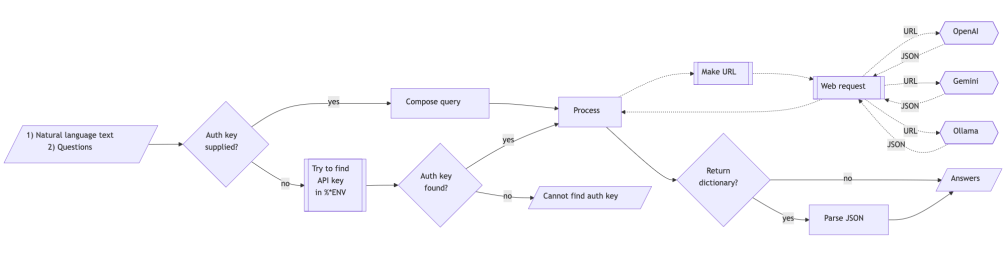
Mermaid diagram

The following flowchart corresponds to the conceptual steps in the package function llm_textual_answer:


References

Articles

[JL1] Jérôme Louradour, “New in the Wolfram Language: FindTextualAnswer”, (2018), blog.wolfram.com.

Functions

[AAf1] Anton Antonov, LLMTextualAnswer, (2024), Wolfram Function Repository.

[WRIf1] Wolfram Research, Inc., FindTextualAnswerWolfram Language function, (2018), (updated 2020).

Packages

[AAp1] Anton Antonov, LLMTextualAnswer, Python package, (2026), GitHub/antononcube.

[AAp2] Anton Antonov, ML::FindTextualAnswer, Raku package, (2023-2025), GitHub/antononcube.

[AAp3] Anton Antonov, ML::NLPTemplateEngine, Raku package, (2023-2025), GitHub/antononcube.