Resource Tuner2.04
Publisher Description
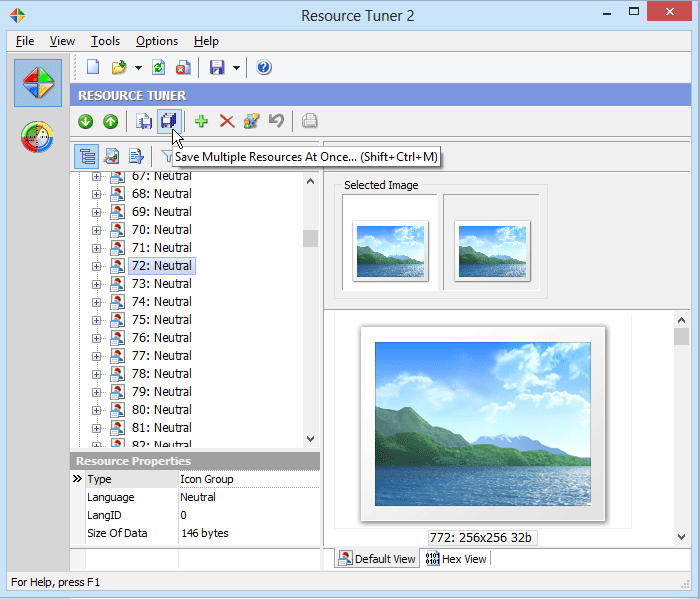
Resource Tuner enables you to customize your favorite programs by modifying the executable file (EXE, DLL, SYS, MSSTYLES, SCR and more) resources. Resource Tuner makes it a snap to replace them with other images, texts and sounds more to your liking. Extract images, edit them, and place them back. Or extract images from one application and put them into another. Have fun personalizing any application to your own unique taste. With Resource Tuner you can view, extract, edit, modify, translate, or repair the resources contained within 32 and 64 bit Windows executable files with the click of a button. Resource Tuner offers a thorough look at all of the resources (bitmaps, jpeg, png, xml, icons, strings, etc) in the file, and allows you to make modifications without needing to recompile the source code. It also allows you to edit the properties of any controls on Delphi forms within the PE file. Because Resource Tuner has itself been written using Delphi, there's a very strong emphasis on peeking inside Delphi applications and packages. Each element of the user interface - dialog boxes, menus, icons, pictures, toolbars, string tables and more are right at your fingertips. Support is provided for nearly every type of resources imaginable. Using the Manifest Wizard, you can now incorporate the new visual style into your legacy application. The wizard inserts an XML application manifest into the resource section of the executable, allowing your old application to take advantage of the slick new look for common controls featured in Windows 8.
About Resource Tuner
This program is available in English. It was last updated on 08 March, 2026. Resource Tuner is compatible with the following operating systems: Windows.
The company that develops Resource Tuner is Heaventools Software. The latest version released by its developer is 2.04. This version was rated by 2 users of our site and has an average rating of 2.5.
The download we have available for Resource Tuner has a file size of 4.2 MB. Just click the green Download button above to start the downloading process. The program is listed on our website since 2015-07-16 and was downloaded 590 times. We have already checked if the download link is safe, however for your own protection we recommend that you scan the downloaded software with your antivirus. Your antivirus may detect the Resource Tuner as malware if the download link is broken.
How to install Resource Tuner on your Windows device:
- Click on the Download button on our website. This will start the download from the website of the developer.
- Once the Resource Tuner is downloaded click on it to start the setup process (assuming you are on a desktop computer).
- When the installation is finished you should be able to see and run the program.
Program Details
System requirements
Download information
Pricing
Version History
version 2.04
posted on 2015-07-16
Added the option to add support for Windows 10 platform in the Manifest Wizard, added the Favorite Files menu item to display a list of favorite files for easy access, other minor bugfixes and improvements.
version 1.99
posted on 2007-01-25
Now Resource Tuner is Vista Ready and supports marking a Pre-Vista application with a requested execution level.