

Rule Solver allows creators of business decision models to define unknown decision variables, define and post constraints to express their relationships, and rely on predefined search strategies to find with the proper decisions. To do this, Rule Solver introduces new types of decision table columns allowing a user to mix and match business rules with technical constraints within the same decision tables. Rule Solver provides several predefined templates for definition and resolution of constraint satisfaction and optimization problems:
- Defining Constrained Variables
- Defining Constraints
- Posting Constraints
- Constraints with Probabilities
- Search Methods
- Solver Templates
DEFINING SOLVER’s VARIABLES
You may create constrained variables, expressions, or they arrays using the predefined column “SolverDefineVariables“. Here are typical examples of defining constrained variables that demonstrate the use of different definition methods:

The first column defines the name of a new constrained variable, expression, or array. The second column defines the creation method that may use 1, 2, or 3 parameters defined in the columns Par 1, Par 2, and Par 3.
We recommend to take all cells (even method names) in quotes. Operators like “+” or “=” always must be taken in quotes. The exception is the use of OpenRules FEEL formulas like:

that concatenates the value of “First Guest Seat” and the word “Seat” after a space. Such formulas should not be taken in quotes. However, if your formula uses a stand-alone decision variable name from a Glossary you may put it in quotes as well, e.g. “Last Seat”.
You may use multiple tables with columns “SolverDefineVariables” with different numbers of parameters and giving columns your own titles as in the table below (from the sample decision model “Zebra“):

You may find the complete list of all methods for defining new constrained variables, expressions, or their arrays here.
DEFINING SOLVER’s CONSTRAINTS
You may create your own custom constraints using the predefined column “SolverDefineConstraints“. Here are typical examples of defining custom constraints that demonstrate the use of different constraint types:
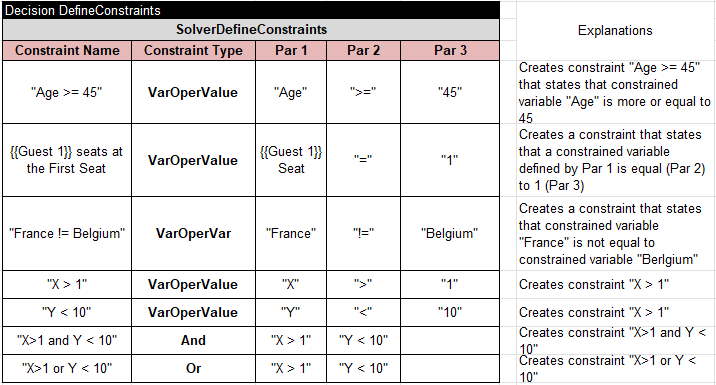
Note that by defining constraints you do not make them active yet. To take an effect the constraints need to be posted. For instance, the decision model Miss Manners” defines incompatibility constraint for Guest 1 and Guest 2 using the following table:

These constraint will be posted later using the constraint type “IfThen”.
POSTING SOLVER’s CONSTRAINTS
You may post constraints using the predefined column “SolverPostConstraints“. Here are typical examples of posting constraints that demonstrate the use of different posting methods:

You may find the complete list of constraint posting methods here.
PREDEFINED SOLVER’s SEARCH METHODS
To give a decision model access to standard search strategies, Rule Solver includes several predefined methods or column templates:
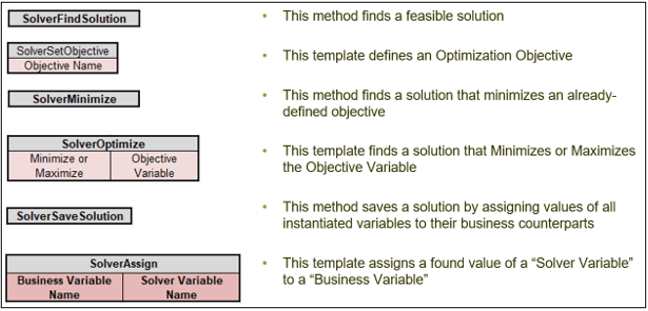
Rules Solver also provides predefined templates for the above linear and global constraints. With Rule Solver being open-sourced, it is easy for users to add new column templates to implement problem-specific constraints and search methods.
 Rules-based Decision Optimization Services