The storage community recently received sobering news regarding the discontinuation of maintenance for key projects at MinIO. As the landscape shifts, we understand the anxiety this causes for developers and enterprises who rely on open-source infrastructure for their mission-critical data.
As a maintainer of RustFS, I want to be clear: RustFS is here to stay.
We believe that the foundation of the modern web must be built on code that is transparent, community-driven, and accessible to all. Therefore, we are officially pledging that the RustFS core repository will remain permanently open-source under its current permissive licensing.
Our mission has always been to provide a high-performance, memory-safe filesystem that the world can trust. In light of recent events, we are doubling down on our roadmap to ensure RustFS remains the most reliable alternative for those seeking long-term stability without the fear of vendor abandonment.
Open source is not just a development model for us; it is a promise. We invite all former MinIO contributors and users to join our community. Together, we will build a future that no single corporate decision can dismantle.
]]>
We are thrilled to share some monumental news with our community today. RustFS has officially been recognized in the Runa Capital Open Source Software (ROSS) Index for the fourth quarter of 2025!
A Prestigious Recognition
The ROSS Index, curated by Runa Capital, tracks the fastest-growing open-source startups globally. Runa Capital is a powerhouse in the open-source venture capital space, with an incredible track record of backing industry titans such as:
- ClickHouse (The high-performance analytical database)
- Nginx (The engine behind the modern web)
- MariaDB (The backbone of many enterprise data layers)
To be listed alongside the next generation of open-source innovators is not just an honor; it is a validation of the hard work our contributors and users have put into making RustFS a reality.
Our Mission: Accelerating AI Infrastructure
This recognition comes at a pivotal time. As the demand for AI continues to scale, the bottleneck is increasingly becoming the storage layer. At RustFS, we are committed to building the most efficient AI Infrastructure (AI Infra) possible.
We are doubling down on our technical roadmap to push the boundaries of performance:
- Deep NVIDIA DPU Integration: Offloading storage tasks to Data Processing Units to free up host CPUs for AI workloads.
- Native RDMA Support: Utilizing Remote Direct Memory Access to achieve ultra-low latency and massive throughput.
- Global Speed: Ensuring that AI training and inference workloads have the high-speed data access they require, no matter the scale.
Thank You!
We want to extend a massive thank you to Runa Capital for the recognition and, more importantly, to you—our community. Whether you have contributed code, reported bugs, or shared our vision, you are the reason RustFS is climbing the charts.
We are just getting started. Let’s build the future of AI storage together.
Stay tuned for more updates!
Follow us on GitHub and join our journey to redefine distributed storage.
]]>
By default, RustFS uses a port 9001 for the Web Console and a port 9000 for API access. To ensure security and compliance, users always deploy RustFS with HTTPS enabled, even with a reverse proxy (such as Nginx, Traefik, or Caddy). The blog will share an even more secure way, which uses Cloudflare tunnel to access your RustFS instance without exposing ports directly to the public internet, and make RustFS more secure eventually.
RustFS installation
RustFS has several installation methods, such as binary, Docker, and Helm Chart. For detailed instructions, please refer to the installation instructions. This blog will show how to install RustFS via docker with docker-compose.yml.
Creating a docker-compose.yml file with the following content,
services:
  rustfs:
    image: rustfs/rustfs:latest
    container_name: rustfs
    hostname: rustfs
    environment:
      - RUSTFS_VOLUMES=/data/rustfs{1...4}
      - RUSTFS_ADDRESS=0.0.0.0:9000
      - RUSTFS_CONSOLE_ENABLE=true
      - RUSTFS_CONSOLE_ADDRESS=0.0.0.0:9001
      - RUSTFS_ACCESS_KEY=rustfsadmin
      - RUSTFS_SECRET_KEY=rustfsadmin
      - RUSTFS_TLS_PATH=/opt/tls
    ports:
      - "9000:9000"  # API endpoint
      - "9001:9001"  # Console
    volumes:
      - data1:/data/rustfs1
      - data2:/data/rustfs2
      - data3:/data/rustfs3
      - data4:/data/rustfs4
      - ./certs:/opt/tls

    networks:
      - rustfs

networks:
  rustfs:
    driver: bridge
    name: rustfs

volumes:
  data1:
  data2:
  data3:
  data4:
Running the command to deploy the RustFS instance:
docker compose up -dVerifying the installation:
docker compose ps
NAME      IMAGE                         COMMAND                 SERVICE   CREATED          STATUS          PORTS
rustfs    rustfs/rustfs:1.0.0-alpha.81  "/entrypoint.sh rust…"  rustfs    22 minutes ago   Up 22 minutes   0.0.0.0:9000-9001->9000-9001/tcp, [::]:9000-9001->9000-9001/tcp
Cloudflare Tunnel Setup
Configuring a Cloudflare Tunnel consists of two main parts: Domain Configuration and Tunnel Configuration.
1. Domain Configuration (optional but recommended)
Proper domain configuration ensures seamless access to RustFS later. So you should have a domain.
- Log in to your Cloudflare account and navigate to the Domain section.
- In the left sidebar, go to Account Home. If you already own a domain, select Onboard a domain; otherwise, choose Buy a domain.
- If onboarding, enter your domain name and follow the guides until you select Continue to activation.
- Finally, the domain Status will appear as Active on your dashboard.

2. Tunnel Configuration
- Log in to the Cloudflare Zero Trust Dashboard.
- Navigate to Networks -> Tunnels and click Create a tunnel.
- Select cloudflared as the connector type.
- In the Install and run connectors section, choose the operating system matching your RustFS server and follow the installation instructions.
- Once installed, you can verify the service status on RustFS server.
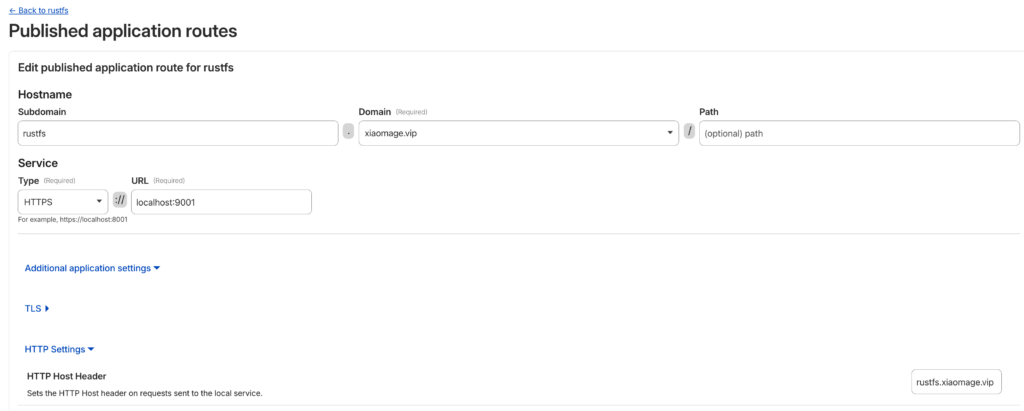
- In the Route Traffic section, configure the Hostname and Service:
- Hostname: Select the domain you added earlier. You can also specify a Subdomain (e.g.,
rustfs). - Service: Select the type and URL. For this setup, choose HTTP (or HTTPS if enabled internally) and set the URL to localhost:9001.
- Hostname: Select the domain you added earlier. You can also specify a Subdomain (e.g.,
- Click Complete setup.
The tunnel Status should now show as a green HEALTHY badge.
Note : In the Hostname settings, go to Additional application settings -> HTTP Settings. In the HTTP Host Header field, enter the domain name you are using to access RustFS. This prevents SignatureDoesNotMatch errors during S3 API calls.
Login Verification
Congratulations! You can now access your RustFS instance via your configured domain. In the above configuration, RustFS instance URL will be https://rustfs.xiaomage.vip.

Log in the RustFS instance with default credentials rustfsadmin / rustfsadmin.
You can now interact with RustFS using various tools like, mc, rc or rclone.
Using RustFS with mc
mc is the client for MinIO, since RustFS is S3-compatible and serves as a MinIO alternative, so it mc will work perfectly with RustFS.
Prerequisites
Installing mc with the MinIO documentation and checking the version to make sure installation works fine.
mc --version
# mc version RELEASE.2025-08-29T21-30-41Z...
Usage
# Set alias
mc alias set rustfs https://rustfs.xiaomage.vip rustfsadmin rustfsadmin

# Create a bucket
mc mb rustfs/hello

# List buckets
mc ls rustfs
[2026-01-23 21:39:36 CST]     0B hello/
[2026-01-23 20:12:59 CST]     0B test/

# Upload a file
echo "123456" > 1.txt
mc cp 1.txt rustfs/hello
# 1.txt: 100.0% 7 B 1 B/s

# Verify upload
mc ls rustfs/hello
[2026-01-23 21:40:44 CST]     7B STANDARD 1.txt
Using RustFS with rclone
rclone is a powerful command-line tool for syncing files across different cloud storage providers, which can also operate RustFS.
Prerequisites
Installing the rclone CLI according to the official guide and checking the version rclone to make sure installation works fine.
rclone --version
# rclone v1.72.1 ...
Usage
- Configure Rclone
Run rclone config and follow the guidance. Finally, the ~/.config/rclone/rclone.conf configuration will be generated and should be like this:
[rustfs]
type = s3
provider = Minio
access_key_id = rustfsadmin
secret_access_key = rustfsadmin
endpoint = https://rustfs.xiaomage.vip
region = us-east-1
force_path_style = trueNote: Since RustFS is not included in rclone’s provider list, use Minio as the provider. In the future, we will open a PR to add RustFS to the provider list.
- Basic Commands
# List buckets and objects
rclone ls rustfs: --s3-sign-accept-encoding=false
        7 hello/1.txt
    11792 test/1.log
   520512 test/123.mp3

# View object content
rclone cat rustfs:hello/1.txt --s3-sign-accept-encoding=false
123456NOTE: The --s3-sign-accept-encoding=false flag is required because Cloudflare modifies the Accept-Encoding header. In the S3 protocol, this change triggers a SignatureDoesNotMatch error. See RustFS Issue #1492 for details.
Using RustFS with rc
Prerequisites
rc is the native RustFS CLI. The current version is 0.1.1 and can be installed via Cargo or compiled from source. After installation, check the version to make sure the installation works fine.
rc --version
# rc 0.1.1
Usage
rc supports standard commands like alias, ls, mb, and rb, similar to mc.
# Set alias
rc alias set rustfs https://rustfs.xiaomage.vip rustfsadmin rustfsadmin
✓ Alias 'rustfs' configured successfully.

# List buckets
rc ls rustfs
[2026-01-23 13:39:36]          0B hello/
[2026-01-23 13:56:57]          0B rclone/
[2026-01-23 12:12:59]          0B test/

# Create a bucket
rc mb rustfs/client
✓ Bucket 'rustfs/client' created successfully.
For more features, run rc --help. If you encounter issues, please provide feedback on GitHub Issues.
We strongly recommend that all installations running a version prior to 1.0.0-alpha.79 be upgraded immediately.
 A More Secure RustFS Through Global Collaboration
Security is a journey, not a destination. We want to extend a sincere thank you to the global security research community and the security teams who have audited the RustFS codebase.
The transparency of open source allows us to collaborate with experts worldwide. Because of your scrutiny, audits, and responsible disclosure, RustFS is becoming more secure with every release. We define success not by the absence of vulnerabilities, but by our speed and transparency in addressing them.
Security Fixes
This release addresses specific security vulnerabilities reported by the community. These issues have been mitigated in version 1.0.0-alpha.79.
We have published the following Security Advisories:
- GHSA-h956-rh7x-ppgj: Fixes a critical path traversal vulnerability.
- GHSA-pq29-69jg-9mxc: Addresses security risks in RPC authentication.
- GHSA-gw2x-q739-qhcr: Enhances validation for object management and replication.
Key Changes in 1.0.0-alpha.79
In addition to security patches, this release includes significant updates to protocol support, policy management, and system stability.
 Features & Enhancements
- Protocol Support: Added support for FTPS and SFTP (@yxrxy).
- Deployment: Added node selector support for standalone deployments (@majinghe, @31ch).
- Policies: Policy resources now support string and array modes (@GatewayJ).
- Configuration: Enabled the possibility to freely configure requests and limits (@mkrueger92).
- IAM: Added permission verification for account creation and version deletion (@GatewayJ).
- Testing: Enhanced S3 test classification and readiness detection (@overtrue).
 Bug Fixes & Improvements
- Security: Fixed path traversal and enhanced object validation (@weisd).
- Security: Refactored RPC Authentication System for improved maintainability (@weisd).
- Security: Corrected
RemoteAddrextension type to enable accurate IP-based policy evaluation (@LeonWang0735). - S3 Compatibility: Fixed bucket policy principal parsing to support specific AWS wildcards (@yxrxy).
- S3 Compatibility: Fixed
list object versionsnext marker behavior (@overtrue). - Networking: Removed NGINX Ingress default body size limit (@usernameisnull).
- Platform: Fixed issues with casting available blocks on FreeBSD/OpenBSD and removed hardcoded bash paths (@jan-schreib).
- Performance: Improved memory ordering for the disk health tracker (@weisd).
- Fix: Resolved URL output format issues in IPv6 environments and UI timing errors (@houseme).
- Fix: Addressed FTPS/SFTP download issues and optimized S3Client caching (@yxrxy).
 Maintenance & Dependencies
- Upgraded
tokioto 1.49.0 (@houseme). - Migrated to
aws-lc-rsand upgraded GitHub Actions artifacts (@houseme). - Replaced
native-tlswith purerustlsfor FTPS/SFTP E2E tests (@yxrxy). - Removed
sysctlcrate in favor of libc’s call interface (@jan-schreib). - General dependency upgrades and cleanup of unused crates.
Upgrade Information
To upgrade to the latest version, please visit our release page:
]]>A container image registry is a mandatory component for application containerization. While Docker Hub is the top player, network connectivity issues often make it less than smooth to use in certain regions. Consequently, building an enterprise-exclusive private image registry has become a key step in enterprise cloud-native transformation.
There are many similar solutions on the market today, such as Harbor, GitLab Container Registry, and GitHub Container Registry. However, these projects all utilize the open-source project Distribution. The primary product of this project is an open-source Registry implementation compliant with the OCI Distribution specification. Therefore, we can use this open-source project independently to build a private container image hosting platform.
Since Distribution supports S3 as a storage backend, and RustFS is a distributed object storage system compatible with S3, we can configure RustFS as the storage backend for Distribution. The complete implementation process is detailed below.
Basic Configuration
Installation
We will containerize the deployment of both Distribution and RustFS. The entire process involves three containers:
- Distribution: Hosts the container images. It depends on the RustFS and MC services; the configuration is as follows:
  registry:
    depends_on:
      - rustfs
      - mc
    restart: always
    image: registry:3
    ports:
      - 5000:5000
    environment:
      REGISTRY_STORAGE: s3
      REGISTRY_AUTH: htpasswd
      REGISTRY_AUTH_HTPASSWD_PATH: /auth/htpasswd
      REGISTRY_AUTH_HTPASSWD_REALM: Registry Realm
      REGISTRY_STORAGE_S3_ACCESSKEY: rustfsadmin
      REGISTRY_STORAGE_S3_SECRETKEY: rustfsadmin
      REGISTRY_STORAGE_S3_REGION: us-east-1
      REGISTRY_STORAGE_S3_REGIONENDPOINT: http://rustfs:9000
      REGISTRY_STORAGE_S3_BUCKET: docker-registry
      REGISTRY_STORAGE_S3_ROOTDIRECTORY: /var/lib/registry
      REGISTRY_STORAGE_S3_FORCEPATHSTYLE: true
      REGISTRY_STORAGE_S3_LOGLEVEL: debug
    volumes:
      - ./auth:/auth
    networks:
- rustfs-ociNote: REGISTRY_AUTH specifies the authentication method for the container image registry. This article uses a username and password. You can generate an encrypted password using the following command:
docker run \
  --entrypoint htpasswd \
  httpd:2 -Bbn testuser testpassword > auth/htpasswd
Mount the generated auth/htpasswd file into the Registry container. You will then be able to log in to the registry using testuser/testpassword.
- RustFS: Stores the image registry data. The configuration is as follows:
  rustfs:
    image: rustfs/rustfs:1.0.0-alpha.77
    container_name: rustfs
    hostname: rustfs
    environment:
      - RUSTFS_VOLUMES=/data
      - RUSTFS_ADDRESS=0.0.0.0:9000
      - RUSTFS_CONSOLE_ENABLE=true
      - RUSTFS_CONSOLE_ADDRESS=0.0.0.0:9001
      - RUSTFS_ACCESS_KEY=rustfsadmin
      - RUSTFS_SECRET_KEY=rustfsadmin
      - RUSTFS_OBS_LOGGER_LEVEL=debug
      - RUSTFS_OBS_LOG_DIRECTORY=/logs
    healthcheck:
      test:
        [
          "CMD",
          "sh", "-c",
          "curl -f http://localhost:9000/health && curl -f http://localhost:9001/rustfs/console/health"
        ]
      interval: 10s
      timeout: 5s
      retries: 3
      start_period: 30s
    ports:
      - "9000:9000"  # API endpoint
      - "9001:9001"  # Console
    networks:
- rustfs-oci- MC: Creates the bucket to store data. It depends on the RustFS service;
  mc:
    depends_on:
      - rustfs
    image: minio/mc
    container_name: mc
    networks:
      - rustfs-oci
    environment:
      - AWS_ACCESS_KEY_ID=rustfsadmin
      - AWS_SECRET_ACCESS_KEY=rustfsadmin
      - AWS_REGION=us-east-1
    entrypoint: |
      /bin/sh -c "
      until (/usr/bin/mc alias set rustfs http://rustfs:9000 rustfsadmin rustfsadmin) do echo '...waiting...' && sleep 1; done;
      /usr/bin/mc rm -r --force rustfs/docker-registry;
      /usr/bin/mc mb rustfs/docker-registry;
      /usr/bin/mc policy set public rustfs/docker-registry;
      tail -f /dev/null
      "
Write the configurations for the three containers above into a docker-compose.yml file, and then execute:
docker compose up -dCheck the service status:
docker ps
CONTAINER ID   IMAGE                          COMMAND                   CREATED             STATUS                       PORTS                                                                                NAMES
7834dee8cbbf   registry:3                     "/entrypoint.sh /etc…"    38 minutes ago      Up 38 minutes                0.0.0.0:80->5000/tcp, 0.0.0.0:443->5000/tcp, [::]:80->5000/tcp, [::]:443->5000/tcp   docker-registry-registry-1
f922568dd11f   minio/mc                       "/bin/sh -c '\nuntil …"   About an hour ago   Up About an hour                                                                                                  mc
bf20a5b2ab4b   rustfs/rustfs:1.0.0-alpha.77   "/entrypoint.sh rust…"    About an hour ago   Up About an hour (healthy)   0.0.0.0:9000-9001->9000-9001/tcp, [::]:9000-9001->9000-9001/tcp                      rustfs
Testing & Verification
We will verify the setup by logging into the container registry using the docker command and pushing a container image.
- Log in to the container registry
docker login localhost:5000
Username: testuser
Password:

WARNING! Your credentials are stored unencrypted in '/root/.docker/config.json'.
Configure a credential helper to remove this warning. See
https://docs.docker.com/go/credential-store/

Login Succeeded- Push an image
# Pull an image
docker pull rustfs/rustfs:1.0.0-alpha.77

# Tag the image
docker tag rustfs/rustfs:1.0.0-alpha.77 localhost:5000/rustfs:1.0.0-alpha.77

# Push the image
docker push localhost:5000/rustfs:1.0.0-alpha.77
The push refers to repository [localhost:5000/rustfs]
4f4fb700ef54: Pushed
8d10e1ace7fc: Pushed
fcd530aedb30: Pushed
ea6fa4aba595: Pushed
2d35ebdb57d9: Pushed
67d0472105ad: Pushed
09194c842438: Pushed
1.0.0-alpha.77: digest: sha256:88eafb9e9457dbabb08b9e93cfed476f01474e48ec85e7a9038f1f4290380526 size: 1680

i Info → Not all multiplatform-content is present and only the available single-platform image was pushed
sha256:f761246690fdf92fc951c90c12ce4050994c923fb988e3840f072c7d9ee11a63 -> sha256:88eafb9e9457dbabb08b9e93cfed476f01474e48ec85e7a9038f1f4290380526- RustFS Verification
Check the contents of the docker-registry bucket on RustFS to confirm that the image data has been stored.

As you can see, the relevant data for the container image localhost:5000/rustfs:1.0.0-alpha.77 has been successfully stored in RustFS.
Advanced Configuration
In the configuration above, the Distribution Registry provides services via HTTP. However, in enterprise production environments, this method is typically impermissible; HTTPS must be configured.
For the Distribution Registry, HTTPS can be configured in several ways, such as providing a local certificate or using Let’s Encrypt directly. This article chooses the latter.
Configuring Let’s Encrypt for Distribution Registry involves the following four parameters:
| Parameter | Required | Description |
|---|---|---|
cachefile | yes | The file path (absolute path) where the Let’s Encrypt agent caches data. |
email | yes | The email address used to register with Let’s Encrypt. |
hosts | no | A list of hostnames (domains) allowed to use Let’s Encrypt certificates. |
directoryurl | no | The URL of the ACME server (this refers to a privately deployed ACME Server). |
Therefore, you only need to configure the following parameters:
REGISTRY_HTTP_TLS_LETSENCRYPT_CACHEFILE: /auth/acme.json
REGISTRY_HTTP_TLS_LETSENCRYPT_EMAIL: email@com
REGISTRY_HTTP_TLS_LETSENCRYPT_HOSTS: '["example.rustfs.com"]'
Then execute the following command again:
docker compose up -dVerify the setup on another server:
docker login example.rustfs.com
Authenticating with existing credentials... [Username: testuser]

i Info → To login with a different account, run 'docker logout' followed by 'docker login'


Login Succeeded
Execute the previous image push and RustFS console verification steps again.
Moving forward, you can use the image registry corresponding to the example.rustfs.com domain to host all internal enterprise container images. Furthermore, you can integrate the entire container image build and push process into your CI/CD pipelines.
RustFS is a high-performance, S3-compatible object storage system built for modern cloud-native and AI workloads.
Laravel, one of the world’s most popular PHP frameworks, supports RustFS natively via Laravel Sail and the Flysystem S3 adapter.
This guide provides a complete, end-to-end integration walkthrough for Laravel + Laravel Sail + RustFS on Ubuntu 24.04.
Laravel Sail added first-class support for RustFS
Reference: https://github.com/laravel/sail/pull/822
Architecture Overview
- Laravel Sail runs the Laravel application inside Docker containers
- RustFS provides S3-compatible object storage
- Flysystem S3 Adapter bridges Laravel and RustFS
- Communication uses standard AWS S3 APIs
Prerequisites
- Ubuntu 24.04 LTS
- sudo privileges
- Internet access
1. Install PHP 8.3
1.1 Update System and Install Dependencies
sudo apt update
sudo apt install -y lsb-release ca-certificates apt-transport-https software-properties-common
1.2 Add PHP Repository (Ondřej Surý PPA)
sudo add-apt-repository ppa:ondrej/php
sudo apt update
1.3 Install PHP 8.3 and Required Extensions
sudo apt install -y php8.3 php8.3-cli php8.3-fpm php8.3-mysql php8.3-curl php8.3-mbstring php8.3-xml php8.3-zip php8.3-bcmath php8.3-gd1.4 Verify Installation
php -v2. Install Docker Engine
Docker is required for both Laravel Sail and RustFS.
2.1 Remove Conflicting Packages
sudo apt-get remove -y docker.io docker-doc docker-compose docker-compose-v2 podman-docker containerd runc2.2 Install Docker Repository and GPG Key
sudo apt-get update
sudo apt-get install -y ca-certificates curl

sudo install -m 0755 -d /etc/apt/keyrings
sudo curl -fsSL https://download.docker.com/linux/ubuntu/gpg   -o /etc/apt/keyrings/docker.asc
sudo chmod a+r /etc/apt/keyrings/docker.asc
2.3 Add Docker Repository
echo "deb [arch=$(dpkg --print-architecture) signed-by=/etc/apt/keyrings/docker.asc] https://download.docker.com/linux/ubuntu $(. /etc/os-release && echo "$VERSION_CODENAME") stable" | sudo tee /etc/apt/sources.list.d/docker.list > /dev/null2.4 Install Docker Engine
sudo apt-get update
sudo apt-get install -y docker-ce docker-ce-cli containerd.io docker-buildx-plugin docker-compose-plugin
2.5 Verify Docker Installation
sudo docker run hello-world3. Install RustFS (Docker Deployment)
RustFS is deployed as a single-node Docker service for development and testing.
mkdir -p data logs
sudo chown -R 10001:10001 data logs

docker run -d --name rustfs -p 9000:9000 -p 9001:9001 -v $(pwd)/data:/data -v $(pwd)/logs:/logs rustfs/rustfs:latest- S3 API Endpoint: http://localhost:9000
- Management Console: http://localhost:9001
- Default Credentials: rustfsadmin / rustfsadmin (unless overridden)
Create a bucket named test-bucket using the RustFS console.
4. Install Composer
php -r "copy('https://getcomposer.org/installer', 'composer-setup.php');"
php composer-setup.php
php -r "unlink('composer-setup.php');"
sudo mv composer.phar /usr/local/bin/composer

composer -V
5. Create Laravel Project with Sail
5.1 Create Laravel Project
composer create-project laravel/laravel rustfs-laravel
cd rustfs-laravel
5.2 Install Laravel Sail
php artisan sail:install5.3 Start Sail Environment
./vendor/bin/sail up -d6. Install Flysystem S3 Adapter
Laravel requires the AWS S3 Flysystem adapter to communicate with RustFS.
./vendor/bin/sail composer require league/flysystem-aws-s3-v37. Configure Laravel to Use RustFS
Edit the .env file in the project root:
FILESYSTEM_DISK=s3

AWS_ACCESS_KEY_ID=rustfsadmin
AWS_SECRET_ACCESS_KEY=rustfsadmin
AWS_DEFAULT_REGION=us-east-1
AWS_BUCKET=test-bucket

# RustFS S3 API endpoint (Docker bridge on Linux)
AWS_ENDPOINT=http://172.17.0.1:9000

# Required for S3-compatible storage
AWS_USE_PATH_STYLE_ENDPOINT=true
8. Validation Integration (Smoke Test)
This step verifies end-to-end compatibility between Laravel Sail and RustFS,
including write, read, existence check, and latency measurement.
Edit routes/web.php and add:
use Illuminate\Support\Facades\Route;
use Illuminate\Support\Facades\Storage;

Route::get('/test-rustfs', function () {
    $fileName = 'rustfs-smoke-test-' . time() . '.txt';
    $content = 'Hello RustFS! This is a Laravel Sail integration test.';

    try {
        // Write object
        $start = microtime(true);
        Storage::disk('s3')->put($fileName, $content);
        $writeLatency = round((microtime(true) - $start) * 1000, 2);

        // Existence check
        $exists = Storage::disk('s3')->exists($fileName);

        // Read object
        $readContent = Storage::disk('s3')->get($fileName);

        return response()->json([
            'status' => 'success',
            'file' => $fileName,
            'exists' => $exists,
            'write_latency_ms' => $writeLatency,
            'content_read' => $readContent,
            'driver_config' => config('filesystems.disks.s3'),
        ]);
    } catch (\Throwable $e) {
        return response()->json([
            'status' => 'error',
            'message' => $e->getMessage(),
        ], 500);
    }
});
Open your browser and visit:
http://localhost/test-rustfsExpected Result
A successful response confirms:
- Successful S3 authentication
- Object PUT operation
- Object existence check (HEAD)
- Object GET operation
{
  "status": "success"
}
Conclusion
Laravel Sail integrates seamlessly with RustFS using standard S3 APIs.
This setup allows PHP developers to adopt RustFS as a high-performance, self-hosted object storage backend with minimal configuration.
For advanced topics such as clustering, TLS, presigned URLs,
and production hardening, refer to the official RustFS documentation.
Original author: https://github.com/soakes. Many thanks for his submission and contribution.
In the evolving landscape of object storage, RustFS has emerged as a compelling alternative to MinIO. While MinIO set the standard for self-hosted S3-compatible storage, its shift to the AGPLv3 license has created compliance challenges for many organizations. RustFS addresses this by offering a high-performance, memory-safe architecture built in Rust, released under the permissive Apache 2.0 license.
This guide outlines the technical process for migrating data from an existing MinIO cluster to a new RustFS deployment with minimal downtime.
Why Migrate?
Before executing the migration, it is important to understand the technical drivers:
- Licensing Compliance: RustFS uses the Apache 2.0 license, allowing for broader integration in commercial and proprietary environments without the copyleft implications of MinIO’s AGPLv3.
- Performance Stability: Written in Rust, RustFS eliminates the Garbage Collection (GC) pauses inherent in Go-based systems like MinIO. This results in lower tail latency and more consistent throughput, particularly under high load.
- S3 Compatibility: RustFS maintains strict API compatibility with Amazon S3, allowing existing tooling (Terraform, SDKs, backup scripts) to function without modification.
Migration Tooling: The MinIO Client (mc)
The most robust tool for this migration is, ironically, the MinIO Client (mc). It provides distinct advantages over generic S3 CLI tools:
- Resumability: Automatically handles network interruptions.
- Data Integrity: Includes checksum verification for transferred objects.
- Metadata Preservation: Retains original object tags, content-types, and custom metadata.
Prerequisites
- Source: A running MinIO instance.
- Destination: A running RustFS instance.
- Tooling:
mcinstalled on a host with network access to both clusters. - Credentials: Root/Admin Access Keys for both the source and destination.
A Note on Access Credentials
For this migration, we strongly recommend using the Root User (Admin) Access Keys for both the MinIO source and the RustFS destination.
While least-privilege principles usually apply, the migration process involves mc mirror, which attempts to replicate the entire bucket structure. If a bucket exists on the source but not the destination, mc needs the s3:CreateBucket permission to create it automatically. Using root credentials ensures the client has full authority to replicate the namespace structure without permission errors interrupting the transfer.
Step-by-Step Migration
1. Configure Remote Aliases
Define aliases for both storage clusters in the mc configuration.
# Configure the Source (MinIO)
mc alias set minio-old https://minio.example.com ADMIN_ACCESS_KEY ADMIN_SECRET_KEY

# Configure the Destination (RustFS)
mc alias set rustfs-new https://rustfs.example.com ADMIN_ACCESS_KEY ADMIN_SECRET_KEY
Verification: Run mc ls rustfs-new to confirm connectivity and permissions.
2. Perform a Dry Run
Before initiating the transfer, simulate the operation to verify path resolution and permissions. The --dry-run flag lists the operations that would be performed without moving data.
mc mirror --dry-run minio-old/production-data rustfs-new/production-data3. Execute the Mirror
There are two primary strategies for the data transfer:
Option A: Static Transfer (Cold Storage)
For backup or archive data that is not actively being written to.
mc mirror minio-old/production-data rustfs-new/production-dataOption B: Active Synchronization (Zero Downtime)
For production workloads, use the --watch flag. mc will perform an initial sync of existing data and then continuously monitor the source for new objects, replicating them to the destination in near real-time.
mc mirror --watch --overwrite minio-old/production-data rustfs-new/production-data--watch: Continuously replicates new objects.--overwrite: Updates objects on the destination if they have changed on the source.--remove: (Optional) Deletes objects on the destination if they are deleted from the source. Use with caution.
4. Final Cutover
Once the data is synchronized:
- Quiesce the Application: Pause write operations to the application to ensure a consistent state.
- Wait for Sync: Allow
mc mirrorto process the final queue of pending objects. - Update Configuration: Change the S3 Endpoint URL in your application settings to point to the RustFS instance (
https://rustfs.example.com). - Restart & Verify: Restart the application and verify data accessibility.
5. Verification
After the cutover, verify data integrity using the diff command. This compares the source and destination metadata to identify any discrepancies.
mc diff minio-old/production-data rustfs-new/production-dataIf the command returns no output, the datasets are identical.
Conclusion
Migrating to RustFS offers a path to a more performant and permissively licensed object storage infrastructure. By leveraging standard tools like mc and ensuring proper administrative privileges during the migration, organizations can execute this transition with confidence and minimal operational impact.
RustFS Helm Chart Search
Search for rustfs on Artifacthub, and you will see three results:

Select the Helm Chart marked Official. This is the Helm Chart officially published by RustFS, while the other two are published by community contributors.
You can read the README to learn more details about the RustFS Helm Chart.
Using the RustFS Helm Chart
Click the INSTALL button on the right side of Artifacthub to see the instructions for using the RustFS Helm Chart, which are divided into two steps:
- Add the repo:
helm repo add rustfs https://charts.rustfs.com
- Install the chart:
helm install my-rustfs rustfs/rustfs
If you want to install a specific version, you can first list all available versions:
# Update repo
helm repo update

# List versions
helm search repo rustfs --versions
NAME         	CHART VERSION	APP VERSION   	DESCRIPTION
rustfs/rustfs	0.0.70       	1.0.0-alpha.70	RustFS helm chart to deploy RustFS on kubernete...
rustfs/rustfs	0.0.69       	1.0.0-alpha.69	RustFS helm chart to deploy RustFS on kubernete...
rustfs/rustfs	0.0.68       	1.0.0-alpha.68	RustFS helm chart to deploy RustFS on kubernete...
Then you can specify a version using --version, for example:
helm install rustfs rustfs/rustfs --version 0.0.70
Installation Verification
You can check the status of RustFS pods:
kubectl -n rustfs get pods -w
NAME       READY   STATUS    RESTARTS        AGE
rustfs-0   1/1     Running   0               2m27s
rustfs-1   1/1     Running   0               2m27s
rustfs-2   1/1     Running   0               2m27s
rustfs-3   1/1     Running   0               2m27s
Check the Ingress:
kubectl -n rustfs get ing
NAME     CLASS   HOSTS            ADDRESS         PORTS     AGE
rustfs   nginx   your.rustfs.com   10.43.237.152   80, 443   29m
Open https://your.rustfs.com in your browser and log in to the RustFS instance using the default username and password: rustfsadmin.
Feedback
If you encounter any issues during use, feel free to submit them via Issues on RustFS Helm Chart repository .
Enterprises’ thirst for real-time data is driving profound changes in data architecture. However, building modern, efficient data streaming platforms generally faces two major bottlenecks:
- Apache Kafka, as the central hub for real-time data, exposes severe cost and operational challenges in cloud environments due to its traditional architecture. High holding costs, near-zero elasticity, and complex partition migrations force enterprises to compromise between cost and performance.
- The selection of object storage—the cornerstone of data persistence—is equally challenging. Traditional distributed storage solutions, while powerful, are complex in architecture and have extremely high deployment and operational barriers; while lightweight solutions use the AGPL license, posing potential compliance risks and restrictions for enterprise commercial use.
Enterprises need a new data architecture that balances high performance, low cost, ease of maintenance, and license friendliness.
To address these challenges, AutoMQ and RustFS have announced a strategic partnership. The two parties will deeply integrate AutoMQ’s cloud-native stream processing capabilities, which are 100% compatible with the Apache Kafka protocol, with RustFS, a high-performance distributed object storage built on Rust, licensed under Apache 2.0, and compatible with S3.
This collaboration aims to provide global enterprises with a next-generation Diskless Kafka platform that offers a superior architecture, lower costs, higher performance, and complete avoidance of licensing risks, thereby fundamentally solving the cost and efficiency challenges of real-time data stream processing in the cloud era.
About AutoMQ
AutoMQ is a next-generation cloud-native Kafka-compatible stream processing platform dedicated to solving the core pain points of traditional Kafka in cloud environments: high cost, limited elasticity, and complex operation and maintenance.
AutoMQ employs an advanced compute-storage separation architecture, directly persisting streaming data to S3-compatible object storage, while the compute layer (Broker) is completely stateless. This revolutionary design ensures 100% compatibility with the Apache Kafka protocol, guaranteeing seamless migration to existing ecosystems such as Flink and Spark, while delivering a hundredfold increase in elasticity efficiency and second-level partition migration capabilities, helping enterprises run real-time streaming services with up to 90% savings in Total Cost of Ownership (TCO).
 Core Advantages
- Extreme Cost Efficiency: Achieves unlimited storage and pay-as-you-go pricing based on object storage, and completely eliminates expensive cross-Availability Zone (AZ) data replication traffic through a multi-point write architecture, achieving up to 90% TCO savings.
- Hundredfold Elasticity Efficiency: Stateless Broker supports second-level auto-scaling of compute resources. Partition migration time has been reduced from several hours to 1.5 seconds, enabling truly seamless cluster expansion for business operations.
- 100% Kafka Compatibility: Fully compatible with the Apache Kafka protocol and ecosystem, supporting zero-downtime migration from existing clusters without any code modifications.
- Fully Managed and Zero-Maintenance: Built-in automatic data rebalancing and fault self-healing capabilities, providing a BYOC (Bring Your Own Cloud) deployment mode. Data remains 100% within the customer’s VPC, ensuring data privacy and security.

About RustFS
RustFS is a high-performance distributed object storage system developed in Rust and compliant with the S3 protocol. It aims to provide a robust data foundation for AI/ML, big data, and cloud-native applications.
Unlike heavyweight architectures like Ceph, RustFS adopts a lightweight “metadata-free” design, where all nodes are equal, greatly simplifying deployment, operation, and scaling, and avoiding single points of failure in metadata. Leveraging the memory safety, high concurrency, and high performance advantages of the Rust language, RustFS achieves extremely high read/write performance and memory stability while providing exabyte-scale scalability.
Core Advantages
- Apache 2.0 Friendly License: Utilizing the Apache-2.0 open-source license, it is completely friendly to enterprise commercial use, avoiding the intellectual property and compliance risks associated with licenses such as AGPL.
- High Performance and High Stability: Developed in Rust, it naturally possesses advantages in memory safety and high concurrency; under equivalent configurations, its read/write performance far surpasses Ceph, and its memory usage is stable with no high-concurrency jitter.
- Lightweight, metadata-free architecture: Deployment and maintenance are extremely simple, requiring no dedicated metadata server. Scaling is easy, requiring only a single command to start, significantly lowering the operational threshold.
- 100% S3 Compatibility: Fully compatible with the S3 API, supporting existing toolchains and SDKs. It also supports enterprise-level features such as version control, object read-only, and cross-region replication, seamlessly replacing existing S3 storage solutions.

Figure 2: RustFS Architecture (Source: RustFS Official Website)
AutoMQ × RustFS: Building a secure, scalable, cross-cloud Diskless Kafka architecture
The deep integration of AutoMQ’s compute-storage separation architecture and RustFS’s high-performance distributed storage achieves end-to-end technical synergy across three dimensions: cross-cloud support, security and reliability, and unlimited scalability, jointly forming a next-generation Diskless Kafka platform.
Building a Unified, Highly Available Data Flow
Both architectures are designed specifically for multi-cloud environments. AutoMQ provides a flexible BYOC (Bring Your Own Cloud) deployment model, supporting compute instances deployed in multi-cloud environments such as Amazon Web Services, Google Cloud, and Azure, as well as private data centers (IDCs). RustFS provides “true multi-cloud storage” capabilities at the storage layer, supporting bucket-level proactive-proactive cross-region replication. The combination enables enterprises to build unified, vendor-locked real-time data services.
Achieving End-to-End Data Security and Privacy
Both technologies jointly construct end-to-end security and reliability. AutoMQ provides TLS/mTLS encryption at the access layer and deploys the data plane within the user’s VPC using BYOC mode. RustFS provides high-performance object storage security encryption at the storage layer and ensures data integrity through version control and WORM mechanisms. Together, they provide a strict read-after-write consistency model.
Independent flexibility in computing and storage
The architectures of both solutions completely resolve the pain point of traditional Kafka’s difficulty in scaling. RustFS supports EB-level storage capacity and “unlimited scaling.” AutoMQ, with its storage-compute separation, achieves auto-scaling at the compute layer. The perfect combination allows enterprises to independently expand compute resources (to cope with traffic surges) or storage resources (to cope with data growth).

Figure 3: AutoMQ & RustFS Collaborative Architecture
What It Brings
The deep technical synergy between AutoMQ and RustFS brings enterprises a high-performance, low-cost, secure, and compliant real-time data infrastructure.
- True unlimited elasticity and high performance: Both architectures support independent scaling. AutoMQ reduces partition migration time from hours to seconds, maintaining P99 latency <10ms. RustFS provides EB-level storage capacity.
- End-to-end security, reliability, and compliance: AutoMQ ensures data never leaves the VPC. RustFS provides encryption, version control, and importantly, the Apache 2.0 license, allowing enterprises to avoid “license traps” like AGPL.
- A Fully Open-Source Joint Solution: Both parties have built on the Apache License, collaborating to create a 100% full-stack Apache-licensed solution for enterprises.
- Extreme Cost Optimization: AutoMQ can save up to 90% on Kafka TCO. RustFS’s lightweight architecture and license friendliness further reduce storage and software costs.
- Cross-Cloud Support and Simplified Operations: Both companies provide “true multi-cloud storage,” helping enterprises prevent single-cloud vendor lock-in and reducing operational complexity.
Open Source Resources
- AutoMQ GitHub: AutoMQ Open Source Project
- RustFS GitHub: RustFS Open Source Project (Note: Please verify this link matches your repository)
Looking Ahead
AutoMQ and RustFS will continue to deepen their technological integration, jointly driving the development of cloud-native real-time data infrastructure. Together, they will provide global enterprises with lower-cost, higher-performance, easier-to-maintain, and compliance-risk-free data streaming solutions.
]]>1. A Massive “Thank You” to the Community
Happy Thanksgiving. Today is a day of gratitude, and we want to take a moment to thank everyone who has helped us along this journey.
On July 2, 2025, we flipped the switch and open-sourced RustFS. We knew we built something cool, but we didn’t expect the explosion of support that followed.
In just four months, we’ve hit 11,000+ GitHub Stars. We are now the fastest-growing distributed object storage project on GitHub.
To everyone who starred, forked, or committed code: Thank you.
We are a truly distributed team for a distributed world. Our core engineers are shipping code from the US, Europe, China, and Singapore. Our contributor base is even wider, with developers joining us from Germany, Turkey, Japan, France, the Netherlands, and beyond.
2. The Problem: Storage is Broken
Object storage is the standard. It’s the backbone of the modern web. But let’s be honest: the current options are frustrating. You’re usually stuck choosing between open-source projects that are drifting toward closed-source models, or tools that are painful to deploy and manage.
We built RustFS because we were tired of that choice.
3. Our Mission: The Long Game
Our goal is simple: Democratize storage. We want to drive down costs and drive up efficiency for everyone, everywhere.
We’ve been grinding for over two years. We believe in Long-Termism. We aren’t here for a quick flip; we’re here to build infrastructure that lasts.
When we look at the history of technology, we see humanity simulating itself:
- AI simulates our reasoning and imagination.
- Robotics simulates our bodies.
- Networks simulate our nervous systems.
- Cameras simulate our eyes.
- Storage simulates our memory.
Just like human memory, the need for data storage grows exponentially every year.
RustFS is two years old. In the grand scheme of things, we are just a sapling. But we are growing strong roots. Our vision is to grow into a tree that provides shade—security and stability—for every company struggling with data costs.
4. Open Collaboration
We welcome integrations with the broader open-source ecosystem. We also invite developers building S3-compatible solutions to explore innovative and commercial partnerships with us.
5. Open Source is a Social Responsibility
We’ve started generating some early revenue, and we believe in walking the walk. It’s not enough to take from open source; you have to give back.
We have already donated to the Rust Foundation, the s3s project, and individual independent developers.
We are committed to building a company with a conscience. As we grow, we pledge to direct more resources toward supporting the open-source ecosystem and charitable causes, specifically helping children fighting illness.
For us, open source isn’t just a license. It’s a responsibility.
6. We Are Building in Public (And We Need You)
We’re proud of what we’ve built, but we know we aren’t perfect yet.
We need your stress tests. We need your bug reports. We need your harsh feedback. We build in public, and we welcome criticism because it makes the product better.
7. Get Involved
Ready to jump in? Here is how you can connect with us:
- Report Bugs: GitHub Issues
- Join the Chat: GitHub Discussions
- Try it Now: play.rustfs.com
- Investors & Partners: [email protected]
Let’s build the future of storage together.
— The RustFS Team
]]>