WordPress Plugins - ScriptsTown https://scriptstown.com/wordpress-plugins/ Tutorials, Themes & Plugins Sun, 15 Mar 2026 19:12:37 +0000 en-US hourly 1 https://wordpress.org/?v=6.9.4 https://scriptstown.com/wp-content/uploads/2023/11/cropped-ScriptsTown-32x32.png WordPress Plugins - ScriptsTown https://scriptstown.com/wordpress-plugins/ 32 32 Dark Mode Toggle https://scriptstown.com/wordpress-plugins/dark-mode-toggle/ Tue, 22 Feb 2022 05:58:54 +0000 https://scriptstown.com/?post_type=st-plugin&p=3157 An excellent plugin to quickly add a dark or night mode toggle switch button on your WordPress site. It is compatible with any theme and works out of the box.

The post Dark Mode Toggle appeared first on ScriptsTown.

]]>
Dark Mode Toggle is a WordPress plugin to bring a simple toggle switch to quickly switch between dark and light mode. It works out of the box with automatic configurations and you can use this plugin with any WordPress theme. Also, it offers some basic options to customize the position of the toggle button on your WordPress site.

Frequently Asked Questions

Where to find the Options related to the Plugin?

You can find all the options related to the plugin in “Appearance” > “Dark Mode”.

How to Fix Images when Dark Mode is Active?

If you see any reverse effect on certain images when dark mode is active, then you can avoid that reverse effect on those images with the CSS. For example, if all those images have a class, “.css-selector”, then you can apply this CSS to remove invert effect from those images:

.darkmode--activated .css-selector { filter: invert(1); }

You may also read this in-depth guide on how to fix inverse effect on images.

Is there a Premium version available?

There is a premium version, Dark Mode Toggle Pro available with advanced features.

The post Dark Mode Toggle appeared first on ScriptsTown.

]]>
Dark Mode Toggle Pro https://scriptstown.com/wordpress-plugins/dark-mode-toggle-pro/ Tue, 22 Feb 2022 05:19:38 +0000 https://scriptstown.com/?post_type=st-plugin&p=3155 Bring dark / night mode toggle switch on your WordPress website and admin area. It can save user's choice and auto-match OS theme. Fast and easy to use.

The post Dark Mode Toggle Pro appeared first on ScriptsTown.

]]>
Dark Mode Toggle Pro is a WordPress plugin that adds a dark / night mode toggle button on a WordPress site as well as on the admin area. The plugin comes with a separate set of settings to enable and configure the dark mode switch on the front and admin. It can save the user’s selection on the next page refresh and can auto-match OS themes.

The plugin comes with automatic configuration as well as many options to customize the toggle button very easily. Also, it is very lightweight, fast, and easy to use.

Upload Customized Toggle Buttons

In the pro version, you can upload custom toggle buttons for both dark mode and light mode.
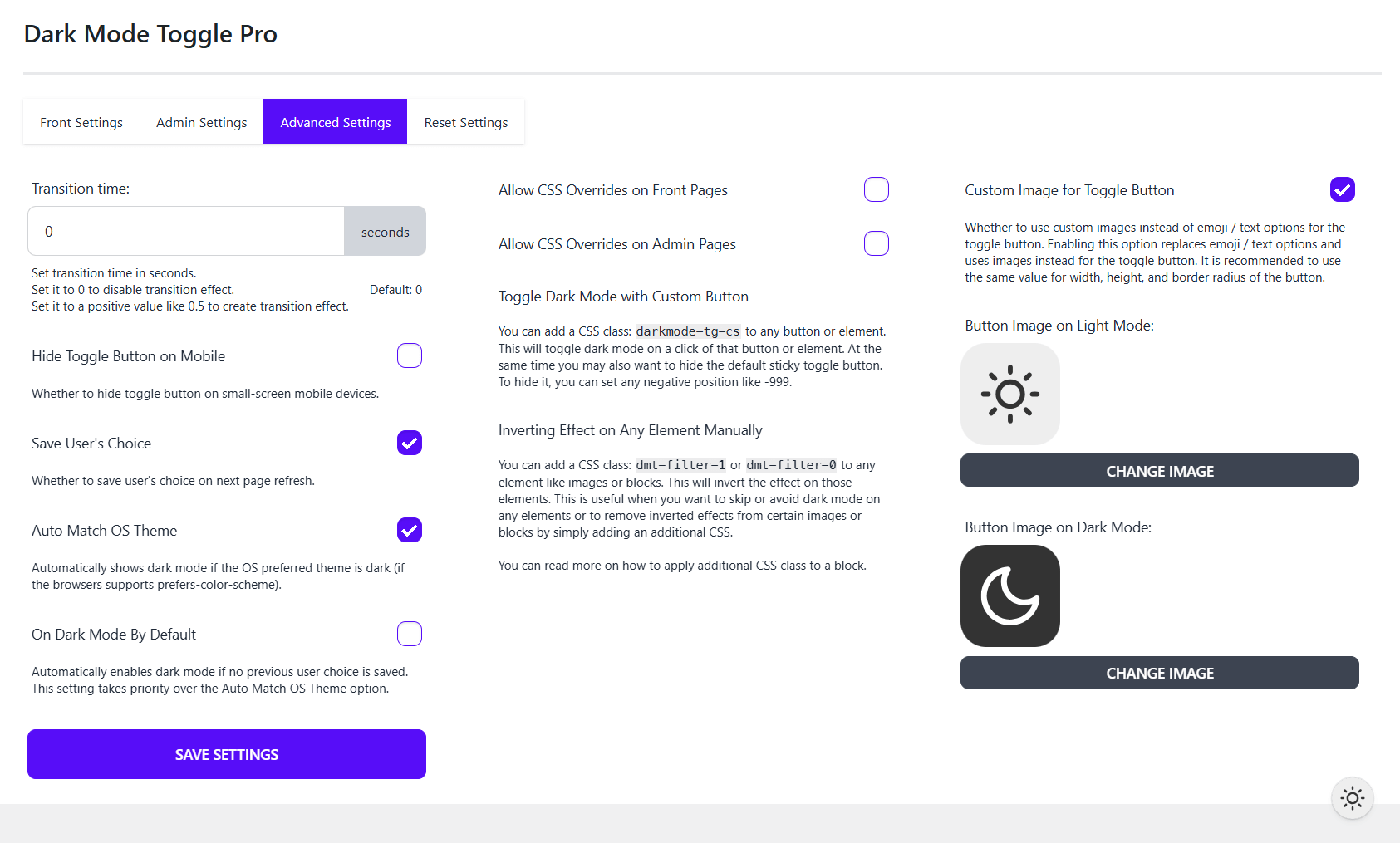
Advanced Settings - Dark Mode Toggle Pro
Advanced Settings – Dark Mode Toggle Pro

Frequently Asked Questions

Where to find the Dark Mode Options and Settings?

You can find all the options and settings of the plugin in “Appearance” > “Dark Mode Pro”.

The post Dark Mode Toggle Pro appeared first on ScriptsTown.

]]>
Login Security Pro https://scriptstown.com/wordpress-plugins/login-security-pro/ Fri, 22 May 2020 02:27:51 +0000 https://scriptstown.com/?post_type=st-plugin&p=480 Premium security plugin to limit failed login attempts, show recent login history, redirect users based on roles, Add reCAPTCHA or Cloudflare Turnstile. Fast and easy.

The post Login Security Pro appeared first on ScriptsTown.

]]>
Login Security Pro is a premium WordPress security plugin to protect your website. It offers various security features such as limiting login attempts, recent login history, user role-based redirection after login, and logout, Google reCAPTCHA, Cloudflare Turnstile, WooCommerce captcha support, blocking spam comments, and preventing Brute-force attacks.

The post Login Security Pro appeared first on ScriptsTown.

]]>
Event Timeline Feed https://scriptstown.com/wordpress-plugins/timeline-feed/ Thu, 14 May 2020 22:55:23 +0000 https://scriptstown.com/?post_type=st-plugin&p=417 Create and showcase unlimited event timelines on your WordPress website. It offers multiple layouts and style options with clean, elegant, and responsive design.

The post Event Timeline Feed appeared first on ScriptsTown.

]]>
Event Timeline Feed adds an event timeline view to your WordPress website. You can create multiple timelines and add any number of events to the timeline with the event title, description, event link, icon, date, and time. Also, you can choose from multiple eye-catching, responsive layouts to showcase the timeline. Each layout has its unique sets of colors and typography settings, which you can use to further enhance the layout design.

The post Event Timeline Feed appeared first on ScriptsTown.

]]>
Contact Form Query https://scriptstown.com/wordpress-plugins/contact-form-query/ Thu, 14 May 2020 22:46:30 +0000 https://scriptstown.com/?post_type=st-plugin&p=415 Add a contact form to your WordPress site and receive new message notification to your specified email and WordPress admin panel with search and filter options.

The post Contact Form Query appeared first on ScriptsTown.

]]>
Contact Form Query is a WordPress plugin to add a contact form to your website. It allows receiving new message notifications to your specified email and also to the WordPress Admin Panel. Also, it adds a dashboard widget where the admin can view all the latest messages received in the WordPress dashboard.

It supports filtering and searching for messages. And, you can add extra notes to a message for reference purposes or mark them as answered.

To prevent spam entries in the contact form, this plugin allows you to block messages based on blacklisted keywords so you can input and provide any keywords to easily block certain types of spam messages. Also, it comes with a captcha feature with support for Google reCAPTCHA and Cloudflare Turnstile.

Frequently Asked Questions

How to display a contact form on a page or post?

Use the shortcode [contact_form_query] to display the contact form on a page or post. Also, you may use “Contact Form” block in the block editor to display the contact form.

Email not working when using WP Mail?

You can read the following guide to correctly configure your email settings, so emails work properly on your WordPress site.

How to get Site Key and Secret Key for reCAPTCHA or Cloudflare Turnstile?

Read the guide on how to get the site key and secret key for Google reCAPTCHA.

Also, you can read how to get the site key and secret key for Cloudflare Turnstile.

How to block message entries based on keywords?

You can block messages based on keywords. Simply input all the keywords line by line that you want to block in the “Blacklist Keywords” field available in “Contact” > “Settings” > “Captcha”. For example, if you input this:

block keyword one
[email protected]
keywordthree

This will block any message that contains any of the above three keywords “block keyword one”, “blockthisemail@domain”, or “keywordthree”. Also, these keywords can be in any of the fields like email, subject, message, name, etc. You can leave this field empty if you do not want to block message entries based on keywords.

The post Contact Form Query appeared first on ScriptsTown.

]]>
Social Icons Sticky https://scriptstown.com/wordpress-plugins/share-social-media/ Thu, 14 May 2020 22:29:56 +0000 https://scriptstown.com/?post_type=st-plugin&p=413 Add social media sharing icons to a post or page of a WordPress website and allow visitors to share content on various social media sites. Add sticky social icons.

The post Social Icons Sticky appeared first on ScriptsTown.

]]>
Social Icons Sticky is a WordPress plugin to add multiple social icons in different placement positions. Place social icons before or after the page/post content. Also, you can place sticky icons on the right or left side of your WordPress website.

Frequently Asked Questions

Where to Find the Plugin Settings?

In your WordPress admin panel, you can find all the settings related to Social Icons Sticky plugin from “Settings” > “Social Share”.

The post Social Icons Sticky appeared first on ScriptsTown.

]]>
Login Security Captcha https://scriptstown.com/wordpress-plugins/login-security-recaptcha/ Thu, 14 May 2020 22:16:25 +0000 https://scriptstown.com/?post_type=st-plugin&p=410 Security plugin to quickly add Cloudflare Turnstile or Google reCAPTCHA v2 and v3 to WordPress standard login, registration, lost password, and comment form.

The post Login Security Captcha appeared first on ScriptsTown.

]]>
Login Security Captcha is a WordPress security plugin to prevent spam comments and attacks like Brute-force. This plugin supports Cloudflare Turnstile as well as Google reCAPTCHA Version 2 and Version 3. Also, you can configure captcha theme and monitor error logs.

Frequently Asked Questions

Is Google reCAPTCHA not working?

You may have a caching plugin installed on your WordPress site. To make reCAPTCHA work, you can try any one of the following options:

  • Exclude this URI in your caching plugin settings (JS Excludes): /repatcha/api.js
  • Disable JavaScript-related caching from your plugin settings.
  • Or, simply deactivate the caching plugin.

The post Login Security Captcha appeared first on ScriptsTown.

]]>