SetVsel1.51
Publisher Description
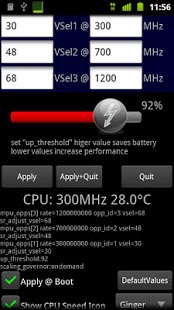
Overclocking Undervolting Tool for Motorola Defy.
Save Akku Power and set CPU Scaling to minimum while Screen is Off.
Set Scaling to maximum on incomming phonecall.
Set Scaling to Medium on Low Battery
With setvsel you can set Vsel OnDemand or Performance
it include a stability test to ensure you settings are stable
Need ***ROOT***
version 1.11maybe 2.2 support (i cant test this, it use overclock,ko from milestone2.2)VSels are now added dynamicly so 4Vsel are possible now !!!new stabilitytestsome bugfixes
version 1.12now you have the option to use the BuildIn Test or StabilityTest from the Market
Version 1.14 it loads the OverclockModule from MilestoneOverclock (if Installed) now and use that. (because of unsupported rom) maybe droid and milestone works too this way
it also looks at /system/modules/overclock.ko .... so to all RomCockers pls place a working overclock.ko for your Rom into that folder ;o)
Version 1.30works now on CN2.2widget that shows akt cpuspeed is included (beta)ad's removedwaiting dialog on startup (can be removed with a donation search market for SetVsel(donate))
Version 1.31-bugfix for startup probs on some phones-ultra fast reboot is back (this time it seems without freezes)-menueitem for reloading overclock.ko-more logs for better bugfixing
Version 1.32-bugfixes-optionally CpuSpeedIcon in statusbar
version 1.33better error handling and logginghopefully fix force closes (if not pls send logcat)
version 1.34reboot on UK 2.2 fixed
version 1.35new cpuspeedicon in gingerbread green ;)
version 1.36bugfixesup_threshold is configurableyou can quick switch scaling_governor over notificationpulldon
version 1.37added the option to set up_threshold to 99% on low battery
version 1.38bugfix
version 1.39fixed the bug that the wating dialog comes on screen rotation.
version 1.41performance enhancments
version 1.42bugfix when changing iconset
version 1.43the abnormal batteryusage is fixed !!!!
version 1.45-now you can set 2 batterylimits ! 1 for limit Vsel and 1 for setThresholdi.e set up_threshold to 99 on batt = 40% and on batt = 20% limit to vsel2-more onthefly options via notify menue
version 1.47-shows a RED icon when both battery conditions are reached
version 1.48-SD Card Speedfix added
version 1.50-added BatteryInfo in 1% Steps to NotifyBar
version 1.51-optional apply "sysctl -w vm.min_free_kbytes=4096" @boot-small bugfixes
About SetVsel
The company that develops SetVsel is inteks. The latest version released by its developer is 1.51. This app was rated by 1 users of our site and has an average rating of 4.0.
To install SetVsel on your Android device, just click the green Continue To App button above to start the installation process. The app is listed on our website since 2013-06-12 and was downloaded 511 times. We have already checked if the download link is safe, however for your own protection we recommend that you scan the downloaded app with your antivirus. Your antivirus may detect the SetVsel as malware as malware if the download link to com.SetVsel.Inteks.org is broken.
How to install SetVsel on your Android device:
- Click on the Continue To App button on our website. This will redirect you to Google Play.
- Once the SetVsel is shown in the Google Play listing of your Android device, you can start its download and installation. Tap on the Install button located below the search bar and to the right of the app icon.
- A pop-up window with the permissions required by SetVsel will be shown. Click on Accept to continue the process.
- SetVsel will be downloaded onto your device, displaying a progress. Once the download completes, the installation will start and you'll get a notification after the installation is finished.
Program Details
System requirements
Download information
Pricing
Version History
version 1.51
posted on 2013-06-12
version 1.51,-optional apply "sysctl -w vm.min_free_kbytes=4096" @boot,-small bugfixes
version 1.48
posted on 2011-04-09
Several fixes and updates