The post Terms and Conditions for Blog/Media Registration on seedbacklink appeared first on Seedbacklink Singapore.
]]>
Using a Top Level Domain (TLD)
Websites must use a paid primary domain, such as .com, .id, .co.id, .net, or other official TLDs. Websites using free subdomains are not accepted, for example:
- blogname.wordpress.com
- blogname.blogspot.com
- and similar platforms
Minimum Domain Age
The registered website must not be a new domain, with the following requirements:
- Minimum domain age of 6 months
- Preferably, the domain has been active for 1 year or more
This is intended to ensure the website has sufficient history and stability.
Website Ownership
The website must be directly managed by its owner, not owned by a third party or rented. This must be demonstrated by:
- Consistent and reachable contact information
- Clear domain ownership
- Willingness to install the seedbacklink Verified Blog badge
The verification badge guide can be accessed at: https://sg.seedbacklink.com/verified-blog-seedbacklink
Active Blog Posts
The website must not contain only placement articles. In addition to placement content, the website must also have:
- Regular blog articles
- Informative, educational, or niche-relevant content
- Periodic content updates
Websites that only contain promotional or placement content may not be approved.
Active and Well-Maintained Website
A website is considered active if:
- The latest content update is no more than 3 months old
- The website does not appear abandoned or poorly maintained
Websites that have not been updated for a long time will be difficult to approve.
Minimum Traffic Requirement
The website must have minimum monthly traffic of at least several hundred visitors.
Traffic checks are conducted through:
Please note that the traffic data used by the seedbacklink system refers to Similarweb and is updated periodically. Therefore, traffic shown in Google Analytics may not be immediately detected by the system.
Not Offering Similar Services
Websites are not allowed to offer:
- Backlink services
- Article placement services
- Other services similar to seedbacklink
This requirement is intended to avoid service conflicts.
Free from Prohibited Content
Websites must not:
- Display or promote gambling sites
- Contain prohibited links in the footer, sidebar, or other sections
- Contain illegal or unlawful content
Websites found to violate these terms will be rejected immediately.
Closing
Please ensure that all the requirements above are met before registering your website on seedbacklink. If your website is not approved, you may make improvements first and then request a re-review after meeting the specified criteria. If you need further assistance, please contact the seedbacklink support team via WhatsApp or our official email at [email protected].
The post Terms and Conditions for Blog/Media Registration on seedbacklink appeared first on Seedbacklink Singapore.
]]>The post Why Was My Website Rejected for Not Using a TLD? appeared first on Seedbacklink Singapore.
]]>Your website was rejected because the domain used is not considered a supported TLD (Top Level Domain), which is currently one of the main requirements for registering a new blog on seedbacklink.
The following domains are no longer accepted for new website registrations:
- .web.id
- .my.id
- .biz.id
This policy is automatically enforced by our system. Therefore, even if your website is active and contains content, the registration will still be rejected if the domain does not fall under the supported TLD category.
Why Are These Domains Not Accepted?
This policy change is implemented to maintain the quality, credibility, and performance of publisher websites in the eyes of advertisers. Websites using TLDs are generally considered more stable, professional, and trustworthy for campaign purposes.
With this standard in place, advertisers can achieve more relevant and higher-quality publication results, ensuring that the seedbacklink ecosystem remains healthy and competitive.
What About Previously Registered Websites?
Before this policy was implemented, domains such as .my.id were still allowed and widely used by existing publishers.
For websites that:
- Were registered before this policy took effect, and
- Have received or completed orders
Their status remains safe and will not be removed or restricted. This policy applies only to new website registrations, not to websites that are already active in the system.
How to Resolve the Rejection
To ensure your website can be registered and approved on seedbacklink, please take the following steps:
Use a TLD Domain
Register your website using a commonly accepted TLD, such as:
- .com
- .net
- .org
- .id
- or other relevant TLDs
Once your website uses a TLD domain, you may reapply through the seedbacklink dashboard.
Conclusion
Websites will continue to be rejected if they use domains that do not meet seedbacklink’s latest TLD policy. However, previously registered websites using non-TLD domains remain safe and can continue to operate as usual.
If you have any questions or would like to confirm whether your domain is supported, please feel free to contact the seedbacklink support team via WhatsApp or email at [email protected].
The post Why Was My Website Rejected for Not Using a TLD? appeared first on Seedbacklink Singapore.
]]>The post What payment options are available for Singaporean? appeared first on Seedbacklink Singapore.
]]>Available Payment Methods
- Digital Payment
seedbacklink supports multiple digital payments such as TouchnGo eWallet, ShopeePay, GrabPay, and Boost. After selecting a digital payment method, you can enter your name, email address and phone number.

- QR Payment
Payments can also be made easily via QR-based payments. Simply scan the QR code displayed on the payment page and complete your payment using ShopeePay QR.

- PayPal
seedbacklink also supports payments through PayPal. You can pay using your PayPal balance or international debit/credit cards such as Visa and Mastercard linked to your PayPal account. After selecting PayPal as your payment method, enter the payment amount in SGD and proceed to the secure PayPal checkout page to complete the transaction.

Transaction Security
All payments on seedbacklink are protected with 2C2P security system. Your personal information and transaction data are fully encrypted to ensure safety and privacy.
Payment Verification Process
After your payment is completed, the system will automatically verify the transaction instantly. You can check your payment status at any time through your seedbacklink dashboard under the “Payment” menu.
Need Help?
If you experience any issues during payment or your transaction is not yet verified, please contact the seedbacklink support team via our official WhatsApp or through email at [email protected]. We are here to help ensure your payment process runs smoothly.
The post What payment options are available for Singaporean? appeared first on Seedbacklink Singapore.
]]>The post Minimum Traffic Requirements for Website Approval appeared first on Seedbacklink Singapore.
]]>Your website was rejected because our system detected that it does not yet have sufficient traffic to meet the registration criteria on seedbacklink.
Please note that seedbacklink uses traffic data from Similarweb, which is updated once a month. Because of this, even if your website already shows traffic in Google Analytics (GA), it may not be reflected in our system until Similarweb updates its data.
How to Resolve This Issue
You can choose one of the following options to get your website approved:
Option 1: Wait for the Monthly Traffic Update
This is the easiest option if your website has already started getting visitors.
What you should do:
-
Make sure your website stays active and continues to receive daily visits.
-
Wait for Similarweb’s monthly traffic update (usually at the beginning of the month).
-
Once your traffic appears on Similarweb or on https://en.seedbacklink.com/tool/website-traffic-checker/, you can contact the seedbacklink team for a re-review.
Option 2: Improve Your Website Traffic First
If your website is still new or has very low traffic, we recommend improving its performance before reapplying.
Tips to increase traffic:
-
Promote your website through social media or relevant online communities.
-
Publish quality content regularly.
-
Apply basic SEO practices to help your site appear in Google search results.
Once your traffic increases and is detected by Similarweb, you may submit your website again for review.
Conclusion
Your website will remain unapproved if the traffic is not yet detected in Similarweb. However, once your traffic appears (at least a few hundred monthly visitors), you can contact our support team for a re-evaluation.
If you have any further questions, feel free to reach out to us via WhatsApp or email [email protected]. seedbacklink support team will be happy to assist you.
The post Minimum Traffic Requirements for Website Approval appeared first on Seedbacklink Singapore.
]]>The post Website Rejected Due to Ownership Issue appeared first on Seedbacklink Singapore.
]]>Your website was rejected because our system detected issues that raised doubts about the ownership of the domain. There are two main possible causes:
-
Different Contact Information — The contact details listed on your website do not match the contact information registered in your seedbacklink account.
-
Verification Badge Not Installed — The official seedbacklink verification badge has not been added to your website. Installing the badge helps confirm ownership, as only the website’s admin or owner can place it directly on the site.
How to Resolve the Issue
To get your website approved, please complete one of the following verification options:
Option 1: Install the Verification Badge
This is the quickest way to verify your ownership.
-
Verification Badge Link: https://sg.seedbacklink.com/verified-blog-seedbacklink
-
Action: Copy the verification badge code and place it on your website.

-
Next Step: Once the badge is installed, reapply for verification so our team can review and approve your submission.


Option 2: Provide Official Proof of Ownership
If you’re unable to install the badge, you can submit an official document to verify ownership.
Accepted Documents:
-
Website ownership statement or declaration letter.
-
Proof of payment or a screenshot from your domain/hosting provider dashboard showing your name as the registered owner.
Action: Send the ownership document(s) to our support team.
Next Step: Once submitted, please notify us so we can proceed with a manual verification process.
Summary
Your website will remain unapproved until at least one of the ownership verification steps above is completed. Please choose one of the options and contact us once done so we can finalize the verification.
If you have any further questions, feel free to reach out to our support team via WhatsApp or email — we’re happy to help.
The post Website Rejected Due to Ownership Issue appeared first on Seedbacklink Singapore.
]]>The post What is the New KOL Feature on seedbacklink? appeared first on Seedbacklink Singapore.
]]>With the KOL Service, advertisers can easily discover, select, and book influencers that best match their campaign goals. The process is simple and transparent—starting from searching for KOLs, setting up a campaign brief, uploading ready-to-publish content (photos/videos), all the way to secure payment. Advertisers also receive up to four revision opportunities, ensuring that every campaign aligns with their objectives and expectations.
By introducing this feature, seedbacklink makes it easier for advertisers to run precise and impactful digital campaigns with the right influencers.
Key Benefits of the KOL Feature on seedbacklink
-
Find influencers that fit your budget – choose KOLs that match your campaign spend.
-
Work with KOLs across multiple platforms – Instagram, TikTok, YouTube, and X.
-
Filter by niche and follower count – reach audiences that matter most to your brand.
-
Target by location – ideal for local campaigns that need a precise reach.
-
Transparent and seamless process – all information is clear and accessible, just click and launch your campaign.
Why Use the KOL Feature on seedbacklink?
With seedbacklink, you no longer need to waste time manually searching for influencers. Everything is provided in one platform—with complete data, transparent pricing, and an end-to-end system that simplifies the advertiser’s workflow.
Simply set your campaign needs, select the right KOL, upload your content or brief, make payment, and let the influencer handle the execution. It’s easy, fast, and effective.
The post What is the New KOL Feature on seedbacklink? appeared first on Seedbacklink Singapore.
]]>The post Can I Use a Credit Card as a Payment Method on seedbacklink? appeared first on Seedbacklink Singapore.
]]>To pay with a credit card, simply follow the standard ordering steps outlined in our Order Guide. Below is a step-by-step overview:
How to Pay Using a Credit Card on seedbacklink
-
Choose Your Desired Order
After logging in to your seedbacklink account, browse the available blogs or publishers. Click the “Order” button for the one you wish to purchase. -
Complete Your Order Details
Enter all required information such as the target URL, anchor text, and any additional notes if needed. -
Proceed to Payment
Once your order details are filled in, you’ll be directed to the payment page where you can select your preferred payment method. -
Select Credit Card as Your Payment Method
Choose “Credit Card” as the payment method. seedbacklink currently supports credit card transactions through our trusted, secure payment gateway partners. -
Enter Your Credit Card Information
Provide accurate and complete credit card details. Make sure your card is valid and enabled for online transactions. -
Confirm and Complete the Payment
Follow the on-screen instructions to finalize the payment. Once completed, your order will be processed immediately.
Note: Ensure your credit card has sufficient balance and is authorized for online transactions. All credit card payments on seedbacklink are encrypted and securely processed through our payment gateway system.
If you encounter any issues during the payment process—such as a failed credit card transaction—please don’t hesitate to contact our support team via WhatsApp or email. We’re here to ensure your transaction is completed safely and successfully.
The post Can I Use a Credit Card as a Payment Method on seedbacklink? appeared first on Seedbacklink Singapore.
]]>The post Can Advertisers Request a Wallet Withdrawal or Refund? appeared first on Seedbacklink Singapore.
]]>It’s important to understand that seedbacklink operates as a professional content publication marketplace, connecting advertisers and publishers for seamless collaboration. The withdrawal feature is exclusively available to publishers as a method to receive payment for completed and validated publication orders.
In contrast, the wallet balance on advertiser accounts is strictly intended for purchasing publication services and cannot be withdrawn or refunded in the form of cash. This policy is in place as part of seedbacklink’s operational and compliance standards, governed under official business regulations and monitored by relevant financial authorities.
As a legally registered and regulated marketplace platform, seedbacklink is committed to maintaining a transparent, accountable, and secure financial ecosystem. Allowing advertisers to withdraw funds—especially those originating from the same source or account—may potentially raise fraud or suspicious activity alerts that violate financial compliance norms. Such activities could have a serious impact on the continuity of the platform, as our system is directly connected to banks and dual-channel government monitoring systems.
For this reason, and to uphold platform integrity, financial compliance, and long-term sustainability, advertiser wallet balances are non-withdrawable and non-refundable. We strongly encourage advertisers to plan their top-up and spending activities carefully before adding funds to their wallet.
If you have further questions, please don’t hesitate to reach out to our support team via WhatsApp or email.
The post Can Advertisers Request a Wallet Withdrawal or Refund? appeared first on Seedbacklink Singapore.
]]>The post How to Withdraw Funds on seedbacklink? appeared first on Seedbacklink Singapore.
]]>Step-by-Step Guide to Withdraw on seedbacklink:
-
Log in to your seedbacklink account.

-
Once logged in, navigate to your Dashboard and select the Withdraw option.
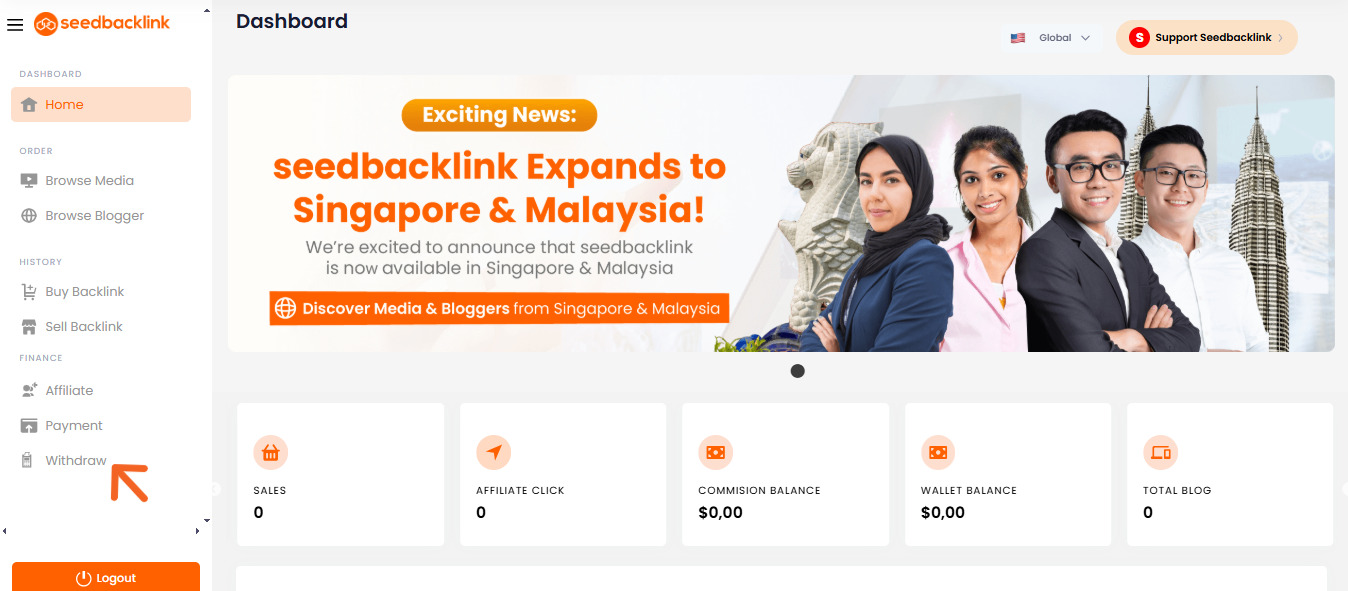
-
If this is your first withdrawal, the system will prompt you to add your paypal account details.

-
Enter your full bank account information, including:
-
Bank Name
-
Beneficiary Email

-
-
After successfully adding your paypal details, you can proceed by clicking the Withdraw button.

-
Enter the amount you wish to withdraw.

-
Click Continue to confirm your withdrawal request.

-
Done. Your withdrawal request will be processed according to the applicable disbursement schedule.
Withdrawing Affiliate Commission
In addition to withdrawing your earnings as a publisher, you can also withdraw your commission if you are an affiliate partner at seedbacklink. The withdrawal process is the same. However, under the Withdraw menu, please select the Commission Withdrawal option.

You will then be directed to a page where you can submit your commission withdrawal request by clicking the Withdraw button.

Withdrawal Terms and Disbursement Schedule
-
No maximum withdrawal limit
-
Withdrawals are not processed instantly and will not be disbursed on the same day as the request
-
Disbursement dates: 5th and 25th of every month
-
If the 5th or 25th falls on a Saturday, Sunday, or public holiday, the disbursement will be processed on the previous business day
-
Submission deadline: Withdrawals must be submitted before 11:00 AM (Western Indonesian Time) on the disbursement day
-
Requests submitted after 11:00 AM (Western Indonesian Time) will be processed on the next scheduled disbursement date
If you encounter any issues or have further questions about the withdrawal process, feel free to contact the seedbacklink support team for assistance.
The post How to Withdraw Funds on seedbacklink? appeared first on Seedbacklink Singapore.
]]>The post When Will My Withdrawal Be Processed? appeared first on Seedbacklink Singapore.
]]>Withdrawal Schedule
Withdrawals at seedbacklink are processed twice a month, specifically on the following dates:
-
5th of each month
-
25th of each month
If the 5th or 25th falls on a Saturday, Sunday, or a Indonesia national holiday, the withdrawal will be processed on the nearest previous business day.
Submission Deadline
To ensure your withdrawal request is included in the scheduled processing, make sure to submit it before 11:00 AM (Western Indonesian Time) on the 5th or 25th.
Requests submitted after 11:00 AM will be processed during the next withdrawal cycle.
Submissions Outside the Schedule
If you submit a withdrawal request outside the scheduled dates, the system will automatically queue your request to be processed during the next eligible withdrawal period.
Confirmation If Withdrawal Is Not Yet Processed
Under normal conditions, withdrawals are processed within a maximum of 3×24 hours from the applicable processing date.
If you do not receive your funds after this period, please contact our support team immediately so we can investigate and resolve the issue.
If you have any questions or need further assistance, feel free to reach out to our support team via WhatsApp or email.
The post When Will My Withdrawal Be Processed? appeared first on Seedbacklink Singapore.
]]>