
When saving in custom.el this can look like this
'(eglot-java-eclipse-jdt-args
   '("-Xmx4G" "--add-modules=ALL-SYSTEM" "--add-opens" "java.base/java.util=ALL-UNNAMED" "--add-opens" "java.base/java.lang=ALL-UNNAMED" "-javaagent:/Users/phil/.emacs.d/share/lombok/lombok.jar" ...))
only the -javaagent is required, but increasing the -Xmx to 4G has been useful for me for big projects.
.dir-locals.el to automatically configure the project correctly when opened.
((nil
  . ((eglot-workspace-configuration
      . (:gopls (:buildFlags  ["-tags=SOMETAG ANOTHERTAG"])))))))
It is important to use [ ... ] here which represents a vector in elisp, to make sure it gets serialized correctly by json-serialize into a JSON Array of string.
Using the above snippet, when visiting a *.go file in the project, gopls will automatically build using the provided build tags.
(use-package lsp-php
  :config
  ;; register remote intelephense
  (lsp-register-client
   (make-lsp-client :new-connection
                    (lsp-tramp-connection lsp-intelephense-server-command)
                    :activation-fn (lsp-activate-on "php")
                    :priority -1
                    :notification-handlers
                    (ht ("indexingStarted" #'ignore)
                        ("indexingEnded" #'ignore))
                    :initialization-options
                    (lambda ()
                      (list :storagePath lsp-intelephense-storage-path
                            :globalStoragePath
                            lsp-intelephense-global-storage-path
                            :licenceKey lsp-intelephense-licence-key
                            :clearCache lsp-intelephense-clear-cache))
                    :multi-root lsp-intelephense-multi-root
                    :completion-in-comments? t
                    :remote? t
                    :server-id 'iph-remote
                    :synchronize-sections '("intelephense"))))
I am reusing the lsp-intelephense-server-command and most of the other lsp-intelephense variables as they contain the right configuration, and I haven’t had an issue, even so lsp-intelephense-storage-path might need configuration depending on the value and setup, but it has worked for me. Importantly server-id and remote? need to be set for lsp-mode to handle the remote server correctly, but this has worked like a charm for me. Having the same tooling both locally and remote sure is nice!
Providing storage
As my local install of Kubernetes doesn’t use a cloud provider for storage but is self contained on my desktop, I am using local-path-provisioner to provide the backend for the persistent volume claims, installing worked straight out of the box, no issues.
Provisioning MariaDB
MariaDB is providing images to use on hub.docker.com so no issues, here and since MariaDB works mostly like MySQL the configuration options are very similar, except switching the names, which is actually optional. The big issue I ran into is that in the original tutorial a livenessProbe and a readinessProbe are setup to restart the container if required.
livenessProbe:
  exec:
    command:
    - bash
    - -c
    - mysqladmin -u ${MARIADB_USER} -p${MARIADB_PASSWORD} ping
  initialDelaySeconds: 10
  periodSeconds: 5
  timeoutSeconds: 5
readinessProbe:
    exec:
      command:
      - bash
      - -c
      - mysql -u ${MARIADB_USER} -p${MARIADB_PASSWORD} -e "SELECT 1"
    initialDelaySeconds: 5
    periodSeconds: 2
    timeoutSeconds: 1
A readinessProbe does not however delay the livenessProbe also the time given, 10sec, seems to be to short, at least in my setup so my databased continued to be restarted during initialization leaving it not working since the MariaDB startup script will only attempt the database setup if the data directory is empty, which it will only be on the first start. This leaves the database in a state without users, or properly set passwords. The fix, and likely “better” way of handling this for me was replacing the readinessProbe with a startupProbe.
livenessProbe:
  exec:
    command:
    - bash
    - -c
    - mysqladmin -u ${MARIADB_USER} -p${MARIADB_PASSWORD} ping
  periodSeconds: 10
startupProbe:
  exec:
    command:
    - bash
    - -c
    - mysql -u ${MARIADB_USER} -p${MARIADB_PASSWORD} -e "SELECT 1"
  periodSeconds: 10
  failureThreshold: 60 # total 60x10s = 600s = 10min to initialize
The final setup that works for me I uploaded in a Gist seperated into files for each part. With all the files present and local-path-provisioner installed kubectl apply -f . should work, make sure to replace the secrets in secrets.yml with base64encoded proper values.
A quick, and somewhat hacky, way to detect scala 3 projects is to check the build.sbt file for the version, using projectile to find the root of the project and searching for a scalaVersion to start with 3.
(defun is-scala3-project ()
  "Check if the current project is using scala3.

Loads the build.sbt file for the project and serach for the scalaVersion."
  (projectile-with-default-dir (projectile-project-root)
    (when (file-exists-p "build.sbt")
      (with-temp-buffer
        (insert-file-contents "build.sbt")
        (search-forward "scalaVersion := \"3" nil t)))))
Now using emacs advice-add the function adding the hooks to indent and format can be modified to no longer no longer insert the hooks for automatic formatting
(defun with-disable-for-scala3 (orig-scala-mode-map:add-self-insert-hooks &rest arguments)
    "When using scala3 skip adding indention hooks."
    (unless (is-scala3-project)
      (apply orig-scala-mode-map:add-self-insert-hooks arguments)))

(advice-add #'scala-mode-map:add-self-insert-hooks :around #'with-disable-for-scala3)
To still have some indention but not use the scala syntax specific one, the indent-line-function needs to be replaced with one purely using the previous line for reference ignoring syntax.
(defun disable-scala-indent ()
  "In scala 3 indent line does not work as expected due to whitespace grammar."
  (when (is-scala3-project)
    (setq indent-line-function 'indent-relative-maybe)))

(add-hook 'scala-mode-hook #'disable-scala-indent)
While it is more convenient to have indention supported, while the issue in emacs-scala-mode is being worked on this provides a quick fix to still have scala 3 code formatted. Also with metals and lsp supporting scala 3, the buffer can be reformatted in case formatting is an issue.
]]>Setting up the Scala process
Scala, as running on the JVM, allows to be run with the well know flags to be debugged namely
-Xdebug -Xrunjdwp:transport=dt_socket,server=y,suspend=n,address=5005When using sbt this can be simplified to running as
sbt -jvm-debug 5005which launches an sbt shell exposing a debug port 5005 on localhost. It is good practice to always use localhost and if truly remote to use SSH port forwarding, as the debugger has no authentication or any security in place.
Attaching the debugger
In dap-mode in Emacs uses debug-templates to determine what to run, in the case of scala and metals we need to provide the connection information as well as the lsp-project to use as the source for the code to set breakpoints and in general browse the code. The project name to use can normally be found in the build.sbt file this means for a project like the one associated with the FP Tower Foundations Course the setup looks like
(dap-register-debug-template
  "Scala Attach Foundations (localhost:5005)"
  '(:type "scala"
    :request "attach"
    :name "Scala Attach Foundations (localhost:5005)"
    :hostName "localhost"
    :port 5005
    :targets [(:uri "file:///Users/pfehre/source/foundations?id=foundation")]))
important is the targets uri in this case as the default template for scala attach sets the project name to root resulting in the invalid target file:///Users/pfehre/source/foundations?id=root. With this setup and evaluated the commad dap-debug will now contain a Scala Attach Foundations (localhost:5005) target to use to attach to the process.
As this is project specific setup it makes sense to add it to the .dir-locals.el file so it automatically gets registered when visiting the project folder.
((nil . ((eval . (dap-register-debug-template
                  "Scala Attach Foundations (localhost:5005)"
                  '(:type "scala"
                    :request "attach"
                    :name "Scala Attach Foundations (localhost:5005)"
                    :hostName "localhost"
                    :port 5005
                    :targets [(:uri "file:///Users/pfehre/source/foundations?id=foundation")]))))))
would make this work.
]]>This is all the configuration to make git-link work as expected, and it should be pretty generic.
| ;; using https://github.com/jwiegley/use-package and https://github.com/sshaw/git-link | |
| ;; in the git config of the repository setup the following | |
| ;; [git-link] | |
| ;; remote = mysourcegraph.sourcegraph | |
| ;; [remote "mysourcegraph.sourcegraph"] | |
| ;; url = https://my.sourcegraph.host/my.git.host/myrespository | |
| (use-package git-link | |
| :ensure t | |
| :config | |
| (defun git-link-sourcegraph (hostname dirname filename _branch commit start end) | |
| (let ((line-or-range (if end (format "%s-%s" start end) start))) | |
| (format "https://%s/%s@%s/-/blob/%s#L%s" | |
| hostname | |
| dirname | |
| commit | |
| filename | |
| line-or-range))) | |
| (defun git-link-commit-sourcegraph (hostname dirname commit) | |
| (format "https://%s/%s@%s" | |
| hostname | |
| dirname | |
| commit)) | |
| (add-to-list 'git-link-remote-alist '("sourcegraph" git-link-sourcegraph)) | |
| (add-to-list 'git-link-commit-remote-alist '("sourcegraph" git-link-commit-sourcegraph)) | |
| (setq git-link-open-in-browser 't)) |
| ;;; bloop --- bloop minor mode | |
| ;; Author: Philipp Fehre <[email protected]> | |
| ;; Keywords: scala, bloop, tools, convenience | |
| ;;; Commentary: | |
| ;; Helpers to integrate better with bloop, inspired by emacs-bloop | |
| ;; https://github.com/tues/emacs-bloop/blob/master/bloop.el | |
| ;; C-c M-j jack-in a bloop project running a new Ammonite REPL buffer | |
| ;; C-c M-z switch to an active Ammonite REPL | |
| ;; C-c b c Compile a bloop project backed by projectile-compile-project | |
| ;; C-c b t Test a bloop project backed by projectile-test-project | |
| ;; C-c b r Run a bloop project | |
| ;; Changelog: | |
| ;; - 25/8/2020 - Added run command mapping bloop-run (C-c b r) | |
| ;; - 1/5/2020 - initial working version | |
| ;;; Code: | |
| (require 'projectile) | |
| (require 'scala-mode) | |
| (require 'ammonite-term-repl) | |
| (require 's) | |
| (defgroup bloop nil | |
| "Bloop integration for emacs" | |
| :group 'tools | |
| :group 'convenience | |
| :link '(url-link :tag "Gist" "https://gist.github.com/sideshowcoder/a9b2ceaca38cdf0ea95f29bf0130b171")) | |
| (defcustom bloop-program-name "bloop" | |
| "Program used to run bloop commands, default to whatever is in the path." | |
| :type 'string | |
| :group 'bloop) | |
| (defcustom bloop-reporter "scalac" | |
| "Either bloop or scalac. | |
| The main difference is that bloop shows errors in reverse order. | |
| Emacs generally assumes the first error in the output is the most | |
| relevant so the scalac reporter will most likely be preferred. | |
| This is used for test and compile." | |
| :type 'string | |
| :group 'bloop) | |
| (defun bloop--command (&rest args) | |
| "Build a bloop command for ARGS." | |
| (s-join " " (cons bloop-program-name args))) | |
| (defun bloop--available-projects () | |
| "Get a list of currently available projects from bloop." | |
| (projectile-with-default-dir (projectile-project-root) | |
| (let ((projects-string (shell-command-to-string (bloop--command "projects")))) | |
| (split-string projects-string)))) | |
| (defun bloop-switch-to-ammonite () | |
| "Switch to the running Ammonite REPL." | |
| (interactive) | |
| (if-let ((ammonite-buffer (get-buffer ammonite-term-repl-buffer-name))) | |
| (switch-to-buffer ammonite-buffer) | |
| (message "Ammonite is not running try C-c M-j to start an Ammonite REPL for bloop."))) | |
| (defun bloop-run-ammonite (project) | |
| "Run Ammonite for a bloop PROJECT." | |
| (interactive (list (completing-read "Run Ammonite REPL for project: " (bloop--available-projects)))) | |
| (projectile-with-default-dir (projectile-project-root) | |
| (let ((ammonite-term-repl-program bloop-program-name) | |
| (ammonite-term-repl-program-args (list "console" project))) | |
| (run-ammonite)))) | |
| (defun bloop-compile (project) | |
| "Compile a bloop PROJECT." | |
| (interactive (list (completing-read "Compile bloop project: " (bloop--available-projects)))) | |
| (let ((command (bloop--command "compile" project))) | |
| (projectile--run-project-cmd command projectile-compilation-cmd-map | |
| :show-prompt 't | |
| :prompt-prefix "Compile command: " | |
| :save-buffers t))) | |
| (defun bloop-test (project) | |
| "Test a bloop PROJECT." | |
| (interactive (list (completing-read "Test bloop project: " (bloop--available-projects)))) | |
| (let ((test-command (bloop--command "test" "--reporter" bloop-reporter project))) | |
| (projectile--run-project-cmd test-command projectile-test-cmd-map | |
| :show-prompt 't | |
| :prompt-prefix "Test command: " | |
| :save-buffers t))) | |
| (defun bloop-run (project) | |
| "Run a bloop PROJECT." | |
| (interactive (list (completing-read "Run bloop project: " (bloop--available-projects)))) | |
| (let ((run-command (bloop--command "run" project))) | |
| (projectile--run-project-cmd run-command projectile-run-cmd-map | |
| :show-prompt 't | |
| :prompt-prefix "Run command: " | |
| :save-buffers t))) | |
| ;;;###autoload | |
| (define-minor-mode bloop-mode | |
| "Bloop integration for emacs." | |
| :lighter " bloop" | |
| :keymap (let ((map (make-sparse-keymap))) | |
| (define-key map (kbd "C-c M-j") #'bloop-run-ammonite) | |
| (define-key map (kbd "C-c M-z") #'bloop-switch-to-ammonite) | |
| (define-key map (kbd "C-c b c") #'bloop-compile) | |
| (define-key map (kbd "C-c b t") #'bloop-test) | |
| (define-key map (kbd "C-c b r") #'bloop-run) | |
| map)) | |
| ;;;###autoload | |
| (add-hook 'scala-mode-hook 'bloop-mode) | |
| (provide 'bloop) | |
| ;;; bloop.el ends here |
- [ ] this item is open
- [x] this item is close
- this item is also open
- ~~this item is also close~~
For checklists I want the box to be checked when I toggle the item for, others I want the item to be crossed out via strike-through. All of those actions already exist in Emacs Markdown-Mode, but they are different depending on the list, I want Emacs to do what I mean no matter the list so I added this
(defun coder--markdown-toogle-list-item-dwim ()
    "Toogle the current list item depending on the type do the right thing.

1. When it is not a markdown list, ignore
2. When the list is a checklist indicated by [ ] check the checkbox
3. When the list is a normal list, strike-through the current item
4. When the item already has strike-through applied, un-strike it"
    (interactive)
    (save-match-data
      (save-excursion
        (when-let ((bounds (markdown-cur-list-item-bounds)))
          ;; move to the beginning of the item after the list marker
          (goto-char (cl-first bounds))
          (forward-char (cl-fourth bounds))

          (cond ((looking-at "\\[[\s-xX]\\]") (markdown-toggle-gfm-checkbox))
                ((thing-at-point-looking-at markdown-regex-strike-through) (markdown-insert-strike-through))
                (t (progn
                     (set-mark (point))
                     (end-of-line)
                     (activate-mark)
                     ;; remove trailing whitespace from line first, this
                     ;; otherwise breaks strikethrough rendering
                     (delete-trailing-whitespace)
                     (markdown-insert-strike-through))))))))
Happy markdown editing!
]]>$ brew cask install emacsit automatically installs emacsclient, but this needs to be launched via the terminal. When running the Emacs.app from Applications it will launch a new instance of emacs every time. Most of the time when I want to quickly edit something I tend to prefer to launch emacsclient to create a new window or frame in the existing running instance. Since I launch almost all my applications via Spotlight the simple way to achieve this is to create a script with the .command and use this instead.
$ cat ec.command
#!/bin/bash

EMACSCLIENT=/usr/local/bin/emacsclient
$EMACSCLIENT -n -c -a '' $*
With this in place configure the script to be run via the terminal of your choice, in my case iTerm, by right clicking on the file and Get Info.
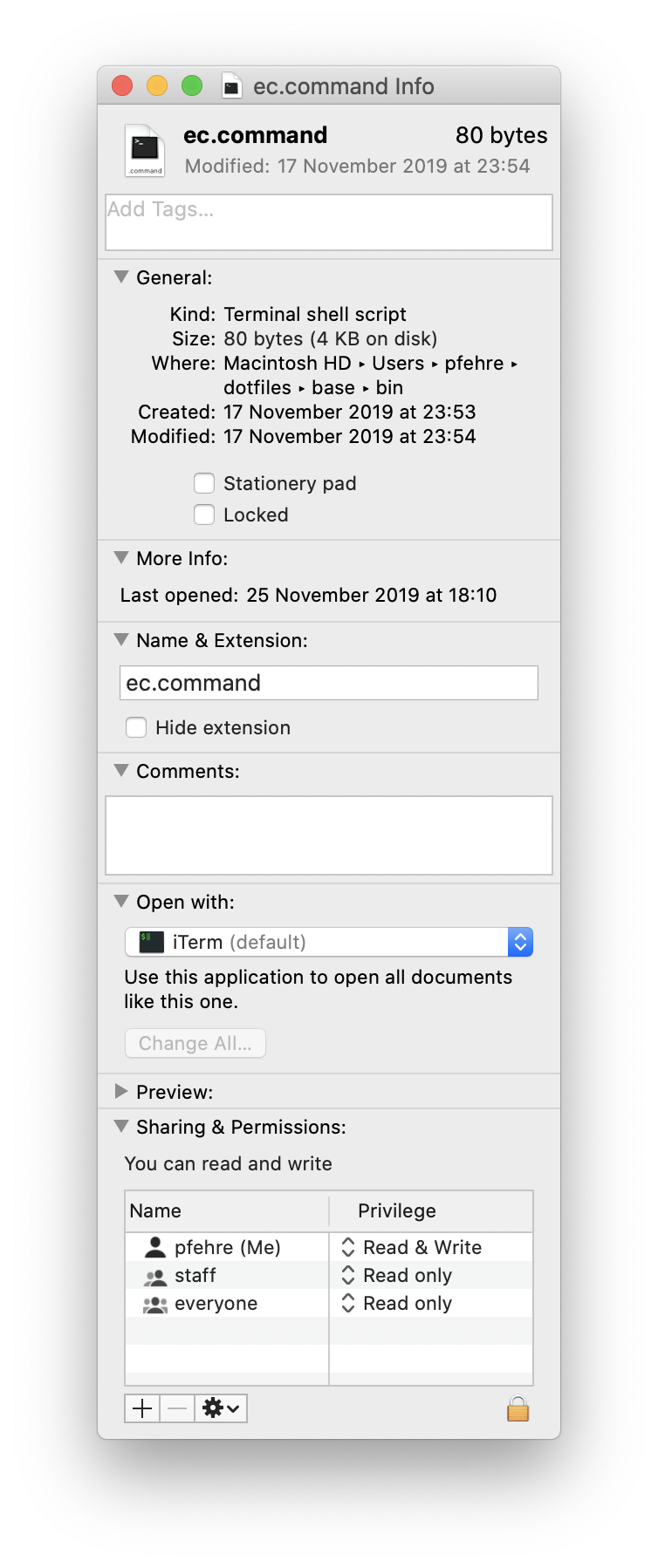
Thats it now Spotlight will execute the script when typing ec and hitting Enter on the top hit, assuming it is indexed.
]]>