Defesa Civil Alerta – Cell Broadcast – Public Warning System (PWS) – Brasil


Defesa Civil Alerta é a nova ferramenta de envio de alertas de emergência do Governo Federal, cuja implantação é coordenada pela Defesa Civil Nacional e pela Agência Nacional de Telecomunicações (Anatel e executada prestadoras de telefonia móvel (Algar, Claro, Tim e Vivo).

O objetivo do “Defesa Civil Alerta”, que utiliza a tecnologia Cell Broadcast, é complementar as outras ferramentas de alertas de emergência disponíveis para prevenção e mitigação dos impactos causados por desastres, avisando e orientando as pessoas que estejam em localidades com risco iminente de alagamentos, enxurradas, deslizamentos de terra, vendavais, chuvas de granizo, dentre outros. O conteúdo dos alertas é de responsabilidade da Defesa Civil..

Mas o que é Defesa Civil Alerta?

Em outubro de 2022, a Anatel determinou às operadoras de telefonia móvel uma evolução do sistema de notificações de desastres, por meio da tecnologia Cell Broadcast.A nova funcionalidade, que foi denominada “Defesa Civil Alerta” vai complementar as atuais ferramentas utilizadas para o envio de alertas (SMS, TV por Assinatura, Whatsapp, Telegram e Google Public Alerts).

Por meio do “Defesa Civil Alerta”, serão enviadas mensagens de texto, estilo pop-up na tela do celular, sobrepostas ao conteúdo sendo acessado naquele momento, a todos os aparelhos compatíveis conectados às redes móveis 4G e 5G, localizados nas regiões com risco de desastres naturais ou outras situações emergenciais.

Para receber o “Defesa Civil Alerta” não será necessário cadastro prévio e o conteúdo das mensagens e o momento de envio será definido pelos órgãos de Defesa Civil. 

Há dois tipos de alertas conforme sua severidade ou finalidade:  extremo e severo. O primeiro, é o nível máximo de alerta, caracterizado por ameaças extremas à vida ou à propriedade. Já o segundo, indica a necessidade de medidas de proteção. No caso do alerta extremo a mensagem acionará um sinal sonoro no celular, semelhante a uma sirene, ainda que o aparelho esteja no modo silencioso, o que vai permitir maior eficiência do alerta nas situações de risco. No caso do alerta severo, o sinal sonoro será um “beep” similar ao do SMS e não irá soar no modo silencioso. 

Caso você não esteja recebendo o alerta de emergência da Defesa Civil, é importante verificar as configurações do seu celular para garantir sua segurança.

No iPhone

Acesse Ajustes > Notificações > Role até o final e ative as funções:

Alerta de teste
Alerta de teste técnico
Alerta severo

No Android

Acesse Configurações > Notificações > Configurações avançadas > Alerta de emergência sem fio e ative:

Alerta severo
Alerta de teste

O sistema Cell Broadcast opera com dois níveis de alerta de emergência, conforme a gravidade da situação:

Alerta Nível Severo: indica perigo muito alto, exigindo precauções e evacuação da área de risco.

Alerta Nível Extremo: aponta risco iminente à vida, exigindo ação imediata. Quem receber esse alerta deve deixar o local sem demora.

Info: https://www.gov.br/mdr/pt-br/assuntos/protecao-e-defesa-civil/defesa-civil-alerta/defesacivilalerta

NøDVARSEL – Public Warning System – Cell Broadcast (Norway)


About Emergency Alert

The Emergency Alert System will be used to notify the public in the event of serious and emergency incidents that involve a threat to life and health. An emergency alert contains information about what is happening and what you need to do to protect yourself.

The Emergency Alert System is a service provided by the Norwegian authorities. The police and Civil Defence determine which areas are to be notified and send out the actual notification.

The following will happen when you receive an emergency warning:

  • Your phone will vibrate and play a loud siren-like sound.
  • Your screen will display a short text message informing you what is happening and what you should do. If your phone supports text-to-speech you can have the message read out loud.

When you receive an emergency alert, you must stop what you are doing, read or listen to the warning and follow the advice given.

When will an emergency alert be given?

The Emergency Alert System can be used to notify of serious and emergency incidents.These may be incidents of radioactive emissions, serious terror attacks or other accidents and catastrophic situations, where the public must be warned quickly.

An emergency alert can be national, regional, or local.

The system must also be tested occasionally. You can find planned dates for testing at: www.emergencyalert.no.

See also: Which incidents will you be warned about?

Public warnings and information

The Emergency Alert System on mobile telephones is a supplement to the channels that are already used to notify the public. In Norway, for some time we have had public warnings given via sirens, which signal with a loud sound that you must seek information.

In the event of a serious incident, important information will be broadcast across several channels, for example, radio, TV, online newspapers, public authority web pages and social media.

Who can receive emergency alerts?

Emergency alerts are sent out to devices that are within a specific geographic area.

Most new devices already support the reception of Emergency Alerts and only need to be activated. Devices are automatically activated when updated with required software from Android og iOS. 

The Emergency Alert System does not use your telephone number or any other personal information. Therefore it does not matter which subscription you have, where you live or work, or where the telephone is registered.

Receiving emergency alerts is free of charge. You do not need to register, subscribe or download an app.

To receive emergency alerts, your phone must be connected to the mobile telephone network (4G/5G). Your phone must also be updated with required software.

These devices can receive emergency alerts:

  • Android phones running on Android 11 or later
  • Smart watches and phones with Android GO with Android 13 or later
  • Apple phones (iPhone 8 or later) running on iOS 16.2 or later
  • Apple watch running on watchOS 9.2 or later
  • Smart watches with wearOS

Make sure your device has all the latest software updates.

Check your phone

How to check and update your Android version (Android help)

Find the software version on your iPhone (Apple support)

Update your iPhone to the latest version of iOS (Apple support)

More Info: https://www.emergencyalert.no

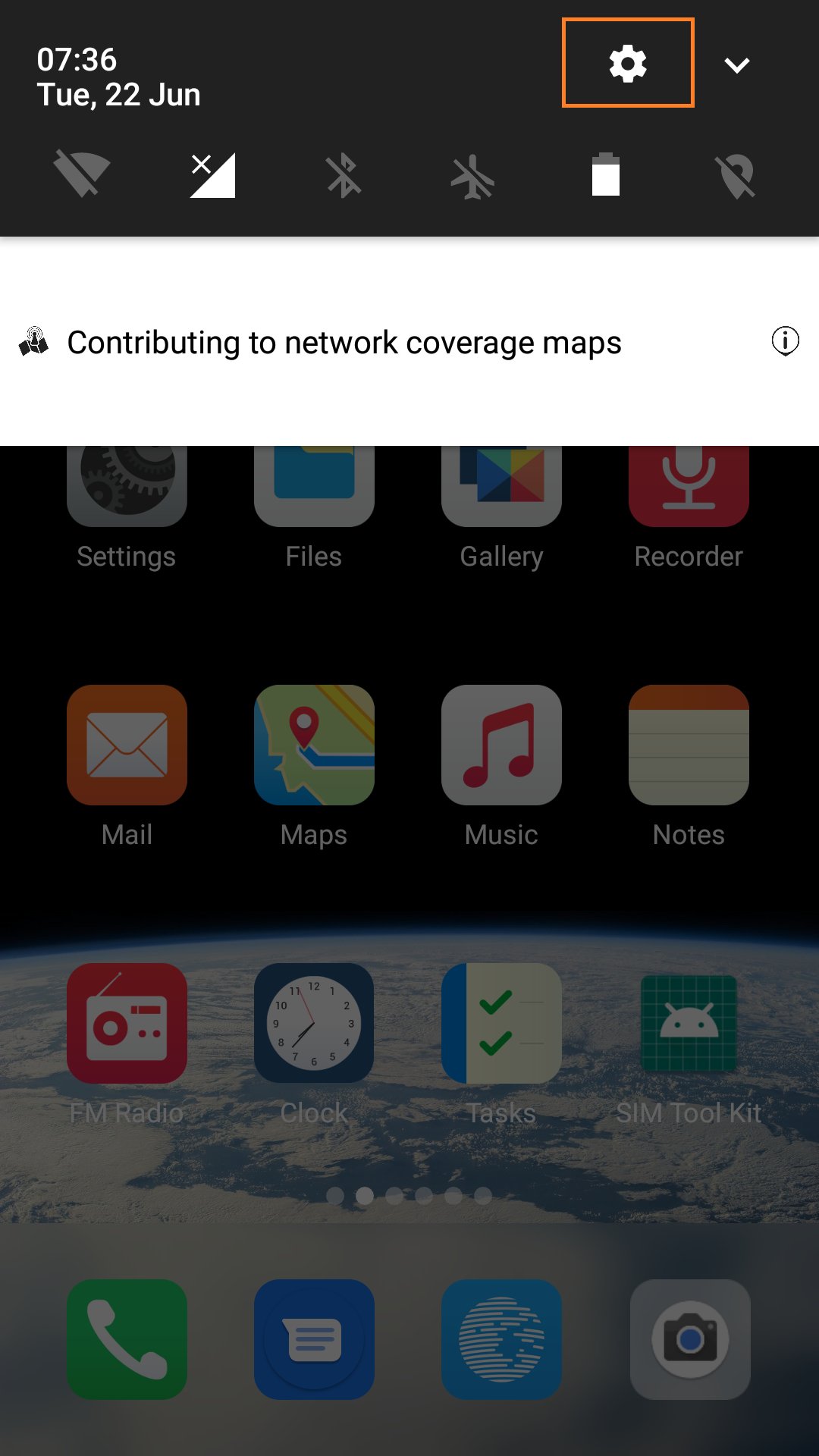
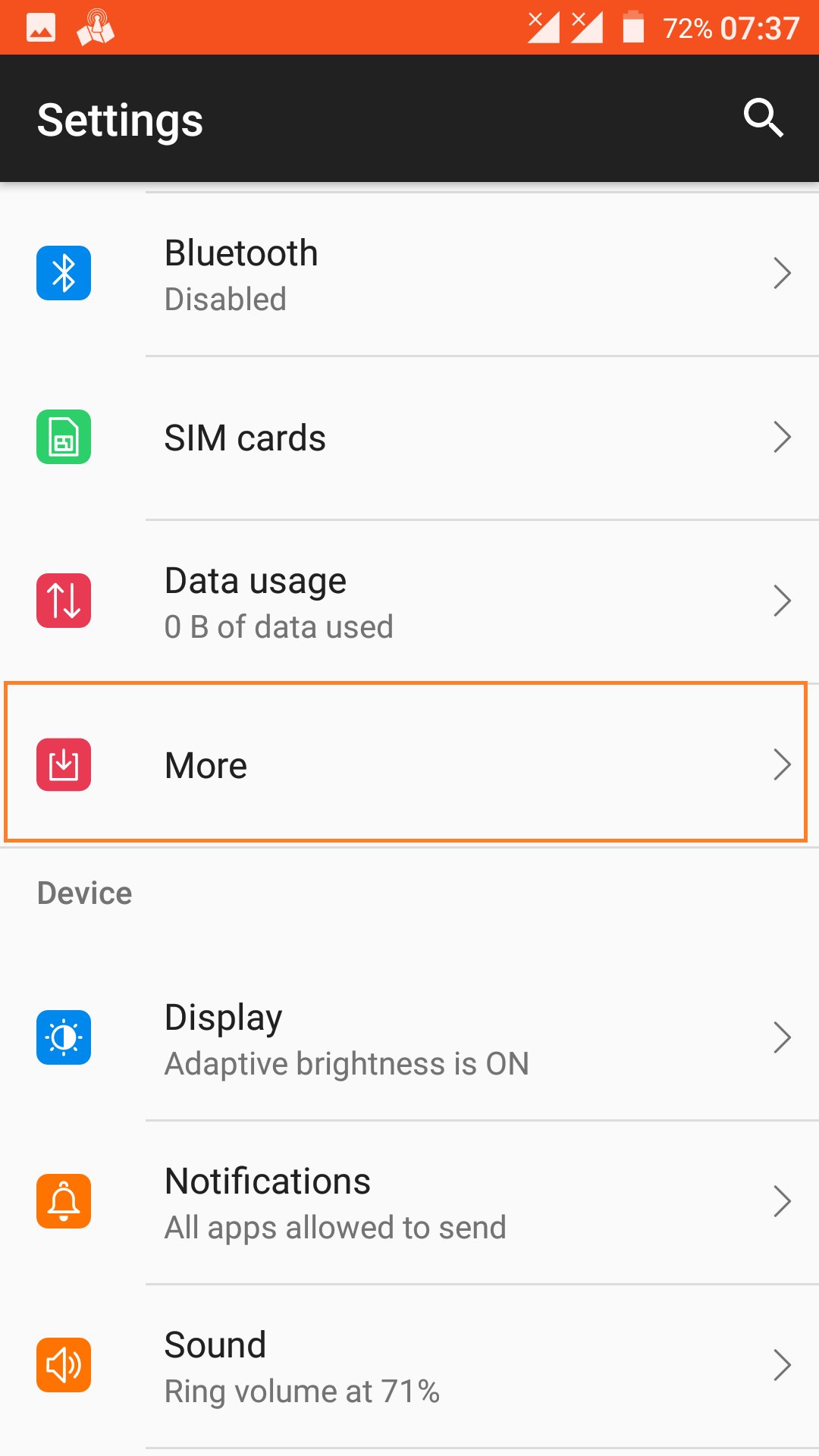
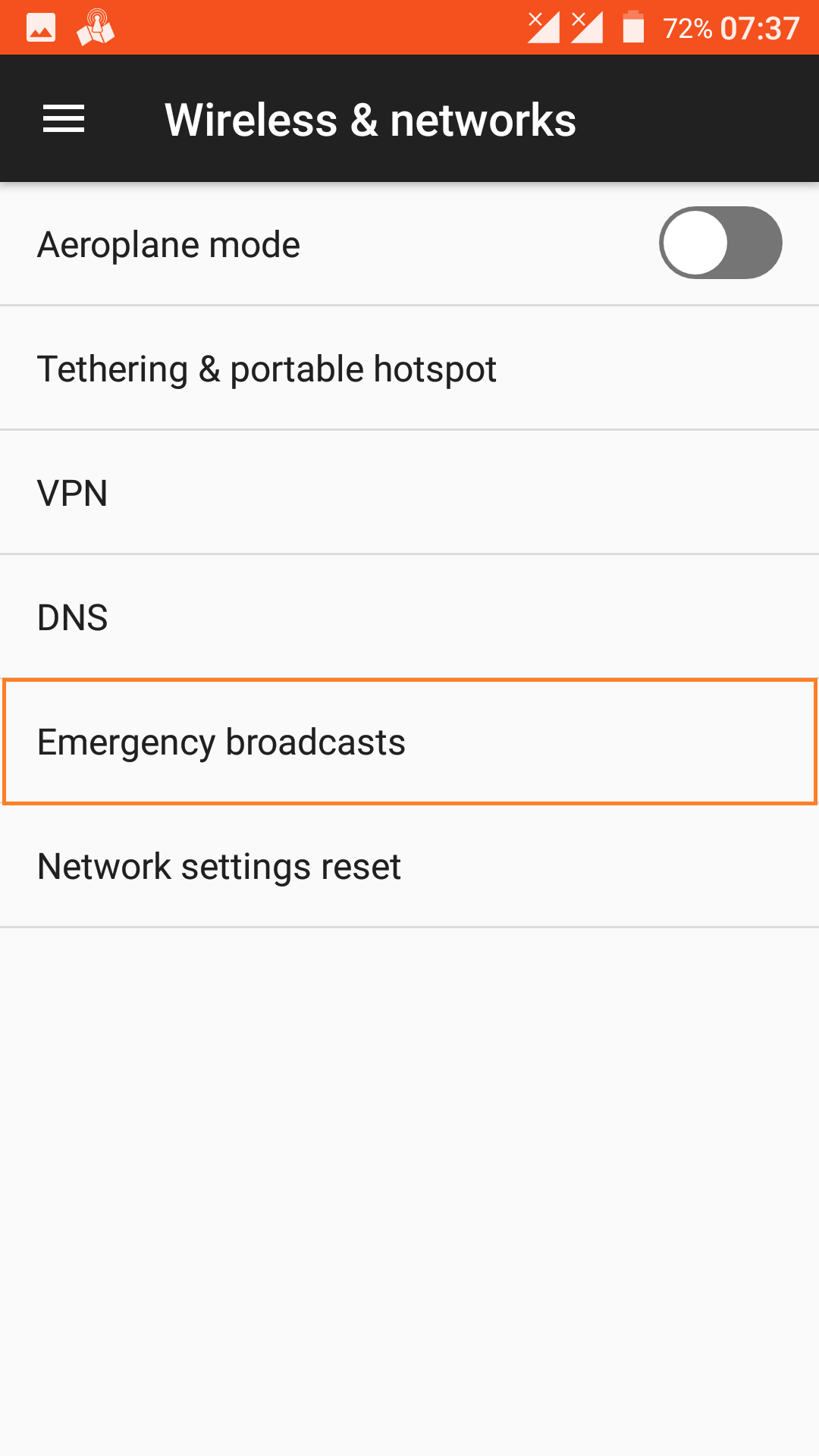
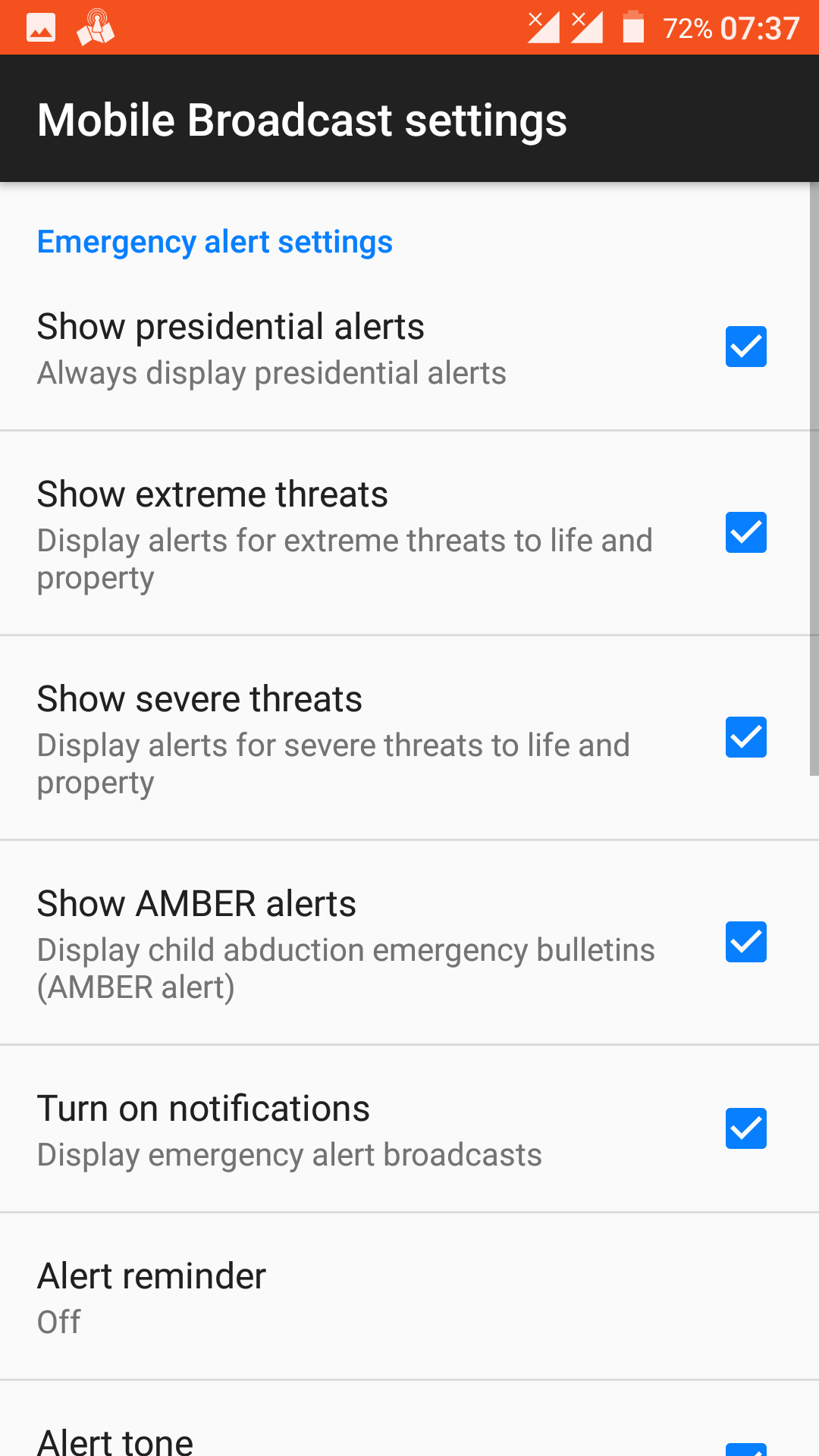
Emergency Cell Broadcast Activation Instructions for Xiaomi Redmi Note 4 with ROM /e/OS


Emergency Cell Broadcast Activation Instructions for Xiaomi Redmi Note 4 with ROM /e/OS

Android Version 7.1.2

  1. Go to Settings
  2. Select More
  3. Select Emergency Broadcasts
  4. Select All Channels

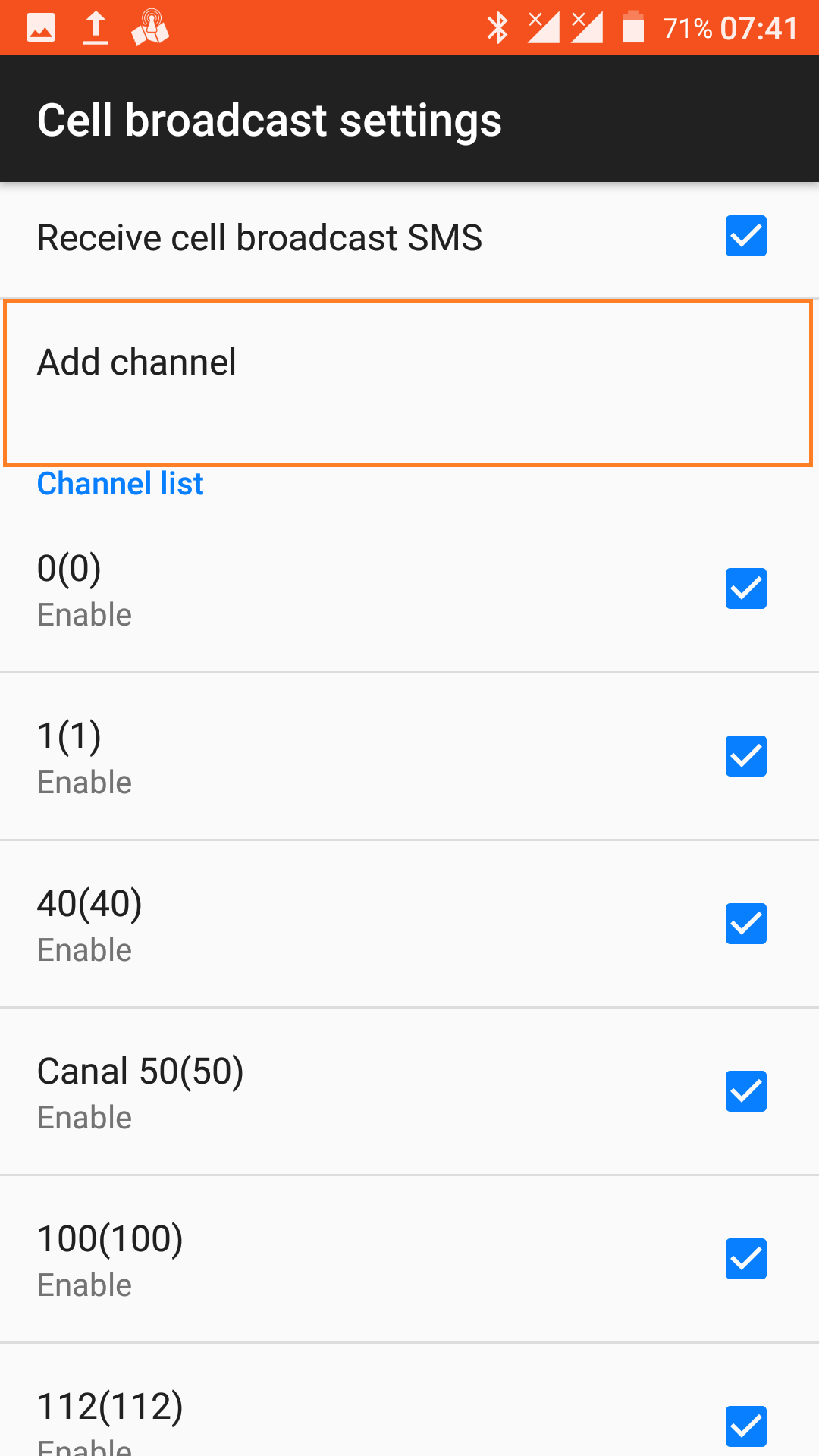
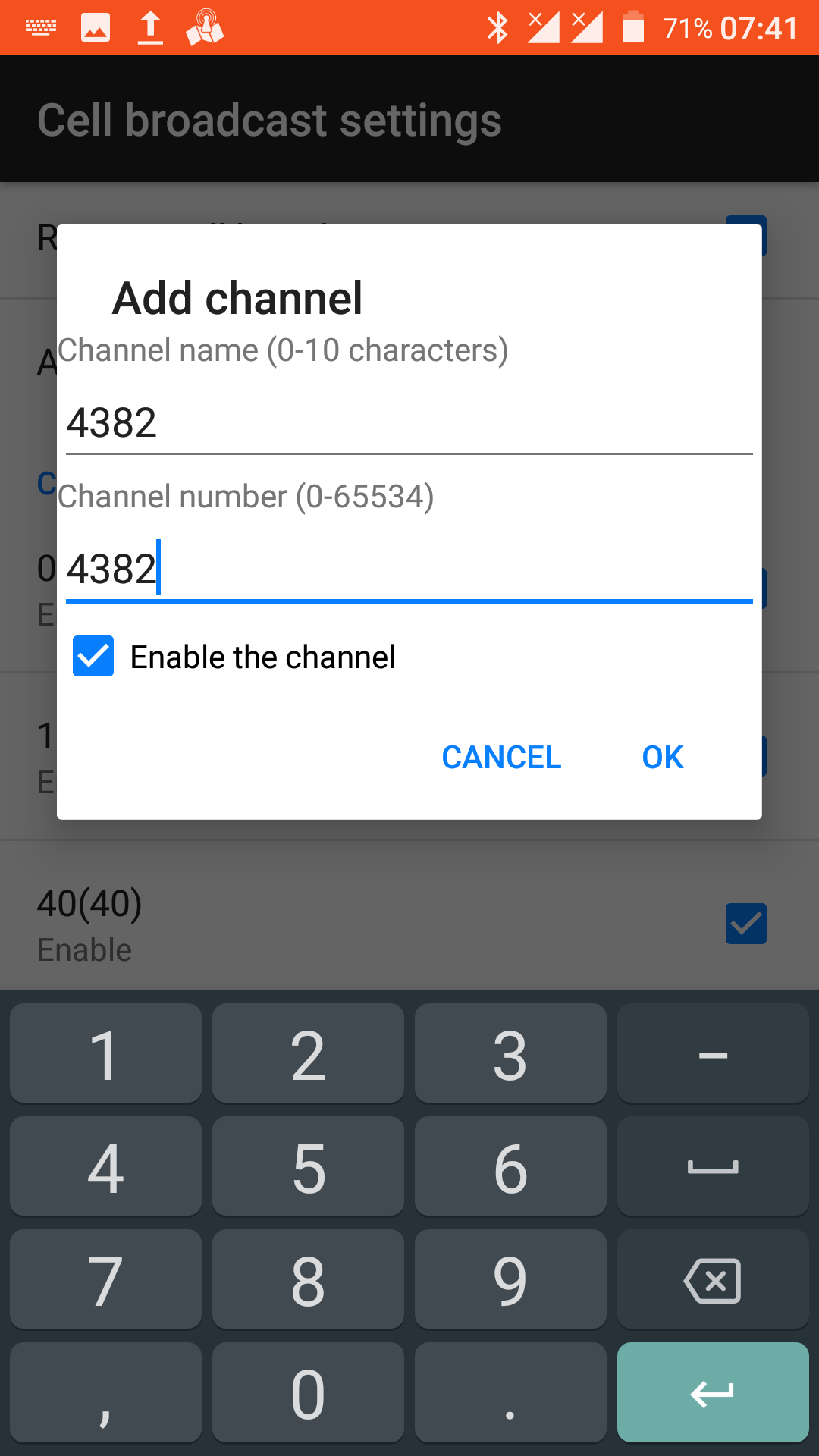
With the “Activity Launcher” application on most smartphones it is possible to add several Cell Broadcast channels manually.

For example, Channel 4382 for receiving Cell Broadcast test from the mobile operator.

Technische Richtlinie DE-Alert (TR DE-Alert)


Technische Richtlinie DE-Alert (TR DE-Alert)

Cell Broadcast – PWS Public Warning System Germany

Source: https://www.bundesnetzagentur.de/SharedDocs/Downloads/DE/Sachgebiete/Telekommunikation/Unternehmen_Institutionen/Anbieterpflichten/OeffentlicheSicherheit/DEAlert/Technische%20Richtlinie%20DE-Alert.pdf;jsessionid=F532C6658332AD4574ECFB06DA692687?__blob=publicationFile&v=4

Source: https://www.instagram.com/reel/CcU2empAGsn/?igshid=MDJmNzVkMjY%3D

Cell Broadcast for Public Warning | iOS – Android 4G and 5G


Pictograms on 5G mobile network

Cell Broadcast for Public Warning save lives.

Left Smartphone. Android 11 – 5G Mobile Network
Right Smartphone. iPhone – 4G Mobile Network.

Emergency alerts do not cause, and are not affected by, busy phone networks.

You will get alerts based on your current location.

  • Emergency Alerts will be sent across all networks, 2G, 3G, 4G and 5G.
  • No personal information (such as telephone number, identity or location) is used in the sending of any Emergency Alert. (GDPR OK)
  • Including visitors from other countries.
  • In their desired language.
  • In near real-time.
  • Specific ringtone and unique vibration.
  • Text-to-speech support for Android devices.
  • Repetition, Prioritization.
  • SIM Card not needed.
  • Using Device Based Geo-Fencing in 4G and 5G networks. Cell Broadcast provides GPS accuracy in Cell Broadcast alert messages of several meters. (WEA 3.0)

Source: https://twitter.com/RatZillaS/status/1370377307915968515?s=20

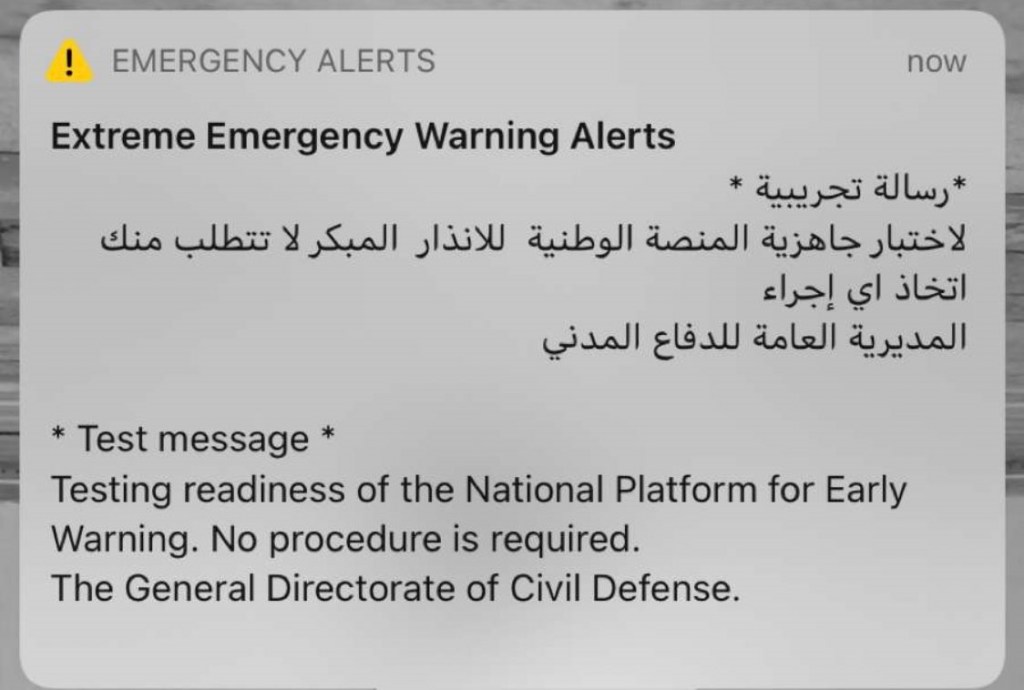
Cell Broadcast (Extreme Emergency Warning Alerts) – Saudi Arabia


Info: https://www.citc.gov.sa/en/new/publicConsultation/Pages/143903.aspx

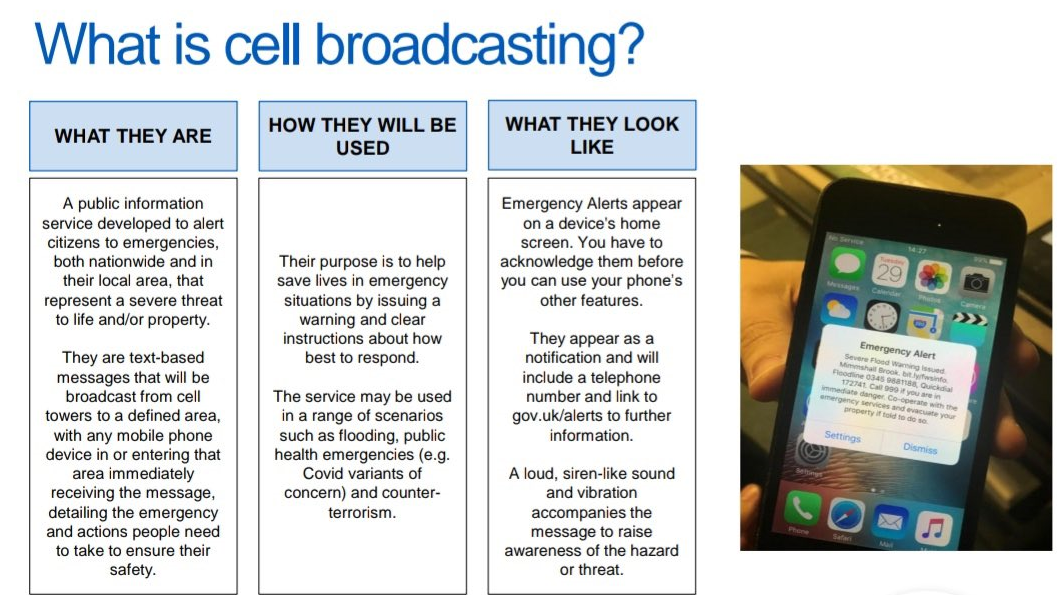
UK Cell Broadcast – Public Warning System – Emergency Alerts


Cell_Broadcast_UK_1

Cell_Broadcast_UK_2Cell_Broadcast_UK_3

Cell_Broadcast_UK

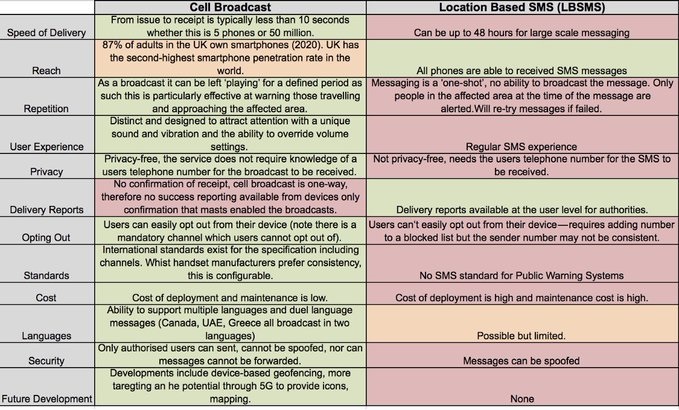
The Public Warning System is multi-channel, is possibles send warnings to go out via multiple channels.

In the UK a large number of phones are already enabled.


iPhone Cell Broadcast Message

Source: http://demo.fws.environment-agency.gov.uk/videos/SR-Hull-iPhone5.mp4

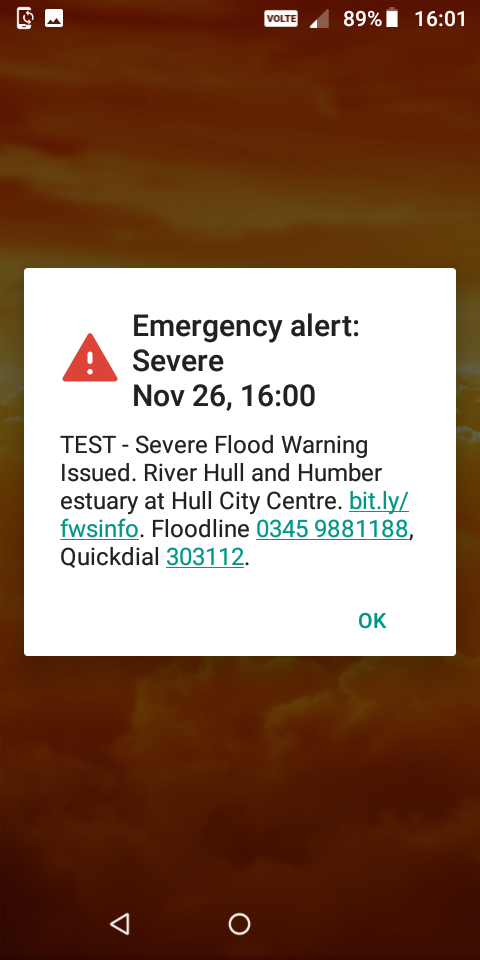
Android Cell Broadcast Message

Source: http://demo.fws.environment-agency.gov.uk/videos/SR-Hull-MotoE5.mp4

Source: https://twitter.com/FujitsuFlood/status/1146700283323588608 and https://twitter.com/FloodDigitalEA/status/1141439469133926400

Emergency Alerting in England – Warning simulation exercise (Cell Broadcast Trials 2019)

https://twitter.com/frazer_HX/status/1397169591588167681?s=20

About Emergency Alerts

Emergency Alerts is a new service from the UK government. It’s expected to launch in summer 2021.

Emergency alerts will warn you if there’s a danger to life nearby.

In an emergency, your phone or tablet will receive an alert with advice about how to stay safe.

When you get an emergency alert

Your phone or tablet may:

  • make a loud siren-like sound, even if it’s set on silent
  • vibrate
  • read out the alert

Stop what you’re doing and follow the instructions in the alert.

Sometimes an alert will include a phone number or a link to the GOV.UK website for more information.

The government and mobile phone networks are testing emergency alerts. You may get an alert if you live in, or travel through, a test area.

If you’re driving when you get an alert

Find somewhere safe to stop before using your phone or tablet. It is illegal to use a hand-held device while driving.

If you want to see an alert again

You can find current and past alerts on your phone or tablet.Find alerts onAndroid phones and tabletsFind alerts oniPhone

If you get reminders about an alert

Android phones and tablets may get more than one reminder about the same emergency alert. To turn these reminders off, search your settings for ‘emergency alerts’.

Reasons you might get an alert

The government and mobile phone networks are testing emergency alerts.

You may get an alert if you live in, or travel through, a test area.

Reasons you might get an emergency alert

The government and mobile phone networks are testing emergency alerts.

If there’s a test in your local area, you might get an alert.

You may also get an alert if you travel through a test area during a test.

When the service is live

You may get alerts about:

  • severe flooding
  • fires
  • explosions
  • terrorist incidents
  • public health emergencies

Emergency alerts will only be sent by:

  • the emergency services
  • government departments, agencies and public bodies that deal with emergencies

For most people, the chance of receiving an alert will be low.

How it works

Emergency alerts are broadcast from mobile phone masts. Every compatible mobile phone or tablet in range will receive an alert.

The government does not need your phone number to send you an alert.

How emergency alerts work

Emergency alerts work like a radio broadcast.

In an emergency, mobile phone masts in the surrounding area will broadcast an alert. Every compatible mobile phone or tablet in range of a mast will receive the alert.

What you need to know

The emergency services and the UK government do not need your phone number to send you an alert.

You will get alerts based on your current location – not where you live or work.

No one will collect or share data about you, your device or your location when you receive an alert.

You will not get alerts if your device is turned off or in aeroplane mode.

Emergency alerts are free. You do not need to sign up for them or download an app.

You can opt out of some emergency alerts, but you should keep them switched on for your own safety.

Phone handsets and devices

Make sure your device has all the latest software updates.

Emergency alerts work on:

  • iPhones running iOS 14.5 or later
  • Android phones and tablets running Android 11 or later

If you have an earlier version of Android, you may still be able to receive alerts. To check, search your settings for ‘emergency alerts’.

Mobile phone networks

Emergency alerts work on all 4G and 5G phone networks in the UK.

Phones and tablets connected to a 2G or 3G network will not receive emergency alerts.

Emergency alerts do not cause, and are not affected by, busy phone networks.

Source: https://www.gov.uk/alerts

Cell Broadcast Huawei | Portugal


Activating your mobile phone’s emergency alerts feature


CBS-Flyer-ENG-RGB

Now you can get free emergency alerts on your mobile phone when you’re within a disaster or emergency zone. Here’s how to enable this feature:

A. To activate for Android phones

  1. Open your Messages app, tap Settings.
  2. Look for Emergency AlertsCell Broadcast or Wireless Alerts options. Tap or slide the switch to turn it on.

Note: For some versions, you may go to SettingsMore, then Emergency Broadcasts. If you are asked to add specific ID, define or input Channel 728.

B. To activate for iOS

  1. Go to Settings, then Notifications.
  2. Scroll down to find AMBER Alerts, Emergency Alerts, and Test Message. Tap or slide to activate.

Note: For iOS, you would need to update to its latest version (iOS 10.2 and up, carrier version SMART 27.1).

How is this all possible?

Smart Communications has invested in cell broadcast technology which allows Smart’s users within a specified location to receive timely and accurate warnings from authorized government sources in times of calamities or threats. During emergencies or calamities, mobile users should receive an emergency alert – a very loud siren-like sound will go off with a corresponding message about the emergency flashed onscreen.

Smart Communications has made it possible for agencies like Philippine Institute of Volcanic and Seismology (PHILVOLCS), the Natural Disaster Risk Reduction and Management Council (NDRRMC), as well as the Philippine Atmospheric, Geophysical and Astronomical Services Administration (PAGASA) to send free warning alerts straight to Smart users’ mobile phones in accordance to RA No 10649 of 2014 aka the Free Mobile Disaster Alerts Act.

Watch this video to learn more:

Emergency Cell Broadcast Activation Instructions for Specific Devices:

Samsung Galaxy J7 Prime
1. Go to Messages
2. Select More
3. Select Settings
4. Select More settings
5. Select Cell broadcast
6. Click On to activate

MyPhone My21
1. Go to Messages
2. Click Options
3. Select Cell Broadcasts
4. Click on Options
5. Select Settings
6. Select SIM 1
7. Check the Cell Broadcast SMS enabled

Alcatel OT 4032-E Pop C2
1. Go to Messages
2. Click on Options
3. Select Settings
4. Select General
5.Click on Cell Broadcast
6. Select Cell Broadcast (Enable cell broadcast)

O+ 360 Alpha
1. Click on Messages
2. Press on Options
3. Select Settings
4. Select General
5. Click on Cell broadcast
6. Select on cell broadcast (Enable cell broadcast)

Samsung GT-S3850
1. Select Messages
2. Press on Options
3. Select Settings
4. Click Broadcast messages
5. Press Activation

SAMSUNG GT-E1272
1. Click on Menu
2. Select Messages
3. Press Broadcast Messages
4. Select Settings
5. Press On in Activation

Moto G4 Plus
1. Go to Settings, then under Wireless and Networks, tap on More
2. Go to Emergency Broadcasts
3. Make sure the following items are ticked on the settings. Also, you may configure the notification settings
when you receive a cell broadcast.

Oppo F3
1. Go to Settings
2. Select Messages
3. Click Advanced
4. Go to Cell Broadcast
5. Disclaimer appears. Click on “Agree”
6. Press Settings
7. Click on Cell Information Activation

Huawei Mate 8
1. Select Messages
2. Press More
3. Select Cell Broadcasts
4. Click Menu
5. Go to Settings

LG G6
1. Select Services
2. Click Cell Broadcast
3. Click on Options
4. Press Settings
5. Click Cell Broadcast service to enable

Acer Z530
1. Select Messages
2. Click on Options
3. Select Settings
4. Click on General
5. Select Cell broadcast
6. Check Enable cell broadcast

Samsung J3 2016
1. Select Messages
2. Click More
3. Select Settings
4. Select More Settings
5. Click Cell broadcast
6. Click On

Samsung Galaxy S8
1. Go to Messages.
2. Tap the 3 dots on the rightmost part
of the Search bar.
3. Tap Settings > More settings > Broadcast channels.
4. Enable or switch On Cell Broadcast.
5. Tap “Select channels” then select “All channels”

Samsung Galaxy S7
1. Go to Messages.
2. Tap the 3 dots on the rightmost part
of the Search bar.
3. Tap Settings > More settings > Cell broadcast
4. Enable or switch On Cell Broadcast.
5. Tap “Select channels” then select “All channels”

Starmobile PLAY Click
1. Go to Messages.
2. Tap More button (3 dots on the upper right).
3. Tap Cell broadcasts then tap the 3 dots on the upper right.
4. Tap Settings then tap CARD1.
5. Tick “Enable Cell Broadcast SMS”

Starmobile Diamond X1
1. Go to Messaging.
2. Tap Options > Settings > Cell broadcast
3. Tick “Cell broadcast” to enable cell broadcast

HUAWEI Y7
1. Go to Messaging > Cell broadcasts
2. Tap More button (3 dots on the upper right then tap Settings).

O+ Crunch
1. Go to Messaging.
2. Tap More button (3 dots on the upper right).
3. Tap Cell broadcasts then tap More button (3 dots on the upper right).
4. Tap Settings then tap the SIM Card inserted.
5. Tick “Enable Cell Broadcast SMS”

LENOVO A1000
1. Go to Message.
2. Tap More button (3 dots on the upper right).
3. Tap Cell broadcasts then tap More button (3 dots on the upper right).
4. Tap Settings then tap the SIM Card inserted.
5. Tick “Enable Cell Broadcast SMS”


Fonte: https://help.smart.com.ph/article/activating-your-mobile-phone-s-emergency-alerts-feature

Fonte: https://twitter.com/kennetuv/status/882865209785724928

Smart Communications test out its Cell Broadcast technology


cb cblte cellbroadcast


Fonte: https://pinoyscreencast.net/telecom/smart-communications-test-cell-broadcast-technology/